
solairs11与solairs10 ftp服务的区别
                 Migration from Solaris WU-FTPD to ProFTPD

Introduction

------------

This document provides an overview of migrating the Solaris WU-FTPD

configuration to Solaris ProFTPD. ProFTPD replaces WU-FTPD in this

Oracle Solaris release and has a different configuration system.

Migration from the previous Solaris FTP server setup must be done

manually.

This document contains the following sections:

    * Section 1 - basic overview of configuration

    * Section 2 - managing access

    * Section 3 - virtual host configuration

    * Section 4 - other options

1. Basic overview of configuration

WU-FTPD uses several configuration files to manage the FTP server:

  /etc/ftpd/ftpaccess

  /etc/ftpd/ftpservers

  /etc/ftpd/ftphosts

  /etc/ftpd/ftpconversions

  /etc/ftpd/ftpgroups

These configuration files manage all aspects from general options to

account management and virtual servers.

Configuration of ProFTPD is contained in /etc/proftpd.conf. It is also

possible to manage some options on per-directory basis with .ftpaccess

files.

ProFTPD consists of a core server and a series of "modules".

Configuration of ProFTPD is separated into "contexts" containing

"directives".

2. Managing access

WU-FTPD uses several files to manage access to system:

  /etc/ftpd/ftpaccess

  /etc/ftpd/ftphosts

  /etc/ftpd/ftpgroups

ProFTPD uses the "Limit" context to configure access.

For backward compatibility /etc/ftpd/ftpusers is provided and

/etc/ftpusers is symlink to /etc/ftpd/ftpusers. It is used if

UseFtpUsers is set to "on" which is the default setting.

2.1. Anonymous access

In WU-FTPD anonymous access is enabled by the ftpconfig(1M) command

which also created the necessary chroot(1M) environment. ProFTPD does

not need chroot(1M) as all access management is handled as part of the

"Anonymous" context.

2.2. Allow/deny retrieve of files

In ProFTPD it is possible to manage access to files on a per-directory

basis with .ftpaccess files.

2.3. Control of download/upload size

Directives are provided for control of download and upload size:

  MaxRetrieveFileSize - size of downloaded files

  MaxStoreFileSize - size of uploaded files

2.4. Maximum login failures before terminating the FTP connection

MaxLoginAttempts controls the maximum number of login failures. The

default is 3.

3. Virtual host configuration

ProFTPD provides a comprehensive set of directives to manage virtual

FTP servers. Refer to the VirtualHost documentation for details.

4. Other options

Other common WU-FTPD /etc/ftpd/ftpaccess options are configured in

ProFTPD as follows:

4.1. Connection management

4.1.1. Limit IP address on which FTP server listens

For a standalone FTP server DefaultAddress configures the listener

address. For virtual servers the IP addresses are part of the

VirtualHost context.

4.1.2. IP Class of Service setup

ProFTPD does not support manipulation of IP Class of Service within FTP

server implementation.

4.1.3. Keepalive

ProFTPD always sets the SO_KEEPALIVE socket option.

4.1.4. TCP window size

Directives are provided for control of socket options:

  SocketOptions - tune socket-level options, including

                  TCP send/receive window sizes.

4.1.5. Enable/disable reverse remote host lookup

Reverse DNS lookup is configured using UseReverseDNS, the default is

"on".

4.2. Session management

4.2.1. Timeouts management

ProFTPD provides the following set of timeouts:

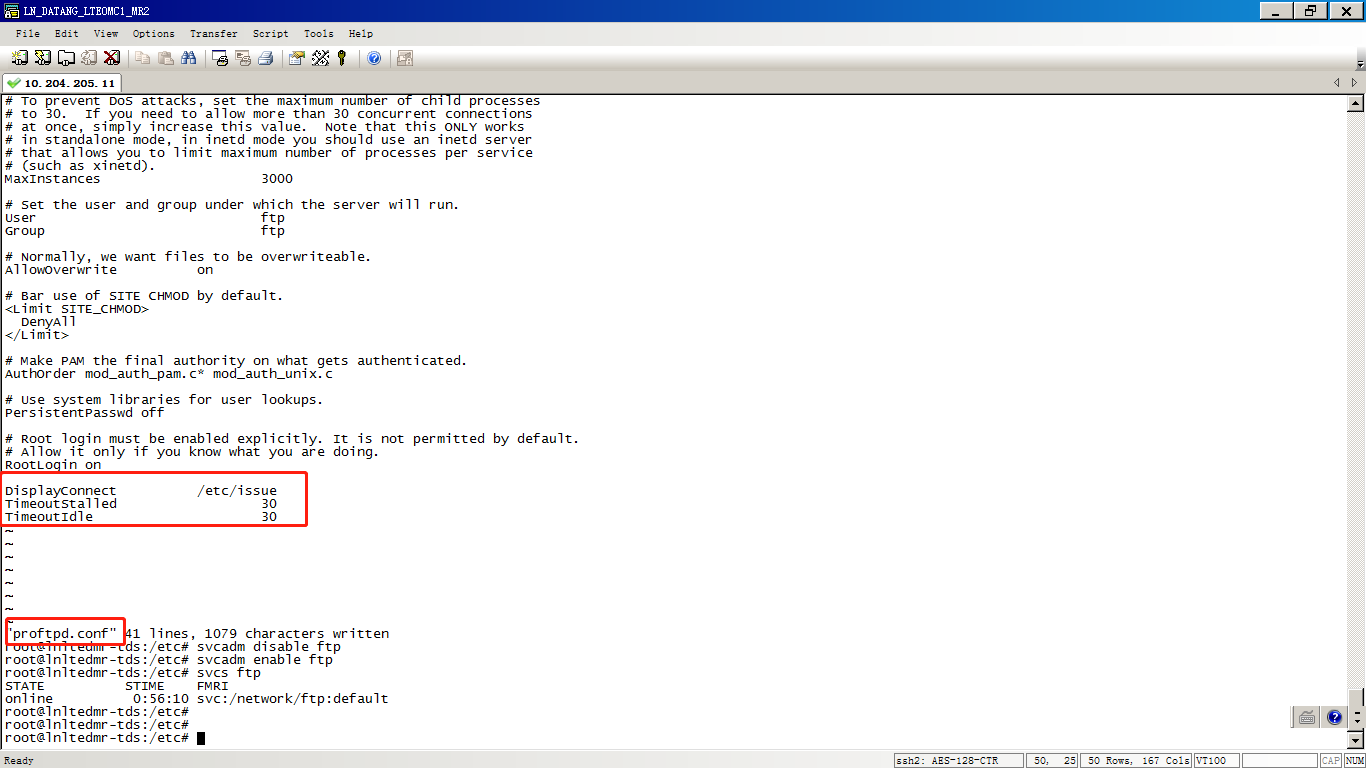
  TimeoutIdle - the idle connection timeout

  TimeoutLinger - the timeout used for lingering closes

  TimeoutLogin - the login timeout

  TimeoutNoTransfer - the connection without data transfer timeout

  TimeoutSession - the timeout for the whole session

  TimeoutStalled - the timeout on stalled downloads

4.2.2. banner option

The DisplayConnect directive configures an ASCII text filename which

will be displayed to the user when they initially connect but before

they login.

4.2.3. message option

Two directives are provided:

  DisplayLogin - for message file after login

  DisplayChdir - for message file after every chdir

4.2.4. Control of list options

ProFTPD does not allow the use of an external command to generate

directory listings. Listing output is controlled by ListOptions.

4.3. Process management

4.3.1. Setting nice(1)

ProFTPD does not provide an interface for changing the nice value.  The

nice value needs to managed outside of ProFTPD for example using the

nice(1) command.

4.3.2. Setting umask

Use the Umask directive.

4.3.3. E-mail notification for uploads

ProFTPD provides /usr/sbin/ftpmail script which reads TranferLog

entries and sends e-mail notifications when uploads occur.

4.3.4. Shutdown management

ftpshut(1M) and ftprestart(1M) commands are provided. The file

monitored by FTP server is set to /etc/shutmsg and it is not possible

to configure the path.

4.4. Log options

The ProFTPD mod_log module handles logging. By default it uses

syslogd(1M). Control of the log format is provided by the LogFormat

directive.

4.5. Kerberos support

ProFTPD supports Kerberos authentication through the mod_gss module.

4.6. Miscellaneous options

4.6.1. cdpath

Provided by the CDPath directive.

4.7. Removed options

4.7.1 alias

Aliasing of directory paths is not provided by ProFTPD.

4.7.2 ftpconversion and compress

ftpconversion is not supported by ProFTPD. For compression external

modules mod_deflate and mod_gzipfs can be used but they are not

provided in the Solaris default installation.

4.7.3. SITE EXEC

SITE EXEC is not provided by ProFTPD. Consider using other more secure

methods for command execution.

4.7.4. quota-info

quota-info option replacement is not provided by ProFTPD.

4.7.5. passive address

passive address option replacement is not provided by ProFTPD.

-- end --
O网页链接
基于 wu-ftpd 分发的旧 FTP 服务器已由 proftpd 服务器替换。/usr/share/doc/proftpd/proftpd_migration.txt 中介绍了从旧服务到新服务的配置信息迁移。
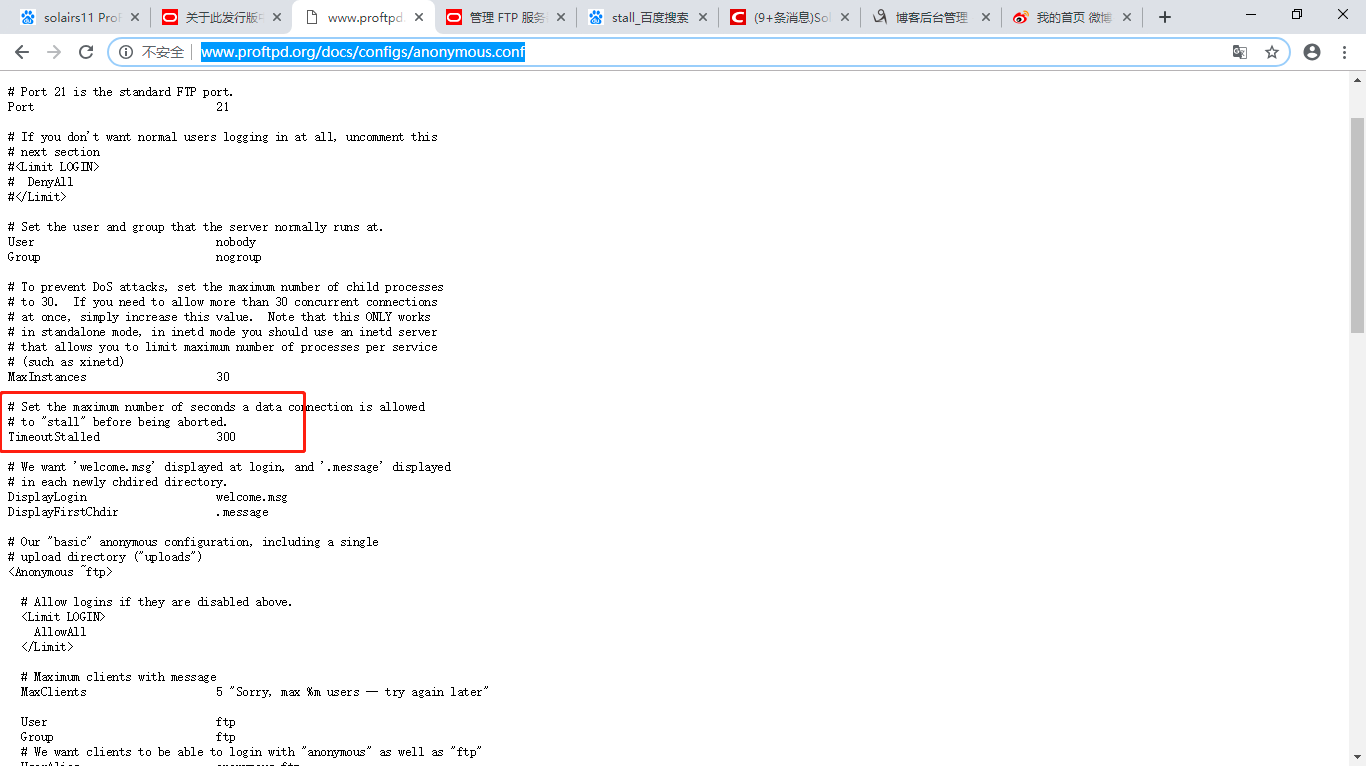
http://www.proftpd.org/docs/configs/anonymous.conf
solairs11与solairs10 ftp服务的区别的更多相关文章
- [转] Linux学习之CentOS(三十六)--FTP服务原理及vsfptd的安装、配置
本篇随笔将讲解FTP服务的原理以及vsfptd这个最常用的FTP服务程序的安装与配置... 一.FTP服务原理 FTP(File Transfer Protocol)是一个非常古老并且应用十分广泛的文 ...
- linux Centos 6.5 FTP服务原理及vsfptd的安装、配置(转)
本篇随笔将讲解FTP服务的原理以及vsfptd这个最常用的FTP服务程序的安装与配置... 一.FTP服务原理 FTP(File Transfer Protocol)是一个非常古老并且应用十分广泛的文 ...
- ftp服务配置
文件传输协议(File Transfer Protocol,FTP),基于该协议FTP客户端与服务端可以实现共享文件.上传文件.下载文件. FTP 基于TCP协议生成一个虚拟的连接,主要用于控制F ...
- atitit.网络文件访问协议.unc smb nfs ftp http的区别
atitit.网络文件访问协议.unc smb nfs ftp http的区别 1. 网络文件访问协议1 2. NETBios协议 2 3. SMB(Server Message Block)2 3 ...
- linux服务基础之ftp服务
ftp是一种文件传输协议,我们以redhat6.9为服务器系统,来介绍一下ftp服务器,这里我们先介绍一下ftp协议工作的原理 ftp协议可以在不同类型的计算机之间传输文件,工作流程大致为 1:客户机 ...
- FTP服务基础
网络文件共享 本章内容 FTP服务 NFS服务 SAMBA服务 DAS.NAS.SAN(文件) DAS:开放系统的直连式存储(Direct-Attached Storage) 磁盘连接到本机的电脑上, ...
- CentOS7.5上FTP服务的安装与使用
1.FTP简介 1.1FTP:File Transfer Protocol 文件传输协议 FTP是用于在网络上进行文件传输的一套标准协议,使用客户/服务器模式.它属于网络传输协议的应用层.文件传送(f ...
- CentOS6.5下搭建FTP服务
一.FTP协议 FTP(File Transfer Protocol,文件传输协议) 是 TCP/IP 协议组中的协议之一.FTP协议包括两个组成部分,其一为FTP服务器,其二为FTP客户端.其中FT ...
- 利用vsftpd在Linux构建安全的FTP服务
最近在机房搭建Linux环境,需要用到了FTP服务,查看了许多的资料,在这里做一下笔记 一.安装 方法一,使用yum命令安装,需要能够连接外网 # yum install vsftpd 方法二,使用安 ...
随机推荐
- GO自定义类型与指针
指针 定义:将地址形象化的称为“指针”.将地址形象化的称为“指针”.意思是通过它能找到以它为地址的内存单元.一个指针变量指向了一个值的内存地址.意思是通过它能找到以它为地址的内存单元.一个指针变量指向 ...
- java:多线程(代理模式,Thread中的方法,Timer,生产者和消费者)
*进程:一个正在运行的程序,进程是操作系统分配资源的基本单位,每个进行有独立的内存空间,进程之间切换开销较大. *线程:一个轻量级的进程,线程是任务调度的基本单位,一个进程可以有多个线程, * 系统没 ...
- Zookeeper 假死脑裂
该问题就是服务集群因为网络震荡导致的多主多从问题,解决方案就是设置服务切换的超时时间,但也同时会导致无法达到高可用的要求.
- Centos6.5修改mysql登陆用户密码
1.修改mysql的登陆设置: vim /etc/my.cnf 并在[mysqld] 下面添加一句:skip-grant-tables=1 添加成功后保存退出. 2.重启mysql并修改密码 重启my ...
- sklearn.preprocessing.StandardScaler数据标准化
原文链接:https://blog.csdn.net/weixin_39175124/article/details/79463993 数据在前处理的时候,经常会涉及到数据标准化.将现有的数据通过某种 ...
- python 并发编程 多线程 Thread对象的其他属性或方法
介绍 Thread实例对象的方法 # isAlive(): 返回线程是否活动的. # getName(): 返回线程名. # setName(): 设置线程名. threading模块提供的一些方法: ...
- 解决js跨域使用nginx配置问题
在server域中加入以下配置: #解决跨域问题 add_header Access-Control-Allow-Origin *; add_header Access-Control-Allow-C ...
- Redis配置主从时报错“Could not connect to Redis at 192.168.0.50:6379: Connection refused not connected>”
配置Redis主从时,修改完从节点配置文件,然后报错 [root@Rich七哥-0-50 redis]# /opt/redis/redis-cli -h 192.168.0.50 Could not ...
- springMvc中获取通过注解获取properties配置文件(转)
springMvc的项目中,通过注解@Value获取properties配置文件中的配置,使用该注解必须引入的包: spring-beans-4.1.4.RELEASE.jar 下面是需要在sprin ...
- java中的小知识点
1.数据类型的相关知识点 1.1.java内置封装类的转换 java中内置的封装类Byte.Integer.Float.Double和Long都可以转换成double类型的数值:因为这些封装好的类中都 ...