
Ocelot快速入门教程
Ocelot是什么
Ocelot是一个用.NET Core实现并且开源的API网关,就像一个公司的门卫承担着寻址、限制进入、安全检查、位置引导、等等功能。它的功能包括了:路由、请求聚合、服务发现、认证、鉴权、限流熔断、并内置了负载均衡器、Service Fabric、Skywalking等的集成。而且这些功能都只需要简单的配置即可完成。
Ocelot部署场景
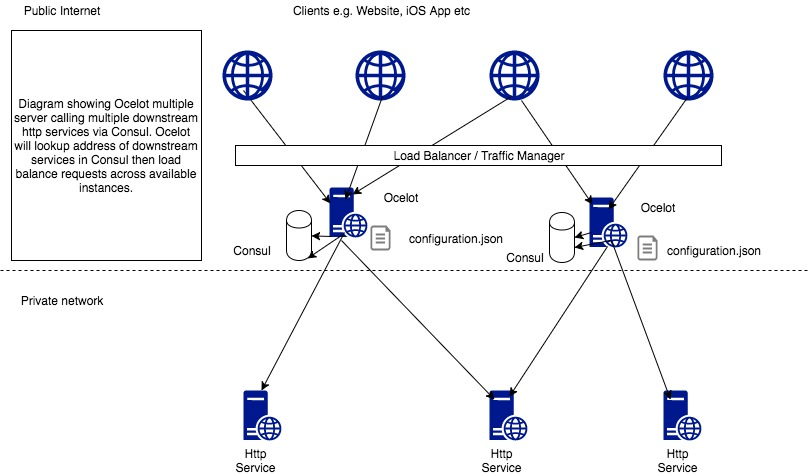
一般而言,我们不会只部署一台网关服务器,那样太危险了。只要有一台挂了,就全完蛋了。为了实现高可用,我们会部署多台,当然在多台网关前,你还需要一台负载均衡器。Ocelot类型Nginx,内置了负载均衡器,但是他无法提供健康检查功能,服务注册也只能通过手动在配置文件里面添加完成。不够灵活。这个时候我们会采用Consul来做服务发现。Consul与Ocelot完美结合。
Ocelot配置说明
安装直接nuget上下载,再Add一下,这里就不说了。
{

  "ReRoutes": [

    {

      "DownstreamPathTemplate": "/api/Products/{everything}",

      "DownstreamScheme": "http",

      "UpstreamPathTemplate": "/api/Products/{everything}",

      "ServiceName": "ProductService",

      "UpstreamHttpMethod": [ "Get" ],

      "FileCacheOptions": { "TtlSeconds": 15 },

      "AuthenticationOptions": {

        "AuthenticationProviderKey": "ApiSecurity",

        "AllowedScopes": []

      },

      "RouteClaimsRequirement": {

        "userType" : "SALESMAN"

      }

    },

    {

      "DownstreamPathTemplate": "/api/Products",

      "DownstreamScheme": "http",

      "UpstreamPathTemplate": "/api/Products",

      "ServiceName": "ProductService",

      "UpstreamHttpMethod": [ "Get" ],

      "FileCacheOptions": { "TtlSeconds": 15 },

      "AuthenticationOptions": {

        "AuthenticationProviderKey": "ApiSecurity",

        "AllowedScopes": []

      },

      "RouteClaimsRequirement": {

        "userType" : "SALESMAN"

      }

    },

    {

      "DownstreamPathTemplate": "/api/Offer",

      "DownstreamScheme": "http",

      "UpstreamPathTemplate": "/api/Offers",

      "ServiceName": "PolicyService",

      "UpstreamHttpMethod": [ "Post" ],

      "AuthenticationOptions": {

        "AuthenticationProviderKey": "ApiSecurity",

        "AllowedScopes": []

      },

      "RouteClaimsRequirement": {

        "userType" : "SALESMAN"

      },

      "AddHeadersToRequest": {

        "AgentLogin" : "Claims[http://schemas.xmlsoap.org/ws/2005/05/identity/claims/nameidentifier] > value[0] > |"

      }

    },

    {

      "DownstreamPathTemplate": "/api/Policy",

      "DownstreamScheme": "http",

      "UpstreamPathTemplate": "/api/Policies",

      "ServiceName": "PolicyService",

      "UpstreamHttpMethod": [ "Post" ],

      "AuthenticationOptions": {

        "AuthenticationProviderKey": "ApiSecurity",

        "AllowedScopes": []

      },

      "RouteClaimsRequirement": {

        "userType" : "SALESMAN"

      }

    },

    {

      "DownstreamPathTemplate": "/api/Policy/{number}",

      "DownstreamScheme": "http",

      "UpstreamPathTemplate": "/api/Policies/{number}",

      "ServiceName": "PolicyService",

      "UpstreamHttpMethod": [ "Get" ],

      "FileCacheOptions": { "TtlSeconds": 15 },

      "AuthenticationOptions": {

        "AuthenticationProviderKey": "ApiSecurity",

        "AllowedScopes": []

      },

      "RouteClaimsRequirement": {

        "userType" : "SALESMAN"

      }

    },

    {

      "DownstreamPathTemplate": "/api/PolicySearch",

      "DownstreamScheme": "http",

      "UpstreamPathTemplate": "/api/PolicySearch",

      "ServiceName": "PolicySearchService",

      "UpstreamHttpMethod": [ "Get" ],

      "AuthenticationOptions": {

        "AuthenticationProviderKey": "ApiSecurity",

        "AllowedScopes": []

      },

      "RouteClaimsRequirement": {

        "userType" : "SALESMAN"

      }

    }

  ],

  "GlobalConfiguration": {

    "RequestIdKey": "OcRequestId",

    "AdministrationPath": "/administration",

    "UseServiceDiscovery" : true,

    "ServiceDiscoveryProvider": { "Type": "Eureka", "Host" : "localhost", "Port" : "8761"}

  }

}
两个根节点ReRoutes,GlobalConfiguration。
ReRoutes (告诉Ocelot如何处理上游请求)
【DownstreamPathTemplate】
下游路由模板,即真实处理请求的路径模板
【DownstreamScheme】
请求方式,http/https
【UpstreamPathTemplate】
上游请求的模板,即用户真实请求的链接
【UpstreamHttpMethod】
上游请求的http方法,是个数组,你可以写多个
【LoadBalancerOptions】
LeastConnection : 将请求发往最空闲的那个服务器
RoundRobin :轮流发送
NoLoadBalance :不启用负载均衡,总是发往第一个请求或者服务发现的那个服务器
【RateLimitOptions】
限流相关配置
GlobalConfiguration(顾名思义,全局配置)
包括了服务发现Eureka
Ocelot快速入门教程的更多相关文章
- 专为设计师而写的GitHub快速入门教程
专为设计师而写的GitHub快速入门教程 来源: 伯乐在线 作者:Kevin Li 原文出处: Kevin Li 在互联网行业工作的想必都多多少少听说过GitHub的大名,除了是最大的开源项目 ...
- EntityFramework6 快速入门教程
EntityFramework6 快速入门教程 不得不说EF在国内实在是太小众,相关的技术文章真实屈指可数,而且很多文章都很旧了,里面使用的版本跟如今的EF6差别还是比较大.我刚开始弄这个的时候真是绕 ...
- Apple Watch开发快速入门教程
Apple Watch开发快速入门教程 试读下载地址:http://pan.baidu.com/s/1eQ8JdR0 介绍:苹果为Watch提供全新的开发框架WatchKit.本教程是国内第一本A ...
- 指示灯组与3个复位按钮的介绍Arduino Yun快速入门教程
指示灯组与3个复位按钮的介绍Arduino Yun快速入门教程 1.4.2 指示灯组 指示灯组的放大图如图1.5所示. 图1.5 指示灯组 各个指示灯对应的功能如下: q RX:对应于0号端口, ...
- 游戏控制杆OUYA游戏开发快速入门教程
游戏控制杆OUYA游戏开发快速入门教程 1.2.2 游戏控制杆 游戏控制杆各个角度的视图,如图1-4所示,它的硬件规格是本文选自OUYA游戏开发快速入门教程大学霸: 图1-4 游戏控制杆各个角度的 ...
- Query 快速入门教程
Query 快速入门教程 http://www.365mini.com/page/jquery-quickstart.htm#what_is_jquery jquery常用方法及使用示例汇总 http ...
- Realm for Android快速入门教程
介绍 如果你关注安卓开发的最新趋势,你可能已经听说过Realm.Realm是一个可以替代SQLite以及ORMlibraries的轻量级数据库. 相比SQLite,Realm更快并且具有很多现代数据库 ...
- CMake快速入门教程-实战
http://www.ibm.com/developerworks/cn/linux/l-cn-cmake/ http://blog.csdn.net/dbzhang800/article/detai ...
- .NET Core 快速入门教程
.NET Core 快速学习.入门系列教程.这个入门系列教程主要跟大家聊聊.NET Core的前世今生,以及Windows.Linux(CentOS.Ubuntu)基础开发环境的搭建.第一个.NET ...
随机推荐
- ASP。NET MVC警告横幅使用Bootstrap和AngularUI Bootstrap
Watch this script in action - demo 下载Source Code from GitHub 下载Source Code from CodeProject (1.1 MB) ...
- JavaScript实时显示当前时间
1.HTML部分 <div id="div1">显示当前时间!</div> 2.css部分 #div1 { width: 700px; height: 50 ...
- protoc-c 阅读笔记
以前和山哥做过类似的,最近想起来,抽空又看了下 protoc-c. 山哥做的报文流向: rpc -> lydtree -> motree -> struct 涉及的细节很多 1) l ...
- markdown的基本使用
1.什么是markdown? markdown是一种轻量级的标记语言 可以转换为html/xhtml和其它格式 可读.直观.学习成本低 当你学会使用markdown编写文档时,你会感觉自己发现了一个新 ...
- MeteoInfoLab脚本示例:加载图片和透明图层
MeteoInfoLab的georead函数提供了读取shape文件.image文件(JPG.PNG等,需要有相应的地理定位文件)文件生成图层的功能(事实上shaperead也是同样的功能,不过函数名 ...
- 【树形DP】JSOI BZOJ4472 salesman
题目内容 vjudge链接 某售货员小T要到若干城镇去推销商品,由于该地区是交通不便的山区,任意两个城镇 之间都只有唯一的可能经过其它城镇的路线. 小T 可以准确地估计出在每个城镇停留的净收 益.这些 ...
- redis 开启AOF 持久化
redis 开启AOF 找到redis 安装目录 打开 redis.conf 修改以下参数: appendonly yes (默认no,关闭)表示是否开启AOF持久化: append ...
- centos8平台使用stress做压力测试
一,安装stress: 说明:el8的源里面还没有,先用el7的rpm包 [root@centos8 source]# wget https://download-ib01.fedoraproject ...
- centos8上使用lsblk查看块设备
一,查看lsblk命令所属的rpm包 [root@yjweb ~]# whereis lsblk lsblk: /usr/bin/lsblk /usr/share/man/man8/lsblk.8.g ...
- 第二章 OSI参考模型
一.产生背景 1.伴随着计算机网络的飞跃发展,各大厂商根据自己的协议生产出了不同的硬件和软件 2.为了实现网络设备间的互相通讯,ISO和IEEE相继提出了OSI参考模型及其TCP/IP模型 二.OSI ...