
3种 Springboot 全局时间格式化方式,别再写重复代码了
本文收录在个人博客:www.chengxy-nds.top,技术资料共享,同进步
时间格式化在项目中使用频率是非常高的,当我们的 API 接口返回结果,需要对其中某一个 date 字段属性进行特殊的格式化处理,通常会用到 SimpleDateFormat 工具处理。
SimpleDateFormat dateFormat = new SimpleDateFormat("yyyy-MM-dd");

Date stationTime = dateFormat.parse(dateFormat.format(PayEndTime()));
可一旦处理的地方较多,不仅 CV 操作频繁,还产生很多重复臃肿的代码,而此时如果能将时间格式统一配置,就可以省下更多时间专注于业务开发了。
可能很多人觉得统一格式化时间很简单啊,像下边这样配置一下就行了,但事实上这种方式只对 date 类型生效。
spring.jackson.date-format=yyyy-MM-dd HH:mm:ss

spring.jackson.time-zone=GMT+8
而很多项目中用到的时间和日期API 比较混乱, java.util.Date 、 java.util.Calendar 和 java.time LocalDateTime 都存在,所以全局时间格式化必须要同时兼容性新旧 API。
看看配置全局时间格式化前,接口返回时间字段的格式。
@Data

public class OrderDTO {

    private LocalDateTime createTime;

    private Date updateTime;

}
很明显不符合页面上的显示要求(有人抬杠为啥不让前端解析时间,我只能说睡服代码比说服人容易得多~)
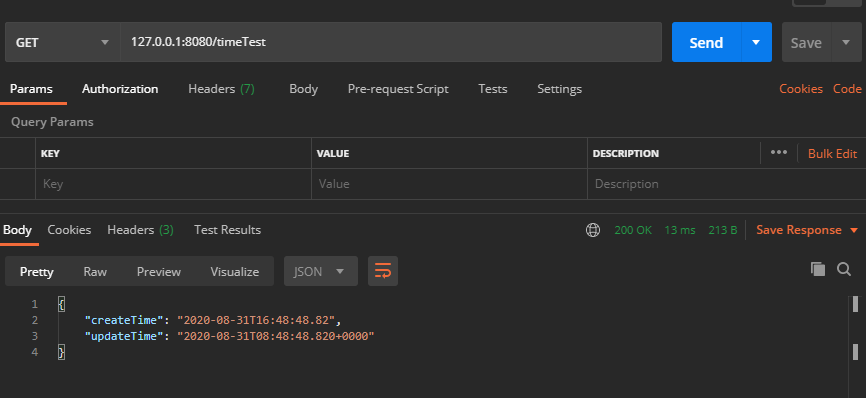
一、@JsonFormat 注解
@JsonFormat 注解方式严格意义上不能叫全局时间格式化,应该叫部分格式化,因为@JsonFormat 注解需要用在实体类的时间字段上,而只有使用相应的实体类,对应的字段才能进行格式化。
@Data

public class OrderDTO {

    @JsonFormat(locale = "zh", timezone = "GMT+8", pattern = "yyyy-MM-dd")

    private LocalDateTime createTime;

    @JsonFormat(locale = "zh", timezone = "GMT+8", pattern = "yyyy-MM-dd HH:mm:ss")

    private Date updateTime;

}
字段加上 @JsonFormat 注解后,LocalDateTime 和 Date 时间格式化成功。
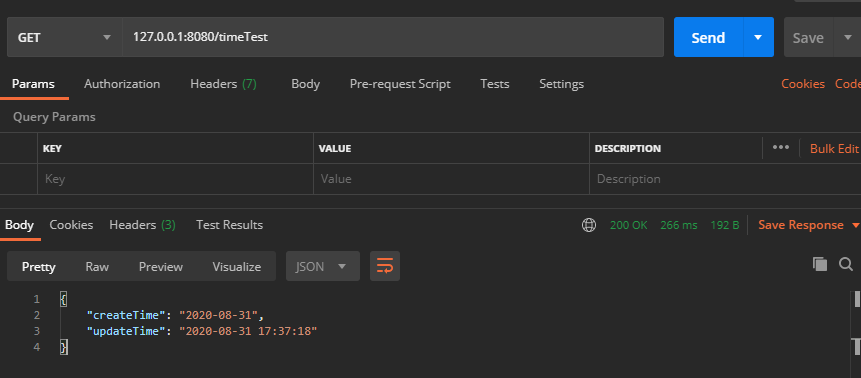
二、@JsonComponent 注解(推荐)
这是我个人比较推荐的一种方式,前边看到使用 @JsonFormat 注解并不能完全做到全局时间格式化,所以接下来我们使用 @JsonComponent 注解自定义一个全局格式化类,分别对 Date 和 LocalDate 类型做格式化处理。
@JsonComponent

public class DateFormatConfig {

    @Value("${spring.jackson.date-format:yyyy-MM-dd HH:mm:ss}")

    private String pattern;

    /**

     * @author xiaofu

     * @description date 类型全局时间格式化

     * @date 2020/8/31 18:22

     */

    @Bean

    public Jackson2ObjectMapperBuilderCustomizer jackson2ObjectMapperBuilder() {

        return builder -> {

            TimeZone tz = TimeZone.getTimeZone("UTC");

            DateFormat df = new SimpleDateFormat(pattern);

            df.setTimeZone(tz);

            builder.failOnEmptyBeans(false)

                    .failOnUnknownProperties(false)

                    .featuresToDisable(SerializationFeature.WRITE_DATES_AS_TIMESTAMPS)

                    .dateFormat(df);

        };

    }

    /**

     * @author xiaofu

     * @description LocalDate 类型全局时间格式化

     * @date 2020/8/31 18:22

     */

    @Bean

    public LocalDateTimeSerializer localDateTimeDeserializer() {

        return new LocalDateTimeSerializer(DateTimeFormatter.ofPattern(pattern));

    }

    @Bean

    public Jackson2ObjectMapperBuilderCustomizer jackson2ObjectMapperBuilderCustomizer() {

        return builder -> builder.serializerByType(LocalDateTime.class, localDateTimeDeserializer());

    }

}
看到 Date 和 LocalDate 两种时间类型格式化成功,此种方式有效。
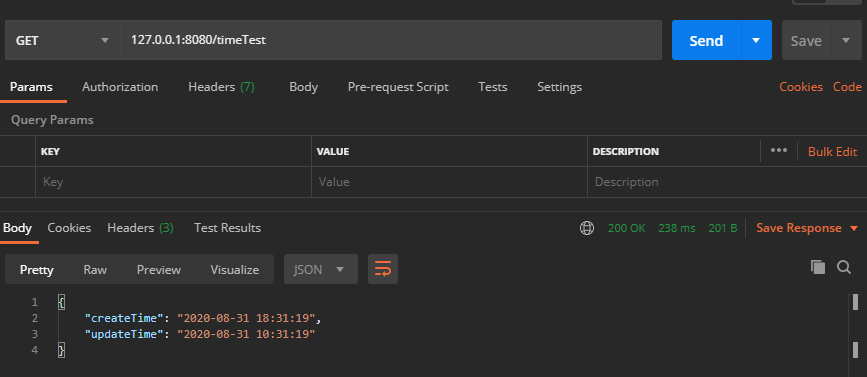
但还有个问题,实际开发中如果我有个字段不想用全局格式化设置的时间样式,想自定义格式怎么办?
那就需要和 @JsonFormat 注解配合使用了。
@Data

public class OrderDTO {

    @JsonFormat(locale = "zh", timezone = "GMT+8", pattern = "yyyy-MM-dd")

    private LocalDateTime createTime;

    @JsonFormat(locale = "zh", timezone = "GMT+8", pattern = "yyyy-MM-dd")

    private Date updateTime;

}
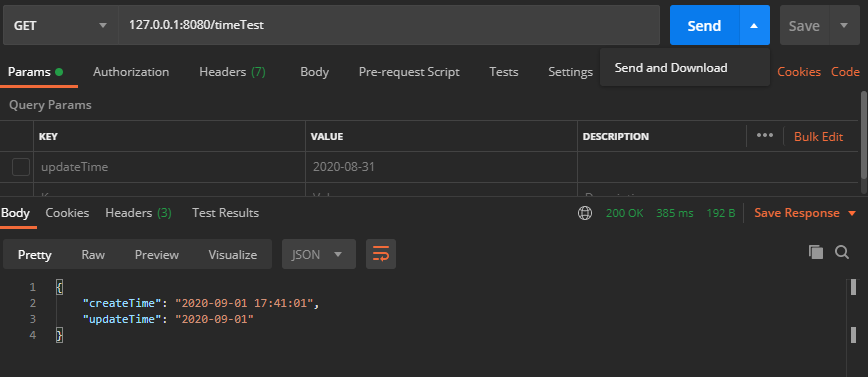
从结果上我们看到 @JsonFormat 注解的优先级比较高,会以 @JsonFormat 注解的时间格式为主。
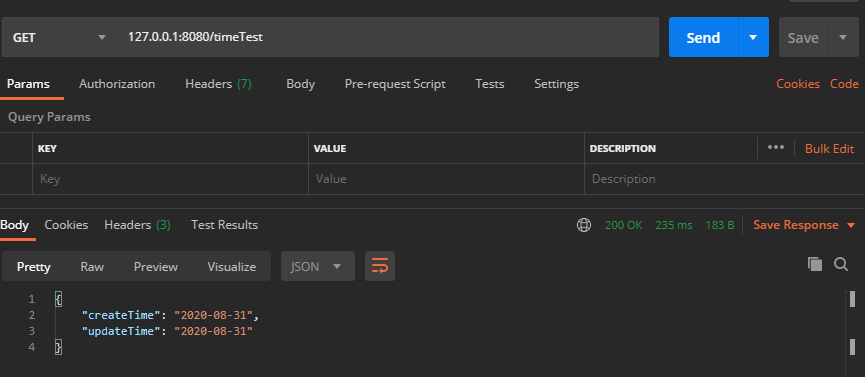
三、@Configuration 注解
这种全局配置的实现方式与上边的效果是一样的。
注意:在使用此种配置后,字段手动配置
@JsonFormat注解将不再生效。
@Configuration

public class DateFormatConfig2 {

    @Value("${spring.jackson.date-format:yyyy-MM-dd HH:mm:ss}")

    private String pattern;

    public static DateFormat dateFormat = new SimpleDateFormat("yyyy-MM-dd HH:mm:ss");

    @Bean

    @Primary

    public ObjectMapper serializingObjectMapper() {

        ObjectMapper objectMapper = new ObjectMapper();

        JavaTimeModule javaTimeModule = new JavaTimeModule();

        javaTimeModule.addSerializer(LocalDateTime.class, new LocalDateTimeSerializer());

        javaTimeModule.addDeserializer(LocalDateTime.class, new LocalDateTimeDeserializer());

        objectMapper.registerModule(javaTimeModule);

        return objectMapper;

    }

    /**

     * @author xiaofu

     * @description Date 时间类型装换

     * @date 2020/9/1 17:25

     */

    @Component

    public class DateSerializer extends JsonSerializer<Date> {

        @Override

        public void serialize(Date date, JsonGenerator gen, SerializerProvider provider) throws IOException {

            String formattedDate = dateFormat.format(date);

            gen.writeString(formattedDate);

        }

    }

    /**

     * @author xiaofu

     * @description Date 时间类型装换

     * @date 2020/9/1 17:25

     */

    @Component

    public class DateDeserializer extends JsonDeserializer<Date> {

        @Override

        public Date deserialize(JsonParser jsonParser, DeserializationContext deserializationContext) throws IOException {

            try {

                return dateFormat.parse(jsonParser.getValueAsString());

            } catch (ParseException e) {

                throw new RuntimeException("Could not parse date", e);

            }

        }

    }

    /**

     * @author xiaofu

     * @description LocalDate 时间类型装换

     * @date 2020/9/1 17:25

     */

    public class LocalDateTimeSerializer extends JsonSerializer<LocalDateTime> {

        @Override

        public void serialize(LocalDateTime value, JsonGenerator gen, SerializerProvider serializers) throws IOException {

            gen.writeString(value.format(DateTimeFormatter.ofPattern(pattern)));

        }

    }

    /**

     * @author xiaofu

     * @description LocalDate 时间类型装换

     * @date 2020/9/1 17:25

     */

    public class LocalDateTimeDeserializer extends JsonDeserializer<LocalDateTime> {

        @Override

        public LocalDateTime deserialize(JsonParser p, DeserializationContext deserializationContext) throws IOException {

            return LocalDateTime.parse(p.getValueAsString(), DateTimeFormatter.ofPattern(pattern));

        }

    }

}
总结
分享了一个简单却又很实用的 Springboot 开发技巧,其实所谓的开发效率,不过是一个又一个开发技巧堆砌而来,聪明的程序员总是能用最少的代码完成任务。
如果对你有用,欢迎 在看、点赞、转发 ,您的认可是我最大的动力。
原创不易,燃烧秀发输出内容,如果有一丢丢收获,点个赞鼓励一下吧!
整理了几百本各类技术电子书,送给小伙伴们。关注公号回复【666】自行领取。和一些小伙伴们建了一个技术交流群,一起探讨技术、分享技术资料,旨在共同学习进步,如果感兴趣就加入我们吧!

3种 Springboot 全局时间格式化方式,别再写重复代码了的更多相关文章
- SpringBoot中时间格式化的5种方法!
在我们日常工作中,时间格式化是一件经常遇到的事儿,所以本文我们就来盘点一下 Spring Boot 中时间格式化的几种方法. 时间问题演示 为了方便演示,我写了一个简单 Spring Boot 项 ...
- SpringBoot全局时间转换器
SpringBoot全局时间转换器 日常开发中,接收时间类型参数处处可见,但是针对不同的接口.往往需要的时间类型不一致 @DateTimeFormat(pattern = "yyyy-MM- ...
- VS开发中的代码编写小技巧——避免重复代码编写的几种方法
上一篇文章中程序员的幸福生活--有你的日子,每天都是情人节,收到了大家的很多好评.鼓励和祝福,非常感动,真诚的谢谢大家.也希望每个朋友都能保持一个积极向上的心态,去迎接丰富多彩的人生. 在开发过程中, ...
- Springboot 关于日期时间格式化处理方式总结
项目中使用LocalDateTime系列作为DTO中时间的数据类型,但是SpringMVC收到参数后总报错,为了配置全局时间类型转换,尝试了如下处理方式. 注:本文基于Springboot2.x测试, ...
- 真没想到,Springboot能这样做全局日期格式化,有点香!
最近面了一些公司,有一些 Java方面的架构.面试资料,有需要的小伙伴可以在公众号[程序员内点事]里,无套路自行领取 说在前边 最近部门几位同事受了一些委屈相继离职,共事三年临别之际颇有不舍,待一切手 ...
- js 中时间格式化的几种方法
1.项目中时间返回值,很过时候为毫秒值,我们需要转换成 能够看懂的时间的格式: 例如: yyyy-MM-dd HH:mm:ss 2.处理方法(处理方法有多种,可以传值到前端处理,也可以后台可以好之后再 ...
- Go中的fmt几种输出的区别和格式化方式
在日常使用fmt包的过程中,各种眼花缭乱的print是否让你莫名的不知所措呢,更让你茫然的是各种格式化的占位符..简直就是噩梦.今天就让我们来征服格式化输出,做一个会输出的Goer. fmt.Prin ...
- SpringBoot全局异常处理与定制404页面
一.错误处理原理分析 使用SpringBoot创建的web项目中,当我们请求的页面不存在(http状态码为404),或者器发生异常(http状态码一般为500)时,SpringBoot就会给我们返回错 ...
- ie 与 Chrome 时间格式化问题.
ie 与 Chrome 时间格式化通用: new Date(res[i].Time.replaceAll("-", "/")).format("yyy ...
随机推荐
- Android JNI之静态注册
这篇说静态注册,所谓静态注册,就是native的方法是直接通过方法名的规定格式和Java端的声明处代码对应起来的,其对应规则如下: JNIEXPORT <返回值> JNICALL Java ...
- 转)Understanding Java Memory Management
Understanding Java Memory Management - IBM Java Native Interface (JNI) Objects and Code Java Native ...
- Newbe.Claptrap 框架如何实现多级生命周期控制?
Newbe.Claptrap 框架如何实现多级生命周期控制?最近整理了一下项目的术语表.今天就谈谈什么是 Claptrap Lifetime Scope. 特别感谢 kotone 为本文提供的校对建议 ...
- 嵌入式linux系统应用开发
关于嵌入式系统 平时大家说的嵌入式其实范围比较广的,是一种软硬件可裁剪,以应用为中心开发的专用系统,硬件平台可以是单片机,或者以ARM系列的处理器.单片机一般直接裸奔程序,不过现在有了好多基于单片 ...
- Python库大全,建议收藏留用!
学Python,想必大家都是从爬虫开始的吧.毕竟网上类似的资源很丰富,开源项目也非常多. 很多人学习python,不知道从何学起.很多人学习python,掌握了基本语法过后,不知道在哪里寻找案例上手. ...
- Html视频播放同时获取当前帧下的图片
<!DOCTYPE html> <html> <head> <meta charset="UTF-8"> <title> ...
- .NETCore微服务探寻(三) - 远程过程调用(RPC)
前言 一直以来对于.NETCore微服务相关的技术栈都处于一个浅尝辄止的了解阶段,在现实工作中也对于微服务也一直没有使用的业务环境,所以一直也没有整合过一个完整的基于.NETCore技术栈的微服务项目 ...
- 发布新版首页“外婆新家”升级版:全新的UI,熟悉的味道
在7月30日我们我们忐忑不安地发布了新版网站首页,发布后迎接我们的不是新颜新风貌的惊喜,而是我们最担心的残酷现实——“让我们等这么多年,等来的就是这个新的丑容颜”,在大家的批评声中我们深深地认识到我们 ...
- Bytom DAPP 开发流程
从目前已经发布的DAPP来看,DAPP架构大致可以分成3种类型:插件钱包模式.全节点钱包模式和兼容模式. 插件钱包模式是借助封装了钱包的浏览器插件通过RPC协议与区块链节点通信,插件在运行时会将Web ...
- 计算vtable的大小
在ClassFileParser::parseClassFile()函数中会计算vtable和itable所需要的大小,因为vtable和itable是内嵌在Klass中的,parseClassFil ...