
CMD文件内容统计程序简单版本
WordCount命令行程序通过CMD接收参数,输出统计结果到指定文件。
项目码云地址:https://gitee.com/ggtc/WordCount.git
实现的功能有:
统计文件字符数
 1 using System.IO;

 2

 3 namespace WordCount

 4 {

 5      public class ClassCharCount:InterfaceCommandable

 6     {

 7          public string Count(string fileName)

 8          {

 9              string strResult = "字符数:";

10              try

11              {

12                  FileStream fs = new FileStream(fileName, FileMode.Open);

13                  strResult += Convert.ToString(fs.Length);

14                  fs.Close();

15                  Console.WriteLine("字符数统计成功");

16                  return strResult;

17              }

18              catch

19              {

20                  Console.WriteLine("文件打开失败");

21                  return strResult;

22              }

23          }

24     }

25 }
统计单词个数(逗号,空格分隔)
 1 using System.IO;

 2

 3 namespace WordCount

 4 {

 5     class ClassWordCount:InterfaceCommandable

 6     {

 7         public string Count(string fileName)

 8         {

 9             string strResult = "单词数:";

10             try

11             {

12                 FileStream fs = new FileStream(fileName, FileMode.Open);

13                 StreamReader sr = new StreamReader(fs, Encoding.Default);

14                 string sen = Convert.ToString(sr.ReadToEnd());

15                // Console.WriteLine(sen);//检查读文件结果

16                 fs.Close();

17                 sr.Close();

18                 char[] separator={',',' ',','};//中英文逗号及空格

19                 string[] words = sen.Split(separator, StringSplitOptions.RemoveEmptyEntries);//按指定字符分割字符串

20                 strResult += Convert.ToString(words.Length);

21                 Console.WriteLine("单词数统计成功");

22                 return strResult;

23             }

24             catch

25             {

26                 Console.WriteLine("文件打开失败");

27                 return strResult;

28             }

29         }

30

31        /* public string DeleteComments(string fs)//去注释

32         {

33             string subString = "";

34             int[] comments,

35             return subString;

36         }*/

37     }

38 }
统计文件行数(换行符为准)
 1 using System.IO;

 2

 3 namespace WordCount

 4 {

 5     class ClassRowsCount:InterfaceCommandable

 6     {

 7         public string Count(string fileName)

 8         {

 9             string strResult = "行数:";

10             try

11             {

12                 FileStream fs = new FileStream(fileName, FileMode.Open);

13                 StreamReader sr = new StreamReader(fs, Encoding.Default);

14                 string sen = Convert.ToString(sr.ReadToEnd());

15                 // Console.WriteLine(sen);//检查读文件结果

16                 fs.Close();

17                 sr.Close();

18

19                 char[] separator = { '\n'};

20                 string[] Rows = sen.Split(separator, StringSplitOptions.RemoveEmptyEntries);//按指定字符分割字符串

21                 strResult += Convert.ToString(Rows.Length);

22                 Console.WriteLine("行数统计成功");

23                 return strResult;

24             }

25             catch

26             {

27                 Console.WriteLine("打开文件失败");

28                 return strResult;

29             }

30         }

31     }

32 }
以上三个类实现这个接口
1 interface InterfaceCommandable

2     {

3         string Count(string fileName);

4     }
更改默认输出文件
 1  public static void ChangePrint(string fileName)

 2         {

 3             try

 4             {

 5                 StreamWriter sw = new StreamWriter("resultposition.txt");

 6                 sw.Write(fileName);

 7                 sw.Close();

 8                 Console.WriteLine("输出地址更改成功");

 9             }

10             catch

11             {

12                 Console.WriteLine("输出地址更改失败");

13             }

14

15         }
 1 //用于在模块间传递数据

 2             string strResult = "";

 3             //将输入传给处理模块

 4             strResult = ClassCountDeal.CountDeal(args);

 5             //根据输出地址调用输出模块将统计结果输出到指定文件

 6             StreamReader sr = new StreamReader("resultposition.txt");

 7             string position=sr.ReadToEnd();

 8             sr.Close();

 9             if(position=="")

10             {

11                 OutClass.Print(strResult);

12             }

13             else

14             {

15

16                 OutClass.Print(strResult, position);

17             }
输出模块
仅仅接收统计结果输出到指定文件
 1 using System.IO;

 2

 3 namespace WordCount

 4 {

 5     public static class OutClass

 6     {

 7         public static void Print(string strResult)

 8         {

 9                 try

10                     {

11                           StreamWriter sw = new StreamWriter("result.txt");

12                           sw.WriteLine(strResult);//将结果写入默认文件

13                           Console.WriteLine("数据写入成功");

14                           sw.Close();

15                     }

16                 catch

17                     {

18                           Console.WriteLine("数据写入失败");

19                     }

20         }

21

22         public static void Print(string strResult,string args)

23         {

24             try

25             {

26                 StreamWriter sw = new StreamWriter(args);

27                 sw.WriteLine(strResult);//将结果写入指定文件

28                 Console.WriteLine("数据写入成功");

29                 sw.Close();

30             }

31             catch

32             {

33                 Console.WriteLine("数据写入失败");

34             }

35         }

36 }

37 }
根据输入参数调用统计模块
一共有四个命令-c,统计字符数;-w,统计单词数;-l,统计行数;-o,更换输出文件。后面加要统计的文件名。
 1 public static class ClassCountDeal

 2     {

 3         public static string CountDeal(string[] args)

 4         {

 5             string strResult = "";

 6             //根据用户参数个数调用统计模块

 7             int i=0;

 8             while(i<args.Length-1)

 9             {

10                 switch (args[i])

11                 {

12                     //统计字符数

13                     case "-c":

14                         InterfaceCommandable ccmd = new ClassCharCount();

15                         strResult += ccmd.Count(args[args.Length-1]) + '\n';

16                         break;

17                     //统计单词数

18                     case "-w":

19                         InterfaceCommandable wcmd = new ClassWordCount();

20                         strResult += wcmd.Count(args[args.Length - 1]) + '\n';

21                         break;

22                     //统计行数,换行符为准

23                     case "-l":

24                         InterfaceCommandable lcmd = new ClassRowsCount();

25                         strResult += lcmd.Count(args[args.Length - 1]) + '\n';

26                         break;

27                     case "-o":

28                         //更改输出到用户指定的文件

29                         OutClass.ChangePrint(args[args.Length - 1]);

30                         break;

31                     default:

32                         Console.WriteLine("命令错误");

33                         break;

34                 }

35                 i++;

36             }

37             //返回统计结果

38             return strResult;

39         }

40     }
我通过 strResult 这个变量在各个模块间传输统计数据。
附上运行截图在此:
 //跳转到程序所在目录
 //输入命令和要统计的文件名
结果如下:
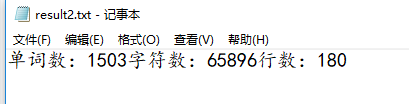
测试一下更改输出地址

嗯?看看存放数据文件的名字的记录文件已经改了啊?

删除掉地址文件里的数据

再试一下写入:

但是
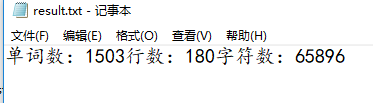
看来运行没错,我的提示语句有了点小小的Bug~
修改判断如下

CMD文件内容统计程序简单版本的更多相关文章
- 文件内容统计:对任意给定的.txt文件进行内容的字符数、行数、单词数进行统计
项目源码地址:https://gitee.com/xjtsh/projects 功能实现: wc.exe -c file.c //返回文件 file.c 的字符数 wc.exe -w file ...
- cmd文件内容添加到文件内容命令
今天需要因为有点SQL文件需要添加修改,但是感觉是做运维工作得当然不能一个一个来了.搞了半天bat才找到这个命令(真是一个不合格的运维) 例如:a.txt 内容添加到 b.txt (不是覆盖,而是在 ...
- 文件内容统计——Linux wc命令
有了该命令,就可以得到当前目录下所有符合条件的文件总数,如下: find -type f | wc -l 这个命令的功能也很好记,因为它功能很有限: wc -c filename:显示一个文件的字节数 ...
- DSP6455的cmd文件
DSP6455的cmd文件 CMD 的专业名称叫链接器配置文件,存放链接器的配置信息,DSP编译器的编译结果是未定位的,DSP也没有操作系统来定位执行代码,DSP系统的配置需求也不尽相同,因此需要定义 ...
- [译]在Linux中清空或删除大文件内容的5种方法
原文来源: https://www.tecmint.com/empty-delete-file-content-linux/ 有时,在处理Linux终端中的文件时,您可能希望清除文件的内容,而无需使用 ...
- 用C#Winform写个简单的批量清空文件内容和删除文件的小工具
用C#Winform写个简单的批量清空文件内容和删除文件的小工具 本文介绍这个简单得不能再简单的小项目.做这个项目,有以下目的. 1 当然是做个能用的工具 2 学习使用Github 关于用VS2013 ...
- MFC Wizard创建的空应用程序中各个文件内容的解析
创建的MFC应用程序名为:wd,那么: 一.wd.h解析 // wd.h : main header file for the WD application // #if !defined(AFX_W ...
- Golang: 读取文件并统计内容
上次我们从命令行接收用户输入,并统计了每次输入内容出现的次数,今天对程序加以改造,使其能够读取文件内容,并统计每行文本出现的次数. 首先,我们把接收输入的逻辑封装成一个函数: // scan.go p ...
- Java基础-输入输出-2.编写IoDemo.java的Java应用程序,程序完成的功能是:首先读取text.txt文件内容,再通过键盘输入文件的名称为iodemo.txt,把text.txt的内容存入iodemo.txt
2.编写IoDemo.java的Java应用程序,程序完成的功能是:首先读取text.txt文件内容,再通过键盘输入文件的名称为iodemo.txt,把text.txt的内容存入iodemo.txt ...
- Sed 静默替换文件内容 以及 awk 的简单使用
1. Sed的help 鸟哥说的 学东西 先看 help 先看man 再google 不好FQ再百度.. Usage: sed [OPTION]... {script-only-if-no-other ...
随机推荐
- Python 中的数字类型与转换技巧
Python中有三种数字类型: int(整数) float(浮点数) complex(复数) 当您将值分配给变量时,将创建数字类型的变量: 示例:获取您自己的Python服务器 x = 1 # int ...
- JS 取Json中对象特定属性值
解析JSON JSON 数据 var str = '[{"a": "1","b": "2"}, {"a&quo ...
- std::thread 二:互斥量(多个互斥量的解决方法)
// *:这里的lock是函数模板,最少传两个互斥量 // 第一种,使用 lock 和 unlock std::mutex m_mutex1; std::mutex m_mutex2; std::lo ...
- selenium报错:Message: stale element reference: element is not attached to the page document
在使用selenium时,报了一个错误 报错的原因: 所引用的元素已过时,不再依附于当前页面.通常情况下,这是因为页面进行了刷新或跳转 解决方法: 重新定位元素 代码示例: # 旧代码(报错) lis ...
- 重新点亮linux 基本软件————防火墙[一]
前言 简单介绍一下linux的防火墙. 正文 防火墙分类: 软件防火墙和硬件防火墙 包过:过滤防火墙和应用层防火墙 iptables 的表和链 规则表: filter nat mangle raw f ...
- 堡垒机安装pytorch,mmcv,mmclassification,并训练自己的数据集
堡垒机创建conda环境,并激活进入环境 conda create -n mmclassification python=3.7 conda activate mmclassification 堡垒机 ...
- 第五章-for循环的练习
/* * @Issue: 每个苹果0.8元,第一天买两个苹果,从第二天开始,每天买前一天的两倍,直至购买的苹果数量 * 个数达到不超过100的最大值,编写程序求每天平均花多少钱. * @Author: ...
- docker containerd runc containerd-shim等组件的关系
早期 kubelet 创建容器工作原理 因为 docker 出生的比 k8s 早,所以 k8s 早期的容器运行时都是基于 docker 的,kubelet 通过 docker 的 api 创建容器.后 ...
- 上架即封神!3.6k Star 的开源游戏模拟器,Delta 冲上 App Store 免费榜
一直以来,苹果设备的应用商店(App Store)都是禁止游戏模拟器上架,所以 iPhone/iPad 用户不能直接安装 GBA.红白机之类的模拟器应用,这也让想在 iPhone 上重温童年游戏机的机 ...
- 探索Kimi智能助手:如何用超长文本解锁高效信息处理新境界
目前,Kimi备受瞩目,不仅在社交平台上引起了广泛关注,而且在解决我们的实际问题方面也显示出了巨大潜力.其支持超长文本的特性使得我们能够更加灵活地配置信息,避免了频繁与向量数据库进行交互以及编写提示词 ...