
WorkStation的网络损耗
WorkStation的网络损耗
背景
对周六遇到的问题进行了一下深入思考.

发现虽然可以通过WorkStation的方式来进行Clients以及新命令的扩容.

但是Workstation的桥接网络模式的性能不清楚有多大的损耗.

为了房子性能出现巨大的衰退.

这边进行了一下简要的测试与验证.
结论
Windows物理机 本地进行测试和使用linux远程测试 3.2.100 的QPS 都在 24000 左右.

比较稳定, linux上面的测试结果甚至要比 Windows本地测试的要稍微高一点

但是 Windows 上面的 WorkStation虚拟机就就存在问题.

虚拟机内直接的测试结果是 35000左右

在虚拟机外部使用桥接网络测试的结果只有 10000多一点.

桥接网络导致redis的QPS只有实际值的三分之一, 也只有Windows 上面 3.2.100 的 一半.

感觉桥接网络导致了非常大的性能损耗.

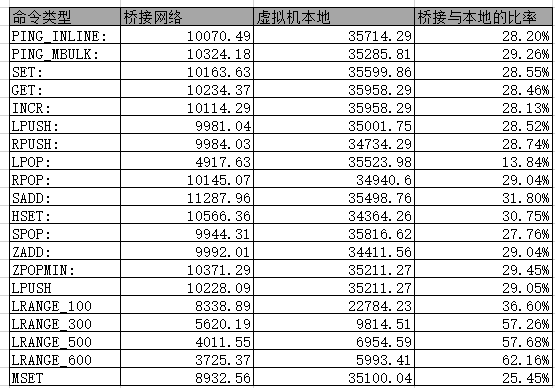

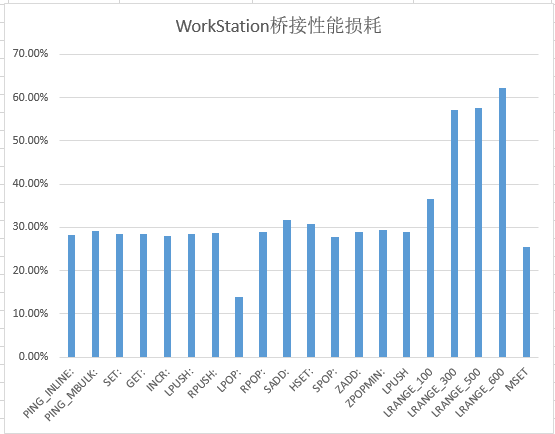
在远程的测试结果
PING_INLINE: 10070.49 requests per second, p50=1.935 msec

PING_MBULK: 10324.18 requests per second, p50=1.903 msec

SET: 10163.63 requests per second, p50=1.943 msec

GET: 10234.37 requests per second, p50=1.919 msec

INCR: 10114.29 requests per second, p50=1.935 msec

LPUSH: 9981.04 requests per second, p50=1.951 msec

RPUSH: 9984.03 requests per second, p50=1.967 msec

LPOP: 4917.63 requests per second, p50=2.015 msec

RPOP: 10145.07 requests per second, p50=1.935 msec

SADD: 11287.96 requests per second, p50=1.703 msec

HSET: 10566.36 requests per second, p50=1.911 msec

SPOP: 9944.31 requests per second, p50=1.951 msec

ZADD: 9992.01 requests per second, p50=1.967 msec

ZPOPMIN: 10371.29 requests per second, p50=1.887 msec

LPUSH (needed to benchmark LRANGE): 10228.09 requests per second, p50=1.919 msec

LRANGE_100 (first 100 elements): 8338.89 requests per second, p50=2.263 msec

LRANGE_300 (first 300 elements): 5620.19 requests per second, p50=3.255 msec

LRANGE_500 (first 500 elements): 4011.55 requests per second, p50=4.623 msec

LRANGE_600 (first 600 elements): 3725.37 requests per second, p50=4.991 msec

MSET (10 keys): 8932.56 requests per second, p50=2.079 msec
在本地的测试结果
PING_INLINE: 35714.29 requests per second, p50=0.287 msec

PING_MBULK: 35285.81 requests per second, p50=0.295 msec

SET: 35599.86 requests per second, p50=0.311 msec

GET: 35958.29 requests per second, p50=0.303 msec

INCR: 35958.29 requests per second, p50=0.303 msec

LPUSH: 35001.75 requests per second, p50=0.327 msec

RPUSH: 34734.29 requests per second, p50=0.319 msec

LPOP: 35523.98 requests per second, p50=0.327 msec

RPOP: 34940.60 requests per second, p50=0.319 msec

SADD: 35498.76 requests per second, p50=0.311 msec

HSET: 34364.26 requests per second, p50=0.319 msec

SPOP: 35816.62 requests per second, p50=0.303 msec

ZADD: 34411.56 requests per second, p50=0.335 msec

ZPOPMIN: 35211.27 requests per second, p50=0.303 msec

LPUSH (needed to benchmark LRANGE): 34566.20 requests per second, p50=0.319 msec

LRANGE_100 (first 100 elements): 22784.23 requests per second, p50=0.455 msec

LRANGE_300 (first 300 elements): 9814.51 requests per second, p50=1.031 msec

LRANGE_500 (first 500 elements): 6954.59 requests per second, p50=1.447 msec

LRANGE_600 (first 600 elements): 5993.41 requests per second, p50=1.671 msec

MSET (10 keys): 35100.04 requests per second, p50=0.391 msec
Windows 本地Redis3.2.100的测试结果
PING_INLINE: 22296.54 requests per second

PING_BULK: 22872.83 requests per second

SET: 22967.39 requests per second

GET: 23380.88 requests per second

INCR: 22246.94 requests per second

LPUSH: 23375.41 requests per second

RPUSH: 22862.37 requests per second

LPOP: 23239.60 requests per second

RPOP: 22794.62 requests per second

SADD: 23299.16 requests per second

SPOP: 23062.73 requests per second

LPUSH (needed to benchmark LRANGE): 23272.05 requests per second

LRANGE_100 (first 100 elements): 12515.64 requests per second

LRANGE_300 (first 300 elements): 7000.84 requests per second

LRANGE_500 (first 450 elements): 5093.21 requests per second

LRANGE_600 (first 600 elements): 4213.72 requests per second

MSET (10 keys): 19845.21 requests per second
Windows 远程测试结果
PING_INLINE: 21422.45 requests per second, p50=0.863 msec

PING_MBULK: 24348.67 requests per second, p50=0.759 msec

SET: 25201.61 requests per second, p50=0.743 msec

GET: 25933.61 requests per second, p50=0.719 msec

INCR: 26034.89 requests per second, p50=0.719 msec

LPUSH: 26581.61 requests per second, p50=0.703 msec

RPUSH: 24888.00 requests per second, p50=0.751 msec

LPOP: 25542.79 requests per second, p50=0.735 msec

RPOP: 25406.50 requests per second, p50=0.735 msec

SADD: 25621.32 requests per second, p50=0.735 msec

HSET: 25733.40 requests per second, p50=0.727 msec

SPOP: 25879.92 requests per second, p50=0.727 msec

ZADD: 25859.84 requests per second, p50=0.727 msec
WorkStation的网络损耗的更多相关文章
- VMware Workstation Pro网络配置(WiFi配置等)
常用技巧 连续按两下ctrl+alt,实现鼠标脱离 VMware Workstation Pro网络配置有几种模式: 桥接模式: 网络上的独立主机 占用路由器新IP资源 通过VMware Networ ...
- VMware Workstation中网络连接之桥接、NAT和Host-only
在Windows XP系统中,安装好VMware Workstation虚拟机软件以后,我们可以查看一下"网络连接"窗口: 在窗口中多出了两块网卡: VMware Network ...
- [VMware WorkStation]虚拟机网络
桥接模式下复制物理网络连接: 复制物理网卡连接状态,就是说把你指定的.本机的.真是网卡的状态信息复制给虚拟机的虚拟网卡,比如说你的本机真是网卡链接到了家用路由器的LAN口上,获得到了DHCP分配的地址 ...
- VMware Workstation的网络连接方式:NAT、桥接和Host Only
安装完VMware Workstation后会自动生成两个网络连接:VMware Network Adapter VMnet8 和 VMware Network Adapter VMnet1(通常称为 ...
- VMware workstation 虚拟网络 三种上网区别
以VMware workstation为例,其虚拟网络设备有3种: 第一种:vmnet0(桥接模式),无实体虚拟网卡,其实就是一个协议而已,会在对应网卡上加入VMware bridge protoco ...
- [转]VMware Workstation网络连接的三种模式
经常要使用VMWare Workstation来在本地测试不同的操作系统,以前也搞不清楚网络连接三种模式,最近看了几篇文章才算明白.现总结如下: 1. VMware Workstation的虚拟网络组 ...
- WMware workstation中几种网络连接的说明 【转】
博客来源:WMware workstation中几种网络连接的说明 VMware workstation中几种网络连接的说明 WMware workstation中网络连接包括,桥接模式.NAT模式. ...
- VMware workstation 网络选择 NAT模式 访问外网
多年不用本地做测试 尽然被 nat 模式給卡着了 :动手的还是所以要记录一下: 1.根据自己需求创建 虚拟机 之后: 配置[网络适配器] -- 选择 nat 模式 ( 选择网卡 ) 虚拟机 ...
- VMWare Workstation 配置docker多macvlan网络方法
VMWare Workstation 配置docker多macvlan网络方法 答案就是.....换VirtualBox 噗... VMWare Workstation host-only网络,三台虚 ...
- 转-深入理解VMware虚拟网络
原文出处:http://wangchunhai.blog.51cto.com/225186/381225 VMware Workstation是一款非常不错的虚拟机软件,许多爱好者用VMware Wo ...
随机推荐
- maven 实现pb的实时编译
<properties> <protobuf.version>3.15.7</protobuf.version></properties> <ex ...
- Go语言实现GoF设计模式:备忘录模式的实践探索
本文分享自华为云社区<[Go实现]实践GoF的23种设计模式:备忘录模式>,作者:元闰子. 简介 相对于代理模式.工厂模式等设计模式,备忘录模式(Memento)在我们日常开发中出镜率并不 ...
- 5G多输入多输出技术,到底是个啥东东?
摘要:多输入多输出技术是指在发射端和接收端分别使用多个发射天线和接收天线,使信号通过发射端与接收端的多个天线传送和接收,从而改善通信质量. 本文作者|历天一 多输入多输出技术是指在发射端和接收端分别使 ...
- 带你读AI论文:SDMG-R结构化提取—无限版式小票场景应用
摘要:在文档图像中提取关键信息在自动化办公应用中至关重要.传统基于模板匹配或者规则的方法,在通用性方面.未见过版式模板数据方面,效果都不好:为此,本文提出了一种端到端的空间多模态图推理模型(SDMG- ...
- Solon2 开发之IoC,七、切面与函数环绕拦截
想要环绕拦截一个 Bean 的函数.需要三个前置条件: 通过注解做为"切点",进行拦截(不能无缘无故给拦了吧?费性能) Bean 的 method 是被代理的 在 Bean 被扫描 ...
- No compiler detected, make sure you are running on top of a JDK instead of a JRE
Java 调 webservice 报如下错误 [2023-11-07 17:01:02.315] ERROR [scheduling-1] ToHisApiImpl.java:106 - No co ...
- ORM之Sequelize
一.环境: Vue.Quasar.Electron.Postgres.Sequelize.sequelize-auto 二.安装 (1)添加Sequelize(全局安装) $npm install - ...
- Java 多线程上下文传递在复杂场景下的实践
一.引言 海外商城从印度做起,慢慢的会有一些其他国家的诉求,这个时候需要我们针对当前的商城做一个改造,可以支撑多个国家的商城,这里会涉及多个问题,多语言,多国家,多时区,本地化等等.在多国家的情况下如 ...
- Optional详细用法
package com.example.apidemo.jdk8; import com.example.apidemo.vo.UserInfo; import java.math.BigDecima ...
- vue实现文件上传功能
https://www.jb51.net/article/145500.htm Element中的el-upload使用过程中踩的坑 https://www.jianshu.com/p/c837224 ...