
fusionpbx简介

概述
fusionpbx是以freeswitch作为底层框架开发而成的开源PBX,在freeswitch的基础上,优化了GUI的易用性。
fusionpbx可用作高可用性的单租户或基于域的多租户 PBX、运营商级交换机、呼叫中心服务器、传真服务器、voip服务器、语音邮件服务器、会议服务器、语音应用服务器、设备框架等。
fusionpbx提供无限分机、语音邮件到电子邮件、音乐保持、呼叫停放、呼叫中心、呼叫队列、电话配置和许多其他功能。 它提供您的业务所需的功能,并为中小型企业带来企业级电话系统功能。
fusionpbx官方网站:https://www.fusionpbx.com/
本文档主要介绍fusionpbx的安装过程和简单应用。
环境
centos:CentOS release 7.0 (Final)或以上版本
GCC:4.8.5
安装步骤
官方的安装脚本很方便,也很好用。
安装过程比较久,需要耐心等待。
CentOS Install
Start with a minimal install of CentOS 7. Then run the following commands as 'root'.
yum install wget
wget -O - https://raw.githubusercontent.com/fusionpbx/fusionpbx-install.sh/master/centos/pre-install.sh | sh
cd /usr/src/fusionpbx-install.sh/centos && ./install.sh
安装成功后会提示重启服务器
Installation has completed.
Use a web browser to login.
domain name: https://192.168.0.152
username: admin
password: gdeW2wUjAjJvjD9
The domain name in the browser is used by default as part of the authentication.
If you need to login to a different domain then use username@domain.
username: admin@192.168.0.152
Official FusionPBX Training
Fastest way to learn FusionPBX. For more information https://www.fusionpbx.com.
Available online and in person. Includes documentation and recording.
Location: Online
Admin Training: TBA
Advanced Training: TBA
Continuing Education: https://www.fusionpbx.com/training
Timezone: https://www.timeanddate.com/weather/usa/idaho
Additional information.
https://fusionpbx.com/members.php
https://fusionpbx.com/training.php
https://fusionpbx.com/support.php
https://www.fusionpbx.com
http://docs.fusionpbx.com
*------------------------------------------*
* NOTE: Please save the above information. *
* REBOOT YOUR SERVER TO COMPLETE INSTALL. *
*------------------------------------------*
fusionpbx相关的进程
通过命令查看fusionpbx使用到的组件和进程。
[root@localhost ~]# ps -ef | grep -E 'freeswitch|php-fpm|nginx|postgres|postfix|memcached'
memcach+ 1041 1 0 10:45 ? 00:00:00 /usr/bin/memcached -u memcached -p 11211 -m 64 -c 1024
root 1054 1 0 10:45 ? 00:00:00 php-fpm: master process (/etc/php-fpm.conf)
postgres 1206 1 0 10:45 ? 00:00:00 /usr/pgsql-14/bin/postmaster -D /var/lib/pgsql/14/data/
freeswi+ 1701 1 0 10:45 ? 00:00:13 /usr/bin/freeswitch -u freeswitch -g daemon -ncwait -nonat
root 1753 1 0 10:45 ? 00:00:00 nginx: master process /usr/sbin/nginx
freeswi+ 1754 1753 0 10:45 ? 00:00:00 nginx: worker process
freeswi+ 1755 1753 0 10:45 ? 00:00:00 nginx: worker process
freeswi+ 1756 1753 0 10:45 ? 00:00:00 nginx: worker process
freeswi+ 1757 1753 0 10:45 ? 00:00:00 nginx: worker process
root 1819 1 0 10:45 ? 00:00:00 /usr/libexec/postfix/master -w
postfix 1820 1819 0 10:45 ? 00:00:00 pickup -l -t unix -u
postfix 1821 1819 0 10:45 ? 00:00:00 qmgr -l -t unix -u
postgres 1869 1206 0 10:45 ? 00:00:00 postgres: logger
postgres 2065 1206 0 10:45 ? 00:00:00 postgres: checkpointer
postgres 2066 1206 0 10:45 ? 00:00:00 postgres: background writer
postgres 2067 1206 0 10:45 ? 00:00:00 postgres: walwriter
postgres 2068 1206 0 10:45 ? 00:00:00 postgres: autovacuum launcher
postgres 2069 1206 0 10:45 ? 00:00:00 postgres: stats collector
postgres 2070 1206 0 10:45 ? 00:00:00 postgres: logical replication launcher
freeswi+ 2151 1054 0 10:45 ? 00:00:00 php-fpm: pool www
freeswi+ 2152 1054 0 10:45 ? 00:00:00 php-fpm: pool www
freeswi+ 2153 1054 0 10:45 ? 00:00:00 php-fpm: pool www
freeswi+ 2154 1054 0 10:45 ? 00:00:00 php-fpm: pool www
freeswi+ 2155 1054 0 10:45 ? 00:00:00 php-fpm: pool www
freeswi+ 9436 1054 0 10:55 ? 00:00:00 php-fpm: pool www
root 9587 9406 0 11:19 pts/1 00:00:00 grep --color=auto -E freeswitch|php-fpm|nginx|postgres|postfix|memcached
页面操作
浏览器打开URL https://192.168.0.152/
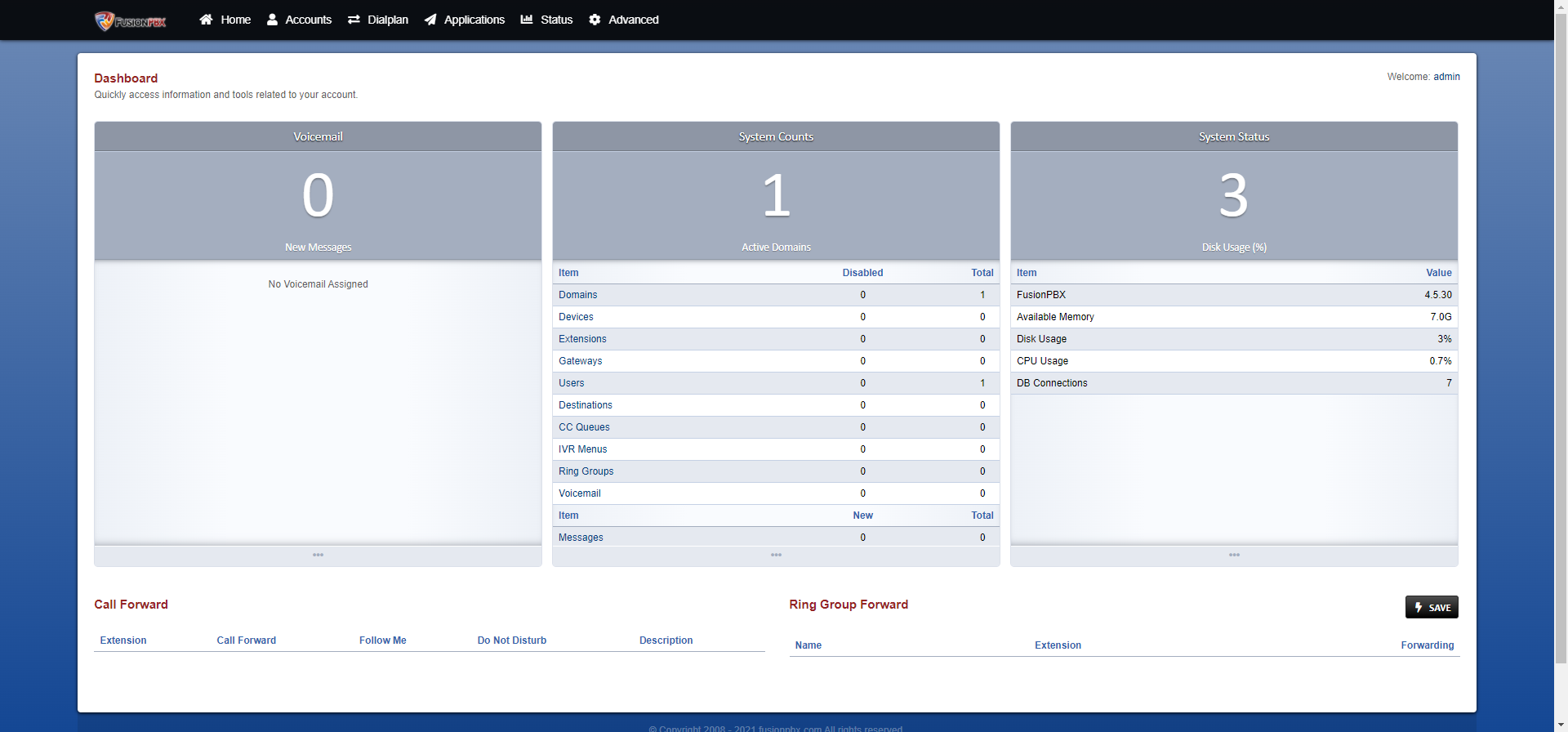
然后就没有然后了,我尝试了好几天,都无法使用SIP账号注册/呼叫。
官方文档中,整个系统如何启动/停止的操作都没有,模块组件的介绍也没有,碰到问题的解决思路更无从谈起。
最后,我想卸载掉它,也找不到任何资料。
感觉就是为了卖会员,付费培训。
卸载
经过1个小时的摸索,总结的卸载步骤,无法保证完全恢复
yum remove freeswitch
yum remove php-fpm
yum remove nginx
yum remove memcached
yum remove postgresql
yum remove postfix
yum remove php-pgsql
rpm -qa postgresql* | xargs rpm -e
总结
fusionpbx最好的一点,就是安装比较容易。
但是实际使用起来,一点都不容易,文档不全,描述不清晰,使用的人群也不多,网上资料很少。
碰到问题,往往无从下手。
总之,看看还行,使用就算了。
问题汇总
1, 添加了一个用户public01,groups设置为public,使用该用户登陆之后,页面无法切换到其他用户。解决办法:清理页面缓存。
2, fusionpbx安装完成后,并不能直接注册打电话。。。未解决,放弃了。
空空如常
求真得真
fusionpbx简介的更多相关文章
- ASP.NET Core 1.1 简介
ASP.NET Core 1.1 于2016年11月16日发布.这个版本包括许多伟大的新功能以及许多错误修复和一般的增强.这个版本包含了多个新的中间件组件.针对Windows的WebListener服 ...
- MVVM模式和在WPF中的实现(一)MVVM模式简介
MVVM模式解析和在WPF中的实现(一) MVVM模式简介 系列目录: MVVM模式解析和在WPF中的实现(一)MVVM模式简介 MVVM模式解析和在WPF中的实现(二)数据绑定 MVVM模式解析和在 ...
- Cassandra简介
在前面的一篇文章<图形数据库Neo4J简介>中,我们介绍了一种非常流行的图形数据库Neo4J的使用方法.而在本文中,我们将对另外一种类型的NoSQL数据库——Cassandra进行简单地介 ...
- REST简介
一说到REST,我想大家的第一反应就是“啊,就是那种前后台通信方式.”但是在要求详细讲述它所提出的各个约束,以及如何开始搭建REST服务时,却很少有人能够清晰地说出它到底是什么,需要遵守什么样的准则. ...
- Microservice架构模式简介
在2014年,Sam Newman,Martin Fowler在ThoughtWorks的一位同事,出版了一本新书<Building Microservices>.该书描述了如何按照Mic ...
- const,static,extern 简介
const,static,extern 简介 一.const与宏的区别: const简介:之前常用的字符串常量,一般是抽成宏,但是苹果不推荐我们抽成宏,推荐我们使用const常量. 执行时刻:宏是预编 ...
- HTTPS简介
一.简单总结 1.HTTPS概念总结 HTTPS 就是对HTTP进行了TLS或SSL加密. 应用层的HTTP协议通过传输层的TCP协议来传输,HTTPS 在 HTTP和 TCP中间加了一层TLS/SS ...
- 【Machine Learning】机器学习及其基础概念简介
机器学习及其基础概念简介 作者:白宁超 2016年12月23日21:24:51 摘要:随着机器学习和深度学习的热潮,各种图书层出不穷.然而多数是基础理论知识介绍,缺乏实现的深入理解.本系列文章是作者结 ...
- Cesium简介以及离线部署运行
Cesium简介 cesium是国外一个基于JavaScript编写的使用WebGL的地图引擎,一款开源3DGIS的js库.cesium支持3D,2D,2.5D形式的地图展示,可以自行绘制图形,高亮区 ...
- 1.Hibernate简介
1.框架简介: 定义:基于java语言开发的一套ORM框架: 优点:a.方便开发; b.大大减少代码量; c.性能稍高(不能与数据库高手相比,较一般数据库使用者 ...
随机推荐
- JTAG串链
- [ABC264F] Monochromatic Path
Problem Statement We have a grid with $H$ rows and $W$ columns. Each square is painted either white ...
- 可视化学习:CSS transform与仿射变换
引言 在几年前,我就在一些博客中看到关于CSS中transform的分析,讲到它与线性代数中矩阵的关系,但当时由于使用transform比较少,再加上我毕竟是个数学学渣,对数学有点畏难心理,就有点看不 ...
- VA01/VA02/VA03 销售订单根据定价和步骤校验权限隐藏价格(二)
1.文档说明 1.1.内容回顾 之前发表过相关文章<VA01/VA02/VA03 销售订单根据定价和步骤校验权限隐藏价格>,本篇文章对上一篇文章做补充说明. 第一篇文章是通过拥有权限,则隐 ...
- Ascii字符画 在线生成工具
英文 http://patorjk.com/software/taag/ 点击 Test All 一键测试所有样式 目前有317种可选 个人常用格式 3D-ASCII ANSI Shadow Bulb ...
- Python subprocess 使用(一)
Python subprocess 使用(一) 本文主要讲下 subprocess 的简单使用. 1: 通过subprocess 获取设备信息 import subprocess def get_an ...
- Javascript Ajax总结——其他跨域技术之Web Sockets
Web Sockets的目标是在一个单独的持久连接上提供全双工.双向通信.在Javascript中创建了Web Sockets之后,会有一个HTTP请求发送到浏览器以发起连接.在取得服务器响应后,建立 ...
- Tomcat自动化脚本
/bin/bash war包名称 war_name="tchg.war" 要上传war包指定目录 war_dir="/usr/local/src/tchg" 工 ...
- MyBatisPlus-使用步骤
MyBatisPlus-使用步骤 第一步 引入maven坐标依赖 <dependency> <groupId>com.baomidou</groupId> < ...
- String与StringBuilder的互相转换
String与StringBuilder的互相转换 String转StringBulider StringBuilder sb = new StringBuilder(); sb.append(use ...