
CSS & JS Effect – Show More
效果

show more 是很常被使用的效果, 因为空间总是不够的丫.
比起 scroll, show more 的体验通常会好一些, 尤其在手机, 它有更好的引导.
实现思路

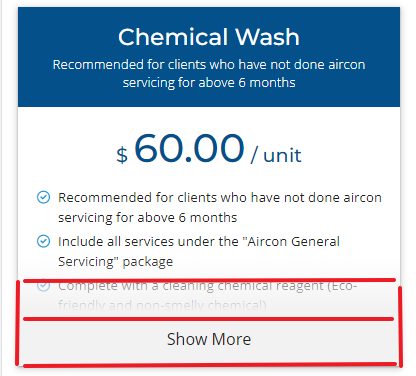
1. 卡片需要一个 max-height 限制内容, 同时 overflow: hidden
2. 做一个 overlay show more 绝对定位到最底部.
3. overlay 内部除了 button 以外还要有一个渐变 gradient 隐约阻挡内容, 这样就起到了引导作用.
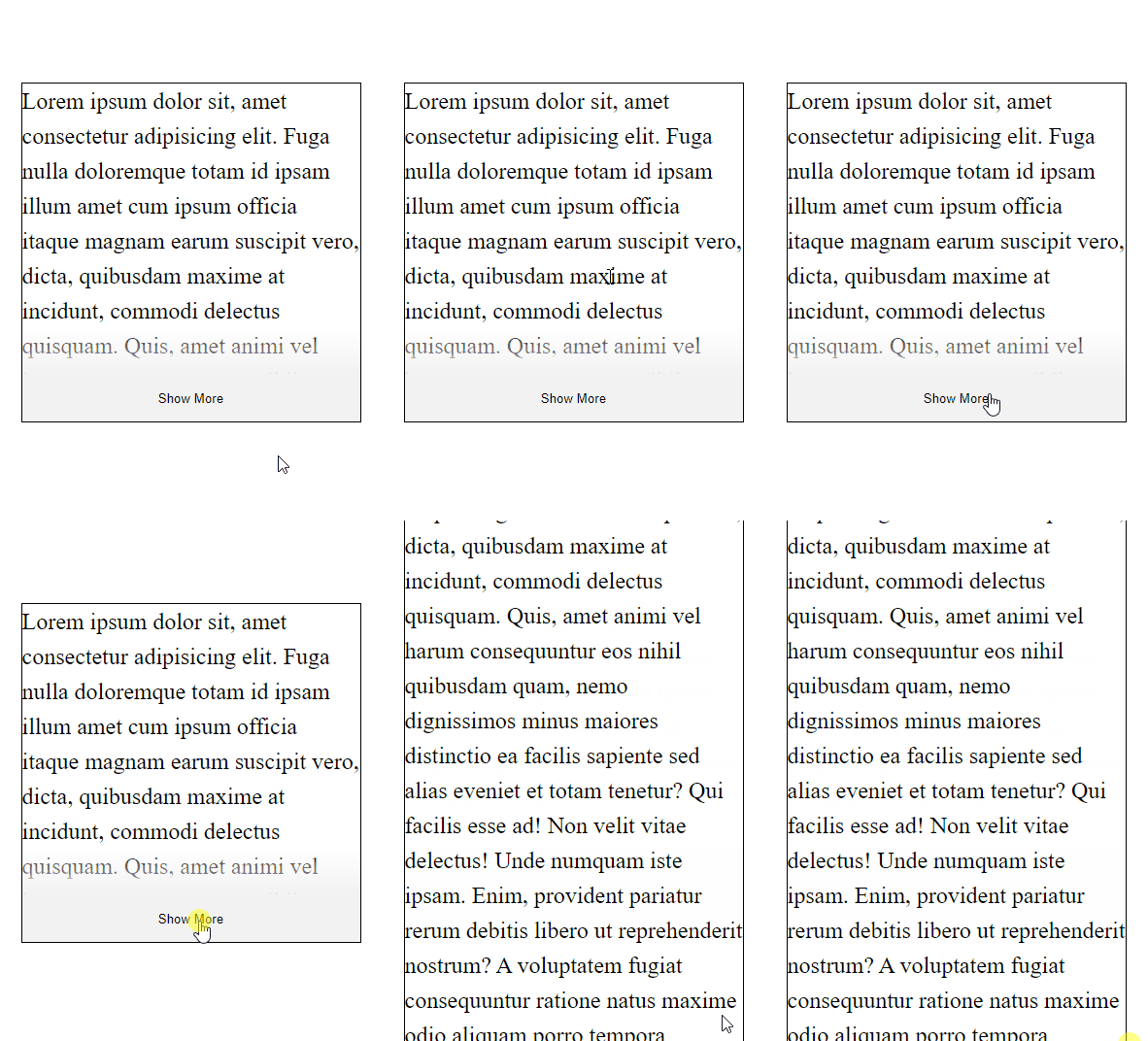
4. show more 点击后解除 max-height 限制, 这里需要 JS 来实现.
注意: 如果内容没有超过 max-height show more 不应该出现. 这个也需要 JS 实现.
搭场景
HTML
<div class="container">

  <div class="card">

    <p>

      Lorem ipsum dolor sit, amet consectetur adipisicing elit. Fuga nulla

      doloremque totam id ipsam illum amet cum ipsum officia itaque magnam

      earum suscipit vero, dicta, quibusdam maxime at incidunt, commodi

      delectus quisquam. Quis, amet animi vel harum consequuntur eos nihil

      quibusdam quam, nemo dignissimos minus maiores distinctio ea facilis

      sapiente sed alias eveniet et totam tenetur? Qui facilis esse ad! Non

      velit vitae delectus! Unde numquam iste ipsam. Enim, provident

      pariatur rerum debitis libero ut reprehenderit nostrum? A voluptatem

      fugiat consequuntur ratione natus maxime odio aliquam porro tempora

      doloremque eius quaerat repudiandae molestias eos consectetur, esse

      nemo. Impedit, praesentium assumenda.

    </p>

  </div>
一张卡片, 内容, 做简单的演示就好了
CSS Style
.container {

  display: grid;

  place-content: center;

  height: 100vh;

  .card {

    width: 350px;

    max-height: 350px;

    border: 1px solid black;

    p {

      line-height: 1.5;

      font-size: 1.5rem;

    }

  }

}
给点样式美化一下
效果
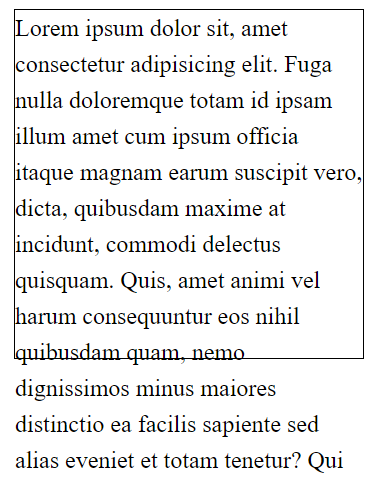
上样式
添加 show more HTML
添加 show more overlay HTML 到 card 里面
<div class="show-more-overlay show">

  <div class="gradient"><span>Show More</span></div>

  <button class="btn">Show More</button>

</div>
gradient 的高度为了和 buttom 一样, 所以也写了字撑高
限制高度
.container {

  .card {

    overflow: hidden;

  }

}
定位 show more overlay
.card {

  position: relative;

  .show-more-overlay {

    display: none;

    // js 会负责给 .show 的 class

    &.show {

      display: revert;

    }

    position: absolute;

    left: 0;

    bottom: 0;

    width: 100%;

  }

}
一开始是 display none 的, JS 会依据内容是否超过了 max-height 决定 show
button 和 gradient 样式
.card {

  .show-more-overlay {

    .gradient,

    .btn {

      padding: 1rem;

    }

    .gradient {

      background-image: linear-gradient(

        to top,

        hsla(0, 0%, 95%, 1),

        hsla(0, 0%, 95%, 0.01)

      );

      span {

        visibility: hidden;

      }

    }

    .btn {

      border-width: 0; // reset CSS

      width: 100%;

      background-color: hsl(0, 0%, 95%);

    }

  }

}
gradient 的高度和颜色需要配合 button 哦
pointer-event
这里需要注意一下, button 是可以点击的, gradient 是要穿透的.
gradient 要穿透, 那么它的 parent 也必须要穿透, 要不 overlay 也会当着内容.
而 pointer-event 的规则是, 默认所以元素都是不穿透的, 但如果 parent pointer-event: none, 那么所有子孙就可穿透了. 子孙可以通过 pointer-event:auto override 回去.
所以这里的做法是让 overlay pointer-event none, 然后 button pointer-event:auto
.card {

  .show-more-overlay {

    pointer-events: none;

    .btn {

      cursor: pointer;

      pointer-events: auto;

    }

  }

}
上 Javascript
const card = document.querySelector(".card");

if (card.scrollHeight > card.offsetHeight) {

  const overlay = card.querySelector(".show-more-overlay");

  overlay.classList.add("show");

  const btn = overlay.querySelector(".btn");

  btn.addEventListener("click", () => {

    card.style.maxHeight = "initial";

    overlay.classList.remove("show");

  });

}
检查 height, 显示 show more
监听点击, hide show more, 解开 max-height 限制.
需要注意的是, 如果内容有图片这类的, 可能因为加载慢而计算错误哦, 可以写一个 resize observer 解决.
Final Core
HTML


<div class="container">

  <div class="card">

    <p>

      Lorem ipsum dolor sit, amet consectetur adipisicing elit. Fuga nulla

      doloremque totam id ipsam illum amet cum ipsum officia itaque magnam

      earum suscipit vero, dicta, quibusdam maxime at incidunt, commodi

      delectus quisquam. Quis, amet animi vel harum consequuntur eos nihil

      quibusdam quam, nemo dignissimos minus maiores distinctio ea facilis

      sapiente sed alias eveniet et totam tenetur? Qui facilis esse ad! Non

      velit vitae delectus! Unde numquam iste ipsam. Enim, provident

      pariatur rerum debitis libero ut reprehenderit nostrum? A voluptatem

      fugiat consequuntur ratione natus maxime odio aliquam porro tempora

      doloremque eius quaerat repudiandae molestias eos consectetur, esse

      nemo. Impedit, praesentium assumenda.

    </p>

    <div class="show-more-overlay">

      <div class="gradient"><span>Show More</span></div>

      <button class="btn">Show More</button>

    </div>

  </div>

</div>
CSS Style
.container {

  display: grid;

  place-content: center;

  height: 100vh;

  .card {

    width: 350px;

    max-height: 350px;

    border: 1px solid black;

    p {

      line-height: 1.5;

      font-size: 1.5rem;

    }

    overflow: hidden;

    position: relative;

    .show-more-overlay {

      display: none;

      // js 会负责给 .show 的 class

      &.show {

        display: revert;

      }

      position: absolute;

      left: 0;

      bottom: 0;

      width: 100%;

      pointer-events: none;

      .gradient,

      .btn {

        padding: 1rem;

      }

      .gradient {

        background-image: linear-gradient(

          to top,

          hsla(0, 0%, 95%, 1),

          hsla(0, 0%, 95%, 0.01)

        );

        span {

          visibility: hidden;

        }

      }

      .btn {

        border-width: 0; // reset CSS

        width: 100%;

        background-color: hsl(0, 0%, 95%);

        cursor: pointer;

        pointer-events: auto;

      }

    }

  }

}
JavaScript
const card = document.querySelector(".card");

if (card.scrollHeight > card.offsetHeight) {

  const overlay = card.querySelector(".show-more-overlay");

  overlay.classList.add("show");

  const btn = overlay.querySelector(".btn");

  btn.addEventListener("click", () => {

    card.style.maxHeight = "initial";

    overlay.classList.remove("show");

  });

}
效果
CSS & JS Effect – Show More的更多相关文章
- CSS & JS 制作滚动幻灯片
==================纯CSS方式==================== <!DOCTYPE html> <html> <head> <met ...
- 【转】Maven Jetty 插件的问题(css/js等目录死锁)的解决
Maven Jetty 插件的问题(css/js等目录死锁,不能自动刷新)的解决: 1. 打开下面的目录:C:\Users\用户名\.m2\repository\org\eclipse\jetty ...
- Css Js Loader For Zencart
Css Js Loader 描述:这个插件很早就出来了,可能知道人非常少 这个插件的功能是整合所有的网站的CSS和JS内容到一个文件里边. 因为CSS和JS文件到了一个文件,加快了程序的运行 在配合其 ...
- 购物车数字加减按钮HTML+CSS+JS(有需要嫌麻烦的小伙伴拿走不谢)
之前在写详情页的时候,如下图 因为自己嫌麻烦,就去看其他网站是怎么写的,想直接拿来用,后来看来看去觉得写得很麻烦,于是最后还是决定自己写,附上HTML+CSS+JS代码,一条龙一站式贴心服务2333 ...
- vs合并压缩css,js插件——Bundler & Minifier
之前做了一个大转盘的抽奖活动,因为比较火,部分用户反馈看不到页面的情况,我怀疑js加载请求过慢导致,所以今天针对之前的一个页面进行调试优化. 首先想到的是对页面的js和css进行压缩优化,百度了下vs ...
- nginx资源定向 css js路径问题
今天玩玩项目,学学nginx发现还不错,速度还可以,但是CSS JS确无法使用,原来Iginx配置时需要对不同类型的文件配置规则,真是很郁闷,不过想想也还是很有道理.闲暇之际,把配置贴上来.#user ...
- IIS7的集成模式下如何让自定义的HttpModule不处理静态文件(.html .css .js .jpeg等)请求
今天将开发好的ASP.NET站点部署到客户的服务器上后,发现了一个非常头疼的问题,那么就是IIS7的应用程序池是集成模式的话,ASP.NET项目中自定义的HttpModule会处理静态文件(.html ...
- 网站加载css/js/img等静态文件失败
网站加载css/js/img等静态文件失败,报网站http服务器内部500错误.而服务器中静态文件存在且权限正常. 从浏览器中直接访问文件,出来乱码.这种问题原因在于iis中该网站mime配置报错,不 ...
- 【前端】Sublime text3 插件HTML/CSS/JS prettify 格式化代码
1.首先安装插件 菜单的preference->packages control,然后输入install .. 回车,再输入HTML/CSS/JS prettify 再回车,重启后就可以了. 2 ...
- CSS+JS实现兼容性很好的无限级下拉菜单
<!DOCTYPE html PUBLIC "-//W3C//DTD XHTML 1.1//EN" "http://www.w3.org/TR/xhtml11/DT ...
随机推荐
- [oeasy]python0004_游乐场_和python一起玩耍_python解释器_数学运算
和python玩耍 Python 回忆 上次 了解shell环境中的命令 命令 作用 whoami 显示当前用户名 pwd 显示当前文件夹 ls 列出当前文件夹下的内容 python3 仿佛进入大于号 ...
- SP12304 题解
原题链接 | 题解链接 本篇题解为此题最较简单做法及最较少码量, 并且码风优良, 请放心阅读. 题目简述 当 \(i\) 的所有正因数和 \(=\) \(n\) 时, 其中 \(i\) 的最小值. 思 ...
- VUE小知识~作用域插槽
作用域插槽可以为我们向组件内插入特定的标签,方便修改维护. 组件内需要使用 <slot></slot>进行插槽站位. 组件标签内需要使用<template > &l ...
- Fiddler+proxifier解决抓取不到客户端接口的问题
工作中偶尔会遇到Fiddler抓不到客户端接口问题,那么就要借助第三方工具proxifier来实现了: 下载地址: 原地址:链接: https://pan.baidu.com/s/1JPJ4cILEs ...
- Golang 高性能 Websocket 库 gws 使用与设计(一)
前言 大家好这里是,白泽,这期分析一下 golang 开源高性能 websocket 库 gws. 视频讲解请关注B站:白泽talk 介绍 gws:https://github.com/lxzan/g ...
- 认识netty的基本组件
Java NIO VS Netty 有了 Java NIO,而且 Netty 也是基于 Java NIO 实现,那么为什么不能直接用 Java NIO 来实现网络通信模块呢? 接下来我就给大家解释一下 ...
- web3 产品介绍 Dune Analytics 区块链的数据探索和可视化 链上热点和趋势一手掌握
Dune Analytics 是一个强大的数据分析平台,旨在帮助用户在区块链上进行数据探索和可视化. Dune Analytics的特点: 数据查询与可视化:Dune Analytics允许用户从多个 ...
- T800机器人图片 —— 强大的好莱坞电影工业,T800机器人模型也如此精细真实!
视频地址: https://www.ixigua.com/6764744689003266571
- 解决Python使用matplotlib绘图时出现的中文乱码问题
原文地址: https://blog.csdn.net/qq_33254766/article/details/120304721 全文略,详细见原文. 解决方法: # 设置字体的属性 # plt.r ...
- 目前国内全地形能力最强的双足机器人 —— 逐际动力 —— 提出迭代式预训练(Iterative Pre-training)方法的强化学习算法
相关: https://weibo.com/1255595687/O5k4Aj8l2 该公司对其产品的强化学习训练算法给出了较少的描述: 提出迭代式预训练(Iterative Pre-training ...