
Eharts立体柱状图
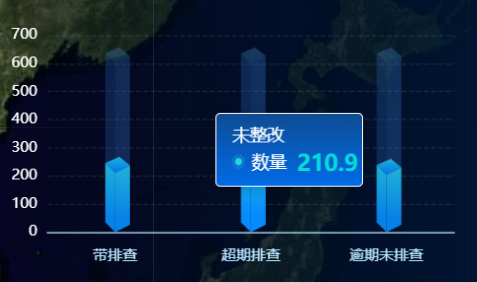
一下这三个div大小不一样 为了保证每次柱状图渲染正确 添加key
initEchart(index) {
this.myChart = this.createEchartsInstance(`dangerChart${index}`); // var myChart = echarts.init(chartDom);
this.myChart.clear();
let option;
// 绘制左侧面
const CubeLeft = echarts.graphic.extendShape({
shape: {
x: 0,
y: 0
},
buildPath: function (ctx, shape) {
// 会canvas的应该都能看得懂,shape是从custom传入的
const xAxisPoint = shape.xAxisPoint;
const c0 = [shape.x, shape.y];
const c1 = [shape.x - 8, shape.y - 8];
const c2 = [xAxisPoint[0] - 8, xAxisPoint[1] - 8];
const c3 = [xAxisPoint[0], xAxisPoint[1]];
ctx.moveTo(c0[0], c0[1]).lineTo(c1[0], c1[1]).lineTo(c2[0], c2[1]).lineTo(c3[0], c3[1]).closePath();
}
});
// 绘制右侧面
const CubeRight = echarts.graphic.extendShape({
shape: {
x: 0,
y: 0
},
buildPath: function (ctx, shape) {
const xAxisPoint = shape.xAxisPoint;
const c1 = [shape.x, shape.y];
const c2 = [xAxisPoint[0], xAxisPoint[1]];
const c3 = [xAxisPoint[0] + 12, xAxisPoint[1] - 6];
const c4 = [shape.x + 12, shape.y - 6];
ctx.moveTo(c1[0], c1[1]).lineTo(c2[0], c2[1]).lineTo(c3[0], c3[1]).lineTo(c4[0], c4[1]).closePath();
}
});
// 绘制顶面
const CubeTop = echarts.graphic.extendShape({
shape: {
x: 0,
y: 0
},
buildPath: function (ctx, shape) {
const c1 = [shape.x, shape.y];
const c2 = [shape.x + 12, shape.y - 6];
const c3 = [shape.x + 3.5, shape.y - 13];
const c4 = [shape.x - 8, shape.y - 8];
ctx.moveTo(c1[0], c1[1]).lineTo(c2[0], c2[1]).lineTo(c3[0], c3[1]).lineTo(c4[0], c4[1]).closePath();
}
});
// 注册三个面图形
echarts.graphic.registerShape('CubeLeft', CubeLeft);
echarts.graphic.registerShape('CubeRight', CubeRight);
echarts.graphic.registerShape('CubeTop', CubeTop); const MAX = [600, 600, 600, 600, 600, 600, 600];
const VALUE = [210.9, 260.8, 204.2, 504.9, 440.5, 400.3, 119.0];
option = {
backgroundColor: 'transparent',
tooltip: {
trigger: 'axis',
axisPointer: {
type: 'none'
},
className: 'chartClass',
// eslint-disable-next-line no-unused-vars
formatter: function (params, ticket, callback) {
const item = params[1];
return `<div class="text">未整改 </div>
<div class="fixCount">
<div class="circle"></div>
<div class="count">数量</div>
<div class="num">${item.value}</div>
</div>`;
}
},
grid: {
left: 10,
right: 10,
bottom: 10,
top: 10,
containLabel: true
},
xAxis: {
type: 'category',
data: ['带排查', '超期排查', '逾期未排查'],
axisLine: {
show: true,
lineStyle: {
color: '#BAE7FF'
}
},
offset: 6,
axisTick: {
show: false,
length: 9,
alignWithLabel: true,
lineStyle: {
color: '#7DFFFD'
}
},
axisLabel: {
show: true,
fontSize: 12
}
},
yAxis: {
// min: 0,
// max: 600,
// interval: 200,
type: 'value',
axisLine: {
show: false,
lineStyle: {
color: 'white'
}
},
splitLine: {
show: true,
lineStyle: {
type: 'dashed',
color: 'rgba(255,255,255,0.1)'
}
},
axisTick: {
show: false
},
axisLabel: {
show: true,
fontSize: 12
},
boundaryGap: ['20%', '20%']
},
series: [
{
type: 'custom',
renderItem: function (params, api) {
const location = api.coord([api.value(0), api.value(1)]);
return {
type: 'group',
children: [
{
type: 'CubeLeft',
shape: {
api,
x: location[0],
y: location[1],
xAxisPoint: api.coord([api.value(0), 0])
},
style: {
fill: 'rgba(47,102,192,.27)'
}
},
{
type: 'CubeRight',
shape: {
api,
x: location[0],
y: location[1],
xAxisPoint: api.coord([api.value(0), 0])
},
style: {
fill: 'rgba(59,128,226,.27)'
}
},
{
type: 'CubeTop',
shape: {
api,
x: location[0],
y: location[1],
xAxisPoint: api.coord([api.value(0), 0])
},
style: {
fill: 'rgba(72,156,221,.27)'
}
}
]
};
},
data: MAX
},
{
type: 'custom',
renderItem: (params, api) => {
const location = api.coord([api.value(0), api.value(1)]);
var color =
api.value(1) > 600
? 'red'
: new echarts.graphic.LinearGradient(0, 0, 0, 1, [
{
offset: 0,
color: '#20B0D6'
},
{
offset: 0.8,
color: '#0681E7'
}
]);
return {
type: 'group',
children: [
{
type: 'CubeLeft',
shape: {
api,
xValue: api.value(0),
yValue: api.value(1),
x: location[0],
y: location[1],
xAxisPoint: api.coord([api.value(0), 0])
},
style: {
fill: color
}
},
{
type: 'CubeRight',
shape: {
api,
xValue: api.value(0),
yValue: api.value(1),
x: location[0],
y: location[1],
xAxisPoint: api.coord([api.value(0), 0])
},
style: {
fill: color
}
},
{
type: 'CubeTop',
shape: {
api,
xValue: api.value(0),
yValue: api.value(1),
x: location[0],
y: location[1],
xAxisPoint: api.coord([api.value(0), 0])
},
style: {
fill: color
}
}
]
};
}, data: VALUE
},
{
type: 'bar',
label: {
normal: {
show: false,
position: 'top',
fontSize: 12,
color: '#fff',
offset: [2, -20]
}
},
itemStyle: {
color: 'transparent'
},
tooltip: {},
data: MAX
}
]
};
option && this.myChart.setOption(option, true);
}
Eharts立体柱状图的更多相关文章
- eccharts-gl 3D立体柱状图
echarts-gl继承于echarts echarts-gl官方实例https://echarts.baidu.com/examples/index.html#chart-type-globe 代码 ...
- Echarts 圆形立体柱状图
先放个效果图 const resData = [ { label: "上海", value: 66 }, { label: "北京", value: 26 }, ...
- MATLAB之折线图、柱状图、饼图以及常用绘图技巧
MATLAB之折线图.柱状图.饼图以及常用绘图技巧 一.折线图 参考代码: %图1:各模式直接成本预测 %table0-table1为1*9的数组,记录关键数据 table0 = data_modol ...
- echarts-gl 3D柱状图保存为图片,打印
echarts-gl生成的立体柱状图生成图片是平面的,但是需求是3D图并且可以打印,我们的思路是先转成图片,然后再打印,代码如下: 生成3D图 <td>图表分析</td> &l ...
- 【Java EE 学习 74 下】【数据采集系统第六天】【使用Jfreechart的统计图实现】【将JFreechart整合到项目中】
之前说了JFreechart的基本使用方法,包括生成饼图.柱状统计图和折线统计图的方法.现在需要将其整合到数据采集系统中根据调查结果生成三种不同的统计图. 一.统计模型的分析和设计 实现统计图显示的流 ...
- 一秒钟教会你如何 使用jfreechart制作图表,扇形图,柱形图,线型图,时序图,附上详细代码,直接看效果
今天有小伙伴问到我怎么使用jfreeChat生成图标,去年就有一个这方便的的总结,今天再遇到,就总结出来,供大家参考: 第一个: 创建柱状图,效果图如下: 柱状图代码如下: package cn.xf ...
- Baidu图表插件--Eharts使用(柱状图)
官网链接:http://echarts.baidu.com/index.html 官网的demo,api都很详细:我就分享下我的学习步骤 首先定义一个显示图标的区域: <div id=" ...
- PHP实现动态生成饼状图、柱状图和折线图(转载)
PHP在图像操作方面的表现非常出色,我们只需借助可以免费得到的GD库便可以轻松实现图.表勾画.下面将分别介绍PHP实现的饼状图.折线图和柱状图以 及他们的使用方法,这几段代码的特点就是不需要再把它们复 ...
- WPF用SkewTransform画3D柱状图
WPF用SkewTransform画3D柱状图 SkewTransform主要是对控件实现一种2-D扭曲,具体内容可以查看以下链接: http://msdn.microsoft.com/zh-cn/l ...
- 空间数据可视化:1. 3D_Bar图表| 空间柱状图
1.Sublime的使用 中文版的配置 https://jingyan.baidu.com/article/ca2d939d1e83feeb6c31cefc.html (百度经验) sublime里边 ...
随机推荐
- [转帖]Jmeter 参数化
一.Jmeter参数化概念 当使用JMeter进行测试时,测试数据的准备是一项重要的工作.若要求每次迭代的数据不一样时,则需进行参数化,然后从参数化的文件中来读取测试数据. 参数化是自动化测试脚本的一 ...
- [转帖]Sysbench - 一种系统性能benchmark
SysBench是一款开源的.跨平台的.模块化的.多线程的性能测试工具,通过高负载地运行在数据库上,可以执行CPU/内存/线程/IO/数据库等方面的性能测试.用于评估操作系统的性能参数. 1 sysb ...
- [转帖]【Redis】Redis中使用Lua脚本
Lua是一种轻量小巧的脚本语言,用标准C语言编写并以源代码形式开放,其设计目的是为了嵌入应用程序中,从而为应用程序提供灵活的扩展和定制功能. Lua具体语法参考:https://www.runoob. ...
- 基于Seata探寻分布式事务的实现方案
作者:京东物流技术与数据智能部 张硕 1 背景知识 随着业务的快速发展.业务复杂度越来越高,几乎每个公司的系统都会从单体走向分布式,特别是转向微服务架构.随之而来就必然遇到分布式事务这个难题,这篇文章 ...
- 【实践篇】最全的【DDD领域建模】小白学习手册(文末附资料)
导读 DDD领域建模被各个大小厂商提起并应用,而每个人都有自己的理解,本文就是针对小白,系统地讲解DDD到底是什么,解决了什么问题,及一些建议和实践.本文主要是思想的一种碰撞和分享,希望能对朋友们有所 ...
- 当你对 redis 说你中意的女孩是 Mia
作者:京东科技 周新智 一.Redis 众所周知,Redis = Remote Dictionary Server,即远程字典服务. 是一个开源的使用ANSI C语言编写.支持网络.可基于内存亦可持久 ...
- vue新一轮的面试题
参考的连接: https://juejin.cn/post/6844903876231954446 1. 在vue中watch和created哪个先执行?为什么? 在wacth监控数据时,设置imme ...
- Ant Design Vue表单验证失败
表单验证遇见的坑 01 如果你受控数据是这样写的话 const formState= reactive({ youForm:{ youNaNe:'', useSlectValue: '001', da ...
- fasthttp 中如何使用 linux 系统调用 `sendfile`
作者:张富春(ahfuzhang),转载时请注明作者和引用链接,谢谢! cnblogs博客 zhihu Github 公众号:一本正经的瞎扯 接上一篇:fasthttp 中如何使用Transfer-E ...
- 从零开始配置 vim(7)——自动命令
这篇我们来谈论vim一个相当重要的东西--自动命令. 从编程的角度来看,自动命令有点类似于事件响应,或者回调函数之类.当外部发生某些事件的时候,自动执行事先定义好的一组命令. 定义一个自动命令的格式如 ...