
Spring Boot整合JWT实现接口访问认证
最近项目组需要对外开发相关API接口,需要对外系统进行授权认证。实现流程是先给第三方系统分配appId和appSecret,第三方系统调用我getToken接口获取token,然后将token填入Authorization请求头用于访问相关API接口。
参考文章:https://blog.csdn.net/ltl112358/article/details/79507148
具体实现方式如下:
1.引入jjwt依赖
<dependency>

            <groupId>io.jsonwebtoken</groupId>

            <artifactId>jjwt</artifactId>

            <version>0.6.0</version>

        </dependency>
2.编写Filter
用于保护受限的API接口。
package com.laoxu.easyblog.framework;

import io.jsonwebtoken.Claims;

import io.jsonwebtoken.Jwts;

import io.jsonwebtoken.SignatureException;

import org.springframework.web.filter.GenericFilterBean;

import javax.servlet.FilterChain;

import javax.servlet.ServletException;

import javax.servlet.ServletRequest;

import javax.servlet.ServletResponse;

import javax.servlet.http.HttpServletRequest;

import javax.servlet.http.HttpServletResponse;

import java.io.IOException;

public class ApiFilter extends GenericFilterBean {

    public void doFilter(final ServletRequest req, final ServletResponse res, final FilterChain chain)

            throws IOException, ServletException {

        // Change the req and res to HttpServletRequest and HttpServletResponse

        final HttpServletRequest request = (HttpServletRequest) req;

        final HttpServletResponse response = (HttpServletResponse) res;

        // Get authorization from Http request

        final String authHeader = request.getHeader("authorization");

        // If the Http request is OPTIONS then just return the status code 200

        // which is HttpServletResponse.SC_OK in this code

        if ("OPTIONS".equals(request.getMethod())) {

            response.setStatus(HttpServletResponse.SC_OK);

            chain.doFilter(req, res);

        }

        // Except OPTIONS, other request should be checked by JWT

        else {

            // Check the authorization, check if the token is started by "Bearer "

            if (authHeader == null || !authHeader.startsWith("Bearer ")) {

                throw new ServletException("Missing or invalid Authorization header");

            }

            // Then get the JWT token from authorization

            final String token = authHeader.substring(7);

            try {

                // Use JWT parser to check if the signature is valid with the Key "secretkey"

                final Claims claims = Jwts.parser().setSigningKey("laoxu").parseClaimsJws(token).getBody();

                // Add the claim to request header

                request.setAttribute("claims", claims);

            } catch (final SignatureException e) {

                throw new ServletException("Invalid token");

            }

            chain.doFilter(req, res);

        }

    }

}
package com.laoxu.easyblog.config;
import com.laoxu.easyblog.framework.ApiFilter;
import org.springframework.boot.web.servlet.FilterRegistrationBean;
import org.springframework.context.annotation.Bean;
import org.springframework.context.annotation.Configuration;
/**
* @Description: 对指定api接口进行访问认证
* @Author laoxu
* @Date 2019/5/10 21:17
**/
@Configuration
public class ApiAuthConfig {
@Bean
public FilterRegistrationBean apiFilter() {
final FilterRegistrationBean registrationBean = new FilterRegistrationBean();
registrationBean.setFilter(new ApiFilter());
registrationBean.addUrlPatterns("/api/user/*");
return registrationBean;
}
}
3.编写API接口
package com.laoxu.easyblog.controller;

import com.laoxu.easyblog.framework.Result;

import com.laoxu.easyblog.framework.ResultUtil;

import io.jsonwebtoken.Jwts;

import io.jsonwebtoken.SignatureAlgorithm;

import org.springframework.web.bind.annotation.*;

import java.util.Date;

/**

 * @Description:

 * @Author laoxu

 * @Date 2019/5/10 22:04

 **/

@RestController

@RequestMapping("/api")

public class TokenController {

    @PostMapping("/getToken")

    public Result<String> login(@RequestParam("appId") String appId, @RequestParam("appSecret") String appSecret) {

        if(!("app123".equals(appId) && "123".equals(appSecret))){

            return ResultUtil.fail("授权失败");

        }

        // Create Twt token

        String jwtToken = Jwts.builder().setSubject(appId).claim("roles", "member").setIssuedAt(new Date())

                .signWith(SignatureAlgorithm.HS256, "laoxu").compact();

        return ResultUtil.ok(jwtToken);

    }

}
package com.laoxu.easyblog.controller;

import com.laoxu.easyblog.framework.Result;

import com.laoxu.easyblog.framework.ResultUtil;

import io.jsonwebtoken.Jwts;

import io.jsonwebtoken.SignatureAlgorithm;

import org.springframework.web.bind.annotation.PostMapping;

import org.springframework.web.bind.annotation.RequestMapping;

import org.springframework.web.bind.annotation.RequestParam;

import org.springframework.web.bind.annotation.RestController;

import java.util.Date;

/**

 * @Description:

 * @Author laoxu

 * @Date 2019/5/10 22:04

 **/

@RestController

@RequestMapping("/api/user")

public class ApiController {

    @RequestMapping("/getUser")

    public Result<String> loginSuccess() {

        return ResultUtil.ok("zhangsan");

    }

}
4.测试
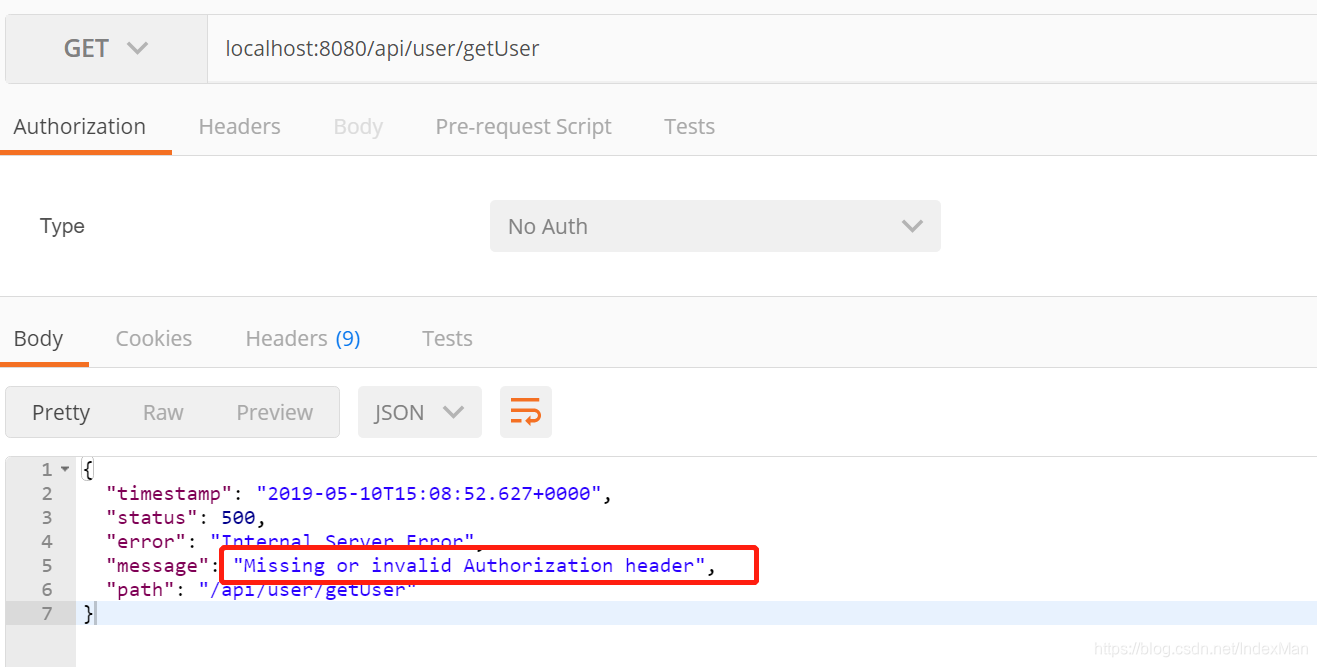
4.1 直接访问受限接口
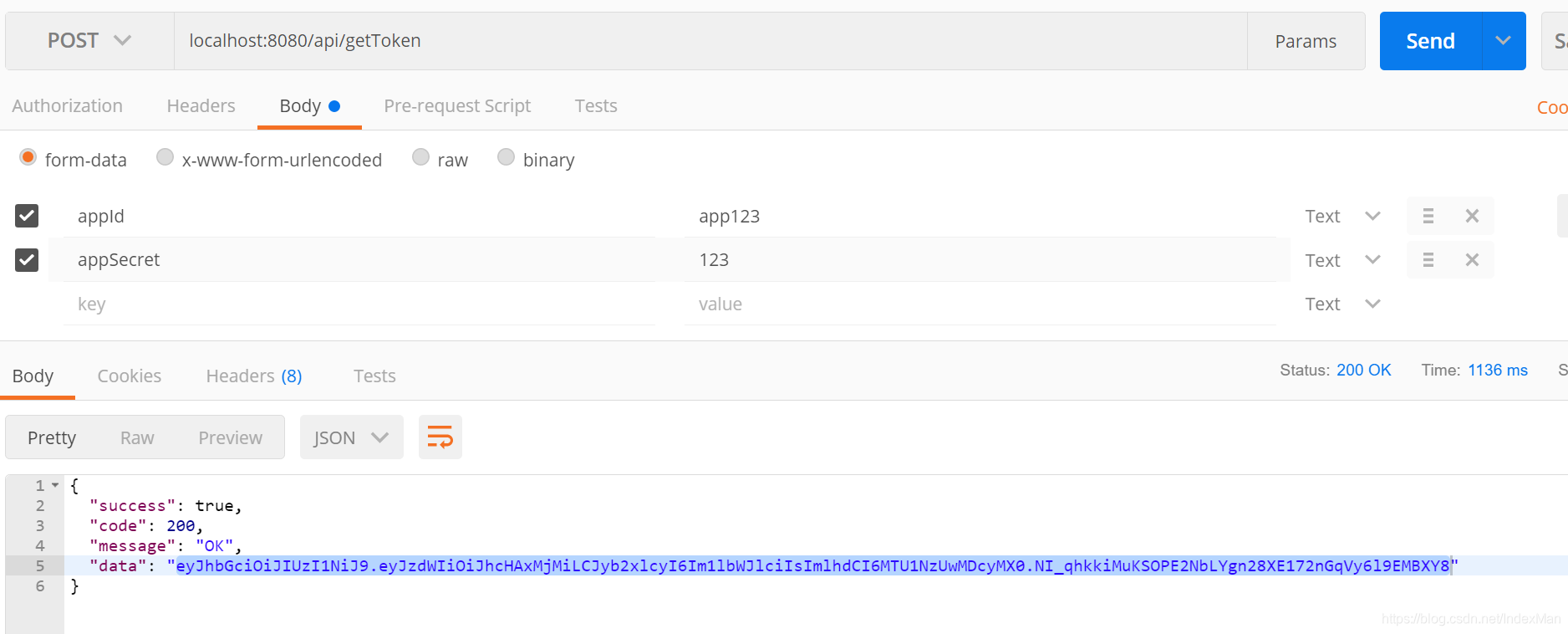
4.2 获取token
4.3 携带token再次访问受限接口

Spring Boot整合JWT实现接口访问认证的更多相关文章
- Spring Boot初识(4)- Spring Boot整合JWT
一.本文介绍 上篇文章讲到Spring Boot整合Swagger的时候其实我就在思考关于接口安全的问题了,在这篇文章了我整合了JWT用来保证接口的安全性.我会先简单介绍一下JWT然后在上篇文章的基础 ...
- Spring Boot整合Servlet,Filter,Listener,访问静态资源
目录 Spring Boot整合Servlet(两种方式) 第一种方式(通过注解扫描方式完成Servlet组件的注册): 第二种方式(通过方法完成Servlet组件的注册) Springboot整合F ...
- spring boot整合JWT例子
application.properties jwt.expire_time=3600000 jwt.secret=MDk4ZjZiY2Q0NjIxZDM3M2NhZGU0ZTgzMjY34DFDSS ...
- Spring Boot Security JWT 整合实现前后端分离认证示例
前面两章节我们介绍了 Spring Boot Security 快速入门 和 Spring Boot JWT 快速入门,本章节使用 JWT 和 Spring Boot Security 构件一个前后端 ...
- Spring Boot整合实战Spring Security JWT权限鉴权系统
目前流行的前后端分离让Java程序员可以更加专注的做好后台业务逻辑的功能实现,提供如返回Json格式的数据接口就可以.像以前做项目的安全认证基于 session 的登录拦截,属于后端全栈式的开发的模式 ...
- Spring Boot(十四):spring boot整合shiro-登录认证和权限管理
Spring Boot(十四):spring boot整合shiro-登录认证和权限管理 使用Spring Boot集成Apache Shiro.安全应该是互联网公司的一道生命线,几乎任何的公司都会涉 ...
- Spring Boot 整合mybatis时遇到的mapper接口不能注入的问题
现实情况是这样的,因为在练习spring boot整合mybatis,所以自己新建了个项目做测试,可是在idea里面mapper接口注入报错,后来百度查询了下,把idea的注入等级设置为了warnin ...
- SpringBoot系列 - 集成JWT实现接口权限认证
会飞的污熊 2018-01-22 16173 阅读 spring jwt springboot RESTful API认证方式 一般来讲,对于RESTful API都会有认证(Authenticati ...
- 基于SpringSecurity和JWT的用户访问认证和授权
发布时间:2018-12-03 技术:springsecurity+jwt+java+jpa+mysql+mysql workBench 概述 基于SpringSecurity和JWT的用户访 ...
- Spring Boot 整合 Shiro ,两种方式全总结!
在 Spring Boot 中做权限管理,一般来说,主流的方案是 Spring Security ,但是,仅仅从技术角度来说,也可以使用 Shiro. 今天松哥就来和大家聊聊 Spring Boot ...
随机推荐
- [转帖]win10多网卡指定ip走某个网卡的方案
https://zhuanlan.zhihu.com/p/571614314 我的电脑上有两个网卡,一个网卡A(网线),一个是网卡B(WIFI). 需求:网卡A和网卡B是不同的网络,网卡A已经把338 ...
- [转帖]TiDB Lightning 监控告警
https://docs.pingcap.com/zh/tidb/v6.5/monitor-tidb-lightning tidb-lightning 支持使用 Prometheus 采集监控指标 ( ...
- [转帖]Jmeter 参数化
一.Jmeter参数化概念 当使用JMeter进行测试时,测试数据的准备是一项重要的工作.若要求每次迭代的数据不一样时,则需进行参数化,然后从参数化的文件中来读取测试数据. 参数化是自动化测试脚本的一 ...
- [转帖]3.3.7. 自动诊断和建议报告SYS_KDDM
https://help.kingbase.com.cn/v8/perfor/performance-optimization/performance-optimization-6.html#sys- ...
- [转帖]【OS】OSWbb(OSWatcher Black Box)的简介和使用
http://blog.itpub.net/26736162/viewspace-2142613/ OSWatcher Black Box, 简称OSW,是提供的一个小但是非常有用的工具,它通过调用O ...
- [转帖]sqlserver on linux vs windows
简单对比下sqlserver on windows与linux的特点,发现新的继续添加 对比项 sqlserver on windows sqlserver on Linux 备注 费用 需要wind ...
- [转帖]Linux查看raid1和raid10分别由哪些盘组成,在哪个槽位
查找有问题的盘 MegaCli64 -PDList -aALL |grep "Firmware state" 6个盘,2个坏了 查看raid级别和硬盘的状态 MegaCli64 - ...
- 软件缺陷(bug)
生活中我们肯定听过身边的朋友说过:'这tm就是个bug','你就是bug一样的存在' 等话语.当你听到这句话的时候或许有些懵逼或许认为这货说的什么玩意.其实当你想成为一名测试工程师的时候你就要天天和b ...
- Python 潮流周刊第 29 期(摘要)
本周刊由 Python猫 出品,精心筛选国内外的 250+ 信息源,为你挑选最值得分享的文章.教程.开源项目.软件工具.播客和视频.热门话题等内容.愿景:帮助所有读者精进 Python 技术,并增长职 ...
- mac接入两根网线
mac机接了USB扩展槽之后,扩展槽可以接入一根网线,机器自带一个网线口,这样就可以同时接入两根网线,为什么要这样做? 因为我所在的公司是分内外网的,研发的机器是内网环境,而打包机有时候需要联网,那么 ...