
Spring源码之springMVC
web.xml
它的作用是配置初始化信息,如web页面、servlet、servlet-mapping、filter、listener、启动加载级别等。
SpringMVC 通过servlet拦截所有的URL来达到控制的目的,所以它必须要有web.xml
比较关键的配置是:
contextConfigLocation 配置spring配置文件地址
DispatcherServlet 前端控制器
程序入口
ContextLoaderListener.initWebApplicationContext().createWebApplicationContext()
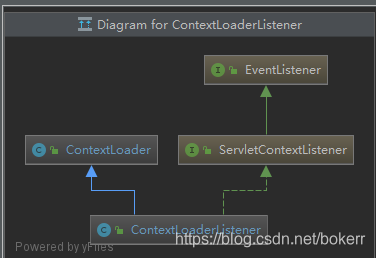
加载ApplicationContext 并注入Servlet容器
先判断contextClass 属性是否配置,否则加载默认的:XmlWebApplicationContext
protected Class<?> determineContextClass(ServletContext servletContext) {

   	String contextClassName = servletContext.getInitParameter(CONTEXT_CLASS_PARAM);

   	if (contextClassName != null) {

   		try {

   			return ClassUtils.forName(contextClassName, ClassUtils.getDefaultClassLoader());

   		}

   		catch (ClassNotFoundException ex) {

   			throw new ApplicationContextException(

   					"Failed to load custom context class [" + contextClassName + "]", ex);

   		}

   	}

   	else {

   		// 默认值:org.springframework.web.context.support.XmlWebApplicationContext 可继承它修改容器配置

   		contextClassName = defaultStrategies.getProperty(WebApplicationContext.class.getName());

   		try {

   			return ClassUtils.forName(contextClassName, ContextLoader.class.getClassLoader());

   		}

   		catch (ClassNotFoundException ex) {

   			throw new ApplicationContextException(

   					"Failed to load default context class [" + contextClassName + "]", ex);

   		}

   	}

   }
ContextLoader 中的static 静态语句块可以知道加载的配置文件是: ContextLoader.properties
static {

		// Load default strategy implementations from properties file.

		// This is currently strictly internal and not meant to be customized

		// by application developers.

		try {

			// DEFAULT_STRATEGIES_PATH = ContextLoader.properties

			ClassPathResource resource = new ClassPathResource(DEFAULT_STRATEGIES_PATH, ContextLoader.class);

			defaultStrategies = PropertiesLoaderUtils.loadProperties(resource);

		}

		catch (IOException ex) {

			throw new IllegalStateException("Could not load 'ContextLoader.properties': " + ex.getMessage());

		}

	}
以上为容器加载阶段,详细细节之前章节已经讲述,不再赘述
ContextLoader 的 initWebApplicationContext 方法中,发现如下代码:
servletContext.setAttribute(WebApplicationContext.ROOT_WEB_APPLICATION_CONTEXT_ATTRIBUTE, this.context);
servlet容器持有该引用
servlet
Servlet是按照servlet规范使用Java编写的程序,基于HTTP协议运行在服务器端,它的声明周期分为:初始化、运行、销毁。
初始化
- servlet容器加载servlet类,把它的.class字节码文件读取到内存中
- servlet容器创建一个ServletConfig对象,它包含该servlet的初始化配置信息
- servlet容器创建一个 servlet 对象
- servlet容器调用servlet对象的init() 方法进行初始化
运行阶段
- servlet容器接收到请求时,会根据请求创建一个servletRequest(请求信息) 对象和servletResponse(封装返回信息) 对象,
调用service方法并处理请求,通过servletResponse相应请求后销毁这两个对象。
销毁阶段
- Web应用终止,servlet容器调用servlet对象的destory方法,然后销毁servlet对象以及相关的 servletConfig对象。
DispatcherServlet
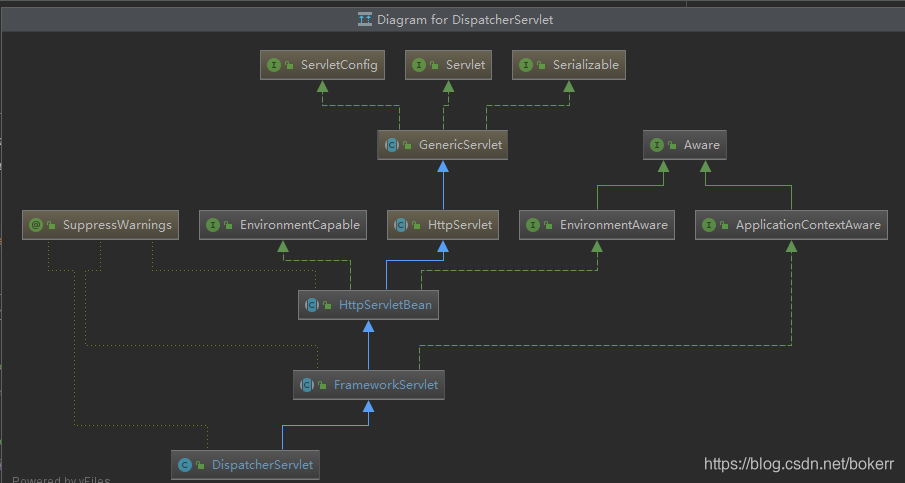
它是SpringMVC的核心, 是servlet的一个实现类
初始化
在它的父类HttpServletBean中找到了init方法的调用
该方法只是初始的配置信息加载
public final void init() throws ServletException {

		if (logger.isDebugEnabled()) {

			logger.debug("Initializing servlet '" + getServletName() + "'");

		}

		// Set bean properties from init parameters.

		// 解析 <init-param> 并验证

		// requiredProperties 配置必须要的参数,否则抛出异常

		PropertyValues pvs = new ServletConfigPropertyValues(getServletConfig(), this.requiredProperties);

		if (!pvs.isEmpty()) {

			try {

				// servlet 转为 BeanWrapper 从而可以像spring那样 对 init-param 的值进行注入

				BeanWrapper bw = PropertyAccessorFactory.forBeanPropertyAccess(this);

				ResourceLoader resourceLoader = new ServletContextResourceLoader(getServletContext());

				bw.registerCustomEditor(Resource.class, new ResourceEditor(resourceLoader, getEnvironment()));

				initBeanWrapper(bw);// 钩子函数

				bw.setPropertyValues(pvs, true);// 注册到自定义属性编辑器

			}

			catch (BeansException ex) {

				if (logger.isErrorEnabled()) {

					logger.error("Failed to set bean properties on servlet '" + getServletName() + "'", ex);

				}

				throw ex;

			}

		}

		// Let subclasses do whatever initialization they like.

		initServletBean();// 钩子函数

		if (logger.isDebugEnabled()) {

			logger.debug("Servlet '" + getServletName() + "' configured successfully");

		}

	}
继续,在父类 FrameworkServlet 中找到了钩子函数:initServletBean方法的具体实现:
有模板方法模式那味儿了,很遗憾这里还是准备工作
@Override

	protected final void initServletBean() throws ServletException {

		getServletContext().log("Initializing Spring FrameworkServlet '" + getServletName() + "'");

		if (logger.isInfoEnabled()) {

			logger.info("FrameworkServlet '" + getServletName() + "': initialization started");

		}

		long startTime = System.currentTimeMillis();

		try {

			// 对WebApplicationContext进一步初始化和补充

			this.webApplicationContext = initWebApplicationContext();

			initFrameworkServlet();

		}

		catch (ServletException | RuntimeException ex) {

			logger.error("Context initialization failed", ex);

			throw ex;

		}

		if (logger.isInfoEnabled()) {

			long elapsedTime = System.currentTimeMillis() - startTime;

			logger.info("FrameworkServlet '" + getServletName() + "': initialization completed in " +

					elapsedTime + " ms");

		}

	}
然后 initWebApplicationContext() 方法对容器进一步初始化和补充
protected WebApplicationContext initWebApplicationContext() {// 对WebApplicationContext进一步初始化和补充

		WebApplicationContext rootContext =

				WebApplicationContextUtils.getWebApplicationContext(getServletContext());// 从 容器 servletContext 中获取

		WebApplicationContext wac = null;

		if (this.webApplicationContext != null) { // webApplicationContext 是否在构造函数中被注入 (未解析过)  new DispatcherServlet()->.super(WebApplicationContext)

			wac = this.webApplicationContext;

			if (wac instanceof ConfigurableWebApplicationContext) {

				ConfigurableWebApplicationContext cwac = (ConfigurableWebApplicationContext) wac;

				if (!cwac.isActive()) {

					if (cwac.getParent() == null) {

						cwac.setParent(rootContext);

					}

					configureAndRefreshWebApplicationContext(cwac);

				}

			}

		}

		if (wac == null) {

			// WebApplicationContext 是否被 contextAttribute 属性注入

			wac = findWebApplicationContext();

		}

		if (wac == null) {

			// 既无构造器注入,也无contextAttribute属性注入,那么通过初始化的 WebApplicationContext 构造新的容器

			wac = createWebApplicationContext(rootContext);

		}

		if (!this.refreshEventReceived) {

			synchronized (this.onRefreshMonitor) {

				onRefresh(wac);// 加载配置  钩子,由子类 DispatcherServlet 实现,用于 Spring Web功能的 相关解析器的初始化

			}

		}

		if (this.publishContext) {

			String attrName = getServletContextAttributeName();

			getServletContext().setAttribute(attrName, wac);

		}

		return wac;

	}
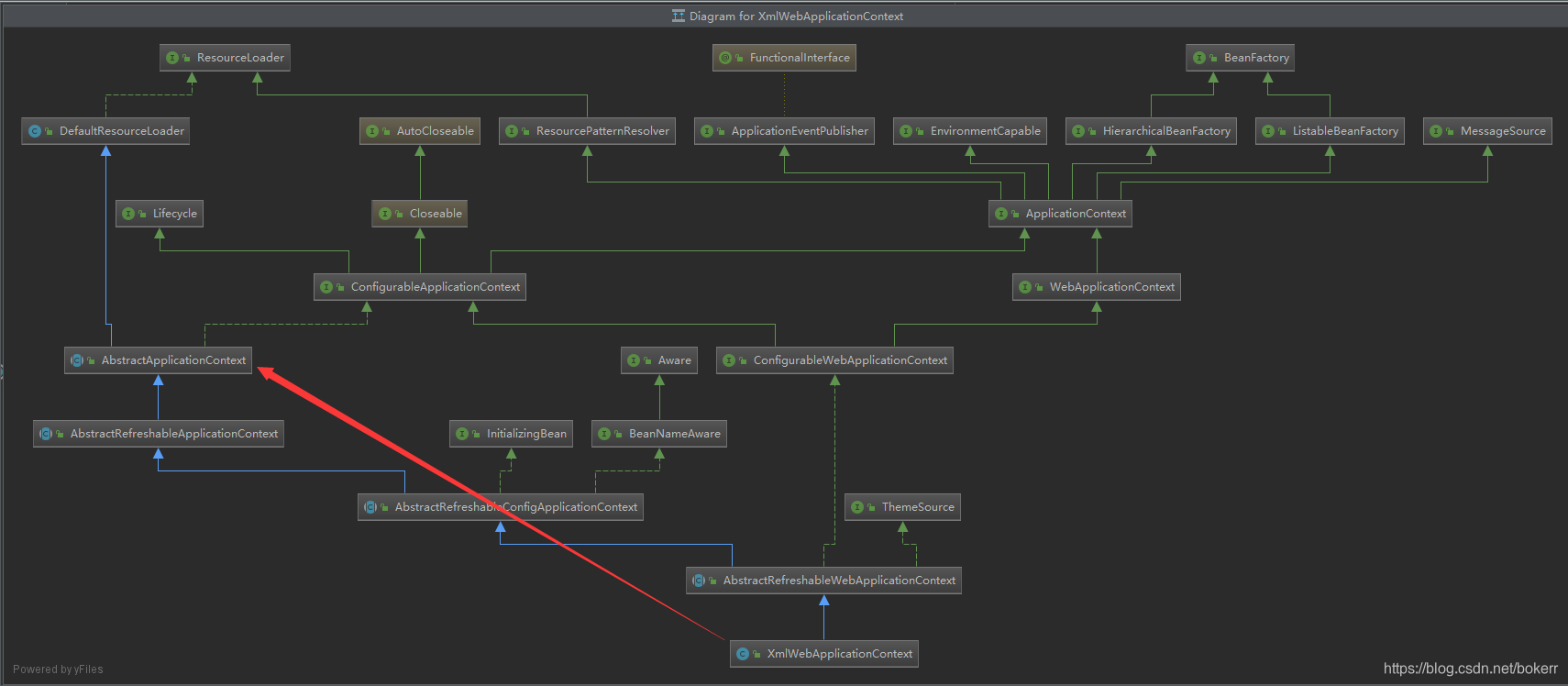
跟进 方法configureAndRefreshWebApplicationContext() 发现了我们的老朋友 refresh() 方法,是不是很眼熟?
ApplicationContext 容器加载过程中 它近乎是一切的起点了,查看默认的容器类XmlWebApplicationContext 的类图不难证实这点
protected void configureAndRefreshWebApplicationContext(ConfigurableWebApplicationContext wac) {

		...

		......

		.........

		wac.refresh();// ConfigurableApplicationContext.refresh() <-   AbstractApplicationContext.refresh() <- XmlWebApplicationContext

	}
然后看initWebApplicationContext()方法内调用的,onRefresh()方法
FrameworkServlet 类中找到的onRefresh() 又是空方法,不解释,钩子函数它又来了,最后回到DispatcherServlet类,发现了该方法的具体定义:
该方法的主要功能是刷新Spring在Web功能实现中所必须使用的全局变量的初始化
从配置文件:DispatcherServlet.properties 可得知部分全局变量所使用的默认值
    @Override

	protected void onRefresh(ApplicationContext context) {// 用于 Spring Web功能的 相关解析器的初始化

		initStrategies(context);

	}

	/**

	 * Initialize the strategy objects that this servlet uses.

	 * <p>May be overridden in subclasses in order to initialize further strategy objects.

	 */

	protected void initStrategies(ApplicationContext context) {// 各个全局功能解析器初始化

		initMultipartResolver(context);// 处理文件上传

		initLocaleResolver(context);// 国际化配置? 基于:url  session  cookie 支持国际化

		initThemeResolver(context);// Theme主题控制网页风格

		// 可以有多个HandleMapping,根据优先级访问,直到获取到可用的Handle 为止 (Ordered 接口控制)

		initHandlerMappings(context);// 处理客户端发起的Request请求,根据WebApplicationContext的配置来,回传给 DispatcherServler 对应的Controller

		// DispatcherServlet 通过处理器映射(HandleMapping)配置,得到处理器(Handle),之后会轮询处理器(Handle)的<配适器模块>

		// 并查找能够处理当前HTTP请求的处理器(Handle),的配适器实现(Adapter)

		// org.springframework.web.servlet.mvc.HttpRequestHandlerAdapter  对Http请求处理器进行配适  OtherClass <- HttpAdapter <-  HttpHandle

		// org.springframework.web.servlet.mvc.SimpleControllerHandlerAdapter  将Http请求配饰到一个Controller 的实现进行处理

		// org.springframework.web.servlet.mvc.method.annotation.RequestMappingHandlerAdapter  用于执行Controller方法的配适器,对注解方式的支持

		initHandlerAdapters(context);// 配适器

		initHandlerExceptionResolvers(context);// 异常处理

		initRequestToViewNameTranslator(context);// 当Controller没有返回任何View对象或者逻辑视图名称,并在该方法中没有向response的输出流里面写任何数据,那么spring会使用约定方式提供一个逻辑视图名称。

		// resolverViewName 方法 根据 viewName创建合适的View 实现

		initViewResolvers(context);// Controller 计算结束后将结果封装到ModleAndView,DispatcherServlet 会根据ModleAndView 选择合适的视图进行渲染

		initFlashMapManager(context);// SpringMVC Flash attributes 提供了属性存储功能,可够重定向时其它请求使用

	}
DispatcherServlet 的逻辑处理
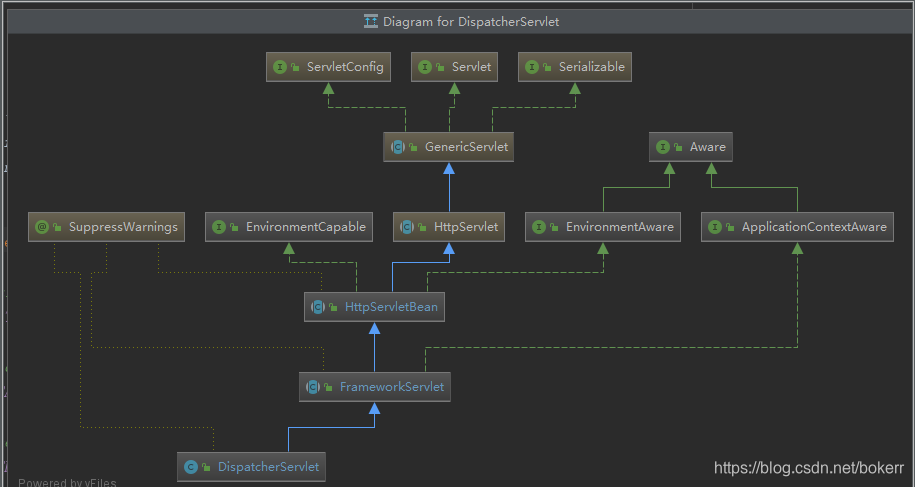
看 HttpServlet 类的结构 看关键的doGet和doPost,在FrameworkServlet类中找到了如下方法实现:
    @Override

	protected final void doGet(HttpServletRequest request, HttpServletResponse response)

			throws ServletException, IOException {

		processRequest(request, response);

	}

	@Override

	protected final void doPost(HttpServletRequest request, HttpServletResponse response)

			throws ServletException, IOException {

		processRequest(request, response);

	}

	protected final void processRequest(HttpServletRequest request, HttpServletResponse response)

    			throws ServletException, IOException {

    		// 主要目的:提取请求参数,用于重定向

    		long startTime = System.currentTimeMillis();

    		Throwable failureCause = null;

    		LocaleContext previousLocaleContext = LocaleContextHolder.getLocaleContext();// 为了后续请求能使用提取属性

    		LocaleContext localeContext = buildLocaleContext(request);

    		RequestAttributes previousAttributes = RequestContextHolder.getRequestAttributes();// 为了后续请求能使用提取属性

    		ServletRequestAttributes requestAttributes = buildRequestAttributes(request, response, previousAttributes);

    		WebAsyncManager asyncManager = WebAsyncUtils.getAsyncManager(request);

    		asyncManager.registerCallableInterceptor(FrameworkServlet.class.getName(), new RequestBindingInterceptor());

    		// 初始化

    		initContextHolders(request, localeContext, requestAttributes);

    		try {

    			// 准备工作 具体实现由 DispatcherServlet 提供

    			doService(request, response);

    		}

    		catch (ServletException | IOException ex) {

    			failureCause = ex;

    			throw ex;

    		}

    		catch (Throwable ex) {

    			failureCause = ex;

    		}

    		finally {

    			resetContextHolders(request, previousLocaleContext, previousAttributes);// 设置提取的请求参数,用于重定向

    			if (requestAttributes != null) {

    				requestAttributes.requestCompleted();

    			}

     			publishRequestHandledEvent(request, response, startTime, failureCause);// 事件通知

    		}

    	}
忽略准备工作:doService().doDispatch(HttpServletRequest request, HttpServletResponse response)
如下为核心代码逻辑,之前提到的全部变量配置将登上舞台了
protected void doDispatch(HttpServletRequest request, HttpServletResponse response) throws Exception {

		HttpServletRequest processedRequest = request;

		HandlerExecutionChain mappedHandler = null;

		boolean multipartRequestParsed = false;

		// 当业务比较复杂时启用另一个线程

		WebAsyncManager asyncManager = WebAsyncUtils.getAsyncManager(request);// 管理异步请求处理的中心类,通常不由应用程序类直接使用。

		try {

			ModelAndView mv = null;

			Exception dispatchException = null;

			try {

				// 检查全局变量

				// 如果请求类型为:multipartContent 将 HttpServletRequest 转为 MultipartHttpServletRequest  (包装器 ? 策略模式)

				processedRequest = checkMultipart(request);

				multipartRequestParsed = (processedRequest != request);// 检查原类型   包装 /  代理

				// Determine handler for the current request.

				// 根据URL 匹配

				mappedHandler = getHandler(processedRequest);// 按优先级从各个HandleMapping 中获取Handle

				if (mappedHandler == null) {

					noHandlerFound(processedRequest, response);

					return;

				}

				HandlerAdapter ha = getHandlerAdapter(mappedHandler.getHandler());// 根据handle 获取匹配的配适器 Adapter

				String method = request.getMethod();

				boolean isGet = "GET".equals(method);

				if (isGet || "HEAD".equals(method)) {// last-modified(缓存处理机制)  请求头处理 <最后修改时间>

					long lastModified = ha.getLastModified(request, mappedHandler.getHandler());

					// 未变化? 最后修改时间未变?  过滤重复请求???

					if (new ServletWebRequest(request, response).checkNotModified(lastModified) && isGet) {

						return;

					}

				}

				// 调用拦截器的preHandle方法

				if (!mappedHandler.applyPreHandle(processedRequest, response)) {

					return;

				}

				// Actually invoke the handler.

				// 激活Handle 并返回视图  (由配适器的 handle方法完成 )

				// 查看配置文件DispatcherServlet.properties 可以知道  HandlerAdapter ha 的具体实现类,跟踪handle方法:

				mv = ha.handle(processedRequest, response, mappedHandler.getHandler());

				if (asyncManager.isConcurrentHandlingStarted()) {

					return;

				}

				applyDefaultViewName(processedRequest, mv);// 视图名称处理

				// 调用所有拦截器的postHandle 方法,如果存在的话

				mappedHandler.applyPostHandle(processedRequest, response, mv);

			}

			catch (Exception ex) {

				dispatchException = ex;

			}

			catch (Throwable err) {

				dispatchException = new NestedServletException("Handler dispatch failed", err);

			}

			processDispatchResult(processedRequest, response, mappedHandler, mv, dispatchException);

		}

		catch (Exception ex) {

			// 完成处理后,激活触发器

			triggerAfterCompletion(processedRequest, response, mappedHandler, ex);

		}

		catch (Throwable err) {

			// 完成处理后,激活触发器

			triggerAfterCompletion(processedRequest, response, mappedHandler,

					new NestedServletException("Handler processing failed", err));

		}

		finally {

			if (asyncManager.isConcurrentHandlingStarted()) {

				if (mappedHandler != null) {

					mappedHandler.applyAfterConcurrentHandlingStarted(processedRequest, response);

				}

			}

			else {

				if (multipartRequestParsed) {

					cleanupMultipart(processedRequest);

				}

			}

		}

	}
查看配置文件 DispatcherServlet.properties 可以知道 HandlerAdapter ha 的具体实现类,跟踪handle方法:
org.springframework.web.servlet.HandlerAdapter=org.springframework.web.servlet.mvc.HttpRequestHandlerAdapter,
org.springframework.web.servlet.mvc.SimpleControllerHandlerAdapter,
org.springframework.web.servlet.mvc.method.annotation.RequestMappingHandlerAdapter
org.springframework.web.servlet.HandlerMapping=org.springframework.web.servlet.handler.BeanNameUrlHandlerMapping,
org.springframework.web.servlet.mvc.method.annotation.RequestMappingHandlerMapping
- getHandle()
AbstractHandlerMapping.getHandel().[ AbstractUrlHandlerMapping.getHandlerInternal() ]
根据请求url获取handel
protected Object getHandlerInternal(HttpServletRequest request) throws Exception {

		String lookupPath = getUrlPathHelper().getLookupPathForRequest(request);// 截取 url

		Object handler = lookupHandler(lookupPath, request);// 根据 url 获取 handle

		if (handler == null) {// 获取到的解析器为空

			// We need to care for the default handler directly, since we need to

			// expose the PATH_WITHIN_HANDLER_MAPPING_ATTRIBUTE for it as well.

			Object rawHandler = null;

			if ("/".equals(lookupPath)) {// 请求路径仅为根路径: 则使用RootHandle处理

				rawHandler = getRootHandler();

			}

			if (rawHandler == null) {

				rawHandler = getDefaultHandler();// 否则设置默认的 Handle

			}

			if (rawHandler != null) { // 默认 Handle 可能为空

				// Bean name or resolved handler?

				if (rawHandler instanceof String) { // 若查找的 Handle 类型为String 则为beanName 否则为 Handle 本身

					String handlerName = (String) rawHandler;

					rawHandler = obtainApplicationContext().getBean(handlerName);// 从容器中获取

				}

				validateHandler(rawHandler, request);// 校验钩子函数

				// 初始化 Handle ???  HandlerExecutionChain 对 Handle 进行包装

				handler = buildPathExposingHandler(rawHandler, lookupPath, lookupPath, null);

			}

		}

		if (handler != null && logger.isDebugEnabled()) {

			logger.debug("Mapping [" + lookupPath + "] to " + handler);

		}

		else if (handler == null && logger.isTraceEnabled()) {

			logger.trace("No handler mapping found for [" + lookupPath + "]");

		}

		return handler;

	}
2.getHandlerAdapter
根据handel获取配饰器Adapter
SimpleControllerHandlerAdapter.suport
public boolean supports(Object handler) {

		return (handler instanceof Controller);

	}
看到controller主要解析就完成了,剩下的事情就是处理请求,并绑定视图放回,以及当发生异常时对异常视图进行处理。
Spring源码之springMVC的更多相关文章
- Spring源码解析 - springMVC核心代码
一.首先来讲解下springMVC的底层工作流程 1.首先我们重点放在前端控制器(DispatcherServlet) 其类图: 因为从流程图看,用户的请求最先到达就是DispatcherServle ...
- spring源码学习之springMVC(一)
个人感觉<Spring技术内幕:深入解析Spring架构与设计原理(第2版)>这本书对spring的解读要优于<Spring源码深度解析(第2版)>这本书的,后者感觉就是再陈述 ...
- Spring源码学习之:FactoryBean的使用
转载:http://book.51cto.com/art/201311/419081.htm ==========个人理解========================= FactoryBean和B ...
- Spring源码情操陶冶-AbstractApplicationContext#finishRefresh
承接前文Spring源码情操陶冶-AbstractApplicationContext#finishBeanFactoryInitialization 约定web.xml配置的contextClass ...
- Spring源码情操陶冶-自定义节点的解析
本文承接前文Spring源码情操陶冶-DefaultBeanDefinitionDocumentReader#parseBeanDefinitions,特开辟出一块新地来啃啃这块有意思的骨头 自定义节 ...
- Spring源码阅读笔记
前言 作为一个Java开发者,工作了几年后,越发觉力有点不从心了,技术的世界实在是太过于辽阔了,接触的东西越多,越感到前所未有的恐慌. 每天捣鼓这个捣鼓那个,结果回过头来,才发现这个也不通,那个也不精 ...
- Spring 源码学习系列
前言 Spring框架之于 JavaEE 程序员来说,犹如锄头之于农民.Java 程序员每天都要使用Spring框架,Spring框架也确实是个可手的工具. 最初使用Spring的时候,我们需要配置m ...
- Spring 源码分析-1-启动
Spring 源码分析-1-启动 在web项目中使用spring的时候,我们会在web.xml中加入如下配置: <listener> <listener-class>org.s ...
- 深入源码分析SpringMVC底层原理(二)
原文链接:深入源码分析SpringMVC底层原理(二) 文章目录 深入分析SpringMVC请求处理过程 1. DispatcherServlet处理请求 1.1 寻找Handler 1.2 没有找到 ...
- spring 源码解析
1. [文件] spring源码.txt ~ 15B 下载(167) ? 1 springн┤┬вио╬Ш: 2. [文件] spring源码分析之AOP.txt ~ 15KB 下载( ...
随机推荐
- [转帖]linux audit审计(7-1)--读懂audit日志
https://www.cnblogs.com/xingmuxin/p/8807774.html auid=0 auid记录Audit user ID,that is the loginuid.当我 ...
- [转帖]Day63_Kafka(一)
第一讲 Kafka基础操作 课程大纲 课程内容 学习效果 掌握目标 Kafka简介 消息队列 掌握 Kafka简介 Kafka分布式环境 Kafka操作 Kafka shell 掌握 Kafka ap ...
- [转帖]docker 最新版本升级
文章目录 前言 一.卸载低版本docker 1.1 检查docker版本 1.2 删除docker 二.开始安装 2.1 安装所需依赖 2.2 设置docker yum源 2.3 查看所有可用版本 2 ...
- 【图论,网络流】CF1525F Goblins And Gnomes
Problem Link 你在打怪.你有一个 \(n\) 个点 \(m\) 条边的 DAG,接下来会有 \(k\) 波怪来袭,第 \(i\) 波怪有 \(i\) 个,它们会各自选择走一条路径,要求它们 ...
- overflow的所有值,overlay不占位
visible: 默认值.内容不会被修剪,会呈现在元素框之外. hidden: 内容会被修剪,并且其余内容是不可见的. scroll: 内容会被修剪,总是显示滚动条. auto: 内容被修剪,超出浏览 ...
- export default 和 export 这两种方式导出的区别
参考地址 https://blog.csdn.net/sleepwalker_1992/article/details/81461543 使用export向外暴露的成员,只能使用{ }的形式来接收,这 ...
- 【k哥爬虫普法】非法入侵计算机信息系统,获取1500万余条个人信息!
我国目前并未出台专门针对网络爬虫技术的法律规范,但在司法实践中,相关判决已屡见不鲜,K 哥特设了"K哥爬虫普法"专栏,本栏目通过对真实案例的分析,旨在提高广大爬虫工程师的法律意识, ...
- C++ LibCurl实现Web隐藏目录扫描
LibCurl是一个开源的免费的多协议数据传输开源库,该框架具备跨平台性,开源免费,并提供了包括HTTP.FTP.SMTP.POP3等协议的功能,使用libcurl可以方便地进行网络数据传输操作,如发 ...
- 5.13 汇编语言:仿写For循环语句
循环语句(for)是计算机编程中的一种基本控制结构,它允许程序按照指定的次数或范围重复执行一段代码块.for循环在处理需要进行迭代操作的情况下非常有用,它使得程序可以更加方便地控制循环的次数.一般来说 ...
- C/C++ 常用排序算法整理
(伪)冒泡排序算法: 相邻的两个元素之间,如果反序则交换数值,直到没有反序的记录为止. #include <stdio.h> void BubbleSort(int Array[], in ...