
[转帖]win10下使用Rclone将OneDrive映射到本地磁盘教程(开机自动挂载)
win10下使用Rclone将OneDrive映射到本地磁盘教程(开机自动挂载)
onedrive云盘是微软推出的云储存空间服务,相比于百度云,没有会员限制,有着较快的下载上传速度。采用Rclone软件可将onedrive映射为电脑本地,成为电脑上的一个(云)磁盘空间,便于使用,且Rclone支持全平台,能够在不同操作系统上对onedrive进行挂载。
本文主要介绍win10下使用Rclone将OneDrive映射到本地磁盘,并且实现了win10系统开机自动挂载,有效解决了电脑重启后onedrive挂载盘丢失需要重新手动挂载的问题。
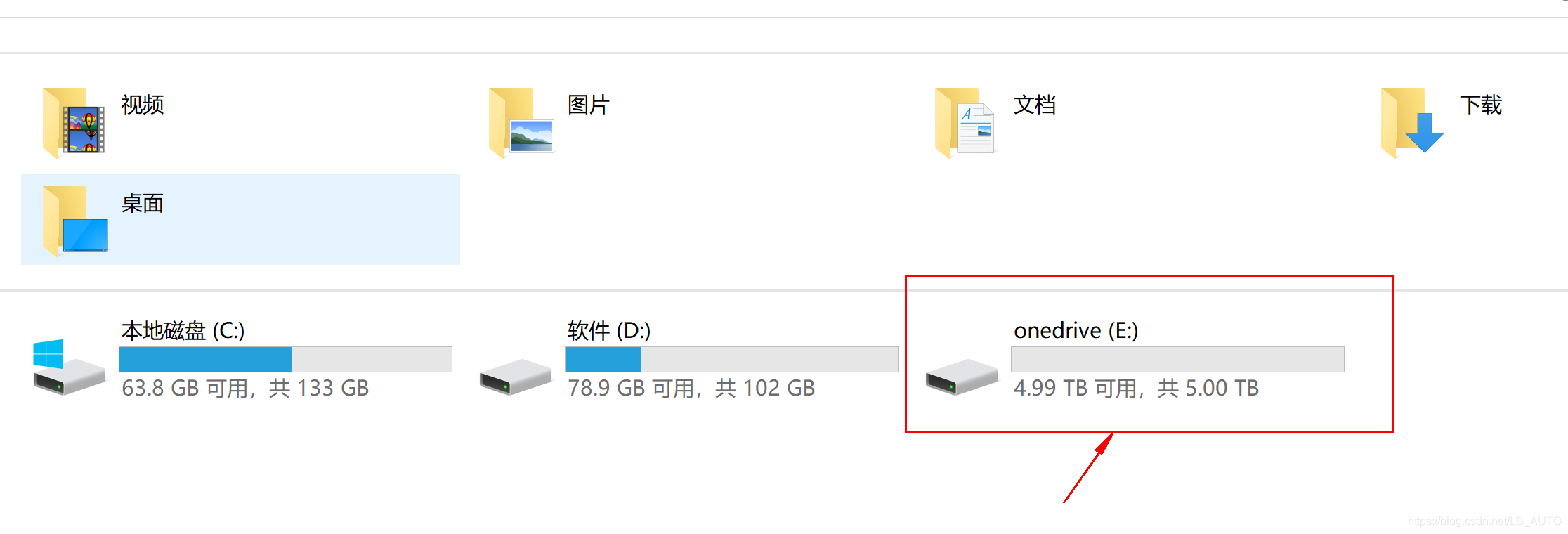
最终得到的效果如图所示(5T onedrive磁盘)
下载rclone,winfsp和Git bash
首先需要下载和安装挂载所需的软件和辅助工具。
一共有3个:
Rclone:https://github.com/rclone/rclone/releases
Winfsp:https://github.com/billziss-gh/winfsp/releases
Git bash:https://gitforwindows.org/
Rclone.
点击链接进入下载网址,可以看到有许多不同的版本,适用于Windows系统有rclone-v1.51.0-windows-amd64.zip和rclone-v1.51.0-windows-386.zip,根据自己电脑是64位的还是32位的对应选择合适的压缩包下载。
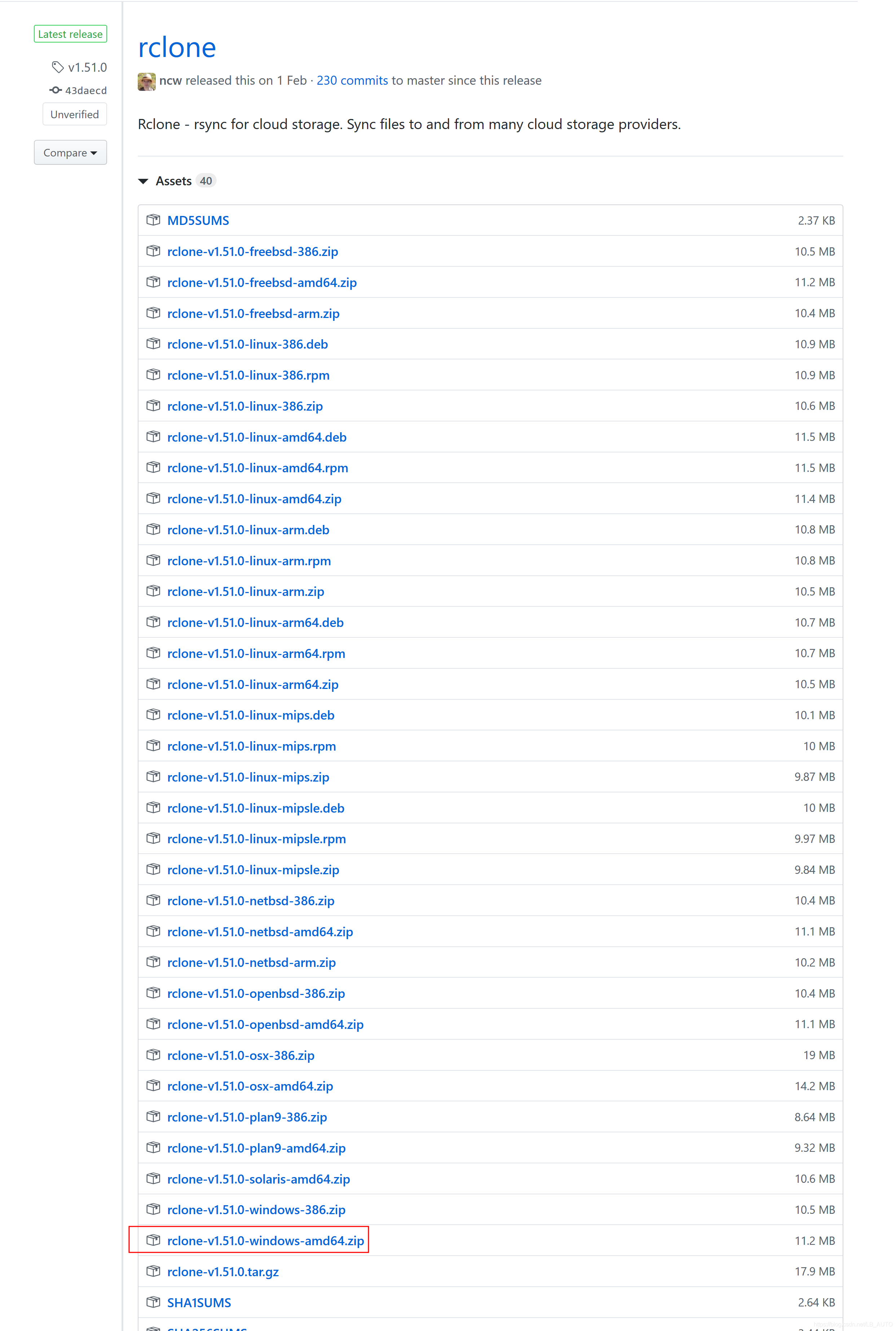 我的电脑是64位的系统,所以下载红框圈出的压缩包,
rclone-v1.51.0-windows-amd64.zip。
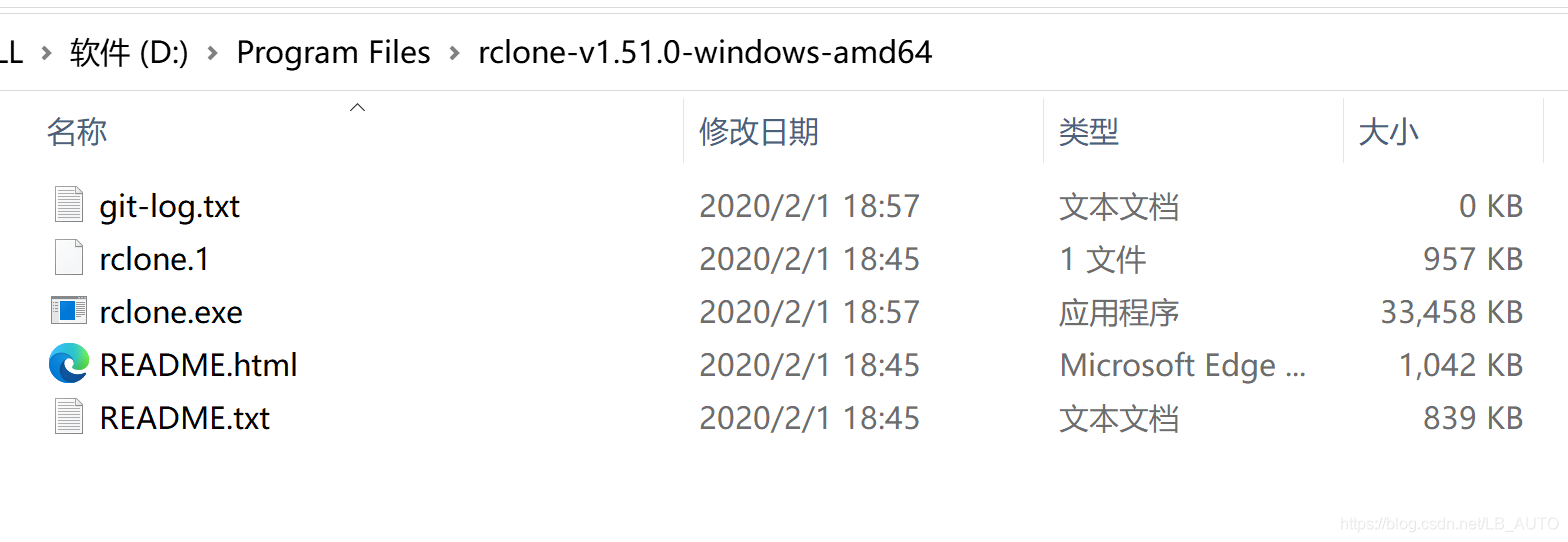
下载完成之后,将压缩包解压到一个全英文的目录下,例如我解压到了D:\Program Files\rclone-v1.51.0-windows-amd64
Winfsp. 和 Git bash.
下载之后直接安装即可,无需修改安装位置,一路按默认的点下去就可。
考虑到github网站下载速度较慢,我将上述Rclone和Winfsp的安装文件下载好之后,放在网盘里分享出来供大家使用。
链接:https://pan.baidu.com/s/1g3OxTiuIr2b86w2-zq5liA
提取码:hksx
配置Rclone
安装好这几个软件后,开始配置Rclone。
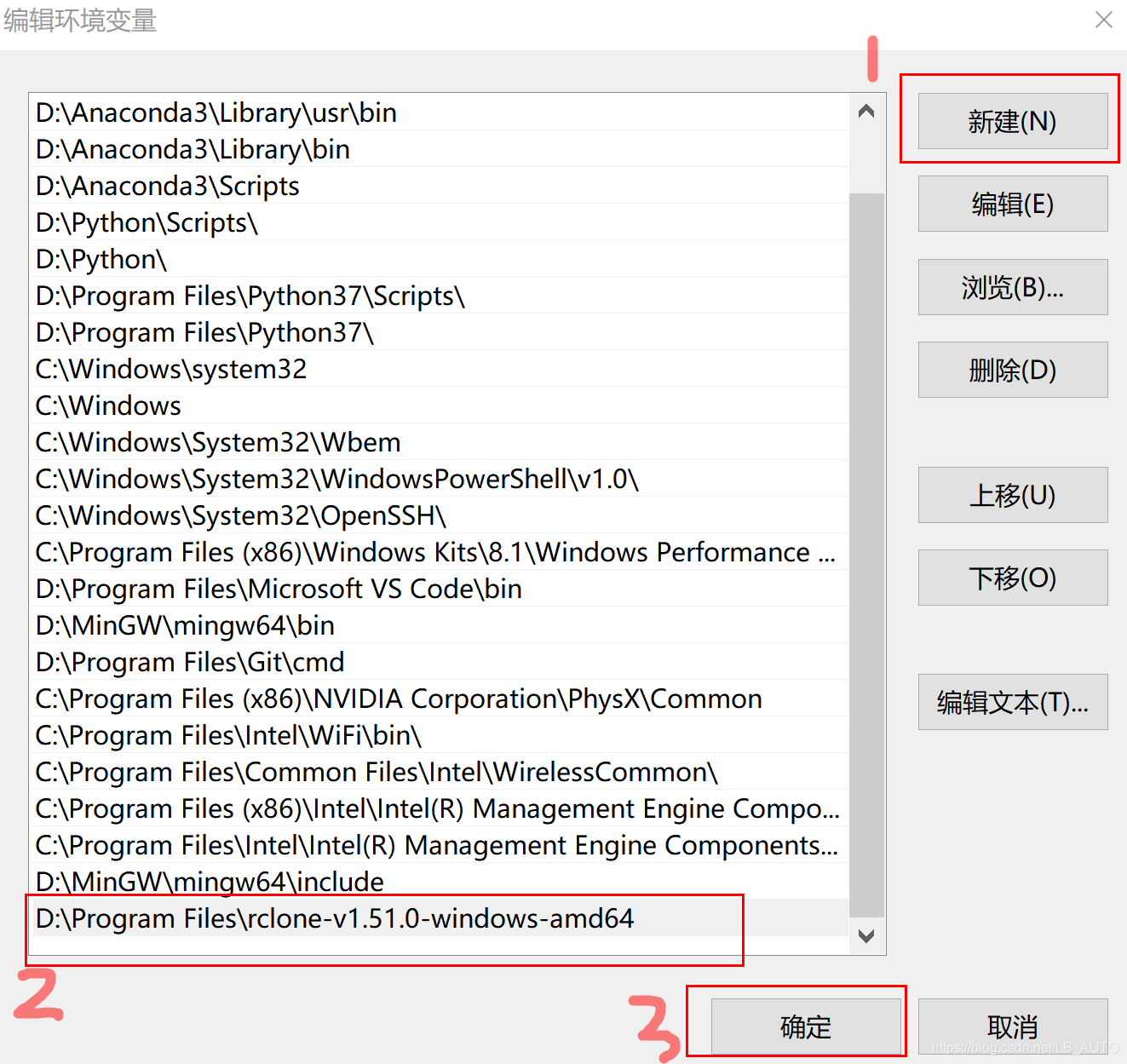
- 首先修改windows系统的环境变量,将rclone的路径添加到path中:
在桌面上右键点击此电脑标志,然后点击属性->高级系统设置->环境变量->系统变量->Path
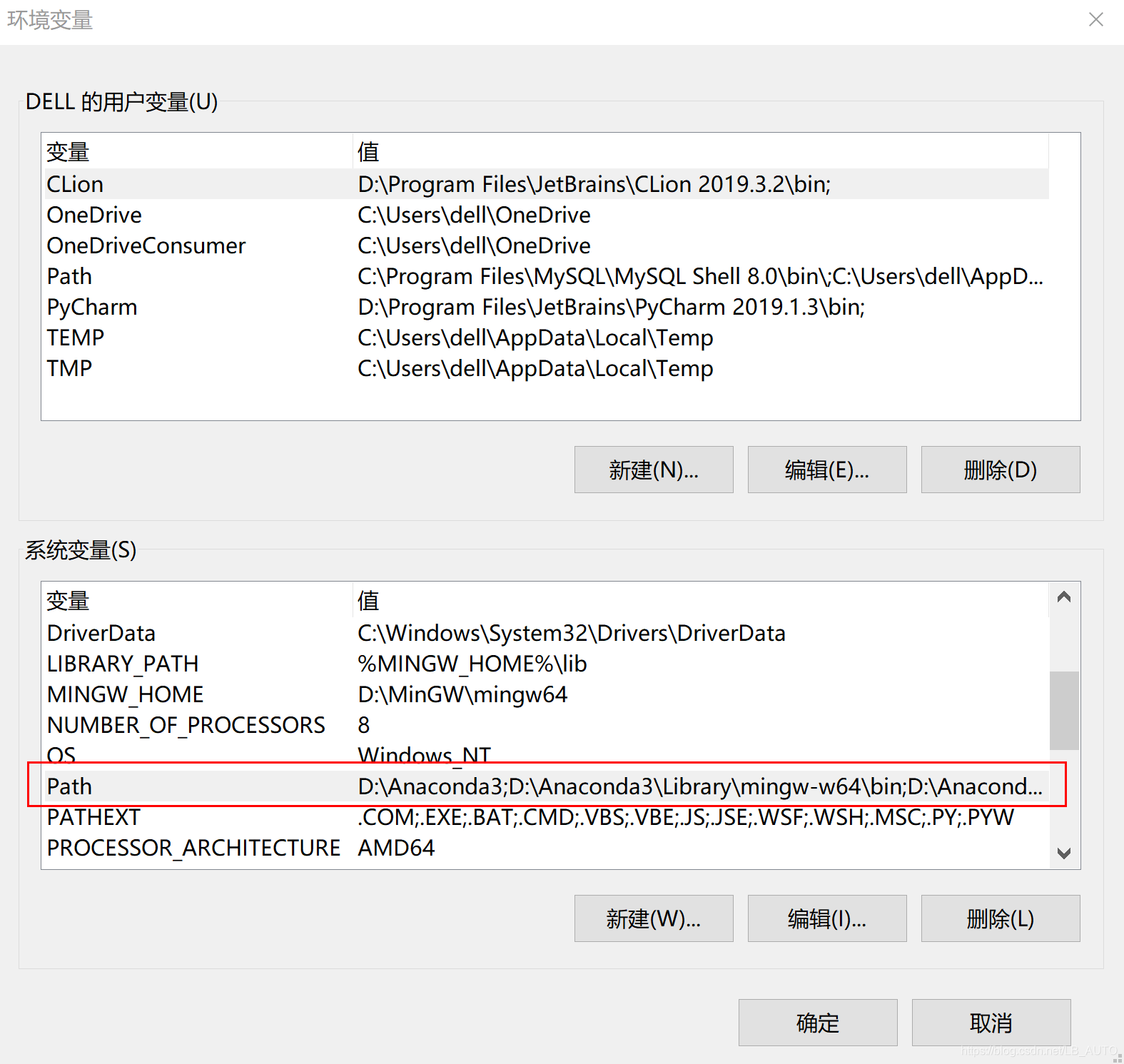
添加rclone文件夹的路径到path中,我电脑上rclone放置的路径在D:\Program Files\rclone-v1.51.0-windows-amd64
 2. 修改好环境变量之后,打开windows powershell,配置rclone.config。
按键盘上的win+x,然后按a键,即可调出windows powershell
输入rclone --version,可查看rclone是否成功安装。
Windows PowerShell

版权所有 (C) Microsoft Corporation。保留所有权利。

尝试新的跨平台 PowerShell https://aka.ms/pscore6

PS C:\Windows\system32> rclone --version


rclone v1.51.0


- os/arch: windows/amd64


- go version: go1.13.7
- 1
- 2
- 3
- 4
- 5
- 6
- 7
- 8
- 9
查看成功安装rclone后,输入rclone config,配置要加载的onedrive信息,按照下面的步骤依次进行下去。
PS C:\Windows\system32> rclone config  (步骤1. 输入rclone config)

2020/04/25 13:29:37 NOTICE: Config file "C:\\Users\\dell\\.config\\rclone\\rclone.conf" not found - using defaults

No remotes found - make a new one

n) New remote

s) Set configuration password

q) Quit config

n/s/q> n  (步骤2. 输入n,表示新建配置)

name> onedrive  (步骤3. 命名为"onedrive",也可取其他的名字,但要与下面所使用的名字保持一致)

Type of storage to configure.

Enter a string value. Press Enter for the default ("").

Choose a number from below, or type in your own value

 1 / 1Fichier

   \ "fichier"

 2 / Alias for an existing remote

   \ "alias"

 3 / Amazon Drive

   \ "amazon cloud drive"

 4 / Amazon S3 Compliant Storage Provider (AWS, Alibaba, Ceph, Digital Ocean, Dreamhost, IBM COS, Minio, etc)

   \ "s3"

 5 / Backblaze B2

   \ "b2"

 6 / Box

   \ "box"

 7 / Cache a remote

   \ "cache"

 8 / Citrix Sharefile

   \ "sharefile"

 9 / Dropbox

   \ "dropbox"

10 / Encrypt/Decrypt a remote

   \ "crypt"

11 / FTP Connection

   \ "ftp"

12 / Google Cloud Storage (this is not Google Drive)

   \ "google cloud storage"

13 / Google Drive

   \ "drive"

14 / Google Photos

   \ "google photos"

15 / Hubic

   \ "hubic"

16 / In memory object storage system.

   \ "memory"

17 / JottaCloud

   \ "jottacloud"

18 / Koofr

   \ "koofr"

19 / Local Disk

   \ "local"

20 / Mail.ru Cloud

   \ "mailru"

21 / Mega

   \ "mega"

22 / Microsoft Azure Blob Storage

   \ "azureblob"

23 / Microsoft OneDrive

   \ "onedrive"

24 / OpenDrive

   \ "opendrive"

25 / Openstack Swift (Rackspace Cloud Files, Memset Memstore, OVH)

   \ "swift"

26 / Pcloud

   \ "pcloud"

27 / Put.io

   \ "putio"

28 / QingCloud Object Storage

   \ "qingstor"

29 / SSH/SFTP Connection

   \ "sftp"

30 / Sugarsync

   \ "sugarsync"

31 / Transparently chunk/split large files

   \ "chunker"

32 / Union merges the contents of several remotes

   \ "union"

33 / Webdav

   \ "webdav"

34 / Yandex Disk

   \ "yandex"

35 / http Connection

   \ "http"

36 / premiumize.me

Storage> 23  (步骤4. 输入数字23,因为Microsoft OneDrive对应的类型是23)

** See help for onedrive backend at: https://rclone.org/onedrive/ **

Microsoft App Client Id


Leave blank normally.


Enter a string value. Press Enter for the default ("").


client_id>  (步骤5. 按enter键跳过)


Microsoft App Client Secret


Leave blank normally.


Enter a string value. Press Enter for the default ("").


client_secret>  (步骤6. 按enter键跳过)


Edit advanced config? (y/n)


y) Yes


n) No (default)


y/n> n  (步骤7. 输入n,采用默认设置)


Remote config


Use auto config?


 Say Y if not sure


 Say N if you are working on a remote or headless machine


y) Yes (default)


n) No


y/n> y (步骤8. 输入y,采用默认设置)


If your browser doesn't open automatically go to the following link: http://127.0.0.1:53682/auth?state=lcvcDmCLf1ugmaCzlEtMSA


Log in and authorize rclone for access


Waiting for code...


----------------------------------


(步骤8执行后会跳转到Microsoft OneDrive账号登录界面和授权界面,登录后在授权请求界面点击“是”)


-----------------------------------


Got code


Choose a number from below, or type in an existing value


1 / OneDrive Personal or Business


\ "onedrive"


2 / Root Sharepoint site


\ "sharepoint"


3 / Type in driveID


\ "driveid"


4 / Type in SiteID


\ "siteid"


5 / Search a Sharepoint site


\ "search"


Your choice> 1  (步骤9. 输入1,数字1对应OneDrive Personal or Business)


Found 1 drives, please select the one you want to use:


0:  (personal) id=cdffcd6a2a3dc176


Chose drive to use:> 0 (步骤10. 输入0,数字0对应OneDrive个人版)


Found drive 'root' of type 'personal', URL: https://onedrive.live.com/?cid=cdffcd6a2a3dc176


Is that okay?


y) Yes (default)


n) No


y/n> y  0 (步骤11. 输入y,采用默认设置)


--------------------


[onedrive]


type = onedrive


token = {"access_token":"(隐私信息省略)


drive_id = (隐私信息省略)**


drive_type = personal


--------------------


y) Yes this is OK (default)


e) Edit this remote


d) Delete this remote


y/e/d> y  (步骤12. 输入y)


Current remotes:

Name                 Type


==                 ==


onedrive             onedrive

e) Edit existing remote


n) New remote


d) Delete remote


r) Rename remote


c) Copy remote


s) Set configuration password


q) Quit config


e/n/d/r/c/s/q> q  (步骤13. 输入q,退出)

- 1
- 2
- 3
- 4
- 5
- 6
- 7
- 8
- 9
- 10
- 11
- 12
- 13
- 14
- 15
- 16
- 17
- 18
- 19
- 20
- 21
- 22
- 23
- 24
- 25
- 26
- 27
- 28
- 29
- 30
- 31
- 32
- 33
- 34
- 35
- 36
- 37
- 38
- 39
- 40
- 41
- 42
- 43
- 44
- 45
- 46
- 47
- 48
- 49
- 50
- 51
- 52
- 53
- 54
- 55
- 56
- 57
- 58
- 59
- 60
- 61
- 62
- 63
- 64
- 65
- 66
- 67
- 68
- 69
- 70
- 71
- 72
- 73
- 74
- 75
- 76
- 77
- 78
- 79
- 80
- 81
- 82
- 83
- 84
- 85
- 86
- 87
- 88
- 89
- 90
- 91
- 92
- 93
- 94
- 95
- 96
- 97
- 98
- 99
- 100
- 101
- 102
- 103
- 104
- 105
- 106
- 107
- 108
- 109
- 110
- 111
- 112
- 113
- 114
- 115
- 116
- 117
- 118
- 119
- 120
- 121
- 122
- 123
- 124
- 125
- 126
- 127
- 128
- 129
- 130
- 131
- 132
- 133
- 134
- 135
- 136
- 137
- 138
- 139
- 140
- 141
- 142
- 143
- 144
- 145
- 146
- 147
- 148
- 149
- 150
- 151
- 152
- 153
- 154
- 155
- 156
完成rclone配置后,挂载onedrive磁盘。
在git中输入如下命令并执行(注意,末尾的&很重要,不加&的话退出git则挂载就失效了):
rclone mount onedrive:/ E: --cache-dir D:\Onedrive --vfs-cache-mode writes &
- 1
到这一步,就可以在电脑上看到多出一个onedrive(E)磁盘。
但还没有结束,还需要解决电脑重启后挂载失效的问题。
开机自动挂载
采用开机自动挂载的方式,可有效解决电脑重启后onedrive磁盘消息的问题,省去重新手动挂载的麻烦。
新建两个文件,分别为rclone.bat和rclone.vbs
- rclone.bat中写入上述挂载命令:
rclone mount onedrive:/ E: --cache-dir D:\Onedrive --vfs-cache-mode writes &
- 1
- rclone.vbs设置开机自动调用cmd运行rclone.bat文件并退出cmd,写入如下代码:
CreateObject("WScript.Shell").Run "cmd /c D:/rclone.bat",0
- 1
将rclone.bat文件放到D盘(或其他的盘)目录下,我放在了D盘,所以在rclone.vbs中该文件的路径就是D:/rclone.bat
将rclone.vbs文件放到windows系统启动项目录下,在文件夹的路径框中输入
%USERPROFILE%\AppData\Roaming\Microsoft\Windows\Start Menu\Programs\Startup
即可进入启动项目录
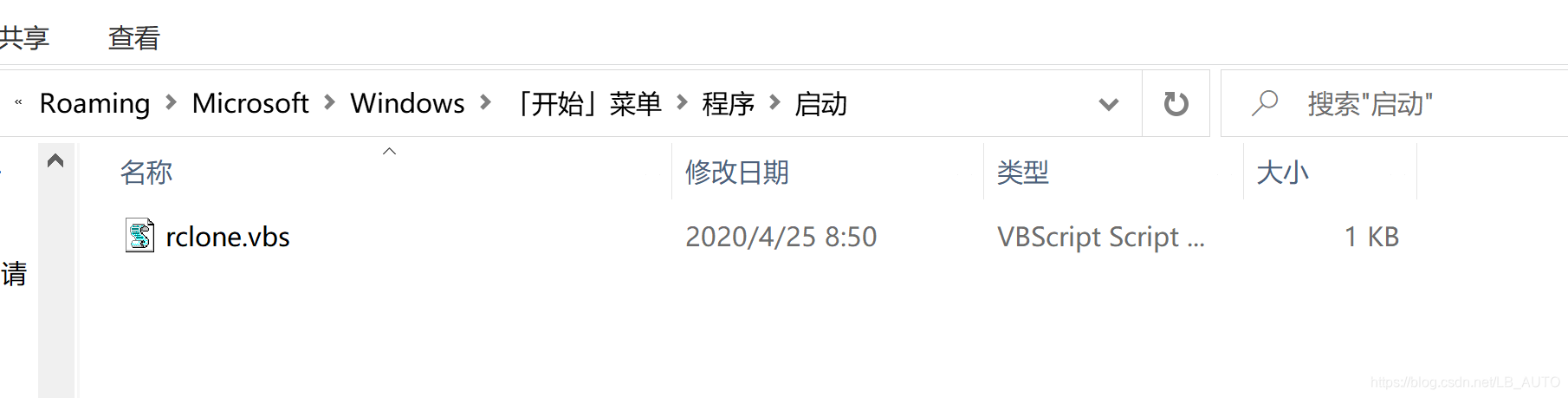
至此,onedrive磁盘的挂载完成,且电脑下次开机时onedrive磁盘也不会消失
</article>
[转帖]win10下使用Rclone将OneDrive映射到本地磁盘教程(开机自动挂载)的更多相关文章
- CentOS 7 下挂载NTFS文件系统并实行开机自动挂载
CentOS 7 下想要挂载NTFS的文件系统该怎么办呢? 我们需要一个NTFS-3G工具,并编译它之后在mount就可以了,就这么简单. 首先要进入官网下载NTFS-3G工具 http://www. ...
- Linux下如何挂载文件,并设置开机自动挂载
首先保证服务端安装了 查看是否安装命令: nfsstat yum install nfs-utils 安装nfs-utils 192.168.50.85(服务端)192.168.50.83(客户端) ...
- ubuntu下设置开机自动挂载硬盘
我们在linux中常常用mount命令把硬盘分区或者光盘挂载到文件系统中./etc/fstab就是在开机引导的时候自动挂载到linux的文件系统. 如果给计算机配了一块新磁盘,已经分区,格式化,挂载, ...
- CentOS 7 下挂载NTFS盘及开机自动挂载
一.工具 NTFS-3G 二.安装2种安装方式 2.1.yum安装 yum install NTFS* 2.2.编译安装 下载 解压 wget https://tuxera.com/opensourc ...
- virtualbox下ubuntu共享文件夹自动挂载
1.若想删除挂载,可执行命令 umount -f /mnt/share 2.若想开机自动挂载,可以在 /etc/fstab 文件末添加一项 sharing /mnt/share vboxsf ...
- Ubuntu安装配置rclone(Onedrive应用)
rclone安装 命令行安装 脚本安装 curl https://rclone.org/install.sh | sudo bash # 或者 curl https://rclone.org/inst ...
- win10 下visual studio 2015 在调试模式下不能跟踪源文件
win10 下visual studio 2015 在调试模式下不能跟踪源文件,只要一调试就会关闭(隐藏)打开的文档,非常不方便.经过一番折腾,发现是配置的问题. 如果安装多个版本的VS,请删除对应版 ...
- win10下的使用
一.win10下使用win7那样的图片查看器快些. 打开图片的设置,关闭自动增强我的图片 二.查看win10秘钥 1.打开注册表,依次定位:HKEY_LOCAL_MACHINE/SOFTWARE/Mi ...
- Win7/Win8/Win8.1/Win10下的DragEnter DragDrop事件不触发
Win7/Win8/Win8.1/Win10下的DragDrop事件不触发 2011-02-02 来自:博客园 字体大小:[大 中 小] 摘要:你的应用程序需要从windows资源管理器拖动文件到 ...
- Win10下Android studio配置
Win10下Android studio配置 一.安装Android Studio的准备工作 1.下载好JDK,去官网上找一个下载下来 2.安装JDK.并配置环境变量.安装过程:本人将使用的是jdk- ...
随机推荐
- JavaFx之全局异常捕获(二十)
JavaFx之全局异常捕获(二十) javafx开发时,我们有时候需要捕获未处理的异常.手动抛出的异常,在main方法中添加下面代码: public static void main(String[] ...
- 谈谈muduo库的销毁连接对象——C++程序内存管理和线程安全的极致体现
前言 网络编程的连接断开一向比连接建立复杂的多,这一点在陈硕写的muduo库中体现的淋漓尽致,同时也充分体现了C++程序在对象生命周期管理上的复杂性,稍有不慎,满盘皆输. 为了纪念自己啃下muduo库 ...
- Kubernetes常见错误总结
1.屏幕持续打印Pod日志报error: unexpected EOF错误 Kubernetes: requesting flag for "kubectl logs" to av ...
- 2023-11-01:用go语言,沿街有一排连续的房屋。每间房屋内都藏有一定的现金, 现在有一位小偷计划从这些房屋中窃取现金, 由于相邻的房屋装有相互连通的防盗系统,所以小偷 不会窃取相邻的房屋, 小
2023-11-01:用go语言,沿街有一排连续的房屋.每间房屋内都藏有一定的现金, 现在有一位小偷计划从这些房屋中窃取现金, 由于相邻的房屋装有相互连通的防盗系统,所以小偷 不会窃取相邻的房屋, 小 ...
- 借问变量何处存,牧童笑称用指针,Go lang1.18入门精炼教程,由白丁入鸿儒,go lang类型指针(Pointer)的使用EP05
指针是指什么?指针是存储另一个变量的内存地址的变量.变量是一种使用方便的占位符,用于引用计算机内存地址,一个指针变量可以指向任何一个值的内存地址它指向那个值的内存地址.类比的话,指针就是书籍中的目录, ...
- 618大促,电商企业如何拔得头筹,“敏捷+ DevOps”有话说
前言 当今企业发展不再以大为目标,而更多追求强和快,因为只有后者才能适应时代变化让企业处以不败之地,我们称这个时代为快鱼吃大鱼的时代,追求快和强也是企业的新形态. 传统行业小到菜场经济,大到航空航天, ...
- 科技抗疫,少年可期,为这群有AI的天使开发者疯狂打call
摘要:2020年初新冠突发,在这场抗疫的战斗中,让我们深刻体会到,疫情与每一个人息息相关.有这样一群来自华中科技大学的师生项目团队,他们利用AI技术,助力全球抗疫,他们是怎么做的呢?让我们一起来看看吧 ...
- 华为云GuassDB(for Redis)发布全新版本推出:Lua脚本和SSL连接加密
摘要:9月8日,华为云GuassDB(for Redis)正式推出全新版本.新版本内核带来性能提升.无损升级.慢日志统计等多维度产品体验,同时推出Lua脚本和SSL连接加密两大重要功能,让业务设计更加 ...
- ElasticSearch 实现分词全文检索 - filter查询
目录 ElasticSearch 实现分词全文检索 - 概述 ElasticSearch 实现分词全文检索 - ES.Kibana.IK安装 ElasticSearch 实现分词全文检索 - Rest ...
- 使用 Kubeadm 部署 Kubernetes(K8S) 安装 -- Ingress-Ngnix
前置条件:使用 Kubeadm 部署 Kubernetes(K8S) 安装 安装ingress-nginx组件(在master节点执行) 通过 ip+port 号进行访问,使用 Service 里的 ...