
文件系统(02):基于SpringBoot框架,管理Xml和CSV文件类型
本文源码:GitHub·点这里 || GitEE·点这里
一、文档类型简介
1、XML文档
XML是可扩展标记语言,是一种用于标记电子文件使其具有结构性的标记语言。标记指计算机所能理解的信息符号,通过此种标记,计算机之间可以处理包含各种的信息比如数据结构,格式等。它可以用来标记数据、定义数据类型,是一种允许用户对自己的标记语言进行定义的源语言。适合网络传输,提供统一的方法来描述和交换应用程序的结构化数据。
2、CSV文档
CSV文档,以逗号分隔文档内容值,其文件以纯文本形式存储结构数据。CSV文件由任意数目的记录组成,记录间以某种换行符分隔;每条记录由字段组成,字段间的分隔符是其它字符或字符串,最常见的是逗号。CSV是一种通用的、相对简单的文件格式,通常被用在大数据领域,进行大规模的数据搬运操作。
二、XML文件管理
1、Dom4j依赖
Dom4j是基于Java编写的XML文件操作的API包,用来读写XML文件。具有性能优异、功能强大和简单易使用的特点。
<dependency>

    <groupId>dom4j</groupId>

    <artifactId>dom4j</artifactId>

    <version>1.6.1</version>

</dependency>

<dependency>

    <groupId>jaxen</groupId>

    <artifactId>jaxen</artifactId>

    <version>1.1.6</version>

</dependency>
2、基于API封装方法
涉及对XML文件读取、加载、遍历、创建、修改、删除等常用方法。
public class XmlUtil {

    /**

     * 创建文档

     */

    public static Document getDocument (String filename) {

        File xmlFile = new File(filename) ;

        Document document = null;

        if (xmlFile.exists()){

            try{

                SAXReader saxReader = new SAXReader();

                document = saxReader.read(xmlFile);

            } catch (Exception e){

                e.printStackTrace();

            }

        }

        return document ;

    }

    /**

     * 遍历根节点

     */

    public static Document iteratorNode (String filename) {

        Document document = getDocument(filename) ;

        if (document != null) {

            Element root = document.getRootElement();

            Iterator iterator = root.elementIterator() ;

            while (iterator.hasNext()) {

                Element element = (Element) iterator.next();

                System.out.println(element.getName());

            }

        }

        return document ;

    }

    /**

     * 创建XML文档

     */

    public static void createXML (String filePath) throws Exception {

        // 创建 Document 对象

        Document document = DocumentHelper.createDocument();

        // 创建节点,首个节点默认为根节点

        Element rootElement = document.addElement("project");

        Element parentElement = rootElement.addElement("parent");

        parentElement.addComment("版本描述") ;

        Element groupIdElement = parentElement.addElement("groupId") ;

        Element artifactIdElement = parentElement.addElement("artifactId") ;

        Element versionElement = parentElement.addElement("version") ;

        groupIdElement.setText("SpringBoot2");

        artifactIdElement.setText("spring-boot-starters");

        versionElement.setText("2.1.3.RELEASE");

        //设置输出编码

        OutputFormat format = OutputFormat.createPrettyPrint();

        File xmlFile = new File(filePath);

        format.setEncoding("UTF-8");

        XMLWriter writer = new XMLWriter(new FileOutputStream(xmlFile),format);

        writer.write(document);

        writer.close();

    }

    /**

     * 更新节点

     */

    public static void updateXML (String filePath) throws Exception {

        Document document = getDocument (filePath) ;

        if (document != null){

            // 修改指定节点

            List elementList = document.selectNodes("/project/parent/groupId");

            Iterator iterator = elementList.iterator() ;

            while (iterator.hasNext()){

                Element element = (Element) iterator.next() ;

                element.setText("spring-boot-2");

            }

            //设置输出编码

            OutputFormat format = OutputFormat.createPrettyPrint();

            File xmlFile = new File(filePath);

            format.setEncoding("UTF-8");

            XMLWriter writer = new XMLWriter(new FileOutputStream(xmlFile),format);

            writer.write(document);

            writer.close();

        }

    }

    /**

     * 删除节点

     */

    public static void removeElement (String filePath) throws Exception {

        Document document = getDocument (filePath) ;

        if (document != null){

            // 修改指定节点

            List elementList = document.selectNodes("/project/parent");

            Iterator iterator = elementList.iterator() ;

            while (iterator.hasNext()){

                Element parentElement = (Element) iterator.next() ;

                Iterator parentIterator = parentElement.elementIterator() ;

                while (parentIterator.hasNext()){

                    Element childElement = (Element)parentIterator.next() ;

                    if (childElement.getName().equals("version")) {

                        parentElement.remove(childElement) ;

                    }

                }

            }

            //设置输出编码

            OutputFormat format = OutputFormat.createPrettyPrint();

            File xmlFile = new File(filePath);

            format.setEncoding("UTF-8");

            XMLWriter writer = new XMLWriter(new FileOutputStream(xmlFile),format);

            writer.write(document);

            writer.close();

        }

    }

    public static void main(String[] args) throws Exception {

        String filePath = "F:\\file-type\\project-cf.xml" ;

        // 1、创建文档

        Document document = getDocument(filePath) ;

        System.out.println(document.getRootElement().getName());

        // 2、根节点遍历

        iteratorNode(filePath);

        // 3、创建XML文件

        String newFile = "F:\\file-type\\project-cf-new.xml" ;

        createXML(newFile) ;

        // 4、更新XML文件

        updateXML(newFile) ;

        // 5、删除节点

        removeElement(newFile) ;

    }

}
3、执行效果图
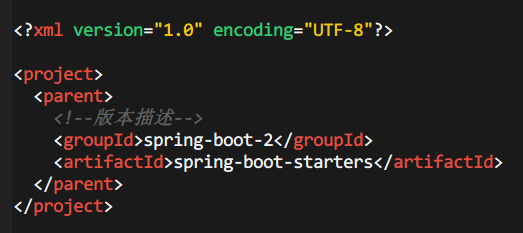
三、CSV文件管理
1、CSV文件样式
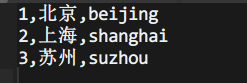
这里不需要依赖特定的Jar包,按照普通的文件读取即可。
2、文件读取
@Async

@Override

public void readNotify(String path, Integer columnSize) throws Exception {

    File file = new File(path) ;

    String fileName = file.getName() ;

    int lineNum = 0 ;

    if (fileName.startsWith("data-")) {

        InputStreamReader isr = new InputStreamReader(new FileInputStream(file),"GBK") ;

        BufferedReader reader = new BufferedReader(isr);

        List<DataInfo> dataInfoList = new ArrayList<>(4);

        String line  ;

        while ((line = reader.readLine()) != null) {

            lineNum ++ ;

            String[] dataArray = line.split(",");

            if (dataArray.length == columnSize) {

                String cityName = new String(dataArray[1].getBytes(),"UTF-8") ;

                dataInfoList.add(new DataInfo(Integer.parseInt(dataArray[0]),cityName,dataArray[2])) ;

            }

            if (dataInfoList.size() >= 4){

                LOGGER.info("容器数据:"+dataInfoList);

                dataInfoList.clear();

            }

        }

        if (dataInfoList.size()>0){

            LOGGER.info("最后数据:"+dataInfoList);

        }

        reader.close();

    }

    LOGGER.info("读取数据条数:"+lineNum);

}
3、文件创建
@Async

@Override

public void createCsv(List<String> dataList,String path) throws Exception {

    File file = new File(path) ;

    boolean createFile = false ;

    if (file.exists()){

        boolean deleteFile = file.delete() ;

        LOGGER.info("deleteFile:"+deleteFile);

    }

    createFile = file.createNewFile() ;

    OutputStreamWriter ost = new OutputStreamWriter(new FileOutputStream(path),"UTF-8") ;

    BufferedWriter out = new BufferedWriter(ost);

    if (createFile){

        for (String line:dataList){

            if (!StringUtils.isEmpty(line)){

                out.write(line);

                out.newLine();

            }

        }

    }

    out.close();

}
4、编写测试接口
这里基于Swagger2管理接口测试 。
@Api("Csv接口管理")

@RestController

public class CsvWeb {

    @Resource

    private CsvService csvService ;

    @ApiOperation(value="文件读取")

    @GetMapping("/csv/readNotify")

    public String readNotify (@RequestParam("path") String path,

                              @RequestParam("column") Integer columnSize) throws Exception {

        csvService.readNotify(path,columnSize);

        return "success" ;

    }

    @ApiOperation(value="创建文件")

    @GetMapping("/csv/createCsv")

    public String createCsv (@RequestParam("path") String path) throws Exception {

        List<String> dataList = new ArrayList<>() ;

        dataList.add("1,北京,beijing") ;

        dataList.add("2,上海,shanghai") ;

        dataList.add("3,苏州,suzhou") ;

        csvService.createCsv(dataList,path);

        return "success" ;

    }

}
四、源代码地址
文中涉及文件类型,在该章节源码ware18-file-parent/case-file-type目录下。
GitHub·地址

https://github.com/cicadasmile/middle-ware-parent

GitEE·地址

https://gitee.com/cicadasmile/middle-ware-parent

推荐阅读:Spring框架基础
文件系统(02):基于SpringBoot框架,管理Xml和CSV文件类型的更多相关文章
- 文件系统(01):基于SpringBoot框架,管理Excel和PDF文件类型
本文源码:GitHub·点这里 || GitEE·点这里 一.文档类型简介 1.Excel文档 Excel一款电子表格软件.直观的界面.出色的计算功能和图表工具,在系统开发中,经常用来把数据转存到Ex ...
- 如何用SpringBoot框架来接收multipart/form-data文件
https://blog.csdn.net/linzhiqiang0316/article/details/77016997 ************************************* ...
- Vue Element-ui 框架:路由设置 限制文件类型 表单验证 回车提交 注意事项 监听事件
1.验证上传文件的类型: (1)验证图片类型 <template> <el-upload class="avatar-uploader" action=" ...
- 记录SSM框架项目迁移SpringBoot框架-----pom.xml的迁移
第一步:迁移pom.xml文件(去除spring相关的依赖) SSM中的pom: <project xmlns="http://maven.apache.org/POM/4.0.0&q ...
- 基于Spring-Boot框架的Elasticsearch搜索服务器配置
一.相关包maven配置 <!-- https://mvnrepository.com/artifact/org.springframework.data/spring-data-elastic ...
- 基于SpringBoot框架企业级应用系统开发全面实战
Eclipse 安装spring-tool-suite教程,并创建一个新的springboot项目 使用SpringBoot构建项目,加载SSM整合的applicationContext.xml的注解 ...
- 用AOP拦截自定义注解并获取注解属性与上下文参数(基于Springboot框架)
目录 自定义注解 定义切面 获取上下文信息JoinPoint ProceedingJoinPoint 定义测试方法 测试结果 小结 AOP可以用于日志的设计,这样话就少不了要获取上下文的信息,博主在设 ...
- java代码和spring框架读取xml和properties文件
1.java文件读取properties文件 Properties props = new Properties(); try { //资源文件存放在类文件的根目录下.即是放在src下面.则不需要写路 ...
- SpringBoot-文件系统-Excel,PDF,XML,CSV
SpringBoot-文件系统-Excel,PDF,XML,CSV 1.Excel文件管理 1.1 POI依赖 1.2 文件读取 1.3 文件创建 1.4 文件导出 1.5 文件导出接口 2.PDF文 ...
随机推荐
- 【他山之石】mybatis打印sql日志 相关配置
背景:mybatis的sql日志打印对我来说一直比较迷,哪怕看过网上很多博客后还是这样,这两天刚好又遇到了问题,要查sql不得已又来查阅,这次终于搞定了. mybatis是有提供日志功能支持的,目前支 ...
- .NET Core 3.1之深入源码理解HealthCheck(二)
写在前面 前文讨论了HealthCheck的理论部分,本文将讨论有关HealthCheck的应用内容. 可以监视内存.磁盘和其他物理服务器资源的使用情况来了解是否处于正常状态. 运行状况检查可以测试应 ...
- js获取当前农历时间
<template> <div class="gaia-header"> <img alt="gaia_logo" src=&qu ...
- 从零开始学asyncio(中)
本篇文章主要是讲解asyncio模块的实现原理. 这个系列还有另外两篇文章: 从零开始学asyncio(上) 从零开始学asyncio(下) 一. asyncio模块简介 asyncio是python ...
- 2020年Java程序员应该学习的10大技术
对于Java开发人员来说,最近几年的时间中,Java生态诞生了很多东西.每6个月更新一次Java版本,以及发布很多流行的框架,如Spring 5.Spring Security 5和Spring Bo ...
- 13.利用pymysql创建变量类型的表名解说
在练习爬虫爬取数据时,想将爬取的数据用pymysql存储到数据库中,并且存储时的表名是一个变量,但在写完代码运行后经常出面1064的错误代码,在网上查找相关解决方法,但一直找不到完美的解决方法, 通过 ...
- Vue.js项目在apache服务器部署后,刷新404的问题
原因是vue-router 使用了路由的 history 模式,这种模式充分利用 history.pushState API 来完成 URL 跳转而无须重新加载页面. const router = n ...
- 使用vue-baidu-map解析geojson
这是后台给我的gejson: {"type":"FeatureCollection","features":[{"type&quo ...
- kmp算法初步理解
123456789 abbdaxnds Next 01212 第三位看第二位b,第二位和第三位相同,都是b,所以第三位的next是第二位的next加1,即1+1=2 第四位看第三位b,第四位d与第 ...
- 【转】python中查询某个函数的使用方法
使用help(),例查询sum函数的用法 使用官方文档: 1)打开python的IDLE: 2)点击help,选择python doc(这是python的官方文档,或者你也可以直接按f1键) 3)在调 ...