
HTML5表单验证(4个实用的表单美化案例)
multipart/form-data 在使用包含文件上传控件的表单时,必须使用
autocomplete="on" 自动补全功能
novalidate 不验证
<form enctype="multipart/form-data" novalidate autocomplete="on"></form>
placeholder
required 必填
autofocus 默认聚焦
pattern 正则验证
<input type="text" name="gonghao" required autofocus placeholder="请输入工号" pattern="^\d{5}[imooc]$">
dataList对选择框的记忆
list记忆内容
        <input type="text" list="tips">

        <dataList id="tips">

            <option value="erwerewr"></option>

            <option value="erwerew2r"></option>

            <option value="erwerew2r"></option>

            <option value="erwerewr"></option>

        </dataList>
html5约束验证API
id.validity获取验证约束
console.log(username.validity);
如果输入值长度大于要求的长度,则截取要求的长度部分
    <input type="number" id="numbers" oninput="checkLength(this,5)" step="0.01" />

    function checkLength(obj, length) {

        if (obj.value.length > length) {

            obj.value = obj.value.substr(0, length);

        }

    }
valueMissing => required
typeMismatch => HTML类型,如email
rangeUnderflow => min
        <input type="text" required pattern="^\d{4}$" oninput="checkit(this)" placeholder="请输入代码">

-----------------------

        function checkit(obj){

            console.log(obj.validity);

            var it = obj.validity;

            if (true===it.valueMissing) {

                obj.setCustomValidity("不能为空");

            }else{

                if (true===it.patternMismatch) {

                    obj.setCustomValidity("必须是4个数字");

                }else{

                    obj.setCustomValidity("");

                }

            }

        }
checkValidity()满足约束返回true,否则false
    if (username.checkValidity()) {

        alert("用户名符合");

    } else {

        alert("不符合");

    }
自带验证美化
:required
:optional
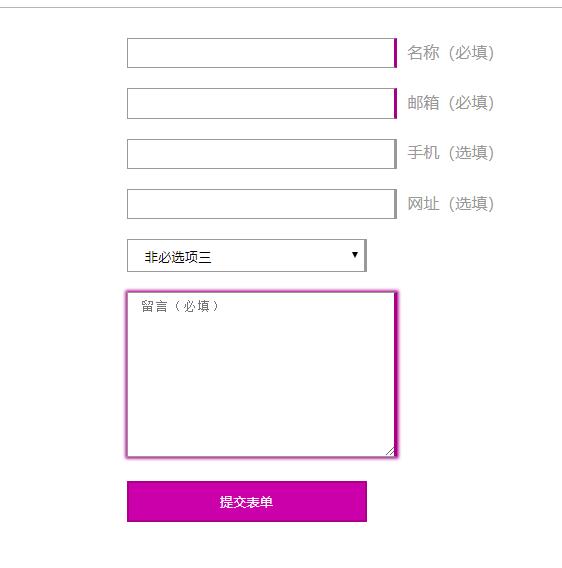
<!DOCTYPE html>

<html lang="en">

<head>

    <meta charset="UTF-8">

    <title></title>

    <style>

        .container{

            max-width:400px;

            margin:20px auto;

        }

        input,select,textarea{

            width: 240px;

            margin:10px 0;

            border:1px solid #999;

            padding: .5em 1em;

        }

        label{

            color:#999;

            margin-left: 10px;

        }

        input:required,textarea:required{

            border-right:3px solid #aa0088;

        }

        input:optional,select:optional{

            border-right:3px solid #999;

        }

        input:required +label::after{

            content: "(必填)"

        }

        input:optional +label::after{

            content: "(选填)"

        }

        input:focus,select:focus,textarea:focus{

            outline:0;

        }

        input:required:focus,textarea:required:focus{

            box-shadow: 0 0 3px 1px #aa0088;

        }

        input:optional:focus,select:required:focus{

            box-shadow: 0 0 3px 1px #999;

        }

        input[type="submit"]{

            background-color: #cc00aa;

            border: 2px solid #aa0088;

            padding:10px 0;

            color:#fff;

        }

        input[type="submit"]:hover{

            background-color:#aa0088;

        }

    </style>

</head>

<body>

    <!-- <div class="contenteditable"></div> -->

    <div class="container">

        <form action="#">

            <input type="name" required><label>名称</label>

            <input type="email" required><label>邮箱</label>

            <input type="tel"><label>手机</label>

            <input type="url"><label>网址</label>

            <select name="" id="">

                <option value="">非必选项一</option>

                <option value="">非必选项二</option>

                <option value="">非必选项三</option>

                <option value="">非必选项四</option>

            </select>

            <textarea name="#" cols="30" rows="10" placeholder="留言(必填)" required></textarea>

            <input type="submit" value="提交表单">

        </form>

    </div>

</body>

</html>
:valid
:invalid
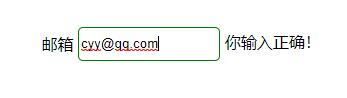
<!DOCTYPE html>

<html lang="en">

<head>

    <meta charset="UTF-8">

    <title>纯CSS表单验证美化(invalid和valid)应用案例</title>

    <style>

        .container{

            margin:100px;

            position:relative;

        }

        input{

            border: 1px solid #999;

            outline:0;

            width:140px;

            height:30px;

            line-height:30px;text-indent:36px;transition: all .3s;

            border-radius:5px;

        }

        span.title{

            position:absolute;

            line-height:30px;

            height: 30px;

            left:2px;

            top:2px;

            transition:all .3s;

        }

        input:focus,input:hover{

            text-indent:2px;

        }

        input:focus+span.title,input:hover+span.title{

            transform:translateX(-120%)

        }

        input:valid ~label::after{

            content: "你输入正确!"

        }

        input:invalid ~label::after{

            content: "你邮箱错误!"

        }

        input:valid{

            border:1px solid green;

        }

        input:invalid{

            border:1px solid red;

        }

    </style>

</head>

<body>

    <div class="container">

        <input id="mail" type="email" required placeholder="输入邮箱">

        <span class="title">邮箱</span>

        <label for="mail"></label>

    </div>

</body>

</html>
oninvalid
oninput
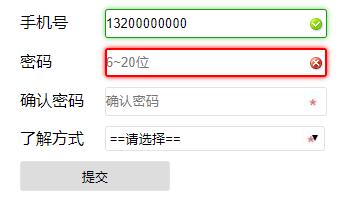
<!DOCTYPE html>

<html>

<head>

    <meta charset="utf-8">

    <meta http-equiv="X-UA-Compatible" content="IE=edge">

    <title>html5表单美化综合案例</title>

    <meta name="viewport" content="initial-scale=1, maximum-scale=1">

</head>

<style>

.onelist {

    margin: 10px 0 5px 12px;

}

.onelist label {

    width: 80px;

    display: inline-block

}

.onelist input,

.onelist select {

    height: 25px;

    line-height: 25px;

    width: 220px;

    border-radius: 3px;

    border: 1px solid #e2e2e2;

}

.onelist input[type="submit"] {

    width: 150px;

    height: 30px;

    line-height: 30px;

}

select:required,

input:required,

textarea:required {

    background: #fff url(../img/star.jpg) no-repeat 99% center;

}

select:required:valid,

input:required:valid,

textarea:required:valid {

    background: #fff url(../img/right.png) no-repeat 99% center;

    box-shadow: 0 0 5px #5cd053;

    border-color: #28921f;

}

select:focus:invalid,

input:focus:invalid,

textarea:focus:invalid {

    background: #fff url(../img/error.png) no-repeat 99% center;

    box-shadow: 0 0 5px red;

    border-color: red;

    outline: red solid 1px;

}

</style>

<body>

    <form class="myform" onsubmit="return checkForm();" method="post">

        <div class="onelist">

            <label for="UserName">手机号</label>

            <input name="UserName" id="UserName" type="text" placeholder="请输入手机号码" pattern="^1[0-9]{10}$" required oninvalid="this.setCustomValidity('请输入正确的号码');" oninput="setCustomValidity('')">

        </div>

        <div class="onelist">

            <label for="Password">密码</label>

            <input name="Password" id="Password" type="password" placeholder="6~20位" class="" pattern="^[a-zA-Z0-9]\w{5,19}$" required oninvalid="this.setCustomValidity('请输入正确密码');" oninput="setCustomValidity('')" onchange="checkPassword()">

        </div>

        <div class="onelist">

            <label for="Repassword">确认密码</label>

            <input name="Repassword" id="Repassword" type="password" placeholder="确认密码" class="" required onchange="checkPassword()">

        </div>

        <div class="onelist">

            <label for="Repassword">了解方式</label>

            <select name="konw" required>

                <option value="">==请选择==</option>

                <option value="1">搜索引擎</option>

                <option value="2">朋友圈</option>

                <option value="3">朋友推广</option>

                <option value="4">广告投放</option>

            </select>

        </div>

        <div class="onelist">

            <input type="submit" value="提交">

        </div>

    </form>

    <script type="text/javascript">

    function checkPassword() {

        var pass1 = document.getElementById("Password");

        var pass2 = document.getElementById("Repassword");

        if (pass1.value != pass2.value)

            // 设置自定义验证约束提示信息

            pass2.setCustomValidity("两次输入的密码不匹配");

        else

            pass2.setCustomValidity("");

    }

    </script>

</body>

</html>
默认气泡修改
event.preventDefault(); 阻止默认气泡

<!DOCTYPE html>

<html lang="en">

<head>

    <meta charset="UTF-8">

    <meta name="viewport" content="width=device-width, initial-scale=1.0, user-scalable=0, minimum-scale=1.0, maximum-scale=1.0">

    <title>表单验证默认样式修改</title>

</head>

<style>

    .oneline{line-height: 1.5;margin:10px auto;}

    .oneline label{width:100px;text-indent: 15px;font-size:14px;font-family: "Microsoft Yahei";display: inline-block;}

    .oneline .sinput{width:60%;height:30px;border-radius: 6px;border:1px solid #e2e2e2;}

    .oneline input[type="submit"]{margin-left:20px;width:80px;height:30px;border:0;background-color:#5899d0;color:#fff;font-size:14px;border-radius: 6px;}

    .error-message{color:red; font-size:12px;text-indent:108px;}

</style>

<body>

    <form id="forms">

        <div class="oneline">

            <label for="name">用户名:</label>

            <input id="name" name="name" class="sinput" required>

        </div>

        <div class="oneline">

            <label for="email">Email:</label>

            <input id="email" name="email" class="sinput" type="email" required>

        </div>

        <div class="oneline">

            <input type="submit" value="提交" id="thesubmit">

        </div>

    </form>

    <script>

    function replaceValidationUI(form) {

        form.addEventListener("invalid", function(event) {

            event.preventDefault();

        }, true);

        form.addEventListener("submit", function(event) {

            if (!this.checkValidity()) {

                event.preventDefault();

            }

        }, true);

        var submitButton = document.getElementById("thesubmit");

        submitButton.addEventListener("click", function(event) {

            var inValidityField = form.querySelectorAll(":invalid"),

                errorMessage = form.querySelectorAll(".error-message"),

                parent;

            for (var i = 0; i < errorMessage.length; i++) {

                errorMessage[i].parentNode.removeChild(errorMessage[i]);

            }

            for (var i = 0; i < inValidityField.length; i++) {

                parent = inValidityField[i].parentNode;

                parent.insertAdjacentHTML("beforeend", "<div class='error-message'>" + inValidityField[i].validationMessage + "</div>")

            }

            if (inValidityField.length > 0) {

                inValidityField[0].focus();

            }

        })

    }

    var form = document.getElementById("forms");

    replaceValidationUI(form);

    </script>

</body>

</html>
HTML5表单验证(4个实用的表单美化案例)的更多相关文章
- laravel基础课程---14、表单验证(lavarel如何进行表单验证)
laravel基础课程---14.表单验证(lavarel如何进行表单验证) 一.总结 一句话总结: lavarel的验证的功能比tp要[简单]且[强大]很多 直接控制器中:添加[规则数组]和[修改提 ...
- ElementUI表单验证攻略:解决表单项启用和禁用验证的切换,以及动态表单验证的综合性问题
试想一种比较复杂的业务场景: 表格(el-table)的每一行数据的第一列是勾选框,最后一列是输入框.当某一行的勾选框勾上时,启用该行的输入框,并开启该行输入框的表单验证:取消该行的勾选框,则禁用该行 ...
- bootstrapValidator.js,最好用的bootstrap表单验证插件 简单实用方法
实用方法 1.引入 在有jquery和bootstrap的页面里引入bootstrapValidator.js和bootstrapValidator.css文件 2. 按照bootstrap的表单组件 ...
- HTML5 Web Form 新增属性和表单验证
<form>标签的基本属性 method属性:指定浏览器向服务器传送数据的方式,可选: action属性:设置服务器接受和处理表单数据的URL: enctype属性:制定表单数据在发送到服 ...
- js 常用正则表达式表单验证代码
正则表达式使用详解 简介 简单的说,正则表达式是一种可以用于模式匹配和替换的强有力的工具.其作用如下:测试字符串的某个模式.例如,可以对一个输入字符串进行测试,看在该字符串是否存在一个电话号码模式或一 ...
- AngularJS复习------表单验证
在AngularJS中能够将HTML5表单验证功能同自己的验证指令结合起来使用,这里介绍使用的核心功能. 使用表单验证,首先要确保表单的每个控件都有name属性 如果想要屏蔽浏览器对表单的默认验证行为 ...
- js常用正则表达式表单验证代码
方法一: var re=/正则表达式/; re.test($("txtid").val()) 方法二: $("txtid").val.match(/正则 ...
- JQuery制作网页——第九章 表单验证
1. 表单验证:减轻服务器的压力.保证输入的数据符合要求: 2. 常用的表单验证:日期格式.表单元素是否为空.用户名和密码.E-mail地址.身份证号码等: 3. 表单验证的思路: 1. ...
- spring+thymeleaf实现表单验证数据双向绑定
前言 这个教程介绍了Thymeleaf与Spring框架的集成,特别是SpringMvc框架. 注意Thymeleaf支持同Spring框架的3.和4.版本的集成,但是这两个版本的支持是封装在thym ...
- JQuery制作网页——表单验证
1. 表单验证:减轻服务器的压力.保证输入的数据符合要求: 2. 常用的表单验证:日期格式.表单元素是否为空.用户名和密码.E-mail地址.身份证号码等: 3. 表单验证的思路: 1. ...
随机推荐
- Codeforces_837
A.扫一遍. #include<bits/stdc++.h> using namespace std; int n; string s; int main() { cin >> ...
- Codeforces_446_B
http://codeforces.com/problemset/problem/446/B 分别将每行的和与每列的和存入优先队列,计算操作n次的最大和,保存每一次结果. 枚举行和列操作的次数,注意要 ...
- 快速下载Keil μVision MDK-Arm包
搜索"MDK Pack",找到Keil官网的MDK包下载页,如下图所示 Keil的官网的域名是Keil.com,下图搜索结果的URL的域名部分被红框标记,那是Keil官网的域名 以 ...
- html标签学习入门 随笔
Html学习入门 随笔1: HTML 标题 HTML 标题(Heading)是通过 <h1> - <h6> 等标签进行定义的. 标题仅用于标题文本 不应该被使用在加粗字 ...
- linux下命令的全称,方便记忆(转)-修改补充版
su:Swith user 切换用户,切换到root用户 cat: Concatenate 串联(cat(Concatenate)命令的用途是连接文件或标准输入并打印.这个命令常用来显示文件内容, ...
- vue子向父传值
要弄懂子组件如何向父组件传值,需要理清步骤 子组件向父组件传值的步骤 一:子组件在组件标签上通过绑定事件的方式向父组件发射数据 <!--html--><template id=&qu ...
- 《Head first设计模式》之迭代器模式
迭代器模式提供一种方法顺序访问一个聚合对象中的各个元素,而又不暴露其内部的表示. 爆炸性新闻:对象村餐厅和对象村煎饼屋合并了! 真是个好消息!现在我们可以在同一个地方,享用煎饼屋美味的煎饼早餐,和好吃 ...
- light oj 1102 - Problem Makes Problem组合数学(隔板法)
1102 - Problem Makes Problem As I am fond of making easier problems, I discovered a problem. Actuall ...
- 幻读在 InnoDB 中是被如何解决的?
在MySQL事务初识中,我们了解到不同的事务隔离级别会引发不同的问题,如在 RR 级别下会出现幻读.但如果将存储引擎选为 InnoDB ,在 RR 级别下,幻读的问题就会被解决.在这篇文章中,会先介绍 ...
- MyEclipse10下载安装破解及汉化内含jdk8u241及其帮助文档
下载MyEclipse10以及破解包 MyEclipse10: 提取码:020c 破解包 提取码:mycj 注:破解包内含有破解教程,很详细,这里就不多说了 MyEclipse10汉化 操作系统:wi ...