
vue+vant ui+高德地图的选址组件
首先在index.html引入高德地图的js
<script src="https://webapi.amap.com/maps?v=1.4.14&key=你的key"></script>
然后写html部分
<template>

  <div class="mymapM">

    <!--捜索-->

    <div v-if="loading" class="loading">

      <van-loading type="spinner" />

    </div>

    <div class="search-box">

      <div class="search-postion">

        <span class="buts">返回</span>

        <input type="text" placeholder="输入关键字搜索" v-model="search_key" />

        <span class="clear" v-if="search_key" @click="search_key ='' ">

          <van-icon color="#8f8f8f" name="clear" />

        </span>

        <span class="buts border_but" @click="keySearch()">捜索</span>

      </div>

    </div>

    <div class="con-box con-map" v-if="!search_key">

      <!--地图-->

      <div class="mapbox">

        <div class="map" id="container"></div>

        <div class="sign"></div>

      </div>

    </div>

    <div class="con-box" v-if="!search_key">

      <!--地址列表-->

      <div class="Hlist-box">

        <ul>

          <li v-for="(item, index) in lists" :key="index" @click="onAddressLi(item)">

            <b>

              <van-icon color="#a6a6a6" name="clock" />

            </b>

            <div>

              <span>{{item.name}}</span>

              <p>{{item.address}}</p>

            </div>

          </li>

        </ul>

      </div>

    </div>

    <!--捜索列表-->

    <div class="search-list" v-if="search_key">

      <ul>

        <li v-for="(item, index) in search_list" :key="index" @click="onSearchLi(item.location)">

          <span>{{item.name}}</span>

          <p>{{item.address}}</p>

        </li>

        <li v-if="noSearchShow">

          <p>暂无搜索结果</p>

        </li>

      </ul>

    </div>

  </div>

</template>
css部分
<style lang="scss" scoped>

.con-map {

  height: 190px;

  width: 100%;

}

.con-box {

  .mapbox {

    margin-bottom: 10px;

    position: fixed;

    z-index:;

    width: 100%;

    height: 180px;

    padding: 10px 0;

    background: #eceeee;

    .map {

      width: 100%;

      height: 180px;

    }

  }

  .Hlist-box {

    width: 96%;

    margin: 0 auto;

    background: #fff;

    border-radius: 5px;

    li {

      height: 40px;

      padding: 14px 22px;

      border-bottom: 1px solid #d9d9d9;

      display: flex;

      b {

        display: inline-block;

        i {

          margin: 18px 18px 0 0;

        }

      }

      div {

        width: 100%;

      }

      span {

        white-space: nowrap;

        text-overflow: ellipsis;

        overflow: hidden;

        font-size: 15px;

        display: inline-block;

        width: 90%;

      }

      p {

        margin-top: 10px;

        color: #a6a6a6;

        white-space: nowrap;

        text-overflow: ellipsis;

        overflow: hidden;

        font-size: 13px;

        width: 90%;

      }

    }

  }

}

.mymapM {

  .search-box {

    height: 48px;

    line-height: 48px;

    background: #fff;

    border-bottom: 1px solid #bfbec4;

    .search-postion {

      height: 48px;

      line-height: 48px;

      background: #fff;

      border-bottom: 1px solid #bfbec4;

      width: 100%;

      position: fixed;

      z-index:;

      display: flex;

      input {

        flex:;

        height: 14px;

        padding: 16px 0;

        border: none;

        text-indent: 10px;

      }

      .clear {

        margin: 2px 6px;

      }

      .buts {

        width: 15%;

        text-align: center;

        display: inline-block;

        flex:;

      }

      .border_but {

        border-left: 1px solid #8f8f8f;

        height: 14px;

        line-height: 14px;

        margin: 17px 0;

      }

    }

  }

  .search-list {

    width: 96%;

    margin: 0 auto;

    margin-top: 10px;

    border-radius: 5px;

    background: #fff;

    li {

      height: 40px;

      padding: 14px 22px;

      border-bottom: 1px solid #d9d9d9;

      span {

        white-space: nowrap;

        text-overflow: ellipsis;

        overflow: hidden;

        font-size: 15px;

        display: inline-block;

        width: 90%;

      }

      p {

        margin-top: 10px;

        color: #a6a6a6;

        white-space: nowrap;

        text-overflow: ellipsis;

        overflow: hidden;

        font-size: 13px;

        width: 90%;

      }

    }

  }

}

.loading {

  position: fixed;

  top: 50%;

  left: 50%;

  transform: translate(-50%, -50%);

  z-index:;

}

</style>
js部分
<script>

export default {

  data() {

    return {

      center: [116.42792, 39.902896], //经度+纬度

      search_key: "", //搜索值

      lists: [], //地点列表

      search_list: [], //搜索结果列表

      marker: "",

      loading: false,

      noSearchShow: false //无搜索结果提示,无搜索结果时会显示暂无搜索结果

    };

  },

  mounted() {

    setTimeout(() => {

      this.adMap();

    }, 1000);

  },

  methods: {

    adMap() {

      this.loading = true;

      //初始化地图

      var map = new AMap.Map("container", {

        zoom: 14, //缩放级别

        center: this.center //设置地图中心点

        //resizeEnable: true,  //地图初始化加载定位到当前城市

      });

      //获取初始中心点并赋值

      var currentCenter = map.getCenter(); //此方法是获取当前地图的中心点

      this.center = [currentCenter.lng, currentCenter.lat]; //将获取到的中心点的纬度经度赋值给data的center

      console.log(this.center);

      //创建标记

      this.marker = new AMap.Marker({

        position: new AMap.LngLat(currentCenter.lng, currentCenter.lat) // 经纬度对象,也可以是经纬度构成的一维数组[116.39, 39.9]

      });

      // 将创建的点标记添加到已有的地图实例:

      map.add(this.marker);

      //根据地图中心点查附近地点,此方法在下方

      this.centerSearch();

      //监听地图移动事件,并在移动结束后获取地图中心点并更新地点列表

      var moveendFun = e => {

        // 获取地图中心点

        currentCenter = map.getCenter();

        this.center = [currentCenter.lng, currentCenter.lat];

        this.marker.setPosition([currentCenter.lng, currentCenter.lat]); //更新标记的位置

        //根据地图中心点查附近地点

      };

      //更新数据

      var centerSearch = () => {

        this.loading = true;

        this.centerSearch();

      };

      // 绑定事件移动地图事件

      map.on("mapmove", moveendFun); //更新标记

      map.on("moveend", centerSearch); //更新数据

    },

    centerSearch() {

      AMap.service(["AMap.PlaceSearch"], () => {

        //构造地点查询类

        var placeSearch = new AMap.PlaceSearch({

          type:

            "汽车服务|餐饮服务|购物服务|生活服务|体育休闲服务|医疗保健服务|住宿服务|风景名胜|商务住宅|政府机构及社会团体|科教文化服务|交通设施服务|金融保险服务|公司企业|地名地址信息", // 兴趣点类别

          pageSize: 30, // 单页显示结果条数

          pageIndex: 1, // 页码

          city: "全国", // 兴趣点城市

          autoFitView: false // 是否自动调整地图视野使绘制的 Marker点都处于视口的可见范围

        });

        //根据地图中心点查附近地点

        placeSearch.searchNearBy(

          "",

          [this.center[0], this.center[1]],

          200,

          (status, result) => {

            if (status == "complete") {

              this.lists = result.poiList.pois; //将查询到的地点赋值

              this.loading = false;

            }

          }

        );

      });

    },

    keySearch() {

      this.loading = true;

      AMap.service(["AMap.PlaceSearch"], () => {

        //构造地点查询类

        var placeSearch = new AMap.PlaceSearch({

          type:

            "汽车服务|餐饮服务|购物服务|生活服务|体育休闲服务|医疗保健服务|住宿服务|风景名胜|商务住宅|政府机构及社会团体|科教文化服务|交通设施服务|金融保险服务|公司企业|地名地址信息", // 兴趣点类别

          pageSize: 30, // 单页显示结果条数

          pageIndex: 1, // 页码

          city: "全国", // 兴趣点城市

          citylimit: false, //是否强制限制在设置的城市内搜索

          autoFitView: false // 是否自动调整地图视野使绘制的 Marker点都处于视口的可见范围

        });

        //关键字查询

        placeSearch.search(this.search_key, (status, result) => {

          if (status == "complete") {

            if (result.poiList.count === 0) {

              this.noSearchShow = true;

            } else {

              this.search_list = result.poiList.pois; //将查询到的地点赋值

              this.noSearchShow = false;

              this.loading = false;

            }

          } else {

            this.search_list = [];

            this.noSearchShow = true;

          }

        });

      });

    },

    onAddressLi(e) {

      console.log(e);

      this.marker.setPosition([e.location.lng, e.location.lat]); //更新标记的位置

    },

    onSearchLi(e) {

      console.log(e.lng + "-" + e.lat);

      this.center = [e.lng, e.lat];

      console.log(this.center);

      this.search_key = "";

      // this.loading=true;

      setTimeout(() => {

        this.adMap();

      }, 1000);

    }

  },

  watch: {

    search_key(newv, oldv) {

      if (newv == "") {

        this.search_list = [];

        this.noSearchShow = false;

        setTimeout(() => {

          this.adMap();

        }, 1000);

      }

    }

  }

};

</script>
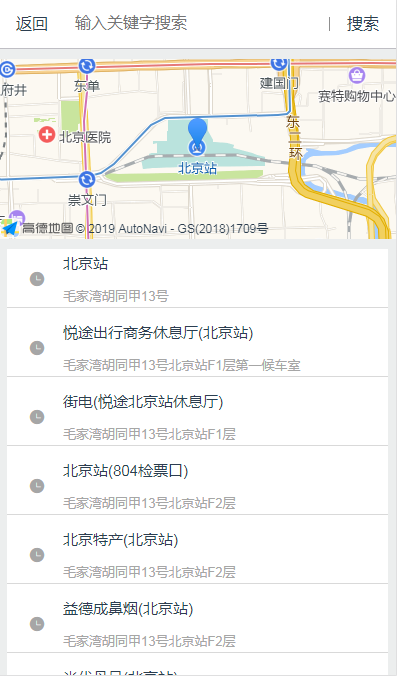
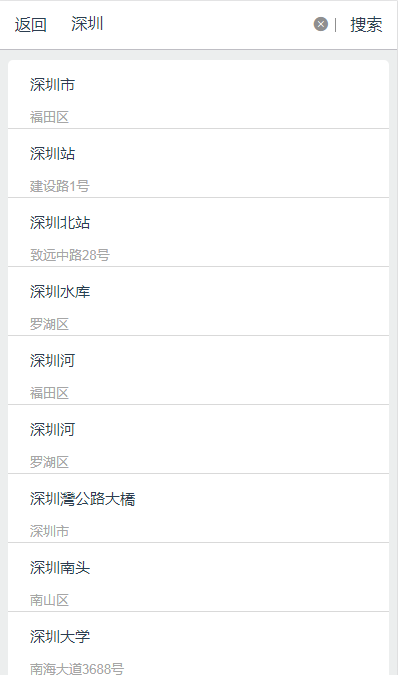
效果图
vue+vant ui+高德地图的选址组件的更多相关文章
- VUE 2.0 引入高德地图,自行封装组件
1. 高德地图官网 申请帐号, 申请相应(JavaScript API)的 Key 2. 在项目中引入, 这里和其他的引入不同的是 直接在 index.html, 不是在 main.js 引入, 博主 ...
- VUE 高德地图选取地址组件开发
高德地图文档地址 http://lbs.amap.com/api/lightmap/guide/picker/ 结合步骤: 1.通过iframe内嵌引入高德地图组件 key就选你自己申请的key &l ...
- 基于vue 2.X和高德地图的vue-amap组件获取经纬度
今天我就讲了一下怎么通过vue和高德地图开发的vue-amap组件来获取经纬度. 这是vue-amap的官网文档:https://elemefe.github.io/vue-amap/#/ 这是我的码 ...
- 在vue中使用高德地图vue-amap
1.安装 vue-amap我安装指定版本0.5.10的版本 npm i --save vue-amap@0.5.10 2.main.js中的配置 key申请地址教程:https://lbs.amap. ...
- vue+element ui 的表格列使用组件
前言:工作中用到 vue+element ui 的前端框架,有这个场景:很多表格的列有许多一样的,所以考虑将列封装为组件.转载请注明出处:https://www.cnblogs.com/yuxiaol ...
- 在vue中使用高德地图开发,以及AMap的引入?
百度引入BMap ,一个import 即可,可AMap 却报AMap is not difined ? 1.首先在 externals: { "BMap": "BMap& ...
- vue.js 使用高德地图
1.获取key值 注册成为高德开发者需要分三步: 第一步,注册高德开发者: 第二步,去控制台创建应用: 第三步,获取Key 2.修改配置文件 webpack.base.conf.js externa ...
- 如何在vue里面调用高德地图
1.修改webpac.base.conf.js文件 与module同一级添加 externals: { 'AMap': 'AMap', 'AMapUI': 'AMapUI' }配置. 然后在index ...
- vue 里面引入高德地图
效果图: 实现: 一:引入 高德,web-sdk (两种方式) 1:在html 中引入(我用的这一种) <script type="text/javascript" src= ...
随机推荐
- l洛谷 NOIP提高组模拟赛 Day2
传送门 ## T1 区间修改+单点查询.差分树状数组. #include<iostream> #include<cstdio> #include<cstring> ...
- 移动端,fixed bottom问题
//不显示 .bar { position:fixed; bottom:0; z-index:99; } //显示 .bar{ position:fixed; bottom:calc(90vh); / ...
- Excel常用函数总结
Excel常用函数总结 2016-10-28 Kevin 叼着奶瓶撩妹 1. VLOOKUP函数 常见形式 问题描述:将下图中G列的数据根据学生的姓名填充到D列. 公式解析: =VLOOKUP(A2, ...
- ES6之主要知识点(四)数值
引自:http://es6.ruanyifeng.com/#docs/number 1.Number.isFinite(),Number.isNaN() Number.isFinite(); // t ...
- springboot思维导图
- 跟我一起了解koa之在koa中使用redis
第一步安装中间件 cnpm i koa-generic-session koa-redis 第二步引入中间件 在中间件中写入session 浏览器中会存储数据 第三步关于Redis来读取和存储数据 读 ...
- 【心无旁骛】vuex-simple
这个算是一个小的demo嘛,先放上开源github地址:https://github.com/sascha245/vuex-simple 倒是可以先看下效果 呃呃,因为这个项目所在的目录与平时我们一般 ...
- php报错:Notice: iconv(): Wrong charset, conversion from `GBK' to `UTF8' is not allowed
代码写错了 $raw_data = iconv("GBK", "UTF8", $raw_data); 改成 $raw_data = iconv("GB ...
- 矩阵快速幂2 3*n铺方格
#include <iostream> #include <cstdlib> #include <cstring> #include <queue> # ...
- Python技巧—list与字符串互相转换
Python技巧-list与字符串互相转换 在Python的编程中,经常会涉及到字符串与list之间的转换问题,下面就将两者之间的转换做一个梳理. 1.list转换成字符串 命令:list() 例子: ...