
HttpClient学习整理(一)
Http协议的重要性相信不用我多说了,HttpClient相比传统JDK自带的URLConnection,增加了易用性和灵活性(具体区别,日后我们再讨论),它不仅使客户端发送Http请求变得容易,而且也方便了开发人员测试接口(基于Http协议的),即提高了开发的效率,也方便提高代码的健壮性。因此熟练掌握HttpClient是很重要的必修内容,掌握HttpClient后,相信对于Http协议的了解会更加深入。
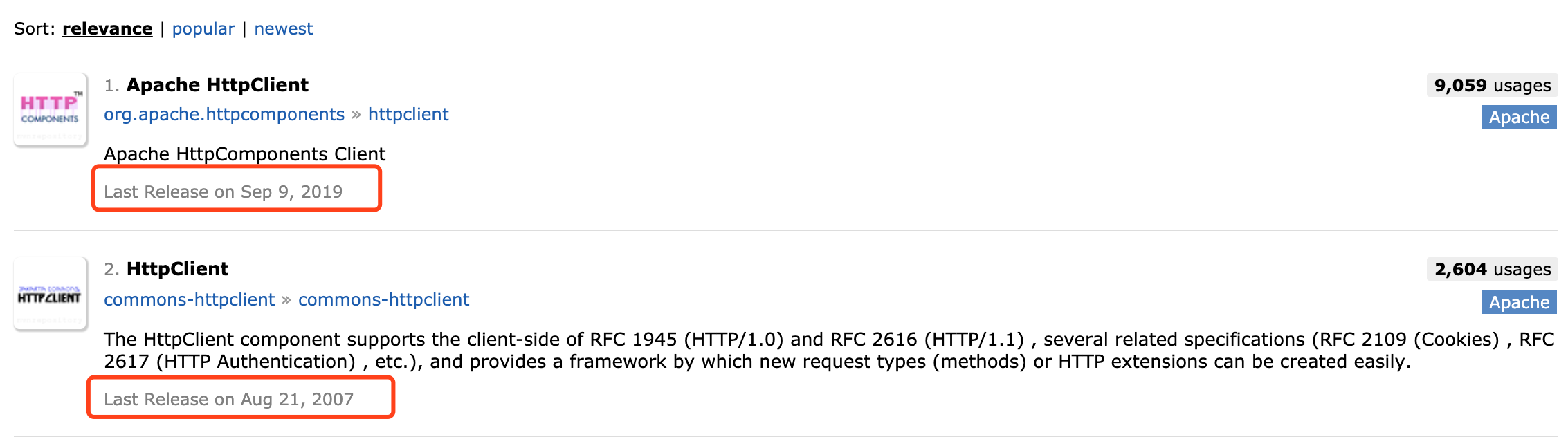
org.apache.commons.httpclient.HttpClient与org.apache.http.client.HttpClient的区别
Commons的HttpClient项目现在不再被开发,已被Apache HttpComponents项目HttpClient和的HttpCore模组取代,提供更好的性能和更大的灵活性。
一、简介
HttpClient是Apache Jakarta Common下的子项目,用来提供高效的、最新的、功能丰富的支持HTTP协议的客户端编程工具包,并且它支持HTTP协议最新的版本和建议。HttpClient已经应用在很多的项目中,比如Apache Jakarta上很著名的另外两个开源项目Cactus和HTMLUnit都使用了HttpClient。
下载地址: https://mvnrepository.com/artifact/org.apache.httpcomponents/httpclient
二、特性
- 基于标准、纯净的java语言。实现了Http1.0和Http1.1
- 以可扩展的面向对象的结构实现了Http全部的方法(GET, POST, PUT, DELETE, HEAD, OPTIONS, and TRACE)。
- 支持HTTPS协议。
- 通过Http代理建立透明的连接。
- 利用CONNECT方法通过Http代理建立隧道的https连接。
- Basic, Digest, NTLMv1, NTLMv2, NTLM2 Session, SNPNEGO/Kerberos认证方案。
- 插件式的自定义认证方案。
- 便携可靠的套接字工厂使它更容易的使用第三方解决方案。
- 连接管理器支持多线程应用。支持设置最大连接数,同时支持设置每个主机的最大连接数,发现并关闭过期的连接。
- 自动处理Set-Cookie中的Cookie。
- 插件式的自定义Cookie策略。
- Request的输出流可以避免流中内容直接缓冲到socket服务器。
- Response的输入流可以有效的从socket服务器直接读取相应内容。
- 在http1.0和http1.1中利用KeepAlive保持持久连接。
- 直接获取服务器发送的response code和 headers。
- 设置连接超时的能力。
- 实验性的支持http1.1 response caching。
- 源代码基于Apache License 可免费获取。
三、使用方法
使用HttpClient发送请求、接收响应很简单,一般需要如下几步即可。
- 创建HttpClient对象。
- 创建请求方法的实例,并指定请求URL。如果需要发送GET请求,创建HttpGet对象;如果需要发送POST请求,创建HttpPost对象。
- 如果需要发送请求参数,可调用HttpGet、HttpPost共同的setParams(HetpParams params)方法来添加请求参数;对于HttpPost对象而言,也可调用setEntity(HttpEntity entity)方法来设置请求参数。
- 调用HttpClient对象的execute(HttpUriRequest request)发送请求,该方法返回一个HttpResponse。
- 调用HttpResponse的getAllHeaders()、getHeaders(String name)等方法可获取服务器的响应头;调用HttpResponse的getEntity()方法可获取HttpEntity对象,该对象包装了服务器的响应内容。程序可通过该对象获取服务器的响应内容。
- 释放连接。无论执行方法是否成功,都必须释放连接
相关jar包
commons-cli-1.2.jar
commons-codec-1.9.jar
commons-logging-1.2.jar
fluent-hc-4.5.1.jar
httpclient-4.5.1.jar
httpclient-cache-4.5.1.jar
httpclient-win-4.5.1.jar
httpcore-4.4.3.jar
httpcore-ab-4.4.3.jar
httpcore-nio-4.4.3.jar
httpmime-4.5.1.jar
jna-4.1.0.jar
jna-platform-4.1.0.jar
四、实例
<dependency>

    <groupId>org.apache.httpcomponents</groupId>

    <artifactId>httpclient</artifactId>

    <version>4.5.11</version>

</dependency>
GET请求
/**

 * 发送 get请求

 */

public void get() {

    CloseableHttpClient httpclient = HttpClients.createDefault();

    try {

        // 创建httpget.

        HttpGet httpget = new HttpGet("http://www.baidu.com/");

        System.out.println("executing request " + httpget.getURI());

        // 执行get请求.

        CloseableHttpResponse response = httpclient.execute(httpget);

        try {

            // 获取响应实体

            HttpEntity entity = response.getEntity();

            System.out.println("--------------------------------------");

            // 打印响应状态

            System.out.println(response.getStatusLine());

            if (entity != null) {

                // 打印响应内容长度

                System.out.println("Response content length: " + entity.getContentLength());

                // 打印响应内容

                System.out.println("Response content: " + EntityUtils.toString(entity));

            }

            System.out.println("------------------------------------");

        } finally {

            response.close();

        }

    } catch (ClientProtocolException e) {

        e.printStackTrace();

    } catch (ParseException e) {

        e.printStackTrace();

    } catch (IOException e) {

        e.printStackTrace();

    } finally {

        // 关闭连接,释放资源

        try {

            httpclient.close();

        } catch (IOException e) {

            e.printStackTrace();

        }

    }

}
POST请求
/**

 * 发送 post请求访问本地应用并根据传递参数不同返回不同结果

 */

public void post() {

    // 创建默认的httpClient实例.

    CloseableHttpClient httpclient = HttpClients.createDefault();

    // 创建httppost

    HttpPost httppost = new HttpPost("http://localhost:8080/myDemo/Ajax/serivceJ.action");

    // 创建参数队列

    List<NameValuePair> formparams = new ArrayList<NameValuePair>();

    formparams.add(new BasicNameValuePair("type", "house"));

    UrlEncodedFormEntity uefEntity;

    try {

        uefEntity = new UrlEncodedFormEntity(formparams, "UTF-8");

        httppost.setEntity(uefEntity);

        System.out.println("executing request " + httppost.getURI());

        CloseableHttpResponse response = httpclient.execute(httppost);

        try {

            HttpEntity entity = response.getEntity();

            if (entity != null) {

                System.out.println("--------------------------------------");

                System.out.println("Response content: " + EntityUtils.toString(entity, "UTF-8"));

                System.out.println("--------------------------------------");

            }

        } finally {

            response.close();

        }

    } catch (ClientProtocolException e) {

        e.printStackTrace();

    } catch (UnsupportedEncodingException e1) {

        e1.printStackTrace();

    } catch (IOException e) {

        e.printStackTrace();

    } finally {

        // 关闭连接,释放资源

        try {

            httpclient.close();

        } catch (IOException e) {

            e.printStackTrace();

        }

    }

}
表单提交
/**

 * post方式提交表单(模拟用户登录请求)

 */

public void postForm() {

    // 创建默认的httpClient实例.

    CloseableHttpClient httpclient = HttpClients.createDefault();

    // 创建httppost

    HttpPost httppost = new HttpPost("http://localhost:8080/myDemo/Ajax/serivceJ.action");

    // 创建参数队列

    List<NameValuePair> formparams = new ArrayList<NameValuePair>();

    formparams.add(new BasicNameValuePair("username", "admin"));

    formparams.add(new BasicNameValuePair("password", "123456"));

    UrlEncodedFormEntity uefEntity;

    try {

        uefEntity = new UrlEncodedFormEntity(formparams, "UTF-8");

        httppost.setEntity(uefEntity);

        System.out.println("executing request " + httppost.getURI());

        CloseableHttpResponse response = httpclient.execute(httppost);

        try {

            HttpEntity entity = response.getEntity();

            if (entity != null) {

                System.out.println("--------------------------------------");

                System.out.println("Response content: " + EntityUtils.toString(entity, "UTF-8"));

                System.out.println("--------------------------------------");

            }

        } finally {

            response.close();

        }

    } catch (ClientProtocolException e) {

        e.printStackTrace();

    } catch (UnsupportedEncodingException e1) {

        e1.printStackTrace();

    } catch (IOException e) {

        e.printStackTrace();

    } finally {

        // 关闭连接,释放资源

        try {

            httpclient.close();

        } catch (IOException e) {

            e.printStackTrace();

        }

    }

}
文件上传
/**

 * 上传文件

 */

public void upload() {

    CloseableHttpClient httpclient = HttpClients.createDefault();

    try {

        HttpPost httppost = new HttpPost("http://localhost:8080/myDemo/Ajax/serivceFile.action");

        FileBody bin = new FileBody(new File("F:\\image\\sendpix0.jpg"));

        StringBody comment = new StringBody("A binary file of some kind", ContentType.TEXT_PLAIN);

        HttpEntity reqEntity = MultipartEntityBuilder.create().addPart("bin", bin).addPart("comment", comment).build();

        httppost.setEntity(reqEntity);

        System.out.println("executing request " + httppost.getRequestLine());

        CloseableHttpResponse response = httpclient.execute(httppost);

        try {

            System.out.println("----------------------------------------");

            System.out.println(response.getStatusLine());

            HttpEntity resEntity = response.getEntity();

            if (resEntity != null) {

                System.out.println("Response content length: " + resEntity.getContentLength());

            }

            EntityUtils.consume(resEntity);

        } finally {

            response.close();

        }

    } catch (ClientProtocolException e) {

        e.printStackTrace();

    } catch (IOException e) {

        e.printStackTrace();

    } finally {

        try {

            httpclient.close();

        } catch (IOException e) {

            e.printStackTrace();

        }

    }

}
SSL链接
/**

 * HttpClient连接SSL

 */

public void ssl() {

    CloseableHttpClient httpclient = null;

    try {

        KeyStore trustStore = KeyStore.getInstance(KeyStore.getDefaultType());

        FileInputStream instream = new FileInputStream(new File("d:\\tomcat.keystore"));

        try {

            // 加载keyStore d:\\tomcat.keystore

            trustStore.load(instream, "123456".toCharArray());

        } catch (CertificateException e) {

            e.printStackTrace();

        } finally {

            try {

                instream.close();

            } catch (Exception ignore) {

            }

        }

        // 相信自己的CA和所有自签名的证书

        SSLContext sslcontext = SSLContexts.custom().loadTrustMaterial(trustStore, new TrustSelfSignedStrategy()).build();

        // 只允许使用TLSv1协议

        SSLConnectionSocketFactory sslsf = new SSLConnectionSocketFactory(sslcontext, new String[] { "TLSv1" }, null,

                SSLConnectionSocketFactory.BROWSER_COMPATIBLE_HOSTNAME_VERIFIER);

        httpclient = HttpClients.custom().setSSLSocketFactory(sslsf).build();

        // 创建http请求(get方式)

        HttpGet httpget = new HttpGet("https://localhost:8443/myDemo/Ajax/serivceJ.action");

        System.out.println("executing request" + httpget.getRequestLine());

        CloseableHttpResponse response = httpclient.execute(httpget);

        try {

            HttpEntity entity = response.getEntity();

            System.out.println("----------------------------------------");

            System.out.println(response.getStatusLine());

            if (entity != null) {

                System.out.println("Response content length: " + entity.getContentLength());

                System.out.println(EntityUtils.toString(entity));

                EntityUtils.consume(entity);

            }

        } finally {

            response.close();

        }

    } catch (ParseException e) {

        e.printStackTrace();

    } catch (IOException e) {

        e.printStackTrace();

    } catch (KeyManagementException e) {

        e.printStackTrace();

    } catch (NoSuchAlgorithmException e) {

        e.printStackTrace();

    } catch (KeyStoreException e) {

        e.printStackTrace();

    } finally {

        if (httpclient != null) {

            try {

                httpclient.close();

            } catch (IOException e) {

                e.printStackTrace();

            }

        }

    }

}
原文链接:https://www.cnblogs.com/jepson6669/p/9358244.html
HttpClient学习整理(一)的更多相关文章
- HttpClient学习整理
HttpClient简介HttpClient 功能介绍 1. 读取网页(HTTP/HTTPS)内容 2.使用POST方式提交数据(httpClient3) 3. 处理页面重定向 ...
- HttpClient 学习整理【转】
转自 http://www.blogjava.net/Alpha/archive/2007/01/22/95216.html HttpClient 是我最近想研究的东西,以前想过的一些应用没能有很好的 ...
- HttpClient 学习整理 (转)
source:http://www.blogjava.net/Alpha/archive/2007/01/22/95216.html HttpClient 是我最近想研究的东西,以前想过的一些应用没能 ...
- HttpClient 学习整理
HttpClient 是我最近想研究的东西,以前想过的一些应用没能有很好的实现,发现这个开源项目之后就有点眉目了,令人头痛的cookie问题还是有办法解决滴.在网上整理了一些东西,写得很好,寄放在这里 ...
- java apache commons HttpClient发送get和post请求的学习整理(转)
文章转自:http://blog.csdn.net/ambitiontan/archive/2006/01/06/572171.aspx HttpClient 是我最近想研究的东西,以前想过的一些应用 ...
- js数组学习整理
原文地址:js数组学习整理 常用的js数组操作方法及原理 1.声明数组的方式 var colors = new Array();//空的数组 var colors = new Array(3); // ...
- TweenMax学习整理--特有属性
TweenMax学习整理--特有属性 构造函数:TweenMax(target:Object, duration:Number, vars:Object) target:Object -- 需要缓 ...
- !!对python列表学习整理列表及数组详细介绍
1.Python的数组分三种类型:(详细见 http://blog.sina.com.cn/s/blog_6b783cbd0100q2ba.html) (1) list 普通的链表,初始化后可以通过特 ...
- Java设计模式(学习整理)---命令模式
设计模式之Command(学习整理) 1.Command定义 不少Command模式的代码都是针对图形界面的,它实际就是菜单命令,我们在一个下拉菜单选择一个命令时,然后会执行一些动作. 将这些命令封装 ...
随机推荐
- GoCenter助力Golang全速前进
一.背景 Go语言是Google开发的一种静态强类型.编译型.并发型,并具有垃圾回收功能的编程语言.为了方便搜索和识别,有时会将其称为Golang.自2009年11月Google正式宣布推出,成为开放 ...
- STM321的SPI驱动遇到的一个坑!!
最近在做项目要用到FATFS文件驱动和SD卡驱动,SD卡驱动我用的是SPI的通信方式,在挂载文件系统是总是挂在失败了,花了一天时间反复检查,才发现SPI在接收时候卡死: 为了寻找问题的原因,整个人都快 ...
- JS 点击验证码刷新
<img src="/get_valid_img" id="valid-img" title="点击再换一张" class=" ...
- 自建CDN Xnign产品指标
Xnign-X1 Xnign-X1 性能参数 参考值 L7 HTTP RPS (128并发请求) 250W QPS L7 HTTP CPS (128并发请求) 110W QPS L7 HTTP RPS ...
- 神器| 这款软件让win系统像Mac系统一样的好用!
每天进步一丢丢,连接梦与想 输不起的人,往往就是赢不了的人 使用过 Mac OS X 系统的朋友可能都会使用过自带的 Quick Look 快速预览功能,用鼠标选中一个文件后,再按下键盘空格键就会弹出 ...
- Lobooi个人作业:阅读与准备作业
这个作业属于哪个课程 https://edu.cnblogs.com/campus/xnsy/GeographicInformationScience 这个作业要求在哪里 https://edu.cn ...
- Commvault逻辑架构及组件说明
在学习和使用Commvault软件的过程中,经常会碰到一些术语和缩写,初学者可能并不是很清楚这些术语和缩写的具体含义,接下来我们梳理一下Commvault软件中这些属于和缩写的含义,有可能一次不能梳理 ...
- 19_05_01校内训练[polygon]
题意 把一个边长为1的正n边形放到一个正m边形中,要求m边形完全覆盖n边形,可以有交点,并且中心重合.求正m边形的最小边长,至少精确到6位.要求logn计算. 思考 先考虑m|n的情况. 我们知道,正 ...
- linux开机无法进入桌面直接进入initramfs模式的问题修复
可能是因为关机异常导致磁盘错误. kali linux升级到2019.4版本之后出现过好几次异常关机导致直接进入initramfs的模式,无法进入系统桌面,网上的办法基本上也都是无效的,前几次翻了很多 ...
- 关于selenium自动化元素定位问题解决的几种方法
遇到了元素定位问题和定位到后无法执行点击操作等,闲话少说,直奔主题: 1.元素定位不到一般有如下3种情况,大家如果遇到了可以对号入座哈 a.查找的元素不在当前窗口中 解决方法:使用driver.swi ...