
rabbitmq template发送的消息中,Date类型字段比当前时间晚了8小时
前言
前一阵开发过程遇到的问题,用的rabbitmq template发送消息,消息body里的时间是比当前时间少了8小时的,这种一看就是时区问题了。
就说说为什么出现吧。
之前的配置是这样的:
@Bean

    public RabbitTemplate rabbitTemplate(ConnectionFactory connectionFactory) {

        RabbitTemplate template = new RabbitTemplate(connectionFactory);

        template.setMessageConverter(new Jackson2JsonMessageConverter());

        template.setMandatory(true);

      	...

        return template;

    }
要发送出去的消息vo是这样的:
@Data

public class TestVO {

    @JsonFormat(pattern = "yyyy-MM-dd HH:mm:ss")

    private Date testDate;

}
然后,出现的问题就是,消息体里,时间比当前时间少了8个小时。
{"testDate":"2019-12-27 05:45:26"}
原因
我们是这么使用rabbitmq template的:
    @Autowired

    private RabbitTemplate rabbitTemplate;

    @Autowired

    private RedisRepository redisRepository;

    /**

     * 发送消息

     * @param exchange 交换机名称

     * @param routingKey 路由键

     * @param msgMbject 消息体,无需序列化,会自动序列化为json

     */

    public void send(String exchange, String routingKey, final Object msgMbject) {

        CorrelationData correlationData = new CorrelationData(GUID.generate());

        CachedMqMessageForConfirm cachedMqMessageForConfirm = new CachedMqMessageForConfirm(exchange, routingKey, msgMbject);

        redisRepository.saveCacheMessageForConfirms(correlationData,cachedMqMessageForConfirm);

		//核心代码:这里,发送出去的msgObject其实就是一个vo或者dto,rabbitmqTemplate会自动帮我们转为json

        rabbitTemplate.convertAndSend(exchange,routingKey,msgMbject,correlationData);

    }
注释里我解释了,rabbitmq会自动做转换,转换用的就是jackson。
跟进源码也能一探究竟:
org.springframework.amqp.rabbit.core.RabbitTemplate#convertAndSend

	@Override

	public void convertAndSend(String exchange, String routingKey, final Object object,

			@Nullable CorrelationData correlationData) throws AmqpException {

		// 这里调用了convertMessageIfNecessary(object)

		send(exchange, routingKey, convertMessageIfNecessary(object), correlationData);

	}
调用了convertMessageIfNessary:
protected Message convertMessageIfNecessary(final Object object) {

		if (object instanceof Message) {

			return (Message) object;

		}

  		// 获取消息转换器

		return getRequiredMessageConverter().toMessage(object, new MessageProperties());

	}
获取消息转换器的代码如下:
	private MessageConverter getRequiredMessageConverter() throws IllegalStateException {

		MessageConverter converter = getMessageConverter();

		if (converter == null) {

			throw new AmqpIllegalStateException(

					"No 'messageConverter' specified. Check configuration of RabbitTemplate.");

		}

		return converter;

	}
getMessageConverter就是获取rabbitmqTemplate 类中的一个field。
	public MessageConverter getMessageConverter() {

		return this.messageConverter;

	}
我们只要看哪里对它进行赋值即可。
然后我想起来,就是在我们业务代码里赋值的:
@Bean

    public RabbitTemplate rabbitTemplate(ConnectionFactory connectionFactory) {

        RabbitTemplate template = new RabbitTemplate(connectionFactory);

		// 下面这里赋值了。。。差点搞忘了

        template.setMessageConverter(new Jackson2JsonMessageConverter());

        template.setMandatory(true);

        return template;

    }
反正呢,总体来说,就是rabbitmqTemplate 会使用我们自定义的messageConverter转换message后再发送。
时区问题,很好重现,源码在:
https://gitee.com/ckl111/all-simple-demo-in-work/tree/master/jackson-demo
@Data

public class TestVO {

    @JsonFormat(pattern = "yyyy-MM-dd HH:mm:ss")

    private Date testDate;

}
测试代码:
    @org.junit.Test

    public void normal() throws JsonProcessingException {

        ObjectMapper mapper = new ObjectMapper();

        TestVO vo = new TestVO();

        vo.setTestDate(new Date());

        String value = mapper.writeValueAsString(vo);

        System.out.println(value);

    }
输出:
{"testDate":"2019-12-27 05:45:26"}
解决办法
指定默认时区配置
 @org.junit.Test

    public void specifyDefaultTimezone() throws JsonProcessingException {

        ObjectMapper mapper = new ObjectMapper();

        SerializationConfig oldSerializationConfig = mapper.getSerializationConfig();

        /**

         * 新的序列化配置,要配置时区

         */

        String timeZone = "GMT+8";

        SerializationConfig newSerializationConfig = oldSerializationConfig.with(TimeZone.getTimeZone(timeZone));

        mapper.setConfig(newSerializationConfig);

        TestVO vo = new TestVO();

        vo.setTestDate(new Date());

        String value = mapper.writeValueAsString(vo);

        System.out.println(value);

    }
在field上加注解
@Data

public class TestVoWithTimeZone {

    @JsonFormat(pattern = "yyyy-MM-dd HH:mm:ss", timezone = "GMT+8")

    private Date testDate;

}
我们这里,新增了timezone,手动指定了时区配置。
测试代码:
    @org.junit.Test

    public void specifyTimezoneOnField() throws JsonProcessingException {

        ObjectMapper mapper = new ObjectMapper();

        TestVoWithTimeZone vo = new TestVoWithTimeZone();

        vo.setTestDate(new Date());

        String value = mapper.writeValueAsString(vo);

        System.out.println(value);

    }
上面两种的输出都是正确的。
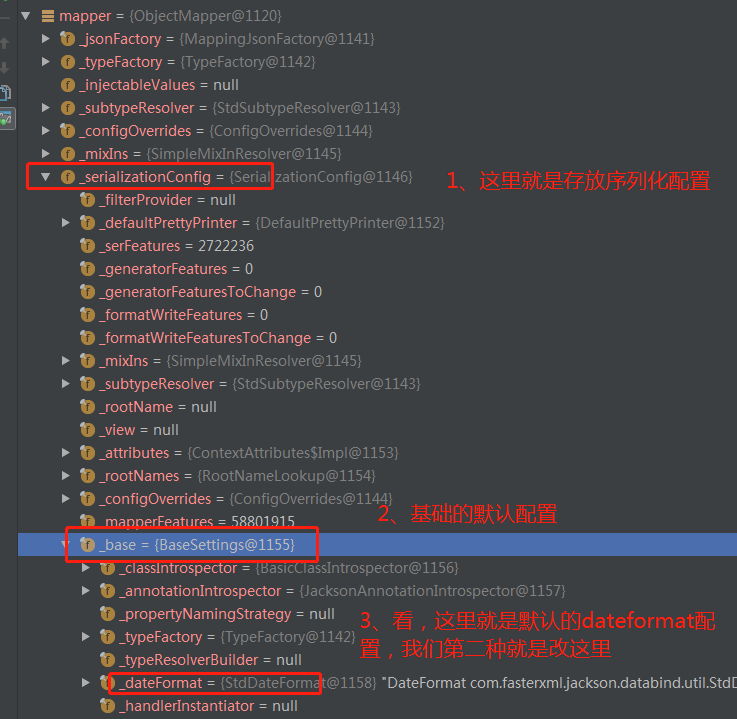
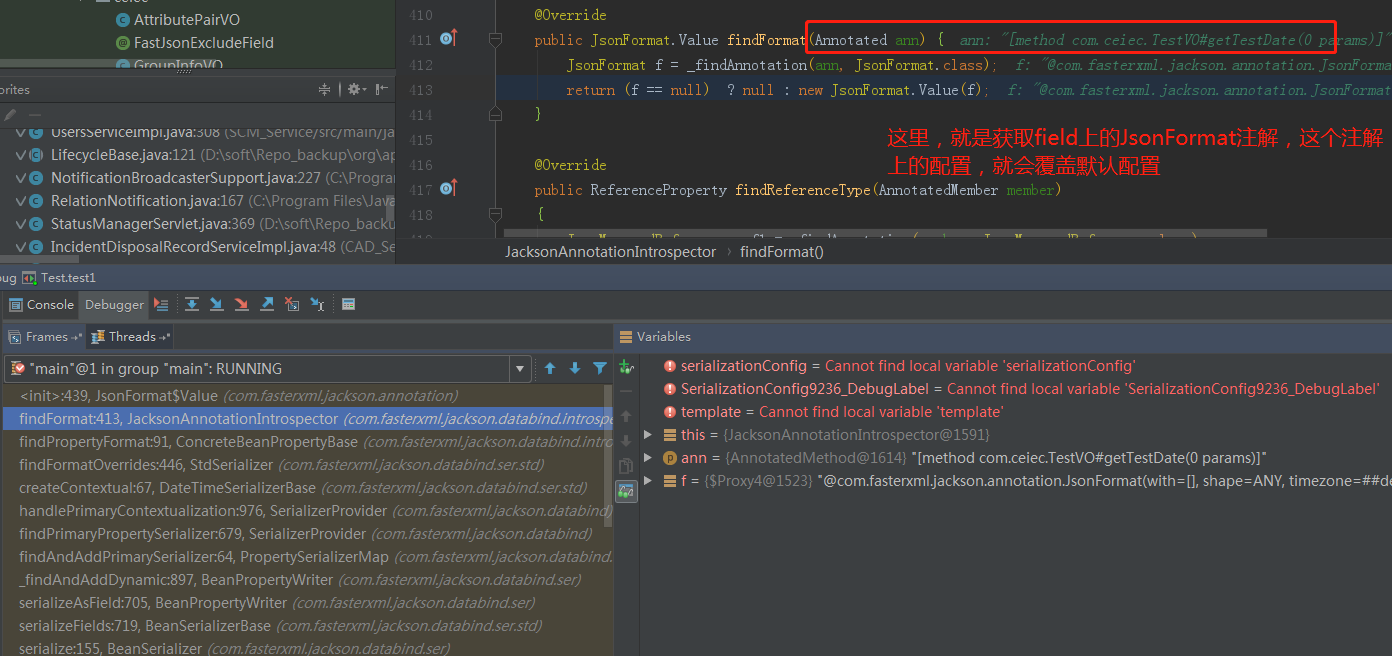
这里没有去分析源码,简单说一下,在序列化的时候,会有一个序列化配置;这个配置由两部分组成:默认配置+这个类自定义的配置。 自定义配置会覆盖默认配置。
我们的第二种方式,就是修改了默认配置;第三种方式,就是使用自定义配置覆盖默认配置。
jackson还挺重要,尤其是spring cloud全家桶,feign也用了这个,restTemplate也用了,还有Spring MVC 里的httpmessageConverter有兴趣的同学,去看下面这个地方就可以了。
如果对JsonFormat的处理感兴趣,可以看下面的地方:
com.fasterxml.jackson.annotation.JsonFormat.Value#Value(com.fasterxml.jackson.annotation.JsonFormat) (打个断点在这里,然后跑个test就到这里了)
总结
差点忘了,针对rabbitmq template的问题,最终我们的解决方案就是:
@Bean

    public RabbitTemplate rabbitTemplate(ConnectionFactory connectionFactory) {

        RabbitTemplate template = new RabbitTemplate(connectionFactory);

        ObjectMapper mapper = new ObjectMapper();

        SerializationConfig oldSerializationConfig = mapper.getSerializationConfig();

        /**

         * 新的序列化配置,要配置时区

         */

        String timeZone = environment.getProperty(CadModuleConstants.SPRING_JACKSON_TIME_ZONE);

        SerializationConfig newSerializationConfig = oldSerializationConfig.with(TimeZone.getTimeZone(timeZone));

        mapper.setConfig(newSerializationConfig);

        Jackson2JsonMessageConverter messageConverter = new Jackson2JsonMessageConverter(mapper);

        template.setMessageConverter(messageConverter);

        template.setMandatory(true);

       	...设置callback啥的

        return template;

    }
以上相关源码在:
https://gitee.com/ckl111/all-simple-demo-in-work/tree/master/jackson-demo
rabbitmq template发送的消息中,Date类型字段比当前时间晚了8小时的更多相关文章
- ORACLE中date类型字段的处理
(1)在英文版本的ORACLE中默认日期格式为'DD-MON-YY',例如'01-JAN-98' 在汉化的中文版本中ORACLE默认日期格式为'日-月-年',例如'21-8月-2003'或'21-8月 ...
- 关于Java读取mysql中date类型字段默认值'0000-00-00'的问题
今天在做项目过程中,查询一个表中数据时总碰到这个问题: java.sql.SQLException:Value '0000-00-00' can not be represented as ...
- ORACLE插入DATE类型字段
1 怎样在ORACLE中输入DATE类型的字段 insert into table_name (date_column) values(to_date('2006-06-04','yyyy-mm-dd ...
- 【java】jackson 中JsonFormat date类型字段的使用
为了便于date类型字段的序列化和反序列化,需要在数据结构的date类型的字段上用JsonFormat注解进行注解具体格式如下 @JsonFormat(pattern = "yyyy-MM- ...
- jackson 中JsonFormat date类型字段的使用
为了便于date类型字段的序列化和反序列化,需要在数据结构的date类型的字段上用JsonFormat注解进行注解具体格式如下 @JsonFormat(pattern = "yyyy-MM- ...
- SpringMVC返回Json,自定义Json中Date类型格式
http://www.cnblogs.com/jsczljh/p/3654636.html —————————————————————————————————————————————————————— ...
- C# WebAPI中DateTime类型字段在使用微软自带的方法转json格式后默认含T的解决办法
原文:C# WebAPI中DateTime类型字段在使用微软自带的方法转json格式后默认含T的解决办法 本人新手,在.Net中写WebAPI的时候,当接口返回的json数据含有日期时间类型的字段时, ...
- 解决Flink输出日志中时间比当前时间晚8个小时的问题
Flink安装在CentOS7上,默认时间是UTC时间,查看Flink日志,发现输出时间比当前时间晚8个小时. 通过如下命令,调整成北京时间 cp /usr/share/zoneinfo/Asia/S ...
- rabbitmq 不发送ack消息如何处理:rabbitmq可靠发送的自动重试机制
转载地址:http://www.jianshu.com/p/6579e48d18ae http://www.jianshu.com/p/4112d78a8753 接这篇 在上文中,主要实现了可靠模式的 ...
随机推荐
- 在 Linux Mint 19 上安装 zsh 和设置小键盘一步到位
在 Linux Mint 19 上安装 zsh 和设置小键盘 安装 zsh 并设置 zsh 为默认 shell 安装 sudo apt install zsh 设置 zsh 为默认 shell,注意没 ...
- 单颗GPU计算能力太多、太贵?阿里云发布云上首个轻量级GPU实例
摘要: 阿里云发布了国内首个公共云上的轻量级GPU异构计算产品——VGN5i实例,该实例打破了传统直通模式的局限,可以提供比单颗物理GPU更细粒度的服务,从而让客户以更低成本.更高弹性开展业务. 在硅 ...
- 基于opencv的RandomForest随机森林
2.OpenCV函数使用 OpenCV提供了随机森林的相关类和函数.具体使用方法如下: (1)首先利用CvRTParams定义自己的参数,其格式如下 CvRTParams::CvRTParams(in ...
- Spring Boot错误——SpringBoot 2.0 报错: Failed to configure a DataSource: 'url' attribute is not specified and no embedded datasource could be configured.
背景 使用Spring Cloud搭建微服务,服务的注册与发现(Eureka)项目启动时报错,错误如下 *************************** APPLICATION FAILED T ...
- 【C++】STL :栈
c++stack(堆栈)是一个容器的改编,它实现了一个先进后出的数据结构(FILO) 使用该容器时需要包含#include<stack>头文件: 定义stack对象的示例代码如下: sta ...
- Maven启用代理访问
如果你的公司正在建立一个防火墙,并使用HTTP代理服务器来阻止用户直接连接到互联网.如果您使用代理,Maven将无法下载任何依赖. 为了使它工作,你必须声明在 Maven 的配置文件中设置代理服务器: ...
- HZOJ visit
对于前30%的数据,可以考虑dp,f[i][j][k]表示时间为i,在i,j位置的方案数,枚举转移即可.要注意的是可以走到矩阵外. 对于另外30%数据,考虑推一下式子,设向右走y步,左z,上s,下x. ...
- Open Source GIS and Freeware GIS Applications
Open Source GIS and Freeware GIS Applications An open source application by definition is software ...
- 13 Free GIS Software Options: Map the World in Open Source
13 Free GIS Software Options: Map the World in Open Source A LIST OF FREE OPEN SOURCE MAPPING SOFT ...
- tinyhttpd简介
一:简介: tinyhttpd是由J. DavidBlackstone在1999年编写的,实现了一个很简单的web服务器.支持GET和POST方法,总代码量也就在500行左右,可以用来学习HTTP协议 ...