
c#数字图像处理(九)图像镜像
        private void mirror_Click(object sender, EventArgs e)

        {

            if (curBitmap!=null)

            {

                mirror mirForm = new mirror();

                if (mirForm.ShowDialog()==DialogResult.OK)

                {

                    Rectangle rect = new Rectangle(, , curBitmap.Width, curBitmap.Height);

                    BitmapData bmpData = curBitmap.LockBits(rect, ImageLockMode.ReadWrite, curBitmap.PixelFormat);

                    IntPtr ptr = bmpData.Scan0;

                    int bytes = ;

                    ////判断是灰度色图像还是彩色图像,给相应的大小

                    if (curBitmap.PixelFormat==PixelFormat.Format8bppIndexed)

                    {

                        bytes= curBitmap.Width * curBitmap.Height;

                    }

                    else if (curBitmap.PixelFormat == PixelFormat.Format24bppRgb)

                    {

                        bytes = curBitmap.Width * curBitmap.Height * ;

                    }

                    byte[] pixelValues = new byte[bytes];

                    Marshal.Copy(ptr, pixelValues, , bytes);

                    //水平中轴

                    int halfWidth = curBitmap.Width / ;

                    //垂直中轴

                    int halfHeight = curBitmap.Height / ;

                    byte temp;

                    byte temp1;

                    byte temp2;

                    byte temp3;

                    if (curBitmap.PixelFormat == PixelFormat.Format8bppIndexed)

                    {

                        if (mirForm.GetMirror)

                        {

                            for (int i = ; i < curBitmap.Height; i++)

                                for (int j = ; j < halfWidth; j++)

                                {

                                    temp = pixelValues[i * curBitmap.Width + j];

                                    pixelValues[i * curBitmap.Width + j] = pixelValues[(i + ) * curBitmap.Width - j - ];

                                    pixelValues[(i + ) * curBitmap.Width - j - ] = temp;

                                }

                        }

                        else

                        {

                            for (int j = ; j < curBitmap.Width; j++)

                            {

                                for (int i = ; i < halfHeight; i++)

                                {

                                    temp = pixelValues[i * curBitmap.Width + j];

                                    pixelValues[i * curBitmap.Width + j] = pixelValues[(curBitmap.Height - i - ) * curBitmap.Width + j];

                                    pixelValues[(curBitmap.Height - i - ) * curBitmap.Width + j] = temp;

                                }

                            }

                        }

                    }

                    else if (curBitmap.PixelFormat == PixelFormat.Format24bppRgb)

                    {

                        if (mirForm.GetMirror)

                        {

                            //水平镜像处理

                            for (int i = ; i < curBitmap.Height; i++)

                            {

                                //每个像素的三个字节在水平镜像时顺序不能变,所以这个方法不能用

                                //for (int j = 0; j < halfWidth; j++)

                                //{

                                //    //以水平中轴线为对称轴,两边像素值交换

                                //    temp = pixelValues[i * curBitmap.Width * 3 + j * 3];

                                //    pixelValues[i * curBitmap.Width * 3 + j * 3] = pixelValues[(i + 1) * curBitmap.Width * 3 - 1 - j * 3];

                                //    pixelValues[(i + 1) * curBitmap.Width * 3 - 1 - j * 3] = temp;

                                //}

                                for (int j = ; j < halfWidth; j++)

                                {//每三个字节组成一个像素,顺序不能乱

                                    temp = pixelValues[ + i * curBitmap.Width *  + j * ];

                                    temp1 = pixelValues[ + i * curBitmap.Width *  + j * ];

                                    temp2 = pixelValues[ + i * curBitmap.Width *  + j * ];

                                    pixelValues[ + i * curBitmap.Width *  + j * ] = pixelValues[ + (i + ) * curBitmap.Width *  - (j + ) * ];

                                    pixelValues[ + i * curBitmap.Width *  + j * ] = pixelValues[ + (i + ) * curBitmap.Width *  - (j + ) * ];

                                    pixelValues[ + i * curBitmap.Width *  + j * ] = pixelValues[ + (i + ) * curBitmap.Width *  - (j + ) * ];

                                    pixelValues[ + (i + ) * curBitmap.Width *  - (j + ) * ] = temp;

                                    pixelValues[ + (i + ) * curBitmap.Width *  - (j + ) * ] = temp1;

                                    pixelValues[ + (i + ) * curBitmap.Width *  - (j + ) * ] = temp2;

                                }

                            }

                        }

                        else

                        {

                            //垂直镜像处理

                            for (int i = ; i < curBitmap.Width * ; i++)

                            {

                                for (int j = ; j < halfHeight; j++)

                                {

                                    //以垂直中轴线为对称轴。两边像素值互换

                                    temp = pixelValues[j * curBitmap.Width *  + i];

                                    pixelValues[j * curBitmap.Width *  + i] = pixelValues[(curBitmap.Height - j - ) * curBitmap.Width *  + i];

                                    pixelValues[(curBitmap.Height - j - ) * curBitmap.Width *  + i] = temp;

                                }

                            }

                        }

                    }

                        Marshal.Copy(pixelValues, , ptr, bytes);

                    curBitmap.UnlockBits(bmpData);

                }

                Invalidate();

            }

        }
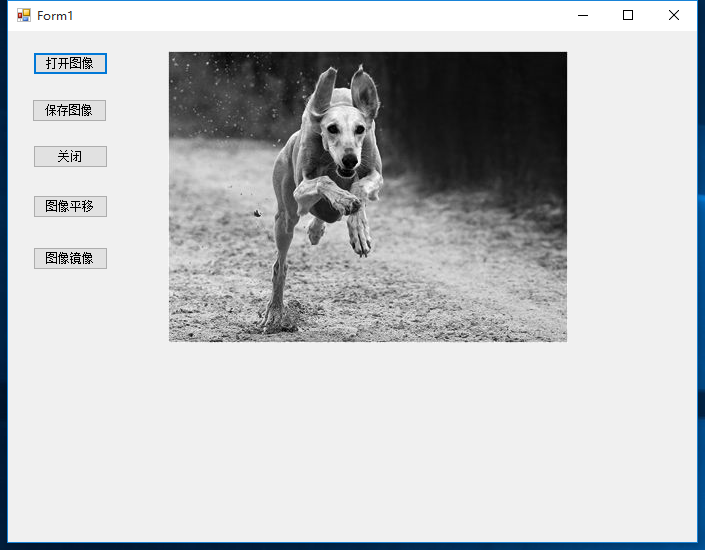
原图:
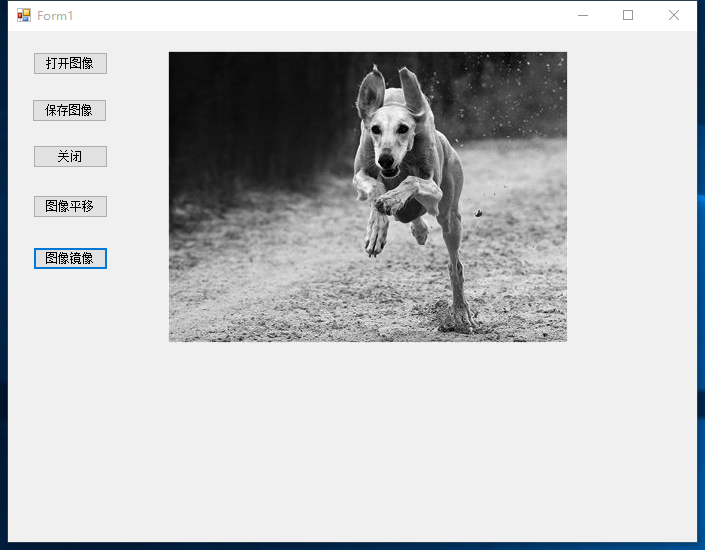
水平镜像:
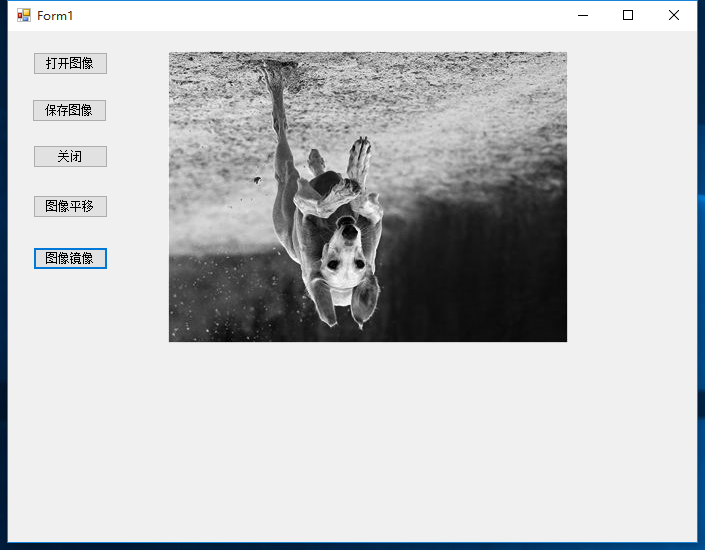
垂直镜像:
c#数字图像处理(九)图像镜像的更多相关文章
- Win8 Metro(C#) 数字图像处理--1 图像打开,保存
原文:Win8 Metro(C#) 数字图像处理--1 图像打开,保存 作为本专栏的第一篇,必不可少的需要介绍一下图像的打开与保存,一便大家后面DEMO的制作. Win8Metro编程中,图像相关 ...
- Win8 Metro(C#)数字图像处理--4图像颜色空间描述
原文:Win8 Metro(C#)数字图像处理--4图像颜色空间描述 图像颜色空间是图像颜色集合的数学表示,本小节将针对几种常见颜色空间做个简单介绍. /// <summary> / ...
- 数字图像处理,图像锐化算法的C++实现
http://blog.csdn.net/ebowtang/article/details/38961399 之前一段我们提到的算法都是和平滑有关, 经过平滑算法之后, 图像锐度降低, 降低到一定程度 ...
- 数字图像处理:图像的灰度变换(Matlab实现)
(1)线性变换:通过建立灰度映射来调整源图像的灰度. k>1增强图像的对比度:k=1调节图像亮度,通过改变d值达到调节亮度目的:0 i = imread('theatre.jpg');i = i ...
- 数字图像处理界标准图像 Lena 后面的故事
熟悉图像处理或者压缩的工程师.研究人员和学生,经常在他们的实验或者项目任务里使用"Lenna"或者"Lena"的图像.Lenna 图像已经成为被广泛使用的测试图 ...
- 【数字图像处理】六.MFC空间几何变换之图像平移、镜像、旋转、缩放具体解释
本文主要讲述基于VC++6.0 MFC图像处理的应用知识,主要结合自己大三所学课程<数字图像处理>及课件进行解说,主要通过MFC单文档视图实现显示BMP图片空间几何变换.包含图像平移.图形 ...
- Win8Metro(C#)数字图像处理--2.19图像水平镜像
原文:Win8Metro(C#)数字图像处理--2.19图像水平镜像 [函数名称] 图像水平镜像函数MirrorXProcess(WriteableBitmap src) [函数代码] ...
- Win8Metro(C#)数字图像处理--2.20图像垂直镜像
原文:Win8Metro(C#)数字图像处理--2.20图像垂直镜像 [函数名称] 图像垂直镜像函数MirrorYProcess(WriteableBitmap src) [函数代码] ...
- 【数字图像处理】五.MFC图像点运算之灰度线性变化、灰度非线性变化、阈值化和均衡化处理具体解释
本文主要讲述基于VC++6.0 MFC图像处理的应用知识,主要结合自己大三所学课程<数字图像处理>及课件进行解说.主要通过MFC单文档视图实现显示BMP图片点运算处理.包含图像灰度线性变换 ...
- Win8 Metro(C#)数字图像处理--3.2图像方差计算
原文:Win8 Metro(C#)数字图像处理--3.2图像方差计算 /// <summary> /// /// </summary>Variance computing. / ...
随机推荐
- P4556 [Vani有约会]雨天的尾巴 (线段树合并)
P4556 [Vani有约会]雨天的尾巴 题意: 首先村落里的一共有n座房屋,并形成一个树状结构.然后救济粮分m次发放,每次选择两个房屋(x,y),然后对于x到y的路径上(含x和y)每座房子里发放一袋 ...
- python 找出字符串中出现次数最多的字母
# 请大家找出s=”aabbccddxxxxffff”中 出现次数最多的字母 # 第一种方法,字典方式: s="aabbccddxxxxffff" count ={} for i ...
- JMeter数据库测试计划
在系统上安装数据库服务器之后. 按着这些次序: 创建名为testdb的数据库. 创建表 - tb_user. 将记录插入到tb_user表中. 下图显示了创建的数据库及其记录. 注意:您需要将相应的J ...
- Java面向对象程序设计第7章1-8
Java面向对象程序设计第7章1-8 1."程序中凡是可能出现异常的地方必须进行捕获或拋出",这句话对吗? 不对. 异常分两类,runtime异常和非runtime异常. runt ...
- 14.python类型总结,集合,字符串格式化
借鉴:https://www.cnblogs.com/linhaifeng/articles/5935801.html https://www.cnblogs.com/wupeiqi/article ...
- Java8 Date API
一 .Clock 时钟 Clock类提供了访问当前日期和时间的方法,Clock是时区敏感的,可以用来取代 System.currentTimeMillis() 来获取当前的微秒数.某一个特定的时间点也 ...
- 【ZooKeeper系列】3.ZooKeeper源码环境搭建
前文阅读: [ZooKeeper系列]1.ZooKeeper单机版.伪集群和集群环境搭建 [ZooKeeper系列]2.用Java实现ZooKeeper API的调用 在系列的前两篇文章中,介绍了Zo ...
- saltstack操作
使用分组 修改minon的ID,做一个标识 [root@node2 ~]# vim /etc/salt/minionmaster: 172.25.254.130 id: web1 #node2[roo ...
- EasyMock.replay()有什么用
现在很多项目都使用EasyMock来作为单元测试框架. EasyMock一个方法,基本上是三步:EasyMock.expect().EasyMock.replay().EasyMock.verify( ...
- 小白进阶之路-python格式化输出
1.不使用格式化前:传值时比较麻烦而且不精确. 2.格式化输出后,%代表先占个位,s代表字符串,%s代表这里之后会传一个字符串类型的值,%s其实可以接受任意类型的值:%d传入的值要求必须是数字. %s ...