
springboot web项目创建及自动配置分析(thymeleaf+flyway)
@
springboot 创建web项目只需要引入对应的web-starter,自己定义好moudel层,再采用相应的模版引擎技术(view层)就可以将数据渲染到模版中,从而生成一个单体的web应用!那这些视图是如何解析的呢?最常用的模版引擎语法有哪些呢?
新建一个空的项目,我们选择对应的web依赖,工具相关我三个都勾选上,数据库驱动选mysql驱动!具体见我的另一篇博客:
springboot集成mybatis和druid监控,此处不再赘述.
创建好项目后,我们来分析下源码
源码分析
首先我们都知道,springboot初始化的项目下面都是没有webapp这样一个模块的,那我们的web相关的一些资源,该放在哪里呢?为何对应的放置就可以生效呢?
我们尝试从源码中寻求答案
SpringMVC 整个 SSM 都是基于它的,所以我们第一步应该去研究 SpringBoot 关于Mvc的自动配置!
- 1、所有mvc相关的配置都在 WebMvcAutoConfiguration (视图解析器、静态资源过滤!)
- 2、addResourceHandlers 静态资源处理方法
@Override

public void addResourceHandlers(ResourceHandlerRegistry registry) {

//禁用默认规则的一个配置,如果你手动的添加了资源映射路径的配置,那么这些自动配置就会直接失效!

if (!this.resourceProperties.isAddMappings()) {

   logger.debug("Default resource handling disabled");

   return;

}

// 缓存控制

Duration cachePeriod = this.resourceProperties.getCache().getPeriod();

CacheControl cacheControl = this.resourceProperties.getCache().getCachecontrol().toHttpCacheControl();

// 分析源代码,需要掌握看对象的方法调用!

// localhost:8080/webjars/jquery.js

// 判断是否存在一个映射路径 /webjars/**,

// addResourceHandler 处理逻辑 /webjars/a.js

// addResourceLocations 处理资源的地址 classpath:/META-INF/resources/webjars/a.js

if (!registry.hasMappingForPattern("/webjars/**")) {

    customizeResourceHandlerRegistration(registry.addResourceHandler("/webjars/**")

    .addResourceLocations("classpath:/META-INF/resources/webjars/")

    .setCachePeriod(getSeconds(cachePeriod)).setCacheControl(cacheControl));

}

// 获取静态资源路径!

String staticPathPattern = this.mvcProperties.getStaticPathPattern(); // localhost:8080/

// 如果访问映射的路径是 staticPathPattern = "/**";

// this.resourceProperties.getStaticLocations())

if (!registry.hasMappingForPattern(staticPathPattern)) {

    customizeResourceHandlerRegistration(registry.addResourceHandler("/**")

    .addResourceLocations(getResourceLocations(this.resourceProperties.getStaticLocations()))

    .setCachePeriod(getSeconds(cachePeriod)).setCacheControl(cacheControl)); }

}

// 对应的资源加载先后顺序 优先级:META-INF > resources > static > public

// 对于怎么验证这个优先级,可以建对于的文件加,放些静态资源,页面直接访问测试

private static final String[] CLASSPATH_RESOURCE_LOCATIONS =

{

     "classpath:/META-INF/resources/",

     "classpath:/resources/",

     "classpath:/static/",

     "classpath:/public/"

};
我们一句句的解读,就可以读懂源码!可以看到这段源码中就这个webjars我们不怎么熟悉
webjars
什么是 webjars?
webjars是一个前端依赖管理工具,集成了前端主流的一些框架,使得我们只需引入对应的jar包就可以在项目中使用它!
接下来,我们引入jquery的依赖:
<dependency>

    <groupId>org.webjars</groupId>

    <artifactId>jquery</artifactId>

    <version>3.4.1</version>

</dependency>
看下生成的依赖:
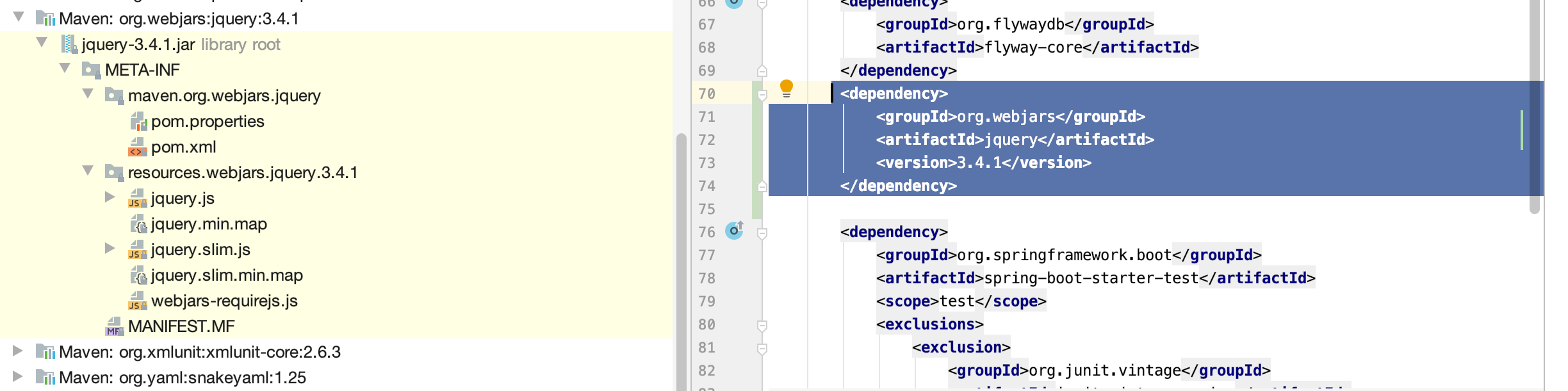
我们看下是否可以直接通过路径访问:http://localhost:8080/webjars/jquery/3.4.1/jquery.js
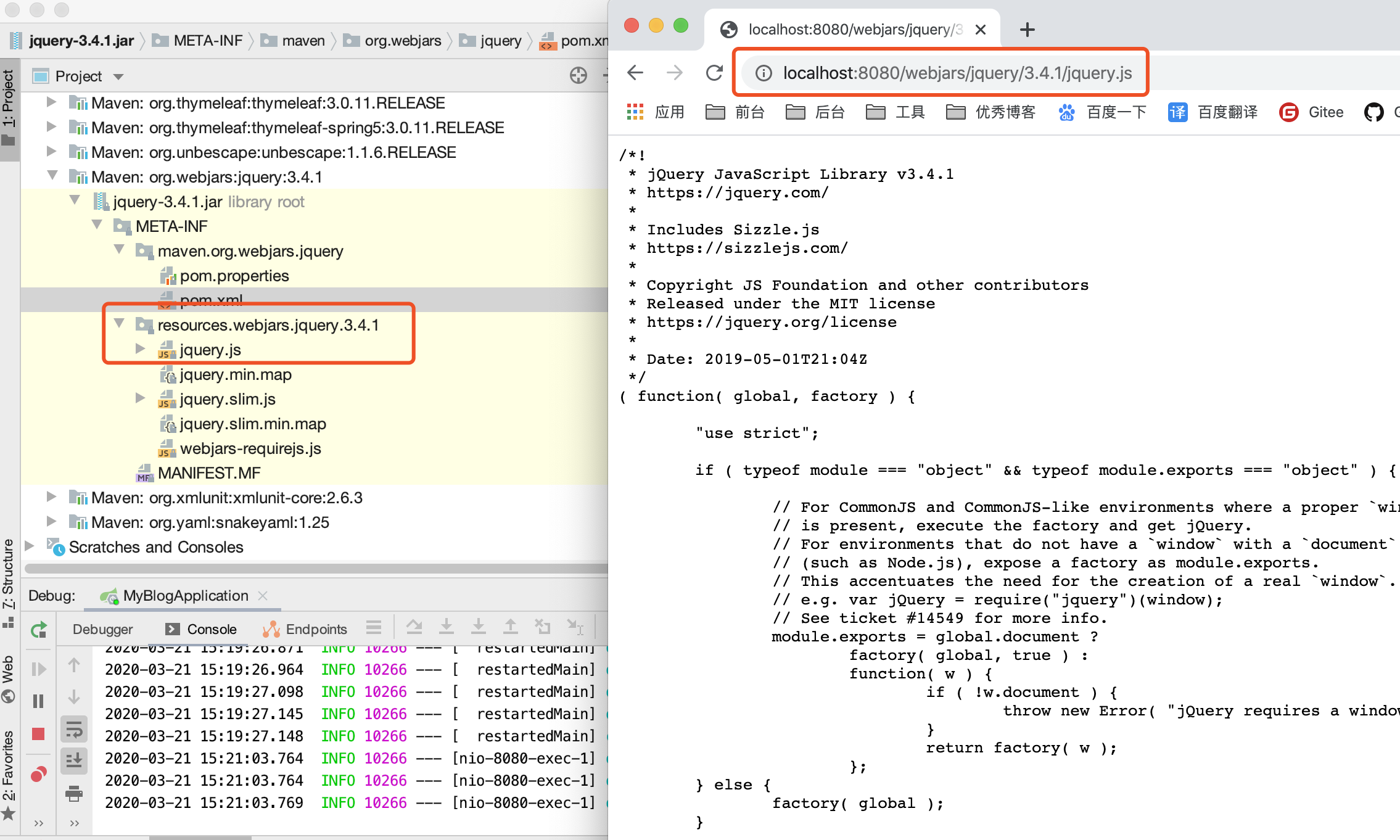
很明显,这样是可以直接访问的。那这些可以常用的框架等静态资源我们可以这样引入,我们自定义的东西例如css 图片等该如何使用呢?
我常用的规则推荐如下:
private static final String[] CLASSPATH_RESOURCE_LOCATIONS =

{

"classpath:/META-INF/resources/", // 在 starter 中使用! SWAGGER-UI

"classpath:/resources/", // 文件资源

"classpath:/static/", // 静态资源

"classpath:/public/" // 公共的,图标......

};
当然我们也可以更改spring的默认资源路径配置:
# 一旦自己配置了  那么默认的就会失效

spring.resources.static-locations=xxx
thymeleaf
- 1.官网:https://www.thymeleaf.org/documentation.html
- 2.github:https://github.com/thymeleaf/thymeleaf/blob/3.0-master
引入依赖,在spring中采用jar一般都是使用对应的starter
<dependency>

    <groupId>org.springframework.boot</groupId>

    <artifactId>spring-boot-starter-thymeleaf</artifactId>

</dependency>
任何starter都有一个xxxProperties我们去其依赖下看看源码:
@ConfigurationProperties(prefix = "spring.thymeleaf") public class ThymeleafProperties {

private static final Charset DEFAULT_ENCODING = StandardCharsets.UTF_8;

    public static final String DEFAULT_PREFIX = "classpath:/templates/";

    public static final String DEFAULT_SUFFIX = ".html";

    ...省略

}
可以看出thymeleaf的默认配置路径是templates下,默认文件格式是.html的
我们要改只需要spring.thymeleaf.prefix=xxx,当然更改了默认的便不会生效了。
测试thymeleaf
templates新增一个页面test.html
<!DOCTYPE html>

<html lang="en">

<head>

    <meta charset="UTF-8">

    <title>Title</title>

</head>

<body>

<p>hello,thymeleaf!</p>

</body>

</html>
controller中新增一个接口:
package com.blog.controller;

import org.springframework.stereotype.Controller;

import org.springframework.web.bind.annotation.RequestMapping;

@Controller

public class IndexController {

    @GetMapping(value = "/test")

    public String test(){

        return "test";

    }

}
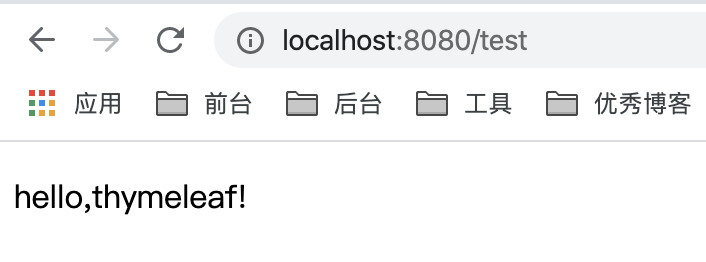
启动项目可见:
thymeleaf语法
了解了基本的页面渲染规则后,我们来看下thymeleaf的语法:
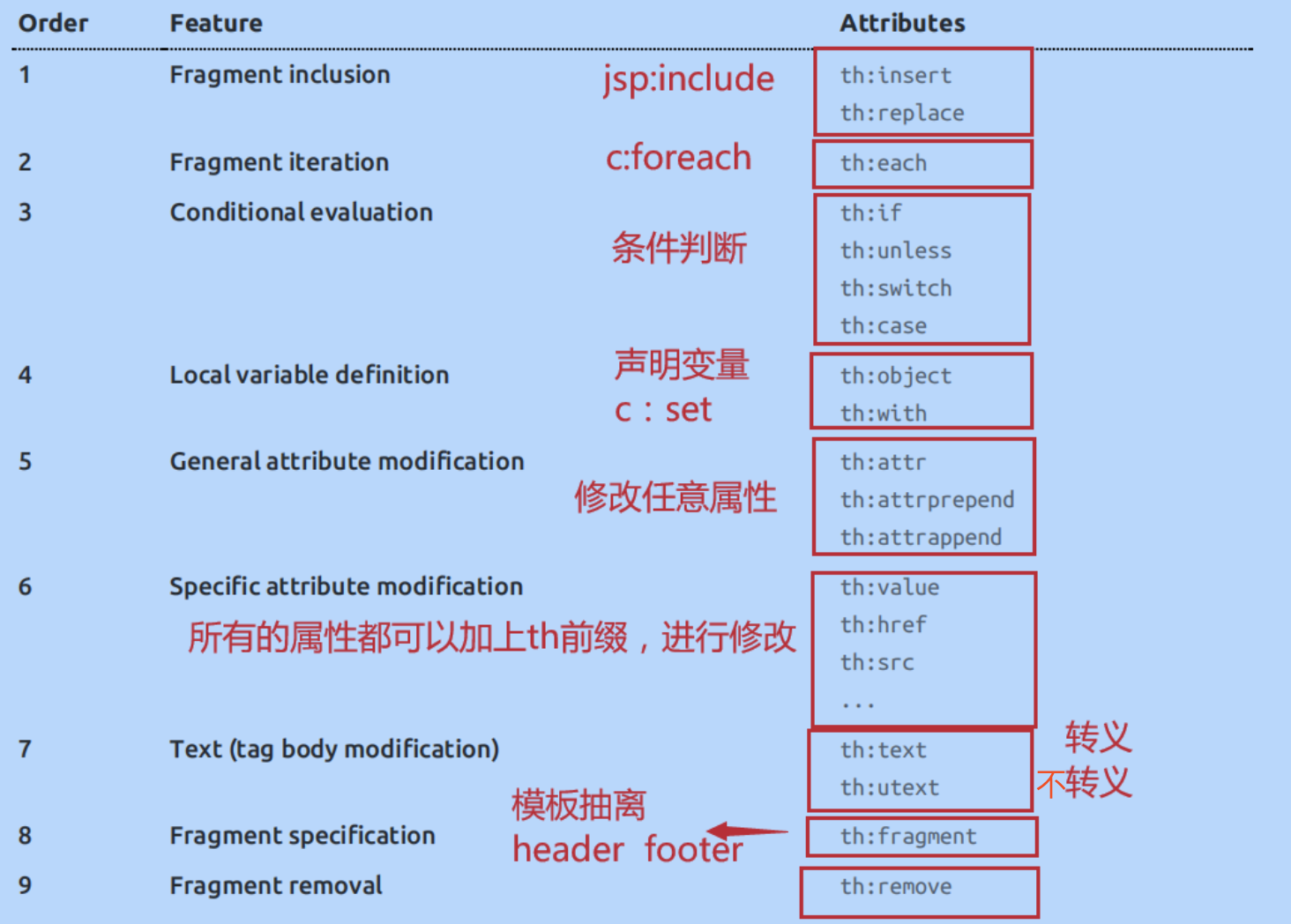
我们还可以编写哪些表达式呢?
Variable Expressions: ${...} 获取一些基本的变量值! OGNL;
- 对象的属性,调用方法
- 使用内置的基本对象
${#ctx.locale}

${param.foo}

${session.foo}

${application.foo}

${#request.getAttribute('foo')}

${#servletContext.contextPath}
- 工具对象
${#messages.msg('msgKey')}

${#uris.escapePath(uri)}

${#conversions.convert(object, 'java.util.TimeZone')}

${#dates.format(date, 'dd/MMM/yyyy HH:mm')}

${#calendars.format(cal)}

${#numbers.formatInteger(num,3)}

${#strings.toString(obj)}

${#arrays.toArray(object)}

.....
4.其他
Selection Variable Expressions: *{...} 选择表达式,和 ${} 是一样的;

 Message Expressions: #{...} 国际化内容获取!

Link URL Expressions: @{...} URL表达式;th:href=“@{/login}”

Fragment Expressions: ~{...} 组件化表达式;

Literals (字面量);

Text literals: 'one text' , 'Another one!' ,... (字符串)

Number literals: 0 , 34 , 3.0 , 12.3 ,...

Boolean literals: true , false

Null literal: null

Literal tokens: one , sometext , main ,...

Text operations: (文本操作)

String concatenation: +

Literal substitutions: |The name is ${name}| Arithmetic operations: (数学运算)

Binary operators: + , - , * , / , %

Minus sign (unary operator): -

Boolean operations: (布尔运算)

Binary operators: and , or

Boolean negation (unary operator): ! , not

Comparisons and equality: (比较运算)

Comparators: > , < , >= , <= ( gt , lt , ge , le )

Equality operators: == , != ( eq , ne )

Conditional operators: (条件运算符)

If-then: (if) ? (then)

If-then-else: (if) ? (then) : (else)

Default: (value) ?: (defaultvalue)

Special tokens:

Page 17 of 104**No-Operation:** _
springmvc 启动配置原理
我们来看官方文档,虽然都是英文但是不要怂,慢慢的翻的多了也就认识了!
地址:官网
找到对应的Spring MVC Auto-configuration
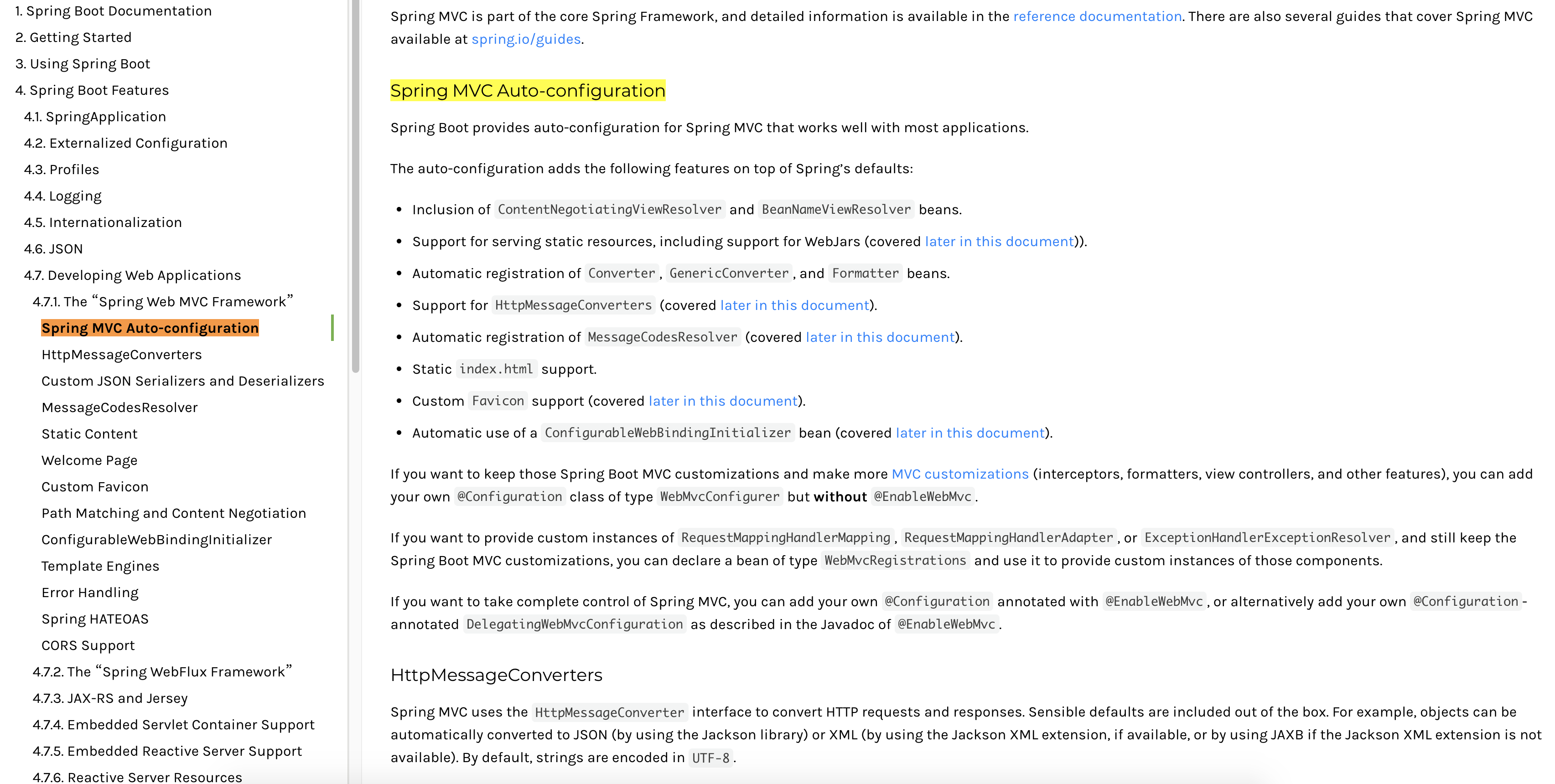
我们来解读下:
Spring MVC Auto-configuration

// SpringBoot为SpringMVC 提供提供了自动配置,他可以很多好的工作于大多数的应用!

Spring Boot provides auto-configuration for Spring MVC that works well with most applications.

// 自动配置在Spring默认配置的基础上添加了以下功能:

The auto-configuration adds the following features on top of Spring’s defaults: // 包含视图解析器

Inclusion of ContentNegotiatingViewResolver and BeanNameViewResolver beans.

// 支持静态资源文件的路径吗,包含webjar的支持

Support for serving static resources, including support for WebJars (covered later in this document)).

// 自动注册了转换器

// 转换器 网页提交的前端对象,到后台自动封装为具体的对象;"1" 自动转换为 数字 1; // 格式化器Formatter 【2020-03-18 后台可以自动封装为Date】

Automatic registration of Converter, GenericConverter, and Formatter beans. // 支持消息转换

// request、response,对象自动转换为 json对象

Support for HttpMessageConverters (covered later in this document).

// 定错代码生成规则

Automatic registration of MessageCodesResolver (covered later in this document). // 支持首页定制

Static index.html support.

// 支持自定义图标

Custom Favicon support (covered later in this document).

//配置web数据绑定

Automatic use of a ConfigurableWebBindingInitializer bean (covered later in this document).

// 如果你希望保持 Spring Boot MVC 一些功能,并且希望添加一些其他的 MVC配置(拦截器、格式化 器、视图控制器、或其他的配置),你可以添加自己的配置类 (类型为WebMvcConfigurer) 需要添加注 解@Configuration ,一定不能拥有注解@EnableWebMvc.

If you want to keep those Spring Boot MVC customizations and make more MVC customizations (interceptors, formatters, view controllers, and other features), you can add your own @Configuration class of type WebMvcConfigurer but without @EnableWebMvc.

//如果要提供RequestMappingHandlerMapping、RequestMappingHandlerAdapter或ExceptionHandlerExceptionResolver的自定义实例,并且仍然保留Spring Boot MVC自定义,则可以声明WebMVCregistration类型的bean,并使用它来提供这些组件的自定义实例

If you want to provide custom instances of RequestMappingHandlerMapping, RequestMappingHandlerAdapter, or ExceptionHandlerExceptionResolver, and still keep the Spring Boot MVC customizations, you can declare a bean of type WebMvcRegistrations and use it to provide custom instances of those components.

// 全面接管Spring MVC,自己配置配置类的时候加上 @EnableWebMvc即可!

If you want to take complete control of Spring MVC, you can add your own @Configuration annotated with @EnableWebMvc, or alternatively add your own @Configuration-annotated DelegatingWebMvcConfiguration as described in the Javadoc of @EnableWebMvc.
我们先分析下为什么加了@EnableWebMvc注解,视图解析器就不生效了,也就是说springmvc这一套东西都不好使了!这个很神奇
源码:
// 如果这个bean不存在,这个类才生效!~

@ConditionalOnMissingBean(WebMvcConfigurationSupport.class)

// @EnableWebMvc 源码

@Import(DelegatingWebMvcConfiguration.class)

public @interface EnableWebMvc

// 点进DelegatingWebMvcConfiguration继承了WebMvcConfigurationSupport

public class DelegatingWebMvcConfiguration extends WebMvcConfigurationSupport

//其实 @EnableWebMvc 就是导入了一个类 WebMvcConfigurationSupport ,但是源码中,一旦导入了 这个类,我们自动配置类就会全部失效!

//如果我们要扩展springmvc

//扩展mvc的方法:

//1、编写一个自己的config配置类

//2、实现一个接口WebMvcConfigurer

//3、重写里面的方法即可!

//@Configuration

//public class MyMvcConfig implements WebMvcConfigurer {

//}
试图解析器
ContentNegotiatingViewResolver
@Bean

@ConditionalOnBean(ViewResolver.class) // 自动配置了 ViewResolver,就是SpringMVC中的视图解析器

@ConditionalOnMissingBean(name = "viewResolver", value = ContentNegotiatingViewResolver.class)

public ContentNegotiatingViewResolver viewResolver(BeanFactory beanFactory) {

    ContentNegotiatingViewResolver resolver = new

ContentNegotiatingViewResolver();

resolver.setContentNegotiationManager(beanFactory.getBean(ContentNegotiationMan ager.class));

    // ContentNegotiatingViewResolver uses all the other view resolvers to ocate

    // a view so it should have a high precedence

    // ContentNegotiatingViewResolver 使用其他所有的视图解析器定位视图,因此它应该具有一 个高的优先级!

    resolver.setOrder(Ordered.HIGHEST_PRECEDENCE);

    return resolver;

}
解析视图名字
resolveViewName
@Override

@Nullable // 参数可以为空

public View resolveViewName(String viewName, Locale locale) throws Exception {

    RequestAttributes attrs = RequestContextHolder.getRequestAttributes();

    Assert.state(attrs instanceof ServletRequestAttributes, "No current ServletRequestAttributes");

    List<MediaType> requestedMediaTypes = getMediaTypes(((ServletRequestAttributes) attrs).getRequest());

    if (requestedMediaTypes != null) {

        // 获取所有候选的视图!

        List<View> candidateViews = getCandidateViews(viewName, locale,

        requestedMediaTypes); // 获取最好的视图

        View bestView = getBestView(candidateViews, requestedMediaTypes, attrs); // 返回最好的视图

        if (bestView != null) {

            return bestView;

        }

    }

    String mediaTypeInfo = logger.isDebugEnabled() && requestedMediaTypes != null ? " given " + requestedMediaTypes.toString() : "";

    if (this.useNotAcceptableStatusCode) { if (logger.isDebugEnabled()) {

        logger.debug("Using 406 NOT_ACCEPTABLE" + mediaTypeInfo); }

        return NOT_ACCEPTABLE_VIEW;

    }

    else {

        logger.debug("View remains unresolved" + mediaTypeInfo); return null;

    }

}
既然他是从容器中加载所有的视图解析器,那么我们可以猜想,我们自己写一个视图解析器,也可以被 扫描并加载!
// 自己写一个 bean

@Bean

public ViewResolver myViewResolver(){

    return new MyViewResolver();

}

private static class MyViewResolver implements ViewResolver{

    @Override

    public View resolveViewName(String viewName, Locale locale) throws Exception{

        return null;

    }

}
集成flyway插件
一直知道这么个东西,很好用单独写一篇博客又显得很浪费;那就跟着这篇博客一并说了吧
概念:
Flyway是独立于数据库的应用、管理并跟踪数据库变更的数据库版本管理工具,说白了就是Flyway可以像Git管理不同人的代码那样,管理不同人的sql脚本,从而做到数据库同步
食用方法
如果新建项目可以直接勾选上flyway插件依赖,我们这里没勾选就自己手动添加:
- 添加依赖
<dependency>

    <groupId>org.flywaydb</groupId>

    <artifactId>flyway-core</artifactId>

</dependency>
- 配置
# 默认不开启flyway

spring.flyway.enabled=false

spring.flyway.baseline-on-migrate=true

# flyway字符编码

spring.flyway.encoding=UTF-8

# flyway文件位置

spring.flyway.locations=classpath:db/migration

# ִV1__xxx.sql v开头默认执行一次

# R1__xxx 开头的脚本则会在项目启动时每次都会清除表后执行

spring.flyway.clean-disabled=false

# flyway 历史记录表

spring.flyway.table=flyway_schema_history
- 新建文件夹
如下图 resource 新增脚本文件(按图所示目录新建,不然无法生成)启动项目可以看到数据库中出现对应的flyway_schema_history表还有按脚本生成的表和数据,flyway_schema_history表中记录的脚本的变更历史
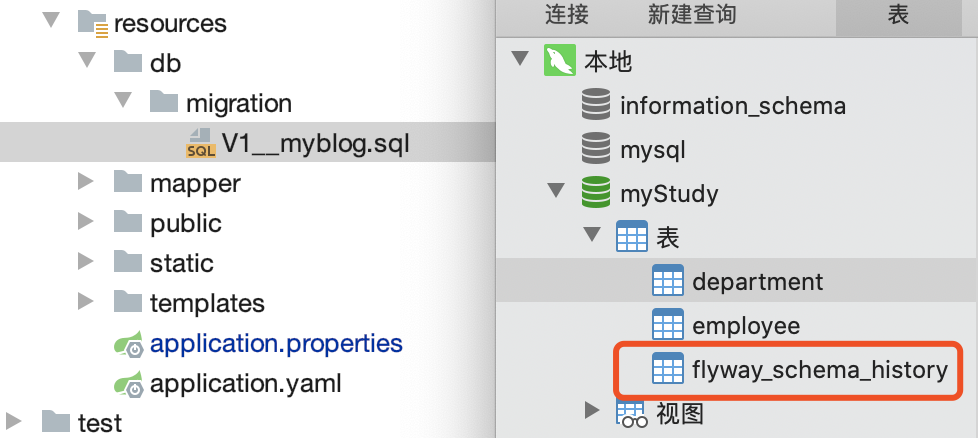
小结:至此我们完成SpringBoot web 项目的搭建,以及thymeleaf 模板的集成和数据库版本管理插件的集成。
springboot web项目创建及自动配置分析(thymeleaf+flyway)的更多相关文章
- mc01_IntelliJ IDEA安装与Java项目创建以及Tomcat配置
IntelliJ IDEA安装与激活 下载地址:http://www.jetbrains.com/idea/ 安装下一步下一步即可,关键是注册激活,该部分分两个步骤: 1. 配置windows hos ...
- springBoot高级:自动配置分析,事件监听,启动流程分析,监控,部署
知识点梳理 课堂讲义 02-SpringBoot自动配置-@Conditional使用 Condition是Spring4.0后引入的条件化配置接口,通过实现Condition接口可以完成有条件的加载 ...
- SpringBoot入门(四)——自动配置
本文来自网易云社区 SpringBoot之所以能够快速构建项目,得益于它的2个新特性,一个是起步依赖前面已经介绍过,另外一个则是自动配置.起步依赖用于降低项目依赖的复杂度,自动配置负责减少人工配置的工 ...
- SpringBoot Web项目中中如何使用Junit
Junit这种老技术,现在又拿出来说,不为别的,某种程度上来说,更是为了要说明它在项目中的重要性. 凭本人的感觉和经验来说,在项目中完全按标准都写Junit用例覆盖大部分业务代码的,应该不会超过一半. ...
- 接管SpringBoot对Activiti的数据源自动配置
SpringBoot的自动配置真的让人又爱又恨,但还是爱更多一点. SpringBoot想要帮我们自动配置好一切,但是有时候配置的却并不是我们需要的,甚至有时候会默默的坑我们. 我的项目是一个多数据源 ...
- SpringBoot | 4.1 SpringMVC的自动配置
目录 前言 1. SpringMVC框架的设计与流程 1.1 SpringMVC框架的示意图 1.2 SpringMVC的组件流程 2. *自动配置的源码分析 2.1 导入Web场景启动器 2.2 找 ...
- 如何在spring-boot web项目中启用swagger
swagger的三个项目及其作用 我们打开swagger的官网,会发现有三个swagger相关的项目,它们分别是 swagger-editor 作用是通过写代码,生成文档描述(一个json文件或其他格 ...
- Web —— java web 项目 Tomcat 的配置 与 第一个web 项目创建
目录: 0.前言 1.Tomcat的配置 2.第一个Web 项目 0.前言 刚刚开始接触web开发,了解的也不多,在这里记录一下我的第一个web项目启动的过程.网上教程很多,使用的java IDE 好 ...
- 第三篇 -- IDEA 创建Springboot Web项目并用Jmeter测试
上一节使用Django写的一个接口程序,这一节讲用IDEA配合Springboot创建web项目.一个是python,一个是java. 参考链接:http://www.uxys.com/html/Ja ...
随机推荐
- 某些时候 v-if 会导致 v-modal 内部数据获取不到 也watch不到,这个时候用v-show即可,另外提一下数组要整体赋值才有双向绑定
某些时候 v-if 会导致 v-modal 内部数据获取不到 也watch不到,这个时候用v-show即可,另外提一下数组要整体赋值才有双向绑定
- 升级cocoapods到指定版本
把cocoapods升级到1.7.4 sudo gem install -n /usr/local/bin cocoapods -v 1.7.4
- WPF 启动缓慢问题
Actually there's 2 main reasons that the default project type for WPF applications is x86. Intellitr ...
- Minio 集群扩容存储空间,配合nginx 负载反向代理后端minio 集群服务器,提升高可用性
环境:Centos 7 软件:minio,Etcd 需求:通过联盟两个集群实例,实现水平扩容存储空间问题: 服务器使用阿里云,一共4台服务器(官方说明最好4台服务器做分布式,测试节省服务器所以我们使 ...
- 编译Zookeeper3.4.6源代码并通过Intellij IDEA运行(2020年)
一.问题背景 生产环境Windows机器上用的Zookeeper 3.4.6,最近经常报如下异常: 经过搜索,看到一篇帖子可以解决:https://www.jianshu.com/p/73eec030 ...
- 搭建DVWA漏洞环境
DVWA是一款开源的渗透测试漏洞练习平台,其中内含XSS.SQL注入.文件上传.文件包含.CSRF和暴力破解等各个难度的测试环境. 搭建步骤: 1.在Windows系统中安装WAMP 下载地址:htt ...
- 从零开始学习R语言(四)——数据结构之“数组(Array)”
本文首发于知乎专栏:https://zhuanlan.zhihu.com/p/60141207 也同步更新于我的个人博客:https://www.cnblogs.com/nickwu/p/125677 ...
- 重定向 CORS 跨域请求
TL;DR 非简单请求不可重定向,包括第一个preflight请求和第二个真正的请求都不行. 简单请求可以重定向任意多次,但如需兼容多数浏览器,只可进行一次重定向. 中间服务器应当同样配置相关 COR ...
- JSFinder:一个在js文件中提取URL和子域名的脚本
JSFinder介绍 JSFinder是一款用作快速在网站的js文件中提取URL,子域名的脚本工具. 支持用法 简单爬取 深度爬取 批量指定URL/指定JS 其他参数 以往我们子域名多数使用爆破或DN ...
- POJ3461一道kmp题,字符串Hash也可
题目链接:http://icpc.njust.edu.cn/Problem/Pku/3461/ 代码如下: #include<cstdio> #include<string.h> ...