
html5 window.postMessage 传递数据的使用
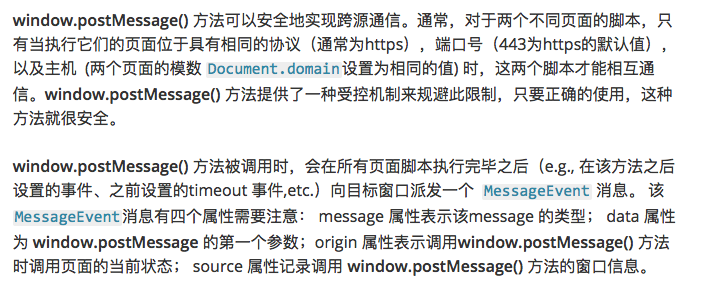
window.postMessage(图片介绍):
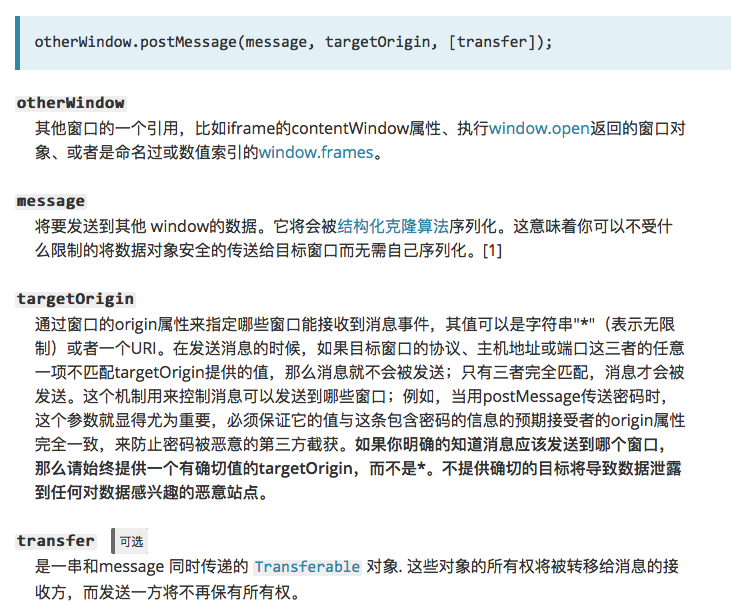
发送方(图片介绍):
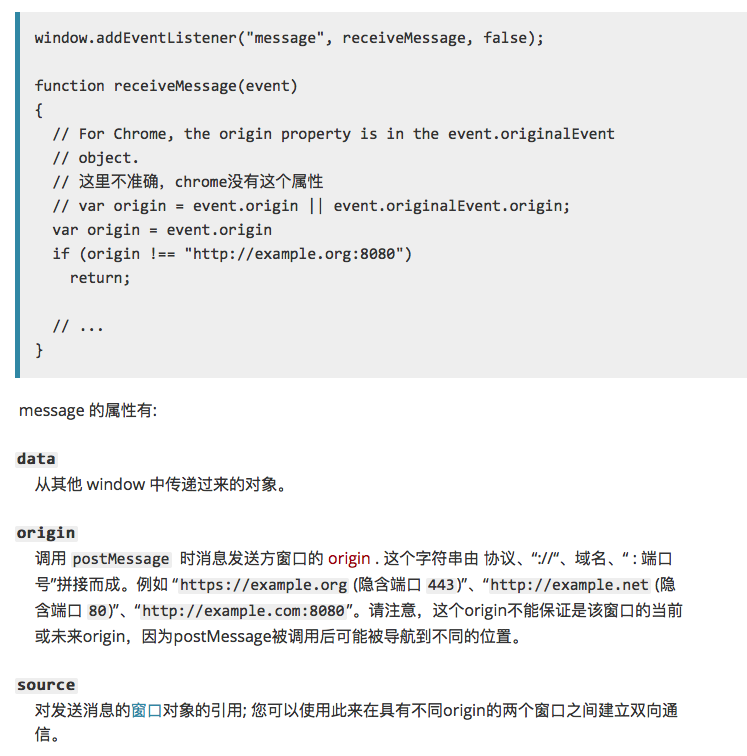
接收方(图片介绍):
个人测试一(iframe):
发送方,地址为:http://localhost:63342/HelloHBuilder/html2/postmessage.html?_ijt=cdirh338ca9a8sbhrjg5ti9odk ,页面内容如下:
<!DOCTYPE html>

<html lang="en">

<head>

    <meta charset="UTF-8">

    <title>postmessage</title>

</head>

<body>

<h1>iframe:</h1>

<iframe id="iframe" src="http://localhost:63342/HelloHBuilder/html2/onmessage.html" style="width: 100%; height: 300px;"></iframe>

 <input id="msg" type="text" placeholder="请输入要发送的消息">

 <button id="send">发送</button>

<script>

    window.onload =function() {

        document.getElementById('send').onclick = function() {

            var msg = document.getElementById('msg').value;

            var iframeWindow = document.getElementById('iframe').contentWindow;

            iframeWindow.postMessage(msg, "http://localhost:63342/HelloHBuilder/html2/onmessage.html");

        }

    }

</script>

</body>

</html>
接收方:地址为:http://localhost:63342/HelloHBuilder/html2/onmessage.html?_ijt=bis6jq7vbn70k1vfeoeqbbb83n,代码如下:
<!DOCTYPE html>

<html lang="en">

<head>

    <meta charset="UTF-8">

    <title>onmessage</title>

</head>

<body>

<div>

    <h2>target.html,以下是接收到的消息:</h2>

         <p id="msg"></p>

     </div>

    <script>

        window.onload = function() {

            if(window.addEventListener){

                window.addEventListener("message", handleMessage, false);

            }

            else{

                window.attachEvent("onmessage", handleMessage);

            }

            function handleMessage(event) {

                event = event || window.event;

                if (event.origin === 'http://localhost:63342') {

                    document.getElementById('msg').innerHTML = event.data;

                }

            }

        }

    </script>

</body>

</html>
实验结果,在页面发送message后,内嵌的iframe可以接收到参数。当发送方和接收方在浏览器的不同Tab标签页时,接收方无法接收message.
个人测试二(window.open):
<!DOCTYPE html>

<html lang="en">

<head>

    <meta charset="UTF-8">

    <title>postMessage</title>

</head>

<body>

<script>

    window.onload = function () {

        var popup = window.open('http://localhost:63342/HelloHBuilder/html2/postMessage(window_open)/onMessage.html?_ijt=s34sf7dgctrlurfdubbn9i3ibg');

        popup.onload = function () {  //必须要有onload

            // 假设当前页面没有改变location,这条语句会成功添加message到发送队列中去(targetOrigin设置对了)

            popup.postMessage("hello there!", "http://localhost:63342/HelloHBuilder/html2/postMessage(window_open)/onMessage.html?_ijt=s34sf7dgctrlurfdubbn9i3ibg");

            function receiveMessage(event) {

                if (event.origin !== "http://localhost:63342") {

                    return;

                }

                console.log(event.data);

            }

            window.addEventListener("message", receiveMessage, false);

        }

    };

</script>

</body>

</html>
<!DOCTYPE html>

<html lang="en">

<head>

    <meta charset="UTF-8">

    <title>on message</title>

</head>

<body>

<h1>this is a new tab, crate by <code>window.open()</code></h1>

<script>

    document.onreadystatechange = function(e) {

        if (document.readyState === 'complete') {

            window.addEventListener('message', receiveMessage, false);

        }

    };

    function receiveMessage(event) {

        if (event.origin !== "http://localhost:63342") {

            return;

        }

        console.log('message', event.data);

        console.log('origin', event.source);

        document.write(event.data);

        // 假设你已经验证了所受到信息的origin (任何时候你都应该这样做), 一个很方便的方式就是把enent.source

        // 作为回信的对象,并且把event.origin作为targetOrigin

        event.source.postMessage("hi there yourself!  the secret response " + "is: rheeeeet!", event.origin);

    }

</script>

</body>

</html>
注:子视窗必须要在父窗口的onload事件执行之前添加message事件监听。
参考:https://www.cnblogs.com/milo-xie/p/6569017.html https://developer.mozilla.org/zh-CN/docs/Web/API/Window/postMessage https://www.cnblogs.com/MarcoHan/p/5245519.html
html5 window.postMessage 传递数据的使用的更多相关文章
- H5中用postMessage传递数据,解决localStorage不能跨域问题
localStorage不能跨域,所以在A域名下用localStorage.YourKey方式存储的值,在B域名下是不能取到的. 所以需要转变思路,目前主要使用的两种方式: 一种方式:在A.B两个页面 ...
- HTML5中window.postMessage,在两个页面之间的数据传递
HTML5中window.postMessage,在两个页面之间的数据传递 2015年11月3日 8536次浏览 关于postMessage window.postMessage虽然说是html5的功 ...
- 用HTML5里的window.postMessage在两个网页间传递数据
说明 window.postMessage()方法可以安全地实现Window对象之间的跨域通信.例如,在一个页面和它生成的弹出窗口之间,或者是页面和嵌入其中的iframe之间. 通常情况下,不同页面上 ...
- HTML5 window/iframe跨域传递消息 API
原文地址:HTML5′s window.postMessage API 在线示例:Using HTML5's window.postMessage(请打开控制台看日志) 原文日期: 2010年09月0 ...
- HTML5之worker开启JS多线程模式及window.postMessage跨域
worker概述 worker基本使用 window下的postMessage worker多线程的应用 一.worker概述 web worker实际上是开启js异步执行的一种方式.在html5之前 ...
- 利用HTML5的window.postMessage实现跨域通信
详见: http://blog.yemou.net/article/query/info/tytfjhfascvhzxcytp77 HTML5的window.postMessage简述 postM ...
- HTML5可预览多图片ajax上传(使用formData传递数据)
HTML5可预览多图片ajax上传(使用formData传递数据) 在介绍上传图片之前,我们简单的来了解下FormData的基本使用:介绍完成后这些基本知识后,我们会在文章最后提供一个demo,就是a ...
- 使用window.name 进行数据跨域传递
其中要点, Stpe1,浏览器在Iframe中加载一个异域的页面,这个页面返回 <script>window.name="任何数据"</script>,这时 ...
- HTML5的postMessage使用记要
HTML5提出了一个新的用来跨域传值的方法,即postMessage(这个名字太通俗了所以你最好看看是不是自己写过一个同名的把它覆盖了).幸运的是IE8就开始支持了. 我们假设有两个网站,1.com与 ...
随机推荐
- 分析Java中的length和length()
在不适用任何带有自动补全功能的IDE的情况下,我们怎么获取一个数组的长度?如何获取字符串的长度? 这里我们先举用实例去分析一下:int[] arr=new int[3]:System.out.prin ...
- 「知乎」对中国用户而言,Pure Android 是否比 MIUI 或 Flyme 体验更好? - Donnie的博客
这篇文章转载自我在知乎上的回答 哎呀-不要站队嘛.其实这是一个很有意思的题目,让我们一点点来看 哦对,谢妖-.本人是Nexus 5用户,系统当然是Pure Android KitKat啦(臭谷粉!点D ...
- mysql插入数据报错一二
上周selenium+phantomjs+python3简单爬取一个网站,往数据库写数据遇到以下两个问题,记录一下: 报错一:Data truncated for column 'update_tim ...
- paillier加密算法原理详解
paillier加密算法是一种公钥加密算法,基于复合剩余类的困难问题.满足加法同态,即密文相乘等于明文相加:D(E(m1)·E(m2))=m1+m2.这里详细介绍其加密解密是如何推导的,需要具备数论. ...
- 微信h5页面调用第三方位置导航
微信h5页面拉起第三方导航应用 需要准备的: 通过微信认证的公众号有备案过的域名 背景:微信公众号点击菜单栏跳到h5页面,需要用到导航功能 需求:当用户点击导航按钮时,跳转到第三方app进行导航 参考 ...
- scroll-view组件bindscroll实例应用:自定义滚动条
我们知道scroll-view组件作为滑动控件非常好用,而有时候我们想放置一个跟随滚动位置来跟进的滚动条,但又不想用滚动条api该怎么办呢?(当然是自己写一个呗还能怎么办[自黑冷漠脸])嗯,没错.自己 ...
- sublime text3 搭建c++/c环境
sublime搭建的c++/c使用很方便,实用性很强,自己阅览了无数的博客,csdn,博客园的都看了,最后还是自己摸索着搭建成功了,如果觉得还不错请给个评论谢谢.(提前声明本人专利不允许转载!!!!) ...
- url参数格式化
getQueryBbj = (url)=>{ let urlData = url.split("?")[1]; let queryArr = urlData.split('& ...
- js中 __proto__ 和 prototype
js中的对象都有__proto__属性存在[隐式原型],注意是两个_, 1,javascript对象的__proto__指向的是该对象的构造函数的原型对象,即constructor.prototype ...
- go结构体继承组合和匿名字段
1.结构体方法 go不是纯粹的面向对象的,在go里面函数是一等公民,但是go也有结构体实现类似java一样类的功能来提供抽象.结构体的方法分为值方法和指针方法,前者在方法中做的改变不会改变调用的实例对 ...