
Filebeat快速入门
Filebeat快速入门
本笔记整理于https://www.elastic.co/guide/en/beats/filebeat/current/filebeat-installation.html,仅做个人学习总结使用。
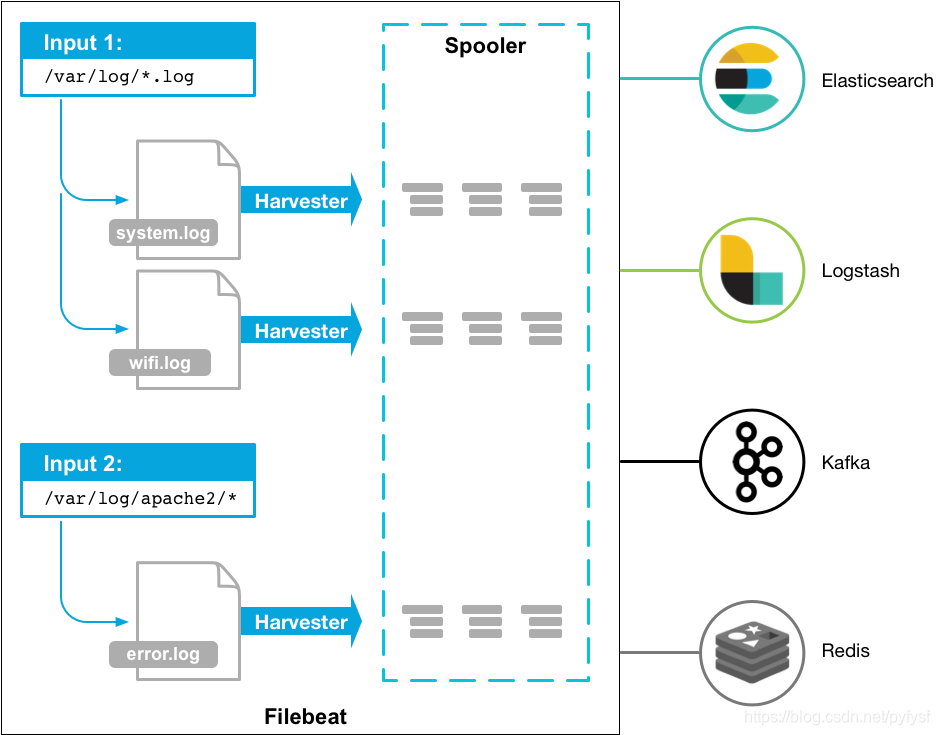
Filebeat是轻量级日志采集工具,经常与ELK搭配使用,作为数据采集源头使用。
filebeat使用示意图
安装部署
Centos7(作者使用)
由于下载太慢了,所以我这里保存了一个下载好的版本(filebeat-6.3.2-linux-x86_64.tar),如果使用请自取:https://quqi.gblhgk.com/s/1727102/vafFOSOsw5AXKP3d
上传到服务器,解压即可
deb(未尝试):
    curl -L -O https://artifacts.elastic.co/downloads/beats/filebeat/filebeat-7.6.1-amd64.deb

    sudo dpkg -i filebeat-7.6.1-amd64.deb
rpm(未尝试):
curl -L -O https://artifacts.elastic.co/downloads/beats/filebeat/filebeat-7.6.1-x86_64.rpm

sudo rpm -vi filebeat-7.6.1-x86_64.rpm
mac(未尝试):
curl -L -O https://artifacts.elastic.co/downloads/beats/filebeat/filebeat-7.6.1-darwin-x86_64.tar.gz

tar xzvf filebeat-7.6.1-darwin-x86_64.tar.gz
linux(未尝试):
curl -L -O https://artifacts.elastic.co/downloads/beats/filebeat/filebeat-7.6.1-linux-x86_64.tar.gz

tar xzvf filebeat-7.6.1-linux-x86_64.tar.gz
Windows(未尝试):
下载 https://download.elastic.co/beats/filebeat/filebeat-5.0.0-windows.zip
解压到 C:\Program Files
重命名 filebeat-5.0.0-windows 目录为 Filebeat
右键点击 PowerSHell 图标,选择『以管理员身份运行』
运行下列命令,将 Filebeat 安装成 windows 服务:
    PS > cd 'C:\Program Files\Filebeat'

    PS C:\Program Files\Filebeat> .\install-service-filebeat.ps1
注意
可能需要额外授予执行权限。命令为:PowerShell.exe -ExecutionPolicy RemoteSigned -File .\install-service-filebeat.ps1
快速使用
作者环境:centos7、JDK8、filebeat-6.3.2、logstash-6.5.1
filebeat.yml配置
修改filebeat.yml配置文件,主要修改节点【filebeat.inputs、 paths、 include_lines、name、(output.logstash)】
按需修改,我这里配置filebeat需要监听【 /shaofei/logs】文件夹下后缀为[.log]的文件,监听的关键字是【'Exception','用户登录异常'】,
注意: 如果需要监听中文,需要保证文件编码为UTF-8。或者使用【encoding】指定所监听的文件编码
我配置了name: 为"study128",我这里使用Logstash作为它的输出端【 Logstash output 】,即使没有接收端来接收filebeat输出的日志也不会影响filebeat的启动
修改配置文件的时候一定要注意yml的格式
###################### Filebeat Configuration Example #########################

# This file is an example configuration file highlighting only the most common

# options. The filebeat.reference.yml file from the same directory contains all the

# supported options with more comments. You can use it as a reference.

#

# You can find the full configuration reference here:

# https://www.elastic.co/guide/en/beats/filebeat/index.html

# For more available modules and options, please see the filebeat.reference.yml sample

# configuration file.

#=========================== Filebeat inputs =============================

filebeat.inputs:

# Each - is an input. Most options can be set at the input level, so

# you can use different inputs for various configurations.

# Below are the input specific configurations.

- type: log

  # Change to true to enable this input configuration.

  enabled: true

  # Paths that should be crawled and fetched. Glob based paths.

  paths:

    - /filebeat/testlogs/input/*.log

  include_lines: ['Exception','用户登录异常']

    #- c:\programdata\elasticsearch\logs\*

  #encoding: gbk

  # Exclude lines. A list of regular expressions to match. It drops the lines that are

  # matching any regular expression from the list.

  #exclude_lines: ['^DBG']

  # Include lines. A list of regular expressions to match. It exports the lines that are

  # matching any regular expression from the list.

  #include_lines: ['^ERR', '^WARN']

  # Exclude files. A list of regular expressions to match. Filebeat drops the files that

  # are matching any regular expression from the list. By default, no files are dropped.

  #exclude_files: ['.gz$']

  # Optional additional fields. These fields can be freely picked

  # to add additional information to the crawled log files for filtering

  #fields:

  #  level: debug

  #  review: 1

  ### Multiline options

  # Mutiline can be used for log messages spanning multiple lines. This is common

  # for Java Stack Traces or C-Line Continuation

  # The regexp Pattern that has to be matched. The example pattern matches all lines starting with [

  #multiline.pattern: ^\[

  # Defines if the pattern set under pattern should be negated or not. Default is false.

  #multiline.negate: false

  # Match can be set to "after" or "before". It is used to define if lines should be append to a pattern

  # that was (not) matched before or after or as long as a pattern is not matched based on negate.

  # Note: After is the equivalent to previous and before is the equivalent to to next in Logstash

  #multiline.match: after

multiline:

 tail_files: true

#============================= Filebeat modules ===============================

filebeat.config.modules:

  # Glob pattern for configuration loading

  path: ${path.config}/modules.d/*.yml

  # Set to true to enable config reloading

  reload.enabled: false

  # Period on which files under path should be checked for changes

  #reload.period: 10s

#==================== Elasticsearch template setting ==========================

#setup.template.settings:

  #index.number_of_shards: 3

  #index.codec: best_compression

  #_source.enabled: false

#================================ General =====================================

# The name of the shipper that publishes the network data. It can be used to group

# all the transactions sent by a single shipper in the web interface.

name: "study128"

# The tags of the shipper are included in their own field with each

# transaction published.

#tags: ["service-X", "web-tier"]

# Optional fields that you can specify to add additional information to the

# output.

#fields:

#  env: staging

#============================== Dashboards =====================================

# These settings control loading the sample dashboards to the Kibana index. Loading

# the dashboards is disabled by default and can be enabled either by setting the

# options here, or by using the `-setup` CLI flag or the `setup` command.

#setup.dashboards.enabled: false

# The URL from where to download the dashboards archive. By default this URL

# has a value which is computed based on the Beat name and version. For released

# versions, this URL points to the dashboard archive on the artifacts.elastic.co

# website.

#setup.dashboards.url:

#============================== Kibana =====================================

# Starting with Beats version 6.0.0, the dashboards are loaded via the Kibana API.

# This requires a Kibana endpoint configuration.

#setup.kibana:

  # Kibana Host

  # Scheme and port can be left out and will be set to the default (http and 5601)

  # In case you specify and additional path, the scheme is required: http://localhost:5601/path

  # IPv6 addresses should always be defined as: https://[2001:db8::1]:5601

  #host: "localhost:5601"

#============================= Elastic Cloud ==================================

# These settings simplify using filebeat with the Elastic Cloud (https://cloud.elastic.co/).

# The cloud.id setting overwrites the `output.elasticsearch.hosts` and

# `setup.kibana.host` options.

# You can find the `cloud.id` in the Elastic Cloud web UI.

#cloud.id:

# The cloud.auth setting overwrites the `output.elasticsearch.username` and

# `output.elasticsearch.password` settings. The format is `<user>:<pass>`.

#cloud.auth:

#================================ Outputs =====================================

# Configure what output to use when sending the data collected by the beat.

#-------------------------- Elasticsearch output ------------------------------

#output.elasticsearch:

  # Array of hosts to connect to.

  #hosts: ["localhost:9200"]

  # Optional protocol and basic auth credentials.

  #protocol: "https"

  #username: "elastic"

  #password: "changeme"

#----------------------------- Logstash output --------------------------------

output.logstash:

  # The Logstash hosts

  hosts: ["127.0.0.1:10515"]

  # Optional SSL. By default is off.

  # List of root certificates for HTTPS server verifications

  #ssl.certificate_authorities: ["/etc/pki/root/ca.pem"]

  # Certificate for SSL client authentication

  #ssl.certificate: "/etc/pki/client/cert.pem"

  # Client Certificate Key

  #ssl.key: "/etc/pki/client/cert.key"

#================================ Logging =====================================

# Sets log level. The default log level is info.

# Available log levels are: error, warning, info, debug

#logging.level: debug

# At debug level, you can selectively enable logging only for some components.

# To enable all selectors use ["*"]. Examples of other selectors are "beat",

# "publish", "service".

#logging.selectors: ["*"]

#============================== Xpack Monitoring ===============================

# filebeat can export internal metrics to a central Elasticsearch monitoring

# cluster.  This requires xpack monitoring to be enabled in Elasticsearch.  The

# reporting is disabled by default.

# Set to true to enable the monitoring reporter.

#xpack.monitoring.enabled: false

# Uncomment to send the metrics to Elasticsearch. Most settings from the

# Elasticsearch output are accepted here as well. Any setting that is not set is

# automatically inherited from the Elasticsearch output configuration, so if you

# have the Elasticsearch output configured, you can simply uncomment the

# following line.

#xpack.monitoring.elasticsearch:

#scan_frequency: 30s

#----------------------------- kafka output --------------------------------

#output.kafka:

#  enabled: true

#  hosts: ["132.228.248.201:9092","132.228.248.202:9092","132.228.248.203:9092"]

#  topic: ETE_CBA_ZZQS_LOG_ERROR

#  version: 0.10.0.1
启动filebeat
./filebeat -e -c filebeat.yml -d "publish"
由于filebeat.yml启动会报错,执行修改filebeat.yml的权限(使用其建议的命令即可)

启动成功
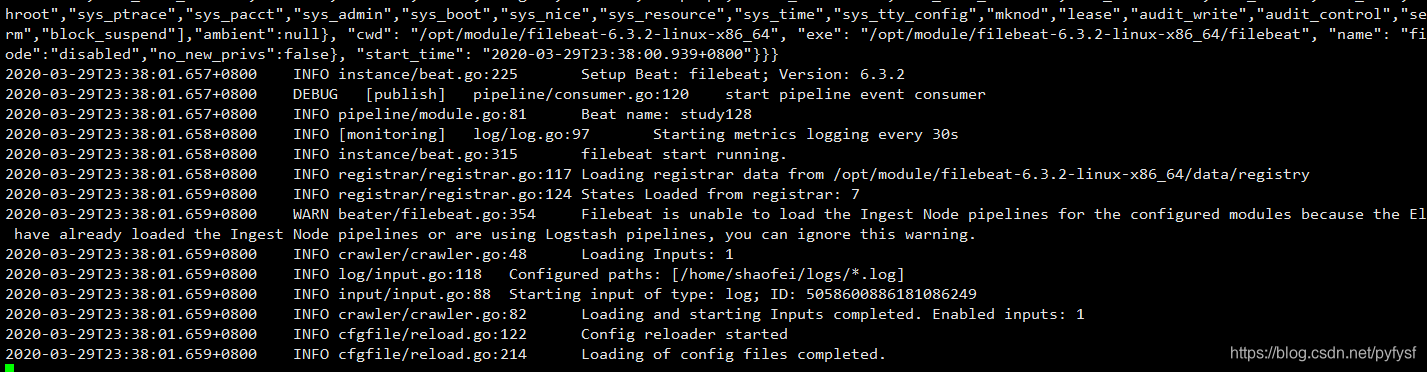
注意: 要保证filebeat.yml配置的采集路径是有读取权限的!
测试采集是否成功
- 在指定目录下创建测试日志
echo "

    2020-03-27 16:51:25,422 ERROR com.quxuecx.Start ->net.sf.json.JSONException: JSONObject["matchID"] not found.

    2020-03-27 16:51:25,422 ERROR com.quxuecx.Start ->net.sf.json.JSONException: JSONObject["matchID"] not found.

    2020-03-27 16:51:25,422 ERROR com.quxuecx.Start ->net.sf.json.JSONException: JSONObject["matchID"] not found.

">>b.log
- 成功
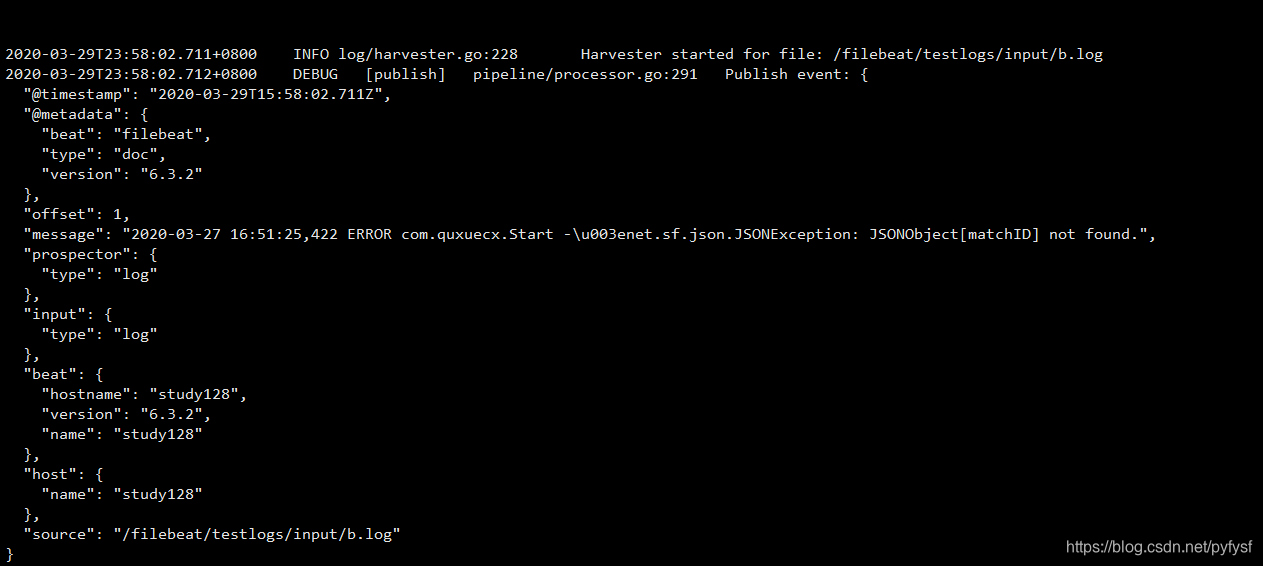
注意: 如果没有看到上述采集成功的图片,请仔细检查filebeat.yml配置文件以及所监听路径和文件的权限是否可以读取。
注意: 文件的内容,必须为log日志格式以及包括你所监听的关键字,请注意。

对接logstash测试
特别注意: filebeat.yml中配置的output.logstash: hosts: ["127.0.0.1:10515"]其中10515这个端口要和logstash配置文件中input filebeat的端口一致。
logstash的概述请查看>> https://blog.csdn.net/pyfysf/article/details/100942174
logstash的配置文件log_error.conf
input {

    # 配置filebeat

    beats {

        port => 10515

    }

}

filter {

}

output {

    # 配置输出到文件中

    file{

       path=>"/home/shaofei/output.log"

    }

    #配置输出到控制台

	stdout{

		codec=>rubydebug

	}

}
启动logstash
./bin/logstash -rf ./config/log_error.conf
配置文件log_error.conf
input {

    # 配置filebeat

    beats {

        port => 10515

    }

}

filter {

}

output {

    # 配置输出到文件中

    file{

       path=>"/home/shaofei/output.log"

    }

    #配置输出到控制台

	stdout{

		codec=>rubydebug

	}

}
启动logstash
./bin/logstash -rf ./config/log_error.conf
Filebeat快速入门的更多相关文章
- ElasticSearch实战系列八: Filebeat快速入门和使用---图文详解
前言 本文主要介绍的是ELK日志系统中的Filebeat快速入门教程. ELK介绍 ELK是三个开源软件的缩写,分别表示:Elasticsearch , Logstash, Kibana , 它们都是 ...
- Elastic FileBeat 快速入门
背景 用过ELK(Elasticsearch, Logstash, Kibana)的人应该都面临过同样的问题,Logstash虽然功能强大:支持许多的input/output plugin.强大的fi ...
- ELK快速入门(四)filebeat替代logstash收集日志
ELK快速入门四-filebeat替代logstash收集日志 filebeat简介 Filebeat是轻量级单用途的日志收集工具,用于在没有安装java的服务器上专门收集日志,可以将日志转发到log ...
- logstash快速入门实战指南-Logstash简介
作者其他ELK快速入门系列文章 Elasticsearch从入门到精通 Kibana从入门到精通 Logstash是一个具有实时流水线功能的开源数据收集引擎.Logstash可以动态统一来自不同来源的 ...
- Kubernetes快速入门
二.Kubernetes快速入门 (1)Kubernetes集群的部署方法及部署要点 (2)部署Kubernetes分布式集群 (3)kubectl使用基础 1.简介 kubectl就是API ser ...
- EFK教程 - EFK快速入门指南
通过部署elasticsearch(三节点)+filebeat+kibana快速入门EFK,并搭建起可用的demo环境测试效果 作者:"发颠的小狼",欢迎转载与投稿 目录 ▪ 用途 ...
- ElasticSearch实战系列六: Logstash快速入门和实战
前言 本文主要介绍的是ELK日志系统中的Logstash快速入门和实战 ELK介绍 ELK是三个开源软件的缩写,分别表示:Elasticsearch , Logstash, Kibana , 它们都是 ...
- Web Api 入门实战 (快速入门+工具使用+不依赖IIS)
平台之大势何人能挡? 带着你的Net飞奔吧!:http://www.cnblogs.com/dunitian/p/4822808.html 屁话我也就不多说了,什么简介的也省了,直接简单概括+demo ...
- SignalR快速入门 ~ 仿QQ即时聊天,消息推送,单聊,群聊,多群公聊(基础=》提升)
SignalR快速入门 ~ 仿QQ即时聊天,消息推送,单聊,群聊,多群公聊(基础=>提升,5个Demo贯彻全篇,感兴趣的玩才是真的学) 官方demo:http://www.asp.net/si ...
随机推荐
- springboot+jwt实现token登陆权限认证
一 前言 此篇文章的内容也是学习不久,终于到周末有时间码一篇文章分享知识追寻者的粉丝们,学完本篇文章,读者将对token类的登陆认证流程有个全面的了解,可以动态搭建自己的登陆认证过程:对小项目而已是个 ...
- 【原创】面试官问我G1回收器怎么知道你是什么时候的垃圾?
这是why技术的第36篇原创文章 上面的图片是我上周末在家拍的.以后的文章里面我的第一张配图都用自己随手拍下的照片吧.分享生活,分享技术,哈哈. 阳台上的花开了,成都的春天快来了,疫情也应该快要过去了 ...
- 一天速成Python教程
一.Python基础 Python是对象有类型,变量无类型的动态类型语言,追求简单优雅易读.可以在终端中逐行运行,也可以编写成大型的面向对象的工程.在开始写之前,注意Python 2.X中,开头要写上 ...
- Java入门教程四(字符串处理)
Java 语言的文本数据被保存为字符或字符串类型.字符及字符串的操作主要用到 String 类和 StringBuffer 类,如连接.修改.替换.比较和查找等. 定义字符串 直接定义字符串 直接定义 ...
- 50-Python2和3字符编码的区别
目录 Python2和3字符编码的区别 python2 python3 Python2和3字符编码的区别 区别点 python2 python3 print 是一个语法结构 是一个函数,print(' ...
- Pycharm+PyQt5开发环境配置
一.安装Python开发环境 python官网下载地址:https://www.python.org/downloads/ 注:千万不要使用最新测试版,很有可能第三方库不支持 笔者目前使用的版本是3. ...
- 记一次苹果APP从账号续费到发布成功的历程
一.一波三折的续费 最近公司开发的苹果APP的SSL证书到期了,计划重新发布一下该APP,已替换即将到期的SSL证书.近几年随着钉钉.企业微信等在线办公软件超级平台的出现,各企业都会选择其中 ...
- SPA中前端路由基本原理与实现方式
SPA 前端路由原理与实现方式 通常 SPA 中前端路由有2中实现方式,本文会简单快速总结这两种方法及其实现: 修改 url 中 Hash 利用 H5 中的 history Hash 我们都知道 ur ...
- call 和 apply 和 bind的区别
有些东西说忘就往,每天记录自己忘记的东西重新学习一遍,挺好 作用:call()和apply()用法都是一样的,改变this的指向问题 区别:接收参数的方式不同, (bind 方法是附加在函数调用后面使 ...
- 什么是YUM
什么是Yum Yum(全称为 Yellow dog Updater, Modified)是一个在RedHat以及CentOS等Linux系统中的Shell前端软件包管理器.基于RPM包管理,能够从指定 ...