
Bootstrap-模态框 modal.js
参考网址:http://v3.bootcss.com/(能抄不写)
1、大模态框
图片效果图:

代码:(button的属性data-target对应的是具体模态框的class)
<!-- Large modal -->
<button type="button" class="btn btn-primary" data-toggle="modal" data-target=".bs-example-modal-lg">Large modal</button>
<div class="modal fade bs-example-modal-lg" tabindex="-1" role="dialog" aria-labelledby="myLargeModalLabel">
<div class="modal-dialog modal-lg" role="document">
<div class="modal-content">
...
</div>
</div>
</div>
2、小模态框
图片效果图:

代码:
<!-- Small modal -->
<button type="button" class="btn btn-primary" data-toggle="modal" data-target=".bs-example-modal-sm">Small modal</button>
<div class="modal fade bs-example-modal-sm" tabindex="-1" role="dialog" aria-labelledby="mySmallModalLabel">
<div class="modal-dialog modal-sm" role="document">
<div class="modal-content">
...
</div>
</div>
</div>
3、我们的模态框
图片效果图
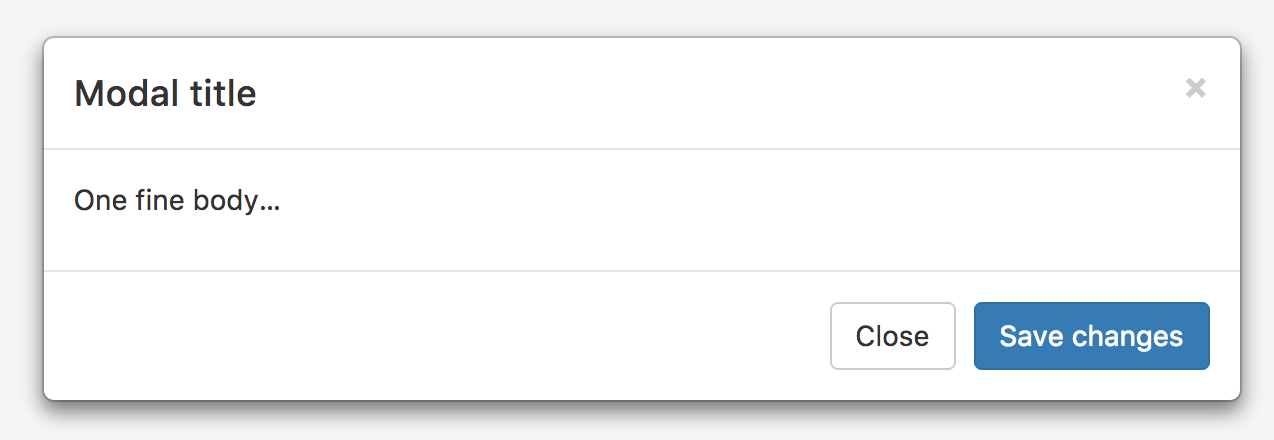
代码:
<div class="modal fade" tabindex="-1" role="dialog">
<div class="modal-dialog" role="document">
<div class="modal-content">
<!--头部开始-->
<div class="modal-header">
<!--关闭按钮-->
<button type="button" class="close" data-dismiss="modal" aria-label="Close">
<span aria-hidden="true">×</span>
</button>
<!--标题-->
<h4 class="modal-title">Modal title</h4>
</div>
<!--头部结束-->
<!--内容开始-->
<div class="modal-body">
<p>One fine body…</p>
</div>
<!--内容结束-->
<!--底部开始-->
<div class="modal-footer">
<button type="button" class="btn btn-default" data-dismiss="modal">Close</button>
<button type="button" class="btn btn-primary">Save changes</button>
</div>
<!--底部结束-->
</div>
<!-- /.modal-content -->
</div>
<!-- /.modal-dialog -->
</div>
<!-- /.modal -->
4、禁止掉动画:如果你不需要模态框弹出时的动画效果(淡入淡出效果),删掉 .fade 类即可。
5、js手动切换、打开、关闭模态框
$('#myModal').modal('toggle');
$('#myModal').modal('show');
$('#myModal').modal('hide');
6、ps注意:
(1)不支持同时打开多个模态框;
(2)模态框的 HTML 代码放置的位置,也就是说,尽量作为 body 标签的直接子元素。
Bootstrap-模态框 modal.js的更多相关文章
- bootstrap模态框modal使用remote第二次加载显示相同内容解决办法
bootstrap模态框modal使用remote动态加载内容,第二次加载显示相同内容解决办法 bootstrap的modal中,使用remote可以动态加载页面到modal-body中,并弹窗显示 ...
- Bootstrap模态框(modal)垂直居中
http://v3.bootcss.com/ 自己也试了改了几种方式也不容乐观,发现在窗口弹出之前是获取不到$(this).height()的值,本想着是用($(window).height()-$( ...
- 模态框 modal.js
模态框经过了优化,更加灵活,以弹出对话框的形式出现,具有最小和最实用的功能集. 不支持模态框重叠 千万不要在一个模态框上重叠另一个模态框.要想同时支持多个模态框,需要自己写额外的代码来实现. 模态框的 ...
- Bootstrap 模态框(Modal)插件
页面效果: html+js: <!DOCTYPE html> <html> <head> <meta charset="utf-8"> ...
- 禁用 Bootstrap 模态框(Modal) 点击空白时自动关闭
在做项目的时候,来了这么一个需求,要求打开模态框后,点击空白的地方不让他自动关闭,只能点击关闭按钮才能关闭. 有了需求,就开始查找资料寻求解决的方法. 我找到的解决方法如下: $('#registCo ...
- Bootstrap模态框modal的高度和宽度设置
(1)高度 将style=“height:900px”放在<div class = "modal-dialog">或者更外层上,整个模态框的高度不会发生变化 如下图所示 ...
- bootstrap模态框modal使用remote动态加载内容,第二次加载显示相同内容解决办法
bootstrap的modal中,使用remote可以动态加载页面到modal-body中,并弹窗显示 如果提供的是 URL,将利用 jQuery 的 load 方法从此 URL 地址加载要展示的内容 ...
- Bootstrap模态框(MVC)
BZ这篇博客主要是为大家介绍一下MVC如何弹出模态框.本文如果有什么不对的地方,希望大神们多多指教,也希望和我一样的小菜多多学习.BZ在这里谢过各位. 首先要在页面加上一个点击事件: @Html.Ac ...
- Bootstrap3模态框Modal垂直居中样式
1,Bootstrap 模态框插件Bootbox垂直居中样式: <!DOCTYPE html> <html lang="en"> <head> ...
- js控制Bootstrap 模态框(Modal)插件
js控制Bootstrap 模态框(Modal)插件 http://www.cnblogs.com/zzjeny/p/5564400.html
随机推荐
- C2 - Skyscrapers (hard version)
前几天做的题,当时好像是超时了,这个博客写的超好https://blog.csdn.net/lucky52529/article/details/89155694 用单调站解决问题. 代码是从另外一篇 ...
- Unix-Time
1. Unix_time 2. Year_2000_problem 3. Year_10,000_problem 4. Year_2038_problem 5. Time_formatting_and ...
- 获取控件的xy坐标
procedure TForm1.SpeedButton1Click(Sender: TObject); var Apoint:TPoint; begin APoint:=TSpeedButt ...
- Linux添加虚拟内存 && 修改Linux系统语言
Linux添加虚拟内存 首先执行free -h查看内存状况: total used free shared buff/cache available Mem: 1.8G 570M 76M 8.4M 1 ...
- uni-app开发小程序-使用uni.switchTab跳转后页面不刷新的问题
uni.switchTab({ url: '/pages/discover/discover', success: function(e) { var page = getCurrentPages() ...
- Linux gcc(ar命令)打包库到另一个库中的另外一种方法
最近的项目中需要在Libcurl写一个wrapper,最好的办法是把我的wrapper和libcurl包在一起,做一个新的静态库 但是很遗憾,直接用以下命令产生的libmywrapper.a 是不能用 ...
- linux下nginx的安装和配置
准备目录 [root@sqh ~]# mkdir /usr/local/nginx [root@sqh ~]# cd /usr/local/nginx 添加一些支持和依赖 1.安装gcc 安装redi ...
- cf 763A. Timofey and a tree
呵呵呵,直接判断是不是一个点连起来所有的特殊边(连接2不同颜色的点的边) (一开始还想各种各样奇怪的dfs...垃圾) #include<bits/stdc++.h> #define LL ...
- php.basic.functions
array_unshift call_user_func_array闭包 下面是学院的代码 class Container { protected $binds; protected $instanc ...
- Arduino函数
输入输出函数 pinMode(pin, mode)将数位脚位(digital pin)指定为输入或输出.如:pinMode(7,INPUT); // 将脚位 7 设定为输入模式 digitalWrit ...