
Bootstrap-模态框 modal.js
参考网址:http://v3.bootcss.com/(能抄不写)
1、大模态框
图片效果图:

代码:(button的属性data-target对应的是具体模态框的class)
<!-- Large modal -->
<button type="button" class="btn btn-primary" data-toggle="modal" data-target=".bs-example-modal-lg">Large modal</button>
<div class="modal fade bs-example-modal-lg" tabindex="-1" role="dialog" aria-labelledby="myLargeModalLabel">
<div class="modal-dialog modal-lg" role="document">
<div class="modal-content">
...
</div>
</div>
</div>
2、小模态框
图片效果图:

代码:
<!-- Small modal -->
<button type="button" class="btn btn-primary" data-toggle="modal" data-target=".bs-example-modal-sm">Small modal</button>
<div class="modal fade bs-example-modal-sm" tabindex="-1" role="dialog" aria-labelledby="mySmallModalLabel">
<div class="modal-dialog modal-sm" role="document">
<div class="modal-content">
...
</div>
</div>
</div>
3、我们的模态框
图片效果图
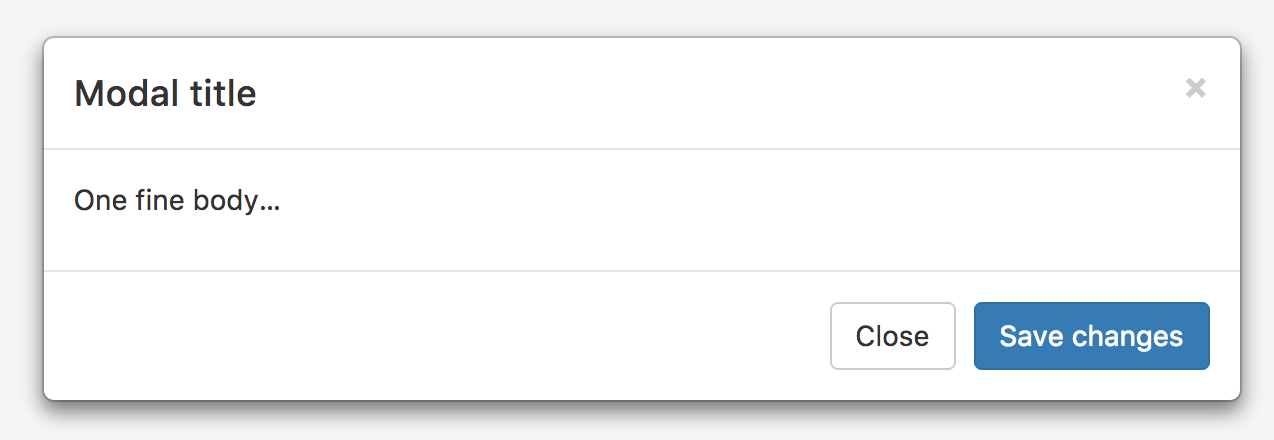
代码:
<div class="modal fade" tabindex="-1" role="dialog">
<div class="modal-dialog" role="document">
<div class="modal-content">
<!--头部开始-->
<div class="modal-header">
<!--关闭按钮-->
<button type="button" class="close" data-dismiss="modal" aria-label="Close">
<span aria-hidden="true">×</span>
</button>
<!--标题-->
<h4 class="modal-title">Modal title</h4>
</div>
<!--头部结束-->
<!--内容开始-->
<div class="modal-body">
<p>One fine body…</p>
</div>
<!--内容结束-->
<!--底部开始-->
<div class="modal-footer">
<button type="button" class="btn btn-default" data-dismiss="modal">Close</button>
<button type="button" class="btn btn-primary">Save changes</button>
</div>
<!--底部结束-->
</div>
<!-- /.modal-content -->
</div>
<!-- /.modal-dialog -->
</div>
<!-- /.modal -->
4、禁止掉动画:如果你不需要模态框弹出时的动画效果(淡入淡出效果),删掉 .fade 类即可。
5、js手动切换、打开、关闭模态框
$('#myModal').modal('toggle');
$('#myModal').modal('show');
$('#myModal').modal('hide');
6、ps注意:
(1)不支持同时打开多个模态框;
(2)模态框的 HTML 代码放置的位置,也就是说,尽量作为 body 标签的直接子元素。
Bootstrap-模态框 modal.js的更多相关文章
- bootstrap模态框modal使用remote第二次加载显示相同内容解决办法
bootstrap模态框modal使用remote动态加载内容,第二次加载显示相同内容解决办法 bootstrap的modal中,使用remote可以动态加载页面到modal-body中,并弹窗显示 ...
- Bootstrap模态框(modal)垂直居中
http://v3.bootcss.com/ 自己也试了改了几种方式也不容乐观,发现在窗口弹出之前是获取不到$(this).height()的值,本想着是用($(window).height()-$( ...
- 模态框 modal.js
模态框经过了优化,更加灵活,以弹出对话框的形式出现,具有最小和最实用的功能集. 不支持模态框重叠 千万不要在一个模态框上重叠另一个模态框.要想同时支持多个模态框,需要自己写额外的代码来实现. 模态框的 ...
- Bootstrap 模态框(Modal)插件
页面效果: html+js: <!DOCTYPE html> <html> <head> <meta charset="utf-8"> ...
- 禁用 Bootstrap 模态框(Modal) 点击空白时自动关闭
在做项目的时候,来了这么一个需求,要求打开模态框后,点击空白的地方不让他自动关闭,只能点击关闭按钮才能关闭. 有了需求,就开始查找资料寻求解决的方法. 我找到的解决方法如下: $('#registCo ...
- Bootstrap模态框modal的高度和宽度设置
(1)高度 将style=“height:900px”放在<div class = "modal-dialog">或者更外层上,整个模态框的高度不会发生变化 如下图所示 ...
- bootstrap模态框modal使用remote动态加载内容,第二次加载显示相同内容解决办法
bootstrap的modal中,使用remote可以动态加载页面到modal-body中,并弹窗显示 如果提供的是 URL,将利用 jQuery 的 load 方法从此 URL 地址加载要展示的内容 ...
- Bootstrap模态框(MVC)
BZ这篇博客主要是为大家介绍一下MVC如何弹出模态框.本文如果有什么不对的地方,希望大神们多多指教,也希望和我一样的小菜多多学习.BZ在这里谢过各位. 首先要在页面加上一个点击事件: @Html.Ac ...
- Bootstrap3模态框Modal垂直居中样式
1,Bootstrap 模态框插件Bootbox垂直居中样式: <!DOCTYPE html> <html lang="en"> <head> ...
- js控制Bootstrap 模态框(Modal)插件
js控制Bootstrap 模态框(Modal)插件 http://www.cnblogs.com/zzjeny/p/5564400.html
随机推荐
- '/'和‘/*’差异造成的No mapping found for HTTP request with URI [/springMVC/welcome.jsp] in DispatcherServlet with name 'springmvc'
在采用springMVC框架的时候所遇到的一个小问题,其中web.xml中关于servlet的配置如下: <servlet> <servlet-name>springmvc&l ...
- 【HITB GSEC CTF 2017】1000levels
https://files.cnblogs.com/files/p4nda/498a3f10-8976-4733-8bdb-30d6f9d9fdad.gz #通过阅读天枢战队大佬们的wp调试的结果 首 ...
- 小程序导航组件navigator活学活用
小程序开发中必不可少的组件navigator,虽然使用频率非常高,但是却没多少人能灵活运用. 先说navigator组件的用处: 它的主要用处是跳转执行,跳转可分为当前页面内跳转.前往页面外部的跳转. ...
- Day7 - J - Raising Modulo Numbers POJ - 1995
People are different. Some secretly read magazines full of interesting girls' pictures, others creat ...
- Day6 - E - Brownie Points II POJ - 2464
Stan and Ollie play the game of Odd Brownie Points. Some brownie points are located in the plane, at ...
- ffmpeg 知识点
ffmpeg FFmpeg是一套可以用来记录.转换数字音频.视频,并能将其转化为流的开源计算机程序.采用LGPL或GPL许可证.它提供了录制.转换以及流化音视频的完整解决方案.它包含了非常先进的音频/ ...
- windows搭建安装react-native环境
在win10环境下,利用Genymotion模拟器,配置react-native的环境. 一.安装JDK 在网上下载jdk,版本最好是1.8以上.安装后要对环境变量进行配置. 同时在 Path 中配置 ...
- TCP/IP 三次握手,四次断开
TCP/IP 三次握手,四次断开 一.TCP报文格式 TCP/IP协议的详细信息参看<TCP/IP协议详解>三卷 本. 下面是TCP报文格式图: 图 ...
- EditText监听器------实时监听
前言: 在Android开发中EditText的使用频率还是挺高的,比如登录界面输入密码验证码等,有的时候要求我们要在输入号码后显示是哪家公司的,比如中国移动,中国联通,这是就会用到EditText监 ...
- HTML学习第二天
HTML学习第二天 今天学的比较少,有些乱,先只写一个知识点 三种样式表插入方式 外部样式表: <link rel="stylesheet" type="text/ ...