
Arduino101学习笔记(十三)—— 101六轴传感器
一、相关API
1、begin:需要在其他CUIREIMU前调用
//*********************************************************************************************

//函数名称:CurieImu.begin()

//输入参数:无

//函数返回:无

//函数功能:开六轴传感器,必须第一个调用

//*********************************************************************************************

CurieIMU.begin();
2、得到陀螺仪的采样频率
//*********************************************************************************************

//函数名称:CurieImu.getGyroRate()

//输入参数:无

//函数返回:25  50  100  200  400  800  1600  3200(Hz)

//函数功能:得到陀螺仪的采样频率
//*********************************************************************************************

CurieIMU.getGyroRate();
3、设置陀螺仪的采样频率
他的数据速率也是采样频率,并影响读数的带宽。
//*********************************************************************************************

//函数名称:CurieImu.setGyroRate(int rate)

//输入参数:rate 采样频率   25  50  100  200  400  800  1600  3200(Hz)

//函数返回:无

//函数功能:无

//*********************************************************************************************

CurieImu.setGyroRate(int rate);
4、得到加速度计的采样频率
//*********************************************************************************************

//函数名称:CurieImu.getAccelerometerRate()

//输入参数:无
//函数返回:rate 采样频率 12.5 25 50 100 200 400 800 1600
//函数功能:返回加速度计的采样频率

//*********************************************************************************************

CurieIMU.getAccelerometerRate()
5、设置加速度计的采样频率
//*********************************************************************************************

//函数名称:CurieImu.setAccelerometerRate(float rate)

//输入参数:rate 采样频率   12.5   25   50   100   200   400   800   1600

//函数返回:无

//函数功能:返回加速度计的采样频率

//*********************************************************************************************

CurieIMU.setAccelerometerRate(float rate)
6、返回陀螺仪测量范围
//*********************************************************************************************

//函数名称:CurieImu.getGyroRange()

//输入参数:无

//函数返回:2000 (+/-2000°/s)

//                 1000 (+/-1000°/s)

//                 500 (+/-500°/s)

//                 250 (+/-250°/s)

//                 125 (+/-125°/s)

//函数功能:返回陀螺仪的测量范围

//*********************************************************************************************

CurieIMU.getGyroRange()
7、设置陀螺仪测量范围
//*********************************************************************************************

//函数名称:CurieImu.setGyroRange()

//输入参数:2000 (+/-2000°/s)

//                 1000 (+/-1000°/s)

//                 500 (+/-500°/s)

//                 250 (+/-250°/s)

//                 125 (+/-125°/s)

//函数返回:无

//函数功能:返回陀螺仪的测量范围

//*********************************************************************************************

CurieIMU.setGyroRange()
8、得到加速度计的测量范围
//*********************************************************************************************

//函数名称:CurieImu.getAccelerometerRange()

//输入参数:无

//函数返回:2 (+/- 2g)

//                 4 (+/- 4g)

//                 8 (+/- 8g)

//                 16 (+/- 16g)

//函数功能:返回陀螺仪的测量范围

//*********************************************************************************************

CurieIMU.getAccelerometerRange()
9、设置加速度计的测量范围
//*********************************************************************************************

//函数名称:CurieImu.setAccelerometerRange(int range)

//输入参数:2 (+/- 2g)

//                 4 (+/- 4g)

//                 8 (+/- 8g)

//                 16 (+/- 16g)

//函数返回:无

//函数功能:返回陀螺仪的测量范围

//*********************************************************************************************

CurieIMU.setAccelerometerRange(int range)
10、自动进行陀螺仪偏移计算
//*********************************************************************************************

//函数名称:CurieImu.autoCalibrateGyroOffset()

//输入参数:无

//函数返回:无

//函数功能:进行陀螺仪偏移计算

//*********************************************************************************************

CurieIMU.autoCalibrateGyroOffset()
11、自动进行加速计偏移计算
//*********************************************************************************************

//函数名称:CurieImu.autoCalibrateAccelerometerOffset(int, axis, int target)

//输入参数:axis:     X_AXIS

//                              Y_AXIS

//                              Z_AXIS

//                 target: it can be 0 or 1.    1表示要取消重力的影响,即平躺时Z轴应该写1

//函数返回:无

//函数功能:进行陀螺仪偏移计算

//*********************************************************************************************

CurieIMU.autoCalibrateAccelerometerOffset(int, axis, int target)
12、偏移修正开关
//关闭

CurieIMU.noGyroOffset();

CurieIMU.noAccelerometerOffset();

//打开

CurieIMU.gyroOffsetEnabled();

CurieIMU.accelerometerOffsetEnabled();
13、得到陀螺仪偏移修正的数值
//*********************************************************************************************

//函数名称:CurieImu.getGyroOffset(int axis)

//输入参数:axis:     X_AXIS

//                              Y_AXIS

//                              Z_AXIS

//函数返回:修正的偏移值,The returned value is from -31.25 °/s to +31.25 °/s in discrete steps of 0.061 °/s.

//函数功能:进行陀螺仪偏移计算

//*********************************************************************************************

CurieIMU.getGyroOffset(int axis)
14、设置陀螺仪偏移
//*********************************************************************************************

//函数名称:CurieImu.setGyroOffset(int axis, int offset)

//输入参数:axis:     X_AXIS

//                    Y_AXIS

//                    Z_AXIS

//                  offset   偏移

//函数返回:

//函数功能:进行陀螺仪偏移计算

//*********************************************************************************************

CurieIMU.setGyroOffset(int axis, int offset)
15、得到陀螺仪偏移
//*********************************************************************************************

//函数名称:CurieImu.getAccelerometerOffset(int axis)

//输入参数:axis:     X_AXIS

//                    Y_AXIS

//                    Z_AXIS

//函数返回:

//函数功能:

//*********************************************************************************************

CurieIMU.getAccelerometerOffset(int axis)
16、设置陀螺仪偏移
//*********************************************************************************************

//函数名称:CurieImu.setAccelerometerOffset(int axis, int offset)

//输入参数:axis:     X_AXIS

//                    Y_AXIS

//                    Z_AXIS

//                  offset   偏移

//函数返回:

//函数功能:进行陀螺仪偏移计算

//*********************************************************************************************

CurieIMU.setAccelerometerOffset(int axis, int offset)
17、得到检测阈值
//*********************************************************************************************

//函数名称:CurieImu.getDetectionThreshold(int feature)

//输入参数:feature: the requested feature. It can assume one of these values:

//                  CURIE_IMU_FREEFALL

//                  CURIE_IMU_SHOCK

//                  CURIE_IMU_MOTION

//                  CURIE_IMU_ZERO_MOTION

//                  CURIE_IMU_TAP

//函数返回:

//函数功能:进行陀螺仪偏移计算

//*********************************************************************************************

CurieIMU.getDetectionThreshold(int feature)
18、设置检测阈值
//*********************************************************************************************

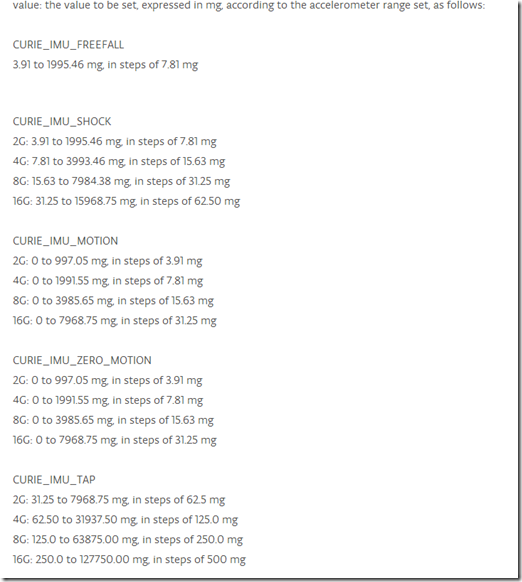
//函数名称:CurieImu.setDetectionThreshold(int feature, float value)

//输入参数:feature: the requested feature. It can assume one of these values:

//                  CURIE_IMU_FREEFALL

//                  CURIE_IMU_SHOCK

//                  CURIE_IMU_MOTION

//                  CURIE_IMU_ZERO_MOTION

//                  CURIE_IMU_TAP

//函数返回:

//函数功能:进行陀螺仪偏移计算

//*********************************************************************************************

CurieIMU.setDetectionThreshold(int feature, float value)
19、得到检测的持续时间
//*********************************************************************************************

//函数名称:CurieImu.getDetectionDuration(int feature)

//输入参数:feature: the requested feature. It can assume one of these values:
- CURIE_IMU_TAP
- CURIE_IMU_TAP_QUIET
- CURIE_IMU_DOUBLE_TAP
- CURIE_IMU_ZERO_MOTION
//函数返回:

//函数功能:检测持续时间

//*********************************************************************************************

CurieIMU.getDetectionDuration(int feature)
20、设置检测的持续时间
//*********************************************************************************************

//函数名称:CurieImu.setDetectionDuration(int feature, float value)

//输入参数:feature: the requested feature. It can assume one of these values:

//                  CURIE_IMU_FREEFALL

//                  CURIE_IMU_SHOCK

//                  CURIE_IMU_MOTION

//                  CURIE_IMU_ZERO_MOTION

//                  CURIE_IMU_DOUBLE_TAP

//                  CURIE_IMU_TAP_SHOCK

//                  CURIE_IMU_TAP_QUIET P

//函数返回:

//函数功能:检测持续时间

//*********************************************************************************************

CurieIMU.setDetectionDuration(int feature, float value)
21、允许某个特征产生中断
//*********************************************************************************************

//函数名称:CurieImu.interrupts(int feature)

//输入参数:feature: the requested feature. It can assume one of these values:

//                 CURIE_IMU_FREEFALL

//                 CURIE_IMU_SHOCK

//                 CURIE_IMU_MOTION

//                 CURIE_IMU_ZERO_MOTION

//                 CURIE_IMU_STEP

//                 CURIE_IMU_TAP

//                 CURIE_IMU_TAP_SHOCK

//                 CURIE_IMU_TAP_QUIET

//                 CURIE_IMU_DOUBLE_TAP

//函数返回:

//函数功能:进行陀螺仪偏移计算

//*********************************************************************************************

CurieIMU.interrupts(int feature)
22、关闭某个特征产生中断
//*********************************************************************************************

//函数名称:CurieImu.noInterrupts(int feature)

//输入参数:feature: the requested feature. It can assume one of these values:

//                 CURIE_IMU_FREEFALL

//                 CURIE_IMU_SHOCK

//                 CURIE_IMU_MOTION

//                 CURIE_IMU_ZERO_MOTION

//                 CURIE_IMU_STEP

//                 CURIE_IMU_TAP

//                 CURIE_IMU_TAP_SHOCK

//                 CURIE_IMU_TAP_QUIET

//                 CURIE_IMU_DOUBLE_TAP

//函数返回:

//函数功能:进行陀螺仪偏移计算

//*********************************************************************************************

CurieIMU.noInterrupts(int feature)
23、返回某个特征是否开了中断
//*********************************************************************************************

//函数名称:CurieImu.interruptEnabled(int feature)

//输入参数:feature: the requested feature. It can assume one of these values:

//                 CURIE_IMU_FREEFALL

//                 CURIE_IMU_SHOCK

//                 CURIE_IMU_MOTION

//                 CURIE_IMU_ZERO_MOTION

//                 CURIE_IMU_STEP

//                 CURIE_IMU_TAP

//                 CURIE_IMU_TAP_SHOCK

//                 CURIE_IMU_TAP_QUIET

//                 CURIE_IMU_DOUBLE_TAP

//函数返回:TURE   FALSE

//函数功能:进行陀螺仪偏移计算

//*********************************************************************************************

CurieIMU.interruptEnabled(int feature)
24、检测是否进入中断状态
//*********************************************************************************************

//函数名称:CurieImu.getInterruptStatus(int feature)

//输入参数:feature: the requested feature. It can assume one of these values:

//                 CURIE_IMU_FREEFALL

//                 CURIE_IMU_SHOCK

//                 CURIE_IMU_MOTION

//                 CURIE_IMU_ZERO_MOTION

//                 CURIE_IMU_STEP

//                 CURIE_IMU_TAP

//                 CURIE_IMU_TAP_SHOCK

//                 CURIE_IMU_TAP_QUIET

//                 CURIE_IMU_DOUBLE_TAP

//函数返回:TURE   FALSE

//函数功能:进行陀螺仪偏移计算

//*********************************************************************************************

CurieIMU.getInterruptStatus(int feature)
25、返回步进检测模式的值
//*********************************************************************************************

//函数名称:CurieImu.getStepDetectionMode()

//输入参数:CURIE_IMU_STEP_MODE_NORMAL

//                  CURIE_IMU_STEP_MODE_SENSITIVE

//                  CURIE_IMU_STEP_MODE_ROBUST

//                  CURIE_IMU_STEP_MODE_UNKNOWN

//函数返回:TURE   FALSE

//*********************************************************************************************

CurieIMU.getStepDetectionMode()
26、设置步进检测模式的值
//*********************************************************************************************

//函数名称:CurieImu.setStepDetectionMode(int mode)

//输入参数:CURIE_IMU_STEP_MODE_NORMAL

//                  CURIE_IMU_STEP_MODE_SENSITIVE

//                  CURIE_IMU_STEP_MODE_ROBUST

//                  CURIE_IMU_STEP_MODE_UNKNOWN

//函数返回:TURE   FALSE

//*********************************************************************************************

CurieIMU.setStepDetectionMode(in mode)
27、读取6轴传感器的数值
//*********************************************************************************************

//函数名称:CurieImu.readMotionSensor(int ax, int ay, int az, int gx, int gy, int gz)

//输入参数:ax: a variable in which the accelerometer's value along x will be stored.

//                 ay: a variable in which the accelerometer's value along y will be stored.

//                 az: a variable in which the accelerometer's value along z will be stored.

//                 gx: a variable in which the gyro's value along x will be stored.

//                 gy: a variable in which the gyro's value along y will be stored.

//                 gz: a variable in which the gyro's value along z will be stored.

//函数返回:

//*********************************************************************************************

CurieIMU.readMotionSensor(int ax, int ay, int az, int gx, int gy, int gz)
28、读取加速度的数值
//*********************************************************************************************

//函数名称:CurieImu.readAccelerometer(int ax, int ay, int az)

//输入参数:ax: a variable in which the accelerometer's value along x will be stored.

//                 ay: a variable in which the accelerometer's value along y will be stored.

//                 az: a variable in which the accelerometer's value along z will be stored.

//函数返回:

//*********************************************************************************************

CurieIMU.readAccelerometer(int ax, int ay, int az)
29、读取陀螺仪的数值
//*********************************************************************************************

//函数名称:CurieImu.readGyro(int gx, int gy, int gz)

//输入参数:

//                 gx: a variable in which the gyro's value along x will be stored.

//                 gy: a variable in which the gyro's value along y will be stored.

//                 gz: a variable in which the gyro's value along z will be stored.

//函数返回:

//*********************************************************************************************

CurieIMU.readGyro(int gx, int gy, int gz)
30、读取温度值
//*********************************************************************************************

//函数名称:CurieImu.readTemperature()

//输入参数:

//函数返回:Celsius=(raw/32767.0)+23  16位的

//*********************************************************************************************

CurieIMU.readTemperature()
31、检测晃动
//*********************************************************************************************

//函数名称:CurieIMU.shockDetected(int axis, int direction)

//输入参数:axis: the axis to check for shock detection. It must have one of these values:

//                          X_AXIS

//                          Y_AXIS

//                          Z_AXIS

//                  direction: the direction to check for shock detection. It must have one of these values:

//                          POSITIVE from zero to positive axis values

//                          NEGATIVE from zero to negative axis values

//函数返回:Ture False

//*********************************************************************************************

CurieIMU.shockDetected(int axis, int direction)
32、检测动作
//*********************************************************************************************

//函数名称:CurieImu.motionDetected(int axis, int direction)

//输入参数:axis: the axis to check for shock detection. It must have one of these values:

//                          X_AXIS

//                          Y_AXIS

//                          Z_AXIS

//                  direction: the direction to check for shock detection. It must have one of these values:

//                          POSITIVE from zero to positive axis values

//                          NEGATIVE from zero to negative axis values

//函数返回:Ture False

//*********************************************************************************************

CurieIMU.motionDetected(int axis, int direction)
33、其他检测
CurieIMU.tapDetected(int axis, int direction)
CurieIMU.stepsDetected()
34、注册中断函数
//*********************************************************************************************

//函数名称:CurieIMU.attachInterrupt(voidFuncPtr callback)

//输入参数:注册中断函数

//函数返回:无

//*********************************************************************************************

CurieIMU.attachInterrupt(voidFuncPtr callback)
35、取消注册中断函数
CurieIMU.detachInterrupt()
二、
Arduino101学习笔记(十三)—— 101六轴传感器的更多相关文章
- 20145213《Java程序设计学习笔记》第六周学习总结
20145213<Java程序设计学习笔记>第六周学习总结 说在前面的话 上篇博客中娄老师指出我因为数据结构基础薄弱,才导致对第九章内容浅尝遏止地认知.在这里我还要自我批评一下,其实我事后 ...
- python3.4学习笔记(十三) 网络爬虫实例代码,使用pyspider抓取多牛投资吧里面的文章信息,抓取政府网新闻内容
python3.4学习笔记(十三) 网络爬虫实例代码,使用pyspider抓取多牛投资吧里面的文章信息PySpider:一个国人编写的强大的网络爬虫系统并带有强大的WebUI,采用Python语言编写 ...
- 【Unity Shaders】学习笔记——SurfaceShader(六)混合纹理
[Unity Shaders]学习笔记——SurfaceShader(六)混合纹理 转载请注明出处:http://www.cnblogs.com/-867259206/p/5619810.html 写 ...
- java之jvm学习笔记十三(jvm基本结构)
java之jvm学习笔记十三(jvm基本结构) 这一节,主要来学习jvm的基本结构,也就是概述.说是概述,内容很多,而且概念量也很大,不过关于概念方面,你不用担心,我完全有信心,让概念在你的脑子里变成 ...
- Nodejs学习笔记(十六)--- Pomelo介绍&入门
目录 前言&介绍 安装Pomelo 创建项目并启动 创建项目 项目结构说明 启动 测试连接 聊天服务器 新建gate和chat服务器 配置master.json 配置servers.json ...
- python3.4学习笔记(二十六) Python 输出json到文件,让json.dumps输出中文 实例代码
python3.4学习笔记(二十六) Python 输出json到文件,让json.dumps输出中文 实例代码 python的json.dumps方法默认会输出成这种格式"\u535a\u ...
- Go语言学习笔记十三: Map集合
Go语言学习笔记十三: Map集合 Map在每种语言中基本都有,Java中是属于集合类Map,其包括HashMap, TreeMap等.而Python语言直接就属于一种类型,写法上比Java还简单. ...
- Nodejs学习笔记(十六)—Pomelo介绍&入门
前言&介绍 Pomelo:一个快速.可扩展.Node.js分布式游戏服务器框架 从三四年前接触Node.js开始就接触到了Pomelo,从Pomelo最初的版本到现在,总的来说网易出品还算不错 ...
- Introduction to 3D Game Programming with DirectX 12 学习笔记之 --- 第六章:在Direct3D中绘制
原文:Introduction to 3D Game Programming with DirectX 12 学习笔记之 --- 第六章:在Direct3D中绘制 代码工程地址: https://gi ...
随机推荐
- poj1177
题意:在平面直角坐标系内给出一些与坐标轴平行的矩形,将这些矩形覆盖的区域求并集,然后问这个区域的周长是多少.(边与边重合的地方不计入周长) 分析:线段树.曾经做过类似的求矩形覆盖的总面积的题.这道题同 ...
- iOS 串行网络请求。。。待研究
nsurlsession 和 nsurlconnection 能实现吗? 手动实现的关键点在哪里? 我这里说的串行网络请求,指的是第一个网络请求不返回数据,第二个网络请求就不能开始. AFNetwor ...
- Python2.7<-------->Python3.x
版本差异 from __future__ Python2.7 Python3.x 除法 / // Unicode u'' ...
- HTML5 video 支持air play
< video src="/path/to/video.mp4" x-webkit-airplay="allow" preload controls> ...
- Effective C++ -----条款09:绝不在构造和析构过程中调用virtual函数
在构造和析构期间不要调用virtual函数,因为这类调用从不下降至derived class(比起当前执行构造函数和析构函数的那层).
- KMP单模快速字符串匹配算法
KMP算法是由Knuth,Morris,Pratt共同提出的算法,专门用来解决模式串的匹配,无论目标序列和模式串是什么样子的,都可以在线性时间内完成,而且也不会发生退化,是一个非常优秀的算法,时间复杂 ...
- js验证手机号
<%@ page language="java" contentType="text/html; charset=UTF-8" pageEncoding= ...
- HDU 1159 Common Subsequence --- DP入门之最长公共子序列
题目链接 基础的最长公共子序列 #include <bits/stdc++.h> using namespace std; ; char c[maxn],d[maxn]; int dp[m ...
- C#复制、粘贴文本信息到剪贴板
复制:private void button1_Click(object sender, System.EventArgs e) { // Takes the selected text from a ...
- python基础——使用__slots__
python基础——使用__slots__ 正常情况下,当我们定义了一个class,创建了一个class的实例后,我们可以给该实例绑定任何属性和方法,这就是动态语言的灵活性.先定义class: cla ...