
Entity Framework Code First (四)Fluent API - 配置属性/类型
上篇博文说过当我们定义的类不能遵循约定(Conventions)的时候,Code First 提供了两种方式来配置你的类:DataAnnotations 和 Fluent API, 本文将关注 Fluent API.
一般来说我们访问 Fluent API 是通过重写继承自 DbContext 的类中方法 OnModelCreating. 为了便于例示,我们先创建一个继承自 DbContext 的类,以及其它的一些类以便使用
public class SchoolEntities : DbContext

    {

        public DbSet<Course> Courses { get; set; }

        public DbSet<Department> Departments { get; set; }

        public DbSet<Instructor> Instructors { get; set; }

        public DbSet<OfficeAssignment> OfficeAssignments { get; set; }

        protected override void OnModelCreating(DbModelBuilder modelBuilder)

        {

            // Configure Code First to ignore PluralizingTableName convention

            // If you keep this convention then the generated tables will have pluralized names.

            modelBuilder.Conventions.Remove<PluralizingTableNameConvention>();

        }

    }

    public class Department

    {

        public Department()

        {

            this.Courses = new HashSet<Course>();

        }

        // Primary key

        public int DepartmentID { get; set; }

        public string Name { get; set; }

        public decimal Budget { get; set; }

        public System.DateTime StartDate { get; set; }

        public int? Administrator { get; set; }

        // Navigation property

        public virtual ICollection<Course> Courses { get; private set; }

    }

    public class Course

    {

        public Course()

        {

            this.Instructors = new HashSet<Instructor>();

        }

        // Primary key

        public int CourseID { get; set; }

        public string Title { get; set; }

        public int Credits { get; set; }

        // Foreign key

        public int DepartmentID { get; set; }

        // Navigation properties

        public virtual Department Department { get; set; }

        public virtual ICollection<Instructor> Instructors { get; private set; }

    }

    public partial class OnlineCourse : Course

    {

        public string URL { get; set; }

    }

    public partial class OnsiteCourse : Course

    {

        public OnsiteCourse()

        {

            Details = new Details();

        }

        public Details Details { get; set; }

    }

    public class Details

    {

        public System.DateTime Time { get; set; }

        public string Location { get; set; }

        public string Days { get; set; }

    }

    public class Instructor

    {

        public Instructor()

        {

            this.Courses = new List<Course>();

        }

        // Primary key

        public int InstructorID { get; set; }

        public string LastName { get; set; }

        public string FirstName { get; set; }

        public System.DateTime HireDate { get; set; }

        // Navigation properties

        public virtual ICollection<Course> Courses { get; private set; }

    }

    public class OfficeAssignment

    {

        // Specifying InstructorID as a primary

        [Key()]

        public Int32 InstructorID { get; set; }

        public string Location { get; set; }

        // When the Entity Framework sees Timestamp attribute

        // it configures ConcurrencyCheck and DatabaseGeneratedPattern=Computed.

        [Timestamp]

        public Byte[] Timestamp { get; set; }

        // Navigation property

        public virtual Instructor Instructor { get; set; }

    }
Model-Wide Setting
HasDefaultSchema() - Default Schema(EF6 onwards)
从 EF6 开始可以使用 DbModelBuilder 中的方法 HasDefaultSchema 来指定所有的表/存储过程/视图等属于哪一个 database schema
modelBuilder.HasDefaultSchema("sales");
PS 1: 在 EF 之前的版本中默认的 schema 是被 hard-coded 成 "dbo", 唯一改变它的方式是使用 ToTable API
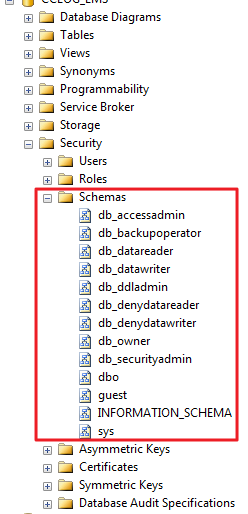
PS 2: 解释一下 database schema, 它就是对诸如表、视图、存储过程等的一种逻辑分组的方式(可以想象成对象的集合),你可以把一个 schema 赋予用户以便他能够访问所有经过授权的对象。Schemas 在数据库中可以被创建并被更新,用户也可以被授权访问它,一个 schema 可以被定义成任意用户拥有,并且 schema 的所有权是可以被转移的。我们可以看一下数据库中的 schema
Custom Conventions(EF6 onwards)
约定配置请参考文章 http://www.cnblogs.com/panchunting/p/entity-framework-code-first-custom-conventions.html
Property Mapping 属性映射
HasKey() - Primary Key
指定属性为主键
// Primary Key

modelBuilder.Entity<OfficeAssignment>()

            .HasKey(t => t.InstructorID);
也可以指定多个属性为联合主键
// Composite Primary Key

modelBuilder.Entity<Department>()

            .HasKey(t => new { t.DepartmentID, t.Name });
HasDatabaseGeneratedOption()
为数字型主键取消数据库生成
// Switching off Identity for Numeric Primary Keys

modelBuilder.Entity<Department>()

            .Property(t => t.DepartmentID)

            .HasDatabaseGeneratedOption(DatabaseGeneratedOption.None);
HasMaxLength() - Specifying the Length on a Property
指定属性长度
// Specifying the Maximum Length on a Property

modelBuilder.Entity<Department>()

            .Property(t => t.Name)

            .HasMaxLength();
IsRequired() - Configuring the Property to be Required
必填字段
// Configuring the Property to be Required

modelBuilder.Entity<Department>()

            .Property(t => t.Name)

            .IsRequired();
Ignore() - Specifying Not to Map a CLR Property to a Column in the Database
忽略
// Specifying Not to Map a CLR Property to a Column in the Database

modelBuilder.Entity<Department>()

            .Ignore(t => t.Budget);
HasColumnName() - Mapping a CLR Property to a Specific Column in the Database
指定列名
// Mapping a CLR Property to a Specific Column in the Database

modelBuilder.Entity<Department>()

            .Property(t => t.Name)

            .HasColumnName("DepartmentName");
MapKey - Renaming a Foreign Key That Is Not Defined in the Model
指定外键名
// Renaming a Foreign Key That Is Not Defined in the Model

modelBuilder.Entity<Course>()

            .HasRequired(c => c.Department)

            .WithMany(t => t.Courses)

            .Map(m => m.MapKey("ChangedDepartmentID"));
HasColumnType() - Configuring the Data Type of a Database Column
指定列类型
// Configuring the Data Type of a Database Column

modelBuilder.Entity<Department>()

            .Property(p => p.Name)

            .HasColumnType("varchar");
Configuring Properties on a Complex Type
在复杂类型(Complex Type)上有两种方式来配置 scalar properties
在 ComplexTypeConfiguration 上调用 Property
// Call Property on ComplexTypeConfiguration

modelBuilder.ComplexType<Details>()

            .Property(t => t.Location)

            .HasMaxLength();
也可以使用点标记法来访问复杂类型上的属性
 // Use the dot notation to access a property of a complex type

 modelBuilder.Entity<OnsiteCourse>()

             .Property(t => t.Details.Location)

             .HasMaxLength();
IsConcurrencyToken() - Configuring a Property to Be Used as an Optimistic Concurrency Token
设置乐观并发标记
// Configuring a Property to Be Used as an Optimistic Concurrency Token

modelBuilder.Entity<OfficeAssignment>()

            .Property(t => t.Timestamp)

            .IsConcurrencyToken();
IsRowVersion() - Configuring a Property to Be Used as an Optimistic Concurrency Token
设置乐观并发标记,效果同上
// Configuring a Property to Be Used as an Optimistic Concurrency Token

modelBuilder.Entity<OfficeAssignment>()

            .Property(t => t.Timestamp)

            .IsRowVersion();
Type Mapping类型映射
ComplexType() - Specifying That a Class Is a Complex Type
指定复杂类型
// Specifying That a Class Is a Complex Type

modelBuilder.ComplexType<Details>();
Ingore() - Specifying Not to Map a CLR Entity Type to a Table in the Database
忽略实体类型
// Specifying Not to Map a CLR Entity Type to a Table in the Database

modelBuilder.Ignore<OnlineCourse>();
ToTable() - Mapping an Entity Type to a Specific Table in the Database
映射表名
// Mapping an Entity Type to a Specific Table in the Database

modelBuilder.Entity<Department>()

            .ToTable("t_Department");
也可以同时指定 schema
// Mapping an Entity Type to a Specific Table in the Database

modelBuilder.Entity<Department>()

            .ToTable("t_ Department", "school");
Mapping the Table-Per-Hierarchy (TPH) Inheritance
映射 TPH
// Mapping the Table-Per-Hierarchy (TPH) Inheritance

modelBuilder.Entity<Course>()

            .Map<Course>(m => m.Requires("Type").HasValue("Course"))

            .Map<OnsiteCourse>(m => m.Requires("Type").HasValue("OnsiteCourse"));
Mapping the Table-Per-Type (TPT) Inheritance
映射 TPT
// Mapping the Table-Per-Type (TPT) Inheritance

modelBuilder.Entity<Course>().ToTable("Course");

modelBuilder.Entity<OnsiteCourse>().ToTable("OnsiteCourse");
Mapping the Table-Per-Concrete Class (TPC) Inheritance
映射 TPC
// Mapping the Table-Per-Concrete Class (TPC) Inheritance

modelBuilder.Entity<Course>()

            .Property(c => c.CourseID)

            .HasDatabaseGeneratedOption(DatabaseGeneratedOption.None);

modelBuilder.Entity<OnsiteCourse>()

            .Map(m =>

            {

                m.MapInheritedProperties();

                m.ToTable("OnsiteCourse");

            });

modelBuilder.Entity<OnlineCourse>()

            .Map(m =>

            {

                m.MapInheritedProperties();

                m.ToTable("OnlineCourse");

            });
Mapping Properties of an Entity Type to Multiple Tables in the Database (Entity Splitting)
映射实体中属性到多张表中
- 实体 Department 属性 DepartmentID, Name 映射到表 Department;
- 同时属性 DepartmentID, Administrator, StartDate, Budget 映射到表 DepartmentDetails
// Mapping Properties of an Entity Type to Multiple Tables in the Database (Entity Splitting)

modelBuilder.Entity<Department>()

            .Map(m =>

            {

                m.Properties(t => new { t.DepartmentID, t.Name });

                m.ToTable("Department");

            })

            .Map(m =>

            {

                m.Properties(t => new { t.DepartmentID, t.Administrator, t.StartDate, t.Budget });

                m.ToTable("DepartmentDetails");

            });
Mapping Multiple Entity Types to One Table in the Database (Table Splitting)
映射多个实体到一张表:实体 Instructor 和 OfficeAssignment 映射到同一张表 Instructor
// Mapping Multiple Entity Types to One Table in the Database (Table Splitting)

modelBuilder.Entity<OfficeAssignment>()

            .HasKey(t => t.InstructorID);

modelBuilder.Entity<Instructor>()

            .HasRequired(t => t.OfficeAssignment)

            .WithRequiredPrincipal(t => t.Instructor);

modelBuilder.Entity<Instructor>().ToTable("Instructor");

modelBuilder.Entity<OfficeAssignment>().ToTable("Instructor");
Mapping an Entity Type to Insert/Update/Delete Stored Procedures (EF6 onwards)
映射实体到增、改、更、删 存储过程,详情请参考文章 http://www.cnblogs.com/panchunting/p/entity-framework-code-first-insert-update-delete-stored-procedures
PS: 关于TPH, TPT, TPC 以后有时间专门写一篇文章介绍
原文参考:http://msdn.microsoft.com/en-us/data/jj591617
Entity Framework Code First (四)Fluent API - 配置属性/类型的更多相关文章
- Code First约定-Fluent API配置
转自:http://blog.163.com/m13864039250_1/blog/static/2138652482015283397609/ 用Fluent API 配置/映射属性和类型 简介 ...
- Entity Framework Code First关系映射约定
本篇随笔目录: 1.外键列名默认约定 2.一对多关系 3.一对一关系 4.多对多关系 5.一对多自反关系 6.多对多自反关系 在关系数据库中,不同表之间往往不是全部都单独存在,而是相互存在关联的.两个 ...
- Entity Framework Code First主外键关系映射约定
本篇随笔目录: 1.外键列名默认约定 2.一对多关系 3.一对一关系 4.多对多关系 5.一对多自反关系 6.多对多自反关系 在关系数据库中,不同表之间往往不是全部都单独存在,而是相互存在关联的.两个 ...
- Entity Framework Code First关系映射约定【l转发】
本篇随笔目录: 1.外键列名默认约定 2.一对多关系 3.一对一关系 4.多对多关系 5.一对多自反关系 6.多对多自反关系 在关系数据库中,不同表之间往往不是全部都单独存在,而是相互存在关联的.两个 ...
- 使用Fluent API 配置/映射属性和类型
Code First约定-Fluent API配置 使用Fluent API 配置/映射属性和类型 简介 通常通过重写派生DbContext 上的OnModelCreating 方法来访问Code F ...
- Entity Framework Code First使用DbContext查询
DbContext.DbSet及DbQuery是Entity Framework Code First引入的3个新的类,其中DbContext用于保持数据库会话连接,实体变化跟踪及保存,DbSet用于 ...
- Entity Framework 实体框架的形成之旅--Code First模式中使用 Fluent API 配置(6)
在前面的随笔<Entity Framework 实体框架的形成之旅--Code First的框架设计(5)>里介绍了基于Code First模式的实体框架的经验,这种方式自动处理出来的模式 ...
- Entity Framework Code First (五)Fluent API - 配置关系
上一篇文章我们讲解了如何用 Fluent API 来配置/映射属性和类型,本文将把重点放在其是如何配置关系的. 文中所使用代码如下 public class Student { public int ...
- Entity Framework Code First (五)Fluent API - 配置关系 转载 https://www.cnblogs.com/panchunting/p/entity-framework-code-first-fluent-api-configuring-relationships.html
上一篇文章我们讲解了如何用 Fluent API 来配置/映射属性和类型,本文将把重点放在其是如何配置关系的. 文中所使用代码如下 public class Student { public int ...
随机推荐
- 洛谷10月月赛Round.1| P3400 仓鼠窝[单调栈]
题目描述 萌萌哒的Created equal是一只小仓鼠,小仓鼠自然有仓鼠窝啦. 仓鼠窝是一个由n*m个格子组成的行数为n.列数为m的矩阵.小仓鼠现在想要知道,这个矩阵中有多少个子矩阵!(实际上就是有 ...
- webstorm的中文教程和技巧分享
webstorm是一款前端javascript开发编辑的神器,此文介绍webstorm的中文教程和技巧分享.webstorm8.0.3中文汉化版下载:百度网盘下载:http://pan.baidu.c ...
- webpack常用加载器和插件
css文件加载器: style-loader,css-loader,sass-loader,less-loader //style和css加载器必须放在一起使用,且style必须放前面(style!c ...
- 一类有依赖的树形背包dp方法
失踪人口回归系列 这个标题是不是看起来很厉害呢233 给一道例题:有一个树,每一个节点代表一个物品,每个物品有重量和价值,每个物品必须先选父亲才能选自己.求给定重量内最大价值. 这题的思路十分的厉害. ...
- HDU 1022 Train Problem I
A - Train Problem I Time Limit:1000MS Memory Limit:32768KB 64bit IO Format:%I64d & %I64u ...
- Oracle字符分隔函数(split)
为了让 PL/SQL 函数返回数据的多个行,必须通过返回一个 REF CURSOR 或一个数据集合来完成.REF CURSOR 的这种情况局限于可以从查询中选择的数据,而整个集合在可以返回前,必须进行 ...
- jboss eap 6.3 集群(cluster)配置
接上一篇继续,Domain模式解决了统一管理多台jboss的问题,今天我们来学习如何利用mod_cluster来实现负载均衡.容错. mod_cluster是jboss的一个开源集群模块(基于apac ...
- Webwork 学习之路【04】Configuration 详解
Webwork做为经典的Web MVC 框架,个人觉得源码中配置文件这部分代码的实现十分考究. 支持自定义自己的配置文件.自定义配置文件读取类.自定义国际化支持. 可以作为参考,单独引入到其他项目中, ...
- 使用 data-* 属性来嵌入自定义数据
1. HTML 实例 <ul> <li data-animal-type="bird">Owl</li> <li data-animal- ...
- WPF 绑定枚举值
前台Xaml <ComboBox x:Name=" HorizontalAlignment="Left" Margin="5 0 0 0" Se ...