
Nginx基本配置
1、Nginx官网下载安装程序,http://nginx.org/
2、启动命令
启动:start nginx.exe
停止:nginx -s stop
重新加载: nginx -s reload
3、配置文件
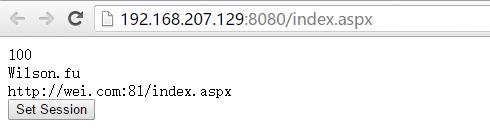
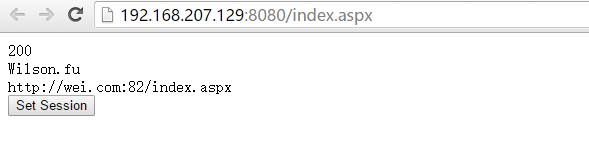
路径 Nginx/conf/nginx.conf,配置文件内容,简单的实现一个负责均衡效果
#user  nobody;

worker_processes  ;

#error_log  logs/error.log;

#error_log  logs/error.log  notice;

#error_log  logs/error.log  info;

#pid        logs/nginx.pid;

events {

    worker_connections  ;

}

http {

    include       mime.types;

    default_type  application/octet-stream;

    #log_format  main  '$remote_addr - $remote_user [$time_local] "$request" '

    #                  '$status $body_bytes_sent "$http_referer" '

    #                  '"$http_user_agent" "$http_x_forwarded_for"';

    #access_log  logs/access.log  main;

    sendfile        on;

    #tcp_nopush     on;

    #keepalive_timeout  ;

    keepalive_timeout  ;

    #gzip  on;

 #服务器的集群

    upstream  wei.com{  #服务器集群名字

    server    127.0.0.1:;#服务器配置   weight是权重的意思,权重越大,分配的概率越大。

    server    127.0.0.1:;

     #ip_hash;

    }

    server {

        listen       ;

        server_name  localhost wei.com;

        #charset koi8-r;

        #access_log  logs/host.access.log  main;

        #location / {

         #   root   html;

          #  index  index.html index.htm;

       # }

  location / {

            proxy_pass http://wei.com;

            proxy_redirect default;

            index index.aspx;

       #root C:\Website\demo1

        }

        #error_page                /.html;

        # redirect server error pages to the static page /50x.html

        #

        error_page        /50x.html;

        location = /50x.html {

            root   html;

        }

        # proxy the PHP scripts to Apache listening on 127.0.0.1:

        #

        #location ~ \.php$ {

        #    proxy_pass   http://127.0.0.1;

        #}

        # pass the PHP scripts to FastCGI server listening on 127.0.0.1:

        #

        #location ~ \.php$ {

        #    root           html;

        #    fastcgi_pass   127.0.0.1:;

        #    fastcgi_index  index.php;

        #    fastcgi_param  SCRIPT_FILENAME  /scripts$fastcgi_script_name;

        #    include        fastcgi_params;

        #}

        # deny access to .htaccess files, if Apache's document root

        # concurs with nginx's one

        #

        #location ~ /\.ht {

        #    deny  all;

        #}

    }

    # another virtual host using mix of IP-, name-, and port-based configuration

    #

    #server {

    #    listen       ;

    #    listen       somename:;

    #    server_name  somename  alias  another.alias;

    #    location / {

    #        root   html;

    #        index  index.html index.htm;

    #    }

    #}

    # HTTPS server

    #

    #server {

    #    listen        ssl;

    #    server_name  localhost;

    #    ssl_certificate      cert.pem;

    #    ssl_certificate_key  cert.key;

    #    ssl_session_cache    shared:SSL:1m;

    #    ssl_session_timeout  5m;

    #    ssl_ciphers  HIGH:!aNULL:!MD5;

    #    ssl_prefer_server_ciphers  on;

    #    location / {

    #        root   html;

    #        index  index.html index.htm;

    #    }

    #}

}
index.aspx 后台源码
<%@ Page Language="C#" AutoEventWireup="true" CodeBehind="Index.aspx.cs" Inherits="OpenLayerDemo.Index" %>

<!DOCTYPE html>

<html xmlns="http://www.w3.org/1999/xhtml">

<head runat="server">

<meta http-equiv="Content-Type" content="text/html; charset=utf-8"/>

    <title></title>

</head>

<body>

    <form id="form1" runat="server">

    <div>

    <asp:Button ID="btnSet" runat="server" OnClick="btnSet_Click" Text="Set Session" />

    </div>

    </form>

</body>

</html>
using System;

using System.Collections.Generic;

using System.Web;

using System.Web.UI;

using System.Web.UI.WebControls;

namespace OpenLayerDemo

{

    public partial class Index : System.Web.UI.Page

    {

        protected void Page_Load(object sender, EventArgs e)

        {

            Response.Write(System.Configuration.ConfigurationManager.AppSettings["val"] + "<br/>");

            if (Session["a"] != null)

            {

                Response.Write(Session["a"]);

            }

            else

            {

                Response.Write("session empty");

            }

            Response.Write("<br/>" + Request.Url.ToString());

        }

        protected void btnSet_Click(object sender, EventArgs e)

        {

            Session["a"] = "Wilson.fu";

        }

    }

}
关于配置参数:
nginx的upstream目前支持的5种方式的分配

1、轮询(默认)

每个请求按时间顺序逐一分配到不同的后端服务器,如果后端服务器down掉,能自动剔除。

upstream backserver {

server 192.168.0.14;

server 192.168.0.15;

}

2、指定权重

指定轮询几率,weight和访问比率成正比,用于后端服务器性能不均的情况。

upstream backserver {

server 192.168.0.14 weight=10;

server 192.168.0.15 weight=10;

}

3、IP绑定 ip_hash

每个请求按访问ip的hash结果分配,这样每个访客固定访问一个后端服务器,可以解决session的问题。

upstream backserver {

ip_hash;

server 192.168.0.14:88;

server 192.168.0.15:80;

}

4、fair(第三方)

按后端服务器的响应时间来分配请求,响应时间短的优先分配。

upstream backserver {

server server1;

server server2;

fair;

}

5、url_hash(第三方)

按访问url的hash结果来分配请求,使每个url定向到同一个后端服务器,后端服务器为缓存时比较有效。

upstream backserver {

server squid1:3128;

server squid2:3128;

hash $request_uri;

hash_method crc32;

}

在需要使用负载均衡的server中增加

proxy_pass http://backserver/;

upstream backserver{

ip_hash;

server 127.0.0.1:9090 down; (down 表示单前的server暂时不参与负载)

server 127.0.0.1:8080 weight=2; (weight 默认为1.weight越大,负载的权重就越大)

server 127.0.0.1:6060;

server 127.0.0.1:7070 backup; (其它所有的非backup机器down或者忙的时候,请求backup机器)

}

max_fails :允许请求失败的次数默认为1.当超过最大次数时,返回proxy_next_upstream 模块定义的错误

fail_timeout:max_fails次失败后,暂停的时间
Nginx配置说明
按照MSDN的标准说法:“对密钥进行配置,以便将其用于对 Forms 身份验证 Cookie 数据和视图状态数据进行加密和解密,并将其用于对进程外会话状态标识进行验证。”也就是说Asp.Net的很多加密,都是依赖于machineKey里面的值,例如Forms 身份验证 Cookie、ViewState的加密。默认情况下,Asp.Net的配置是自己动态生成,如果单台服务器当然没问题,但是如果多台服务器负载均衡,machineKey还采用动态生成的方式,每台服务器上的machinekey值不一致,就导致加密出来的结果也不一致,不能共享验证和ViewState,所以对于多台服务器负载均衡的情况,一定要在每台站点配置相同的machineKey。

machineKey生成的算法:

validationKey = CreateKey(20);

decryptionKey = CreateKey(24);

protected string CreateKey(int len)

{

byte[] bytes = new byte[len];

new RNGCryptoServiceProvider().GetBytes(bytes);

StringBuilder sb = new StringBuilder();

for(int i = 0; i < bytes.Length; i++)

{

sb.Append(string.Format("{0:X2}",bytes[i]));

}

return sb.ToString();

}

附参考的matchineKey配置:

<?xml version="1.0"?>

<configuration>

<system.web>

<machineKey validationKey="3FF1E929BC0534950B0920A7B59FA698BD02DFE8" decryptionKey="280450BB36319B474C996B506A95AEDF9B51211B1D2B7A77" decryption="3DES" validation="SHA1"/>

</system.web>

</configuration>
machineKey
基于redis的思路
http://www.2cto.com/kf/201402/279548.html
Nginx以windows服务方式运行见
https://github.com/daptiv/NginxService
中文帮助:
http://tengine.taobao.org/nginx_docs/cn/
Nginx基本配置的更多相关文章
- 如何在Nginx下配置PHP程序环境
1.nginx与PHP的关系 首先来看nginx与php的关系, FastCGI的关系(而不是像apache那样安装成nginx的模块) FastCGI的意思是, 快速的通用网关接口:CGI Comm ...
- 从零开始学 Java - CentOS 下 Nginx + Tomcat 配置负载均衡
为什么现在有非常多的聪明人都在致力于互联网? 最近在读埃隆·马斯克传记,他说「我认为现在有非常多的聪明人都在致力于互联网」. 仔细一想,好像真的是这样的. 我问了自己一个问题:如果你不敲代码了,你能做 ...
- Nginx主配置参数详解,Nginx配置网站
1.Niginx主配置文件参数详解 a.上面博客说了在Linux中安装nginx.博文地址为:http://www.cnblogs.com/hanyinglong/p/5102141.html b.当 ...
- nginx + tomcat配置负载均衡
目标:Nginx做为HttpServer,连接多个tomcat应用实例,进行负载均衡. 注:本例程以一台机器为例子,即同一台机器上装一个nginx和2个Tomcat且安装了JDK1.7. 1.安装Ng ...
- spring4+websocket+nginx详细配置
实现的版本jdk1.7.0_25, tomcat7.0.47.0, Tengine/2.1.1 (nginx/1.6.2), servlet3.0, spring4.2.2 使用maven导入版本3. ...
- Nginx Location配置总结
Nginx Location配置总结 语法规则: location [=|~|~*|^~] /uri/ { - }= 开头表示精确匹配^~ 开头表示uri以某个常规字符串开头,理解为匹配 url路径即 ...
- 理解nginx的配置
Nginx配置文件主要分成四部分:main(全局设置).server(主机设置).upstream(上游服务器设置,主要为反向代理.负载均衡相关配置)和 location(URL匹配特定位置后的设置) ...
- nginx缓存配置的操作记录梳理
web缓存位于内容源Web服务器和客户端之间,当用户访问一个URL时,Web缓存服务器会去后端Web源服务器取回要输出的内容,然后,当下一个请求到来时,如果访问的是相同的URL,Web缓存服务器直接输 ...
- 在nginx中配置如何防止直接用ip访问服务器web server及server_name特性讲解
看了很多nginx的配置,好像都忽略了ip直接访问web的问题,不利于SEO优化,所以我们希望可以避免直接用IP访问网站,而是域名访问,具体怎么做呢,看下面. 官方文档中提供的方法: If you d ...
- Nginx下配置ThinkPHP的URL Rewrite模式和pathinfo模式支持
前面有关于lnmp环境的搭建,在此就不在赘述.下面就简述thinkPHP如何在nginx下开启url_rewrite和pathinfo模式支持 主要有两个步骤: 一.更改php.ini将;cgi.fi ...
随机推荐
- iOS开发UI篇—UITableview控件使用小结
iOS开发UI篇—UITableview控件使用小结 一.UITableview的使用步骤 UITableview的使用就只有简单的三个步骤: 1.告诉一共有多少组数据 方法:- (NSInteger ...
- ExtJS 刷新后,默认选中刷新前最后一次选中的节点
在对树节点进行操作后往往需要进行reload操作刷新一下树,但是很多业务都需要在树形刷新后默认选中最后一次选中的节点.这样就必须先保存前一次选中节点的信息,在reload之后再次通过节点的 ...
- 【56测试】【字符串】【dp】【记忆化搜索】【数论】
第一题:神秘大门 大意: 两个字符串A,B,按字典序最大的顺序输出B 的每个字符在A 中的位置,如果B不全在A中,输出No,否则Yes. 解: 这道题就是一遍的扫描,因为要按字典序最大的输出,所以从后 ...
- Windows 7中无法访问FTP的解决方法
解决: netsh advfirewall set global StatefulFTP disable
- input标签实现让光标不出现!
实现不让光标出现的效果,很好用,例子如下: <input class="red" readonly unselectable="on" value=&qu ...
- SQL实践中的50句
一个项目涉及到的50个Sql语句(整理版)--1.学生表Student(S,Sname,Sage,Ssex) --S 学生编号,Sname 学生姓名,Sage 出生年月,Ssex 学生性别--2.课程 ...
- 集合ArrayList
/*集合ArrayList * 例如: * 1.创建:ArrayList<Egg> myList = new ArrayList<Egg>(); * Egg类型的集合 ...
- 你会用Python做出装逼的东西吗
如果我回答:“用Python很牛逼,但不能做出装逼的东西”,那大家来学习“小白的Python入门教程 ”,还有多少意义? 所以,为了让装逼的小船升级为牛逼的巨轮,让大家学完“小白的Python入门教程 ...
- Python学习路程day2
import sys #接收执行参数 #!/usr/bin/env python import sys print (sys.argv) 例: >>>python ind ...
- Linux kernel map