
timer控件、三级联动
timer控件:
实现时间日期自增长:
using System;

using System.Collections.Generic;

using System.ComponentModel;

using System.Data;

using System.Drawing;

using System.Linq;

using System.Text;

using System.Windows.Forms;

namespace timer控件

{

    public partial class Form1 : Form

    {

        public Form1()

        {

            InitializeComponent();

            label1.Text = DateTime.Now.ToString("yyyy年MM月dd日hh时mm分ss秒");

        }

        //计时器

        private void timer1_Tick(object sender, EventArgs e)

        {

            label1.Text = DateTime.Now.ToString("yyyy年MM月dd日hh时mm分ss秒");

        }

    }

}
抽奖设置,点击开始开始抽奖,开始按钮变为结束,点击结束,抽奖结束,结束按钮变为开始:
using System;

using System.Collections.Generic;

using System.ComponentModel;

using System.Data;

using System.Drawing;

using System.Linq;

using System.Text;

using System.Windows.Forms;

namespace timer控件

{

    public partial class Form2 : Form

    {

        List<long> nu = new List<long>();

        Random r = new Random();

        public Form2()

        {

            InitializeComponent();

            nu.Add();

            nu.Add();

            nu.Add();

            nu.Add();

            nu.Add();

        }

        //抽奖

        bool s = false;

        private void button1_Click(object sender, EventArgs e)

        {

            if (s)//结束抽奖

            {

                button1.Text = "开始";

                s = false;

                timer1.Enabled = false;

            }

            else//开始抽奖

            {

                button1.Text = "停止";

                s = true;

                timer1.Enabled = true;

            }

        }

        private void timer1_Tick(object sender, EventArgs e)

        {

            label2.Text= nu[r.Next(,nu.Count)].ToString();

        }

    }

}
作弊:
在if结束抽奖中加一句代码:
label2.text="";
三级联动:
创建实体类:
using System;

using System.Collections.Generic;

using System.Linq;

using System.Text;

namespace 三级联动.App_Code

{

    public class china

    {

        public string areacode { get; set; }

        public string areaname { get; set; }

        public string parentareacode { get; set; }

    }

}
创建数据访问类:
using System;

using System.Collections.Generic;

using System.Linq;

using System.Text;

using System.Data.SqlClient;

namespace 三级联动.App_Code

{

    public class chinadata

    {

        SqlConnection conn = null;

        SqlCommand cmd = null;

        public chinadata()

        {

            conn = new SqlConnection("server=.;database=mydb;user=sa;pwd=123");

            cmd = conn.CreateCommand();

        }

        public List<china> select(string pcode)

        {

            List<china> clist = new List<china>();

            cmd.CommandText = "select*from ChinaStates where ParentAreaCode=@a";

            cmd.Parameters.Clear();

            cmd.Parameters.Add("@a",pcode);

            conn.Open();

            SqlDataReader dr = cmd.ExecuteReader();

            if (dr.HasRows)

            {

                while (dr.Read())

                {

                    china c = new china();

                    c.areacode = dr[].ToString();

                    c.areaname = dr[].ToString();

                    c.parentareacode = dr[].ToString();

                    clist.Add(c);

                }

            }

            conn.Close();

            return clist;

        }

    }

}
form1:使用selectedindexchanged事件,引用命名空间
using System;

using System.Collections.Generic;

using System.ComponentModel;

using System.Data;

using System.Drawing;

using System.Linq;

using System.Text;

using System.Windows.Forms;

using 三级联动.App_Code;

namespace 三级联动

{

    public partial class Form1 : Form

    {

        public Form1()

        {

            InitializeComponent();

            //绑定省

            comboBox1.DataSource = new chinadata().select("");

            comboBox1.DisplayMember = "areaname";

            comboBox1.ValueMember = "areacode";

            //绑定市

            comboBox2.DataSource = new chinadata().select(comboBox1.SelectedValue.ToString());

            comboBox2.DisplayMember = "areaname";

            comboBox2.ValueMember = "areacode";

            //绑定区

            comboBox3.DataSource = new chinadata().select(comboBox2.SelectedValue.ToString());

            comboBox3.DisplayMember = "areaname";

            comboBox3.ValueMember = "areacode";

        }

        private void comboBox1_SelectedIndexChanged(object sender, EventArgs e)

        {
       //绑定市跟随省移动

            comboBox2.DataSource = new chinadata().select(comboBox1.SelectedValue.ToString());

            comboBox2.DisplayMember = "areaname";

            comboBox2.ValueMember = "areacode";

        }

        private void comboBox2_SelectedIndexChanged(object sender, EventArgs e)

        {
       //绑定区跟随市移动

            comboBox3.DataSource = new chinadata().select(comboBox2.SelectedValue.ToString());

            comboBox3.DisplayMember = "areaname";

            comboBox3.ValueMember = "areacode";

        }

    }

}
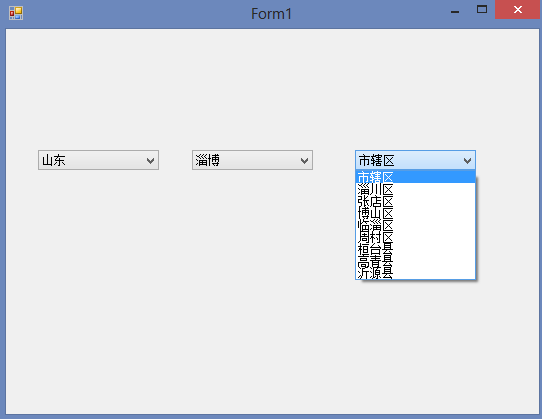
timer控件、三级联动的更多相关文章
- 【2017-05-05】timer控件、三级联动、帐号激活权限设置
一.Timer控件 Timer实际就是一个线程控件. 属性:Enabled 是否被启用 Interval 多长时间执行一次控件中的代码 事件: Tick 事件中放要执行的代码. ...
- timer控件、三级联动、帐号激活权限设置
一.Timer控件 Timer实际就是一个线程控件. 属性:Enabled 是否被启用 Interval 多长时间执行一次控件中的代码 事件: Tick 事件中放要执行的代码. ...
- winform/timer控件/权限设置/三级联动
一.timer控件 组件--timer timer是一个线程,默认可以跨线程访问对象 属性:Enabled--可用性 Interval--间隔时间 Tick:间隔时间发生事件 二.三级联动 例: pu ...
- winform 用户控件、 动态创建添加控件、timer控件、控件联动
用户控件: 相当于自定义的一个panel 里面可以放各种其他控件,并可以在后台一下调用整个此自定义控件. 使用方法:在项目上右键.添加.用户控件,之后用户控件的编辑与普通容器控件类似.如果要在后台往窗 ...
- winform用户控件、动态创建添加控件、timer控件、控件联动
用户控件: 相当于自定义的一个panel 里面可以放各种其他控件,并可以在后台一下调用整个此自定义控件. 使用方法:在项目上右键.添加.用户控件,之后用户控件的编辑与普通容器控件类似.如果要在后台往窗 ...
- WinForm用户控件、动态创建添加控件、timer控件--2016年12月12日
好文要顶 关注我 收藏该文 徐淳 关注 - 1 粉丝 - 3 0 0 用户控件: 通过布局将多个控件整合为一个控件,根据自己的需要进行修改,可对用户控件内的所有控件及控件属性进行修 ...
- 无边框窗体和timer控件
一.无边框窗体 1.控制按钮如何制作就是放置可以点击的控件,不局限于使用按钮或是什么别的,只要放置的控件可以点击能触发点击事件就可以了 做的好看一点,就是鼠标移入(pictureBox1_MouseE ...
- C# Winform学习---MDI窗体的设计,PictureBox控件(图片上一页下一页),Timer控件,MenuStrip控件
一.MDI窗体的设计 1.MDI简介 MDI(Multiple Document Interface)就是所谓的多文档界面,与此对应就有单文档界面 (SDI), 它是微软公司从Windows 2.0下 ...
- WinForm timer控件
timer 控件:按用户定义的时间间隔引发的事件 属性: Enabled 是否启用: Interval 事件发生的事件间隔,单位是毫秒 事件只有一个:Tick 事件经过指定的时间间隔 ...
随机推荐
- chmod() has been disabled for security reasons
最近用 codeigniter 写一个小系统,引用了session 库,codeigniter默认的session存储方式为files.鉴于安全性,文件即肯定涉及到权限问题. 在类 UNIX 操作系统 ...
- struts2:数据校验,通过XWork校验框架实现(validation.xml)
根据输入校验的处理场所的不同,可以将输入校验分为客户端校验和服务器端校验两种.服务器端验证目前有两种方式: 第一种: 参考:struts2:数据校验,通过Action中的validate()方法实现校 ...
- javascript中的真假值、数据类型判断以及+的特殊用法
一.javascript中的假值 jQuery中拥有一组数量奇大的假值,包括 0,NaN(非数),''(空字符串),false,null,undefined 这些值在if判断中全部等于假,但这些值彼此 ...
- 突破软件试用期的"土方法"
机器上有个试用版的vs2008. 想能正常用,又木有去搜序列号.于是用python纠结了这么一段代码: import time import subprocess import os timeNow ...
- 同事的游戏项目--Robocode-学习链接
Robocode机器人库学习链接:http://www.pudn.com/search_db.asp?keyword=Robocode 官网 :http://robocode.sourceforge. ...
- overflow:hidden---清除浮动,隐藏溢出
overflow:hidden这个CSS样式是大家常用到的CSS样式,但是大多数人对这个样式的理解仅仅局限于隐藏溢出,而对于清除浮动这个含义不是很了解.一提到清除浮动,我们就会想到另外一个CSS样式: ...
- 谨慎使用多线程中的fork
// Upon successful completion, pthread_atfork() shall return a value of zero; otherwise, an error nu ...
- 【转】赞一下huicpc035
以下转自:http://hi.baidu.com/fpkelejggfbfimd/item/99421eaefa93a814a9cfb722 本来以为HNU的huicpc035和我一样退役了,后来听说 ...
- jsp+ajax实现无刷新
jsp+ajax实现无刷新,鼠标离开文本框即验证用户名 jsp+ajax实现无刷新,鼠标离开文本框即验证用户名(本功能多用于注册) input.jsp(表单提交页面): %@ page content ...
- 微信、qq信息汇总、回复(一)
想法: 有的人喜欢用qq,有的人喜欢用微信,总而言之,是一个通信工具. qq上有很多群,微信上有很多群,每个群挨个浏览一遍.回复,还容易回复错误,前言不接后语. ...