
(转)利用eclipse external tool 执行mvn jetty:run
一、如果这个工程是标准的maven-webapp那么基本上不用修改,直接运行jetty:run就可以执行。
但是有时候会报错说
[ERROR] No plugin found for prefix 'jetty' in the current project and in the plu
gin groups [org.apache.maven.plugins, org.codehaus.mojo] available from the repo
sitories [local (C:\Documents and Settings\reymont.li\.m2\repository), central (
http://repo.maven.apache.org/maven2)] -> [Help 1]
在pom.xml的project.build节点下添加
<plugins>
<plugin>
<groupId>org.mortbay.jetty</groupId>
<artifactId>maven-jetty-plugin</artifactId>
<version>6.1.10</version>
</plugin>
</plugins>
In order to run Jetty on a webapp project which is structured according to the usual Maven defaults (resources in ${basedir}/src/main/webapp, classes in${project.build.outputDirectory}
and the web.xml descriptor at ${basedir}/src/main/webapp/WEB-INF/web.xml,
you don't need to configure anything.
Simply type:
mvn |
This will start Jetty running on port 8080 and serving your project. Jetty will continue to run until the plugin is explicitly stopped, for example, by a <cntrl-c>.
二、本来一直用jetty插件,换了Ubuntu后,在eclipse里装jetty插件总失败,就想放弃使用插件。
反正maven里已经配置好了jetty,用mvn jetty:run也能启动jetty服务,但是这样就不能用eclipse断点调试,比较不方便。上网调查了下,发现可以用eclipse external tool调用maven命令来执行mvn jetty:run,并能使用debug模式。于是写此文章,以做备忘。
1. Run -> External Tools -> External Tools Configurations
配置见下图

上图的工作路径是在front下,但是项目要求maven执行的时候在工程根目录下,可以用下图配置

切到Environment标签,增加如下变量
Name:MAVEN_OPTS
Value:-Xdebug -Xnoagent -Djava.compiler=NONE -Xrunjdwp:transport=dt_socket,address=8443,server=y,suspend=y
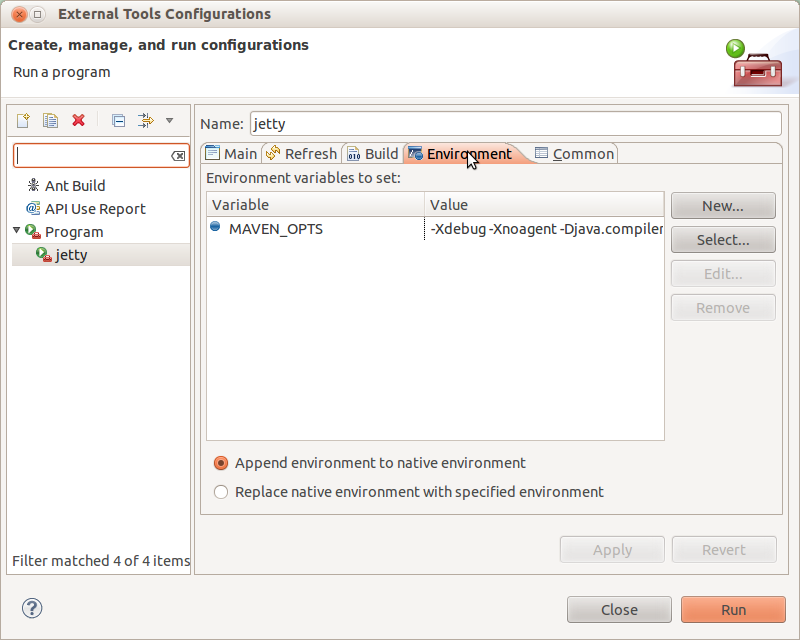
然后保存。
2 Run -> Debug Configurations
注意此处的端口号要和上面的一致。
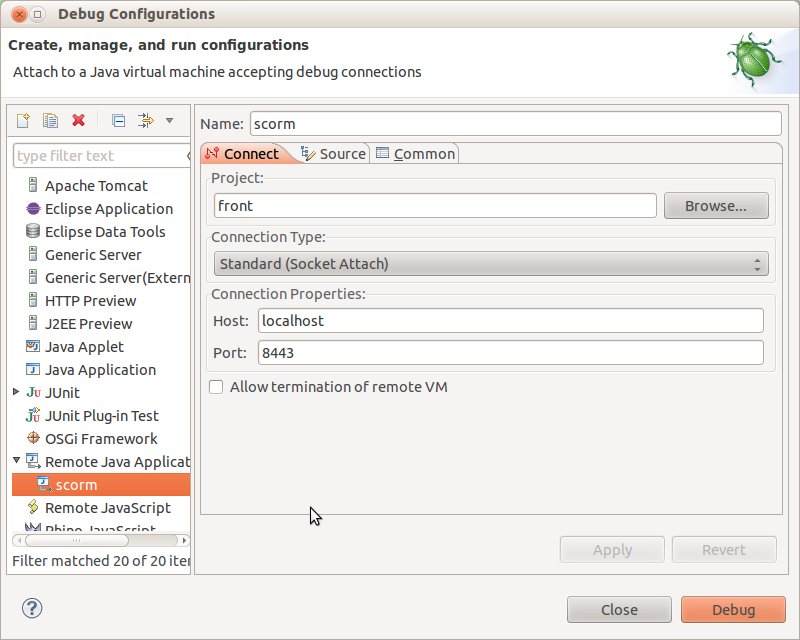
保存,成功!
(转)利用eclipse external tool 执行mvn jetty:run的更多相关文章
- Command mvn jetty:run
How to use the command mav jetty:run? There is a simple display as below: Step 1: You should generat ...
- spring3-mvc-maven-hello-world-master mvn jetty:run 及 mvn war:war 指令
spring3-mvc-maven-annotation-hello-world-master mvn jetty:run Run this project locally Terminal $ m ...
- mvn jetty:run 出现PermGen space outofmemeryerror
使用mvn jetty:run跑别人的项目时出现了PermGen space outofmemeryerror异常 http://stackoverflow.com/questions/1451648 ...
- Eclipse External Tool Configration Notepad++
Location: C:\Program Files\Notepad++\notepad++.exe Arguments: ${resource_loc}
- Eclipse中使用Maven的Jetty插件Debug Web项目
1.环境配置 JAVA_HOME=D:\Program Files\Java\jdk1.7.0_80 JRE_HOME=%JAVA_HOME%\jre CLASSPATH=.;%JAVA_HOME%/ ...
- 命令行执行 mvn package 和常见mvn命令
cmd 打开命令提示符, 然后打开代码所在目录,例如 d: cd d:/code 执行 mvn package Maven常用命令: 1. 创建Maven的普通java项目: mvn arc ...
- mvn jetty debug
使用mvn jetty:run很爽吧,但是怎么debug了,找了Google的N多老外文章,终于可以了,文章链接:http://gaertig.pl/blog/en/2009/03/debug-jet ...
- Mvn+Jetty启动项目
这里要注意,Mvn加jetty启动项目,主要用到的是Maven的jetty插件,和你下的Jetty服务器没什么关系. 我的运行环境是jdk1.7,Eclipse-mars,Maven是Eclipse自 ...
- eclipse中报错:Errors running builder “Integrated External Tool Builder” on project
在eclipse构建项目的时候,一直报如下错误: Errors during build. Errors running builder "Integrated External Tool ...
随机推荐
- php实现发送邮件
smtp.php: <?php class smtp { /* Public Variables */ var $smtp_port; var $time_out; ...
- 在虚机中安装CentOS
摘要 最近看到.net core 1发布的内容,也想尝试着在lunix上跑一圈.linux这方面的知识一直都没怎么接触过,只在工作中见同事操作过,看到满屏幕的命令行,感觉非常的高大上,趁着现在赶紧学习 ...
- HTTP协议详解(真的很经典)
HTTP 是一个属于应用层的面向对象的协议,由于其简捷.快速的方式,适用于分布式超媒体信息系统.它于1990年提出,经过几年的使用与发展,得到不断地完善和 扩展.目前在WWW中使用的是HTTP/1.0 ...
- [译]Mongoose指南 - Model
编译你的第一个model var xxSchema = new Schema({name: 'string', size: 'string'}); var Tank = mongoose.model( ...
- Oracle卸载
用Oracle自带的卸载程序不能从根本上卸载Oracle,从而为下次的安装留下隐患,所以要想完全卸载Oracle就必须要直接将注册表清除. 步骤如下: 1. 开始->设置->控制面板-&g ...
- nyoj 15 括号匹配(二)动态规划
当时看到(二)就把(一)做了, 一很容易,这道题纠结了好几天,直到今晚才看懂别人的代码谢,勉强才写出来.................... 不愧是难度6的题. #include <stdio ...
- Perl 正则表达式
匹配:m/<regexp>;/ (还可以简写为 /<regexp>;/ ,略去 m)替换:s/<pattern>;/<replacement>;/转化: ...
- XML理解
XML:页面之间传递数据,跨平台传递,核心标签 HTML:超文本标记语言,核心标签 <xml version='1.0'>版本1.0<Nation> <one> & ...
- Mac安装OpenCV
安装过程参考这篇文章Mac平台上OpenCV开发环境搭建 也可以参考文档官网上的安装文档Installation in Linux(不知道为什么没有Installation in Mac...) 我的 ...
- 第五天 loadmore
mutating func loadFresh(completion: (result: APIResult<DeserializedType>) -> ()) -> Canc ...