
探索 OpenStack 之(17):计量模块 Ceilometer 中的数据收集机制
本文将阐述 Ceilometer 中的数据收集机制。Ceilometer 使用三种机制来收集数据:
- Notifications:Ceilometer 接收 OpenStack 其它服务发出的 notification message
- Polling:直接从 Hypervisor 或者 使用 SNMP 从host machine,或者使用 OpenStack 其它服务的 API 来获取数据。
- RESTful API:别的 application 使用 Ceilometer 的 REST API 创建 samples。
1. Notifications
1.1 被 Ceilometer 处理的 notifications
所有的 OpenStack 服务都会在执行了某种操作或者状态变化时发出 notification。一些 nofication message 会包含 metering 需要的数据,这部分消息会被ceilometer 处理并转化为samples。下表列出了目前 Ceilometer 所处理的各服务的notification:
(参考文档: http://docs.openstack.org/admin-guide-cloud/content/section_telemetry-notifications.html)
| OpenStack service | Event types | Note |
| OpenStack Compute |
scheduler.run_instance.scheduled,scheduler.select_destinations compute.instance.* |
For a more detailed list of Compute notifications please check the System Usage Data wiki page. |
| Bare metal module for OpenStack | hardware.ipmi.* | |
| OpenStack Image Service |
image.update,image.upload,image.delete,image.send |
The required configuration for Image service can be found in the Configure the Image Service for Telemetry section section in theOpenStack Installation Guide. |
| OpenStack Networking |
floatingip.create.end,floatingip.update.*,floatingip.exists network.create.end,network.update.*,network.exists port.create.end,port.update.*,port.exists router.create.end,router.update.*,router.exists subnet.create.end,subnet.update.*,subnet.exists l3.meter |
|
| Orchestration module |
orchestration.stack.create.end,orchestration.stack.update.end orchestration.stack.delete.end,orchestration.stack.resume.end orchestration.stack.suspend.end |
|
| OpenStack Block Storage |
volume.exists,volume.create.*,volume.delete.* volume.update.*,volume.resize.*,volume.attach.* volume.detach.* snapshot.exists,snapshot.create.* snapshot.delete.*,snapshot.update.* |
The required configuration for Block Storage service can be found in the Add the Block Storage service agent for Telemetry sectionsection in the OpenStack Installation Guide. |
1.2 Cinder Volume Notificaitons 发出过程
Cinder 中 /cinder/volume/util.py 的 notify_about_volume_usage 函数负责调用 oslo.message 的方法来发出 volume usage 相关的 notificaiton message:
def notify_about_volume_usage(context, volume, event_suffix,

                              extra_usage_info=None, host=None):

    if not host:

        host = CONF.host

    if not extra_usage_info:

        extra_usage_info = {}

    usage_info = _usage_from_volume(context, volume, **extra_usage_info)

    rpc.get_notifier("volume", host).info(context, 'volume.%s' % event_suffix, usage_info)
下图显示了该函数被调用的地方。可见:
- Controller 节点上的 cinder-api 会发出 Info 级别的 volume.update.* notificaiton
- Controller 节点上的 cinder-scheduler 会发出 Info 级别的volume.create.* notification
- Volume 节点上的 cinder-volume 会发出 Info 级别的别的 volume.*.* notificaiton
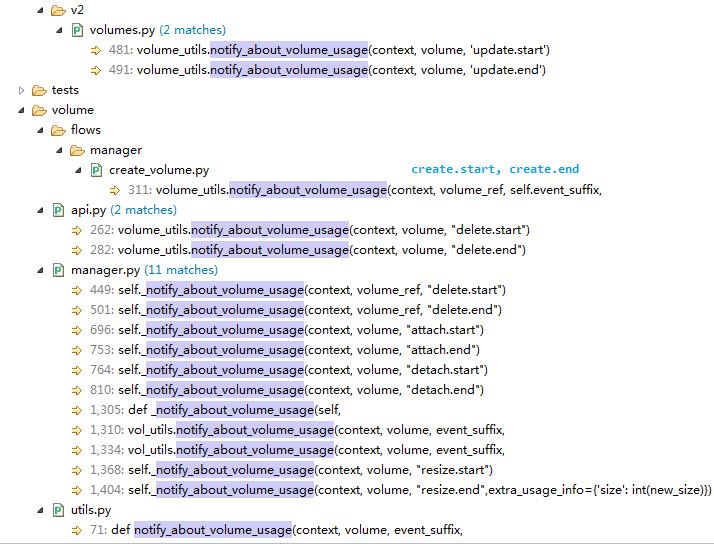
再看看 notification 发出的时机。以 volume.update.* 为例:
 @wsgi.serializers(xml=VolumeTemplate)

    def update(self, req, id, body):

        """Update a volume."""

       ...

        try:

            volume = self.volume_api.get(context, id, viewable_admin_meta=True)

            volume_utils.notify_about_volume_usage(context, volume, 'update.start') #开始更新前发出 volume.update.start notificaiton

            self.volume_api.update(context, volume, update_dict)

        except exception.NotFound:

            msg = _("Volume could not be found")

            raise exc.HTTPNotFound(explanation=msg)

        volume.update(update_dict)

        utils.add_visible_admin_metadata(volume)

        volume_utils.notify_about_volume_usage(context, volume, 'update.end') #更新结束后发出 volume.update.end notification

        return self._view_builder.detail(req, volume)
在来看看使用 notificaiton driver 是如何发出 notification 的:
// /oslo/messaging/notify/_impl_messaging.py,
// notificaiton driver 由 cinder.conf 配置项 notification_driver = cinder.openstack.common.notifier.rpc_notifier 指定,它实际对应的是 oslo.messaging.notify._impl_messaging:MessagingDriver (对应关系由 cinder/setup.cfg 定义)
def notify(self, ctxt, message, priority, retry):

        priority = priority.lower()

        for topic in self.topics:

            target = messaging.Target(topic='%s.%s' % (topic, priority)) #topic 是 notificaitons.info,因此会被发到同名的queue。使用默认的由 cinder.conf 中配置项 control_exchange 指定的exchange,其默认值为 openstack。而 topic 中的 "notifications" 由配置项 #notification_topics=notifications 指定。

            try:

                self.transport._send_notification(target, ctxt, message, version=self.version, retry=retry) #Send a notify message on a topic

            except Exception:

                ......
因此,为了 Cinder 能正确发出 notificaiton 被 Ceilometer 接收到,需要在 controller 节点和 cinder-volume 节点上的 cinder.conf 中做如下配置:
control_exchange = cinder #因为queue "notificaitons.info" 是 bind 到 "cinder" exchange 上的,所以 cinder 的 notificaiton message 需要被发到 “cinder” exchange。

notification_driver = cinder.openstack.common.notifier.rpc_notifier #在某些时候 /oslo/messaging/notify/_impl_messaging.py 不存在,需要手工从别的地方拷贝过来
Cinder 还有会同样的方式发出别的资源的notification:
 81: rpc.get_notifier("volume", host).info(context, 'volume.%s' % event_suffix,

113: rpc.get_notifier('snapshot', host).info(context, 'snapshot.%s' % event_suffix,

129: rpc.get_notifier('replication', host).info(context, 'replication.%s' % suffix,

145: rpc.get_notifier('replication', host).error(context, 'replication.%s' % suffix,

174: rpc.get_notifier("consistencygroup", host).info(context,'consistencygroup.%s' % event_suffix,

204: rpc.get_notifier("cgsnapshot", host).info(
但是目前 Ceilometer 只处理 volume 和 snapshot notificaiton message。
1.3 Ceilometer 处理 Volume notifications 的过程
Ceilometer 从 AMQP message queue "notifications.info" 中获取 notificaiton 消息。该 queue 的名字由 ceilometer.conf 中的配置项 notification_topics = notifications 指定。它会按照一定的方法将 notification 转化为 ceilometer event,然后再转化为 samples。
1.4 Cinder 到 Ceilometer 全过程
(1) cinder-* 发出 event-type 为 "volume.*.*" topic 为"<topic>.<priority>" 的消息 到 类型为 topic 名为 <service> 的exchange
(2)exchange <service> 和 queue "<topic>.<priority>" 使用 routing-key "<topic>.<priority>" 绑定
(3)notificaiton message 被 exchange 转发到 queue "<topic>.<priority>"
(4)ceilometer-agent-notification 从 queue "<topic>.<priority>" 中获取 message

这里对cinder 来说:
- <service> 是 "cinder"。需要注意 cinder 默认的 control exchange 是 "openstack",所以使用 ceilometer 时需要将其修改为 "cinder"。
- <topic> 是 "notificaitons",由 cinder.conf 中的配置项 notification_topics=notifications 指定。
- <priority> 是 "info",由 cinder 代码中写死的。
- notificaiton message 的数据内容可参考 https://wiki.openstack.org/wiki/SystemUsageData
2. Polling
Ceilometer 的 polling 机制使用三种类型的 agent:
- Compute agent
- Central agent
- IPMI agent
在 Kilo 版本中,这些 agent 都属于 ceilometer-polling,不同的是,每种agent使用不同的 polling plug-ins (pollsters)
2.1 Central agent
该 agent 负责使用个 OpenStack 服务的 REST API 来获取 openstack 资源的各种信息,以及通过 SNMP 来获取 hardware 资源的信息。这些资源包括:
OpenStack Networking
OpenStack Object Storage
OpenStack Block Storage
Hardware resources via SNMP
Energy consumption metrics via Kwapi framework
该 agent 收集到的 samples 会通过 AMQP 发给 Ceilometer Collector 或者外部系统。
2.2 Compute agent
Compute agent 安装在 compute node 上,负责收集在上面运行的虚机的使用数据。它是通过调用 hypervisor SDK 来收集数据的。到目前为止支持的hypervisor包括:
- Kernel-based Virtual Machine (KVM)
- Quick Emulator (QEMU)
- Linux Containers (LXC)
- User-mode Linux (UML)
- Hyper-V
- XEN
- VMWare vSphere
除了虚机外,该 agent 还能够收集 compute 节点 cpu 的数据。这功能需要配置 nova.conf 文件中的 compute_monitors 项为 ComputeDriverCPUMonitor。
2.3 IPMI agent
IPMI agent 负责在 compute 节点上收集 IPMI 传感器(sensor)的数据,以及Intel Node Manager 的数据。
3. 使用 Ceilometer REST API 创建 samples
$ ceilometer sample-create -r 37128ad6-daaa-4d22-9509-b7e1c6b08697 -m memory.usage --meter-type gauge --meter-unit MB --sample-volume 48

+-------------------+--------------------------------------------+

| Property          | Value                                      |

+-------------------+--------------------------------------------+

| message_id        | 6118820c-2137-11e4-a429-08002715c7fb       |

| name              | memory.usage                               |

| project_id        | e34eaa91d52a4402b4cb8bc9bbd308c1           |

| resource_id       | 37128ad6-daaa-4d22-9509-b7e1c6b08697       |

| resource_metadata | {}                                         |

| source            | e34eaa91d52a4402b4cb8bc9bbd308c1:openstack |

| timestamp         | 2014-08-11T09:10:46.358926                 |

| type              | gauge                                      |

| unit              | MB                                         |

| user_id           | 679b0499e7a34ccb9d90b64208401f8e           |

| volume            | 48.0                                       |

+-------------------+--------------------------------------------+
4. 收集 Neutron Bandwidth samples
Havana 版本中添加该功能。与 Ceilometer 其他采集方式不同的是,bandwidth 的采集是通过 neutron-meter-agent 收集,然后 push 到 oslo-messaging,ceilometer-agent-notification通过监听消息队列来收取bandwidth信息。
其实现是在 L3 router 层次来收集数据,因此需要操作员配置 IP 范围以及设置标签(label)。比如,我们加两个标签,一个表示内部网络流量,另一个表示外部网络流量。每个标签会计量一定IP范围内的流量。然后,每个标签的带宽的测量数据会被发到 MQ,然后被 Ceilometer 收集到。
参考链接:
https://wiki.openstack.org/wiki/Neutron/Metering/Bandwidth
https://openstackr.wordpress.com/2014/05/23/bandwidth-monitoring-with-neutron-and-ceilometer/
5. 收集物理设备samples
5.1 使用 kwapi kwapi 收集设备能耗数据
- Energy (cumulative type): 表示 kWh.
- Power (gauge type): 表示 watts.
Ceilometer central agent 的 pollers 直接调用 kwapi 的 API 来获取 samples。

参考文档:
http://kwapi.readthedocs.org/en/latest/architecture.html
http://blog.zhaw.ch/icclab/collecting-energy-consumption-data-using-kwapi-in-openstack/
http://perso.ens-lyon.fr/laurent.lefevre/greendayslux/GreenDays_Rossigneux.pdf
5.2 使用 snmp 协议收集硬件的CPU、MEM、IO等信息
在 IceHouse 中新增该功能。
参考文档:http://www.cnblogs.com/smallcoderhujin/p/4150368.html
6. 基于 OpenDayLight 收集 SDN samples
- Central agent 不直接调用 OpenDayLight 的 REST API,而是实现了一个 driver 来调用。
- Driver 调用 REST API 收集统计数据,返回 volume、resource id 和 metadata 给 pollster。
- Pollster 负责产生 samples。
实现代码在OpenStack 的 \ceilometer\network\statistics 目录中。

探索 OpenStack 之(17):计量模块 Ceilometer 中的数据收集机制的更多相关文章
- 探索 OpenStack 之(16):计量模块 Ceilometer 介绍及优化
0. 背景 0.1 为什么要有 Ceilometer? 通常云,特别是公有云在计费方面有三个层次: 计量 (Metering): 收集资源的使用数据,其数据信息主要包括:使用对象(what), 使用者 ...
- 网站统计中的数据收集原理及实现(share)
转载自:http://blog.codinglabs.org/articles/how-web-analytics-data-collection-system-work.html 网站数据统计分析工 ...
- 使用nginx lua实现网站统计中的数据收集
导读网站数据统计分析工具是各网站站长和运营人员经常使用的一种工具,常用的有 谷歌分析.百度统计和腾讯分析等等.所有这些统计分析工具的第一步都是网站访问数据的收集.目前主流的数据收集方式基本都是基于ja ...
- Android中的数据持久化机制
Android中几种最简单但是却最通用的数据持久化技术:SharedPreference.实例状态Bundle和本地文件. Android的非确定性Activity和应用程序生存期使在会话间保留UI状 ...
- 大数据技术之_25_手机APP信息统计系统项目_01_APP 数据生成模块 + 数据收集模块 + 数据处理模块框架搭建 + 业务需求处理 + 数据展示模块 +项目总结 + 问题总结
一 项目概述1.1 角色1.2 业务术语1.3 项目效果展示二 项目需求三 项目概要3.1 项目技术架构3.2 项目目录结构3.3 项目技术选型3.4 项目整体集群规划3.5 创建项目工程四 APP ...
- 67.Android中的数据存储总结
转载:http://mp.weixin.qq.com/s?__biz=MzIzMjE1Njg4Mw==&mid=2650117688&idx=1&sn=d6c73f9f04d0 ...
- 探索 OpenStack 之(15):oslo.messaging 和 Cinder 中 MessageQueue 消息的发送和接收
前言:上一篇文章 只是 RabbitMQ 的科普,本文将仔细分析 Cinder 中 RabbitMQ 的各组件的使用.消息的发送和接收等.由于各流程步骤很多,本文只会使用若干流程图来加以阐述,尽量做到 ...
- 探索 OpenStack 之(14):OpenStack 中 RabbitMQ 的使用
本文是 OpenStack 中的 RabbitMQ 使用研究 两部分中的第一部分,将介绍 RabbitMQ 的基本概念,即 RabbitMQ 是什么.第二部分将介绍其在 OpenStack 中的使用. ...
- 探索 OpenStack 之(13):研究 Keystone
Keystone 是 OpenStack Identity Service 的项目名称.本文就试着尽可能深入地研究 Keystone. 1. Keystone 的功能 做为 OpenStack 云系统 ...
随机推荐
- 很实用的baguetteBox.js 图片弹出层
lightbox JS插件--baguetteBox.js,它是用纯Javascript创建的图像展示效果,拥有图像放大缩小并带有相应的CSS3过度,并能在触摸屏等设备上完美展示. baguetteB ...
- 也来谈谈wap端瀑布流布局
Definition 瀑布流布局,在视觉上表现为参差不齐的多栏布局,随着页面滚动条向下滚动,新数据不断被加载进来. 瀑布流对于图片的展现,是高效而具有吸引力的,用户一眼扫过的快速阅读模式可以在短时间内 ...
- HTML基础知识总结
经过这段时间的学习,对于html的一些基础知识有了一定的了解.所谓好记性不如烂笔头,唯有一点点累积,才能汇聚成知识的海洋.现在,我对这段时间的学习做一个总结. 一.HTML的定义 HTML,超文本标记 ...
- SAP中发送邮件
WITH HEADER LINE, docdata LIKE sodocchgi1, objtxt WITH HEADER LINE, objpack WITH HEADER LINE, reclis ...
- sap后台作业管理/sap打印管理
sap后台作业管理: 后台作业,主要用于运行需要处理大量数据,对交互没有要求的程序.个人认为,简单的创建,配置和监控后台作业没有什么难度.后台作业管理最为困难的解决方案的取舍,系统负载的调控.失控的后 ...
- ArcGis设置到 Oracle 的连接
设置到 Oracle 的连接 地理数据 » 管理地理数据库 » Oracle 中的地理数据库 要建立从客户端计算机到 Oracle 数据库的连接,必须在客户端计算机上安装 Oracle 客户端应用程序 ...
- 用TypeScript开发了一个网页游戏引擎,开放源代码
最开始学习电脑编程的原动力之一就是想自己编写游戏,一方面很好奇这些游戏是怎么做出来的,另一方面觉得有些地方设计的不合理,希望电脑游戏既能让人玩的有趣,又不浪费时间. 学校五年,毕业十年,学用了十多种编 ...
- UIButton的titleEdgeInsets属性和imageEdgeInsets属性实现图片文字按要求排列
button可以设置 titleEdgeInsets属性和 imageEdgeInsets属性来调整其image和label相对位置,具体参考http://stackoverflow.com/ques ...
- Android四大组件之Activity一(组件的概念、Intent、监听)
前言知识补充: 什么是组件? 1.它的类必须实现特定接口或继承特定类 2.需要在配置文件中配置其全类名 3.它的对象不是通过new来创建的, 而是系统自动创建的 4.它的对象具有一定 ...
- CGAffineTransform方法汇总
CGAffineTransform是二维的仿射变换,可以进行位移,旋转,缩放,CGAffineTransform实际上是一个矩阵. CGAffineTransform { CGFloat a, b, ...