
自然语言19.1_Lemmatizing with NLTK(单词变体还原)
python机器学习-乳腺癌细胞挖掘(博主亲自录制视频)https://study.163.com/course/introduction.htm?courseId=1005269003&utm_campaign=commission&utm_source=cp-400000000398149&utm_medium=share
机器学习,统计项目合作QQ:231469242
Lemmatizing with NLTK
# -*- coding: utf-8 -*-

"""

Spyder Editor

This is a temporary script file.

"""

import nltk

from nltk.stem import WordNetLemmatizer

lemmatizer=WordNetLemmatizer()

#如果不提供第二个参数,单词变体还原为名词

#pythonly 无法还原,说明精确度仍然达不到100%

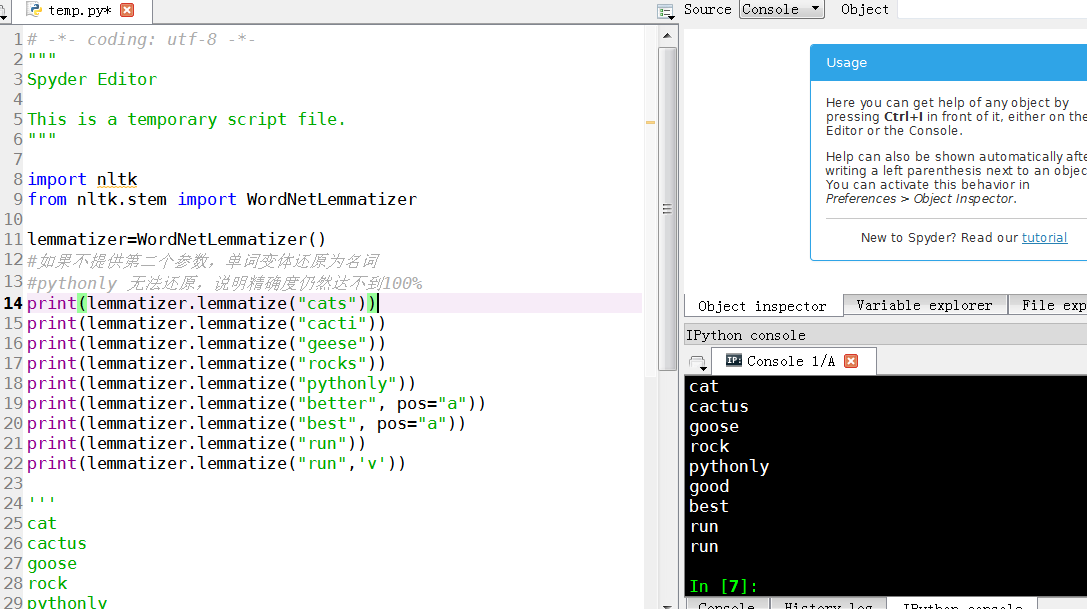
print(lemmatizer.lemmatize("cats"))

print(lemmatizer.lemmatize("cacti"))

print(lemmatizer.lemmatize("geese"))

print(lemmatizer.lemmatize("rocks"))

print(lemmatizer.lemmatize("pythonly"))

print(lemmatizer.lemmatize("better", pos="a"))

print(lemmatizer.lemmatize("best", pos="a"))

print(lemmatizer.lemmatize("run"))

print(lemmatizer.lemmatize("run",'v'))

'''

cat

cactus

goose

rock

pythonly

good

best

run

run

'''
A very similar operation to stemming is called lemmatizing. The
major difference between these is, as you saw earlier, stemming can
often create non-existent words, whereas lemmas are actual words.
So, your root stem, meaning the word you end up with, is not
something you can just look up in a dictionary, but you can look up a
lemma.
Some times you will wind up with a very similar word, but sometimes,
you will wind up with a completely different word. Let's see some
examples.
from nltk.stem import WordNetLemmatizer

lemmatizer = WordNetLemmatizer()

print(lemmatizer.lemmatize("cats"))

print(lemmatizer.lemmatize("cacti"))

print(lemmatizer.lemmatize("geese"))

print(lemmatizer.lemmatize("rocks"))

print(lemmatizer.lemmatize("python"))

print(lemmatizer.lemmatize("better", pos="a"))

print(lemmatizer.lemmatize("best", pos="a"))

print(lemmatizer.lemmatize("run"))

print(lemmatizer.lemmatize("run",'v'))
Here, we've got a bunch of examples of the lemma for the words that we use. The only major thing to note is that lemmatize takes a part of speech parameter, "pos." If not supplied, the default is "noun." This means that an attempt will be made to find the closest noun, which can create trouble for you. Keep this in mind if you use lemmatizing!
In the next tutorial, we're going to dive into the NTLK corpus that came with the module, looking at all of the awesome documents they have waiting for us there.
自然语言19.1_Lemmatizing with NLTK(单词变体还原)的更多相关文章
- 完全图解RNN、RNN变体、Seq2Seq、Attention机制
完全图解RNN.RNN变体.Seq2Seq.Attention机制 本文主要是利用图片的形式,详细地介绍了经典的RNN.RNN几个重要变体,以及Seq2Seq模型.Attention机制.希望这篇文章 ...
- RNN-GRU-LSTM变体详解
首先介绍一下 encoder-decoder 框架 中文叫做编码-解码器,它一个最抽象的模式可以用下图来展现出来: 这个框架模式可以看做是RNN的一个变种:N vs M,叫做Encoder-Decod ...
- Provide Several View Variants for End-Users 为最终用户提供多个视图变体
In this lesson, you will learn how to provide several customized variants of the same View, and allo ...
- 【Visual Lisp】变体与安全数组
(vlax-make-variant) ;;创建一个未初始化的变体 ;;01.整型值变体(setq myvar (vlax-make-variant 10)) ;;创建整型值变体,返回 #<va ...
- labview 变体数据类型
变体数据类型是LabVIEW中多种数据类型的容器.将其它数据转换为变体时,变体将存储数据和数据的原始类型,保证日后可将变体数据反向转换. 例如,如将字符串数据转换为变体,变体将存储字符串的文本,以及说 ...
- Bootstrap 标签的变体 实例样式
Bootstrap 标签样式,代码如下: <!DOCTYPE html> <html> <head> <title>Bootstrap 实例 - 标签的 ...
- 自然语言处理(1)之NLTK与PYTHON
自然语言处理(1)之NLTK与PYTHON 题记: 由于现在的项目是搜索引擎,所以不由的对自然语言处理产生了好奇,再加上一直以来都想学Python,只是没有机会与时间.碰巧这几天在亚马逊上找书时发现了 ...
- Odoo / PS Cloud12版本中,产品变体功能如何使用
场景: 产品:陶瓷马克杯 产品颜色变体:红色.蓝色.白色 产品尺寸变体:10CM.12CM.15CM 每个变体都有不同价格维度 odoo / PS Cloud 专业实施开发 EMAIL:1715860 ...
- 二叉查找树及B-树、B+树、B*树变体
动态查找树主要有二叉查找树(Binary Search Tree),平衡二叉查找树(Balanced Binary Search Tree), 红黑树 (Red-Black Tree ), 都是典型的 ...
随机推荐
- Android下的数据储存方式( 二)
在上一篇文章中我们介绍了SharedPreferences的使用方法. 今天我们继续介绍另一种储存数据的方式:使用内部储存和外部储存 每一个Android设备都拥有两个数据储存区域:外部储存和外部储存 ...
- SharedPreferences
除了SQLite数据库外,SharedPreferences也是一种轻型的数据存储方式,它是Android数据持久化方法中最简单的一种. 其本质是基于XML文件存储key-value键值对数据,通常用 ...
- 【BZOJ 4456】【UOJ #184】【ZJOI 2016】旅行者
http://www.lydsy.com/JudgeOnline/problem.php?id=4456 http://uoj.ac/problem/184 参考(抄)的晨爷的题解(代码) 对矩形进行 ...
- Office 2013 Pro Plus Vol激活
先确认自己是office2013 vol(大客户版),然后cmd(管理员)里面运行如下命令: cd "C:\Program Files\Microsoft Office\Office15&q ...
- 自定义View完全解析
自定义View主要包括以下3种方式: 一.组合控件,利用已有控件的组合,来满足自己的需求. 例子:顶部导航栏 二.继承已有View,比如继承TextView.ImageView等,根据需要重写相应的方 ...
- 系统间通信(10)——RPC的基本概念
1.概述 经过了详细的信息格式.网络IO模型的讲解,并且通过JAVA RMI的讲解进行了预热.从这篇文章开始我们将进入这个系列博文的另一个重点知识体系的讲解:RPC.在后续的几篇文章中,我们首先讲解R ...
- 纯JSP实现简单登录跳转
1.JSP介绍 JSP即Java Server Pages,JSP技术使用Java编程语言编写类XML的tags和scriptlets,来封装产生动态网页的处理逻辑.网页还能通过tags和script ...
- svn服务器无法访问时检查几个文件:
出现该问题基本都是三个配置文件的问题,下面把这个文件列出来. svnserve.conf:[general]anon-access = readauth-access = writepassword- ...
- java高新技术-反射
一.反射的基石->Class类 定义一个类使用 class 有一个类叫Class Java程序中的各个Java类属于同一类事务,描述这类事物的Java类名就是Class. Person类代表人, ...
- 【poj1112】 Team Them Up!
http://poj.org/problem?id=1112 (题目链接) 题意 将n个人分成两组,每个人有认识的人,要求每一组中的人互相认识,并且两组人数之差尽可能的小,求如何分. Solution ...