
linux下nginx编译安装、版本信息修改
环境
centos 7
安装依赖包
yum install -y  gcc gcc-c++ glibc glibc-devel pcre pcre-devel zlib zlib-devel openssl openssl-devel \
unzip psmisc bash-completion  libxml2 libxml2-devel libxslt libxslt-devel perl perl-ExtUtils-Embed
下载源码包
mkdir /usr/local/src
cd /usr/local/src
wget  http://nginx.org/download/nginx-1.20.1.tar.gz

tar -xf nginx-1.20.1.tar.gz
下载nginx_upstream_check_module模块
yum install -y git

cd /usr/local/src/

git clone https://github.com/yaoweibin/nginx_upstream_check_module.git
定制版本信息
版本号、服务器类型、错误页显示
cd /usr/local/src/nginx-1.20.1
修改版本
(本例修改为myweb)
src/core/nginx.h 文件
第13行#define NGINX_VERSION
第14行#define NGINX_VER "nginx/" NGINX_VERSION
sed -i '/define NGINX_VERSION/s/1.20.1/123/' src/core/nginx.h

sed -i '/^#define NGINX_VER.*NGINX_VERSION$/s/nginx/myweb/' src/core/nginx.h
修改HTTP 响应头
src/http/ngx_http_header_filter_module.c 文件
第49行 static u_char ngx_http_server_string[] = "Server: nginx" CRLF;
sed -i '/static u_char ngx_http_server_string/s/nginx/myweb/' src/http/ngx_http_header_filter_module.c
修改错误页底部提示
src/http/ngx_http_special_response.c 文件
第36行 static u_char ngx_http_error_tail[] =
"<hr><center>nginx</center>" CRLF
sed -i '36s#nginx#myweb#' src/http/ngx_http_special_response.c
最终效果
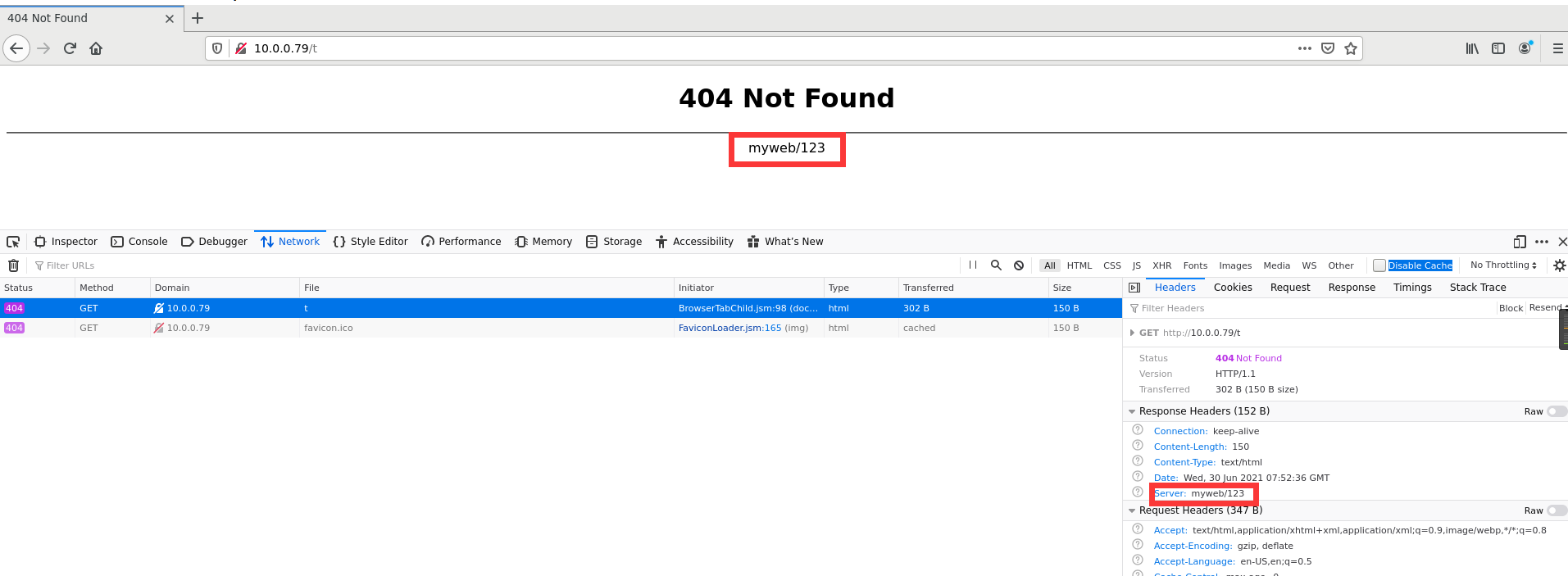
添加nginx用户
useradd -r nginx -s /sbin/nologin
编译安装
./configure --prefix=/usr/local/nginx \
--user=nginx --group=nginx \
--pid-path=/usr/local/nginx/nginx.pid \
--with-http_ssl_module \
--with-http_realip_module \
--with-http_stub_status_module \
--with-http_gzip_static_module \
--with-http_gunzip_module \
--with-http_v2_module \
--with-pcre \
--with-threads \
--with-file-aio \--with-stream \
--with-stream_ssl_module \
--with-stream_realip_module \
--add-module=/usr/local/src/nginx_upstream_check_module
make -j 4
make install
服务及开机自启
开机启动
系统服务(systemctl)
使用systemctl管理:systemctl start | stop | reload | enable | disable nginx
/usr/lib/systemd/system/nginx.service 文件
[Unit]
Description=The nginx HTTP and reverse proxy server
After=network-online.target remote-fs.target nss-lookup.target
Wants=network-online.target
[Service]
Type=forking
PIDFile=/usr/local/nginx/nginx.pid
# Nginx will fail to start if /run/nginx.pid already exists but has the wrong
# SELinux context. This might happen when running `nginx -t` from the cmdline.
# https://bugzilla.redhat.com/show_bug.cgi?id=1268621
ExecStartPre=/usr/bin/rm -f /run/nginx.pid
ExecStartPre=/usr/local/nginx/sbin/nginx -t
ExecStart=/usr/local/nginx/sbin/nginx
ExecReload=/usr/local/nginx/sbin/nginx -s reload
KillSignal=SIGQUIT
TimeoutStopSec=5
KillMode=process
PrivateTmp=true
[Install]
WantedBy=multi-user.target
使用rc.local自启
不便或不需写为服务脚本放置于/etc/rc.d/init.d/目录,且又想开机时自动运行的命令,可直接放置于/etc/rc.d/rc.local文件中
cat >>/etc/rc.d/rc.local<<EOF

/usr/local/nginx/sbin/nginx

EOF
添加执行权限
chmod 755 /etc/rc.d/rc.local
环境变量
使用二进制nginx管理,不用每次都写一长串的绝对路径 nginx [-s reload | stop ]
方法1:PATH变量
cat >>/etc/profile.d/nginx.sh <<EOF
export PATH=/usr/local/nginx/sbin:$PATH
EOF
soure /etc/profile.d/nginx.sh
方法2:软链接
ln -s /usr/local/nginx/sbin/nginx /usr/bin
不显示版本号
主配置文件中添加
server_tokens off;
linux下nginx编译安装、版本信息修改的更多相关文章
- Linux下nginx编译安装教程和编译参数详解
这篇文章主要介绍了Linux下nginx编译安装教程和编译参数详解,需要的朋友可以参考下 一.必要软件准备1.安装pcre 为了支持rewrite功能,我们需要安装pcre 复制代码代码如下: # y ...
- Linux 下Nginx编译安装
Untitled .note-content {font-family: 'Helvetica Neue', Arial, 'Hiragino Sans GB', STHeiti, 'Microsof ...
- centOS linux 下nginx编译安装详解
Nginx的官方网站是 www.nginx.org Nginx的下载地址是:http://nginx.org/en/download.html 由 于官网的设计非常简洁不大气不上档次,所以我们 ...
- linux下nginx编译安装
步骤: 1.获取nginx安装包. 进入nginx官网:http://nginx.org/ 找到稳定版本: 点击红框内的链接. 使用wget获取安装包. wget http://nginx.org/d ...
- Linux下Nginx的安装(二)
一.安装Nginx ## 安装前准备 ## #GNU编译器集合 #Nginx编译需要PCRE #在Nginx的各种模块中需要使用gzip压缩 #在Nginx中,如果服务器提供安全网页时则会用到Open ...
- Nginx 1.9.7.2 + PHP 5.6.18(FastCGI)在CentOS Linux下的编译安装
本文参考张宴的Nginx 0.8.x + PHP 5.2.13(FastCGI)搭建胜过Apache十倍的Web服务器(第6版)[原创]完成.所有操作命令都在CentOS 6.x 64位操作系统下实践 ...
- Linux下Nginx的安装、升级及动态添加模块
系统基于ubuntu server 14.04.4 amd64 安装 第一步 下载并解压Nginx压缩包 从Nginx官网下载Nginx,或者在Linux上执行wget http://nginx.or ...
- linux下nginx的安装和配置
准备目录 [root@sqh ~]# mkdir /usr/local/nginx [root@sqh ~]# cd /usr/local/nginx 添加一些支持和依赖 1.安装gcc 安装redi ...
- Linux下Nginx的安装与配置
安装前需要安装pcre:ftp://ftp.csx.cam.ac.uk/pub/software/programming/pcre/1.解压缩: tar xjpf pcre-7.8.tar.b ...
随机推荐
- promise链式调用的应用
then在链式调用时,会等前一个then或者函数执行完毕,返回状态,才会执行回调函数. (1)代码顺序执行,第一步调用了函数cook ,cook执行返回了一个promise,promise返回的是成功 ...
- Linux Ubuntu SVN图形界面 安装使用
安装 sudo apt-get install rapidsvn 使用 rapidsvn
- 经典深度学习CNN总结 - LeNet、AlexNet、GoogLeNet、VGG、ResNet
参考了: https://www.cnblogs.com/52machinelearning/p/5821591.html https://blog.csdn.net/qq_24695385/arti ...
- Spring 事务回滚机制详解
1:事务原理 1.2:aop/动态代理 类路径:org/springframework/aop/framework/CglibAopProxy.java ReflectiveMethodInvocat ...
- css 文字超出俩行省略号显示
.center-titles{ overflow: hidden; text-overflow: ellipsis; display: -webkit-box; -webkit-line-clamp: ...
- vue JS获取当前时间并格式化 ( 前端小细节,大进步 )
JS // 获取并且格式化时间 formatter (thistime, fmt) { let $this = new Date(thistime) let o = { ...
- 并发编程之:CountDownLatch
大家好,我是小黑,一个在互联网苟且偷生的农民工. 先问大家一个问题,在主线程中创建多个线程,在这多个线程被启动之后,主线程需要等子线程执行完之后才能接着执行自己的代码,应该怎么实现呢? Thread. ...
- (一)Superset 1.3图表篇——Table
本系列文章基于Superset 1.3.0版本.1.3.0版本目前支持分布,趋势,地理等等类型共59张图表.本次1.3版本的更新图表有了一些新的变化,而之前也一直没有做过非常细致的图表教程. 而且目前 ...
- openswan中DH算法说明
Author : Email : vip_13031075266@163.com Date : 2021.01.11 Copyright : 未经同意不得 ...
- openswan专栏序言
openswan专栏序言 "一杯茶,一包烟,一个bug解一天!!!". 2020年春季,正值新冠病毒在全球肆虐之际,美国的疫情已经相当的严峻,每天仍以3万速度狂奔.而国内的疫情 ...