
实验 4 :Open vSwitch 实验 —— Mininet 中使用 OVS 命令
实验 4 :Open vSwitch 实验 —— Mininet 中使用 OVS 命令
一、实验目的
Mininet 安装之后,会连带安装 Open vSwitch,可以直接通过 Python 脚本调用 Open vSwitch 命令,从而直接控制 Open vSwitch,通过实验了解调用控制的方法。
二 、实验任务
在本实验中,使用 Mininet 基于 Python 的脚本,调用“ovs-vsctl”命令直接控制Open vSwitch。使用默认的交换机泛洪规则,设置更高的优先级规则进行预先定义 IP 报文的转发。在多个交换机中通过设置不同 TOS 值的数据包将通过不同的方式到达目的地址,验证主机间的连通性及到达目的地址的时间。
三 、 实验步骤
1. 实验环境
安装了 Ubuntu 18.04.5 Desktop amd64 的虚拟机
2. 实验过程
SDNLAB 实验参考资料:https://www.sdnlab.com/15083.html
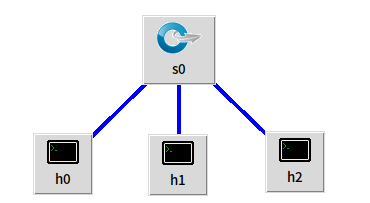
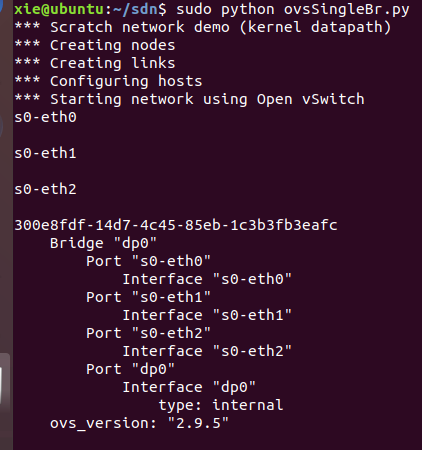
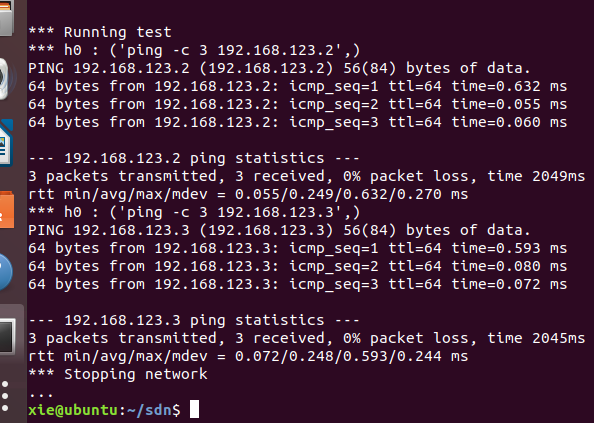
( 1 )创建 ovsSingleBr.py 脚本并添加内容,代码参考SDNLAB脚本对应的拓扑如上图所示,执行 ovsSingleBr.py,在没有控制器的情况下,在 Mininet 脚本中通过调用 ovs 命令直接向 switch0 交换机下发流表,将入端口号为 1/2/3 的数据包泛洪广播,并对目的地址为 192.168.123.1/2/3 的数据包分别从1/2/3 端口转发出去。之后测试 h0 ping h1,h0 ping h2,网络连通。
# ovsSingleBr.py

#!/usr/bin/python

from mininet.net import Mininet

from mininet.node import Node

from mininet.link import Link

from mininet.log import  setLogLevel, info

def myNet():

    "Create network from scratch using Open vSwitch."

    info( "*** Creating nodes\n" )

    switch0 = Node( 's0', inNamespace=False )

    h0 = Node( 'h0' )

    h1 = Node( 'h1' )

    h2 = Node( 'h2' )

    info( "*** Creating links\n" )

    Link( h0, switch0)

    Link( h1, switch0)

    Link( h2, switch0)

    info( "*** Configuring hosts\n" )

    h0.setIP( '192.168.123.1/24' )

    h1.setIP( '192.168.123.2/24' )

    h2.setIP( '192.168.123.3/24' )

    info( "*** Starting network using Open vSwitch\n" )

    switch0.cmd( 'ovs-vsctl del-br dp0' )

    switch0.cmd( 'ovs-vsctl add-br dp0' )

    for intf in switch0.intfs.values():

        print intf

        print switch0.cmd( 'ovs-vsctl add-port dp0 %s' % intf )

    # Note: controller and switch are in root namespace, and we

    # can connect via loopback interface

    #switch0.cmd( 'ovs-vsctl set-controller dp0 tcp:127.0.0.1:6633' )

    print switch0.cmd(r'ovs-vsctl show')

    print switch0.cmd(r'ovs-ofctl add-flow dp0 idle_timeout=0,priority=1,in_port=1,actions=flood' )

    print switch0.cmd(r'ovs-ofctl add-flow dp0 idle_timeout=0,priority=1,in_port=2,actions=flood' )

    print switch0.cmd(r'ovs-ofctl add-flow dp0 idle_timeout=0,priority=1,in_port=3,actions=flood' )

    print switch0.cmd(r'ovs-ofctl add-flow dp0 idle_timeout=0,priority=10,ip,nw_dst=192.168.123.1,actions=output:1' )

    print switch0.cmd(r'ovs-ofctl add-flow dp0 idle_timeout=0,priority=10,ip,nw_dst=192.168.123.2,actions=output:2' )

    print switch0.cmd(r'ovs-ofctl add-flow dp0 idle_timeout=0,priority=10,ip,nw_dst=192.168.123.3,actions=output:3')

    #switch0.cmd('tcpdump -i s0-eth0 -U -w aaa &')

    #h0.cmd('tcpdump -i h0-eth0 -U -w aaa &')

    info( "*** Running test\n" )

    h0.cmdPrint( 'ping -c 3 ' + h1.IP() )

    h0.cmdPrint( 'ping -c 3 ' + h2.IP() )

    #print switch0.cmd( 'ovs-ofctl show dp0' )

    #print switch0.cmd( 'ovs-ofctl dump-tables  dp0' )

    #print switch0.cmd( 'ovs-ofctl dump-ports   dp0' )

    #print switch0.cmd( 'ovs-ofctl dump-flows  dp0' )

    #print switch0.cmd( 'ovs-ofctl dump-aggregate  dp0' )

    #print switch0.cmd( 'ovs-ofctl queue-stats dp0' )

    info( "*** Stopping network\n" )

    switch0.cmd( 'ovs-vsctl del-br dp0' )

    switch0.deleteIntfs()

    info( '\n' )

if __name__ == '__main__':

    setLogLevel( 'info' )

    info( '*** Scratch network demo (kernel datapath)\n' )

    Mininet.init()

    myNet()
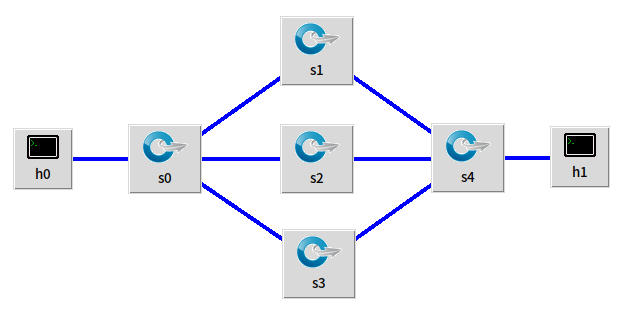
( 2 ) 创建 ovsMultiBr.py 脚本并添加内容,代码参考 SDNLAB 脚本对应的拓扑如上图所示,执行 ovsMultiBr.py,在没有控制器的情况下,在Mininet 脚本中通过调用 ovs 命令给多个交换机下发流表,通过 h0 ping h1 操作测试验证主机间的连通性,并通过 -Q 参数设置不通的 tos 值查看主机间的连通性。通过验证发现,tos 值设置越大,时间使用越少。
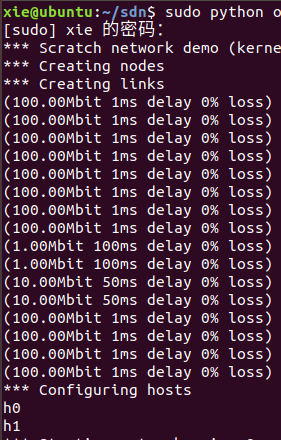
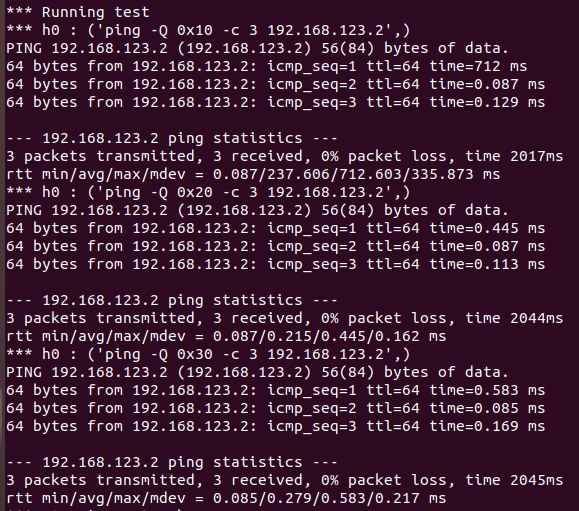
# ovsMultiBr.py

#!/usr/bin/python

from mininet.net import Mininet

from mininet.node import Node

from mininet.link import TCLink

from mininet.log import  setLogLevel, info

def myNet():

    "Create network from scratch using Open vSwitch."

    info( "*** Creating nodes\n" )

    switch0 = Node( 's0', inNamespace=False )

    switch1 = Node( 's1', inNamespace=False )

    switch2 = Node( 's2', inNamespace=False )

    switch3 = Node( 's3', inNamespace=False )

    switch4 = Node( 's4', inNamespace=False )

    h0 = Node( 'h0' )

    h1 = Node( 'h1' )

    info( "*** Creating links\n" )

    linkopts0=dict(bw=100, delay='1ms', loss=0)

    linkopts1=dict(bw=1, delay='100ms', loss=0)

    linkopts2=dict(bw=10, delay='50ms', loss=0)

    linkopts3=dict(bw=100, delay='1ms', loss=0)

    TCLink( h0, switch0, **linkopts0)

    TCLink( switch0, switch1, **linkopts0)

    TCLink( switch0, switch2, **linkopts0)

    TCLink( switch0, switch3, **linkopts0)

    TCLink( switch1, switch4,**linkopts1)

    TCLink( switch2, switch4,**linkopts2)

    TCLink( switch3, switch4,**linkopts3)

    TCLink( h1, switch4, **linkopts0)

    info( "*** Configuring hosts\n" )

    h0.setIP( '192.168.123.1/24' )

    h1.setIP( '192.168.123.2/24' )

    info( str( h0 ) + '\n' )

    info( str( h1 ) + '\n' )

    info( "*** Starting network using Open vSwitch\n" )

    switch0.cmd( 'ovs-vsctl del-br dp0' )

    switch0.cmd( 'ovs-vsctl add-br dp0' )

    switch1.cmd( 'ovs-vsctl del-br dp1' )

    switch1.cmd( 'ovs-vsctl add-br dp1' )

    switch2.cmd( 'ovs-vsctl del-br dp2' )

    switch2.cmd( 'ovs-vsctl add-br dp2' )

    switch3.cmd( 'ovs-vsctl del-br dp3' )

    switch3.cmd( 'ovs-vsctl add-br dp3' )

    switch4.cmd( 'ovs-vsctl del-br dp4' )

    switch4.cmd( 'ovs-vsctl add-br dp4' )

    for intf in switch0.intfs.values():

        print intf

        print switch0.cmd( 'ovs-vsctl add-port dp0 %s' % intf )

    for intf in switch1.intfs.values():

        print intf

        print switch1.cmd( 'ovs-vsctl add-port dp1 %s' % intf )

    for intf in switch2.intfs.values():

        print intf

        print switch2.cmd( 'ovs-vsctl add-port dp2 %s' % intf )

    for intf in switch3.intfs.values():

        print intf

        print switch3.cmd( 'ovs-vsctl add-port dp3 %s' % intf )

    for intf in switch4.intfs.values():

        print intf

        print switch4.cmd( 'ovs-vsctl add-port dp4 %s' % intf )

    print switch1.cmd(r'ovs-ofctl add-flow dp1 idle_timeout=0,priority=1,in_port=1,actions=flood' )

    print switch1.cmd(r'ovs-ofctl add-flow dp1 idle_timeout=0,priority=1,in_port=1,actions=output:2' )

    print switch1.cmd(r'ovs-ofctl add-flow dp1 idle_timeout=0,priority=1,in_port=2,actions=output:1' )

    print switch2.cmd(r'ovs-ofctl add-flow dp2 idle_timeout=0,priority=1,in_port=1,actions=output:2' )

    print switch2.cmd(r'ovs-ofctl add-flow dp2 idle_timeout=0,priority=1,in_port=2,actions=output:1' )

    print switch3.cmd(r'ovs-ofctl add-flow dp3 idle_timeout=0,priority=1,in_port=1,actions=output:2' )

    print switch3.cmd(r'ovs-ofctl add-flow dp3 idle_timeout=0,priority=1,in_port=2,actions=output:1' )

    print switch4.cmd(r'ovs-ofctl add-flow dp4 idle_timeout=0,priority=1,in_port=1,actions=output:4' )

    print switch4.cmd(r'ovs-ofctl add-flow dp4 idle_timeout=0,priority=1,in_port=2,actions=output:4' )

    print switch4.cmd(r'ovs-ofctl add-flow dp4 idle_timeout=0,priority=1,in_port=3,actions=output:4' )

    print switch4.cmd(r'ovs-ofctl add-flow dp4 idle_timeout=0,priority=1,in_port=4,actions=output:3' )

    #print switch0.cmd(r'ovs-ofctl add-flow dp0 idle_timeout=0,priority=10,ip,nw_dst=192.168.123.2,actions=output:4')

    print switch0.cmd(r'ovs-ofctl add-flow dp0 idle_timeout=0,priority=10,ip,nw_dst=192.168.123.2,nw_tos=0x10,actions=output:2')

    print switch0.cmd(r'ovs-ofctl add-flow dp0 idle_timeout=0,priority=10,ip,nw_dst=192.168.123.2,nw_tos=0x20,actions=output:3')

    print switch0.cmd(r'ovs-ofctl add-flow dp0 idle_timeout=0,priority=10,ip,nw_dst=192.168.123.2,nw_tos=0x30,actions=output:4')

    #print switch0.cmd(r'ovs-ofctl add-flow dp0 idle_timeout=0,priority=10,ip,nw_dst=192.168.123.1,actions=output:1')

    #switch0.cmd('tcpdump -i s0-eth0 -U -w aaa &')

    #h0.cmd('tcpdump -i h0-eth0 -U -w aaa &')

    info( "*** Running test\n" )

    h0.cmdPrint( 'ping -Q 0x10 -c 3 ' + h1.IP() )

    h0.cmdPrint( 'ping -Q 0x20 -c 3 ' + h1.IP() )

    h0.cmdPrint( 'ping -Q 0x30 -c 3 ' + h1.IP() )

    #h1.cmdPrint('iperf -s -p 12345 -u &')

    #h0.cmdPrint('iperf -c ' + h1.IP() +' -u -b 10m -p 12345 -t 10 -i 1')

    #print switch0.cmd( 'ovs-ofctl show dp0' )

    #print switch1.cmd( 'ovs-ofctl show dp1' )

    #print switch2.cmd( 'ovs-ofctl show dp2' )

    #print switch3.cmd( 'ovs-ofctl show dp3' )

    #print switch4.cmd( 'ovs-ofctl show dp4' )

    #print switch0.cmd( 'ovs-ofctl dump-tables  dp0' )

    #print switch0.cmd( 'ovs-ofctl dump-ports   dp0' )

    #print switch0.cmd( 'ovs-ofctl dump-flows  dp0' )

    #print switch0.cmd( 'ovs-ofctl dump-aggregate  dp0' )

    #print switch0.cmd( 'ovs-ofctl queue-stats dp0' )

    #print "Testing video transmission between h1 and h2"

    #h1.cmd('./myrtg_svc -u > myrd &')

    #h0.cmd('./mystg_svc -trace st 192.168.123.2')

    info( "*** Stopping network\n" )

    switch0.cmd( 'ovs-vsctl del-br dp0' )

    switch0.deleteIntfs()

    switch1.cmd( 'ovs-vsctl del-br dp1' )

    switch1.deleteIntfs()

    switch2.cmd( 'ovs-vsctl del-br dp2' )

    switch2.deleteIntfs()

    switch3.cmd( 'ovs-vsctl del-br dp3' )

    switch3.deleteIntfs()

    switch4.cmd( 'ovs-vsctl del-br dp4' )

    switch4.deleteIntfs()

    info( '\n' )

if __name__ == '__main__':

    setLogLevel( 'info' )

    info( '*** Scratch network demo (kernel datapath)\n' )

    Mininet.init()

    myNet()
四 、实验 要求
1. 学习 ovsSingleBr.py 和 ovsMultiBr.py,在下图拓扑中实现一个 VLAN。
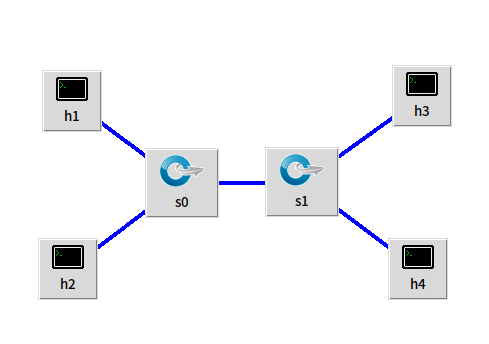
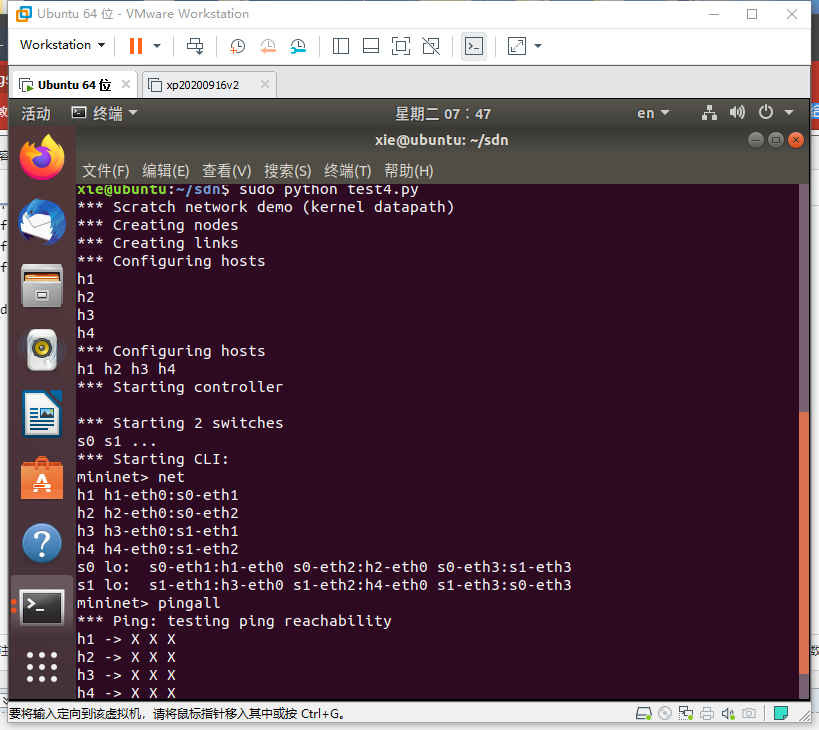
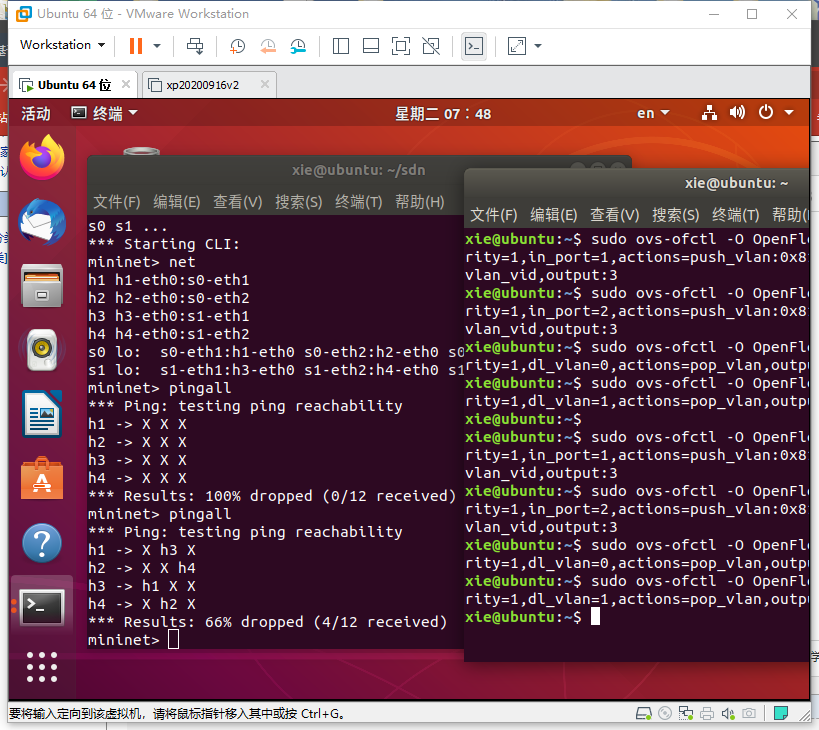
上述代码将 h0 和 h2 划分在 VLAN0 中,h1 和 h3 划分在 VLAN1 中,由于拓扑没有控制器,并且初始化时删除了交换机中的所有流表,因此除非下发流表,否则主机之间网络无法连通。请尝试修改代码,利用 ovs 命令直接下发 VLAN 设置的流表项,最终测试 h0 和 h2 互通,h1 和 h3 互通,其余主机均不通,结果如下图。
(这里用h1和h3互通,h2和h4互通)
# test4.py

# coding=UTF-8

#!/usr/bin/python

from mininet.net import Mininet

from mininet.link import TCLink

from mininet.node import Node

from mininet.log import setLogLevel, info

from mininet.cli import CLI

def test4():

    "Create network from scratch using Open vSwitch."

    net = Mininet()

    info( "*** Creating nodes\n" )

    switch0 = net.addSwitch( 's0' )

    switch1 = net.addSwitch( 's1' )

    h1 = net.addHost( 'h1' )

    h2 = net.addHost( 'h2' )

    h3 = net.addHost( 'h3' )

    h4 = net.addHost( 'h4' )

    info( "*** Creating links\n" )

    net.addLink( h1, switch0 )

    net.addLink( h2, switch0 )

    net.addLink( h3, switch0 )

    net.addLink( h4, switch0 )

    net.addLink( switch1, switch0 )

    info( "*** Configuring hosts\n" )

    h1.setIP( '192.168.123.1/24' )

    h2.setIP( '192.168.123.2/24' )

    h3.setIP( '192.168.123.3/24' )

    h4.setIP( '192.168.123.4/24' )

    info( str( h1 ) + '\n' )

    info( str( h2 ) + '\n' )

    info( str( h3 ) + '\n' )

    info( str( h4 ) + '\n' )

    net.start()

    CLI(net)

    net.stop()

if __name__=='__main__':

    setLogLevel( 'info' )

    info( '*** Scratch network demo (kernel datapath)\n' )

    Mininet.init()

    test4()
sudo ovs-ofctl -O OpenFlow13 add-flow s0 priority=1,in_port=1,actions=push_vlan:0x8100,set_field:4096-\>vlan_vid,output:3

sudo ovs-ofctl -O OpenFlow13 add-flow s0 priority=1,in_port=2,actions=push_vlan:0x8100,set_field:4097-\>vlan_vid,output:3

sudo ovs-ofctl -O OpenFlow13 add-flow s0 priority=1,dl_vlan=0,actions=pop_vlan,output:1

sudo ovs-ofctl -O OpenFlow13 add-flow s0 priority=1,dl_vlan=1,actions=pop_vlan,output:2

sudo ovs-ofctl -O OpenFlow13 add-flow s1 priority=1,in_port=1,actions=push_vlan:0x8100,set_field:4096-\>vlan_vid,output:3

sudo ovs-ofctl -O OpenFlow13 add-flow s1 priority=1,in_port=2,actions=push_vlan:0x8100,set_field:4097-\>vlan_vid,output:3

sudo ovs-ofctl -O OpenFlow13 add-flow s1 priority=1,dl_vlan=0,actions=pop_vlan,output:1

sudo ovs-ofctl -O OpenFlow13 add-flow s1 priority=1,dl_vlan=1,actions=pop_vlan,output:2
OVS 实现 VLAN 可参考博客:https://www.cnblogs.com/fjlinww/p/11791846.html
实验 4 :Open vSwitch 实验 —— Mininet 中使用 OVS 命令的更多相关文章
- 软件定义网络实验记录④--Open vSwitch 实验——Mininet 中使用 OVS 命令
一.实验目的 Mininet 安装之后,会连带安装 Open vSwitch,可以直接通过 Python 脚本调用 Open vSwitch 命令,从而直接控制 Open vSwitch,通过实验了解 ...
- 实验 4:Open vSwitch 实验——Mininet 中使用 OVS 命令
一.安装目的 Mininet 安装之后,会连带安装 Open vSwitch,可以直接通过 Python 脚本调用Open vSwitch 命令,从而直接控制 Open vSwitch,通过实验了解调 ...
- 实验 4:Open vSwitch 实验——Mininet 中使用 OVS 命令
一.实验目的 Mininet 安装之后,会连带安装 Open vSwitch,可以直接通过 Python 脚本调用Open vSwitch 命令,从而直接控制 Open vSwitch,通过实验了解调 ...
- Android实验一(在Android Studio中创建项目和模拟器)
北京电子科技学院(BESTI) 实 验 报 告 课程:移动平台开发 班级:1592 姓名:苏泽楠 学号:20159207 成绩: 指导教师 ...
- SDUT OJ 数据结构实验之二叉树八:(中序后序)求二叉树的深度
数据结构实验之二叉树八:(中序后序)求二叉树的深度 Time Limit: 1000 ms Memory Limit: 65536 KiB Submit Statistic Discuss Probl ...
- SDUT-2804_数据结构实验之二叉树八:(中序后序)求二叉树的深度
数据结构实验之二叉树八:(中序后序)求二叉树的深度 Time Limit: 1000 ms Memory Limit: 65536 KiB Problem Description 已知一颗二叉树的中序 ...
- 实验 6 :OpenDaylight 实验——OpenDaylight 及 Postman实现流表下发
实验 6 :OpenDaylight 实验--OpenDaylight 及 Postman实现流表下发 一.实验目的 熟悉 Postman 的使用:熟悉如何使用 OpenDaylight 通过 Pos ...
- [nRF51822] 10、基础实验代码解析大全 · 实验15 - RTC
一.实验内容: 配置NRF51822 的RTC0 的TICK 频率为8Hz,COMPARE0 匹配事件触发周期为3 秒,并使能了TICK 和COMPARE0 中断. TICK 中断中驱动指示灯D1 翻 ...
- [nRF51822] 9、基础实验代码解析大全 · 实验12 - ADC
一.本实验ADC 配置 分辨率:10 位. 输入通道:5,即使用输入通道AIN5 检测电位器的电压. ADC 基准电压:1.2V. 二.NRF51822 ADC 管脚分布 NRF51822 的ADC ...
随机推荐
- 【C/C++】two pointers/归并排序/原理/理解/实现/算法笔记4.6
1.two pointers 思路:对序列进行扫描的时候,根据序列本身的特性用两个下标i和j对序列进行扫描,从而降低算法复杂度. ·例1 在递增序列中找a + b = M while (i<j) ...
- KNN分类
1. KNN简介 K近邻(K-Nearest Neighbor)简称KNN.它可以做分类算法,也可以做回归算法.个人经验:KNN在做分类问题时非常有效. 2. KNN算法思想 在样本空间中,我们认为两 ...
- vue3官网介绍,安装,创建一个vue实例
前言:这一章主要是vue的介绍.安装.以及如何创建一个vue实例. 一.vue介绍 vue3中文官网:建议先自己看官网. https://v3.cn.vuejs.org/ vue是渐进式框架,渐进式指 ...
- AT2642 [ARC076A] Reconciled? 题解
Content 有 \(n\) 只狗和 \(m\) 只猴,现在要把这 \(n+m\) 只动物排成一排,要求相邻两只动物不能同时是狗或者同时是猴.求排列方案总数对 \(10^9+7\) 取模后的值. 数 ...
- UVA11951 Area 题解
Content 小 S 想买下一块地.他所在的城市可以看成一个 \(n\times m\) 的网格,要购买所处在 \((i,j)\) 的网格需要缴税 \(c_{i,j}\) 元,如果一块地里面有多个网 ...
- CF1166A Silent Classroom 题解
Content 现在有 \(n\) 名学生,我们需要将这些学生分到两个班上.对于两名在同一班级的学生,如果他们的名字首字母相同,他们就会聊天. 现在给定这些学生的名字,问最少有多少对学生会在一起聊天. ...
- LuoguB2133 我家的门牌号 题解
Update \(\texttt{2021.11.27}\) 修复了代码中的 \(10000\) 写成 \(n\) 的错误. Content 一个家庭住在一个胡同里面,门牌号从 \(1\) 开始编号. ...
- 使用容器挂载NFS
https://kubernetes.io/docs/concepts/storage/persistent-volumes/#persistent-volumes nfs 标准协议 v2 v3 v4 ...
- MIUI12.5扫码之后无法连接MIUI+,显示连接失败
设置-应用设置-应用管理-小米互联通信服务(如果没有找到,进行搜索即可)-清除数据 重新扫码连接就可以连上了 (感觉不怎么样,不知道是不是我网卡,用起来卡卡的...)
- Spring Boot定时任务配置
import org.springframework.context.annotation.Configuration; import org.springframework.scheduling.a ...