
实用程序包utils - 基于Rollup打包输出各模块文件(二)
上一次,我们讲到了如何去搭建一个前端工具库的工程,那么今天我们来聊一聊如何去将其打包输出。
需求
事情是这个样子的。我有一个这样的需求,或者是我发现有这么一个需求。就是有时候吧,我也不想搞的那么复杂,我就想写一个简简单单的demo,引入一个JS脚本,CTRL + S一按,浏览器一打开,啪的一下,我就能看见效果,我就能爽起来,我不想npm init 、npm install这种去搞一个规范的工程,我就想回到远古时代,感受最纯真的爱。再比如后端的同学或者测试的同学,我不想知道npm是什么,我也不想去搞什么前端工程化,我就想像在学校老师教我的那样,引入一个JS脚本,啪地一下能出效果,就像layui、jquery那样,引入相关的脚本,it works。
好,今天围绕着楼上这个问题,我们去思考上一次工程化留下来的问题。 ------ 怎么将开发的模块打包输出?

JS中的模块规范
随着时代的发展,社会的进步。为了更好地解决代码的冲突和依赖等问题,JS的模块也经历了很大的发展。比如写服务端Node.js同学熟悉的CommonJS规范,以及专为浏览器设计的AMD(Asynchronous Module Definition)规范,还有它们的结合体UMD(Universal Module Definition)规范,还有2015年推出的ES Module规范。这里具体的示例我们放到后面再讲。
Rollup介绍
Rollup是一个Javascript的模块打包器,它可以做这样一件事,将一大串代码打包成一个模块文件,这个模块可以是我们上面提到的模块规范,比如著名的Vue.js框架就是使用了rollup进行打包相关的文件输出。
如何在项目中运用rollup
这里我主要是用了这5个主要的辅助包
执行相关命令npm install package name即可,欧,不要忘了安装rollup本包
@rollup/plugin-json
这个插件主要是将JSON文件转换为ES Module
https://github.com/rollup/plugins/tree/master/packages/json
rollup-plugin-babel
我们知道babel是JS的一个语法编译器,有了它,或者说加上它的一些插件(比如说垫片),你可以在一些低版本或者不支持ES高级语法的环境下使用它
https://github.com/rollup/plugins/tree/master/packages/babel
rollup-plugin-terser
可能我们生成的代码体积很大,用这个插件可以有效地减小我们输出包的体积
https://github.com/trysound/rollup-plugin-terser
@rollup/plugin-commonjs
这个插件就是将commonJS的语法转化成ES Module的
https://github.com/rollup/plugins/blob/master/packages/commonjs
@rollup/plugin-node-resolve
这个是处理npm包的相关引入依赖的
https://github.com/rollup/plugins/tree/master/packages/node-resolve
下面是我的utils项目的一份配置文件rollup.config.js
import json from '@rollup/plugin-json';

import babel from 'rollup-plugin-babel';

import { terser } from 'rollup-plugin-terser';

import commonjs from '@rollup/plugin-commonjs';

import resolve from '@rollup/plugin-node-resolve';

import pkg from './package.json';

const banner =

  '/*!\n' +

  ` * ataola-utils.js v${pkg.version}\n` +

  ` * (c) 2021-${new Date().getFullYear()} ataola(Jiangtao Zheng)\n` +

  ' * Released under the MIT License.\n' +

  ' */';

export default [

  // browser-friendly UMD build

  {

    input: 'index.js',

    output: {

      name: 'ataola-utils',

      file: pkg.browser,

      format: 'umd',

      sourcemap: true,

      banner,

    },

    plugins: [

      json({

        compact: true,

      }),

      resolve(),

      commonjs(),

      babel({

        exclude: 'node_modules/**',

        runtimeHelpers: true,

        presets: ['@babel/preset-env'],

        plugins: [

          [

            '@babel/plugin-transform-runtime',

            { useESModules: true /**, corejs: 3  */ },

          ],

        ],

      }),

    ],

  },

  {

    input: 'index.js',

    output: [

      { file: pkg.main, format: 'cjs', banner, sourcemap: true },

      { file: pkg.module, format: 'esm', banner, sourcemap: true },

      {

        name: 'ataola-utils',

        file: 'dist/ataola-utils.amd.js',

        format: 'amd',

        extend: true,

        sourcemap: true,

        banner,

      },

      {

        name: 'ataola-utils',

        file: 'dist/ataola-utils.js',

        format: 'iife',

        extend: true,

        sourcemap: true,

        banner,

      },

      {

        name: 'ataola-utils',

        file: 'dist/ataola-utils.min.js',

        format: 'iife',

        extend: true,

        banner,

        sourcemap: true,

        plugins: [terser()],

      },

    ],

    plugins: [

      json({

        compact: true,

      }),

      resolve(),

      commonjs(),

      babel({

        // https://github.com/rollup/rollup-plugin-babel#configuring-babel

        exclude: 'node_modules/**',

        runtimeHelpers: true,

        presets: ['@babel/preset-env'],

        plugins: [

          [

            '@babel/plugin-transform-runtime',

            { useESModules: true /**, corejs: 3  */ },

          ],

        ],

      }),

    ],

  },

];
https://github.com/ataola/utils/blob/main/rollup.config.js
楼上的配置项通俗易懂,字面意思就是它的意思,就不过多解释了。这里我输出的是一个数组,其实也可以是个对象,然后我们在output上面去配置输出的格式,这个根据项目可以灵活配置的。主要是配置了打包输出umd、amd、commonjs、esmodule以及IIFE(Immediately Invoked Function Expression)立即调用函数表达式

打包出来的文件怎么使用
AMD
<!DOCTYPE html>

<html lang="en">

<head>

  <meta charset="UTF-8">

  <meta http-equiv="X-UA-Compatible" content="IE=edge">

  <meta name="viewport" content="width=device-width, initial-scale=1.0">

  <title>ataola utils</title>

</head>

<body>

</body>

<script src="https://cdn.bootcdn.net/ajax/libs/require.js/2.3.6/require.js"></script>

<script>

requirejs(["https://unpkg.com/@ataola/utils@0.1.10/dist/ataola-utils.amd.js"], function(ataola) {

   console.log(ataola)

   console.log(ataola.getVersion())

});

</script>

</html>
https://zhengjiangtao.cn/show/zj/ataola-utils-amd.html
UMD
<!DOCTYPE html>

<html lang="en">

<head>

  <meta charset="UTF-8">

  <meta http-equiv="X-UA-Compatible" content="IE=edge">

  <meta name="viewport" content="width=device-width, initial-scale=1.0">

  <title>ataola utils</title>

</head>

<body>

</body>

<script src="https://unpkg.com/@ataola/utils@0.1.10/dist/ataola-utils.umd.js"></script>

<script>

  const ataola = this['ataola-utils'];

  console.log(ataola);

  console.log(ataola.getVersion());

</script>

</html>
https://zhengjiangtao.cn/show/zj/ataola-utils-umd.html
IIFE
<!DOCTYPE html>

<html lang="en">

<head>

  <meta charset="UTF-8">

  <meta http-equiv="X-UA-Compatible" content="IE=edge">

  <meta name="viewport" content="width=device-width, initial-scale=1.0">

  <title>ataola utils</title>

</head>

<body>

</body>

<script src="https://unpkg.com/@ataola/utils@0.1.10/dist/ataola-utils.min.js"></script>

<script>

  // https://unpkg.com/@ataola/utils@0.1.10/dist/ataola-utils.js

  // https://cdn.jsdelivr.net/npm/@ataola/utils@0.1.10/dist/ataola-utils.js

  // use this['ataola-utils'] || window['ataola-utils']

  const ataola = this['ataola-utils'];

  console.log(ataola);

  console.log(ataola.getVersion());

</script>

</html>
https://zhengjiangtao.cn/show/zj/ataola-utils.html
ES Module
<!DOCTYPE html>

<html lang="en">

<head>

  <meta charset="UTF-8">

  <meta http-equiv="X-UA-Compatible" content="IE=edge">

  <meta name="viewport" content="width=device-width, initial-scale=1.0">

  <title>utils unpkg</title>

</head>

<body>

</body>

<script type="module">

import * as ataola from 'https://unpkg.com/@ataola/utils@0.1.10/dist/ataola-utils.esm.js';

console.log(ataola);

</script>

</html>
https://zhengjiangtao.cn/show/zj/ataola-utils-amd.html
ComonJS
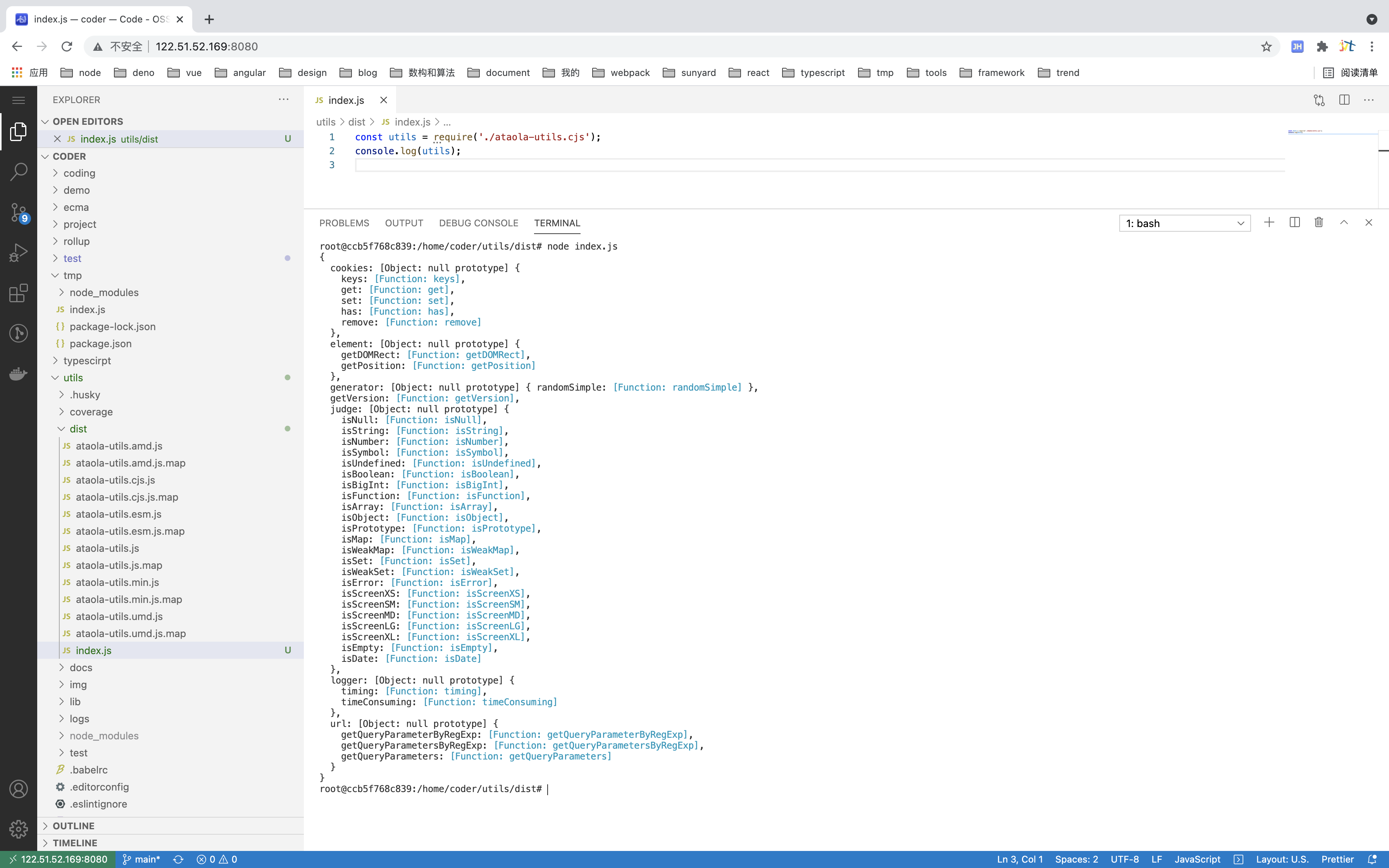
这里AMD相关的引入需要你先引入require.js的支持,如果是commonJS模块的话,需要用seajs,我试了下不是很好使,我放弃了别打我,建议直接在node.js环境下引入,如楼上
参考文献
Rollup官方文档:https://rollupjs.org/guide/zh/
Rollup插件库: https://github.com/rollup/plugins
IIFE: https://developer.mozilla.org/zh-CN/docs/Glossary/IIFE
实用程序包utils - 基于Rollup打包输出各模块文件(二)的更多相关文章
- 学习rollup.js模块文件打包
学习rollup.js模块文件打包 一:rollup 是什么?Rollup 是一个 JavaScript 模块打包器,可以将小块代码编译成大块复杂的代码. webpack 和 Rollup 对比不同点 ...
- X264-编码模块和NAL打包输出
在上一篇介绍了编码器的VCL编码操作,分析了函数x264_slice_write().函数x264_slice_write()里有四个关键模块,分别是宏块分析模块.宏块编码模块.熵编码模块和滤波模块, ...
- vite的项目,使用 rollup 打包的方法
官网资料 构建生产版本--库模式 https://cn.vitejs.dev/guide/build.html#library-mode 详细设置 https://cn.vitejs.dev/conf ...
- 基于FPGA的VGA可移植模块终极设计【转】
本文转载自:http://www.cnblogs.com/lueguo/p/3373643.html 略过天涯 基于FPGA的VGA可移植模块终极设计 一.VGA的诱惑 首先,VGA的驱动,这事, ...
- 基于webpack实现多html页面开发框架二 css打包、支持scss、文件分离
本节主要介绍webpack打包的时候CSS的处理方式 一.解决什么问题 1.CSS打包 2.CSS处理浏览器兼容 3.SASS支持 4.CSS分离成单独的文件 ...
- 介绍一种基于gulp对seajs的模块做合并压缩的方式
之前的项目一直采用grunt来构建,然后用requirejs做模块化,requirejs官方有提供grunt的插件来做压缩合并.现在的项目切到了gulp,模块化用起了seajs,自然而然地也想到了模块 ...
- Python日志输出——logging模块
Python日志输出——logging模块 标签: loggingpythonimportmodulelog4j 2012-03-06 00:18 31605人阅读 评论(8) 收藏 举报 分类: P ...
- openerp模块收藏 基于Lodop的报表打印模块(转载)
基于Lodop的报表打印模块 原文:http://shine-it.net/index.php/topic,7397.0.html 前段时间写了个小模块,来解决OE中报表打印不方便的问题.借鉴了 @b ...
- 打包发布Python模块或程序,安装包
Python模块.扩展和应用程序可以按以下几种形式进行打包和发布: python setup.py获取帮助的方式 python setup.py --help python setup.py --he ...
随机推荐
- vue项目打包本地后通过nginx解决跨域
前言 有时候我们打包好vue项目让后端人员部署项目时可能会有小插曲,为了不麻烦后端人员和避免尴尬,最好的办法就是在本地自己先测一下,而在本地运行打包后的项目会遇到接口跨域的问题.我平时经常用的方法就是 ...
- ARM详细指令集
算术和逻辑指令 ADC : 带进位的加法 (Addition with Carry) ADC{条件}{S} <dest>, <op 1>, <op 2> dest ...
- Ubuntu下修改Nexus 5的boot.img--改user模式为debug模式
博客地址:http://blog.csdn.net/qq1084283172/article/details/52422205 在学习Android逆向的时候,总会用到Android的调试模式.一般情 ...
- 路由器逆向分析------MIPS交叉编译环境的搭建(Buildroot)
本文博客地址:http://blog.csdn.net/qq1084283172/article/details/68950682 为了能在我们熟悉的windows或者ubuntu下开发mips架构的 ...
- hdu 5020 求三点共线的组合数(容器记录斜率出现次数)
题意: 给你n个点,问你3点共线的组合数有多少,就是有多少种组合是满足3点共线的. 思路: 一开始抱着试1试的态度,暴力了一个O(n^3),结果一如既往的超时了,然后又在刚刚超时 ...
- hdu4994 博弈,按顺序拿球
题意: 给你n堆东西,两个人博弈的去拿,每次最少一个,最多是一堆,必须按顺序那,也就是只有把第一堆的东西拿完了才能去拿第二堆东西,谁先拿完谁胜,问新手是否能胜利. 思路: 显然 ...
- hdu4908 中位数子串
题意: 给你N个数字组成的数列,然后问你这里面有多少个是以M为中位数的子序列. 思路: 首先分四中简单的情况求 (1) 就是只有他自己的那种情况 那么sum+1 ...
- Python中数据的排序
目录 列表的排序 sort(key,reverse)方法 sorted(target,key,reverse) 函数 元组tuple的排序 sort(key,reverse)方法 sorted(tar ...
- JEET W1S运动蓝牙耳机简评
对于我这种喜欢运动的人来说,很早之前就一直想买个运动蓝牙耳机了.这次正好有此机会可以评测来自JEET的W1S运动蓝牙耳机,真的是非常的幸运! 终于,在期盼中,我的来自深圳的快递隔了四天终于到了!JEE ...
- mongo中常用的命令
命令使用mongo shell 执行 1.mongo中增加新字段 mongo shell 进入后执行use table选中要添加字段的库 db.getCollection('表名').update({ ...