
spring cloud 通过 ribbon 实现客户端请求的负载均衡(入门级)
项目结构

环境:
idea:2020.1 版
jdk:8
maven:3.6.2
1. 搭建项目
( 1 )父工程:spring_cloud_demo_parent
pom 文件
<?xml version="1.0" encoding="UTF-8"?>

<project xmlns="http://maven.apache.org/POM/4.0.0" xmlns:xsi="http://www.w3.org/2001/XMLSchema-instance"

         xsi:schemaLocation="http://maven.apache.org/POM/4.0.0 https://maven.apache.org/xsd/maven-4.0.0.xsd">

    <modelVersion>4.0.0</modelVersion>

    <modules>

        <module>miscroservice-eureka-server</module>

        <module>miscroservice-eureka-user</module>

        <module>miscroservice-eureka-order</module>

    </modules>

    <parent>

        <groupId>org.springframework.boot</groupId>

        <artifactId>spring-boot-starter-parent</artifactId>

        <version>2.3.0.RELEASE</version>

        <relativePath/> <!-- lookup parent from repository -->

    </parent>

    <groupId>com.kevin.parent</groupId>

    <artifactId>demo_parent</artifactId>

    <version>0.0.1-SNAPSHOT</version>

    <name>demo_parent</name>

    <description>Demo project for Spring Boot</description>

    <packaging>pom</packaging>

    <properties>

        <java.version>1.8</java.version>

        <spring-cloud.version>Hoxton.SR4</spring-cloud.version>

    </properties>

    <dependencyManagement>

        <dependencies>

            <dependency>

                <groupId>org.springframework.cloud</groupId>

                <artifactId>spring-cloud-dependencies</artifactId>

                <version>${spring-cloud.version}</version>

                <type>pom</type>

                <scope>import</scope>

            </dependency>

        </dependencies>

    </dependencyManagement>

    <dependencies>

        <dependency>

            <groupId>org.projectlombok</groupId>

            <artifactId>lombok</artifactId>

            <optional>true</optional>

        </dependency>

        <dependency>

            <groupId>com.alibaba</groupId>

            <artifactId>fastjson</artifactId>

            <version>1.2.68</version>

        </dependency>

    </dependencies>

    <build>

        <plugins>

            <plugin>

                <groupId>org.springframework.boot</groupId>

                <artifactId>spring-boot-maven-plugin</artifactId>

            </plugin>

        </plugins>

    </build>

</project>
( 2 ) 注册中心 eureka: miscroservice-eureka-server
pom 文件
<?xml version="1.0" encoding="UTF-8"?>

<project xmlns="http://maven.apache.org/POM/4.0.0"

         xmlns:xsi="http://www.w3.org/2001/XMLSchema-instance"

         xsi:schemaLocation="http://maven.apache.org/POM/4.0.0 http://maven.apache.org/xsd/maven-4.0.0.xsd">

    <parent>

        <artifactId>demo_parent</artifactId>

        <groupId>com.kevin.parent</groupId>

        <version>0.0.1-SNAPSHOT</version>

    </parent>

    <modelVersion>4.0.0</modelVersion>

    <artifactId>miscroservice-eureka-server</artifactId>

    <dependencies>

        <dependency>

            <groupId>org.springframework.cloud</groupId>

            <artifactId>spring-cloud-starter-eureka-server</artifactId>

            <version>1.4.7.RELEASE</version>

        </dependency>

    </dependencies>

</project>
application.yml 文件:
server:

  port: 8761

eureka:

  instance:  # 实例

    hostname: localhost

  client:

    register-with-eureka: false # 不需要向自己注册

    fetch-registry: false # 不需要向自己检索

    service-url:  #注册中心访问方式

      defaultZone: http://${eureka.instance.hostname}:${server.port}/eureka
( 3 )服务提供者:miscroservice-eureka-order
pom 文件
<?xml version="1.0" encoding="UTF-8"?>

<project xmlns="http://maven.apache.org/POM/4.0.0"

         xmlns:xsi="http://www.w3.org/2001/XMLSchema-instance"

         xsi:schemaLocation="http://maven.apache.org/POM/4.0.0 http://maven.apache.org/xsd/maven-4.0.0.xsd">

    <parent>

        <artifactId>demo_parent</artifactId>

        <groupId>com.kevin.parent</groupId>

        <version>0.0.1-SNAPSHOT</version>

    </parent>

    <modelVersion>4.0.0</modelVersion>

    <artifactId>miscroservice-eureka-order</artifactId>

    <dependencies>

        <dependency>

            <groupId>org.springframework.cloud</groupId>

            <artifactId>spring-cloud-starter-eureka</artifactId>

            <version>1.4.7.RELEASE</version>

        </dependency>

        <dependency>

            <groupId>org.springframework.boot</groupId>

            <artifactId>spring-boot-starter-web</artifactId>

        </dependency>

    </dependencies>

</project>
application.yml:
server:

  port: 7900

eureka:

  instance:

    prefer-ip-address: true # 是否显示主机 ip

  client:

    service-url:

      defaultZone: http://localhost:8761/eureka/

spring:

  application:

    name: miscroservice-eureka-order
( 4 )服务消费者:miscroservice-eureka-user
pom 文件
<?xml version="1.0" encoding="UTF-8"?>

<project xmlns="http://maven.apache.org/POM/4.0.0"

         xmlns:xsi="http://www.w3.org/2001/XMLSchema-instance"

         xsi:schemaLocation="http://maven.apache.org/POM/4.0.0 http://maven.apache.org/xsd/maven-4.0.0.xsd">

    <parent>

        <artifactId>demo_parent</artifactId>

        <groupId>com.kevin.parent</groupId>

        <version>0.0.1-SNAPSHOT</version>

    </parent>

    <modelVersion>4.0.0</modelVersion>

    <artifactId>miscroservice-eureka-user</artifactId>

    <dependencies>

        <dependency>

            <groupId>org.springframework.cloud</groupId>

            <artifactId>spring-cloud-starter-eureka</artifactId>

            <version>1.4.7.RELEASE</version>

        </dependency>

        <dependency>

            <groupId>org.springframework.boot</groupId>

            <artifactId>spring-boot-starter-web</artifactId>

        </dependency>

        <dependency>

            <groupId>org.springframework.cloud</groupId>

            <artifactId>spring-cloud-commons</artifactId>

        </dependency>

    </dependencies>

</project>
application.yml:
server:

  port: 8000

eureka:

  instance:

    prefer-ip-address: false # 是否显示主机的 ip

    instance-id: ${spring.cloud.client.ip-address}:${server.port}  # 将服务实例 id 设置为 ip:端口号形式

  client:

    service-url:

      defaultZone: http://localhost:8761/eureka/  # 指定 eureka 服务地址

spring:

  application:

    name: miscroservice-eureka-user
2. 编写业务代码
( 1 )注册中心 eureka 启动类
package com.kevin.eureka.server;

import org.springframework.boot.SpringApplication;

import org.springframework.boot.autoconfigure.SpringBootApplication;

import org.springframework.cloud.netflix.eureka.server.EnableEurekaServer;

/**

 * @author kevin

 * @version: EurekaApplication.java v 1.0, 2020年05月21日 12:57

 * @Description

 *

 * @EnableEurekaServer 表明该服务是一个 eureka 注册中心服务

 **/

@SpringBootApplication

@EnableEurekaServer

public class EurekaApplication {

    public static void main(String[] args) {

        SpringApplication.run(EurekaApplication.class, args);

    }

}
( 2 )服务提供者
A. 启动类:
package com.kevin.eureka.order;

import org.springframework.boot.SpringApplication;

import org.springframework.boot.autoconfigure.SpringBootApplication;

import org.springframework.cloud.netflix.eureka.EnableEurekaClient;

/**

 * @author kevin

 * @version: OrderApplication.java v 1.0, 2020年05月21日 21:43

 * @Description

 **/

@SpringBootApplication

@EnableEurekaClient

public class OrderApplication {

    public static void main(String[] args) {

        SpringApplication.run(OrderApplication.class, args);

    }

}
B. po:
package com.kevin.eureka.order.po;

import lombok.Data;

import lombok.ToString;

import java.io.Serializable;

/**

 * @author kevin

 * @version: Order.java v 1.0, 2020年05月21日 21:48

 * @Description

 **/

@Data

@ToString

public class Order implements Serializable {

    private String id;

    private Double price;

    private String receiverName;

    private String receiverAddress;

    private String receiverPhone;

}
C. controller
package com.kevin.eureka.order.controller;

import com.alibaba.fastjson.JSON;

import com.kevin.eureka.order.po.Order;

import com.kevin.eureka.order.service.ServiceInfoManager;

import org.springframework.beans.factory.annotation.Autowired;

import org.springframework.web.bind.annotation.PathVariable;

import org.springframework.web.bind.annotation.RequestMapping;

import org.springframework.web.bind.annotation.RestController;

/**

 * @author kevin

 * @version: OrderController.java v 1.0, 2020年05月21日 21:51

 * @Description

 **/

@RestController

public class OrderController {

    @Autowired

    private ServiceInfoManager manager;

    /**

     * 通过 id 查询订单

     *

     * @param id

     * @return

     */

    @RequestMapping("/order/{id}")

    public String findOrderById(@PathVariable String id) {

        int port = manager.getPort();

        System.out.println("port = " + port);

        Order order = new Order();

        order.setId("123");

        order.setPrice(20.00);

        order.setReceiverName("小李");

        order.setReceiverAddress("北京市昌平区");

        order.setReceiverPhone("123456");

        return JSON.toJSONString(order);

    }

}
D. 获取服务端口号
package com.kevin.eureka.order.service;

import org.springframework.beans.factory.annotation.Autowired;

import org.springframework.core.env.Environment;

import org.springframework.stereotype.Component;

/**

 * @author kevin

 * @version: ServiceInfoManager.java v 1.0, 2020年05月22日 10:48

 * @Description

 **/

@Component

public class ServiceInfoManager {

    @Autowired

    private Environment env;

    /**

     * 获取端口号

     *

     * @return

     */

    public int getPort() {

        String s = env.getProperty("server.port");

        return Integer.parseInt(s);

    }

}
( 3 )服务消费者:
A. 启动类
package com.kevin.eureka.user;

import org.springframework.boot.SpringApplication;

import org.springframework.boot.autoconfigure.SpringBootApplication;

import org.springframework.cloud.netflix.eureka.EnableEurekaClient;

/**

 * @author kevin

 * @version: UserApplication.java v 1.0, 2020年05月21日 13:09

 * @Description

 **/

@SpringBootApplication

@EnableEurekaClient

public class UserApplication {

    public static void main(String[] args) {

        SpringApplication.run(UserApplication.class, args);

    }

}
B. controller:
package com.kevin.eureka.user.com.kevin.eureka.controller;

import org.springframework.beans.factory.annotation.Autowired;

import org.springframework.web.bind.annotation.PathVariable;

import org.springframework.web.bind.annotation.RequestMapping;

import org.springframework.web.bind.annotation.RestController;

import org.springframework.web.client.RestTemplate;

/**

 * @author kevin

 * @version: UserController.java v 1.0, 2020年05月22日 10:15

 * @Description

 **/

@RestController

public class UserController {

    public static final String ORD_URL = "http://miscroservice-eureka-order/order/";

    @Autowired

    private RestTemplate restTemplate;

    @RequestMapping("/findOrdersByUser/{id}")

    public String findOrdersByUser(@PathVariable String id) {

        String oId = "123";

        return restTemplate.getForObject(ORD_URL + oId, String.class);

    }

}
C. 配置类
package com.kevin.eureka.user.com.kevin.eureka.config;

import org.springframework.cloud.client.loadbalancer.LoadBalanced;

import org.springframework.context.annotation.Bean;

import org.springframework.context.annotation.Configuration;

import org.springframework.web.client.RestTemplate;

/**

 * @author kevin

 * @version: UserConfig.java v 1.0, 2020年05月22日 10:13

 * @Description

 **/

@Configuration

public class UserConfig {

    @Bean

    @LoadBalanced   // 通过 ribbon 实现客户端请求的负载均衡

    public RestTemplate createResTemp(){

        return new RestTemplate();

    }

}
3. 分别启动 eureka、order、user 服务
浏览器中打开 http://localhost:8761/ ,可以看到 order、user 服务都已经注册进来
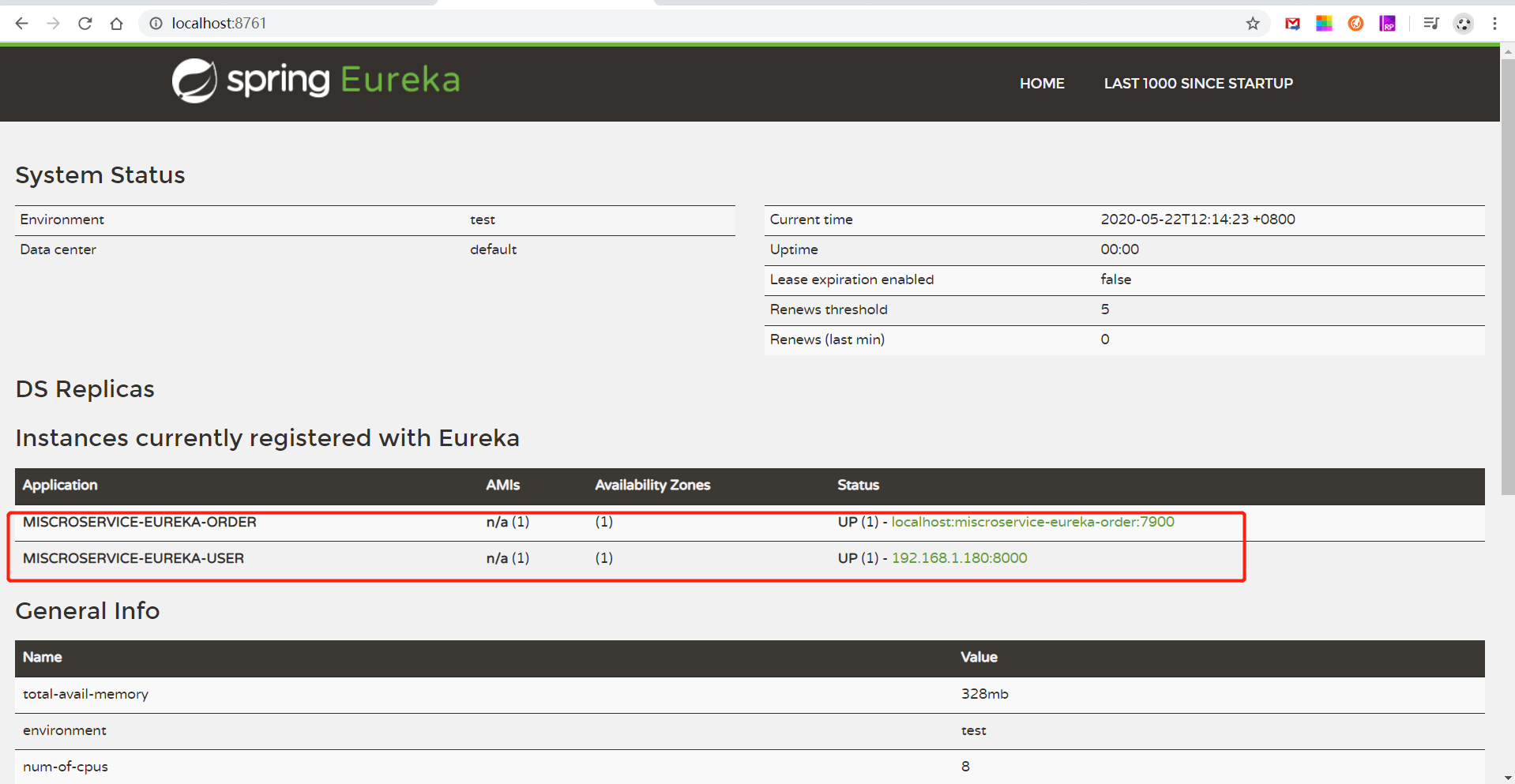
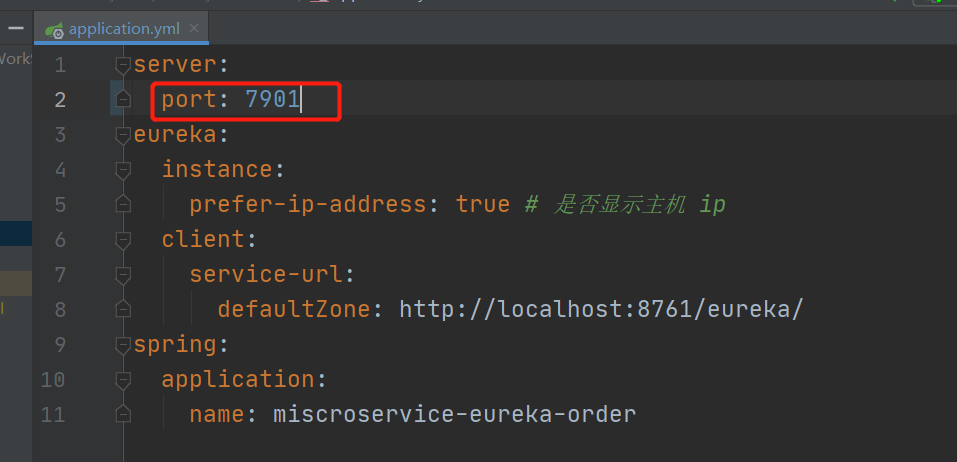
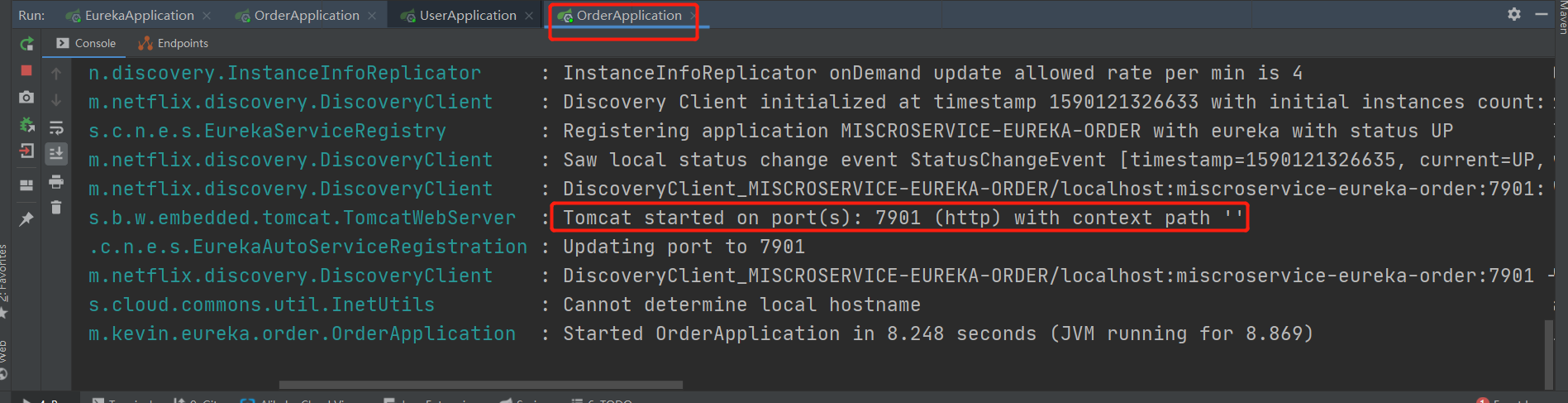
4. 修改 order 端口号为 7901 (不要停止 order 服务)
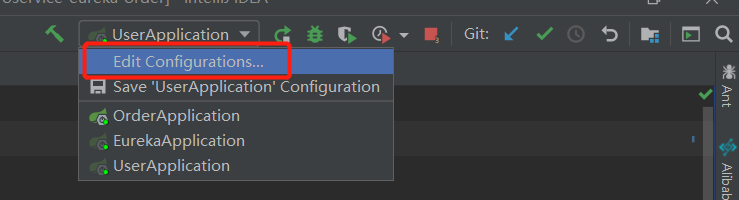
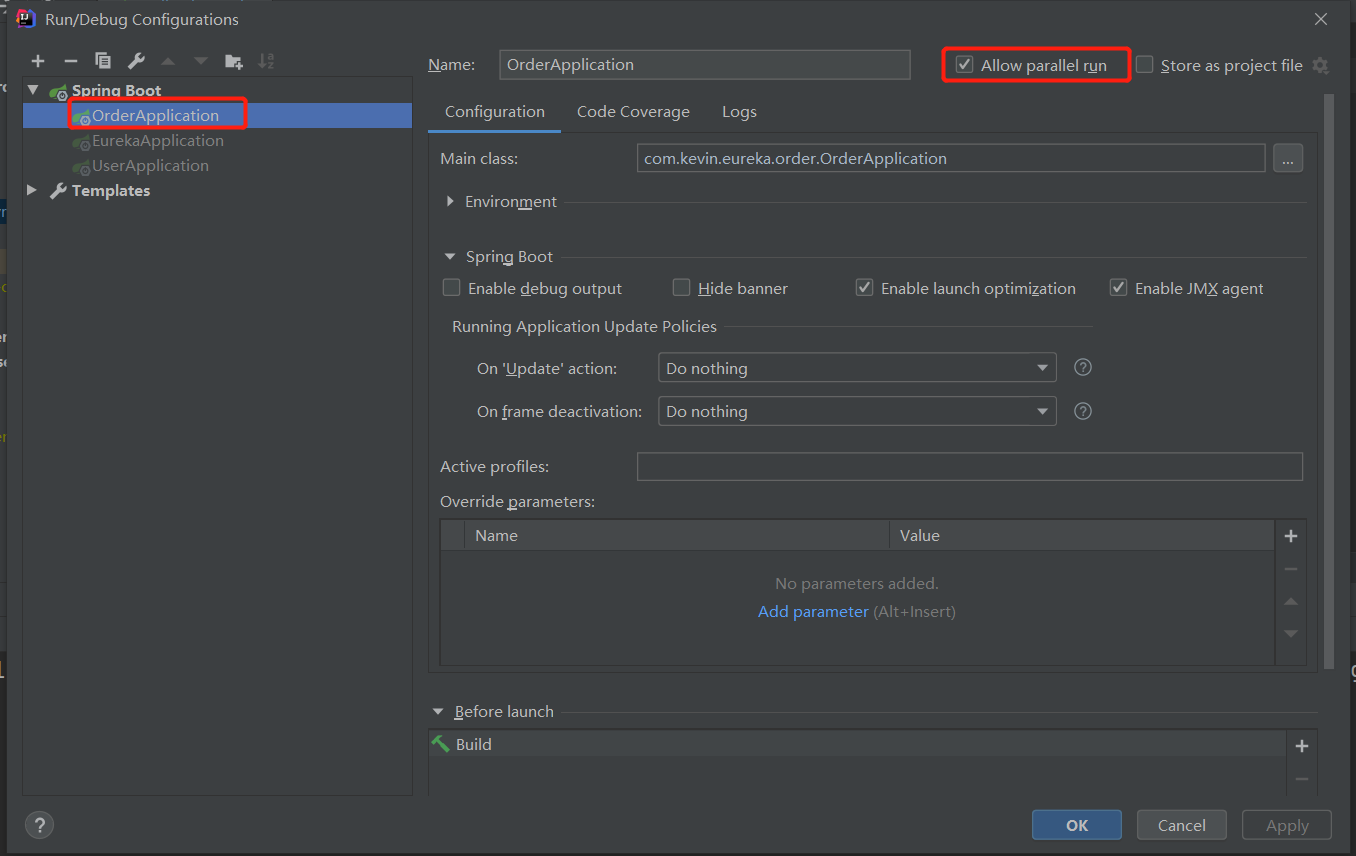
5. 修改idea 配置,由单一启动改为 平行启动,即 将一个服务只能启动一次 改为 可以启动多次
选择 OrderApplication,并 勾上 Allow parallel run
启动 OrderAoolication
查看注册中心

6. postman 测试
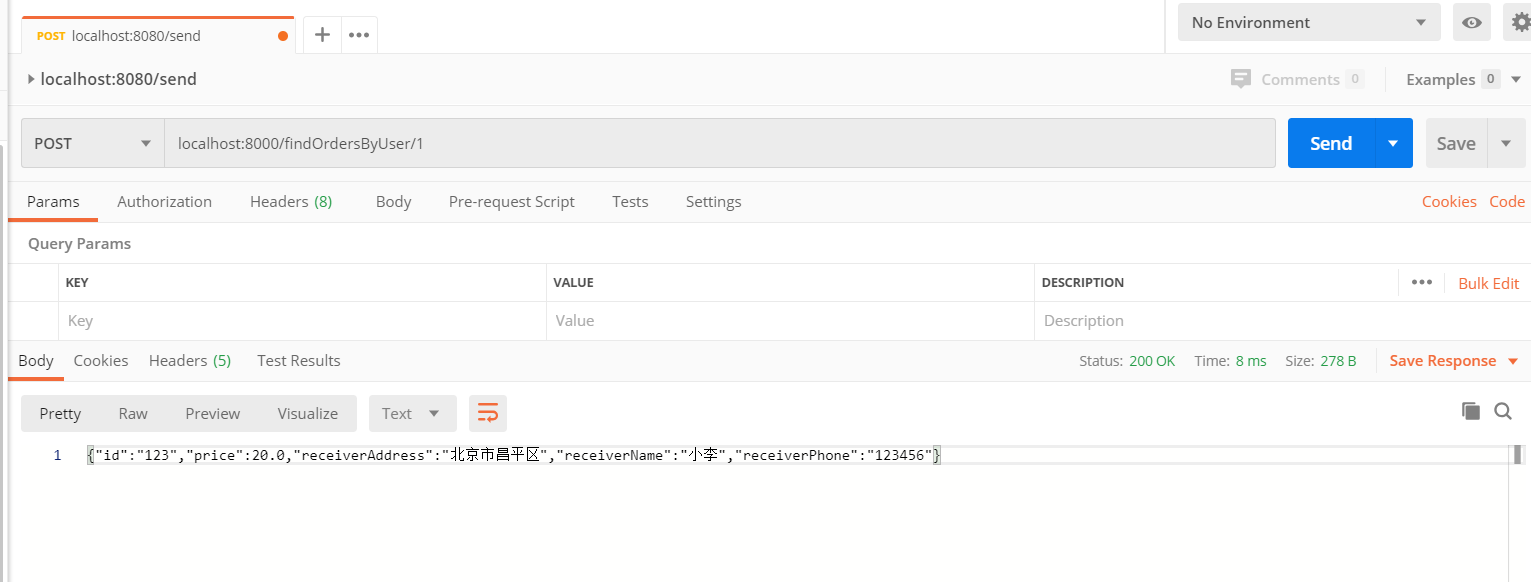
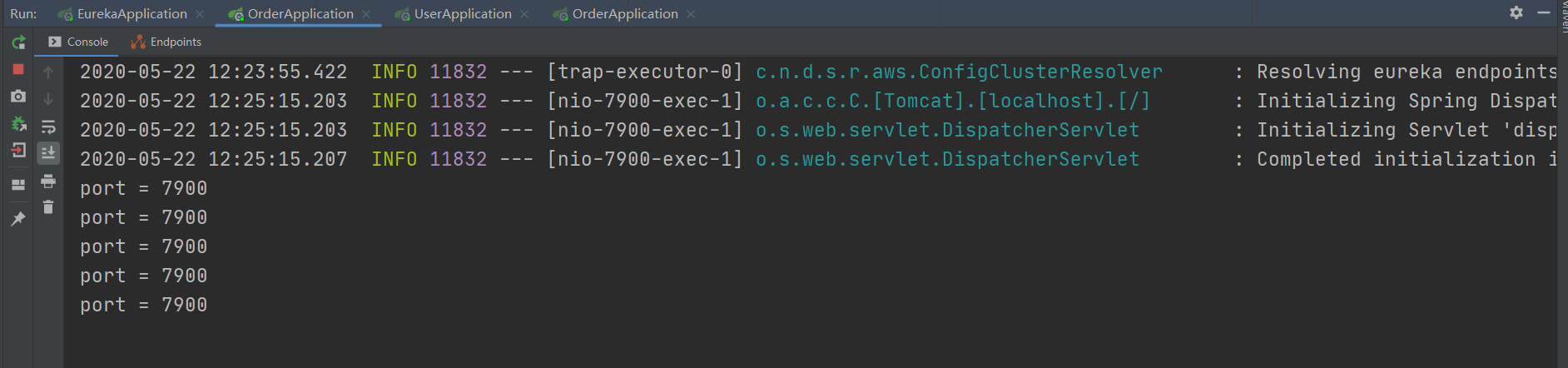
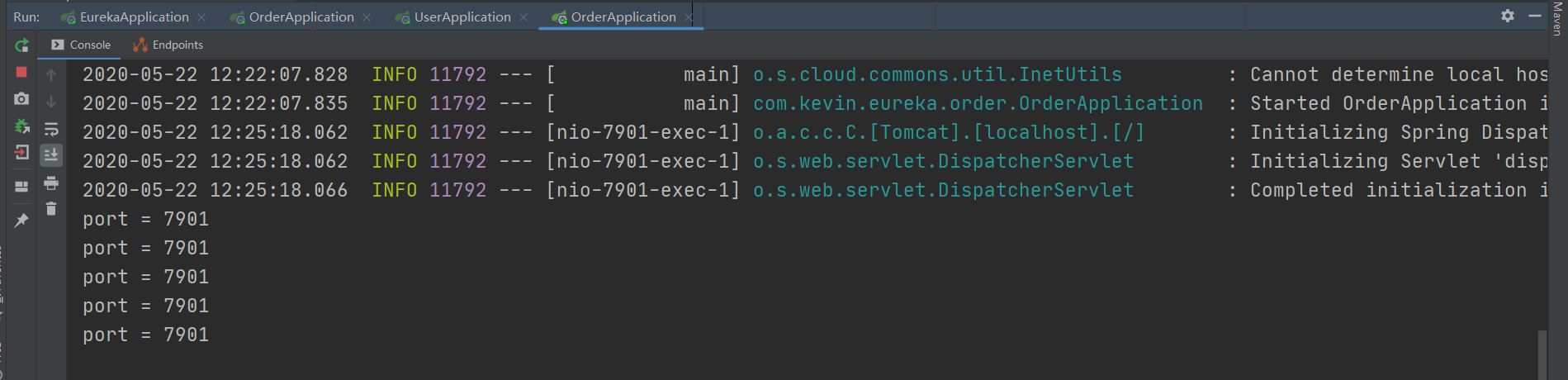
快速按 send,查看 idea 控制台,两个服务都有请求
端口号为 7900 的服务:
端口号为 7901 的服务:
spring cloud 通过 ribbon 实现客户端请求的负载均衡(入门级)的更多相关文章
- 一起来学Spring Cloud | 第三章:服务消费者 (负载均衡Ribbon)
一.负载均衡的简介: 负载均衡是高可用架构的一个关键组件,主要用来提高性能和可用性,通过负载均衡将流量分发到多个服务器,多服务器能够消除单个服务器的故障,减轻单个服务器的访问压力. 1.服务端负载均衡 ...
- Spring Cloud分区发布实践(3) 网关和负载均衡
注意: 因为涉及到配置测试切换, 中间环节需按此文章操作体验, 代码仓库里面的只有最后一步的代码 准备好了微服务, 那我们就来看看网关+负载均衡如何一起工作 新建一个模块hello-gateway, ...
- spring boot 2.0.3+spring cloud (Finchley)2、搭建负载均衡Ribbon (Eureka+Ribbon+RestTemplate)
Ribbon是Netflix公司开源的一个负载均衡组件,将负载均衡逻辑封装在客户端中,运行在客户端的进程里. 本例子是在搭建好eureka的基础上进行的,可参考spring boot 2.0.3+sp ...
- spring cloud使用zuul实现反向代理和负载均衡
首先,这篇文章参考的是http://blog.didispace.com/springcloud5/这位大牛的博客.本人是通过这篇博客来学习zuul的,现在写的博客只是个人在学习时个人的一些感受和理解 ...
- Spring cloud gateway 如何在路由时进行负载均衡
本文为博主原创,转载请注明出处: 1.spring cloud gateway 配置路由 在网关模块的配置文件中配置路由: spring: cloud: gateway: routes: - id: ...
- spring cloud 注册、发现、消费、负载均衡
- spring cloud 使用ribbon简单处理客户端负载均衡
假如我们的multiple服务的访问量剧增,用一个服务已经无法承载, 我们可以把Hello World服务做成一个集群. 很简单,我们只需要复制Hello world服务,同时将原来的端口8762修改 ...
- Spring Cloud第四篇 | 客户端负载均衡Ribbon
本文是Spring Cloud专栏的第四篇文章,了解前三篇文章内容有助于更好的理解本文: Spring Cloud第一篇 | Spring Cloud前言及其常用组件介绍概览 Spring Cl ...
- Spring cloud 之Ribbon(一)基本使用
简介 Spring cloud Ribbon是一个基于HTTP和TCP的客户端负载均衡工具,它是基于Netflix的Riboon实现的.Ribbon是客户端负载均衡器,这有别语例如Nginx服务端负载 ...
随机推荐
- git push超过100M文件处理方法
git push超过100M文件处理方法 github 会在你上传文件大于50M的时候,给予警告 ; 大于100M的时候给出 server reject(拒绝上传) 解决方法 保持单个文件在 100 ...
- PTA 7-1 公路村村通 (30分)
PTA 7-1 公路村村通 (30分) 现有村落间道路的统计数据表中,列出了有可能建设成标准公路的若干条道路的成本,求使每个村落都有公路连通所需要的最低成本. 输入格式: 输入数据包括城镇数目正整数N ...
- PTA 树的同构 (25分)
PTA 树的同构 (25分) 输入格式: 输入给出2棵二叉树树的信息.对于每棵树,首先在一行中给出一个非负整数N (≤10),即该树的结点数(此时假设结点从0到N−1编号):随后N行,第i行对应编号第 ...
- JMeter接口自动化发包与示例
JMeter接口自动化发包与示例 近期需要完成对于接口的测试,于是了解并简单做了个测试示例,看了看这款江湖上声名远播的强大的软件-Jmeter靠不靠谱. 官网:https://jmeter.apach ...
- [nowcoder5668I]Sorting the Array
令$f(n,b,m)=a[1..n]$(这里下标从1开始),考虑一些性质: 性质1.对于$\forall 1\le i\le n-m+1$,若$\exists 1\le j<i,a[j]> ...
- App 端自动化的最佳方案,完全解放双手!
1. 前言 大家好,我是安果! 之前写过一篇文章,文中提出了一种方案,可以实现每天自动给微信群群发新闻早报 如何利用 Python 爬虫实现给微信群发新闻早报?(详细) 但是对于很多人来说,首先编写一 ...
- Go语言核心36讲(Go语言实战与应用十五)--学习笔记
37 | strings包与字符串操作 Go 语言不但拥有可以独立代表 Unicode 字符的类型rune,而且还有可以对字符串值进行 Unicode 字符拆分的for语句. 除此之外,标准库中的un ...
- Python 3 快速入门 3 —— 模块与类
本文假设你已经有一门面向对象编程语言基础,如Java等,且希望快速了解并使用Python语言.本文对重点语法和数据结构以及用法进行详细说明,同时对一些难以理解的点进行了图解,以便大家快速入门.一些较偏 ...
- Codeforces 1188B - Count Pairs(思维题)
Codeforces 题面传送门 & 洛谷题面传送门 虽说是一个 D1B,但还是想了我足足 20min,所以还是写篇题解罢( 首先注意到这个式子里涉及两个参数,如果我们选择固定一个并动态维护另 ...
- 查找 Search
如果值域小一点. 那么我们有一个很精妙的做法. 分块完维护数字\(cnt\),和一个\(bitset\)信息. 然而小不得. 那么我们考虑维护后缀\(nxt_i\),表示第\(i\)位后,最近的\(a ...