
tensorflow summary demo with linear-model
tf.summary + tensorboard 用来把graph图中的相关信息,如结构图、学习率、准确率、Loss等数据,写入到本地硬盘,并通过浏览器可视化之。
整理的代码如下:
import tensorflow as tf

x_train = [1, 2, 3, 6, 8]

y_train = [4.8, 8.5, 10.4, 21.0, 25.3]

x = tf.placeholder(tf.float32, name='x')

y = tf.placeholder(tf.float32, name='y')

W = tf.Variable(1, dtype=tf.float32, name='W')

b = tf.Variable(0, dtype=tf.float32, name='b')

linear_model = W * x + b

with tf.name_scope("loss-model"):

    loss = tf.reduce_sum(tf.square(linear_model - y))

    acc = tf.sqrt(loss)

    tf.summary.scalar("loss", loss)

    tf.summary.scalar("acc", acc)

with tf.name_scope("Parameters"):

    tf.summary.scalar("W", W)

    tf.summary.scalar("b", b)

tf.summary.histogram('histogram/norm', tf.random_normal(shape=[100], mean=10*b, stddev=1),)

tf.summary.image("image", tf.random_uniform([6,10,10,3]), max_outputs=10)

train_step = tf.train.GradientDescentOptimizer(0.001).minimize(loss)

sess = tf.Session()

sess.run(tf.global_variables_initializer())

# 收集所有的操作数据

merged = tf.summary.merge_all()

# 创建writer对象

writer = tf.summary.FileWriter('./logs', sess.graph)

# 训练

for i in range(300):

    summary, _ = sess.run([merged, train_step], {x: x_train, y: y_train})

    if i%10 == 0:

        writer.add_summary(summary, i)

curr_W, curr_b, curr_loss, curr_acc = sess.run([W, b, loss, acc], {x: x_train, y: y_train})

print("After train W: %f, b: %f, loss: %f, acc: %f" % (curr_W, curr_b, curr_loss, curr_acc))
运行结束后,可以看到logs文件夹如下所示:

在当前目录,运行tensorboard --logdir=./logs --port 6006,浏览器打开,得到如下页面
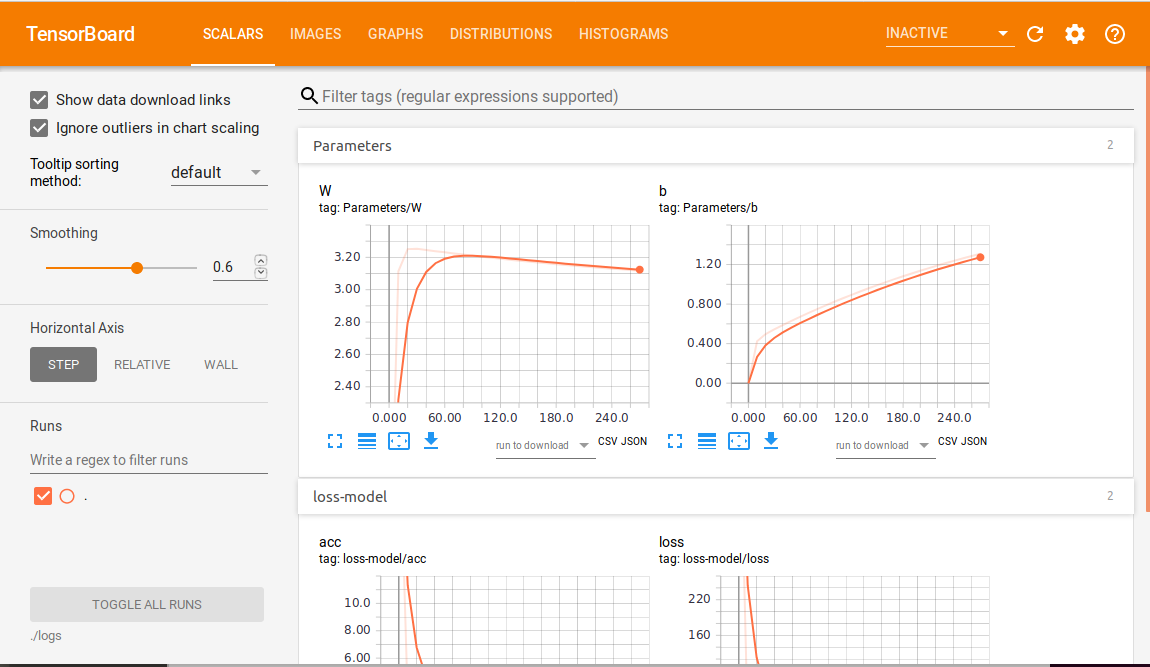
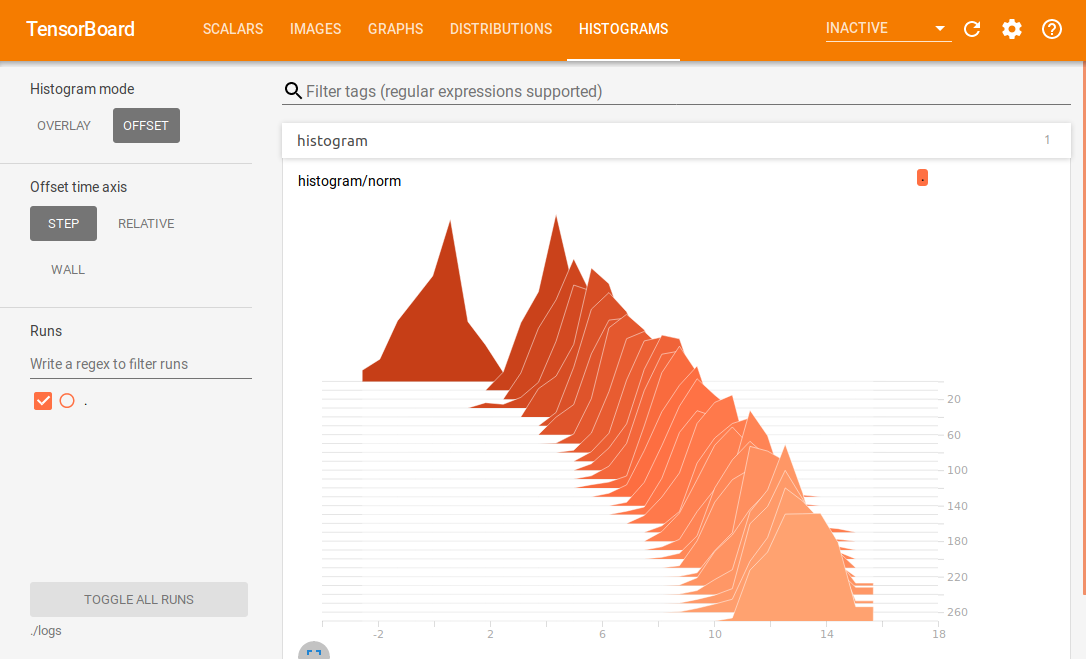
其中,颜色越深的切片越老,颜色越浅的切片越新。
参考:
https://www.jianshu.com/p/0ad3761e3614
https://blog.csdn.net/akadiao/article/details/79551180
https://blog.csdn.net/dcrmg/article/details/79810142
tensorflow summary demo with linear-model的更多相关文章
- TensorFlow Lite demo——就是为嵌入式设备而存在的,底层调用NDK神经网络API,注意其使用的tf model需要转换下,同时提供java和C++ API,无法使用tflite的见后
Introduction to TensorFlow Lite TensorFlow Lite is TensorFlow’s lightweight solution for mobile and ...
- 从线性模型(linear model)衍生出的机器学习分类器(classifier)
1. 线性模型简介 0x1:线性模型的现实意义 在一个理想的连续世界中,任何非线性的东西都可以被线性的东西来拟合(参考Taylor Expansion公式),所以理论上线性模型可以模拟物理世界中的绝大 ...
- Bayesian generalized linear model (GLM) | 贝叶斯广义线性回归实例
一些问题: 1. 什么时候我的问题可以用GLM,什么时候我的问题不能用GLM? 2. GLM到底能给我们带来什么好处? 3. 如何评价GLM模型的好坏? 广义线性回归啊,虐了我快几个月了,还是没有彻底 ...
- Note for video Machine Learning and Data Mining——Linear Model
Here is the note for lecture three. the linear model Linear model is a basic and important model in ...
- Simple tutorial for using TensorFlow to compute a linear regression
"""Simple tutorial for using TensorFlow to compute a linear regression. Parag K. Mita ...
- 2. Linear Model
1. 基本形式 给定由$d$个属性描述的示例 $\textbf{x} =(x_1;x_2;...,x_n)$,其中$x_i$是$x$在第$i$个属性上的取值,线性模型(linear model)试图学 ...
- Tensorflow Summary用法
本文转载自:https://www.cnblogs.com/lyc-seu/p/8647792.html Tensorflow Summary用法 tensorboard 作为一款可视化神器,是学习t ...
- 广义线性模型(Generalized Linear Model)
广义线性模型(Generalized Linear Model) http://www.cnblogs.com/sumai 1.指数分布族 我们在建模的时候,关心的目标变量Y可能服从很多种分布.像线性 ...
- [机器学习]Generalized Linear Model
最近一直在回顾linear regression model和logistic regression model,但对其中的一些问题都很疑惑不解,知道我看到广义线性模型即Generalized Lin ...
随机推荐
- 你有没有乱用“leader”,担当是个好东西
PS:此文为个人认知,不足处请多多批评. 近期在一线leader(经理)身上发现了几个case,然后又回想起前几年自己做的一些傻事,可能都属于明面上leader不会说什么,但私下会有情绪的类型: Ca ...
- windows使用nvm管理node不同版本
最近项目需要升级,新技术需要的node版本较高,而新node不兼容旧版本node,而原项目仍需要继续维护,所以就需要在本地有多个版本的node,基本原理是在环境配置中修改系统变量node的版本文件夹路 ...
- Tbase读写分离与分库分表
一.读写分离 1.1 what 读写分离 读写分离,基本的原理是让主数据库处理事务性增.改.删操作(INSERT.UPDATE.DELETE),而从数据库处理SELECT查询操作.数据库复制被用来把事 ...
- 记一次Hvv中遇到的API接口泄露而引起的一系列漏洞
引言 最近朋友跟我一起把之前废弃的公众号做起来了,更名为鹿鸣安全团队,后面陆续会更新个人笔记,有趣的渗透经历,内网渗透相关话题等,欢迎大家关注 前言 Hvv中的一个很有趣的漏洞挖掘过程,从一个简单的A ...
- C++第三十九篇 -- 研究一下Windows驱动开发(二)-- 驱动程序中重要的数据结构
数据结构是计算机程序的核心,I/O管理器定义了一些数据结构,这些数据结构是编写驱动程序时所必须掌握的.驱动程序经常要创建和维护这些数据结构的实例. 一.驱动对象(DRIVER_OBJECT) 每个驱动 ...
- HTML之单词
段落 paragraph <a href="https://www.runoob.com">超链接 anchor (锚点,引申为连接,link已经被html占用) Hy ...
- jquery 获取url地址参数
1 var url = document.URL; 2 var a = url.split("="); 3 4 if(a[1]){ 5 return options.fn(this ...
- 8.3考试总结(NOIP模拟19)[最长不下降子序列·完全背包问题·最近公共祖先]
一定要保护自己的梦想,即使牺牲一切. 前言 把人给考没了... 看出来 T1 是一个周期性的东西了,先是打了一个暴力,想着打完 T2 T3 暴力就回来打.. 然后,就看着 T2 上头了,后来发现是看错 ...
- [WUSTCTF2020]朴实无华
[WUSTCTF2020]朴实无华 考点:1.MD5碰撞 2.命令执行绕过 打开题发现编码有些问题,修改编码为utf-8 看了源码和请求包没发现什么东西,看到title想到了robots.txt文件, ...
- Docker 实践及命令梳理
文档 Docker Reference Documentation Docker 从入门到实践 [中文] 安装 安装 Docker,设置开机启动,然后配置阿里云镜像加速 1. 安装 Docker Do ...