
tensorflow summary demo with linear-model
tf.summary + tensorboard 用来把graph图中的相关信息,如结构图、学习率、准确率、Loss等数据,写入到本地硬盘,并通过浏览器可视化之。
整理的代码如下:
import tensorflow as tf

x_train = [1, 2, 3, 6, 8]

y_train = [4.8, 8.5, 10.4, 21.0, 25.3]

x = tf.placeholder(tf.float32, name='x')

y = tf.placeholder(tf.float32, name='y')

W = tf.Variable(1, dtype=tf.float32, name='W')

b = tf.Variable(0, dtype=tf.float32, name='b')

linear_model = W * x + b

with tf.name_scope("loss-model"):

    loss = tf.reduce_sum(tf.square(linear_model - y))

    acc = tf.sqrt(loss)

    tf.summary.scalar("loss", loss)

    tf.summary.scalar("acc", acc)

with tf.name_scope("Parameters"):

    tf.summary.scalar("W", W)

    tf.summary.scalar("b", b)

tf.summary.histogram('histogram/norm', tf.random_normal(shape=[100], mean=10*b, stddev=1),)

tf.summary.image("image", tf.random_uniform([6,10,10,3]), max_outputs=10)

train_step = tf.train.GradientDescentOptimizer(0.001).minimize(loss)

sess = tf.Session()

sess.run(tf.global_variables_initializer())

# 收集所有的操作数据

merged = tf.summary.merge_all()

# 创建writer对象

writer = tf.summary.FileWriter('./logs', sess.graph)

# 训练

for i in range(300):

    summary, _ = sess.run([merged, train_step], {x: x_train, y: y_train})

    if i%10 == 0:

        writer.add_summary(summary, i)

curr_W, curr_b, curr_loss, curr_acc = sess.run([W, b, loss, acc], {x: x_train, y: y_train})

print("After train W: %f, b: %f, loss: %f, acc: %f" % (curr_W, curr_b, curr_loss, curr_acc))
运行结束后,可以看到logs文件夹如下所示:

在当前目录,运行tensorboard --logdir=./logs --port 6006,浏览器打开,得到如下页面
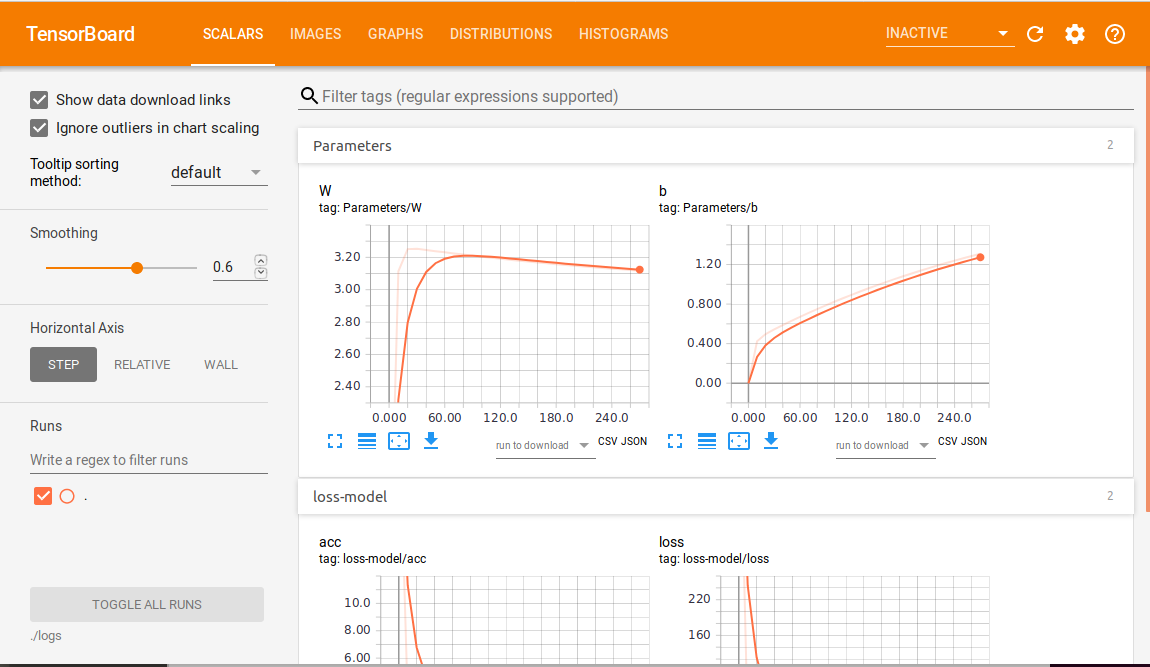
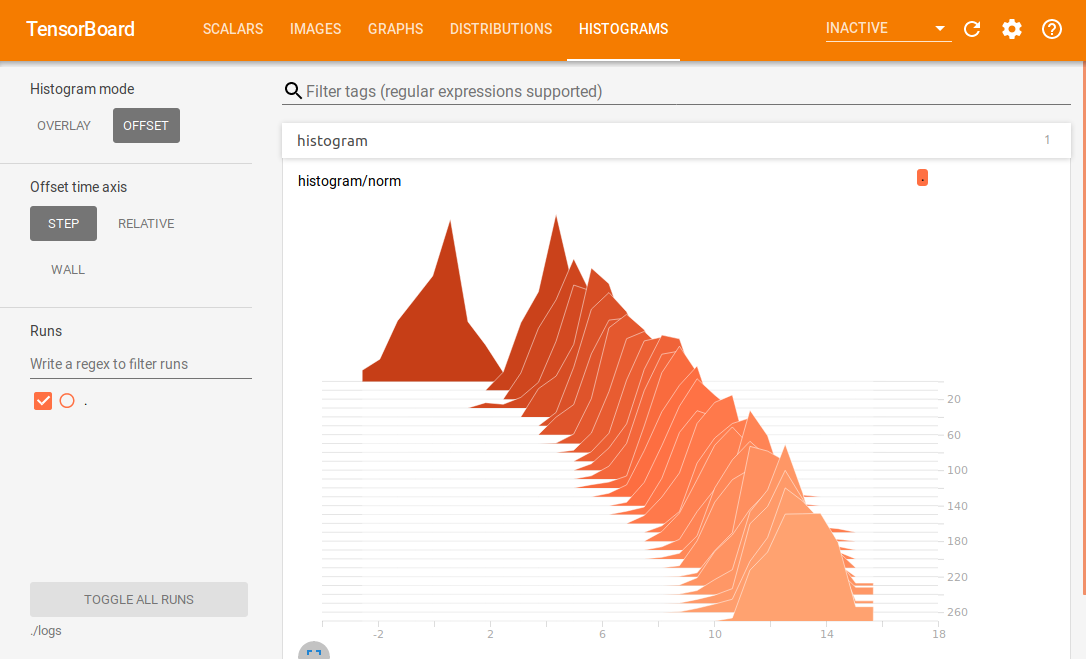
其中,颜色越深的切片越老,颜色越浅的切片越新。
参考:
https://www.jianshu.com/p/0ad3761e3614
https://blog.csdn.net/akadiao/article/details/79551180
https://blog.csdn.net/dcrmg/article/details/79810142
tensorflow summary demo with linear-model的更多相关文章
- TensorFlow Lite demo——就是为嵌入式设备而存在的,底层调用NDK神经网络API,注意其使用的tf model需要转换下,同时提供java和C++ API,无法使用tflite的见后
Introduction to TensorFlow Lite TensorFlow Lite is TensorFlow’s lightweight solution for mobile and ...
- 从线性模型(linear model)衍生出的机器学习分类器(classifier)
1. 线性模型简介 0x1:线性模型的现实意义 在一个理想的连续世界中,任何非线性的东西都可以被线性的东西来拟合(参考Taylor Expansion公式),所以理论上线性模型可以模拟物理世界中的绝大 ...
- Bayesian generalized linear model (GLM) | 贝叶斯广义线性回归实例
一些问题: 1. 什么时候我的问题可以用GLM,什么时候我的问题不能用GLM? 2. GLM到底能给我们带来什么好处? 3. 如何评价GLM模型的好坏? 广义线性回归啊,虐了我快几个月了,还是没有彻底 ...
- Note for video Machine Learning and Data Mining——Linear Model
Here is the note for lecture three. the linear model Linear model is a basic and important model in ...
- Simple tutorial for using TensorFlow to compute a linear regression
"""Simple tutorial for using TensorFlow to compute a linear regression. Parag K. Mita ...
- 2. Linear Model
1. 基本形式 给定由$d$个属性描述的示例 $\textbf{x} =(x_1;x_2;...,x_n)$,其中$x_i$是$x$在第$i$个属性上的取值,线性模型(linear model)试图学 ...
- Tensorflow Summary用法
本文转载自:https://www.cnblogs.com/lyc-seu/p/8647792.html Tensorflow Summary用法 tensorboard 作为一款可视化神器,是学习t ...
- 广义线性模型(Generalized Linear Model)
广义线性模型(Generalized Linear Model) http://www.cnblogs.com/sumai 1.指数分布族 我们在建模的时候,关心的目标变量Y可能服从很多种分布.像线性 ...
- [机器学习]Generalized Linear Model
最近一直在回顾linear regression model和logistic regression model,但对其中的一些问题都很疑惑不解,知道我看到广义线性模型即Generalized Lin ...
随机推荐
- 二本,拿腾讯,阿里 offer 了
我的春招 Hello,首先自我介绍一下,我是一所普普通通的二本院校的大三学生,坐标江苏. 今年三月份拿到了腾讯实习的offer,人生中第一次面试是腾讯,部门是 TEG 的云架构,并且顺利签约,说实话内 ...
- VUP虚拟直播与光学动作捕捉技术
虚拟直播将虚拟场景.虚拟形象实时显示在观众面前,虚拟场景与人物替代了原有的耗费较大搭建成本的实景场景与真人出镜,为观众带来全新的视觉体验,同时新技术降低了原有场景搭建成本,是近些年继AI.VR.动作捕 ...
- SDN与OpenFlow架构--初识
一,为什么需要SDN 1,传统网络的缺点: a,传统网络及其设备的只可配置,不可编程,只能按照已定义好的协议处理或转发数据,不能适应需求新变化,不能自主开发新功能. 如购买一个电饭煲,可以煮饭,煲汤. ...
- Web的工作原理(二)
1.工作过程:如下图所示描述了Web的工作原理. (1) 用户打开计算机(客户机),启动浏览器程序,并在浏览器中指定一个URL(Uniform Resource Locator,统一资源定位器),浏览 ...
- python包安装
python包安装: 一种是有网操作:pip install 包名:例子[pip install setuptools] 无网络服务器上操作: 先把包下载:传上去再安装[] 1.一种是 *.wh ...
- 解决pip下载速度慢的问题
解决链接:https://blog.csdn.net/u013901768/article/details/82343512 感谢这位博主的分享. 博客内容如下: 1. 安装时强制使用国内源进行安装, ...
- 旧VC项目dpiAware支持
起因 工作原因,需要维护一款VS2008 SP1开发的MFC项目, 发现WIN10高分辨率下显示模糊,不考虑升级VC版本情况下尝试解决 尝试 新版本VC中Manifest Tool>Input ...
- Kafka流处理内幕详解
1.概述 流处理是一种用来处理无穷数据集的数据处理引擎.通常无穷数据集具有以下几个特点: 无穷数据:持续产生的数据,它们通常会被称为流数据.例如:银行信用卡交易订单.股票交易就.游戏角色移动产生的数据 ...
- mongodb使用场景及与mysql区别
MySQL是关系型数据库. 优势: 在不同的引擎上有不同 的存储方式. 查询语句是使用传统的sql语句,拥有较为成熟的体系,成熟度很高. 开源数据库的份额在不断增加,mysql的份额页在持续增长. 缺 ...
- ThinkPHP 5
use think\Controller 1.$this->request->param(); 内置request 安全对象, 不再使用 $_GET ,$_POST 2.path ...