
010.kubernets的调度系统之daemonset
daemonset简单操作使用
Deployment 是 Kubernetes 中用于处理无状态服务的资源,而 StatefulSet 是用于支持有状态服务的资源,这两种不同的资源从状态的角度对服务进行了划分,而 DaemonSet 从不同的维度解决了集群中的问题 — 如何同时在集群中的所有节点上提供基础服务和守护进程。
下面简单学习DaemonSet的一写基本的操作和管理
1 介绍
DaemonSet 可以保证集群中所有的或者部分的节点都能够运行同一份 Pod 副本,每当有新的节点被加入到集群时,Pod 就会在目标的节点上启动,如果节点被从集群中剔除,节点上的 Pod 也会被垃圾收集器清除;DaemonSet 的作用就像是计算机中的守护进程,它能够运行集群存储、日志收集和监控等守护进程,这些服务一般是集群中必备的基础服务。
简单的运行一个nginx的daemonset
apiVersion: apps/v1

kind: DaemonSet

metadata:

    name: hello-daemon

    namespace: default

spec:

  template:

    metadata:

      labels:

        name: hello-daemonset

    spec:

      containers:

      - name: webserver

        image: nginx:1.17

        ports:

        - containerPort: 80
2 去掉污点
[root@docker-server1 deployment]# kubectl taint node 192.168.132.132 ingress-
node/192.168.132.132 untainted
当我们使用 kubectl apply -f 创建上述的 DaemonSet 时,它会在 Kubernetes 集群的 kube-system 命名空间中创建 DaemonSet 资源并在所有的节点上创建新的 Pod:
[root@docker-server1 deployment]# kubectl apply -f nginx-daemonset.yaml
daemonset.apps/hello-daemonset created
[root@docker-server1 deployment]# kubectl get pods
NAME                                READY   STATUS              RESTARTS   AGE

busybox-674bd96f74-8d7ml            0/1     Pending             0          3d11h

hello-daemonset-bllq6               0/1     ContainerCreating   0          6s

hello-daemonset-hh69c               0/1     ContainerCreating   0          6s

hello-deployment-5fdb46d67c-gw2t6   1/1     Running             0          3d10h

hello-deployment-5fdb46d67c-s68tf   1/1     Running             0          4d11h

hello-deployment-5fdb46d67c-vzb4f   1/1     Running             0          3d10h

mysql-5d4695cd5-v6btl               1/1     Running             0          3d10h

nginx                               2/2     Running             41         7d

wordpress-6cbb67575d-b9md5          1/1     Running             0          4d9h
[root@docker-server1 deployment]# kubectl get pods
NAME                                READY   STATUS    RESTARTS   AGE

busybox-674bd96f74-8d7ml            0/1     Pending   0          3d11h

hello-daemonset-bllq6               1/1     Running   0          60s

hello-daemonset-hh69c               1/1     Running   0          60s

hello-deployment-5fdb46d67c-gw2t6   1/1     Running   0          3d10h

hello-deployment-5fdb46d67c-s68tf   1/1     Running   0          4d11h

hello-deployment-5fdb46d67c-vzb4f   1/1     Running   0          3d10h

mysql-5d4695cd5-v6btl               1/1     Running   0          3d10h

nginx                               2/2     Running   41         7d

wordpress-6cbb67575d-b9md5          1/1     Running   0          4d9h
两个node节点上有两个hello-daemonset的pods,但是master上没有节点
原因是因为master节点有这些污点Taints: node-role.kubernetes.io/master:NoSchedule
3 查看master节点污点
[root@docker-server1 deployment]# kubectl get nodes
NAME              STATUS   ROLES    AGE    VERSION

192.168.132.131   Ready    master   7d6h   v1.17.0

192.168.132.132   Ready    <none>   7d6h   v1.17.0

192.168.132.133   Ready    <none>   7d6h   v1.17.0
[root@docker-server1 deployment]# kubectl describe nodes 192.168.132.131
Name:               192.168.132.131

Roles:              master

Labels:             beta.kubernetes.io/arch=amd64

                    beta.kubernetes.io/os=linux

                    kubernetes.io/arch=amd64

                    kubernetes.io/hostname=192.168.132.131

                    kubernetes.io/os=linux

                    node-role.kubernetes.io/master=

Annotations:        flannel.alpha.coreos.com/backend-data: {"VtepMAC":"4e:bf:fb:b2:ae:17"}

                    flannel.alpha.coreos.com/backend-type: vxlan

                    flannel.alpha.coreos.com/kube-subnet-manager: true

                    flannel.alpha.coreos.com/public-ip: 192.168.132.131

                    kubeadm.alpha.kubernetes.io/cri-socket: /var/run/dockershim.sock

                    node.alpha.kubernetes.io/ttl: 0

                    volumes.kubernetes.io/controller-managed-attach-detach: true

CreationTimestamp:  Thu, 09 Jan 2020 13:18:59 -0500

Taints:             node-role.kubernetes.io/master:NoSchedule    #master节点的污点

Unschedulable:      false

Lease:

  HolderIdentity:  192.168.132.131

  AcquireTime:     <unset>

  RenewTime:       Thu, 16 Jan 2020 20:02:30 -0500

Conditions:

  Type             Status  LastHeartbeatTime                 LastTransitionTime                Reason                       Message

  ----             ------  -----------------                 ------------------                ------                       -------

  MemoryPressure   False   Thu, 16 Jan 2020 19:59:35 -0500   Thu, 09 Jan 2020 13:18:54 -0500   KubeletHasSufficientMemory   kubelet has sufficient memory available

  DiskPressure     False   Thu, 16 Jan 2020 19:59:35 -0500   Thu, 09 Jan 2020 13:18:54 -0500   KubeletHasNoDiskPressure     kubelet has no disk pressure

  PIDPressure      False   Thu, 16 Jan 2020 19:59:35 -0500   Thu, 09 Jan 2020 13:18:54 -0500   KubeletHasSufficientPID      kubelet has sufficient PID available

  Ready            True    Thu, 16 Jan 2020 19:59:35 -0500   Thu, 09 Jan 2020 13:19:12 -0500   KubeletReady                 kubelet is posting ready status

Addresses:

  InternalIP:  192.168.132.131

  Hostname:    192.168.132.131

Capacity:

  cpu:                4

  ephemeral-storage:  49250820Ki

  hugepages-1Gi:      0

  hugepages-2Mi:      0

  memory:             7990140Ki

  pods:               110

Allocatable:

  cpu:                4

  ephemeral-storage:  45389555637

  hugepages-1Gi:      0

  hugepages-2Mi:      0

  memory:             7887740Ki

  pods:               110

System Info:

  Machine ID:                 c41a461da7684fe58e814987301cfe5e

  System UUID:                C3C44D56-880B-9A8E-84DD-50F48391DD19

  Boot ID:                    fdf3f408-347d-46ee-8c14-212151eb2126

  Kernel Version:             3.10.0-1062.4.1.el7.x86_64

  OS Image:                   CentOS Linux 7 (Core)

  Operating System:           linux

  Architecture:               amd64

  Container Runtime Version:  docker://19.3.5

  Kubelet Version:            v1.17.0

  Kube-Proxy Version:         v1.17.0

PodCIDR:                      10.244.0.0/24

PodCIDRs:                     10.244.0.0/24

Non-terminated Pods:          (10 in total)

  Namespace                   Name                                       CPU Requests  CPU Limits  Memory Requests  Memory Limits  AGE

  ---------                   ----                                       ------------  ----------  ---------------  -------------  ---

  default                     wordpress-6cbb67575d-b9md5                 0 (0%)        0 (0%)      0 (0%)           0 (0%)         4d9h

  kube-system                 coredns-6955765f44-8kxdg                   100m (2%)     0 (0%)      70Mi (0%)        170Mi (2%)     7d6h

  kube-system                 coredns-6955765f44-m66bw                   100m (2%)     0 (0%)      70Mi (0%)        170Mi (2%)     7d6h

  kube-system                 etcd-192.168.132.131                       0 (0%)        0 (0%)      0 (0%)           0 (0%)         6d21h

  kube-system                 kube-apiserver-192.168.132.131             250m (6%)     0 (0%)      0 (0%)           0 (0%)         7d6h

  kube-system                 kube-controller-manager-192.168.132.131    200m (5%)     0 (0%)      0 (0%)           0 (0%)         7d6h

  kube-system                 kube-flannel-ds-amd64-m9lgq                100m (2%)     100m (2%)   50Mi (0%)        50Mi (0%)      7d6h

  kube-system                 kube-proxy-q867d                           0 (0%)        0 (0%)      0 (0%)           0 (0%)         7d6h

  kube-system                 kube-scheduler-192.168.132.131             100m (2%)     0 (0%)      0 (0%)           0 (0%)         7d6h

  kubernetes-dashboard        kubernetes-dashboard-b7ffbc8cb-nz5gf       0 (0%)        0 (0%)      0 (0%)           0 (0%)         3d10h

Allocated resources:

  (Total limits may be over 100 percent, i.e., overcommitted.)

  Resource           Requests    Limits

  --------           --------    ------

  cpu                850m (21%)  100m (2%)

  memory             190Mi (2%)  390Mi (5%)

  ephemeral-storage  0 (0%)      0 (0%)

Events:              <none>
4 daemonset架构
由于集群中只存在一个 Pod,所以 Kubernetes 只会在该节点上创建一个 Pod,如果我们向当前的集群中增加新的节点时,Kubernetes 就会创建在新节点上创建新的副本

所有的 DaemonSet 都是由控制器负责管理的,与其他的资源一样,用于管理 DaemonSet 的控制器是 DaemonSetsController,该控制器会监听 DaemonSet、ControllerRevision、Pod 和 Node 资源的变动。

大多数的触发事件最终都会将一个待处理的 DaemonSet 资源入栈,下游 DaemonSetsController 持有的多个工作协程就会从队列里面取出资源进行消费和同步。
5 去除master节点的污点
[root@docker-server1 ~]# kubectl taint node 192.168.132.131 node-role.kubernetes.io/master-
node/192.168.132.131 untainted
[root@docker-server1 ~]# kubectl get pods -o wide
NAME                                READY   STATUS              RESTARTS   AGE     IP            NODE              NOMINATED NODE   READINESS GATES

busybox-674bd96f74-8d7ml            0/1     Pending             0          4d11h   <none>        <none>            <none>           <none>

hello-daemonset-4ct87               0/1     ContainerCreating   0          7s      <none>        192.168.132.131   <none>           <none>       #开始在mater节点上创建

hello-daemonset-bllq6               1/1     Running             0          24h     10.244.1.30   192.168.132.132   <none>           <none>

hello-daemonset-hh69c               1/1     Running             0          24h     10.244.2.19   192.168.132.133   <none>           <none>

hello-deployment-5fdb46d67c-gw2t6   1/1     Running             0          4d10h   10.244.2.18   192.168.132.133   <none>           <none>

hello-deployment-5fdb46d67c-s68tf   1/1     Running             0          5d12h   10.244.2.15   192.168.132.133   <none>           <none>

hello-deployment-5fdb46d67c-vzb4f   1/1     Running             0          4d10h   10.244.2.16   192.168.132.133   <none>           <none>

mysql-5d4695cd5-v6btl               1/1     Running             0          4d10h   10.244.2.17   192.168.132.133   <none>           <none>

nginx                               2/2     Running             45         8d      10.244.2.14   192.168.132.133   <none>           <none>

wordpress-6cbb67575d-b9md5          1/1     Running             0          5d9h    10.244.0.10   192.168.132.131   <none>           <none>
[root@docker-server1 ~]# kubectl get pods -o wide
NAME                                READY   STATUS    RESTARTS   AGE     IP            NODE              NOMINATED NODE   READINESS GATES

busybox-674bd96f74-8d7ml            0/1     Pending   0          4d11h   <none>        <none>            <none>           <none>

hello-daemonset-4ct87               1/1     Running   0          112s    10.244.0.12   192.168.132.131   <none>           <none>

hello-daemonset-bllq6               1/1     Running   0          24h     10.244.1.30   192.168.132.132   <none>           <none>

hello-daemonset-hh69c               1/1     Running   0          24h     10.244.2.19   192.168.132.133   <none>           <none>

hello-deployment-5fdb46d67c-gw2t6   1/1     Running   0          4d10h   10.244.2.18   192.168.132.133   <none>           <none>

hello-deployment-5fdb46d67c-s68tf   1/1     Running   0          5d12h   10.244.2.15   192.168.132.133   <none>           <none>

hello-deployment-5fdb46d67c-vzb4f   1/1     Running   0          4d10h   10.244.2.16   192.168.132.133   <none>           <none>

mysql-5d4695cd5-v6btl               1/1     Running   0          4d10h   10.244.2.17   192.168.132.133   <none>           <none>

nginx                               2/2     Running   45         8d      10.244.2.14   192.168.132.133   <none>           <none>

wordpress-6cbb67575d-b9md5          1/1     Running   0          5d9h    10.244.0.10   192.168.132.131   <none>           <none>
因为再master节点上,需要运行一些主控节点,所以再这些pods默认打了容忍污点
6 主控节点运行pod原则
比如flannel的配置
[root@docker-server1 ~]# vim kube-flannel.yml

可以容忍所有污点
[root@docker-server1 ~]# kubectl get deploy -n kube-system
NAME      READY   UP-TO-DATE   AVAILABLE   AGE

coredns   2/2     2            2           8d
查看cores的pods
[root@docker-server1 ~]# kubectl get pods -n kube-system
NAME                                      READY   STATUS    RESTARTS   AGE

coredns-6955765f44-8kxdg                  1/1     Running   1          8d

coredns-6955765f44-m66bw                  1/1     Running   1          8d

etcd-192.168.132.131                      1/1     Running   1          7d21h

kube-apiserver-192.168.132.131            1/1     Running   2          8d

kube-controller-manager-192.168.132.131   1/1     Running   4          8d

kube-flannel-ds-amd64-864kc               1/1     Running   0          24h

kube-flannel-ds-amd64-fg972               1/1     Running   1          8d

kube-flannel-ds-amd64-m9lgq               1/1     Running   1          8d

kube-proxy-7xgt9                          1/1     Running   1          8d

kube-proxy-k8kb7                          1/1     Running   1          8d

kube-proxy-q867d                          1/1     Running   1          8d

kube-scheduler-192.168.132.131            1/1     Running   4          8d
[root@docker-server1 ~]# kubectl describe pods coredns-6955765f44-8kxdg -n kube-system
Name:                 coredns-6955765f44-8kxdg

Namespace:            kube-system

Priority:             2000000000

Priority Class Name:  system-cluster-critical

Node:                 192.168.132.131/192.168.132.131

Start Time:           Thu, 09 Jan 2020 13:19:18 -0500

Labels:               k8s-app=kube-dns

                      pod-template-hash=6955765f44

Annotations:          <none>

Status:               Running

IP:                   10.244.0.7

IPs:

  IP:           10.244.0.7

Controlled By:  ReplicaSet/coredns-6955765f44

Containers:

  coredns:

    Container ID:  docker://930fd4bf6bf523fef84bea4327cee72f968ae4839a9a37c2f81e36d592d4ce48

    Image:         k8s.gcr.io/coredns:1.6.5

    Image ID:      docker-pullable://k8s.gcr.io/coredns@sha256:7ec975f167d815311a7136c32e70735f0d00b73781365df1befd46ed35bd4fe7

    Ports:         53/UDP, 53/TCP, 9153/TCP

    Host Ports:    0/UDP, 0/TCP, 0/TCP

    Args:

      -conf

      /etc/coredns/Corefile

    State:          Running

      Started:      Sun, 12 Jan 2020 06:43:53 -0500

    Last State:     Terminated

      Reason:       Error

      Exit Code:    255

      Started:      Thu, 09 Jan 2020 13:22:48 -0500

      Finished:     Fri, 10 Jan 2020 08:00:53 -0500

    Ready:          True

    Restart Count:  1

    Limits:

      memory:  170Mi

    Requests:

      cpu:        100m

      memory:     70Mi

    Liveness:     http-get http://:8080/health delay=60s timeout=5s period=10s #success=1 #failure=5

    Readiness:    http-get http://:8181/ready delay=0s timeout=1s period=10s #success=1 #failure=3

    Environment:  <none>

    Mounts:

      /etc/coredns from config-volume (ro)

      /var/run/secrets/kubernetes.io/serviceaccount from coredns-token-5d2v8 (ro)

Conditions:

  Type              Status

  Initialized       True

  Ready             True

  ContainersReady   True

  PodScheduled      True

Volumes:

  config-volume:

    Type:      ConfigMap (a volume populated by a ConfigMap)

    Name:      coredns

    Optional:  false

  coredns-token-5d2v8:

    Type:        Secret (a volume populated by a Secret)

    SecretName:  coredns-token-5d2v8

    Optional:    false

QoS Class:       Burstable

Node-Selectors:  beta.kubernetes.io/os=linux

Tolerations:     CriticalAddonsOnly

                 node-role.kubernetes.io/master:NoSchedule

                 node.kubernetes.io/not-ready:NoExecute for 300s

                 node.kubernetes.io/unreachable:NoExecute for 300s

Events:          <none>
[root@docker-server1 ~]# kubectl get pods coredns-6955765f44-8kxdg -n kube-system -o yaml
apiVersion: v1

kind: Pod

metadata:

  creationTimestamp: "2020-01-09T18:19:18Z"

  generateName: coredns-6955765f44-

  labels:

    k8s-app: kube-dns

    pod-template-hash: 6955765f44

  name: coredns-6955765f44-8kxdg

  namespace: kube-system

  ownerReferences:

  - apiVersion: apps/v1

    blockOwnerDeletion: true

    controller: true

    kind: ReplicaSet

    name: coredns-6955765f44

    uid: 7d0e80aa-338f-4921-b2c7-79dfeffef50c

  resourceVersion: "102623"

  selfLink: /api/v1/namespaces/kube-system/pods/coredns-6955765f44-8kxdg

  uid: 0a908105-8864-4746-91bf-e97a0a877bf9

spec:

  containers:

  - args:

    - -conf

    - /etc/coredns/Corefile

    image: k8s.gcr.io/coredns:1.6.5

    imagePullPolicy: IfNotPresent

    livenessProbe:

      failureThreshold: 5

      httpGet:

        path: /health

        port: 8080

        scheme: HTTP

      initialDelaySeconds: 60

      periodSeconds: 10

      successThreshold: 1

      timeoutSeconds: 5

    name: coredns

    ports:

    - containerPort: 53

      name: dns

      protocol: UDP

    - containerPort: 53

      name: dns-tcp

      protocol: TCP

    - containerPort: 9153

      name: metrics

      protocol: TCP

    readinessProbe:

      failureThreshold: 3

      httpGet:

        path: /ready

        port: 8181

        scheme: HTTP

      periodSeconds: 10

      successThreshold: 1

      timeoutSeconds: 1

    resources:

      limits:

        memory: 170Mi

      requests:

        cpu: 100m

        memory: 70Mi

    securityContext:

      allowPrivilegeEscalation: false

      capabilities:

        add:

        - NET_BIND_SERVICE

        drop:

        - all

      readOnlyRootFilesystem: true

    terminationMessagePath: /dev/termination-log

    terminationMessagePolicy: File

    volumeMounts:

    - mountPath: /etc/coredns

      name: config-volume

      readOnly: true

    - mountPath: /var/run/secrets/kubernetes.io/serviceaccount

      name: coredns-token-5d2v8

      readOnly: true

  dnsPolicy: Default

  enableServiceLinks: true

  nodeName: 192.168.132.131

  nodeSelector:

    beta.kubernetes.io/os: linux

  priority: 2000000000

  priorityClassName: system-cluster-critical

  restartPolicy: Always

  schedulerName: default-scheduler

  securityContext: {}

  serviceAccount: coredns

  serviceAccountName: coredns

  terminationGracePeriodSeconds: 30

  tolerations:

  - key: CriticalAddonsOnly

    operator: Exists

  - effect: NoSchedule

    key: node-role.kubernetes.io/master

  - effect: NoExecute

    key: node.kubernetes.io/not-ready

    operator: Exists

    tolerationSeconds: 300

  - effect: NoExecute

    key: node.kubernetes.io/unreachable

    operator: Exists

    tolerationSeconds: 300

  volumes:

  - configMap:

      defaultMode: 420

      items:

      - key: Corefile

        path: Corefile

      name: coredns

    name: config-volume

  - name: coredns-token-5d2v8

    secret:

      defaultMode: 420

      secretName: coredns-token-5d2v8

status:

  conditions:

  - lastProbeTime: null

    lastTransitionTime: "2020-01-09T18:19:18Z"

    status: "True"

    type: Initialized

  - lastProbeTime: null

    lastTransitionTime: "2020-01-12T11:44:04Z"

    status: "True"

    type: Ready

  - lastProbeTime: null

    lastTransitionTime: "2020-01-12T11:44:04Z"

    status: "True"

    type: ContainersReady

  - lastProbeTime: null

    lastTransitionTime: "2020-01-09T18:19:18Z"

    status: "True"

    type: PodScheduled

  containerStatuses:

  - containerID: docker://930fd4bf6bf523fef84bea4327cee72f968ae4839a9a37c2f81e36d592d4ce48

    image: k8s.gcr.io/coredns:1.6.5

    imageID: docker-pullable://k8s.gcr.io/coredns@sha256:7ec975f167d815311a7136c32e70735f0d00b73781365df1befd46ed35bd4fe7

    lastState:

      terminated:

        containerID: docker://3c421e454df03aa95db190f2a907b4313dc228124ba6dfba366b0fb82a20e689

        exitCode: 255

        finishedAt: "2020-01-10T13:00:53Z"

        reason: Error

        startedAt: "2020-01-09T18:22:48Z"

    name: coredns

    ready: true

    restartCount: 1

    started: true

    state:

      running:

        startedAt: "2020-01-12T11:43:53Z"

  hostIP: 192.168.132.131

  phase: Running

  podIP: 10.244.0.7

  podIPs:

  - ip: 10.244.0.7

  qosClass: Burstable

  startTime: "2020-01-09T18:19:18Z"
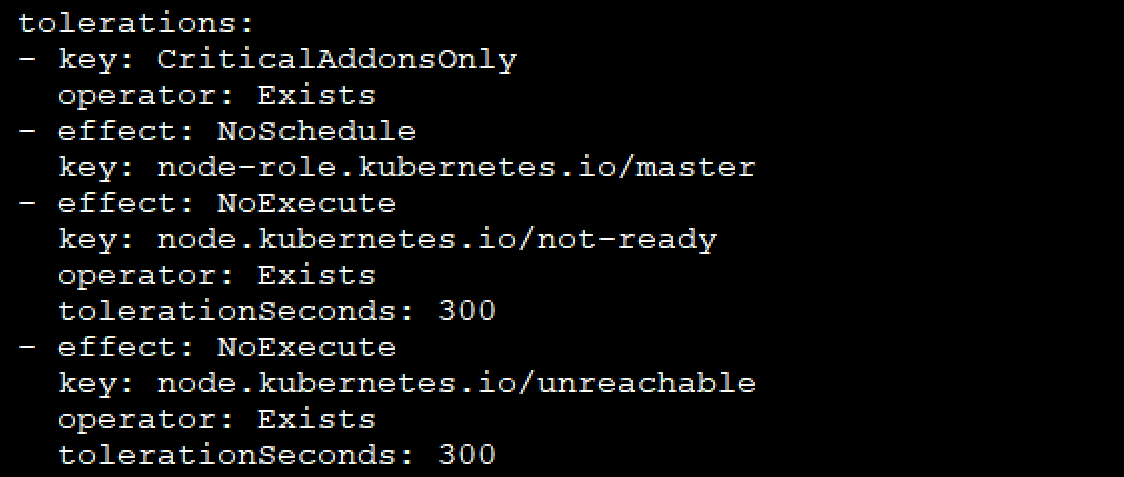
污点容忍配置
DaemonSet 其实就是 Kubernetes 中的守护进程,它会在每一个节点上创建能够提供服务的副本,很多云服务商都会使用 DaemonSet 在所有的节点上内置一些用于提供日志收集、统计分析和安全策略的服务。
7 Daemonset 滚动升级
滚动升级特性是Kubernetes服务发布的一个很有用的特性,而Kubernetes从1.6开始支持 DaemonSet的滚动升级,1.7开始支持DaemonSet滚动升级的回滚。
Daemonset升级策略
DaemonSet目前有两种升级策略,可以通过.spec.updateStrategy.type指定:
- OnDelete: 该策略表示当更新了DaemonSet的模板后,只有手动删除旧的DaemonSet Pod才会创建新的DaemonSet Pod
- RollingUpdate: 该策略表示当更新DaemonSet模板后会自动删除旧的DaemonSet Pod并创建新的DaemonSetPod
示例
要使用DaemonSet的滚动升级,需要 .spec.updateStrategy.type设置为RollingUpdate。 也可以进一步设置.spec.updateStrategy.rollingUpdate.maxUnavailable,默认值为1; 设置.spec.minReadySeconds默认为0,用于指定认为DaemoSet Pod启动可用所需的最小的秒数。
示例如下:
apiVersion: extensions/v1beta1

kind: DaemonSet

metadata:

  name: test-ds

  namespace: kube-system

  labels:

    tier: node

    app: test

spec:

  updateStrategy:

    type: RollingUpdate

  selector:

    matchLabels:

      ...

  template:

    ...
然后执行:
kubectl apply -f test-ds.yaml
可以使用如下命令查看滚动升级状态:
kubectl rollout status dsd/test-ds -n kube-system
关于daemonSet学习到这里
博主声明:本文的内容来源主要来自誉天教育晏威老师,由本人实验完成操作验证,需要的博友请联系誉天教育(http://www.yutianedu.com/),获得官方同意或者晏老师(https://www.cnblogs.com/breezey/)本人同意即可转载,谢谢!
010.kubernets的调度系统之daemonset的更多相关文章
- 009.kubernets的调度系统之污点和容忍
Taints和Tolerations(污点和容忍) Taint需要与Toleration配合使用,让pod避开那些不合适的node.在node上设置一个或多个Taint后,除非pod明确声明能够容忍这 ...
- 008.kubernets的调度系统之标签选择器
一 Kubernetes 调度简介 除了让 kubernetes 集群调度器自动为 pod 资源选择某个节点(默认调度考虑的是资源足够,并且 load 尽量平均),有些情况我们希望能更多地控制 pod ...
- 美团集群调度系统HULK技术演进
本文根据美团基础架构部/弹性策略团队负责人涂扬在2019 QCon(全球软件开发大会)上的演讲内容整理而成.本文涉及Kubernetes集群管理技术,美团相关的技术实践可参考此前发布的<美团点评 ...
- 黑马程序员:Java编程_7K面试题之银行业务调度系统
=========== ASP.Net+Android+IOS开发..Net培训.期待与您交流!=========== 模拟实现银行业务调度系统逻辑,具体需求如下: 银行内有6个业务窗口,1 - 4号 ...
- 黑马程序员_JAVA之银行业务调度系统
------Java培训.Android培训.iOS培训..Net培训.期待与您交流! ------- 1.模拟实现银行业务调度系统逻辑,具体需求如下: 银行内有6个业务窗口,1 - 4号窗口为普通窗 ...
- Java——银行业务调度系统
需求: 模拟实现银行业务调度系统逻辑,具体需求如下: Ø 银行内有6个业务窗口,1 - 4号窗口为普通窗口,5号窗口为快速窗口,6号窗口为VIP窗口. Ø 有三种对应类型的客户:VIP客户,普通 ...
- Hadoop 开源调度系统zeus(二)
紧跟之前Hadoop 开源调度系统zeus(一) 本节主要介绍一下zeus的架构: 先给一个zeus的架构图 无论Master还是Worker都有一套WEB UI,无论从哪个上面去看,看到的结果都是一 ...
- 又一道软通动力7K月薪面试题——银行业务调度系统
后期补充:网友对我诟病最多的就是我帮学生做面试题,说这是小偷和骗子行为,在此,我对自己给学员做面试题做出例如以下解释: (1)学员拿着面试题来找老师,学生也事先思考和尝试后实在没有办法,又求职心切才 ...
- DS Scheduler 0.7 发布,Linux 调度系统 - 开源中国社区
DS Scheduler 0.7 发布,Linux 调度系统 - 开源中国社区 DS Scheduler 0.7 发布,Linux 调度系统
随机推荐
- css — display
1.定义 display用于页面布局,设置元素如何被显示. 值:none | inline | block | inline-block | list-item | run-in | table | ...
- Java读取图片exif信息实现图片方向自动纠正
起因 一个对试卷进行OCR识别需求,需要实现一个功能,一个章节下的题目图片需要上下拼接合成一张大图,起初写了一个工具实现图片的合并,程序一直很稳定的运行着,有一反馈合成的图片方向不对,起初怀疑是本身图 ...
- 【Prolog - 2.0 基础应用】
[术语统一 terms unify] 两者统一,只需满足下面两条件之一 1.原本就是相同的 2.包含变量,这些变量可以用术语统一实例化,从而得到相等的术语 mia和mia是统一的,42和42是统一的, ...
- (Collection, List, 泛型)JAVA集合框架一
Java集合框架部分细节总结一 Collection List 有序,有下标,元素可重复 Set 无序,无下标,元素不可重复 以上为Collection接口 以ArrayList为实现类实现遍历:增强 ...
- 原创 Spring Boot 2.3 新特性分层JAR
背景 在我们实际生产容器化部署过程中,往往会遇到 Docker 镜像很大,部署发布很慢的情况 影响 docker 镜像大小的因素,主要有以下三个方面: 基础镜像的大小 .尽量选择 aphine 作为基 ...
- 自动化kolla-ansible部署ubuntu20.04+openstack-victoria之镜像制作centos7.8-15
自动化kolla-ansible部署ubuntu20.04+openstack-victoria之镜像制作centos7.8-15 欢迎加QQ群:1026880196 进行交流学习 制作OpenS ...
- (十)VMware Harbor 日志管理
VMware Harbor 日志管理 1. 项目日志 每个项目下都有一个"日志"页签. 单击"日志"可以列出所有日志.可以按用户名或"高级搜索&quo ...
- RTSP 流相关工具介绍
RTSP (Real Time Streaming Protocol),实时流协议,是一种应用层协议,专为流媒体使用.本文将介绍 GStreamer, VLC, FFmpeg 这几个工具,如何发送.接 ...
- 敏捷史话(十五):我发明了敏捷估算扑克牌 —— James Greening
雪鸟会议 雪鸟会议前夕,James Grenning 在 Object Mentor 与 Robert C. Martin 一同工作,彼时组织雪鸟会议的 Bob 大叔盛情邀请 James,告知他会议的 ...
- poj_1700 题解
题目描述:在漆黑的夜里,四位旅行者来到了一座狭窄而且没有护栏的桥边. 如果不借助手电筒的话,大家是无论如何也不敢过桥去的. 不幸的是,四个人一共只带了一只手电筒,而桥窄得只够让两个人同时过. 如果各自 ...