
android 开发 View _15 导入一张图片将它裁剪成圆形 与 paint图层叠加处理详解
方法一:
/*

    实现思维是这样的:

    1.首先拿到bitmap图片

    2.得到bitmap图片的高度 宽度,并且计算好各个画图尺寸

    3.创建一个空白的 bitmap图片: Bitmap output = Bitmap.createBitmap(width, height, Bitmap.Config.ARGB_8888);

    4.将这个空白图片导入画布里

    5.然后重点: 这个画布一定是要设置成透明的

    6.在这张透明的画布上画圆型。

    7.然后重点:设置相差裁剪属性

    8.然后在这张透明的画布上添加bitmap图片

    9.返回那张透明的bitmap

     */

    public Bitmap toRoundBitmap(Bitmap bitmap) {

        int width = bitmap.getWidth();

        int height = bitmap.getHeight();

        float roundPx;

        float left, top, right, bottom, dst_left, dst_top, dst_right, dst_bottom;

        if (width <= height) {

            roundPx = width / 2;

            left = 0;

            top = 0;

            right = width;

            bottom = width;

            height = width;

            dst_left = 0;

            dst_top = 0;

            dst_right = width;

            dst_bottom = width;

        } else {

            roundPx = height / 2;

            float clip = (width - height) / 2;

            left = clip;

            right = width - clip;

            top = 0;

            bottom = height;

            width = height;

            dst_left = 0;

            dst_top = 0;

            dst_right = height;

            dst_bottom = height;

        }

        Bitmap output = Bitmap.createBitmap(width, height, Bitmap.Config.ARGB_8888);

        Canvas canvas = new Canvas(output);

        final int color = 0xff424242;

        final Paint paint = new Paint();

        final Rect src = new Rect((int) left, (int) top, (int) right, (int) bottom);

        final Rect dst = new Rect((int) dst_left, (int) dst_top, (int) dst_right, (int) dst_bottom);

        final RectF rectF = new RectF(dst);

        paint.setAntiAlias(true);// 设置画笔无锯齿

        canvas.drawARGB(0, 0, 0, 0); // 填充整个Canvas

        paint.setColor(color);

        // 以下有两种方法画圆,drawRounRect和drawCircle

        // canvas.drawRoundRect(rectF, roundPx, roundPx, paint);// 画圆角矩形,第一个参数为图形显示区域,第二个参数和第三个参数分别是水平圆角半径和垂直圆角半径。

        canvas.drawCircle(roundPx, roundPx, roundPx, paint);

        paint.setXfermode(new PorterDuffXfermode(PorterDuff.Mode.SRC_IN));// 设置两张图片相交时的模式,参考http://trylovecatch.iteye.com/blog/1189452

        canvas.drawBitmap(bitmap, src, dst, paint); //以Mode.SRC_IN模式合并bitmap和已经draw了的Circle

        return output;

    }
参考流程图 & 原理图: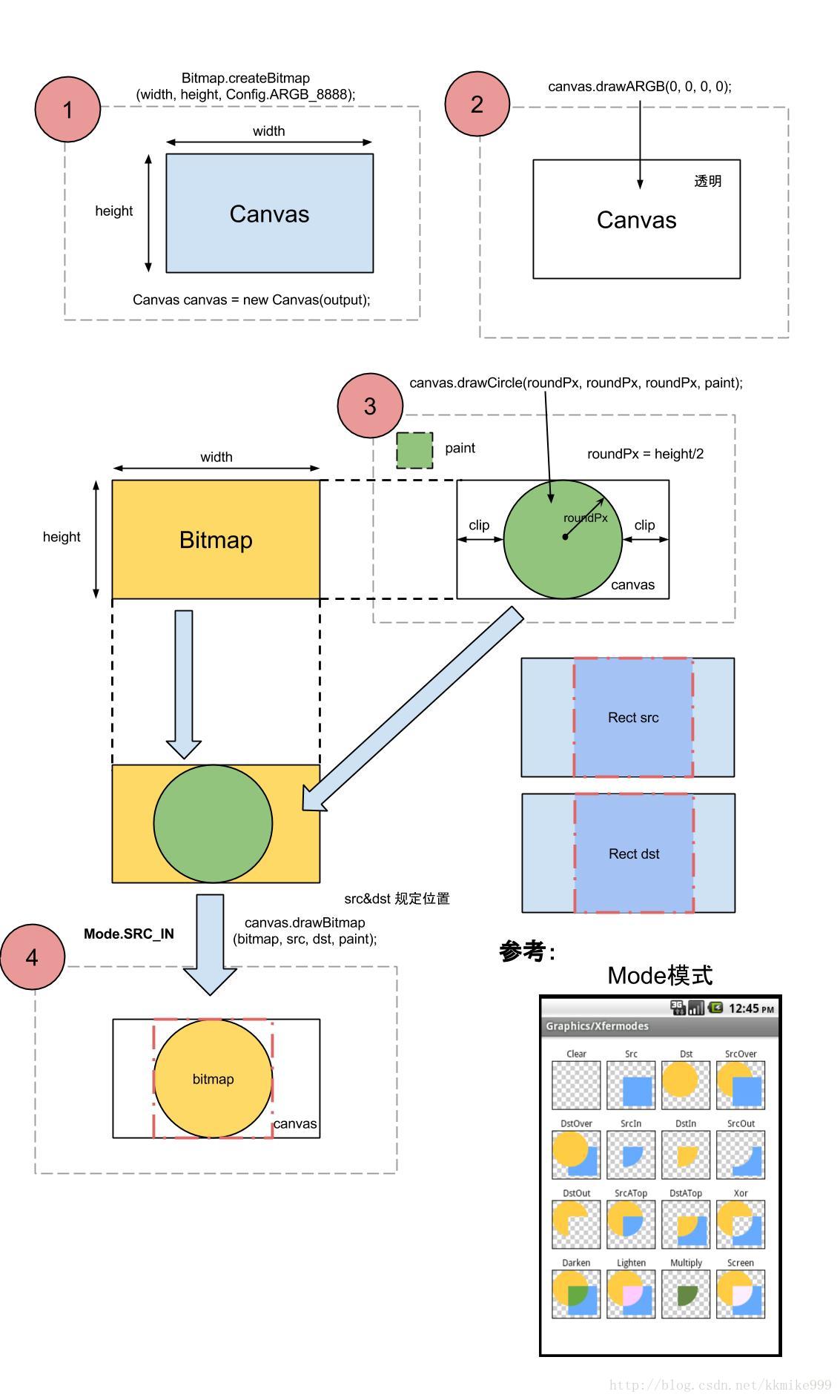
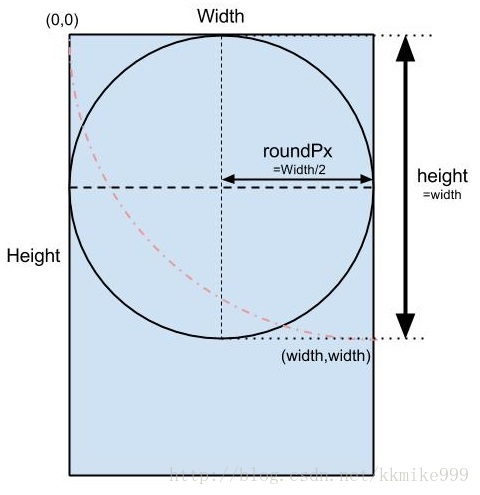
方法二:
转:https://blog.csdn.net/xingxingchance/article/details/77750546
使用clipPath()方法裁剪圆形图片。
首先,我们先看效果图:
裁剪前: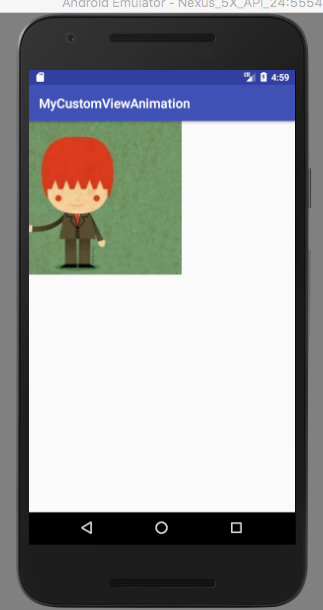
裁剪后: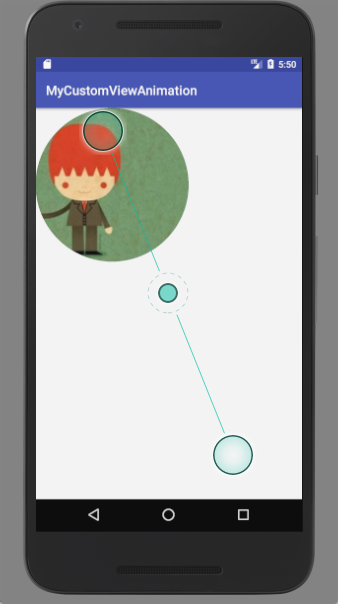
接下来,我们来一步一步的实现。
1.新建一个module
2.新建一个自定义view类,继承View,并重写两参构造器和onDrawn方法
/**

 * Created by zhaoxin on 17/8/31.

 */

public class MyAnimationView extends View {

    public MyAnimationView(Context context, @Nullable AttributeSet attrs) {

        super(context, attrs);

    }

    @Override

    protected void onDraw(Canvas canvas) {

        super.onDraw(canvas);

    }
3.新建一个布局,在布局中通过包名.类导入自定义view
<?xml version="1.0" encoding="utf-8"?>

<LinearLayout xmlns:android="http://schemas.android.com/apk/res/android"

    android:layout_width="match_parent"

    android:layout_height="match_parent">

    <com.example.zhaoxin.mycustomviewanimation.MyAnimationView

        android:layout_width="match_parent"

        android:layout_height="match_parent" />

</LinearLayout>
4.接下来就是重要的裁剪圆形图片部分
/**

 * Created by zhaoxin on 17/8/31.

 */

public class MyAnimationView extends View {

    private Bitmap mBitmap;

    private Path mPath;

    public MyAnimationView(Context context, @Nullable AttributeSet attrs) {

        super(context, attrs);

    }

    @Override

    protected void onDraw(Canvas canvas) {

        super.onDraw(canvas);

        Paint paint = new Paint();

        mBitmap = BitmapFactory.decodeResource(getResources(), R.drawable.pic);

        mPath = new Path();

        mPath.addCircle(mBitmap.getWidth() / 2, mBitmap.getHeight() / 2, mBitmap.getWidth() / 2, Path.Direction.CCW);

        canvas.clipPath(mPath);

        canvas.drawBitmap(mBitmap, 0, 0, paint);

    }

}
个人重写
/*

content:圆形图片的自定义ImageView

time:2018-8-7 17:43

build:zhouqiang

使用方法:请用setImage 方法设置图片

 */

public class CircleImageView extends View {

    private Path mPath;

    private Paint mPaint;

    private Bitmap mBitmap;

    public CircleImageView(Context context) {

        super(context);

        initPaint();

    }

    public CircleImageView(Context context, @Nullable AttributeSet attrs) {

        super(context, attrs);

        initPaint();

    }

    public CircleImageView(Context context, @Nullable AttributeSet attrs, int defStyleAttr) {

        super(context, attrs, defStyleAttr);

        initPaint();

    }

    public void initPaint(){

        mPaint = new Paint();

        mPath = new Path();

    }

    public void setImage(Bitmap bitmap){

        this.mBitmap = bitmap;

    }

    @Override

    protected void onDraw(Canvas canvas) {

        super.onDraw(canvas);

        mPaint.reset();

        mPath.addCircle(getHeight()/2,getWidth()/2,getWidth()/2.5f,Path.Direction.CW);

        mPaint.setAntiAlias(true);

        mPaint.setStyle(Paint.Style.FILL);

        canvas.clipPath(mPath);

        canvas.drawBitmap(mBitmap,

                new Rect(0,0,mBitmap.getWidth(),mBitmap.getHeight()),

                new Rect(0,0,getWidth(),getHeight()),

                mPaint);

    }

}
android 开发 View _15 导入一张图片将它裁剪成圆形 与 paint图层叠加处理详解的更多相关文章
- android 开发 View _1_ View的子类们 和 视图坐标系图
目录: android 开发 View _2_ View的属性动画ObjectAnimator ,动画效果一览 android 开发 View _3_ View的属性动画ValueAnimator a ...
- Android开发之常用必备工具类图片bitmap转成字符串string与String字符串转换为bitmap图片格式
作者:程序员小冰,CSDN博客:http://blog.csdn.net/qq_21376985 QQ986945193 博客园主页:http://www.cnblogs.com/mcxiaobing ...
- Qt开发技术:QCharts(三)QCharts样条曲线图介绍、Demo以及代码详解
若该文为原创文章,未经允许不得转载原博主博客地址:https://blog.csdn.net/qq21497936原博主博客导航:https://blog.csdn.net/qq21497936/ar ...
- Android开发——View滑动的三种实现方式
0. 前言 Android开发中,我们常常需要View滑动实现一些绚丽的效果来优化用户体验.一般View的滑动可以用三种方式实现. 转载请注明出处:http://blog.csdn.net/seu ...
- android 开发 View _10_ Path之基本操作
转载地址:http://www.gcssloop.com/customview/Path_Basic/ 安卓自定义View进阶-Path之基本操作 在上一篇Canvas之图片文字中我们了解了如何使用C ...
- Android开发——View滑动冲突解决方案
0. 前言 我们在Android开发--事件分发机制详解中深入学习了事件分发机制,为我们解决Android开发中的滑动冲突问题做了初步准备.针对滑动冲突这里给出两种解决方案:外部拦截法和内部拦截法 ...
- android 开发 View _6_Canvas详解
牛逼大神的博客地址:http://www.gcssloop.com/customview/Canvas_BasicGraphics 安卓自定义View进阶-Canvas之绘制图形 在上一篇自定义Vie ...
- 【Android UI设计与开发】第01期:引导界面(一)ViewPager介绍和使用详解
做Android开发加起来差不多也有一年多的时间了,总是想写点自己在开发中的心得体会与大家一起交流分享.共同进步,刚开始写也不知该如何下手,仔细想了一下,既然是刚开始写,那就从一个软件给人最直观的感受 ...
- Qt开发技术:图形视图框架(二)场景QGraphicsScene、QGraphicsItem与QGraphicsView详解
前话 Qt的图形视图框架,最核心的三个类为:QGraphicsScene.QGraphicsItem与QGraphicsView. 基于图形框架的高级白板软件Demo QGraphicsSce ...
随机推荐
- jsp九大内置对象 ,三大指令,四大作用域,七大动作
九大内置对象: application:应用程序对象 对整个web工程都有效 request:对当前请求的封装 pageConfig:只对当前页面有效,里面封装了基本request和session的对 ...
- 四:(之六_镜像发布)Dockerfile语法梳理和实践
*6.镜像发布 1>注册Docker Hub账号并登陆. build的镜像名称格式必须是: dockerhub账户名/标识: 使用docker login在项目目录下登录: 浏览器: 2> ...
- np.newaxis
http://blog.csdn.net/mameng1/article/details/54599306
- 关于空指针NULL、野指针、通用指针 (转)
reference:https://www.cnblogs.com/losesea/archive/2012/11/16/2772590.html 首先说一下什么是指针,只要明白了指针的含义,你就明白 ...
- .net ORM框架(Dapper简单应用)
1.引入 Dapper.dll类库 2.创建书籍模型book using System; using System.Collections.Generic; using System.Linq; us ...
- Linux目录路径知识
改IP为静态IP
- 剑指Offer 3. 从尾到头打印链表 (链表)
题目描述 输入一个链表,按链表值从尾到头的顺序返回一个ArrayList. 题目地址 https://www.nowcoder.com/practice/d0267f7f55b3412ba93bd35 ...
- java和js中JSONObject,JSONArray,Map,String之间转换
--------------------------------------------------Java中--------------------------------------------- ...
- git 本地重命名文件夹大小写并提交到远程分支
git branch 查看本地分支 git branch -a 查看本地 本地分支可直接切换:git checkout name 进入正题: 1.文件夹备份 2.git config core.ign ...
- shell命令记录
1. 过滤注释和空行 cat /etc/rsyslog.conf|grep -v "#" | grep -v "^$" 2. flume日志采集: for ...