
SpringMVC 启动流程
首先看一下Web应用部署初始化过程 (Web Application Deployement),官方文档说明:
Web Application Deployment
When a web application is deployed into a container, the following steps must be performed, in this order, before the web application begins processing client requests.
■ Instantiate an instance of each event listener identified by a <listener> element in the deployment descriptor.
■ For instantiated listener instances that implement ServletContextListener, call the contextInitialized() method.
■ Instantiate an instance of each filter identified by a <filter> element in the deployment descriptor and call each filter instance’s init() method.
■ Instantiate an instance of each servlet identified by a <servlet> element that includes a <load-on-startup> element in the order defined by the load-onstartup
element values, and call each servlet instance’s init() method.大致说:
Web应用部署:当一个web应用被部署到一个容器(eg.tomcat),在web应用开始处理客户端请求前,以下步骤会按顺序执行:
1.初始化应用部署描述文件中每一个listener。
2.初始化ServletContextListener实现类,调用contextInitialized()方法。
3.初始化应用部署描述文件中每一个filter,并执行每一个的init()方法。
4.按照顺序<load-on-startup>来初始化servlet,并执行init()方法。
大致总结:先初始化lisener,再filter,最后servlet
SpringMVC启动过程:
常见SpringMVC配置:<web-app>
<display-name>Web Application</display-name>
<!--全局变量配置-->
<context-param>
<param-name>contextConfigLocation</param-name>
<param-value>classpath:applicationContext-*.xml</param-value>
</context-param>
<!--监听器-->
<listener>
<listener-class>org.springframework.web.context.ContextLoaderListener</listener-class>
</listener>
<!--解决乱码问题的filter-->
<filter>
<filter-name>CharacterEncodingFilter</filter-name>
<filter-class>org.springframework.web.filter.CharacterEncodingFilter</filter-class>
<init-param>
<param-name>encoding</param-name>
<param-value>utf-8</param-value>
</init-param>
</filter>
<filter-mapping>
<filter-name>CharacterEncodingFilter</filter-name>
<url-pattern>/*</url-pattern>
</filter-mapping>
<!--Restful前端控制器-->
<servlet>
<servlet-name>mvc</servlet-name>
<servlet-class>org.springframework.web.servlet.DispatcherServlet</servlet-class>
<init-param>
<param-name>contextConfigLocation</param-name>
<param-value>classpath:spring-mvc.xml</param-value>
</init-param>
</servlet>
<servlet-mapping>
<servlet-name>mvc</servlet-name>
<url-pattern>/</url-pattern>
</servlet-mapping>
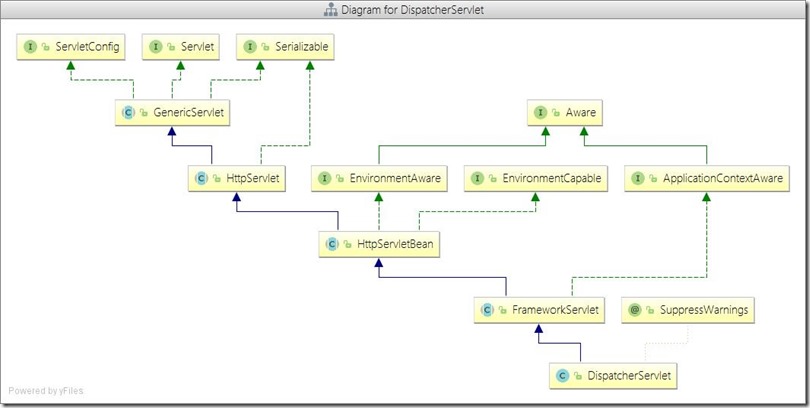
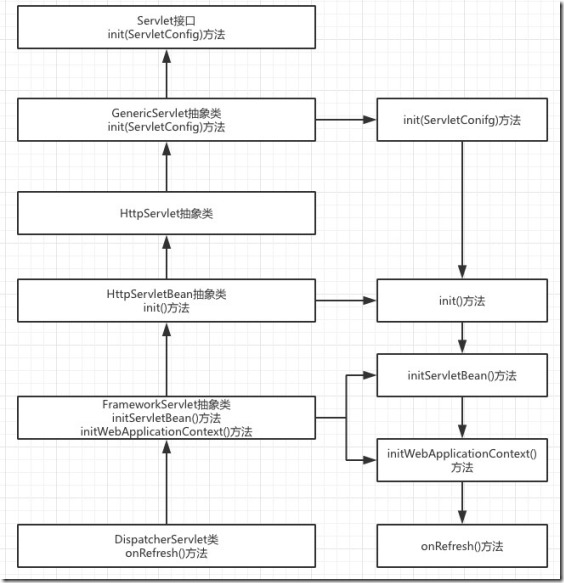
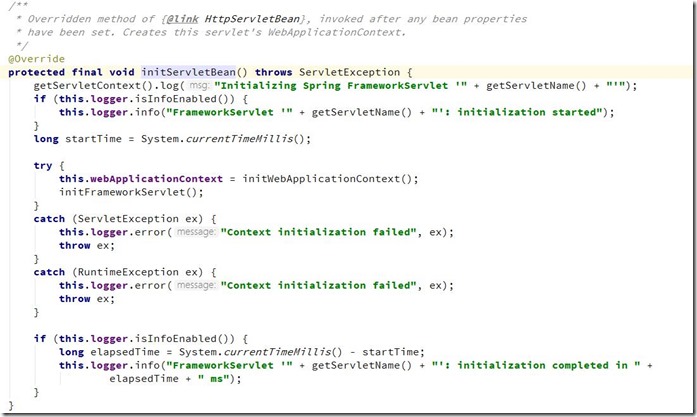
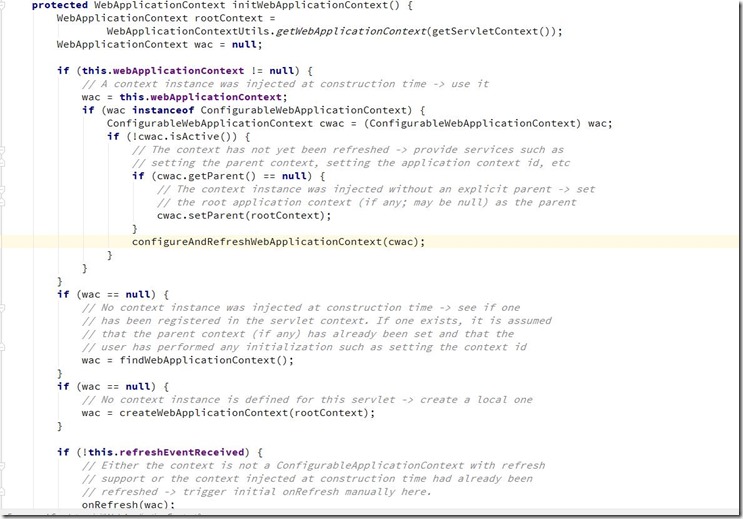
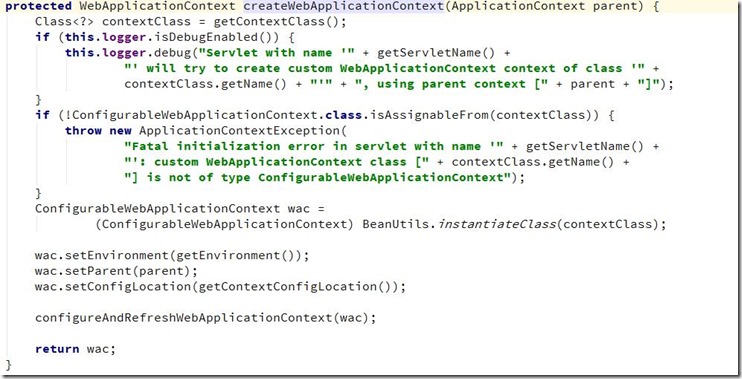
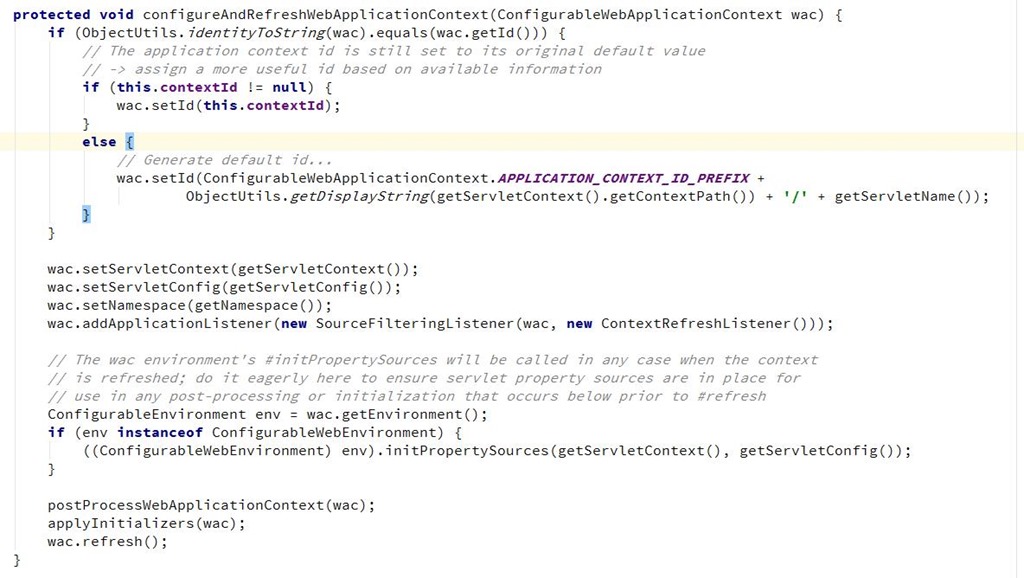
</web-app>DispatchServlet使用说明:其类图如下:可以明显看出DispatchServlet类间接父类实现了Servlet接口,因此其本质上依旧是一个Servlet。DispatchServlet类设计很巧妙,上层父类不同程度的实现了相关接口的部分方法,并留出相关方法用于子类覆盖,将不变的部分统一实现,将变化的部分预留方法用于子类实现。DispatchServlet类初始化过程函数调用图:通过类图和相关初始化函数调用的逻辑来看,DispatchServlet的初始化过程将模板方法,其父类完成不同的统一工作,并预留出相关方法用于子类覆盖去完成不同的可变工作。DispatchServlet类的本质是Servlet,在web应用部署到容器后进行Servelt初始化时会调用相关的init(ServletConfig)方法,因此,DispatchServlet类的初始化过程也由该方法开始。其中FrameworkServlet抽象类中的initServletBean()方法、initWebApplicationContext()方法以及DispatchServlet类中的onFresh()方法。FrameworkServlet initServletBean()方法源码,该方法重写了FrameworkServlet抽象类在执行,终于,initXXXContext的字眼出现了—initWebApplicationContext()方法会首先从ServletContext中获取到由ContextLoaderListener初始化完成并放进入的根容器对象引用(因为创建子容器必须将父容器作为参数传递进去),然后经过层层调用,最终在createWebApplicationContext()中完成了容器的创建工作,该方法的主要代码如下:
* Process the actual dispatching to the handler.
* <p>The handler will be obtained by applying the servlet's HandlerMappings in order.
* The HandlerAdapter will be obtained by querying the servlet's installed HandlerAdapters
* to find the first that supports the handler class.
* <p>All HTTP methods are handled by this method. It's up to HandlerAdapters or handlers
* themselves to decide which methods are acceptable.
* @param request current HTTP request
* @param response current HTTP response
* @throws Exception in case of any kind of processing failure
*/
protected void doDispatch(HttpServletRequest request, HttpServletResponse response) throws Exception {
HttpServletRequest processedRequest = request;
HandlerExecutionChain mappedHandler = null;
boolean multipartRequestParsed = false; WebAsyncManager asyncManager = WebAsyncUtils.getAsyncManager(request); try {
ModelAndView mv = null;
Exception dispatchException = null; try {
processedRequest = checkMultipart(request);
multipartRequestParsed = (processedRequest != request); // Determine handler for the current request.
mappedHandler = getHandler(processedRequest);
if (mappedHandler == null || mappedHandler.getHandler() == null) {
noHandlerFound(processedRequest, response);
return;
} // Determine handler adapter for the current request.
HandlerAdapter ha = getHandlerAdapter(mappedHandler.getHandler()); // Process last-modified header, if supported by the handler.
String method = request.getMethod();
boolean isGet = "GET".equals(method);
if (isGet || "HEAD".equals(method)) {
long lastModified = ha.getLastModified(request, mappedHandler.getHandler());
if (logger.isDebugEnabled()) {
logger.debug("Last-Modified value for [" + getRequestUri(request) + "] is: " + lastModified);
}
if (new ServletWebRequest(request, response).checkNotModified(lastModified) && isGet) {
return;
}
} if (!mappedHandler.applyPreHandle(processedRequest, response)) {
return;
} // Actually invoke the handler.
mv = ha.handle(processedRequest, response, mappedHandler.getHandler()); if (asyncManager.isConcurrentHandlingStarted()) {
return;
} applyDefaultViewName(processedRequest, mv);
mappedHandler.applyPostHandle(processedRequest, response, mv);
}
catch (Exception ex) {
dispatchException = ex;
}
catch (Throwable err) {
// As of 4.3, we're processing Errors thrown from handler methods as well,
// making them available for @ExceptionHandler methods and other scenarios.
dispatchException = new NestedServletException("Handler dispatch failed", err);
}
processDispatchResult(processedRequest, response, mappedHandler, mv, dispatchException);
}
catch (Exception ex) {
triggerAfterCompletion(processedRequest, response, mappedHandler, ex);
}
catch (Throwable err) {
triggerAfterCompletion(processedRequest, response, mappedHandler,
new NestedServletException("Handler processing failed", err));
}
finally {
if (asyncManager.isConcurrentHandlingStarted()) {
// Instead of postHandle and afterCompletion
if (mappedHandler != null) {
mappedHandler.applyAfterConcurrentHandlingStarted(processedRequest, response);
}
}
else {
// Clean up any resources used by a multipart request.
if (multipartRequestParsed) {
cleanupMultipart(processedRequest);
}
}
}
}
SpringMVC 启动流程的更多相关文章
- SpringMVC源码解析-DispatcherServlet启动流程和初始化
在使用springmvc框架,会在web.xml文件配置一个DispatcherServlet,这正是web容器开始初始化,同时会在建立自己的上下文来持有SpringMVC的bean对象. 先从Dis ...
- SpringMVC启动和执行流程
Spring框架大家用得很多,相当熟悉,但是我对里面的运作比较好奇,例如bean的加载和使用,和我们定义的配置文件有什么联系;又例如aop在什么时候起作用,原理又是怎样.经过一个了解后,整理了启动和执 ...
- SpringMVC启动过程详解(li)
通过对SpringMVC启动过程的深入研究,期望掌握Java Web容器启动过程:掌握SpringMVC启动过程:了解SpringMVC的配置文件如何配置,为什么要这样配置:掌握SpringMVC是如 ...
- Spring基础系列-容器启动流程(1)
原创作品,可以转载,但是请标注出处地址:https://www.cnblogs.com/V1haoge/p/9870339.html 概述 我说的容器启动流程涉及两种情况,SSM开发模式和Spri ...
- SpringMVC 工作流程
版权声明:本文为博主原创文章,未经博主允许不得转载. https://blog.csdn.net/baidu_36697353/article/details/64444147 SpringMVC 工 ...
- SpringBoot启动流程分析(六):IoC容器依赖注入
SpringBoot系列文章简介 SpringBoot源码阅读辅助篇: Spring IoC容器与应用上下文的设计与实现 SpringBoot启动流程源码分析: SpringBoot启动流程分析(一) ...
- SpringBoot启动流程及其原理
Spring Boot.Spring MVC 和 Spring 有什么区别? 分别描述各自的特征: Spring 框架就像一个家族,有众多衍生产品例如 boot.security.jpa等等:但他们的 ...
- Spring MVC启动流程分析
本文是Spring MVC系列博客的第一篇,后续会汇总成贴子. Spring MVC是Spring系列框架中使用频率最高的部分.不管是Spring Boot还是传统的Spring项目,只要是Web项目 ...
- 面试高频SpringMVC执行流程最优解(源码分析)
文章已托管到GitHub,大家可以去GitHub查看阅读,欢迎老板们前来Star! 搜索关注微信公众号 码出Offer 领取各种学习资料! SpringMVC执行流程 SpringMVC概述 Spri ...
随机推荐
- Homework 2.0
一.第一题,要求是输入不同的字符的时候输出不同的结果,这道题主要是运用输入和输出语言还有判断语句,分别使用switch和if else来进行输入字符的判断,本体比较简单,注意定义输入变量的类型为cha ...
- Android & iOS 启动画面工具
感谢Aone!为我们开发了如此便捷的工具!! 以下为原文: Android & iOS 启动画面工具 下载:OneSplash.启动画面工具.Aone.20190318.zip 说明:这一个 ...
- windows2008 转 centos7 数据磁盘NTFS无损挂载
转换时 原win硬盘里作为系统稳盘的硬盘必须重新格式化才能装机 数据盘在安装ntfs-3g可以直接挂载 几个重要命令: #lsblk //查看硬盘情况 df -T 只可以查看已经挂载的分区和文件系统 ...
- Linux_x86下NX与ASLR绕过技术(续)
四.Stack Canaries 首先看一下Stack Canaries演进历史: Stack Guard 是第一个使用 Canaries 探测的堆栈保护实现,它于 1997 年作为 GCC 的一个扩 ...
- es6学习日记4
数组的扩展 扩展运算符是三个点(...).它好比 rest 参数的逆运算,将一个数组转为用逗号分隔的参数序列. console.log(...[1, 2, 3]) // 1 2 3 console.l ...
- Python全栈之路----常用模块----random模块
程序中有很多地方需要用到随机字符,比如登陆网站的随机验证码,通过random模块可以很容易生成随机字符串. >>> import random >>> random ...
- RESTful Loads
RESTful 一种软件架构风格.设计风格,而不是标准,只是提供了一组设计原则和约束条件.它主要用于客户端和服务器交互类的软件.基于这个风格设计的软件可以更简洁,更有层次,更易于实现缓存等机制. 概述 ...
- pycharm 在线激活
1.在pycharm过期页面选择 enter License 2.激活界面的License server输入:http://idea.liyang.io 然后点击激活 (确保电脑能上网,亲测有效)
- HTTP 各状态码大全
基本涵盖了所有问题 HTTP 400 – 请求无效 HTTP 401.1 – 未授权:登录失败 HTTP 401.2 – 未授权:服务器配置问题导致登录失败 HTTP 401.3 – ACL 禁止访问 ...
- 解决WPF中异常导致的程序Crash
通常在WPF中出现异常,会导致程序Crash,即使把异常Throw出来,依旧会报错,解决方法只需在App.xaml.cs中进行处理即可,废话不说,代码如下: private int exception ...