
[原]Failed connect to mirrors.cloud.aliyuncs.com:80; Connection refused
web site : https://opsx.alibaba.com/mirror
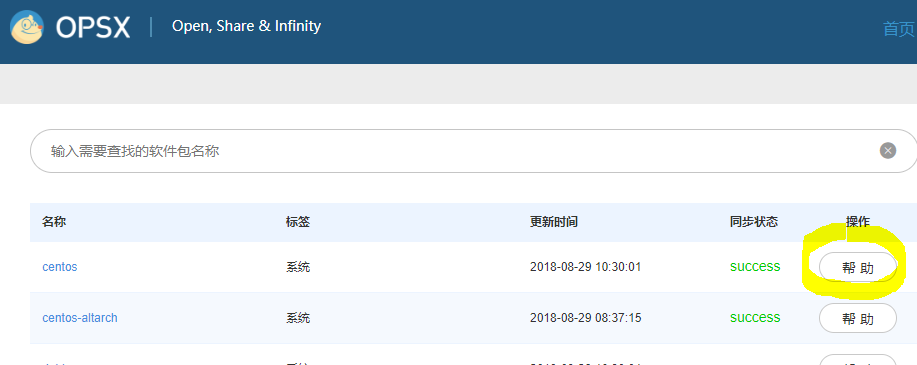
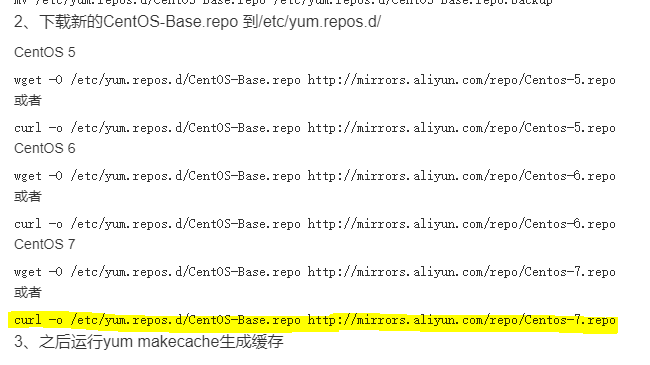
运行后出现下面的Error:
base//x86_64/other_db         FAILED

http://mirrors.aliyun.com/centos/7/os/x86_64/repodata/4a963ccbdeb4a9246170341539b5f4816d8a55cc59b65e972ce161da4812b78a-other.sqlite.bz2: [Errno 14] HTTP Error 404 - Not Found

Trying other mirror.

base//x86_64/filelists_db     FAILED

http://mirrors.aliyuncs.com/centos/7/os/x86_64/repodata/dd9bfa9712cb74c7b6698776da1050bc20c71f0dc2a5d9e5a34e292cb739045c-filelists.sqlite.bz2: [Errno 14] curl#7 - "Failed connect to mirrors.aliyuncs.com:80; Connection refused"

Trying other mirror.

base//x86_64/other_db         FAILED

http://mirrors.cloud.aliyuncs.com/centos/7/os/x86_64/repodata/4a963ccbdeb4a9246170341539b5f4816d8a55cc59b65e972ce161da4812b78a-other.sqlite.bz2: [Errno 14] curl#7 - "Failed connect to mirrors.cloud.aliyuncs.com:80; Connection refused"

Trying other mirror.
解决方法:
step 1)
[root@controller yum.repos.d]# yum clean all

Loaded plugins: fastestmirror, langpacks

Cleaning repos: base extras updates

Cleaning up everything

Maybe you want: rm -rf /var/cache/yum, to also free up space taken by orphaned data from disabled or removed repos

Cleaning up list of fastest mirrors

[root@controller yum.repos.d]# yum makecache

Loaded plugins: fastestmirror, langpacks

Determining fastest mirrors

 * base: mirrors.aliyun.com

 * extras: mirrors.aliyun.com

 * updates: mirrors.aliyun.com

base                                                                   | 3.6 kB  ::

extras                                                                 | 3.4 kB  ::

updates                                                                | 3.4 kB  ::

(/): base/x86_64/group_gz                                           |  kB  ::

(/): base/x86_64/filelists_db                                       | 6.9 MB  ::

(/): extras/x86_64/filelists_db                                     |  kB  ::

(/): extras/x86_64/prestodelta                                      |   kB  ::

(/): extras/x86_64/primary_db                                       |  kB  ::

(/): extras/x86_64/other_db                                         |  kB  ::

(/): updates/x86_64/prestodelta                                     |  kB  ::

(/): updates/x86_64/filelists_db                                    | 2.9 MB  ::

(/): base/x86_64/primary_db                                         | 5.9 MB  ::

(/): base/x86_64/other_db                                          | 2.5 MB  ::

(/): updates/x86_64/primary_db                                     | 5.2 MB  ::

(/): updates/x86_64/other_db                                       |  kB  ::

Metadata Cache Created
[原]Failed connect to mirrors.cloud.aliyuncs.com:80; Connection refused的更多相关文章
- Failed connect to mirrors.cloud.aliyuncs.com:80
在yum insatall 安装是报错 Failed connect to mirrors.cloud.aliyuncs.com:80; Connection refused 解决方法: cd /et ...
- 阿里云apt-get安装包时Err:2 http://mirrors.cloud.aliyuncs.com/ubuntu xenial-security/main amd64 git amd64 1:2.7.4-0ubuntu1.2 404 Not Found
新部署的云服务器出现如下错误: root@iZj6cbjalvhsw0fhndmm5xZ:~# apt-get install git Reading package lists... Done Bu ...
- centos 7 IP不能访问nginx Failed connect to 185.239.226.111:80; No route to host解决办法
服务器环境 centos 7.4 问题描述 1.可以ping通IP ,用IP访问nginx 不能访问,在服务器上curl localhost curl 185.239.226.111可以获得 [ro ...
- Failed to connect to raw.githubusercontent.com port 443: Connection refused
问题:macOS安装Homebrew时总是报错(Failed to connect to raw.githubusercontent.com port 443: Connection refused) ...
- Linux下安装vim-plug报错:Failed to connect to raw.githubusercontent.com port 443: Connection refused
安装vim-plug时,输入以下命令: curl -fLo ~/.vim/autoload/plug.vim --create-dirs https://raw.githubusercontent.c ...
- ssh: connect to host github.com port 22: Connection refused
假设git例如,下面的问题时,远程推送: [fulinux@ubuntu learngit]$ git push -u origin master ssh: connect to host githu ...
- centos解决bash: telnet: command not found...&& telnet: connect to address 127.0.0.1: Connection refused拒绝连接
检查telnet是否已安装: [root@hostuser src]# rpm -q telnet-serverpackage telnet-server is not installed[root@ ...
- [原]openstack-kilo--issue(十一)Failed connect to 169.254.169.254:80; No route to host
本博客已经添加"打赏"功能,"打赏"位置位于右边栏红色框中,感谢您赞助的咖啡. # curl http://169.254.169.254/latest/use ...
- openstack-kilo--issue(十一)Failed connect to 169.254.169.254:80; No route to host
# curl http://169.254.169.254/latest/user-data curl: () Failed connect to ; No route to host 解决方案: c ...
随机推荐
- 多重背包--java
多重背包 有N种物品和一个容量为V的背包.第i种物品最多有n[i]件可用,每件费用是c[i],价值 是w[i].求解将哪些物品装入背包可使这些物品的费用总和不超过背包容量,且价值总和最大母函数的思想也 ...
- 深度优先搜素之N皇后问题
#include<stdio.h>#include<malloc.h>#include<math.h>int x,a[101],book[101],count=0; ...
- Python 之 __new__() 方法与实例化(转)
_new__() 是在新式类中新出现的方法,它作用在构造方法建造实例之前,可以这么理解,在 Python 中存在于类里面的构造方法 __init__() 负责将类的实例化,而在 __init__() ...
- JAVA自学笔记06
JAVA自学笔记06 1.二维数组 1)格式: ①数据类型[][]数组名 = new 数据类型[m][n]; 或 数据类型[]数组名[]=new 数据类型[m][n]; m表示这个二维数组有多少个一维 ...
- 常见爬虫/BOT对抗技术介绍(一)
爬虫,是大家获取互联网公开数据的有效手段.爬虫.反爬虫技术.反-反爬虫技术随着互联网的不断发展,也在不断发展更新, 本文简要介绍现代的爬虫/BOT对抗技术,如有疏漏,多谢指正! 一.反爬虫/BOT技术 ...
- SharePoint REST 服务获取讨论版问题
前言 最近,有这么个需求,需要获取讨论版里的问题,然后汇总,这里就考虑用REST服务了. 1.我们先创建这么一个讨论版列表,然后添加一些问题,如下图: 2.然后需要开发REST服务代码了,如下图: 3 ...
- 【原】Linux环境下Shell调用MySQL并实现定时任务
对于一些周期性事务,我们可以在Linux下,使用shell脚本调用mysql数据库存储过程,并设置定时任务. 本来是要mysql数据库中创建事件任务来,定时执行存储过程,做数据传输的...使用cron ...
- 阿里的Json解析包FastJson使用
阿里巴巴FastJson是一个Json处理工具包,包括“序列化”和“反序列化”两部分,它具备如下特征: 速度最快,测试表明,fastjson具有极快的性能,超越任其他的Java Json parser ...
- 解决eureka注册时使用ip而不是hostname
eureka的client注册到server时默认是使用hostname而不是ip,这就导致client在多台机器时,服务间相互调用时也会使用hostname进行调用,从而调用失败.这时候就需要使用i ...
- PHP访问SQL Server驱动对应关系
引用地址: https://docs.microsoft.com/en-us/sql/connect/php/system-requirements-for-the-php-sql-driver?vi ...