
vue2.0 之列表渲染-v-for
v-for 数组渲染
App.vue代码
<template>

  <div>

    <ul>

      <li v-for="item in list"> {{ item.name }} - {{ item.price }}</li>

    </ul>

    <ul>

      <li v-for="item in list" v-text="item.name + '-' + item.price"></li>

    </ul>

    <ul>

      <li v-for="(item, index) in list"> {{ index }} - {{ item.name }} - {{ item.price }}</li>

    </ul>

  </div>

</template>

<script>

  export default {

    data () {

      return {

        list: [

          {

            name: 'apple 7S',

            price: 6188

          },

          {

            name: 'huawei P10',

            price: 4288

          },

          {

            name: 'mi6',

            price: 2999

          }

        ]

      }

    }

  }

</script>

<style>

  html {

    height: 100%;

  }

</style>
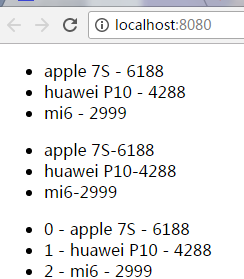
页面效果
v-for 对象渲染
App.vue代码
<template>

  <div>

    <ul>

      <li v-for="value in objlist"> {{ value }}</li>

    </ul>

    <ul>

      <li v-for="(key, value) in objlist"> {{ key + ':' + value }}</li>

    </ul>

  </div>

</template>

<script>

  export default {

    data () {

      return {

        objlist: {

          name: 'apple 7S',

          price: 6188,

          color: 'red',

          size: 6.0

        }

      }

    }

  }

</script>

<style>

  html {

    height: 100%;

  }

</style>
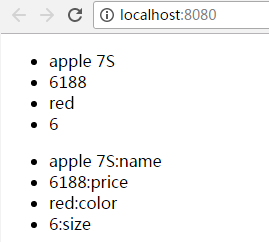
页面显示
v-for 子组件渲染
创建./components/hello.vue文件
<template>

  <div>

    {{ hello }}

  </div>

</template>

<script>

  export default {

    data () {

      return {

        hello: 'i am component hello'

      }

    }

  }

</script>

<style scoped>/**/

h1 {

  height: 100px;

}

</style>
App.vue代码
<template>

  <div>

    <componenthello v-for="(key, value) in objlist"></componenthello>

  </div>

</template>

<script>

  import componenthello from './components/hello'

  export default {

    components: {

      componenthello

    },

    data () {

      return {

        objlist: {

          name: 'apple 7S',

          price: 6188,

          color: 'red',

          size: 6.0

        }

      }

    }

  }

</script>

<style>

  html {

    height: 100%;

  }

</style>
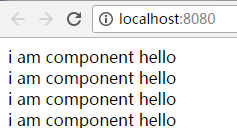
页面显示
列表数据的同步更新
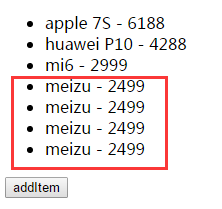
案例一:
<template>

  <div>

    <ul>

      <li v-for="item in list"> {{ item.name }} - {{ item.price }}</li>

    </ul>

    <button v-on:click="addItem">addItem</button>

  </div>

</template>

<script>

  export default {

    data () {

      return {

        list: [

          {

            name: 'apple 7S',

            price: 6188

          },

          {

            name: 'huawei P10',

            price: 4288

          },

          {

            name: 'mi6',

            price: 2999

          }

        ]

      }

    },

    methods: {

      addItem () {

        this.list.push({

          name: 'meizu',

          price: 2499

        })

      }

    }

  }

</script>

<style>

  html {

    height: 100%;

  }

</style>
案例二
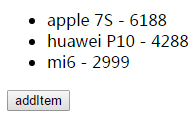
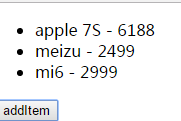
<template>

  <div>

    <ul>

      <li v-for="item in list"> {{ item.name }} - {{ item.price }}</li>

    </ul>

    <button v-on:click="addItem">addItem</button>

  </div>

</template>

<script>

  import Vue from 'vue'

  export default {

    data () {

      return {

        list: [

          {

            name: 'apple 7S',

            price: 6188

          },

          {

            name: 'huawei P10',

            price: 4288

          },

          {

            name: 'mi6',

            price: 2999

          }

        ]

      }

    },

    methods: {

      addItem () {

        Vue.set(this.list, 1, {

          name: 'meizu',

          price: 2499

        })

      }

    }

  }

</script>

<style>

  html {

    height: 100%;

  }

</style>
点击按钮前
点击按钮后
vue2.0 之列表渲染-v-for的更多相关文章
- vue2.0 之文本渲染-v-html、v-text
vue2.0 之文本渲染-v-html.v-text 1.index.html代码 <!DOCTYPE html> <html> <head> <meta c ...
- Vue2.0流式渲染中文乱码问题
在参照vue2.0中文官方文档学习服务端渲染之流式渲染时,因为响应头默认编码类型为GBK,而文件为UFT-8类型,所以出现了中文乱码问题. 解决办法:设置响应头编码类型即可 response.setH ...
- vue2.0 之条件渲染
条件渲染v-if.v-show <template> <div> <a v-if="isPartA">partA</a> <a ...
- Vue2.0 中,“渐进式框架”和“自底向上增量开发的设计”这两个概念是什么?(转)
https://www.zhihu.com/question/51907207?rf=55052497 徐飞 在我看来,渐进式代表的含义是:主张最少. 每个框架都不可避免会有自己的一些特点,从而会对使 ...
- 前端MVC Vue2学习总结(四)——条件渲染、列表渲染、事件处理器
一.条件渲染 1.1.v-if 在字符串模板中,如 Handlebars ,我们得像这样写一个条件块: <!-- Handlebars 模板 --> {{#if ok}} <h1&g ...
- vue2.0 — 移动端的输入框实时检索更新列表
我们都是行走在这世界的孤独者 - 暖暖 最近在做vue2.0的项目遇到一个移动端实事检索搜索更新列表的效果,但用户在搜索框输入客户的电话或姓名的时候,客户列表内容会做相应的更新,下面给大家看下图~· ...
- vue2.0的虚拟DOM渲染
1.为什么需要虚拟DOM 前面我们从零开始写了一个简单的类Vue框架(文章链接),其中的模板解析和渲染是通过Compile函数来完成的,采用了文档碎片代替了直接对页面中DOM元素的操作,在完成数据的更 ...
- 从壹开始前后端分离 [ Vue2.0+.NET Core2.1] 二十五║初探SSR服务端渲染(个人博客二)
缘起 时间真快,现在已经是这个系列教程的下半部 Vue 第 12 篇了,昨天我也简单思考了下,可能明天再来一篇,Vue 就基本告一段落了,因为什么呢,这里给大家说个题外话,当时写博文的时候,只是想给大 ...
- 【vue2】Style和Class,条件,列表渲染,双向数据绑定,事件处理
目录 1.style和class 2. 条件渲染 2.1 指令 2.2 案例 3. 列表渲染 3.1 v-for:放在标签上,可以循环显示多个此标签 3.2 v-for 循环数组,循环字符串,数字,对 ...
随机推荐
- 20135316Linux内核学习笔记第八周
20135316王剑桥<Linux内核分析>MOOC课程http://mooc.study.163.com/course/USTC 1000029000 一.进程调度与进程调度的时机分析 ...
- PAT 1022 D进制的A+B
https://pintia.cn/problem-sets/994805260223102976/problems/994805299301433344 输入两个非负10进制整数A和B(<=2 ...
- CentOS(6.8)7 安装 Mysql 5.7
https://blog.csdn.net/zyw_java/article/details/70949596 https://blog.csdn.net/yzl11/article/details/ ...
- postman发送json格式的post请求
在地址栏里输入请求url:http://127.0.0.1:8081/getmoney 选择“POST”方式, 在“headers”添加key:Content-Type , value:applic ...
- 如何删除GitHub或者GitLab 上的文件夹
如何删除GitHub或者GitLab 上的文件夹 需求分析 假设小明有一天不小心把本地仓库的一个文件夹A推送到了远程GIT服务器(例如:github,gitlab,gitee)上,此时想删除远程仓 ...
- php 文件上传 $_FILES 错误码
假设文件上传字段的名称file_name,则: $_FILES['file_name']['error']有以下几种类型 1.UPLOAD_ERR_OK 其值为 0,没有错误发生,文件上传成功. 2. ...
- Linux net core docker hello world 简单使用
安装.net core From 官网 sudo sh -c 'echo -e "[packages-microsoft-com-prod]\nname=packages-microsoft ...
- [kali] 安装完kali之后允许远程ssh
1. 安装kali 2.控制台登录kali 3. 修改 /etc/ssh/sshd_config 4.将 permitrootlogin 前面的注释去掉,并且后面改为yes 5.然后重启ssd服务 / ...
- Angular 序列化和反序列化和遍历
<!DOCTYPE html><html ng-app="myApp"><head lang="en"> <meta ...
- 解决Ubuntu中vi命令的编辑模式下不能正常使用方向键和退格键的问题
在Ubuntu中,进入vi命令的编辑模式,发现按方向键不能移动光标,而是会输出ABCD,以及退格键也不能正常删除字符.这是由于Ubuntu预装的是vim-tiny,而我们需要使用vim-full,解决 ...