
vue2.0 之列表渲染-v-for
v-for 数组渲染
App.vue代码
<template>

  <div>

    <ul>

      <li v-for="item in list"> {{ item.name }} - {{ item.price }}</li>

    </ul>

    <ul>

      <li v-for="item in list" v-text="item.name + '-' + item.price"></li>

    </ul>

    <ul>

      <li v-for="(item, index) in list"> {{ index }} - {{ item.name }} - {{ item.price }}</li>

    </ul>

  </div>

</template>

<script>

  export default {

    data () {

      return {

        list: [

          {

            name: 'apple 7S',

            price: 6188

          },

          {

            name: 'huawei P10',

            price: 4288

          },

          {

            name: 'mi6',

            price: 2999

          }

        ]

      }

    }

  }

</script>

<style>

  html {

    height: 100%;

  }

</style>
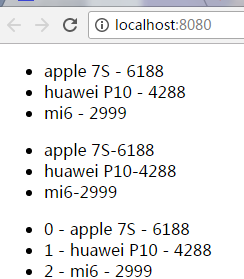
页面效果
v-for 对象渲染
App.vue代码
<template>

  <div>

    <ul>

      <li v-for="value in objlist"> {{ value }}</li>

    </ul>

    <ul>

      <li v-for="(key, value) in objlist"> {{ key + ':' + value }}</li>

    </ul>

  </div>

</template>

<script>

  export default {

    data () {

      return {

        objlist: {

          name: 'apple 7S',

          price: 6188,

          color: 'red',

          size: 6.0

        }

      }

    }

  }

</script>

<style>

  html {

    height: 100%;

  }

</style>
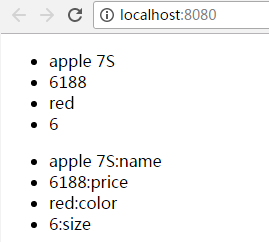
页面显示
v-for 子组件渲染
创建./components/hello.vue文件
<template>

  <div>

    {{ hello }}

  </div>

</template>

<script>

  export default {

    data () {

      return {

        hello: 'i am component hello'

      }

    }

  }

</script>

<style scoped>/**/

h1 {

  height: 100px;

}

</style>
App.vue代码
<template>

  <div>

    <componenthello v-for="(key, value) in objlist"></componenthello>

  </div>

</template>

<script>

  import componenthello from './components/hello'

  export default {

    components: {

      componenthello

    },

    data () {

      return {

        objlist: {

          name: 'apple 7S',

          price: 6188,

          color: 'red',

          size: 6.0

        }

      }

    }

  }

</script>

<style>

  html {

    height: 100%;

  }

</style>
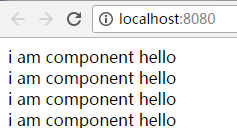
页面显示
列表数据的同步更新
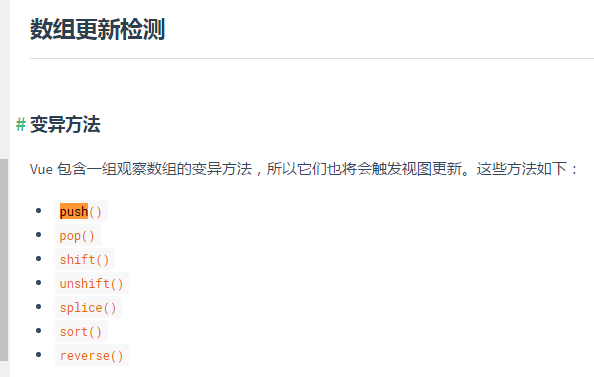
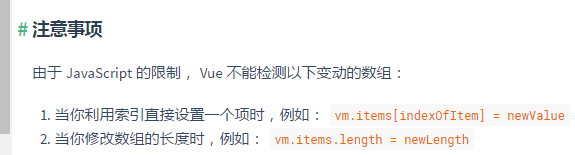
案例一:
<template>

  <div>

    <ul>

      <li v-for="item in list"> {{ item.name }} - {{ item.price }}</li>

    </ul>

    <button v-on:click="addItem">addItem</button>

  </div>

</template>

<script>

  export default {

    data () {

      return {

        list: [

          {

            name: 'apple 7S',

            price: 6188

          },

          {

            name: 'huawei P10',

            price: 4288

          },

          {

            name: 'mi6',

            price: 2999

          }

        ]

      }

    },

    methods: {

      addItem () {

        this.list.push({

          name: 'meizu',

          price: 2499

        })

      }

    }

  }

</script>

<style>

  html {

    height: 100%;

  }

</style>
案例二
<template>

  <div>

    <ul>

      <li v-for="item in list"> {{ item.name }} - {{ item.price }}</li>

    </ul>

    <button v-on:click="addItem">addItem</button>

  </div>

</template>

<script>

  import Vue from 'vue'

  export default {

    data () {

      return {

        list: [

          {

            name: 'apple 7S',

            price: 6188

          },

          {

            name: 'huawei P10',

            price: 4288

          },

          {

            name: 'mi6',

            price: 2999

          }

        ]

      }

    },

    methods: {

      addItem () {

        Vue.set(this.list, 1, {

          name: 'meizu',

          price: 2499

        })

      }

    }

  }

</script>

<style>

  html {

    height: 100%;

  }

</style>
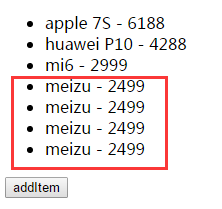
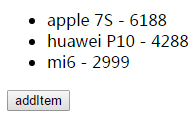
点击按钮前
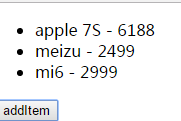
点击按钮后
vue2.0 之列表渲染-v-for的更多相关文章
- vue2.0 之文本渲染-v-html、v-text
vue2.0 之文本渲染-v-html.v-text 1.index.html代码 <!DOCTYPE html> <html> <head> <meta c ...
- Vue2.0流式渲染中文乱码问题
在参照vue2.0中文官方文档学习服务端渲染之流式渲染时,因为响应头默认编码类型为GBK,而文件为UFT-8类型,所以出现了中文乱码问题. 解决办法:设置响应头编码类型即可 response.setH ...
- vue2.0 之条件渲染
条件渲染v-if.v-show <template> <div> <a v-if="isPartA">partA</a> <a ...
- Vue2.0 中,“渐进式框架”和“自底向上增量开发的设计”这两个概念是什么?(转)
https://www.zhihu.com/question/51907207?rf=55052497 徐飞 在我看来,渐进式代表的含义是:主张最少. 每个框架都不可避免会有自己的一些特点,从而会对使 ...
- 前端MVC Vue2学习总结(四)——条件渲染、列表渲染、事件处理器
一.条件渲染 1.1.v-if 在字符串模板中,如 Handlebars ,我们得像这样写一个条件块: <!-- Handlebars 模板 --> {{#if ok}} <h1&g ...
- vue2.0 — 移动端的输入框实时检索更新列表
我们都是行走在这世界的孤独者 - 暖暖 最近在做vue2.0的项目遇到一个移动端实事检索搜索更新列表的效果,但用户在搜索框输入客户的电话或姓名的时候,客户列表内容会做相应的更新,下面给大家看下图~· ...
- vue2.0的虚拟DOM渲染
1.为什么需要虚拟DOM 前面我们从零开始写了一个简单的类Vue框架(文章链接),其中的模板解析和渲染是通过Compile函数来完成的,采用了文档碎片代替了直接对页面中DOM元素的操作,在完成数据的更 ...
- 从壹开始前后端分离 [ Vue2.0+.NET Core2.1] 二十五║初探SSR服务端渲染(个人博客二)
缘起 时间真快,现在已经是这个系列教程的下半部 Vue 第 12 篇了,昨天我也简单思考了下,可能明天再来一篇,Vue 就基本告一段落了,因为什么呢,这里给大家说个题外话,当时写博文的时候,只是想给大 ...
- 【vue2】Style和Class,条件,列表渲染,双向数据绑定,事件处理
目录 1.style和class 2. 条件渲染 2.1 指令 2.2 案例 3. 列表渲染 3.1 v-for:放在标签上,可以循环显示多个此标签 3.2 v-for 循环数组,循环字符串,数字,对 ...
随机推荐
- Scrum Meeting 5
第五次会议 No_00:工作情况 No_01:任务说明 待完成 已完成 No_10:燃尽图 No_11:照片记录 待更新 No_100:代码/文档签入记录 No_101:出席表 ...
- 《Metasploit渗透测试魔鬼训练营》第一章读书笔记
第1章 魔鬼训练营--初识Metasploit 20135301 1.1 什么是渗透测试 1.1.1 渗透测试的起源与定义 如果大家对军事感兴趣,会知道各国军队每年都会组织一些军事演习来锻炼军队的攻防 ...
- 剑指offer:复杂链表的复制
题目描述: 输入一个复杂链表(每个节点中有节点值,以及两个指针,一个指向下一个节点,另一个特殊指针指向任意一个节点),返回结果为复制后复杂链表的head.(注意,输出结果中请不要返回参数中的节点引用, ...
- 【Alpha发布】网站已经正式发布!
Alpha版本发布说明 一.功能介绍 本团队所做的物理实验网站是以生成物理实验报告为基础功能的网站.Alpha版本具有的功能大体如下: Figure 1首页 1. 注册登录功能 用户可以通过在注册页通 ...
- JavaScript中给onclick绑定事件后return false遇到的问题
<!DOCTYPE html> <html lang="en"> <head> <meta charset="UTF-8&quo ...
- A glance for agile method
看看Apache最新的JIRA,新版的JIRA是有Agile模块的. Scrum早有耳闻,接触得也比较多,Kanban一次面试中提到过.今日深入查阅KanBan: http://www.agilewe ...
- 自定义控件DataPager
在最近的一个项目中,涉及到一个自定义翻页控制的控件,下面就这一个控件做详细的说明,这个自定义控件的主要作用是对数据源进行翻页控制,比如说:“上一页.下一页.首页.末页”等相关操作,由于在一个项目中有多 ...
- spring学习总结(一)_Ioc基础(下)
本篇文章继续上篇文章讲解Ioc基础,这篇文章主要介绍零配置实现ioc,现在相信大家项目中也基本都是没有了xml配置文件.废话不多说.一起学习 代码示例 BookDao.java package com ...
- 线性代数的本质与几何意义 03. 矩阵与线性变换 (3blue1brown 咪博士 图文注解版)
首先,恭喜你读到了咪博士的这篇文章.本文可以说是该系列最重要.最核心的文章.你对线性代数的一切困惑,根源就在于没有真正理解矩阵到底是什么.读完咪博士的这篇文章,你一定会有一种醍醐灌顶.豁然开朗的感觉! ...
- maven 父工程 消除重复 对子模块进行管理 主要继承依赖
子类继承父类的 可以不需要groupid与versionid