
ABP集成短信发送模块
ABPZero并没有手机短信发送功能,现在我们来集成一个,为后面注册、登录作铺垫。
阿里云短信服务
首先需要在阿里云开通短信服务,连接地址
开通后,在签名管理中添加一个签名

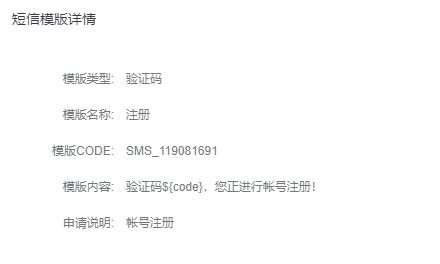
在模板管理中添加一个模板,如下图所示
最后需要使用阿里云提供的.NET发送短信类库,下面可以直接下载我上传的类库,也可以去官方下载,然后提取我所说的2个类库(aliyun-net-sdk-core.dll、aliyun-net-sdk-dysmsapi.dll)
直接下载文件:https://files.cnblogs.com/files/shensigzs/aliyun-net-sdk.zip (里面包含2个类库,把这2个类库引用到Core项目)
.NET发送短信SDK:https://help.aliyun.com/document_detail/59836.html?spm=5176.doc55284.6.573.GaNxg6
安装类库
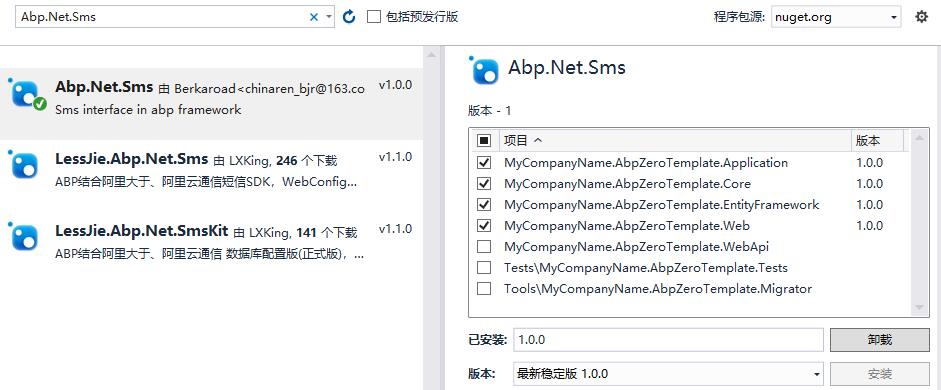
如下图所示
使用的模块是Abp.Net.Sms,源码地址:https://github.com/berkaroad/Abp.Net.Sms
Core项目添加实现
添加AliDayuSmsSender类,实现2个方法(一个同步、一个异步)
文件路径:D:\abp version\aspnet-zero-3.4.0\aspnet-zero-3.4.0\src\MyCompanyName.AbpZeroTemplate.Core\Authorization\Users\AliDayuSmsSender.cs

using System;

using System.Collections.Generic;

using System.Linq;

using System.Text;

using System.Threading.Tasks;

using Abp.Dependency;

using Abp.Net.Sms;

using Abp.UI;

using Aliyun.Acs.Core;

using Aliyun.Acs.Core.Exceptions;

using Aliyun.Acs.Core.Profile;

using Aliyun.Acs.Dysmsapi.Model.V20170525;

using Castle.Core.Logging;

namespace MyCompanyName.AbpZeroTemplate.Authorization.Users

{

    public class AliDayuSmsSender : SmsSenderBase, ITransientDependency

    {

        private IClientProfile profile = null;

        public ILogger Logger { get; set; }

        public AliDayuSmsSender(ISmsSenderConfiguration configuration) : base(configuration)

        {

            Logger = NullLogger.Instance;

            profile = DefaultProfile.GetProfile("cn-hangzhou", configuration.GetAppKey(), configuration.GetAppSecret());

        }

        protected override void SendSms(SmsMessage sms)

        {

            DefaultProfile.AddEndpoint("cn-hangzhou", "cn-hangzhou", "Dysmsapi", "dysmsapi.aliyuncs.com");

            IAcsClient acsClient = new DefaultAcsClient(profile);

            SendSmsRequest request = new SendSmsRequest();

            try

            {

                //必填:待发送手机号。支持以逗号分隔的形式进行批量调用,批量上限为1000个手机号码,批量调用相对于单条调用及时性稍有延迟,验证码类型的短信推荐使用单条调用的方式

                request.PhoneNumbers = sms.To;

                //必填:短信签名-可在短信控制台中找到

                request.SignName = sms.FreeSignName;

                //必填:短信模板-可在短信控制台中找到

                request.TemplateCode = string.IsNullOrEmpty(sms.TemplateCode)

                    ? _configuration.GetDefaultSmsTemplateCode()

                    : sms.TemplateCode;

                //可选:模板中的变量替换JSON串,如模板内容为"亲爱的${name},您的验证码为${code}"时,此处的值为

                request.TemplateParam = sms.TemplateParams;

                //可选:outId为提供给业务方扩展字段,最终在短信回执消息中将此值带回给调用者

                //request.OutId = "yourOutId";

                //请求失败这里会抛ClientException异常

                SendSmsResponse sendSmsResponse = acsClient.GetAcsResponse(request);

                Logger.Info("发送返回:" + sendSmsResponse.Message);

            }

            catch (ServerException e)

            {

                throw new UserFriendlyException("短信发送失败",

                    new Exception(string.Format("to:{0},errCode:{1},errMsg:{2}",

                        sms.To,

                        e.ErrorCode,

                        e.Message)));

            }

            catch (ClientException e)

            {

                throw new UserFriendlyException("短信发送失败",

                    new Exception(string.Format("to:{0},errCode:{1},errMsg:{2}",

                        sms.To,

                        e.ErrorCode,

                        e.Message)));

            }

        }

        protected override Task SendSmsAsync(SmsMessage sms)

        {

            DefaultProfile.AddEndpoint("cn-hangzhou", "cn-hangzhou", "Dysmsapi", "dysmsapi.aliyuncs.com");

            var task = new Task(() =>

            {

                IAcsClient acsClient = new DefaultAcsClient(profile);

                SendSmsRequest request = new SendSmsRequest();

                try

                {

                    //必填:待发送手机号。支持以逗号分隔的形式进行批量调用,批量上限为1000个手机号码,批量调用相对于单条调用及时性稍有延迟,验证码类型的短信推荐使用单条调用的方式

                    request.PhoneNumbers = sms.To;

                    //必填:短信签名-可在短信控制台中找到

                    request.SignName = sms.FreeSignName;

                    //必填:短信模板-可在短信控制台中找到

                    request.TemplateCode = string.IsNullOrEmpty(sms.TemplateCode)

                        ? _configuration.GetDefaultSmsTemplateCode()

                        : sms.TemplateCode;

                    //可选:模板中的变量替换JSON串,如模板内容为"亲爱的${name},您的验证码为${code}"时,此处的值为

                    request.TemplateParam = sms.TemplateParams;

                    //可选:outId为提供给业务方扩展字段,最终在短信回执消息中将此值带回给调用者

                    //request.OutId = "yourOutId";

                    //请求失败这里会抛ClientException异常

                    SendSmsResponse sendSmsResponse = acsClient.GetAcsResponse(request);

                    Logger.Info("发送返回:" + sendSmsResponse.Message);

                }

                catch (ServerException e)

                {

                    throw new UserFriendlyException("短信发送失败",

                        new Exception(string.Format("to:{0},errCode:{1},errMsg:{2}",

                            sms.To,

                            e.ErrorCode,

                            e.Message)));

                }

                catch (ClientException e)

                {

                    throw new UserFriendlyException("短信发送失败",

                        new Exception(string.Format("to:{0},errCode:{1},errMsg:{2}",

                            sms.To,

                            e.ErrorCode,

                            e.Message)));

                }

            });

            task.Start();

            return task;

        }

    }

}
修改AppSettingProvider.cs,在return new[]里面添加如下代码
文件路径:D:\abpweb\PddSellerAssistant\PddSellerAssistant.Core\Configuration\AppSettingProvider.cs
return new[]

                   {

                        // Sms config

                        new SettingDefinition(SmsSettingNames.ServiceUrl,

                            ConfigurationManager.AppSettings[SmsSettingNames.ServiceUrl] ?? ""),

                        new SettingDefinition(SmsSettingNames.AppKey,

                            ConfigurationManager.AppSettings[SmsSettingNames.AppKey] ?? ""),

                        new SettingDefinition(SmsSettingNames.AppSecret,

                            ConfigurationManager.AppSettings[SmsSettingNames.AppSecret] ?? ""),

                        new SettingDefinition(SmsSettingNames.DefaultFreeSignName,

                            ConfigurationManager.AppSettings[SmsSettingNames.DefaultFreeSignName] ?? ""),

                        new SettingDefinition(SmsSettingNames.DefaultSmsTemplateCode,

                            ConfigurationManager.AppSettings[SmsSettingNames.DefaultSmsTemplateCode] ?? ""),

                       //Host settings
修改web.config,添加如下配置节点
 <!-- 短信api配置开始-->

    <add key="Abp.Net.Sms.AppKey" value="" />

    <add key="Abp.Net.Sms.AppSecret" value="" />

    <add key="Abp.Net.Sms.DefaultFreeSignName" value="填写签名名称" />

    <add key="Abp.Net.Sms.DefaultSmsTemplateCode" value="填写模板ID" />

    <add key="Abp.Net.Sms.ServiceUrl" value="" />

    <!-- 短信api配置结束-->
AppKey、AppSecret都可以在阿里云后台获取
修改AbpZeroTemplateCoreModule,代码修改如下
文件路径:D:\abp version\aspnet-zero-3.4.0\aspnet-zero-3.4.0\src\MyCompanyName.AbpZeroTemplate.Core\AbpZeroTemplateCoreModule.cs
if (DebugHelper.IsDebug)

            {

                //调试模式禁用邮件发送

                //IocManager.Register<IEmailSender, NullEmailSender>(DependencyLifeStyle.Transient);

                //调试模式禁用手机短信发送

                //IocManager.Register<ISmsSender, NullSmsSender>(DependencyLifeStyle.Transient);

            }
可以看到我都备注掉,因为我就是要在调试模式下测试邮件、短信是否能够发送。
[DependsOn(typeof(AbpZeroCoreModule),

       typeof(AbpZeroLdapModule),

       typeof(AbpAutoMapperModule),

       typeof(AbpNetSmsModule)

       )]
此处是添加短信模块依赖
Application项目
添加文件ISmsMessageService.cs
文件路径:D:\abp version\aspnet-zero-3.4.0\aspnet-zero-3.4.0\src\MyCompanyName.AbpZeroTemplate.Application\Authorization\Users\ISmsMessageService.cs
public interface ISmsMessageService : IApplicationService

    {

        void Send(string to, string templateCode, string templateParams);

        Task SendAsync(string to, string templateCode, string templateParams);

    }
再添加实现文件SmsMessageService.cs
文件路径:D:\abp version\aspnet-zero-3.4.0\aspnet-zero-3.4.0\src\MyCompanyName.AbpZeroTemplate.Application\Authorization\Users\SmsMessageService.cs
public class SmsMessageService: ISmsMessageService

    {

        private readonly ISmsSender _smsSender;

        public SmsMessageService(ISmsSender smsSender)

        {

            _smsSender = smsSender;

        }

        public void Send(string to, string templateCode, string templateParams)

        {

            _smsSender.Send(to, templateCode, templateParams);

        }

        public async Task SendAsync(string to, string templateCode, string templateParams)

        {

            await _smsSender.SendAsync(to, templateCode, templateParams);

        }

    }
测试短信发送
最后,生成项目
浏览器打开:http://localhost:8088/swagger/ui/index(8088是IIS配置的端口)
找到app_smsMessageService服务进行测试
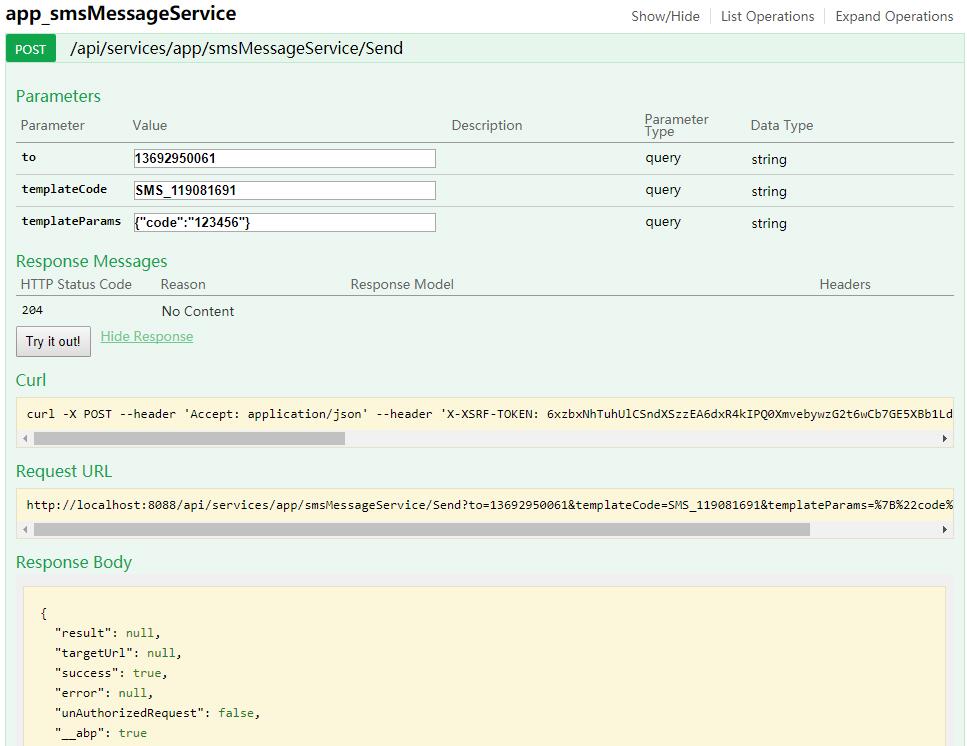

同步、异常都测试通过,至此手机短信发送模块集成完成。
ABP集成短信发送模块的更多相关文章
- 4、ABPZero系列教程之拼多多卖家工具 集成短信发送模块
ABPZero并没有手机短信发送功能,现在我们来集成一个,为后面注册.登录作铺垫. 阿里云短信服务 首先需要在阿里云开通短信服务,连接地址 开通后,在签名管理中添加一个签名 在模板管理中添加一个模板, ...
- Abp 添加阿里云短信发送
ABP中有短信发送接口ISmsSender public interface ISmsSender { Task<string> SendAsync(string number, stri ...
- Laravel SMS 短信发送包
Laravel Sms Laravel 贴合实际需求同时满足多种通道的短信发送组件 我们基于业务需求在 overtrue/easy-sms 基础进行扩展开发,主要实现如下目标: 支持短信验证码直接在 ...
- ABP框架中短信发送处理,包括阿里云短信和普通短信商的短信发送集成
在一般的系统中,往往也有短信模块的需求,如动态密码的登录,系统密码的找回,以及为了获取用户手机号码的短信确认等等,在ABP框架中,本身提供了对邮件.短信的基础支持,那么只需要根据自己的情况实现对应的接 ...
- spring boot集成阿里云短信发送接收短信回复功能
1.集成阿里云通信发送短信: 在pom.xml文件里添加依赖 <!--阿里短信服务--> <dependency> <groupId>com.aliyun</ ...
- 轻松集成腾讯云短信服务实现短信发送(Java实现)
不论是阿里云还是腾讯云,要想在网站上实现短信发送功能,首先得保证你的网站域名是通过备案的,因为短信签名是需要用到备案过的域名截图,所以域名通过了,申请很快就会审批成功了. (说点题外话,备案的话,需要 ...
- Android短彩信源码解析-短信发送流程(三)
3.短信pdu的压缩与封装 相关文章: ------------------------------------------------------------- 1.短信发送上层逻辑 2.短信发送f ...
- 短信发送接口被恶意访问的网络攻击事件(四)完结篇--搭建WAF清理战场
前言 短信发送接口被恶意访问的网络攻击事件(一)紧张的遭遇战险胜 短信发送接口被恶意访问的网络攻击事件(二)肉搏战-阻止恶意请求 短信发送接口被恶意访问的网络攻击事件(三)定位恶意IP的日志分析脚本 ...
- day102:MoFang:后端完成对短信验证码的校验&基于celery完成异步短信发送&flask_jwt_extended&用户登录的API接口
目录 1.用户注册 1.后端完成对短信验证码的校验 2.基于celery实现短信异步发送 2.用户登录 1.jwt登录验证:flask_jwt_extended 2.服务端提供用户登录的API接口 1 ...
随机推荐
- MySQL InnoDB Update和Crash Recovery流程
MySQL InnoDB Update和Crash Recovery流程 概要信息 首先介绍了Redo,Undo,Log Sequence Number (LSN),Checkpoint,Rollba ...
- webpack打包去掉console.log打印与debugger调试
如图,找到build/webpack.prod.conf.js 在 UglifyJsPlugin 插件下添加下列代码 drop_debugger: true, drop_console: true
- git clone 遇到的坑
问题描述: 使用git clone 拉代码遇到了需要输入密码的情况,但是我输入密码输入不了还有怎么都拉取不下代码 很郁闷的说~ 于是,我去问其他人,配置了我的SSH公匙,但是还是不行,我又去百度,果然 ...
- SA-题目
SA的题目 差异:https://lydsy.com/JudgeOnline/problem.php?id=3238 题意概述:给定一个长度为 $n$ 的字符串 $S$,令 $T_ i$ 表示它从第 ...
- jQuery 自定义函数写法分享
时间:02月20日 自定义主要通过两种方式实现$.extend({aa:function(){}});$.fn.extend({aa:function(){}});调用的方法分别是:$.aa(); ...
- 利用python scapy包进行抓包发包与ARP扫描
小技巧 通过在交互式的python解释器下,可以通过help()函数查看函数或模块的用途. dir() 函数不带参数时,返回当前范围内的变量.方法和定义的类型列表:带参数时,返回参数的属性.方法列表 ...
- vmware 12中安装苹果系统
我用的系统是win10... 一.所需软件: 1.下载并安装VMware Workstation Pro 12 密码:7ybc和序列号 密码是:bwm0 2.下载unlocker 203(for OS ...
- 【Codeforces 526D】Om Nom and Necklace
Codeforces 526 D 题意:给一个字符串,求每个前缀是否能表示成\(A+B+A+B+\dots+A\)(\(k\)个\(A+B\))的形式. 思路1:求出所有前缀的哈希值,以便求每个子串的 ...
- 使用Android SDK Manager下载sdk时总是出现中断异常的解决办法。
1.搜到到你本机的hosts文件. 2.打开该文件. 3.在该文件最后一行添加:74.125.31.136 dl-ssl.google.com 4.重新下载问题解决. 参考链接:http://bbs. ...
- SQLServer 窗口函数(转载)
一.窗口函数的作用 窗口函数是对一组值进行操作,不需要使用GROUP BY 子句对数据进行分组,还能够在同一行中同时返回基础行的列和聚合列.窗口函数,基础列和聚合列的查询都非常简单. 二.语法格式 窗 ...