
【git】搭建git服务器
目录
正文
环境:

服务器 CentOS6.6 + git(version 1.7.1) 客户端 Windows10 + git(version 2.8.4.windows.1)
① 安装 Git
Linux 做为服务器端系统,Windows 作为客户端系统,分别安装 Git
服务器端:
#yum install -y git
安装完后,查看 Git 版本
[root@localhost ~]# git --version

git version 1.7.
客户端:
下载 Git for Windows,地址:https://git-for-windows.github.io/
安装完之后,可以使用 Git Bash 作为命令行客户端。
安装完之后,查看 Git 版本
$ git --version

git version 2.8.4.windows.
② 服务器端创建 git 用户,用来管理 Git 服务,并为 git 用户设置密码
[root@localhost home]# id git

id: git:无此用户

[root@localhost home]# useradd git

[root@localhost home]# passwd git
③ 服务器端创建 Git 仓库
设置 /home/data/git/gittest.git 为 Git 仓库
然后把 Git 仓库的 owner 修改为 git
[root@localhost home]# mkdir -p data/git/gittest.git

[root@localhost home]# git init --bare data/git/gittest.git

Initialized empty Git repository in /home/data/git/gittest.git/

[root@localhost home]# cd data/git/

[root@localhost git]# chown -R git:git gittest.git/
④ 客户端 clone 远程仓库
进入 Git Bash 命令行客户端,创建项目地址(设置在 d:/wamp64/www/gittest_gitbash)并进入:

dee@Lenovo-PC MINGW64 /d

$ cd wamp64/www

dee@Lenovo-PC MINGW64 /d/wamp64/www

$ mkdir gittest_gitbash

dee@Lenovo-PC MINGW64 /d/wamp64/www

$ cd gittest_gitbash

dee@Lenovo-PC MINGW64 /d/wamp64/www/gittest_gitbash

$
然后从 Linux Git 服务器上 clone 项目:
$ git clone git@192.168.56.101:/home/data/gittest.git
如果SSH用的不是默认的22端口,则需要使用以下的命令(假设SSH端口号是7700):
$ git clone ssh://git@192.168.56.101:7700/home/data/gittest.git
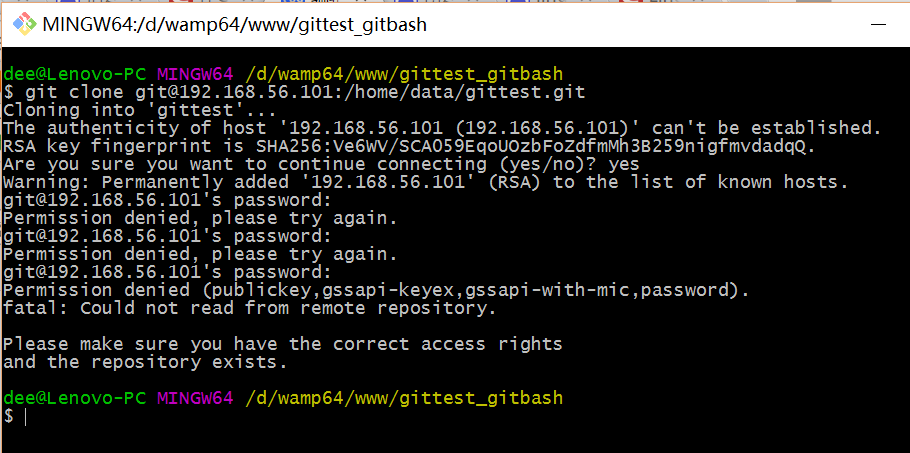
当第一次连接到目标 Git 服务器时会得到一个提示:
The authenticity of host '192.168.56.101 (192.168.56.101)' can't be established.

RSA key fingerprint is SHA256:Ve6WV/SCA059EqoUOzbFoZdfmMh3B259nigfmvdadqQ.

Are you sure you want to continue connecting (yes/no)?
选择 yes:
Warning: Permanently added '192.168.56.101' (RSA) to the list of known hosts.
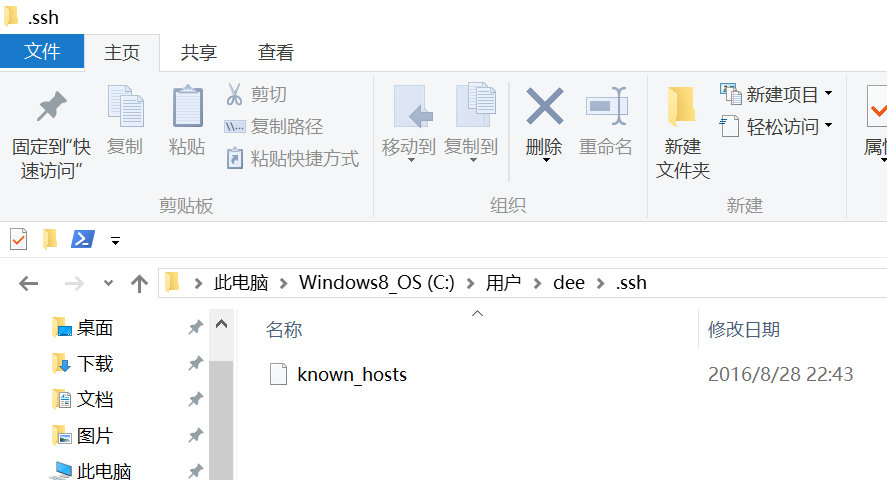
此时 C:\Users\用户名\.ssh 下会多出一个文件 known_hosts,以后在这台电脑上再次连接目标 Git 服务器时不会再提示上面的语句。
后面提示要输入密码,可以采用 SSH 公钥来进行验证。
⑤ 客户端创建 SSH 公钥和私钥
$ ssh-keygen -t rsa -C "472323087@qq.com"
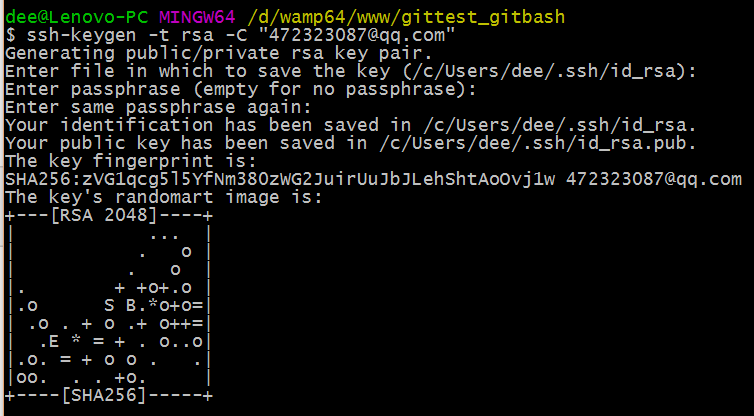
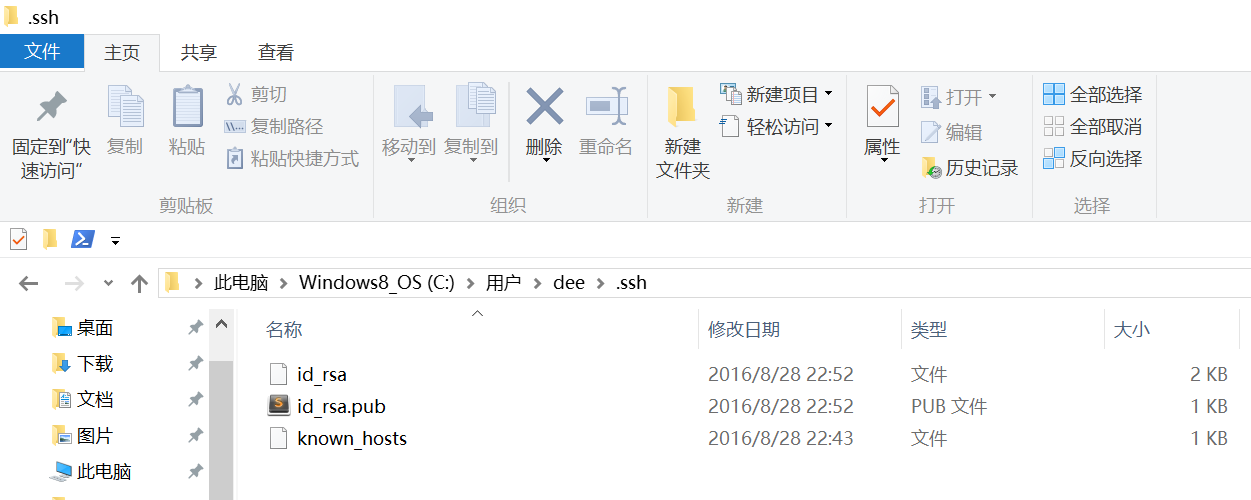
此时 C:\Users\用户名\.ssh 下会多出两个文件 id_rsa 和 id_rsa.pub
id_rsa 是私钥
id_rsa.pub 是公钥
⑥ 服务器端 Git 打开 RSA 认证
进入 /etc/ssh 目录,编辑 sshd_config,打开以下三个配置的注释:
RSAAuthentication yes

PubkeyAuthentication yes

AuthorizedKeysFile .ssh/authorized_keys
保存并重启 sshd 服务:
[root@localhost ssh]# /etc/rc.d/init.d/sshd restart
由 AuthorizedKeysFile 得知公钥的存放路径是 .ssh/authorized_keys,实际上是 $Home/.ssh/authorized_keys,由于管理 Git 服务的用户是 git,所以实际存放公钥的路径是 /home/git/.ssh/authorized_keys
在 /home/git/ 下创建目录 .ssh
[root@localhost git]# pwd

/home/git [root@localhost git]# mkdir .ssh [root@localhost git]# ls -a  . .. .bash_logout .bash_profile .bashrc .gnome2 .mozilla .ssh
然后把 .ssh 文件夹的 owner 修改为 git
[root@localhost git]# chown -R git:git .ssh

[root@localhost git]# ll -a

总用量 32

drwx------. 5 git  git  4096 8月  28 20:04 .

drwxr-xr-x. 8 root root 4096 8月  28 19:32 ..

-rw-r--r--. 1 git  git    18 10月 16 2014 .bash_logout

-rw-r--r--. 1 git  git   176 10月 16 2014 .bash_profile

-rw-r--r--. 1 git  git   124 10月 16 2014 .bashrc

drwxr-xr-x. 2 git  git  4096 11月 12 2010 .gnome2

drwxr-xr-x. 4 git  git  4096 5月   8 12:22 .mozilla

drwxr-xr-x. 2 git  git  4096 8月  28 20:08 .ssh
⑦ 将客户端公钥导入服务器端 /home/git/.ssh/authorized_keys 文件
回到 Git Bash 下,导入文件:
$ ssh git@192.168.56.101 'cat >> .ssh/authorized_keys' < ~/.ssh/id_rsa.pub
需要输入服务器端 git 用户的密码

回到服务器端,查看 .ssh 下是否存在 authorized_keys 文件:
[root@localhost git]# cd .ssh

[root@localhost .ssh]# ll

总用量 4

-rw-rw-r--. 1 git git 398 8月  28 20:08 authorized_keys
可以查看一下是否是客户端生成的公钥。
重要:
修改 .ssh 目录的权限为 700
修改 .ssh/authorized_keys 文件的权限为 600
[root@localhost git]# chmod 700 .ssh

[root@localhost git]# cd .ssh

[root@localhost .ssh]# chmod 600 authorized_keys
⑧ 客户端再次 clone 远程仓库
$ git clone git@192.168.56.101:/home/data/git/gittest.git

查看客户端项目目录:
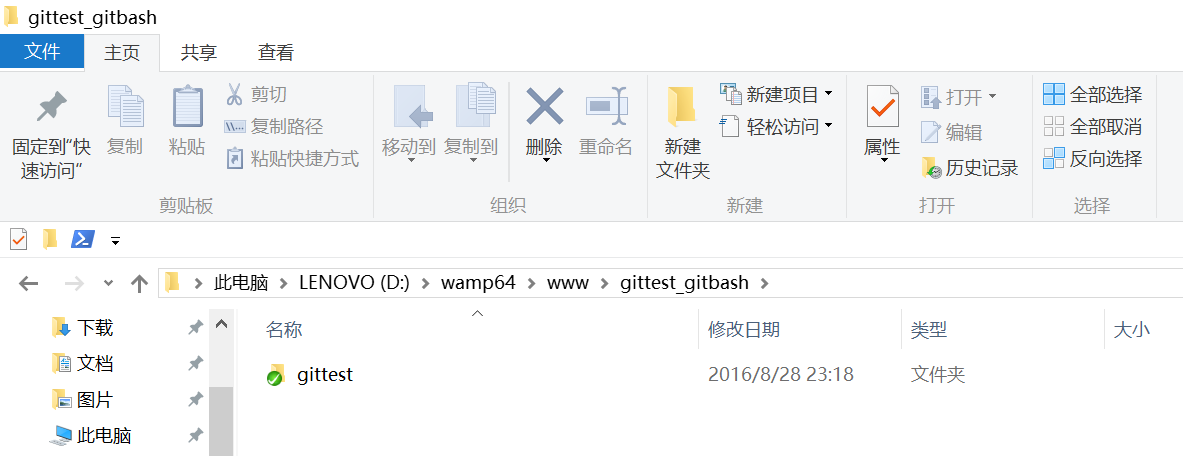
项目已经 clone 了。
也可以使用 tortoiseGit 客户端来管理项目:
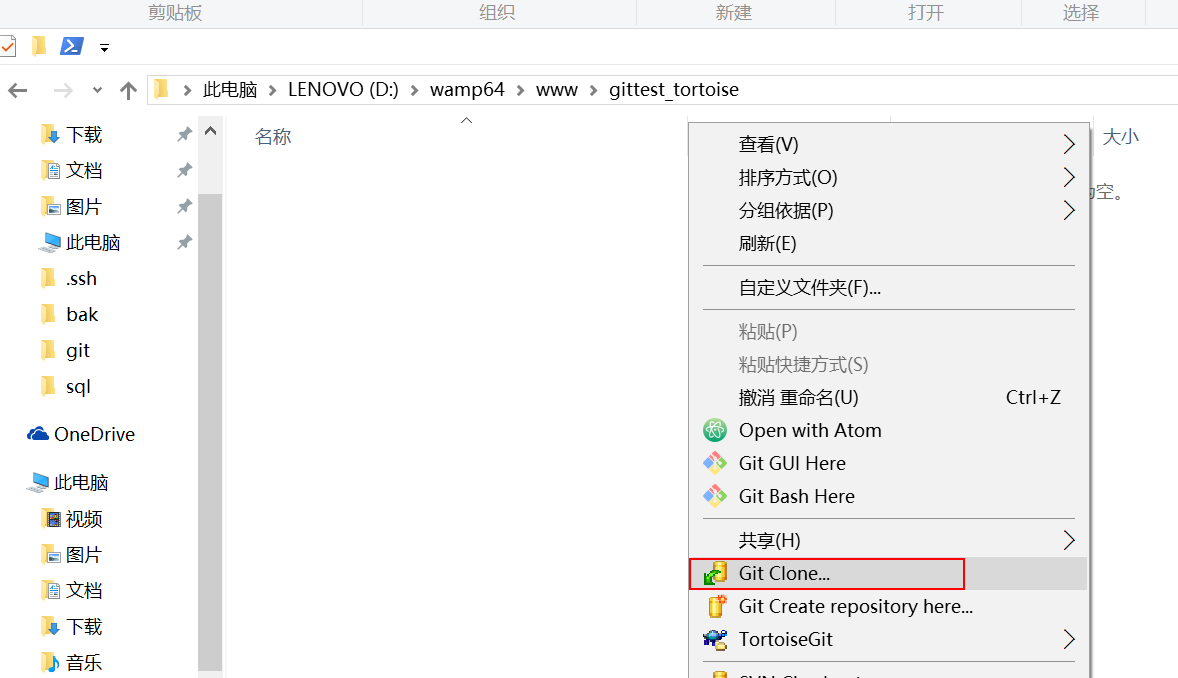
clone
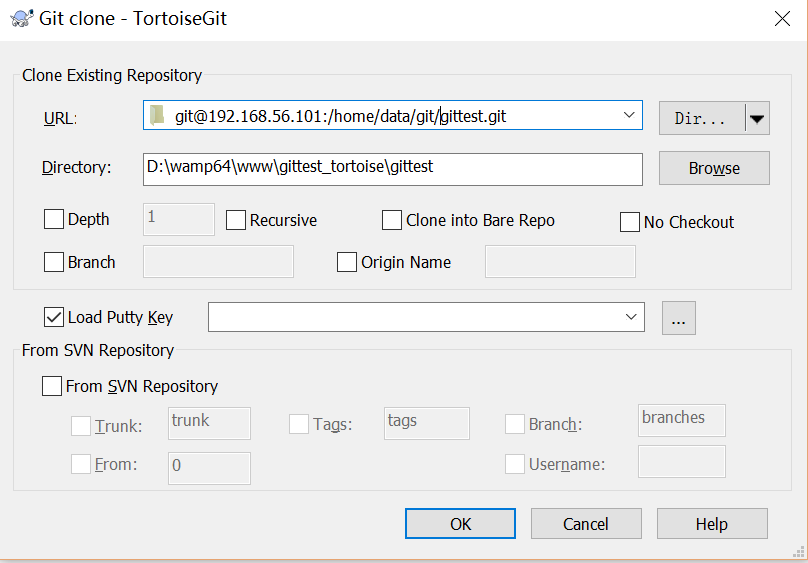
⑨ 禁止 git 用户 ssh 登录服务器
之前在服务器端创建的 git 用户不允许 ssh 登录服务器
编辑 /etc/passwd
找到:
git:x:502:504::/home/git:/bin/bash
修改为
git:x:502:504::/home/git:/bin/git-shell
此时 git 用户可以正常通过 ssh 使用 git,但无法通过 ssh 登录系统。
【git】搭建git服务器的更多相关文章
- Git -- 搭建git服务器
在远程仓库一节中,我们讲了远程仓库实际上和本地仓库没啥不同,纯粹为了7x24小时开机并交换大家的修改. GitHub就是一个免费托管开源代码的远程仓库.但是对于某些视源代码如生命的商业公司来说,既不想 ...
- git - 搭建git仓库
1. 更新git版本: http://codelife.me/blog/2013/06/25/upgrade-git-on-centos-6-4/ 2. 建立git仓库: git init --bar ...
- 如何搭建git服务器
一.前言 现在越来越多的公司用git进行版本控制,不过git是默认是开源的,如果私有的话是需要付费的,如果不想付费自己可以搭建一个git服务器用来版本控制. 二.服务器端操作 1.安装git sudo ...
- 搭建Git服务器
在远程仓库一节中,我们讲了远程仓库实际上和本地仓库没啥不同,纯粹为了7x24小时开机并交换大家的修改. GitHub就是一个免费托管开源代码的远程仓库.但是对于某些视源代码如生命的商业公司来说,既不想 ...
- 在 Linux 下搭建 Git 服务器
环境: 服务器 CentOS6.6 + git(version 1.7.1)客户端 Windows10 + git(version 2.8.4.windows.1) ① 安装 Git Linux 做为 ...
- 搭建git for windows服务器(100%可以成功)
既然Git在Linux下面非常好用,为什么还要搭建git windows的服务器,因为不是所有的用户都需要在linux下面做开发,对吧,还有很多用户选择使用windows做开发. 看到很多网友尝试部分 ...
- 搭建git for windows服务器
文档出处 :http://blog.csdn.net/code_style/article/details/38764203 http://blog.csdn.net/aaron_luchen/art ...
- Git学习笔记(10)——搭建Git服务器
本文主要记录了Git服务器的搭建,以及一些其他的配置,和最后的小总结. Git远程仓库服务器 其实远程仓库和本地仓库没啥不同,远程仓库只是每天24小时开机为大家服务,所以叫做服务器.我们完全可以把自己 ...
- centos 搭建git服务器
centos 6搭建git服务器 安装 rpm -ivh http://mirrors.aliyun.com/epel/epel-release-latest-6.noarch.rpm yum ins ...
- 如何在服务器上搭建git服务器
参考文章: http://www.liaoxuefeng.com/wiki/0013739516305929606dd18361248578c67b8067c8c017b000/00137583770 ...
随机推荐
- ubuntu php5.6源码安装
本系列的lnmp的大框架基本上是按照http://www.linuxzen.com/lnmphuan-jing-da-jian-wan-quan-shou-ce-si-lnmpda-jian-yuan ...
- html5--html实现乘法口诀表
html5--html实现乘法口诀表 总结: 1.多种情况问题:分情况讨论就出来了 2.汉字和数字的对应关系 3.相同的部分统一处理,不同的部分分别对待(这里用中间变量) 问题:九九乘法口诀 两点提示 ...
- Database Firewall——mysql也是支持的
Database Firewall The most impressive feature of MySQL security is the Database Firewall. The firewa ...
- HubbleDotNet引擎查询技术
系统简介 HubbleDotNet 是一个基于.net framework 的开源免费的全文搜索数据库组件.开源协议是 Apache 2.0.HubbleDotNet提供了基于SQL的全文检索接口,使 ...
- mac idea 内存
vim /Applications/IntelliJ\ IDEA.app/Contents/bin/idea.vmoptions -Xms512m -Xmx2048m -XX:ReservedCode ...
- Ruby的一些常用全局变量
$! latesterror message $@ locationof error $_ stringlast read by gets $. linenumber last read by int ...
- Code Project精彩系列(转)
Code Project精彩系列(转) Code Project精彩系列(转) Applications Crafting a C# forms Editor From scratch htt ...
- vue 基础知识随笔
在vue2.0中一个vue实例的生命周期中已经没有ready()了,在vue1.0中才有ready();在vue2.0中立即执行函数使用mounted v-for 参数顺序更新: 数组中使用(valu ...
- bzoj 4596
4596: [Shoi2016]黑暗前的幻想乡 Time Limit: 20 Sec Memory Limit: 256 MBSubmit: 257 Solved: 152[Submit][Sta ...
- bzoj 3143 [Hnoi2013]游走【高斯消元+dp】
参考:http://blog.csdn.net/vmurder/article/details/44542575 和2337有点像 设点u的经过期望(还是概率啊我也分不清,以下都分不清)为\( x[u ...