
jsp实现翻页功能
jsp实现翻页功能
要实现翻页功能,只需要设置一个pageIndex即可,然后每次加载页面时通过pageIndex去加载数据就行。
那么我们可以设置一个隐藏的input框,用于传递pageIndex给下个页面。
当我们点击上一页的时候,通过js方法改变pageIndex的值,再提交表单即可
二话不多说,看代码,代码里面写的还算比较清楚。
这个是index.jsp的代码。
index.jsp
<%@page import="Bean.DBBean"%>
<%@page import="Entity.Record"%>
<%@page import="java.util.List"%>
<%@ page language="java" contentType="text/html; charset=UTF-8"
pageEncoding="UTF-8"%>
<!DOCTYPE html PUBLIC "-//W3C//DTD HTML 4.01 Transitional//EN" "http://www.w3.org/TR/html4/loose.dtd">
<html>
<head>
<meta http-equiv="Content-Type" content="text/html; charset=UTF-8">
<title>NoteBook of Eric Wu</title>
<link rel="stylesheet" href="css/basic.css">
<link rel="stylesheet" href="css/index.css">
</head>
<body>
<%
int allRecord=0;//总的记录条数,不包含查询后的
int totalRecord=0;//总的记录条数,包含查询后的
int totalPage=1;//总的页面数,包含查询后的
int pageIndex=1;//当前页面号,用于控制页面翻转,默认为1
List<Record> records=null;
DBBean db=new DBBean();
allRecord=db.getRecordCount();
totalRecord=db.getRecordCount();
totalPage=(totalRecord-1)/10+1;
if(request.getParameter("pageIndex")!=null){//不是第一次加载
//要做下数据类型转换
pageIndex=Integer.valueOf(request.getParameter("pageIndex"));
if(request.getParameter("keyword")!=null){
String keyword=request.getParameter("keyword");
records=db.getRecords(pageIndex,keyword);//获取查询内容一页的事件记录集,共10条
totalRecord=db.getRecordCount(keyword);
totalPage=(totalRecord-1)/10+1;
}else{
records=db.getRecords(pageIndex);//获取一页的事件记录集,共10条
}
}else{//第一次加载
records=db.getRecords(pageIndex);//获取一页的事件记录集,共10条
}
session.setAttribute("records", records);//便于后面使用
%>
<div id="home">
<div id="header">
<div id="WebTitle">
<div class="maintitle"><a href="index.jsp" target="_blank">NoteBook of Eric Wu</a></div>
<div class="subtitle">The palest ink is better than the best memory !</div>
</div> <div id="navigator">
<ul id="navList">
<li><a href="index.jsp">首页</a></li>
<li><a href="add.jsp">新增</a></li>
<li><a href="change.jsp">修改</a></li>
<li><a href="delete.jsp">删除</a></li>
</ul>
<div id="Stats">
记录-<%=allRecord %>
</div><!--end: Stats 状态-->
</div><!-- end: navigator 导航栏 -->
</div><!-- end: header 头部 --> <div id="main">
<div id="content">
<form id="searchForm" name="searchForm" action="index.jsp" method="get">
<input type="hidden" name="pageIndex" id="pageIndex" value="1">
<div id="search">
<div class="center"></div>
<input type="text" class="search" id="keyword" name="keyword" placeholder="请输入要查询的记录">
<img src="img/search.png" onclick="searchKeyword();" class="button">
</div>
</form>
<table>
<tr>
<th width="10%">序号</th>
<th width="60%">标题</th>
<th width="30%">时间</th>
</tr>
<%
int count=0;
if(records!=null){
for(Record r: records){
count++;
%>
<tr>
<td class="center"><%= count %></td>
<td><a href="content.jsp?recordId=<%= r.getId() %>" target="_blank"><%= r.getTitle() %></a></td>
<td class="center"><%= r.getTime() %></td>
</tr>
<%
}
}
%>
<tr class="alt" >
<td class="center" colspan="3">
共<%= totalRecord %>条记录
共<%= totalPage %>页
每页10条
当前第<%= pageIndex %>页
<a href="javascript:void(0);" class="turnPage" onclick="turnTopPage()">上一页</a>
<a href="javascript:void(0);" class="turnPage" onclick="turnBottomPage()">下一页</a>
</td>
</tr>
</table>
</div><!-- end: content 内容 -->
</div><!-- end: main 主要部分 --> <div id="footer">
Copyright ©2017 汕大-吴广林
</div><!-- end: footer底部-->
</div><!-- end: home 自定义的最大容器 -->
</body> <script type="text/javascript">
var pageIndex=<%=pageIndex %>;
var totalPage=<%=totalPage %>;
console.log(pageIndex);
//上一页
function turnTopPage(){
if(pageIndex==1){
return;
}else{
document.getElementById("pageIndex").value=pageIndex-1;
document.getElementById("searchForm").submit();
}
}
//下一页
function turnBottomPage(){
if(pageIndex>=totalPage){
return;
}else{
document.getElementById("pageIndex").value=pageIndex+1;
document.getElementById("searchForm").submit();
}
}
function searchKeyword(){
document.getElementById("pageIndex").value=1;
document.getElementById("searchForm").submit();
}
</script>
</html>
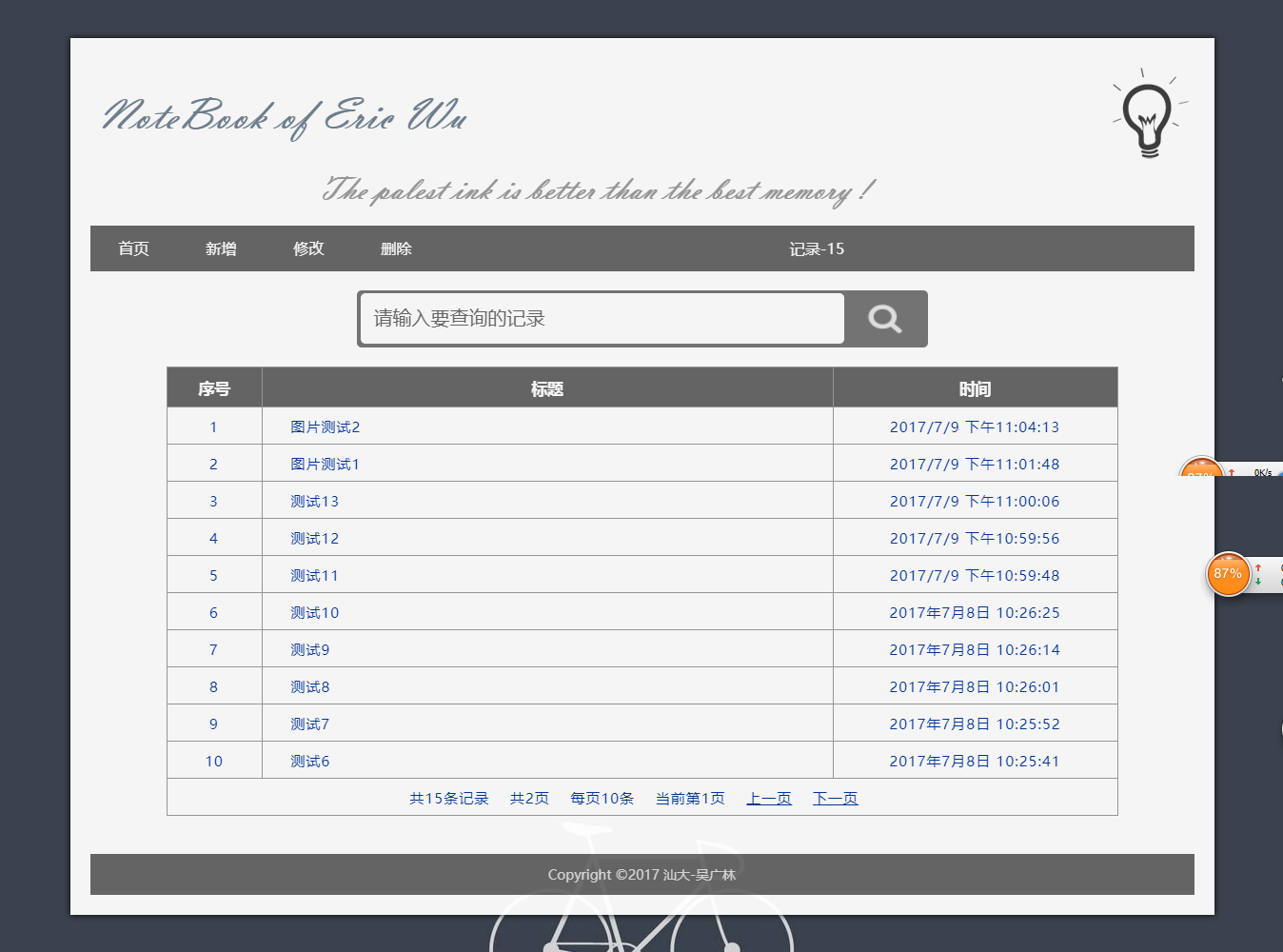
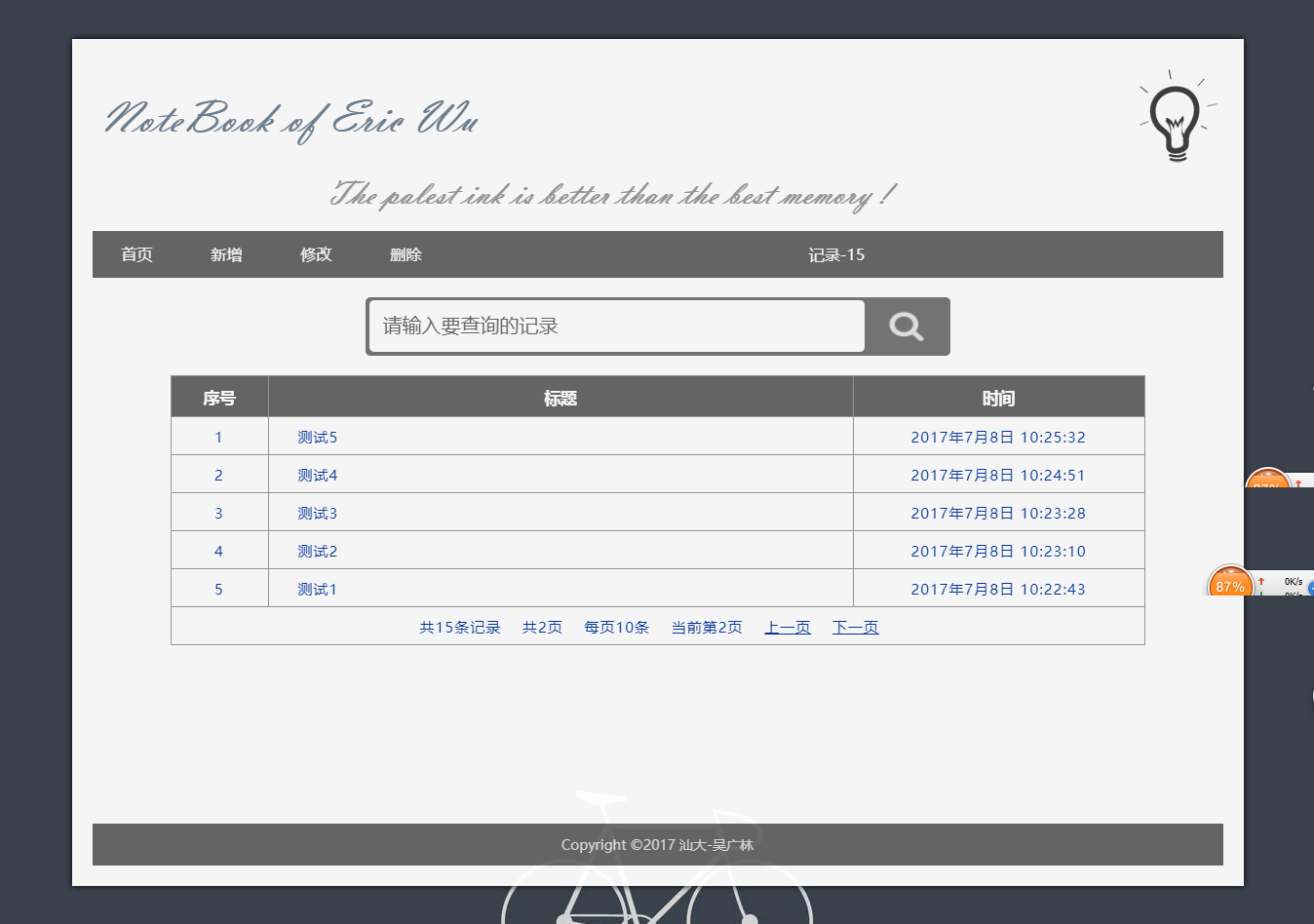
效果图
翻页后:pageIndex=1
翻页后:pageIndex=2
参考:
jsp实现上一页下一页翻页功能 - 汕大小吴 - 博客园
https://www.cnblogs.com/wuguanglin/p/fanye.html
jsp实现翻页功能的更多相关文章
- jsp实现上一页下一页翻页功能
前段时间一直忙于期末考试和找实习,好久没写博客了. 这段时间做了个小项目,包含了翻页和富文本编辑器Ueditor的两个知识点,Ueditor玩的还不是很深,打算玩深后再写篇博客. 要实现翻页功能,只需 ...
- [Qt] CFlip 翻页功能实现
由于需要给table制作翻页功能,所以写了一个翻页的类. 看上去总体效果感觉还是不错的,哈哈. //flip.h #ifndef CFLIP_H #define CFLIP_H #include &l ...
- Web测试——翻页功能测试用例
参考:https://wenku.baidu.com/view/e6462707de80d4d8d15a4f1e.html?rec_flag=default&mark_pay_doc=2&am ...
- Atitit 翻页功能的解决方案与版本历史 v4 r49
Atitit 翻页功能的解决方案与版本历史 v4 r49 1. 版本历史与分支版本,项目版本记录1 1.1. 主干版本历史1 1.2. 分支版本 项目版本记录.1 2. Easyui 的翻页组件2 ...
- Atitit.pagging 翻页功能解决方案专题 与 目录大纲 v3 r44.docx
Atitit.pagging 翻页功能解决方案专题 与 目录大纲 v3 r44.docx 1.1. 翻页的重要意义1 1.2. Dep废弃文档 paip.js翻页分页pageing组件.txt1 ...
- PyQt—QTableWidget实现翻页功能
主要使用QTableWidget中的三个函数实现: verticalScrollBar().setSliderPosition() 设置当前滑动条的位置 verticalScrollBar().max ...
- pyspider示例代码五:实现自动翻页功能
实现自动翻页功能 示例代码一 #!/usr/bin/env python # -*- encoding: utf- -*- # Created on -- :: # Project: v2ex fro ...
- jquery.Table实现的翻页功能比较完整漂亮,本想扩展个模版DIV
jquery.dataTable实现的翻页功能比较完整漂亮,本想提取其的翻页部分,再结合模版DIV,bootstrop实现聊天记息的展示. jquery.Table 与table结合的较紧,不能在很下 ...
- Webdriver控制翻页控件,并实现向前向后翻页功能,附上代码,仅供参考,其他类似日期控件的功能可以自己封装
新增输入与选择页面的html源码: <div style="margin-top:-60px;" class="modal-content" id=&qu ...
随机推荐
- HDU 2243 考研路茫茫——单词情结
考研路茫茫——单词情结 Time Limit: 1000ms Memory Limit: 32768KB This problem will be judged on HDU. Original ID ...
- 【枚举】Southwestern Europe Regional Contest H - Sheldon Numbers
https://vjudge.net/contest/174235#problem/H [题意] 求[x,y]之间有多少个Sheldon Number Sheldon Number是二进制满足以下条件 ...
- 通过rsync+inotify实现数据的实时备份 【转载】
在前面的博文中,我讲到过利用rsync实现数据的镜像和备份,但是要实现数据的实时备份,单独靠rsync还不能实现,本文就讲述下如何实现数据的实时备份. 一.rsync的优点与不足 与传统的cp ...
- iOS React Native 环境的搭建
react native 的官网:http://reactnative.cn/docs/0.47/getting-started.html#content --iOS如何搭建mac版的环境 1.配置 ...
- windows下的asp.net core开发及docker下的发布
参照下面,搭建好开发环境.Docker及配置好Docker加速器 http://www.cnblogs.com/windchen/p/6257846.html 参照下面,将windows共享目录挂载到 ...
- poj - 3686 The Windy's (KM算法)
题意:n个订单和m个生产车间,每个订单在不同的车间生产所需要的时间不一样,并且每个订单只能在同一个车间中完成,直到这个车间完成这个订单就可以生产下一个订单.现在需要求完成n个订单的平均时间最少是多少. ...
- js正则匹配身份证号 有坑
// 不能加g,每次匹配会以lastIndex为起始位去查找 // 若加g,匹配到会用最后一位的index去改变lastIndex,没有匹配到则会把lastIndex重置为0 // 不加g,lastI ...
- Java操作XML牛逼利器JDOM&DOM4J
JDOM JDOM 是一种使用 XML(标准通用标记语言下的一个子集) 的独特 Java 工具包,用于快速开发 XML 应用 程序. JDOM 官方网站:http://www.jdom.org/ 利 ...
- [教程]Delphi 中三种回调函数形式解析
Delphi 支持三种形式的回调函数 全局函数这种方式几乎是所有的语言都支持的,类的静态函数也可以归为此类,它保存的只是一个函数的代码起始地址指针( Pointer ).在 Delphi 中声明一般为 ...
- HTML大文件上传(博客迁移)
Html大文件上传:跳转 通过github和hexo进行搭建博客,主要是在没有网络的时候,可以本地访问,并支持markdown语法. 新博客地址:跳转