
(转)C#调用非托管Win 32 DLL
转载学习收藏,原文地址http://www.cnblogs.com/mywebname/articles/2291876.html
背景
在项目过程中,有时候你需要调用非C#编写的DLL文件,尤其在使用一些第三方通讯组件的时候,通过C#来开发应用软件时,就需要利用DllImport特性进行方法调用。本篇文章将引导你快速理解这个调用的过程。
步骤
1. 创建一个CSharpInvokeCPP的解决方案:
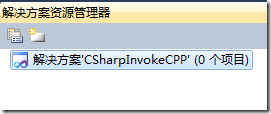
2. 创建一个C++的动态库项目:

3. 在应用程序设置中,选择“DLL”,其他按照默认选项:

最后点击完成,得到如图所示项目:
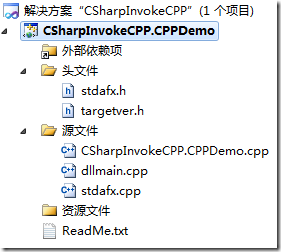
我们可以看到这里有一些文件,其中dllmain.cpp作为定义DLL应用程序的入口点,它的作用跟exe文件有个main或者WinMain入口函数是一样的,它就是作为DLL的一个入口函数,实际上它是个可选的文件。它是在静态链接时或动态链接时调用LoadLibrary和FreeLibrary时都会被调用。详细内容可以参考(http://blog.csdn.net/benkaoya/archive/2008/06/02/2504781.aspx)。
4. 现在我们打开CSharpInvokeCPP.CPPDemo.cpp文件:
现在我们加入以下内容:
|
1
2
3
4
5
6
7
8
9
10
11
12
13
14
15
16
17
18
19
20
21
|
// CSharpInvokeCPP.CPPDemo.cpp : 定义 DLL 应用程序的导出函数。 // #include "stdafx.h" extern "C" __declspec(dllexport) int Add(int x, int y) { return x + y; } extern "C" __declspec(dllexport) int Sub(int x, int y) { return x - y; } extern "C" __declspec(dllexport) int Multiply(int x, int y) { return x * y; } extern "C" __declspec(dllexport) int Divide(int x, int y) { return x / y; } |
extern "C" 包含双重含义,从字面上即可得到:首先,被它修饰的目标是“extern”的;其次,被它修饰的目标是“C”的。而被extern "C"修饰的变量和函数是按照C语言方式编译和连接的。
__declspec(dllexport)的目的是为了将对应的函数放入到DLL动态库中。
extern "C" __declspec(dllexport)加起来的目的是为了使用DllImport调用非托管C++的DLL文件。因为使用DllImport只能调用由C语言函数做成的DLL。
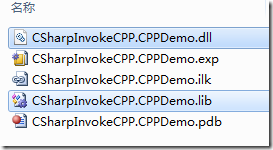
5. 编译项目程序,最后在Debug目录生成CSharpInvokeCPP.CPPDemo.dll和CSharpInvokeCPP.CPPDemo.lib
我们用反编译工具PE Explorer查看下该DLL里面的方法:
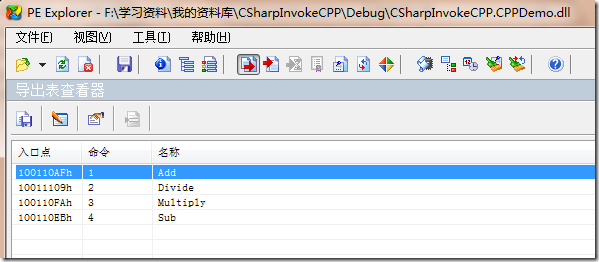
可以发现对外的公共函数上包含这四种“加减乘除”方法。
6. 现在来演示下如何利用C#项目来调用非托管C++的DLL,首先创建C#控制台应用程序:
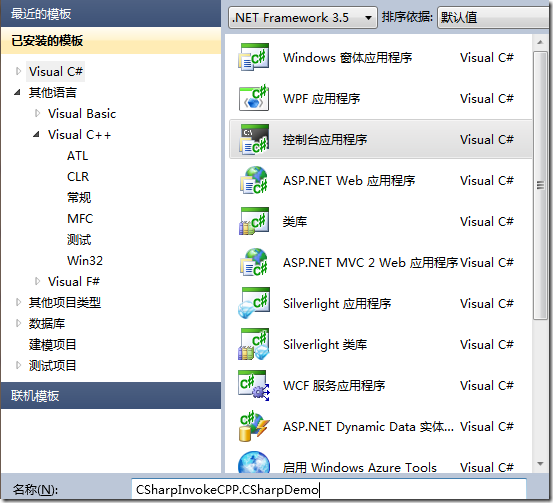
7. 在CSharpInvokeCSharp.CSharpDemo项目上新建一个CPPDLL类,编写以下代码:
|
1
2
3
4
5
6
7
8
9
10
11
12
13
14
|
public class CPPDLL { [DllImport("CSharpInvokeCPP.CPPDemo.dll")] public static extern int Add(int x, int y); [DllImport("CSharpInvokeCPP.CPPDemo.dll")] public static extern int Sub(int x, int y); [DllImport("CSharpInvokeCPP.CPPDemo.dll")] public static extern int Multiply(int x, int y); [DllImport("CSharpInvokeCPP.CPPDemo.dll")] public static extern int Divide(int x, int y); } |
DllImport作为C#中对C++的DLL类的导入入口特征,并通过static extern对extern “C”进行对应。
8. 另外,记得把CPPDemo中生成的DLL文件拷贝到CSharpDemo的bin目录下,你也可以通过设置【项目属性】->【配置属性】->【常规】中的输出目录:
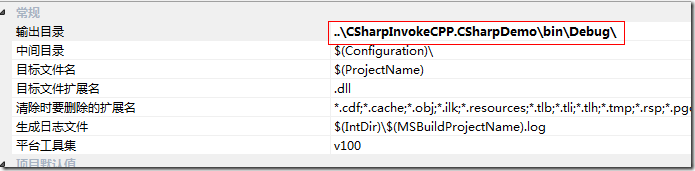
这样编译项目后,生成的文件就自动输出到CSharpDemo中了。
9. 然后在Main入口编写测试代码:
|
1
2
3
4
5
6
7
8
9
10
11
12
13
14
15
16
|
static void Main(string[] args) { int result = CPPDLL.Add(10, 20); Console.WriteLine("10 + 20 = {0}", result); result = CPPDLL.Sub(30, 12); Console.WriteLine("30 - 12 = {0}", result); result = CPPDLL.Multiply(5, 4); Console.WriteLine("5 * 4 = {0}", result); result = CPPDLL.Divide(30, 5); Console.WriteLine("30 / 5 = {0}", result); Console.ReadLine(); } |
运行结果:
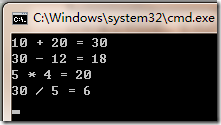
方法得到调用。
10. 以上的方法只能通过静态方法对于C++中的函数进行调用。那么怎样通过静态方法去调用C++中一个类对象中的方法呢?现在我在CPPDemo项目中添加一个头文件userinfo.h:
|
1
2
3
4
5
6
7
8
9
10
11
12
13
14
|
class UserInfo { private: char* m_Name; int m_Age; public: UserInfo(char* name, int age) { m_Name = name; m_Age = age; } virtual ~UserInfo(){ } int GetAge() { return m_Age; } char* GetName() { return m_Name; } }; |
在CSharpInvokeCPP.CPPDemo.cpp中,添加一些代码:
|
1
2
3
4
5
6
7
8
9
10
11
12
13
14
15
16
17
18
19
20
|
#include "malloc.h" #include "userinfo.h" typedef struct { char name[32]; int age; } User; UserInfo* userInfo; extern "C" __declspec(dllexport) User* Create(char* name, int age) { User* user = (User*)malloc(sizeof(User)); userInfo = new UserInfo(name, age); strcpy(user->name, userInfo->GetName()); user->age = userInfo->GetAge(); return user; } |
这里声明一个结构,包括name和age,这个结构是用于和C#方面的结构作个映射。
注意:代码中的User*是个指针,返回也是一个对象指针,这样做为了防止方法作用域结束后的局部变量的释放。
strcpy是个复制char数组的函数。
11. 在CSharpDemo项目中CPPDLL类中补充代码:
|
1
2
3
4
5
6
7
8
9
10
11
|
[DllImport("CSharpInvokeCPP.CPPDemo.dll")] public static extern IntPtr Create(string name, int age); [StructLayout(LayoutKind.Sequential)] public struct User { [MarshalAs(UnmanagedType.ByValTStr, SizeConst = 32)] public string Name; public int Age; } |
其中这里的结构User就和C++中的User对应。
12. 在Program.cs中补充代码:
|
1
2
3
|
IntPtr ptr = CPPDLL.Create("李平", 27); <STRONG><FONT color=#ff0000>CPPDLL.User user = (CPPDLL.User)Marshal.PtrToStructure(ptr, typeof(CPPDLL.User));</FONT></STRONG> Console.WriteLine("Name: {0}, Age: {1}", user.Name, user.Age); |
注意:红色字体部分,这里结构指针首先转换成IntPtr句柄,然后通过Marshal.PtrToStructrue转换成你所需要的结构。
运行结果:

转自liping13599168/archive/2011/03/31/2000320.html
以下是调用时的一些类型转换等注意事项:
C++
C#调用dll时的类型转换总结
|
C++(Win 32) |
C# |
|
char** |
作为输入参数转为char[],通过Encoding类对这个string[]进行编码后得到的一个char[] |
|
作为输出参数转为byte[],通过Encoding类对这个byte[]进行解码,得到字符串 |
|
|
C++ Dll接口: void CplusplusToCsharp(in char** AgentID, out char** AgentIP); C#中的声明: [DllImport("Example.dll")] public static extern void CplusplusToCsharp(char[] AgentID, byte[] AgentIP); C#中的调用: Encoding encode = Encoding.Default; byte[] tAgentID; byte[] tAgentIP; string[] AgentIP; tAgentID = new byte[100]; tAgentIP = new byte[100]; CplusplusToCsharp(encode.GetChars(tAgentID), tAgentIP); AgentIP[i] = encode.GetString(tAgentIP,i*Length,Length); |
|
|
Handle |
IntPtr |
|
Hwnd |
IntPtr |
|
int* |
ref int |
|
int& |
ref int |
|
void* |
IntPtr |
|
unsigned char* |
ref byte |
|
BOOL |
bool |
|
DWORD |
int 或 uint(int 更常用一些) |
|
枚举类型 |
Win32: BOOL MessageBeep(UINT uType // 声音类型); 其中的声音类型为枚举类型中的某一值。 C#: 用户需要自己定义一个枚举类型: public enum BeepType { SimpleBeep = -1, IconAsterisk = 0x00000040, IconExclamation = 0x00000030, IconHand = 0x00000010, IconQuestion = 0x00000020, Ok = 0x00000000, } C#中导入该函数: [DllImport("user32.dll")] public static extern bool MessageBeep(BeepType beepType); C#中调用该函数: MessageBeep(BeepType.IconQuestion); |
|
结构类型 |
Win32: 使用结构指针作为参数的函数: BOOL GetSystemPowerStatus( LPSYSTEM_POWER_STATUS lpSystemPowerStatus ); Win32中该结构体的定义: typedef struct _SYSTEM_POWER_STATUS { BYTE ACLineStatus; BYTE BatteryFlag; BYTE BatteryLifePercent; BYTE Reserved1; DWORD BatteryLifeTime; DWORD BatteryFullLifeTime; } SYSTEM_POWER_STATUS, *LPSYSTEM_POWER_STATUS; C#: 用户自定义相应的结构体: struct SystemPowerStatus { byte ACLineStatus; byte batteryFlag; byte batteryLifePercent; byte reserved1; int batteryLifeTime; int batteryFullLifeTime; } C#中导入该函数: [DllImport("kernel32.dll")] public static extern bool GetSystemPowerStatus( ref SystemPowerStatus systemPowerStatus); C#中调用该函数: SystemPowerStatus sps; ….sps初始化赋值…… GetSystemPowerStatus(ref sps); |
|
字符串 |
对于字符串的处理分为以下几种情况: 1、 字符串常量指针的处理(LPCTSTR),也适应于字符串常量的处理,.net中的string类型是不可变的类型。 2、 字符串缓冲区的处理(char*),即对于变长字符串的处理,.net中StringBuilder可用作缓冲区 Win32: BOOL GetFile(LPCTSTR lpRootPathName); C#: 函数声明: [DllImport("kernel32.dll", CharSet = CharSet.Auto)] static extern bool GetFile ( [MarshalAs(UnmanagedType.LPTStr)] string rootPathName); 函数调用: string pathname; GetFile(pathname); 备注: DllImport中的CharSet是为了说明自动地调用该函数相关的Ansi版本或者Unicode版本 变长字符串处理: C#: 函数声明: [DllImport("kernel32.dll", CharSet = CharSet.Auto)] public static extern int GetShortPathName( [MarshalAs(UnmanagedType.LPTStr)] string path, [MarshalAs(UnmanagedType.LPTStr)] StringBuilder shortPath, int shortPathLength); 函数调用: StringBuilder shortPath = new StringBuilder(80); int result = GetShortPathName( @"d:\test.jpg", shortPath, shortPath.Capacity); string s = shortPath.ToString(); |
|
struct |
具有内嵌字符数组的结构: Win32: typedef struct _TIME_ZONE_INFORMATION { LONG Bias; WCHAR StandardName[ 32 ]; SYSTEMTIME StandardDate; LONG StandardBias; WCHAR DaylightName[ 32 ]; SYSTEMTIME DaylightDate; LONG DaylightBias; } TIME_ZONE_INFORMATION, *PTIME_ZONE_INFORMATION; C#: [StructLayout(LayoutKind.Sequential, CharSet = CharSet.Unicode)] struct TimeZoneInformation { public int bias; [MarshalAs(UnmanagedType.ByValTStr, SizeConst = 32)] public string standardName; SystemTime standardDate; public int standardBias; [MarshalAs(UnmanagedType.ByValTStr, SizeConst = 32)] public string daylightName; SystemTime daylightDate; public int daylightBias; } |
|
具有回调的函数 |
Win32: BOOL EnumDesktops( HWINSTA hwinsta, // 窗口实例的句柄 DESKTOPENUMPROC lpEnumFunc, // 回调函数 LPARAM lParam // 用于回调函数的值 ); 回调函数DESKTOPENUMPROC的声明: BOOL CALLBACK EnumDesktopProc( LPTSTR lpszDesktop, // 桌面名称 LPARAM lParam // 用户定义的值 ); C#: 将回调函数的声明转化为委托: delegate bool EnumDesktopProc( [MarshalAs(UnmanagedType.LPTStr)] string desktopName, int lParam); 该函数在C#中的声明: [DllImport("user32.dll", CharSet = CharSet.Auto)] static extern bool EnumDesktops( IntPtr windowStation, EnumDesktopProc callback, int lParam); |
该表对C#中调用win32函数,以及c++编写的dll时参数及返回值的转换做了一个小的总结,如果想进一步了解这方面内容的话,可以参照msdn中“互操作封送处理”一节。
(转)C#调用非托管Win 32 DLL的更多相关文章
- C#如何调用非托管的C++Dll
现在在Windows下的应用程序开发,VS.Net占据了绝大多数的份额.因此很多以前搞VC++开发的人都转向用更强大的VS.Net.在这种情况下,有很多开发人员就面临了如何在C#中使用C++开发好的类 ...
- 在VS2010上使用C#调用非托管C++生成的DLL文件
背景 在项目过程中,有时候你需要调用非C#编写的DLL文件,尤其在使用一些第三方通讯组件的时候,通过C#来开发应用软件时,就需要利用DllImport特性进行方法调用.本篇文章将引导你快速理解这个调用 ...
- 在VS2017上使用C#调用非托管C++生成的DLL文件(图文讲解)
原文:在VS2010上使用C#调用非托管C++生成的DLL文件(图文讲解) 背景 在项目过程中,有时候你需要调用非C#编写的DLL文件,尤其在使用一些第三方通讯组件的时候,通过C#来开发应用软件时,就 ...
- 【转】在VS2010上使用C#调用非托管C++生成的DLL文件(图文讲解)
原文:http://www.cyqdata.com/cnblogs/article-detail-35876# 背景 在项目过程中,有时候你需要调用非C#编写的DLL文件,尤其在使用一些第三方通讯组件 ...
- 关于C#调用非托管DLL,报“内存已损坏的”坑,坑,坑
因客户需求,与第三方对接,调用非托管DLL,之前正常对接的程序,却总是报“内存已损坏的异常”,程序进程直接死掉,折腾到这个点(2018-05-11 00:26),终于尘埃落定,直接上程序. 之前的程序 ...
- 关于C#调用非托管动态库方式的性能疑问
最近的项目中,因为一些原因,需要C#调用非托管(这里为C++)的动态库.网上喜闻乐见的方式是采用静态(DllImport)方式进行调用.偶然在园子里看到可以用动态(LoadLibrary,GetPro ...
- C#调用非托管dll
以C#开发周立功CAN举例,在官网下载了周立功的demo 一.C++头文件样子 //接口卡类型定义#define VCI_PCI5121 1 //一些结构体定义 typedef struct tagR ...
- .net4.0调用非托管DLL的异常捕获
转发: 由于有些非托管的DLL内部异常未有效处理,当托管程序调用到这样的DLL时,就引起托管程序意外退出. 托管程序使用通常的捕获try……catch块不起作用.原因是.NET 4.0里新的异常处理机 ...
- 托管程序调用非托管dll问题总结
托管程序Visual Basic.net, 非托管DLL标准C++程序(使用VC++编译) 函数调用定义 第一种写法: <DllImportAttribute("XXX.dll&quo ...
随机推荐
- mysql中添加一个和root一样的用户用于远程连接
mysql中添加一个和root一样的用户用于远程连接: 大家在拿站时应该碰到过.root用户的mysql,只可以本地连,对外拒绝连接. 下面语句添加一个新用户administrtor: CREATE ...
- 你了解System.out.println()的真正含义吗?
在Java编程中,我们常常用 System.out.println(); 来输出字符串,也许我们都已经猜到println()是方法名,但System是什么,out又是什么呢? 其实System是jav ...
- The connection to adb is down, and a severe error has occured.
启动android模拟器时.有时会报The connection to adb is down, and a severe error has occured.的错误.在网友说在任务管理器上把所有ad ...
- 使用eclipse编译调试c++
1. 安装JDK 到官网下载最新的jdk版本,并安装 http://www.oracle.com/technetwork/java/javase/downloads/jdk7-downloads-18 ...
- JavaScript中Eval()函数的使用
Eval()常用的几种形式 1.我们预先不知道要执行什么语句,只有当条件和参数给时才知道执行什么语句,这时候eval就派上用场了. function output(a, b) { var tmpa, ...
- 【SQL Server】系统学习之一:表表达式
本节讨论的相关内容包括:视图.派生表.CTE.内联表值函数 场景:如果要查询一组数据(例如聚合数据,也就是几个表聚合在一起的数据),这些数据并未在数据库中以表的形式存在. 1.视图:通常用来分解大型的 ...
- 黄聪:PHP字符串操作(string替换、删除、截取、复制、连接、比较、查找、包含、大小写转换、切割成数组等)
一.字符串替换 str_replace("iwind", "kiki", "i love iwind, iwind said"); 将输出 ...
- 3. redis的超时,事务,watch
一. 键的生存时间 expire设置一个已经存在的key的生存时间,到时间后redis自动删除这个 命令 expire 设置生存时间(单位/秒) pexpire设置生存时间(单位/毫秒) ttl/pt ...
- IO - FileUtils
Apache Commons IO好用的功能主要集中在工具类FileUtil中,包含了建立,删除,复制,移动,比较文件新旧,递归枚举目录清空目录,一次读取整个文件等.以下是一个我认为有用的列表: 1. ...
- Chrome开发者工具详解(2)
Chrome开发者工具面板 面板上包含了Elements面板.Console面板.Sources面板.Network面板.Timeline面板.Profiles面板.Application面板.Sec ...