
从hbase到hive,以及sqoop转到mysql解析
https://blog.csdn.net/qq_33689414/article/details/80328665 hive关联hbase的配置文件
hive和hbase同步
https://cwiki.apache.org/confluence/display/Hive
https://cwiki.apache.org/confluence/display/Hive/HBaseIntegration
1、在hive的配置文件增加属性:hive-site.xml
<property>
<name>hbase.zookeeper.quorum</name>
<value>master:2181,node1:2181,node2:2181</value>
</property>
<property>
<name>hbase.zookeeper.quorum</name>
<value>master,node1,node2</value>
</property>
1.1.2 修改hive-env.sh文件
添加一个环境变量
export HIVE_CLASSPATH=$HIVE_CLASSPATH:/hadoop/hbase/lib/*
2、在hive中创建临时表
一、
CREATE TABLE hbasetbl(key int, value string)
STORED BY 'org.apache.hadoop.hive.hbase.HBaseStorageHandler'/存储格式的jar包
WITH SERDEPROPERTIES ("hbase.columns.mapping" = ":key,cf1:val")//serdeproperties 属性 一一对应
TBLPROPERTIES ("hbase.table.name" = "xyz", "hbase.mapred.output.outputtable" = "xyz");//输出表名
二、
put 'xyz','1111','cf1:name','zhangsan'
put 'xyz','1111','cf1:val','lisi'
三、
set hive.exec.mode.local.auto=true; //设置为本地模式
insert into hbasetbl values(222,'wangwu');
查看hdfs
hbase> flush 'xyz' //执行刷新后,hdfs才会同步
3.
一、
CREATE EXTERNAL TABLE tmp_order
(key string, id string, user_id string)
STORED BY 'org.apache.hadoop.hive.hbase.HBaseStorageHandler'
WITH SERDEPROPERTIES ("hbase.columns.mapping" = ":key,order:order_id,order:user_id")
TBLPROPERTIES ("hbase.table.name" = "t_order");
外部表必须先在hbase建立表(在hive删除这个表会有什么影响?)
二、
create 't_order','order'
在执行
CREATE EXTERNAL TABLE tmp_order
(key string, id string, user_id string)
STORED BY 'org.apache.hadoop.hive.hbase.HBaseStorageHandler'
WITH SERDEPROPERTIES ("hbase.columns.mapping" = ":key,order:order_id,order:user_id")
TBLPROPERTIES ("hbase.table.name" = "t_order");
put 't_order','1','order:order_id','1'
put 't_order','1','order:user_id','1'
select * from tmp_order;
hive
insert into tmp_order values(2,2,2);
一、两个角度
1.用户
2.会话
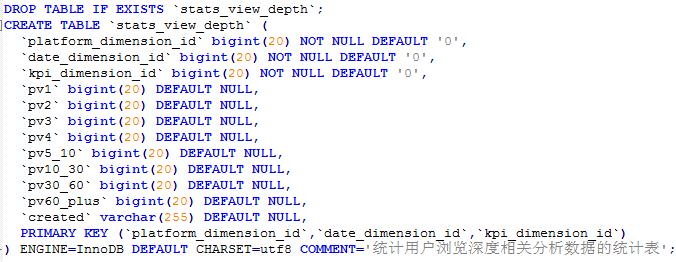
二、mysql数据表
stats_view_depth
CREATE TABLE `stats_view_depth` (
`platform_dimension_id` bigint ,
`data_dimension_id` bigint ,
`kpi_dimension_id` bigint ,
`pv1` bigint ,
`pv2` bigint ,
`pv3` bigint ,
`pv4` bigint ,
`pv5_10` bigint ,
`pv10_30` bigint ,
`pv30_60` bigint ,
`pv60_plus` bigint ,
`created` string
) row format delimited fields terminated by '\t';
三、数据
1.用户ID
2.时间
3.URL
4.PV
四、HIVE和HBASE对应关系
set hive.exec.mode.local.auto=true;
1.在hive中创建hbase的event_log对应表
CREATE EXTERNAL TABLE event_logs(
key string, pl string, en string, s_time bigint, p_url string, u_ud string, u_sd string
) ROW FORMAT SERDE 'org.apache.hadoop.hive.hbase.HBaseSerDe'
STORED BY 'org.apache.hadoop.hive.hbase.HBaseStorageHandler'
with serdeproperties('hbase.columns.mapping'=':key,log:pl,log:en,log:s_time,log:p_url,log:u_ud,log:u_sd')
tblproperties('hbase.table.name'='eventlog');
分组条件
UUID
PL
count(url):1,2,3,4.... (hive_case_when)
3.hive创建临时表:把hql分析之后的中间结果存放到当前的临时表。
CREATE TABLE `stats_view_depth_tmp`(`pl` string, `date` string, `col` string, `ct` bigint);
然后先看第七步的操作SQL,再回头看udf
-- 4. 编写UDF(platformdimension & datedimension)
package com.yjsj.transformer.hive;

import com.yjsj.common.DateEnum;

import com.yjsj.transformer.model.dim.base.DateDimension;

import com.yjsj.transformer.model.dim.base.PlatformDimension;

import com.yjsj.transformer.service.IDimensionConverter;

import com.yjsj.transformer.service.impl.DimensionConverterImpl;

import com.yjsj.util.TimeUtil;

import org.apache.hadoop.hive.ql.exec.UDF;

import org.apache.hadoop.io.IntWritable;

import org.apache.hadoop.io.Text;

import java.io.IOException;

/**

 * 操作日期dimension 相关的udf

 *

 * @author root

 *

 */

public class PlatformDimensionUDF extends UDF {

    private IDimensionConverter converter = new DimensionConverterImpl();

    /**

     * 根据给定的日期(格式为:yyyy-MM-dd)至返回id

     *

     * @param pl

     * @return

     */

    public IntWritable evaluate(Text pl) {

        PlatformDimension dimension = new PlatformDimension(pl.toString());

        try {

            int id = this.converter.getDimensionIdByValue(dimension);

            return new IntWritable(id);

        } catch (IOException e) {

            throw new RuntimeException("获取id异常");

        }

    }

}
package com.yjsj.transformer.hive;

import java.io.IOException;

import org.apache.hadoop.hive.ql.exec.UDF;

import org.apache.hadoop.io.IntWritable;

import org.apache.hadoop.io.Text;

import com.yjsj.common.DateEnum;

import com.yjsj.transformer.model.dim.base.DateDimension;

import com.yjsj.transformer.service.IDimensionConverter;

import com.yjsj.transformer.service.impl.DimensionConverterImpl;

import com.yjsj.util.TimeUtil;

/**

 * 操作日期dimension 相关的udf

 *

 * @author root

 *

 */

public class DateDimensionUDF extends UDF {

    private IDimensionConverter converter = new DimensionConverterImpl();

    /**

     * 根据给定的日期(格式为:yyyy-MM-dd)至返回id

     *

     * @param day

     * @return

     */

    public IntWritable evaluate(Text day) {

        DateDimension dimension = DateDimension.buildDate(TimeUtil.parseString2Long(day.toString()), DateEnum.DAY);

        try {

            int id = this.converter.getDimensionIdByValue(dimension);

            return new IntWritable(id);

        } catch (IOException e) {

            throw new RuntimeException("获取id异常");

        }

    }

}
底层dimension在项目内
-- 5. 上传transformer.jar到hdfs的/yjsj/transformer文件夹中
文件夹放到虚拟机上之后要执行
zip -d wc.jar 'META-INF/.SF' 'META-INF/.RSA' 'META-INF/*SF'
hadoop fs -mkdir -p /yjsj/transformer
hadoop fs -put transformer.jar /yjsj/transformer/
-- 6. 创建hive的function
#create function platform_convert as 'com.yjsj.transformer.hive.PlatformDimensionUDF' using jar 'hdfs://master:9000/yjsj/transformer/transformer.jar';
create function date_convert as 'com.yjsj.transformer.hive.DateDimensionUDF' using jar 'hdfs://master:9000/yjsj/transformer/transformer.jar';
create function platform_convert as 'com.yjsj.transformer.hive.PlatformDimensionUDF' using jar 'hdfs://master:9000/yjsj/transformer/BIG_DATA_SXT_3.jar';
create function date_convert as 'com.yjsj.transformer.hive.DateDimensionUDF' using jar 'hdfs://master:9000/yjsj/transformer/BIG_DATA_SXT_3.jar';
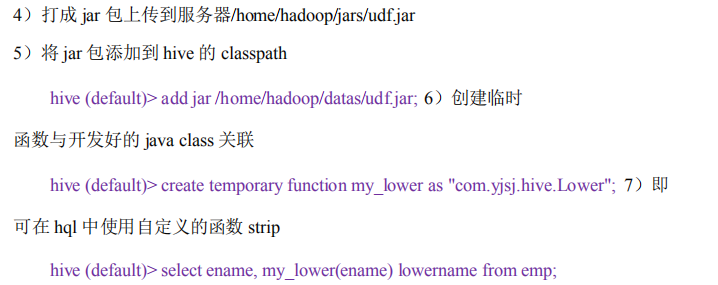
上面的端口号9000要写上,在之前的hive文档里并没有写,如下,是因为默认是8020,而我们修改为9000
7. hql编写(统计用户角度的浏览深度)<注意:时间为外部给定>
select
pl, from_unixtime(cast(s_time/1000 as bigint),'yyyy-MM-dd') as day, u_ud
from event_logs
where
en='e_pv'
and p_url is not null
and pl is not null
and s_time >= unix_timestamp('2019-04-08','yyyy-MM-dd')*1000
and s_time < unix_timestamp('2019-04-09','yyyy-MM-dd')*1000;
下面是上句生成结果(为方便后续综合代码理解,才写的这行SQL语句)
website 2019-04-08 11423967 pv2
website 2019-04-08 11923441 pv1
website 2019-04-08 13117709 pv3
website 2019-04-08 18876987 pv1
website 2019-04-08 22132974 pv5_10
website 2019-04-08 32338628 pv3
website 2019-04-08 32462024 pv1
website 2019-04-08 37100298 pv2
website 2019-04-08 40258369 pv1
website 2019-04-08 43316735 pv4
website 2019-04-08 43367799 pv3
website 2019-04-08 46712177 pv2
website 2019-04-08 48200918 pv2
website 2019-04-08 55242998 pv1
website 2019-04-08 61014907 pv3
website 2019-04-08 66425387 pv2
website 2019-04-08 66752576 pv1
website 2019-04-08 69279477 pv2
website 2019-04-08 69831907 pv2
website 2019-04-08 70509784 pv2
website 2019-04-08 76613477 pv2
website 2019-04-08 76999358 pv4
website 2019-04-08 80101579 pv1
website 2019-04-08 83607412 pv1
website 2019-04-08 87265754 pv2
website 2019-04-08 92096261 pv1
website 2019-04-08 95144920 pv3
from (
select
pl, from_unixtime(cast(s_time/1000 as bigint),'yyyy-MM-dd') as day, u_ud,
(case when count(p_url) = 1 then "pv1"
when count(p_url) = 2 then "pv2"
when count(p_url) = 3 then "pv3"
when count(p_url) = 4 then "pv4"
when count(p_url) >= 5 and count(p_url) <10 then "pv5_10"
when count(p_url) >= 10 and count(p_url) <30 then "pv10_30"
when count(p_url) >=30 and count(p_url) <60 then "pv30_60"
else 'pv60_plus' end) as pv
from event_logs
where
en='e_pv'
and p_url is not null
and pl is not null
and s_time >= unix_timestamp('2019-04-08','yyyy-MM-dd')*1000
and s_time < unix_timestamp('2019-04-09','yyyy-MM-dd')*1000
group by
pl, from_unixtime(cast(s_time/1000 as bigint),'yyyy-MM-dd'), u_ud
) as tmp
insert overwrite table stats_view_depth_tmp
select pl,day,pv,count(u_ud) as ct where u_ud is not null group by pl,day,pv;
select * from stats_view_depth_tmp;
结果如下
website 2019-04-08 pv1 9
website 2019-04-08 pv2 10
website 2019-04-08 pv3 5
website 2019-04-08 pv4 2
website 2019-04-08 pv5_10 1
因为我们需要的内容格式如下
所以之后进行行转列
--把临时表的多行数据,转换一行
UNION 内部的每个 SELECT 语句必须拥有相同数量的列。列也必须拥有相似的数据类型。同时,每个 SELECT 语句中的列的顺序必须相同。
根据where语句筛选要合并的内容项
https://www.runoob.com/sql/sql-union.html
with tmp as
(
select pl,`date` as date1,ct as pv1,0 as pv2,0 as pv3,0 as pv4,0 as pv5_10,0 as pv10_30,0 as pv30_60,0 as pv60_plus from stats_view_depth_tmp where col='pv1' union all
select pl,`date` as date1,0 as pv1,ct as pv2,0 as pv3,0 as pv4,0 as pv5_10,0 as pv10_30,0 as pv30_60,0 as pv60_plus from stats_view_depth_tmp where col='pv2' union all
select pl,`date` as date1,0 as pv1,0 as pv2,ct as pv3,0 as pv4,0 as pv5_10,0 as pv10_30,0 as pv30_60,0 as pv60_plus from stats_view_depth_tmp where col='pv3' union all
select pl,`date` as date1,0 as pv1,0 as pv2,0 as pv3,ct as pv4,0 as pv5_10,0 as pv10_30,0 as pv30_60,0 as pv60_plus from stats_view_depth_tmp where col='pv4' union all
select pl,`date` as date1,0 as pv1,0 as pv2,0 as pv3,0 as pv4,ct as pv5_10,0 as pv10_30,0 as pv30_60,0 as pv60_plus from stats_view_depth_tmp where col='pv5_10' union all
select pl,`date` as date1,0 as pv1,0 as pv2,0 as pv3,0 as pv4,0 as pv5_10,ct as pv10_30,0 as pv30_60,0 as pv60_plus from stats_view_depth_tmp where col='pv10_30' union all
select pl,`date` as date1,0 as pv1,0 as pv2,0 as pv3,0 as pv4,0 as pv5_10,0 as pv10_30,ct as pv30_60,0 as pv60_plus from stats_view_depth_tmp where col='pv30_60' union all
select pl,`date` as date1,0 as pv1,0 as pv2,0 as pv3,0 as pv4,0 as pv5_10,0 as pv10_30,0 as pv30_60,ct as pv60_plus from stats_view_depth_tmp where col='pv60_plus' union all
select 'all' as pl,`date` as date1,ct as pv1,0 as pv2,0 as pv3,0 as pv4,0 as pv5_10,0 as pv10_30,0 as pv30_60,0 as pv60_plus from stats_view_depth_tmp where col='pv1' union all
select 'all' as pl,`date` as date1,0 as pv1,ct as pv2,0 as pv3,0 as pv4,0 as pv5_10,0 as pv10_30,0 as pv30_60,0 as pv60_plus from stats_view_depth_tmp where col='pv2' union all
select 'all' as pl,`date` as date1,0 as pv1,0 as pv2,ct as pv3,0 as pv4,0 as pv5_10,0 as pv10_30,0 as pv30_60,0 as pv60_plus from stats_view_depth_tmp where col='pv3' union all
select 'all' as pl,`date` as date1,0 as pv1,0 as pv2,0 as pv3,ct as pv4,0 as pv5_10,0 as pv10_30,0 as pv30_60,0 as pv60_plus from stats_view_depth_tmp where col='pv4' union all
select 'all' as pl,`date` as date1,0 as pv1,0 as pv2,0 as pv3,0 as pv4,ct as pv5_10,0 as pv10_30,0 as pv30_60,0 as pv60_plus from stats_view_depth_tmp where col='pv5_10' union all
select 'all' as pl,`date` as date1,0 as pv1,0 as pv2,0 as pv3,0 as pv4,0 as pv5_10,ct as pv10_30,0 as pv30_60,0 as pv60_plus from stats_view_depth_tmp where col='pv10_30' union all
select 'all' as pl,`date` as date1,0 as pv1,0 as pv2,0 as pv3,0 as pv4,0 as pv5_10,0 as pv10_30,ct as pv30_60,0 as pv60_plus from stats_view_depth_tmp where col='pv30_60' union all
select 'all' as pl,`date` as date1,0 as pv1,0 as pv2,0 as pv3,0 as pv4,0 as pv5_10,0 as pv10_30,0 as pv30_60,ct as pv60_plus from stats_view_depth_tmp where col='pv60_plus'
)
from tmp
insert overwrite table stats_view_depth
select platform_convert(pl),date_convert(date1),6,sum(pv1),sum(pv2),sum(pv3),sum(pv4),sum(pv5_10),sum(pv10_30),sum(pv30_60),sum(pv60_plus),'2019-04-08' group by pl,date1;
下面则是没有定义UDF时候把下面的select 语句替换掉上面的
select 2,1,6,sum(pv1),sum(pv2),sum(pv3),sum(pv4),sum(pv5_10),sum(pv10_30),sum(pv30_60),sum(pv60_plus),'2019-04-08' group by pl,date1;
select platform_convert(pl),date_convert(date1),6,sum(pv1),sum(pv2),sum(pv3),sum(pv4),sum(pv5_10),sum(pv10_30),sum(pv30_60),sum(pv60_plus),'2019-04-08' group by pl,date1;
select 2,1,6,sum(pv1),sum(pv2),sum(pv3),sum(pv4),sum(pv5_10),sum(pv10_30),sum(pv30_60),sum(pv60_plus),'2019-04-08' group by pl,date1;
select 2,date_convert(date1),6,sum(pv1),sum(pv2),sum(pv3),sum(pv4),sum(pv5_10),sum(pv10_30),sum(pv30_60),sum(pv60_plus),'2019-04-08' group by pl,date1;
查询结果
select * from stats_view_depth;
//上面的前三项
platform_convert(pl),date_convert(date1),6,分别是平台维度id,日期维度id,kpi维度id
而前两项,即平台和日期维度,是通过前面四定义的udf函数来转换的,底层是写的java语句,
(1)继承 org.apache.hadoop.hive.ql.UDF
(2)需要实现 evaluate 函数;evaluate 函数支持重载;
(3)在 hive 的命令行窗口创建函数
a)添加 jar
add jar linux_jar_path b)创
建 function,
create [temporary] function [dbname.]function_name AS class_name;
(4)在 hive 的命令行窗口删除函数
Drop [temporary] function [if exists] [dbname.]function_name; 6)注
意事项
(1)UDF 必须要有返回类型,可以返回 null,但是返回类型不能为 void

sqoop --options-file sqoop_option
-- 7. sqoop脚步编写(统计用户角度)
sqoop export --connect jdbc:mysql://master:3306/result_db --username root --password root --m 1 --columns platform_dimension_id,date_dimension_id,kpi_dimension_id,pv1,pv2,pv3,pv4,pv5_10,pv10_30,pv30_60,pv60_plus,created --export-dir /user/hive/warehouse/stats_view_depth --table stats_view_depth --input-fields-terminated-by '\t'
下面是另外一个维度,方法流程是一样的
-- 8. hql编写(统计会话角度的浏览深度)<注意:时间为外部给定>
from (
select pl, from_unixtime(cast(s_time/1000 as bigint),'yyyy-MM-dd') as day, u_sd,
(case when count(p_url) = 1 then "pv1"
when count(p_url) = 2 then "pv2"
when count(p_url) = 3 then "pv3"
when count(p_url) = 4 then "pv4"
when count(p_url) >= 5 and count(p_url) <10 then "pv5_10"
when count(p_url) >= 10 and count(p_url) <30 then "pv10_30"
when count(p_url) >=30 and count(p_url) <60 then "pv30_60"
else 'pv60_plus' end) as pv
from event_logs
where en='e_pv' and p_url is not null and pl is not null and s_time >= unix_timestamp('2019-04-08','yyyy-MM-dd')*1000 and s_time < unix_timestamp('2019-04-09','yyyy-MM-dd')*1000
group by pl, from_unixtime(cast(s_time/1000 as bigint),'yyyy-MM-dd'), u_sd
) as tmp
insert overwrite table stats_view_depth_tmp
select pl,day,pv,count(distinct u_sd) as ct where u_sd is not null group by pl,day,pv;
with tmp as
(
select pl,date,ct as pv1,0 as pv2,0 as pv3,0 as pv4,0 as pv5_10,0 as pv10_30,0 as pv30_60,0 as pv60_plus from stats_view_depth_tmp where col='pv1' union all
select pl,date,0 as pv1,ct as pv2,0 as pv3,0 as pv4,0 as pv5_10,0 as pv10_30,0 as pv30_60,0 as pv60_plus from stats_view_depth_tmp where col='pv2' union all
select pl,date,0 as pv1,0 as pv2,ct as pv3,0 as pv4,0 as pv5_10,0 as pv10_30,0 as pv30_60,0 as pv60_plus from stats_view_depth_tmp where col='pv3' union all
select pl,date,0 as pv1,0 as pv2,0 as pv3,ct as pv4,0 as pv5_10,0 as pv10_30,0 as pv30_60,0 as pv60_plus from stats_view_depth_tmp where col='pv4' union all
select pl,date,0 as pv1,0 as pv2,0 as pv3,0 as pv4,ct as pv5_10,0 as pv10_30,0 as pv30_60,0 as pv60_plus from stats_view_depth_tmp where col='pv5_10' union all
select pl,date,0 as pv1,0 as pv2,0 as pv3,0 as pv4,0 as pv5_10,ct as pv10_30,0 as pv30_60,0 as pv60_plus from stats_view_depth_tmp where col='pv10_30' union all
select pl,date,0 as pv1,0 as pv2,0 as pv3,0 as pv4,0 as pv5_10,0 as pv10_30,ct as pv30_60,0 as pv60_plus from stats_view_depth_tmp where col='pv30_60' union all
select pl,date,0 as pv1,0 as pv2,0 as pv3,0 as pv4,0 as pv5_10,0 as pv10_30,0 as pv30_60,ct as pv60_plus from stats_view_depth_tmp where col='pv60_plus' union all
select 'all' as pl,date,ct as pv1,0 as pv2,0 as pv3,0 as pv4,0 as pv5_10,0 as pv10_30,0 as pv30_60,0 as pv60_plus from stats_view_depth_tmp where col='pv1' union all
select 'all' as pl,date,0 as pv1,ct as pv2,0 as pv3,0 as pv4,0 as pv5_10,0 as pv10_30,0 as pv30_60,0 as pv60_plus from stats_view_depth_tmp where col='pv2' union all
select 'all' as pl,date,0 as pv1,0 as pv2,ct as pv3,0 as pv4,0 as pv5_10,0 as pv10_30,0 as pv30_60,0 as pv60_plus from stats_view_depth_tmp where col='pv3' union all
select 'all' as pl,date,0 as pv1,0 as pv2,0 as pv3,ct as pv4,0 as pv5_10,0 as pv10_30,0 as pv30_60,0 as pv60_plus from stats_view_depth_tmp where col='pv4' union all
select 'all' as pl,date,0 as pv1,0 as pv2,0 as pv3,0 as pv4,ct as pv5_10,0 as pv10_30,0 as pv30_60,0 as pv60_plus from stats_view_depth_tmp where col='pv5_10' union all
select 'all' as pl,date,0 as pv1,0 as pv2,0 as pv3,0 as pv4,0 as pv5_10,ct as pv10_30,0 as pv30_60,0 as pv60_plus from stats_view_depth_tmp where col='pv10_30' union all
select 'all' as pl,date,0 as pv1,0 as pv2,0 as pv3,0 as pv4,0 as pv5_10,0 as pv10_30,ct as pv30_60,0 as pv60_plus from stats_view_depth_tmp where col='pv30_60' union all
select 'all' as pl,date,0 as pv1,0 as pv2,0 as pv3,0 as pv4,0 as pv5_10,0 as pv10_30,0 as pv30_60,ct as pv60_plus from stats_view_depth_tmp where col='pv60_plus'
)
from tmp
insert overwrite table stats_view_depth select platform_convert(pl),date_convert(date),6,sum(pv1),sum(pv2),sum(pv3),sum(pv4),sum(pv5_10),sum(pv10_30),sum(pv30_60),sum(pv60_plus),'2019-04-08' group by pl,date;
-- 9. sqoop脚步编写(统计会话角度)
sqoop export --connect jdbc:mysql://master:3306/report --username root --password 111111 --table stats_view_depth --export-dir /user/hive/warehouse/stats_view_depth/* --input-fields-terminated-by "\\01" --update-mode allowinsert --update-key platform_dimension_id,data_dimension_id,kpi_dimension_id
-- 10. shell脚步编写
从hbase到hive,以及sqoop转到mysql解析的更多相关文章
- 3.12-3.16 Hbase集成hive、sqoop、hue
一.Hbase集成hive https://cwiki.apache.org/confluence/display/Hive/HBaseIntegration 1.说明 Hive与HBase整合在一起 ...
- hbase结合hive和sqoop实现数据指导mysql
hive综合hbase两个优势表中的: 1.实现数据导入到MYSQL. 2.实现hbase表转换为另外一张hbase表. 三个操作环节: 1.hbase关联hive作为外部 ...
- (MySQL里的数据)通过Sqoop Import HBase 里 和 通过Sqoop Export HBase 里的数据到(MySQL)
Sqoop 可以与HBase系统结合,实现数据的导入和导出,用户需要在 sqoop-env.sh 中添加HBASE_HOME的环境变量. 具体,见我的如下博客: hadoop2.6.0(单节点)下Sq ...
- sqoop将mysql数据导入hbase、hive的常见异常处理
原创不易,如需转载,请注明出处https://www.cnblogs.com/baixianlong/p/10700700.html,否则将追究法律责任!!! 一.需求: 1.将以下这张表(test_ ...
- Sqoop使用,mysql,hbase,hive等相互转换
Sqoop 是一款用来在不同数据存储软件之间进行数据传输的开源软件,它支持多种类型的数据储存软件. 安装 Sqoop 1.下载sqoop并加mysql驱动包 http://mirror.bit.edu ...
- sqoop命令,mysql导入到hdfs、hbase、hive
1.测试MySQL连接 bin/sqoop list-databases --connect jdbc:mysql://192.168.1.187:3306/trade_dev --username ...
- HBASE与hive对比使用以及HBASE常用shell操作。与sqoop的集成
2.6.与 Hive 的集成2.6.1.HBase 与 Hive 的对比1) Hive(1) 数据仓库Hive 的本质其实就相当于将 HDFS 中已经存储的文件在 Mysql 中做了一个双射关系,以方 ...
- Apache的HBase与cdh的sqoop集成(不建议不同版本之间的集成)
1.修改sqoop的配资文件 2.从mysql导入到hbase(import) bin/sqoop import \ --connect jdbc:mysql://linux-hadoop3.ibei ...
- 076 Apache的HBase与cdh的sqoop集成(不建议不同版本之间的集成)
1.修改sqoop的配资文件 2.从mysql导入到hbase(import) bin/sqoop import \ --connect jdbc:mysql://linux-hadoop3.ibei ...
随机推荐
- Delphi 操作键盘按下和释放操作
Unit Unit1; Interface Uses Windows, Messages, SysUtils, Classes, Graphics, Controls, Forms, Dialogs, ...
- 常见jsp跳转总结
这次做项目,用到几种不同的JSP跳转的方式,在此总结5中常用方法. 常用的跳转方式有以下几种: (1)href超链接标记,属于客户端跳转 (2)使用javascript完成,属于客户端跳转 (3)提交 ...
- SOA (面向服务的架构)
面向服务的体系结构,是一个组件模型,它将应用程序的不同功能单元(称为服务)通过这些服务之间定义良好的接口和契约联系起来.接口是采用中立的方式进行定义的,它应该独立于实现服务的硬件平台.操作系统和编程语 ...
- mac版IDEA使用maven的问题
在idea中执行maven碰到这个错误:invalid target release: 1.7.首先做了以下操作 1.查看$JAVA_HOME echo $JAVA_HOME /Library/Jav ...
- KEGG数据库介绍
转载自https://mp.weixin.qq.com/s/pqbMXMkuqEXbLf31PTxGZQ KEGG简介 KEGG 数据库于 1995 年由 Kanehisa Laboratories ...
- Spring ThreadPoolTaskExecutor
1. ThreadPoolTaskExecutor配置 1 <!-- spring thread pool executor --> 2 <bean id="taskExe ...
- pymongo CursorNotFound错误
部分报错如下: File "D:\anaconda\lib\site-packages\pymongo\cursor.py", line 1189, in next if len( ...
- testng + Ignore 忽略测试方法
使用testng的时候,有时候会忽略掉某些测试方法,暂时不跑,简单整理一下一些方法.转载还请说明下 1.使用@Test(enable=false)方法 @Feature("查询") ...
- IN_sales_order带后续P IN_ITEM_SITE带P\SP\TP DUMMY
IN_sales_order带后续P IN_ITEM_SITE带P\SP\TP DUMMY SAP_MATERIAL_SO 处理材料订单缺少BOM,ROUTING信息
- 如何用INNO安装添加快捷启动方式到Win7的快速启动栏(超级任务栏)
问题:如何用INNO安装添加快捷启动方式到Win7的快速启动栏(超级任务栏) 在XP下,添加方式是直接把快捷方式复制到%appdata%\Microsoft\Internet Explorer\Qui ...