
NHibernate的调试技巧和Log4Net配置
1.查看nhibernate写在控制台里的sql语句
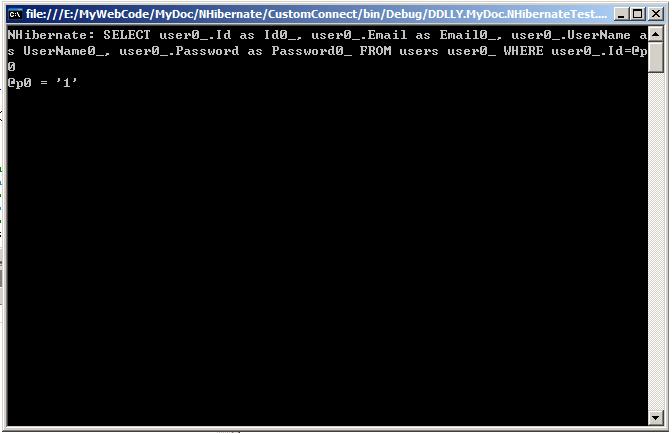
在配置文件中有这么个选项,假如把它设置为true,nhibernate会把执行的sql显示在控制台上。
 <property name="show_sql">true</property>
 对于控制台应用程序我们可以设置断点后很轻松的看到nhibernate执行了什么sql。
下图是从数据库中读取一条数据。
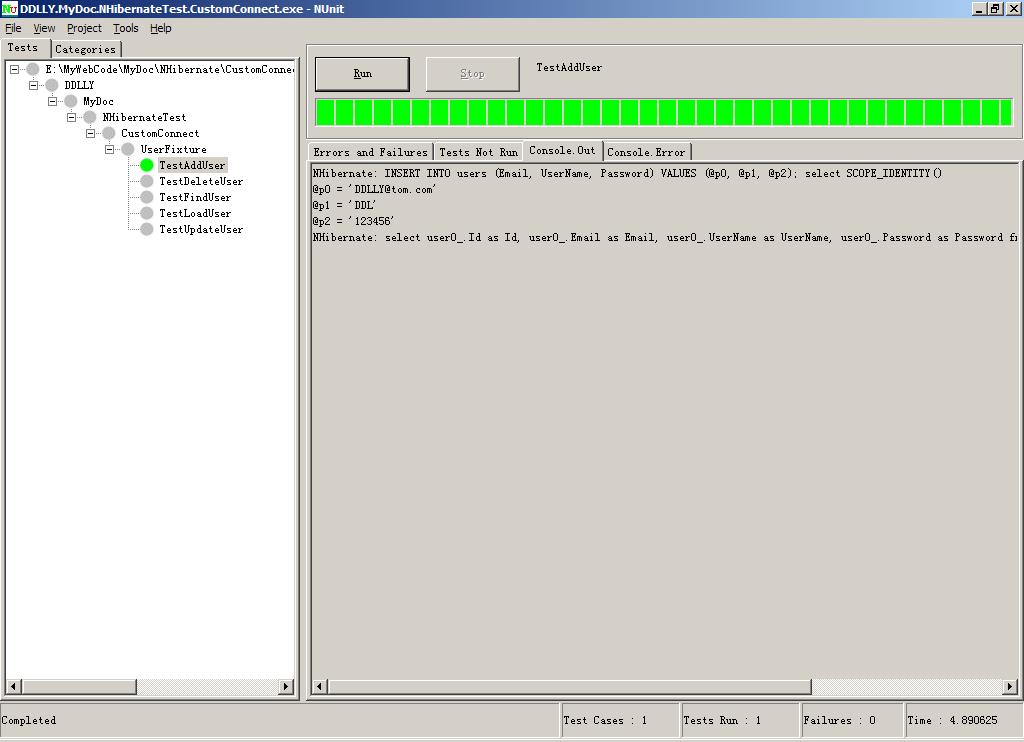
假如你写了单元测试,从nunit同样可以很轻易地看到。
2.配置log4net来查看nhibernate留下的日志
假如你的程序是asp.net程序。那就看不到控制台信息了。那么就使用第二招配置log4net。
按习惯,我还是使用单独的配置文件。当然你也可以配置在应用程序配置文件中(app.config或web.config)。
<?xml version="1.0" encoding="utf-8" ?> <log4net> <appender name="rollingfile" type="log4net.appender.rollingfileappender,log4net" > <param name="file" value="log.txt" /> <param name="appendtofile" value="false" /> <param name="rollingstyle" value="date" /> <param name="datepattern" value="yyyy.mm.dd" /> <param name="staticlogfilename" value="true" /> <layout type="log4net.layout.patternlayout,log4net"> <param name="conversionpattern" value="%d [%t] %-5p %c [%x] <%x{auth}> - %m%n" /> </layout> </appender> <root> <!--假如只需要看看sql设置info就够了,假如你要调试可以设置为debug或all--> <priority value="info" /> <appender-ref ref="rollingfile" /> </root> </log4net>读取log4net配置的代码
xmlconfigurator.configure(new fileinfo("log4net.cfg.xml"));运行了程序后你可以在应用程序目录找到log.txt的配置文件。里面记录了包括sql的nhibernate的运行信息。
这是一个日志的片断
2006-08-08 22:22:16,921 [2036] info nhibernate.cfg.environment [(null)] <(null)> - nhibernate 1.0.22006-08-08 22:22:16,968 [2036] info nhibernate.cfg.environment [(null)] <(null)> - nhibernate section not found in application configuration file2006-08-08 22:22:16,968 [2036] info nhibernate.cfg.environment [(null)] <(null)> - using reflection optimizer2006-08-08 22:22:17,000 [2036] info nhibernate.cfg.configuration [(null)] <(null)> - searching for mapped documents in assembly: ddlly.mydoc.nhibernatetest.log4nettest2006-08-08 22:22:17,000 [2036] info nhibernate.cfg.configuration [(null)] <(null)> - found mapping documents in assembly: ddlly.mydoc.nhibernatetest.log4nettest.user.hbm.xml2006-08-08 22:22:17,062 [2036] info nhibernate.dialect.dialect [(null)] <(null)> - using dialect: nhibernate.dialect.mssql2000dialect2006-08-08 22:22:17,109 [2036] info nhibernate.cfg.binder [(null)] <(null)> - mapping class: ddlly.mydoc.nhibernatetest.log4nettest.user -> users2006-08-08 22:22:17,156 [2036] info nhibernate.cfg.configuration [(null)] <(null)> - configured sessionfactory: ddlly.mydoc.nhibernatetest.log4nettest2006-08-08 22:22:17,171 [2036] info nhibernate.cfg.configuration [(null)] <(null)> - processing one-to-many association mappings2006-08-08 22:22:17,171 [2036] info nhibernate.cfg.configuration [(null)] <(null)> - processing one-to-one association property references2006-08-08 22:22:17,171 [2036] info nhibernate.cfg.configuration [(null)] <(null)> - processing foreign key constraints2006-08-08 22:22:17,187 [2036] info nhibernate.dialect.dialect [(null)] <(null)> - using dialect: nhibernate.dialect.mssql2000dialect2006-08-08 22:22:17,187 [2036] info nhibernate.cfg.settingsfactory [(null)] <(null)> - use outer join fetching: true2006-08-08 22:22:17,187 [2036] info nhibernate.connection.connectionproviderfactory [(null)] <(null)> - intitializing connection provider: nhibernate.connection.driverconnectionprovider2006-08-08 22:22:17,187 [2036] info nhibernate.connection.connectionprovider [(null)] <(null)> - configuring connectionprovider2006-08-08 22:22:17,187 [2036] info nhibernate.cfg.settingsfactory [(null)] <(null)> - optimize cache for minimal puts: false2006-08-08 22:22:17,203 [2036] info nhibernate.cfg.settingsfactory [(null)] <(null)> - echoing all sql to stdout2006-08-08 22:22:17,203 [2036] info nhibernate.cfg.settingsfactory [(null)] <(null)> - query language substitutions: {false=0, no='n', yes='y', true=1}2006-08-08 22:22:17,203 [2036] info nhibernate.cfg.settingsfactory [(null)] <(null)> - cache provider: nhibernate.cache.hashtablecacheprovider2006-08-08 22:22:17,203 [2036] info nhibernate.cfg.configuration [(null)] <(null)> - instantiating and configuring caches2006-08-08 22:22:17,218 [2036] info nhibernate.impl.sessionfactoryimpl [(null)] <(null)> - building session factory2006-08-08 22:22:17,812 [2036] info nhibernate.impl.sessionfactoryobjectfactory [(null)] <(null)> - factory name:ddlly.mydoc.nhibernatetest.log4nettest2006-08-08 22:22:17,859 [2036] info nhibernate.loader.loader [(null)] <(null)> - select user0_.id as id0_, user0_.email as email0_, user0_.username as username0_, user0_.password as password0_ from users user0_ where user0_.id=@p0从这个文件我们可以看到nhibernate都做了些什么(包括执行了什么sql,看上面的最后一行)。
当你想更具体的信息可以把priority设置为all,这样可以看到所有信息。
提示:nhibernate会把一般信息记录为info,调试信息记录为debug,错误信息记录为error。
log4net中支持多个appender你可以也把日志记录到数据库等其他地方,请参看log4net的文档,这里不做讲解。
3.让nhibernate的日志不影响你使用log4net写日志
nhibernate总是会调用配置<root>里面的“appender-ref”来写配置。
所以假如你系统本省也使用了log4net记录日志,而不想让nhibernate的日志影响,则可以定义logger。
<?xml version="1.0" encoding="utf-8" ?> <log4net> <root> <!--假如只需要看看sql设置info就够了,假如你要调试可以设置为debug或all--> <priority value="info" /> <appender-ref ref="rollingfile" /> </root> <logger name="applicationinfolog"> <level value="info" /> <appender-ref ref="rollingfile1" /> </logger> <appender name="rollingfile" type="log4net.appender.rollingfileappender,log4net" > <param name="file" value="log.txt" /> <param name="appendtofile" value="false" /> <param name="rollingstyle" value="date" /> <param name="datepattern" value="yyyy.mm.dd" /> <param name="staticlogfilename" value="true" /> <layout type="log4net.layout.patternlayout,log4net"> <param name="conversionpattern" value="%d [%t] %-5p %c [%x] <%x{auth}> - %m%n" /> </layout> </appender> <appender name="rollingfile1" type="log4net.appender.rollingfileappender,log4net" > <param name="file" value="log1.txt" /> <param name="appendtofile" value="false" /> <param name="rollingstyle" value="date" /> <param name="datepattern" value="yyyy.mm.dd" /> <param name="staticlogfilename" value="true" /> <layout type="log4net.layout.patternlayout,log4net"> <param name="conversionpattern" value="%d [%t] %-5p %c [%x] <%x{auth}> - %m%n" /> </layout> </appender> </log4net>日志记录代码
ilog applicationinfolog=applicationinfolog = logmanager.getlogger("applicationinfolog");applicationinfolog.info("记录日志");此例中nhibernater日志会存在log.txt,系统日志记录在log1.txt。
4.在使用sqlserver时使用事件查看器监视sql
对于sqlserver数据库,假如你没有条件可以完成上面的功能,那么你可以使用事件查看器来监视执行的sql,使用比较简单,不多说了。
NHibernate的调试技巧和Log4Net配置的更多相关文章
- Visual Studio高级调试技巧
1. 设置软件断点,运行到目标位置启动调试器 方法①:使用汇编指令(注:x64 c++不支持嵌入汇编) _asm 方法②:编译器提供的方法 __debugbreak(); 方法③:使用windows ...
- 【转】你所不知道的Android Studio调试技巧
这篇写Android studio debug技巧个人觉得写得不错,转自:http://www.jianshu.com/p/011eb88f4e0d# Android Studio目前已经成为开发An ...
- iOS各种调试技巧豪华套餐
转载自http://www.cnblogs.com/daiweilai/p/4421340.html 目录 前言 逼优鸡 知己知彼 百战不殆 抽刀断Bug 普通操作 全局断点(Global Break ...
- 你所不知道的Android Studio调试技巧
转载:http://www.jianshu.com/p/011eb88f4e0d Android Studio目前已经成为开发Android的主要工具,用熟了可谓相当顺手.作为开发者,调试并发现bug ...
- Visual Studio原生开发的20条调试技巧(下)
我的上篇文章<Vistual Studio原生开发的10个调试技巧>引发了很多人的兴趣,所以我决定跟大家分享更多的调试技巧.接下来你又能看到一些对于原生应用程序的很有帮助的调试技巧(接着上 ...
- Visual Studio原生开发的10个调试技巧
这篇文章只介绍了一些有关Visual Studio的基本调试技巧,但是还有其他一些同样有用的技巧.我整理了一些Visual Studio(至少在VS 2008下)原生开发的调试技巧.(如果你是工作在托 ...
- xcode的调试技巧
转自:http://www.cnblogs.com/daiweilai/p/4421340.html#biyouji 目录 前言逼优鸡知己知彼 百战不殆抽刀断Bug 普通操作 全局断点(Global ...
- LTE Module User Documentation(翻译15)——示例程序、参考场景以及故障检测和调试技巧
LTE用户文档 (如有不当的地方,欢迎指正!) 21 Examples Programs(示例程序) 路径 src/lte/examples/ 包含一些示例仿真程序,这些例子表明如何仿真不 ...
- 调试技巧--Windows端口号是否被占用
调试技巧--Windows端口号是否被占用 一.端口概念 10.0.0.0~10.255.255.255,172.16.0.0~172.16.255.255, 192.168.0.0~192.168. ...
随机推荐
- 20155225 实验四《Android程序设计》实验报告
20155225 实验四<Android程序设计>实验报告 一.安装Android Stuidio 问题一:安装完成后,打开提示我找不到SDK,我已经设置了环境变量,关掉提示,没有影响. ...
- ld 脚本浅析-LD手册粗糙翻译
本文乃转载, 我在其基础上做了少量修改. 原作者的E-mail是zhanglei@sict.ac.cn. 完成于2005.11.5-2005.11.8 0. Contents 1. 概论2. 基本概念 ...
- Metronic4.7.5 下载 HTML5 UI后台管理框架
Metronic 是一套精美的响应式后台管理模板,基于强大的 Twitter Bootstrap 3.3.4 框架实现.Metronic 拥有简洁优雅的 Metro UI 风格界面,6 种颜色可选,7 ...
- CF455D. Serega and Fun
D. Serega and Fun time limit per test 4 seconds memory limit per test 256 megabytes input standard i ...
- chromiumFx编译使用
CEF chormeFx 为针对.Net的CEF框架,下载链接为: https://bitbucket.org/chromiumfx/chromiumfx 点击Download可以下载chromium ...
- Java与Redis
1.下载Java使用Redis架包并引入 jedis-2.9.0.jar 2.用Java使用Redis如下: package com.jef.redis; import redis.clients.j ...
- Linux下文件压缩与打包
Linux常用压缩命令compresscompress压缩出来的文件的后缀是.Z,解压命令是ucompresscompress -c 文件 > 压缩后的文件名 ,选项-v显示压缩过程,选项-c的 ...
- 基于范围的for循环
语法: for ( for-range-declaration : expression ) statement 注意一般用auto表达类型.不需要修改时常用引用类型 例子: // range-bas ...
- Ubuntu18.04 n卡配置
一.背景 最近安装了ubutnu18.04后,安装系统后重启卡住,强制关机重启后,又在开机界面紫屏卡住,上网搜索后发现是n卡的驱动问题,使用以下方法安装驱动后成功解决该问题. 二.解决方法 1.进入恢 ...
- Python 编程:从入门到实战 读书笔记
1..title() 每个单词首字母大写 .upper() 所有字母大写 .lower() 所有字母小写 2. \t 空白 转义字符只能用在""内 ...