
nexus 组件下载和上传
一、 重写 super pom
修改 maven 的 settings.xml
Configuring Maven to Use a Single Repository Group
<settings>

  <mirrors>

    <mirror>

      <!--This sends everything else to /public -->

      <id>nexus</id>

      <mirrorOf>*</mirrorOf>

      <url>http://localhost:8081/nexus/content/groups/public</url>

    </mirror>

  </mirrors>

  <profiles>

    <profile>

      <id>nexus</id>

      <!--Enable snapshots for the built in central repo to direct -->

      <!--all requests to nexus via the mirror -->

      <repositories>

        <repository>

          <id>central</id>

          <url>http://central</url>

          <releases><enabled>true</enabled></releases>

          <snapshots><enabled>true</enabled></snapshots>

        </repository>

      </repositories>

     <pluginRepositories>

        <pluginRepository>

          <id>central</id>

          <url>http://central</url>

          <releases><enabled>true</enabled></releases>

          <snapshots><enabled>true</enabled></snapshots>

        </pluginRepository>

      </pluginRepositories>

    </profile>

  </profiles>

  <activeProfiles>

    <!--make the profile active all the time -->

    <activeProfile>nexus</activeProfile>

  </activeProfiles>

</settings>
补充:
目的是只使用nexus
http://maven.apache.org/ref/3.0.4/maven-model-builder/super-pom.html
二、修改项目中pom文件
1. 指定仓库
    <repositories>

        <repository>

            <id>nexus</id>

            <name>nexus</name>

            <url>http://localhost:8081/nexus/content/groups/public/</url>

            <releases>

                <enabled>true</enabled>

            </releases>

            <snapshots>

                <enabled>true</enabled>

            </snapshots>

        </repository>

    </repositories>

    <pluginRepositories>

        <pluginRepository>

            <id>nexus</id>

            <name>nexus</name>

            <url>http://localhost:8081/nexus/content/groups/public/</url>

            <releases>

                <enabled>true</enabled>

            </releases>

            <snapshots>

                <enabled>true</enabled>

            </snapshots>

        </pluginRepository>

    </pluginRepositories>
2. 设置部署
项目中pom.xml文件
    <distributionManagement>

        <repository>

            <id>user-releases</id>

            <name>user-releases</name>

            <url>http://localhost:8081/nexus/content/repositories/releases/</url>

        </repository>

        <snapshotRepository>

            <id>user-snapshots</id>

            <name>user-snapshots</name>

            <url>http://localhost:8081/nexus/content/repositories/snapshots/</url>

        </snapshotRepository>

    </distributionManagement>
maven的setting.xml
  <servers>

    <server>

      <id>user-releases</id>

      <username>admin</username>

      <password>admin123</password>

    </server>

    <server>

      <id>user-snapshots</id>

      <username>admin</username>

      <password>admin123</password>

    </server>

  </servers>
补充:
目的是 mvn clean deploy 时自动部署到私服
http://maven.apache.org/ref/3.0.4/maven-model/maven.html#class_distributionManagement
关于部署到 repository OR snapshotRepository
查询资料
Prepare a Release

Preparing a release goes through the following release phases:

Check that there are no uncommitted changes in the sources

Check that there are no SNAPSHOT dependencies

Change the version in the POMs from x-SNAPSHOT to a new version (you will be prompted for the versions to use)

Transform the SCM information in the POM to include the final destination of the tag

Run the project tests against the modified POMs to confirm everything is in working order

Commit the modified POMs

Tag the code in the SCM with a version name (this will be prompted for)

Bump the version in the POMs to a new value y-SNAPSHOT (these values will also be prompted for)

Commit the modified POMs
实际测试
<version>0.0.1-SNAPSHOT</version>
版本号加-SNAPSHOT 会自动部署到Snapshots仓库,格式必须为 【版本号-SNAPSHOT】
生的jar包自动添加时间戳 例如:0.0.1-20160315.073435-1.jar
去掉-SNAPSHOT 则会部署到releases 仓库
http://maven.apache.org/maven-release/maven-release-plugin/examples/prepare-release.html
三、手动上传组件
1. 登录nexus
2. 选择目标仓库
3. 选择Tab [Artifact Upload]
4. 完善组件信息
备注:Snapshots 仓库不能手动上传
四、设置代理
1. 登录nexus
2. 进入仓库管理添加代理

五、仓库类型
group、hosted、proxy、virtual
group由三类组成
宿主再分三类
代理一开始有3个
http://books.sonatype.com/nexus-book/reference/confignx-sect-manage-repo.html

六、删除私服中的组件
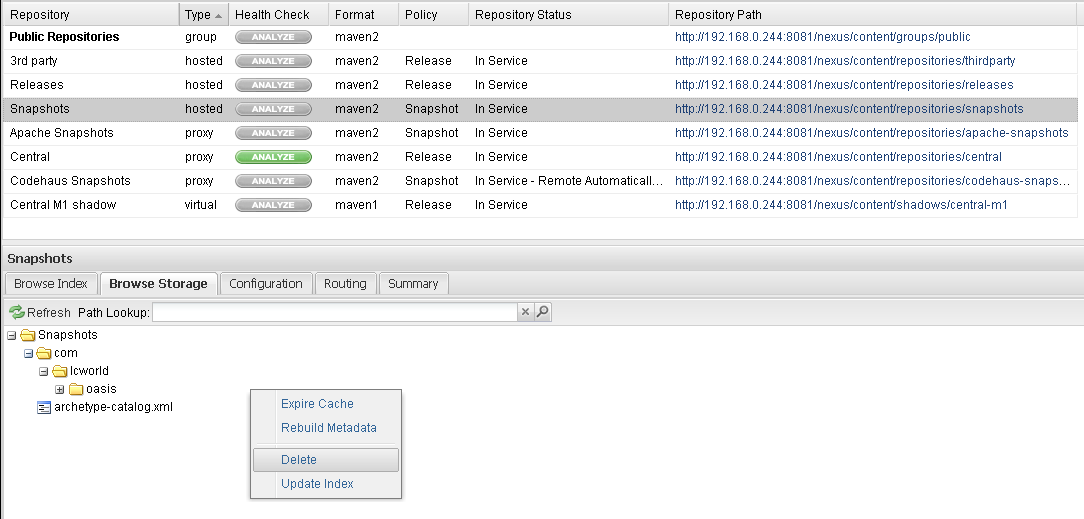
右键删除即可
七、查找并使用组件
登录 nexus
search
就看到组件坐标了
nexus 组件下载和上传的更多相关文章
- 从Nexus私服下载和上传资源(一)
从私服中下载资源 首先要明确将资源下载到哪里 找到maven 配置文件settings.xml 文件,添加如下配置:1.添加镜像配置:将所有访问外网仓库的请求指向私服: <mirror> ...
- 从Nexus私服下载和上传资源(二)
上传资源到私服 当项目完成后如果需要deploy 部署jar 包到私服,则可以添加如下配置: 1.在项目的 pom.xml 文件中添加上传部署的路径: 注意:如果需要对 releases版本进行多次部 ...
- 重新想象 Windows 8 Store Apps (66) - 后台任务: 下载和上传
[源码下载] 重新想象 Windows 8 Store Apps (66) - 后台任务: 下载和上传 作者:webabcd 介绍重新想象 Windows 8 Store Apps 之 后台任务 后台 ...
- 重新想象 Windows 8.1 Store Apps (91) - 后台任务的新特性: 下载和上传的新特性, 程序启动前预下载网络资源, 后台任务的其它新特性
[源码下载] 重新想象 Windows 8.1 Store Apps (91) - 后台任务的新特性: 下载和上传的新特性, 程序启动前预下载网络资源, 后台任务的其它新特性 作者:webabcd 介 ...
- github下载和上传项目
git下载和上传项目 下载: git clone +地址 上传: 1.git init 在当前项目的目录中生成本地的git管理(多一个.git文件夹,为隐藏文件) 2.git add .(注意最后面有 ...
- 使用MFC提供的Http类下载和上传文件
1.下载文件 Download(const CString& strFileURLInServer, //待下载文件的URL const CString & strFileLocalF ...
- 2.4 利用FTP服务器下载和上传目录
利用FTP服务器下载目录 import os,sys from ftplib import FTP from mimetypes import guess_type nonpassive = Fals ...
- 2.3 利用FTP服务器下载和上传文件
二.利用FTP服务器的下载文件 from ftplib import FTP from os.path import exists def getfile(file,site,dir,user=(), ...
- 在XShell中使用sz和rz命令下载和上传文件
借助XShell,使用linux命令sz可以很方便的将服务器上的文件下载到本地,使用rz命令则是把本地文件上传到服务器 工具/原料 XShell CentOS 6.5 使用sz下载文件 1 输 ...
随机推荐
- HIBERNATE知识复习记录2-继承关系
发现了一篇和我类似的学习尚硅谷视频写的文章,内容如下,比我说的详细全面,可以看一下: [原创]java WEB学习笔记87:Hibernate学习之路-- -映射 继承关系(subclass , jo ...
- Mac和iOS开发资源汇总—更新于2013-10-14
小引本文主要汇集一些苹果开发的资源,会经常更新,建议大家把这篇文章单独收藏(在浏览器中按command+D).今天(2013年10月14日)收录了answer哥(黄爱武)的博客,欢迎大家围观! 今天( ...
- 软件工程导论复习 如何画系统流程图和数据流图 part1
一.数据流图与流程图的区别 数据流程图是以图形的方式表达在问题中信息的变换和传递过程.它把系统看成是由数据流联系的各种概念的组合,用分解及抽象手段来控制需求分析的复杂性,采用分层的数据流程图来表示一个 ...
- Hbase—学习笔记(一)
此文的目的: 1.重点理解Hbase的整体工作机制 2.熟悉编程api,能够用来写程序 1. 什么是HBASE 1.1. 概念特性 HBASE是一个数据库----可以提供数据的实时随机读写 HB ...
- 域名相关:DNS A记录 NS记录 MX记录 CNAME记录
1. DNSDNS:Domain Name System 域名管理系统 域名是由圆点分开一串单词或缩写组成的,每一个域名都对应一个惟一的IP地址,这一命名的方法或这样管理域名的系统叫做域名管理系统.D ...
- Java连接MySQL数据库及操作
Java操作MySQL数据库,需要驱动mysql-connector-java 来进行操作,去下载对应的jar包 一.导入需要的jar包 我用的是maven对包进行管理,在maven中添加如下内容 ...
- 使用python发送邮件
最近需要做一个功能,统计bug的数量,然后发邮件给指定人,所有就先要了解一下使用python发送邮件 代码如下: #coding: utf-8 import smtplib from email.MI ...
- css样式表之边框
方框和边框, 边框的顺序为, 上右下左 框的width和height不包括边距的宽度, 设置多少就是多少, margin代表外边距, padding代表内边距, border是边框, 边框border ...
- ALL ANY SOME 这样解释好理解很多
--All:对所有数据都满足条件,整个条件才成立,例如:5大于所有返回的id select * from #A where 5>All(select id from #A) go --Any:只 ...
- <input type="date">设置默认当前日期
日期选择器如下: <input type="date" id="start_date" name="start_date"> 注 ...