
[翻译] VENCalculatorInputView
VENCalculatorInputView
https://github.com/venmo/VENCalculatorInputView
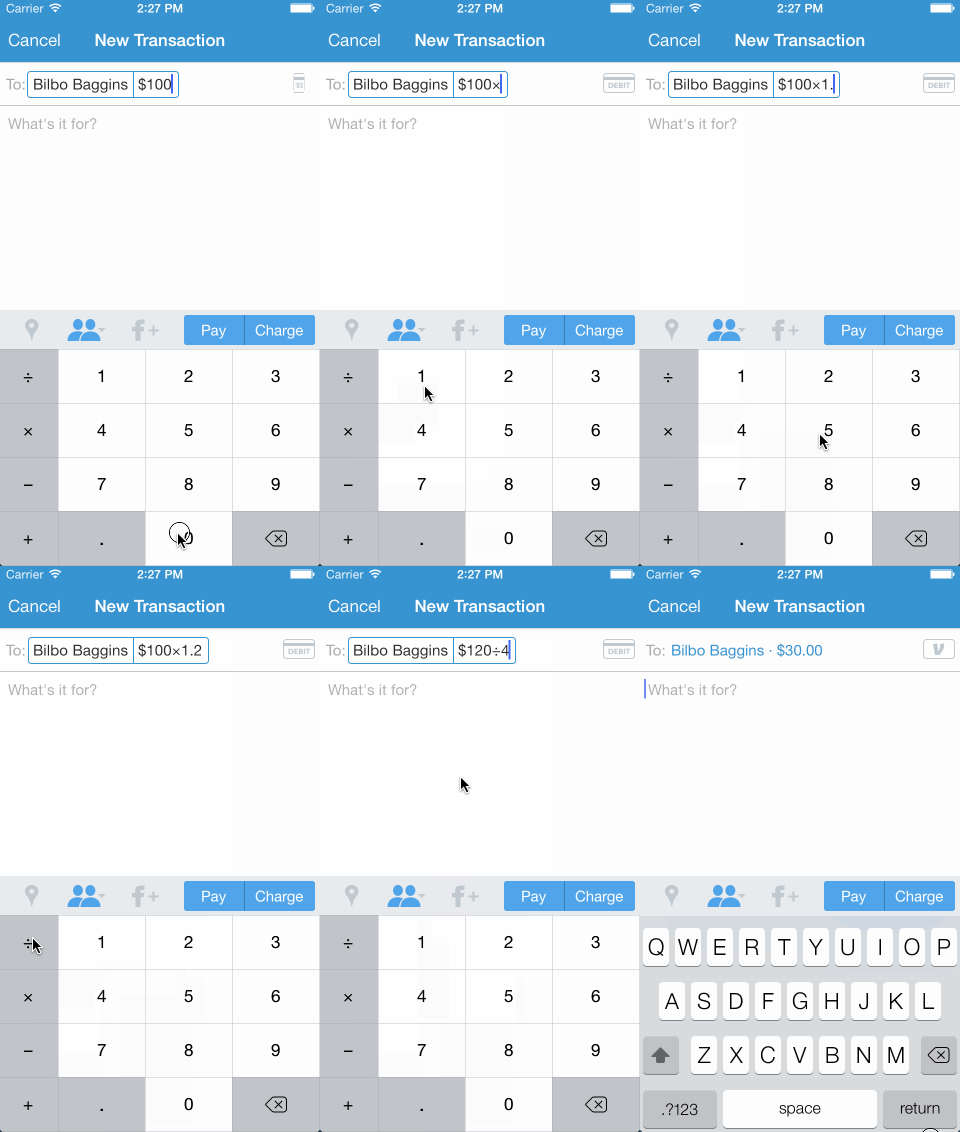
VENCalculatorInputView is the calculator keyboard that is used in the Venmo iOS app. Available for iOS 5 and beyond. Enjoy.
VENCalculatorInputView是一款计数器样式的键盘,该键盘在 Venmo 中有用到,支持iOS5+,希望你喜欢.
Installation
The easiest way to get started is to use CocoaPods. Just add the following line to your Podfile:
最简单的安装方式是使用 CocoaPods ,在下面的Podfile中加入以下一行即可.
pod 'VENCalculatorInputView', '~> 1.4'
Sample Usage
You can choose to use just VENCalculatorInputView (only the keyboard) and define your own behavior or use VENCalculatorInputTextField (keyboard + text field with money calculation built in).
你可以选择直接使用VENCalculatorInputView(仅仅是键盘)然后定义你自己的行为,或者是直接使用VENCalculatorInputTextField(键盘 + 内置的价格计算样式).
Using just the calculator keyboard
1. Set the input view. 设置input view.
Find the UITextField or UITextView that you want to display the keyboard and set its inputView to an instance of VENCalculatorInputView.
找到你想要展示键盘的的UITextField或者是UITextView,然后将VENCalculatorInputView当做实例对象赋值.
myTextField.inputView = [VENCalculatorInputView new];
This will have VENCalculatorInputView display when my TextField becomes firstResponder instead of the system keyboard.
这样子之后,就会让VENCalculatorInputView展示出来,当你的TextField变成第一响应者时(此时并不会展示系统的键盘).
2. Implement the <VENCalculatorInputViewDelegate> methods. 实现<VENCalculatorInputViewDelegate>代理方法
First, have a class implement the <VENCalculatorInputViewDelegate> protocol and set myTextField.inputView.delegate to an instance of that class.
首先,先在类中声明<VENCalculatorInputViewDelegate>的协议,然后将myTextField.inputView.delegate设置上.
Next, implement the delegate method that handles keyboard input:
接着,实现代理方法来处理键盘输入事件:
- (void)calculatorInputView:(VENCalculatorInputView *)inputView didTapKey:(NSString *)key {

    NSLog(@"Just tapped key: %@", key);

    // Handle the input. Something like [myTextField insertText:key];

}
Finally, implement the delegate method that handles the backspace key:
最后,实现代理方法来控制键值backspace:
- (void)calculatorInputViewDidTapBackspace:(VENCalculatorInputView *)calculatorInputView {

    NSLog(@"Just tapped backspace.");

    // Handle the backspace. Something like [myTextField deleteBackward];

}
Try it!
You can read more about custom keyboards in Apple's documentation.
如果要了解更多,你可以看一下自定义键盘的文档(Apple's documentation).
Using the calculator text field (optimized for money calculation) 使用计算器text field(专门为了计算金钱而优化)
All you need to do is use VENCalculatorInputTextField instead of UITextField and use it like normal text field. It will automagically handle the input and make calculations. Take a look at out ourVENCalculatorInputViewSample project.
所有你需要做的,就是使用VENCalculatorInputTextField来替换UITextField,然后就想使用UITextField那样子来用它.他会自动处理计算结果,你可以在项目demo中查看.
Localization
Different regions use different symbols as their decimal separator (e.g. ., ,). By default,VENCalculatorInputView and VENCalculatorInputTextField use the current locale of the device. You can change it by setting the locale property.
不同的地区会用到不同的符号当做他们常用的符号(例如.,).默认情况下,VENCalculatorInputView与VENCalculatorInputTextField是使用了设备当前区域的符号,你可以通过设置locale属性来修改成你想要的.
Testing
We've written some tests. You can run them by opening the project in Xcode and hitting Command-U.
我们已经写了好多测试,你可以在项目中键入 Command - U 来运行测试.
Contributing
We'd love to see your ideas for improving this library! The best way to contribute is by submitting a pull request. We'll do our best to respond to your patch as soon as possible. You can also submit a new GitHub issue if you find bugs or have questions. 
Please make sure to follow our general coding style and add test coverage for new features!
我很欢迎看到你提出新点子来改进这个!最后的贡献你力量的方式是拉一个分支.我们将会尽最大努力来添加上你的修改.当然,你也可以提交你遇到的bug到 new GitHub issue 上面帮助我们改进.
请确保遵循我们的代码风格,然后添加一个新特性的测试样例.
[翻译] VENCalculatorInputView的更多相关文章
- 《Django By Example》第五章 中文 翻译 (个人学习,渣翻)
书籍出处:https://www.packtpub.com/web-development/django-example 原作者:Antonio Melé (译者@ucag注:大家好,我是新来的翻译, ...
- 《Django By Example》第四章 中文 翻译 (个人学习,渣翻)
书籍出处:https://www.packtpub.com/web-development/django-example 原作者:Antonio Melé (译者注:祝大家新年快乐,这次带来<D ...
- [翻译]开发文档:android Bitmap的高效使用
内容概述 本文内容来自开发文档"Traning > Displaying Bitmaps Efficiently",包括大尺寸Bitmap的高效加载,图片的异步加载和数据缓存 ...
- 【探索】机器指令翻译成 JavaScript
前言 前些时候研究脚本混淆时,打算先学一些「程序流程」相关的概念.为了不因太枯燥而放弃,决定想一个有趣的案例,可以边探索边学. 于是想了一个话题:尝试将机器指令 1:1 翻译 成 JavaScript ...
- 《Django By Example》第三章 中文 翻译 (个人学习,渣翻)
书籍出处:https://www.packtpub.com/web-development/django-example 原作者:Antonio Melé (译者注:第三章滚烫出炉,大家请不要吐槽文中 ...
- 《Django By Example》第二章 中文 翻译 (个人学习,渣翻)
书籍出处:https://www.packtpub.com/web-development/django-example 原作者:Antonio Melé (译者注:翻译完第一章后,发现翻译第二章的速 ...
- 《Django By Example》第一章 中文 翻译 (个人学习,渣翻)
书籍出处:https://www.packtpub.com/web-development/django-example 原作者:Antonio Melé (译者注:本人目前在杭州某家互联网公司工作, ...
- 【翻译】Awesome R资源大全中文版来了,全球最火的R工具包一网打尽,超过300+工具,还在等什么?
0.前言 虽然很早就知道R被微软收购,也很早知道R在统计分析处理方面很强大,开始一直没有行动过...直到 直到12月初在微软技术大会,看到我软的工程师演示R的使用,我就震惊了,然后最近在网上到处了解和 ...
- ASP.NET MVC with Entity Framework and CSS一书翻译系列文章之第一章:创建基本的MVC Web站点
在这一章中,我们将学习如何使用基架快速搭建和运行一个简单的Microsoft ASP.NET MVC Web站点.在我们马上投入学习和编码之前,我们首先了解一些有关ASP.NET MVC和Entity ...
随机推荐
- spring整合mongodb
使用spring整合mongodb maven 依赖 <dependency> <groupId>org.mongodb</groupId> <artifac ...
- jquery ajax abort()方法
如果用户频繁点击ajax请求,除最后一个外都是无效的,趁早结束节省资源.也可能出现更严重的问题,最后一个发送的请求,响应未必是最后一个,有可能造成混乱.用jquery的abort方法,可以中途中止aj ...
- 深入了解Java虚拟机(1)java内存区域与内存溢出异常
java内存区域与内存溢出异常 一.运行时数据区域 1.程序计数器:线程私有,用于存储当前所执行的指令位置 2.Java虚拟机栈:线程私有,描叙Java方法执行模型:执行方法时都会创建一个栈帧,存储局 ...
- [HNOI 2018]毒瘤
Description 题库链接 给出一个 \(n\) 个点 \(m\) 条边的无向图.求独立集个数. \(n\leq 10^5,n-1\leq m\leq n+10\) Solution 由于返祖边 ...
- SpringBoot源码分析之SpringBoot的启动过程
SpringBoot源码分析之SpringBoot的启动过程 发表于 2017-04-30 | 分类于 springboot | 0 Comments | 阅读次数 SpringB ...
- vue-router参数传递
1.在vue-router中,有两大对象被挂载到了实例this2.$route(只读.具备信息的对象).$router(具备函数功能)3.查询字符串方式传递参数 1).去哪里 <router-l ...
- [转]ORA-28001: the password has expired解决方法
本文转自:http://blog.csdn.net/btt2013/article/details/54862420 参考文献:http://www.zhetao.com/content259 后台报 ...
- [转]SQL SERVER中openrowset与opendatasource的区别
本文转自:http://blog.sina.com.cn/s/blog_6399df820102vyy8.html SQL SERVER中openrowset与opendatasource的区别: o ...
- css3 transition(转换)笔记
之前transition也用过,大都是ctrl+c,然后ctrl+v,没有了解太详细,这次对transition的应用源自侧边抽屉展开收起的动画效果需要. W3C标准中对css3的transition ...
- 工程中添加工程依赖 Xcode iOS
有时我们需要在一个主工程中添加其他的子工程,用来对子工程进行编写修改或者是利用子工程中的库文件等等操作,这时候我们需要用到工程的嵌套. 步骤:(看图说话) 1.新建主工程,名为TestTTTT ...