
MIPS架构——汇编代码转机器代码编译器 Matlab GUI
MIPS架构下的MCU,指令集包含R-Type、I-Type、J-Type三种,在数电课程设计时为了给MCU编写指令集,需要将汇编语言转化成机器代码,这里分享一下自己写的Matlab 的 GUI。
主函数 C2M
 function varargout = C2M(varargin)

 val = zeros(,);

 % C2M MATLAB code for C2M.fig

 %      C2M, by itself, creates a new C2M or raises the existing

 %      singleton*.

 %

 %      H = C2M returns the handle to a new C2M or the handle to

 %      the existing singleton*.

 %

 %      C2M('CALLBACK',hObject,eventData,handles,...) calls the local

 %      function named CALLBACK in C2M.M with the given input arguments.

 %

 %      C2M('Property','Value',...) creates a new C2M or raises the

 %      existing singleton*.  Starting from the left, property value pairs are

 %      applied to the GUI before C2M_OpeningFcn gets called.  An

 %      unrecognized property name or invalid value makes property application

 %      stop.  All inputs are passed to C2M_OpeningFcn via varargin.

 %

 %      *See GUI Options on GUIDE's Tools menu.  Choose "GUI allows only one

 %      instance to run (singleton)".

 %

 % See also: GUIDE, GUIDATA, GUIHANDLES

 % Edit the above text to modify the response to help C2M

 % Last Modified by GUIDE v2. -Jun- ::

 % Begin initialization code - DO NOT EDIT

 gui_Singleton = ;

 gui_State = struct('gui_Name',       mfilename, ...

                    'gui_Singleton',  gui_Singleton, ...

                    'gui_OpeningFcn', @C2M_OpeningFcn, ...

                    'gui_OutputFcn',  @C2M_OutputFcn, ...

                    'gui_LayoutFcn',  [] , ...

                    'gui_Callback',   []);

 if nargin && ischar(varargin{})

     gui_State.gui_Callback = str2func(varargin{});

 end

 if nargout

     [varargout{:nargout}] = gui_mainfcn(gui_State, varargin{:});

 else

     gui_mainfcn(gui_State, varargin{:});

 end

 % End initialization code - DO NOT EDIT

 % --- Executes just before C2M is made visible.

 function C2M_OpeningFcn(hObject, eventdata, handles, varargin)

 % This function has no output args, see OutputFcn.

 % hObject    handle to figure

 % eventdata  reserved - to be defined in a future version of MATLAB

 % handles    structure with handles and user data (see GUIDATA)

 % varargin   command line arguments to C2M (see VARARGIN)

 % Choose default command line output for C2M

 handles.output = hObject;

 % Update handles structure

 guidata(hObject, handles);

 % UIWAIT makes C2M wait for user response (see UIRESUME)

 % uiwait(handles.figure1);

 % --- Outputs from this function are returned to the command line.

 function varargout = C2M_OutputFcn(hObject, eventdata, handles)

 % varargout  cell array for returning output args (see VARARGOUT);

 % hObject    handle to figure

 % eventdata  reserved - to be defined in a future version of MATLAB

 % handles    structure with handles and user data (see GUIDATA)

 % Get default command line output from handles structure

 varargout{} = handles.output;

 function edit1_Callback(hObject, eventdata, handles)

 % hObject    handle to edit1 (see GCBO)

 % eventdata  reserved - to be defined in a future version of MATLAB

 % handles    structure with handles and user data (see GUIDATA)

 % Hints: get(hObject,'String') returns contents of edit1 as text

 %        str2double(get(hObject,'String')) returns contents of edit1 as a double

 % --- Executes during object creation, after setting all properties.

 function edit1_CreateFcn(hObject, eventdata, handles)

 % hObject    handle to edit1 (see GCBO)

 % eventdata  reserved - to be defined in a future version of MATLAB

 % handles    empty - handles not created until after all CreateFcns called

 % Hint: edit controls usually have a white background on Windows.

 %       See ISPC and COMPUTER.

 if ispc && isequal(get(hObject,'BackgroundColor'), get(,'defaultUicontrolBackgroundColor'))

     set(hObject,'BackgroundColor','white');

 end

 function edit2_Callback(hObject, eventdata, handles)

 % hObject    handle to edit2 (see GCBO)

 % eventdata  reserved - to be defined in a future version of MATLAB

 % handles    structure with handles and user data (see GUIDATA)

 % Hints: get(hObject,'String') returns contents of edit2 as text

 %        str2double(get(hObject,'String')) returns contents of edit2 as a double

 % --- Executes during object creation, after setting all properties.

 function edit2_CreateFcn(hObject, eventdata, handles)

 % hObject    handle to edit2 (see GCBO)

 % eventdata  reserved - to be defined in a future version of MATLAB

 % handles    empty - handles not created until after all CreateFcns called

 % Hint: edit controls usually have a white background on Windows.

 %       See ISPC and COMPUTER.

 if ispc && isequal(get(hObject,'BackgroundColor'), get(,'defaultUicontrolBackgroundColor'))

     set(hObject,'BackgroundColor','white');

 end

 % --- Executes on button press in pushbutton1.

 function pushbutton1_Callback(hObject, eventdata, handles)

 global val

 % hObject    handle to pushbutton1 (see GCBO)

 % eventdata  reserved - to be defined in a future version of MATLAB

 % handles    structure with handles and user data (see GUIDATA)

 str1 = get(handles.edit2, 'String');    %??????

 x = size(str1, );  %????????

 y = size(str1, );  %????????

 %b = zeros(y, x);    %b??????????????????

 for i =  : y

     opcode1 = str1(i,);

     opcode2 = strcat(str1(i,), str1(i,));

     opcode3 = strcat(str1(i,), str1(i,), str1(i,));

     opcode4 = strcat(str1(i,), str1(i,), str1(i,), str1(i,));

     rd = strcat(str1(i, ), str1(i, ));

     rs = strcat(str1(i,), str1(i,));

     rt = strcat(str1(i,), str1(i,));

     if (x >= )

         imm_sh = strcat(str1(i,), str1(i,), str1(i,), str1(i, ), str1(i, ));

     end

     rt4 = strcat(str1(i,), str1(i,));

     rs4 = strcat(str1(i,), str1(i,));

     if (x >= ) imm4 = strcat(str1(i,), str1(i,), str1(i, ), str1(i, ), str1(i, ));

     end

     rd2 = strcat(str1(i, ), str1(i, ));

     rs2 = strcat(str1(i,), str1(i,));

     rt2 = strcat(str1(i,), str1(i,));

     rt_w  = strcat(str1(i, ), str1(i, ));

     imm_w = strcat(str1(i, ), str1(i, ), str1(i, ), str1(i, ), str1(i, ));

     rs_w  = strcat(str1(i, ), str1(i, ));

     switch opcode4

         case 'addi'

             b(i,)=;b(i,)=;b(i,)=;b(i,)=;b(i,)=;b(i,)=;

             b(i, :) = rig_f(rs4); b(i, :) = rig_f(rt4);

             b(i, :) = rig_n(imm4);

             bq(i,:) = 'this is adi';

             %bqq(i,:) = strcat('this is addi ', rs4 , '-', rt4 , '-',imm4);

         otherwise

             switch opcode3

                 case 'add'

                     b(i,)=;b(i,)=;b(i,)=;b(i,)=;b(i,)=;b(i,)=;

                     b(i,)=;b(i,)=;b(i,)=;b(i,)=;b(i,)=;b(i,)=;

                     b(i, :) = rig_f(rs); b(i, :) = rig_f(rt); b(i, :) = rig_f(rd); b(i, :) = ;

                     bq(i,:) = 'this is add';

                     %bqq(i,:) = strcat('this is add, ', rs , '-', rt , '-',rd);

                 case 'sub'

                     b(i,)=;b(i,)=;b(i,)=;b(i,)=;b(i,)=;b(i,)=;

                     b(i,)=;b(i,)=;b(i,)=;b(i,)=;b(i,)=;b(i,)=;

                     b(i, :) = rig_f(rs); b(i, :) = rig_f(rt); b(i, :) = rig_f(rd); b(i, :) = ;

                     bq(i,:) = 'this is sub';bqq(i,:) = strcat('this is sub, ', rs , '-', rt , '-',rd);

                 case 'and'

                     b(i,)=;b(i,)=;b(i,)=;b(i,)=;b(i,)=;b(i,)=;

                     b(i,)=;b(i,)=;b(i,)=;b(i,)=;b(i,)=;b(i,)=;

                     b(i, :) = rig_f(rs); b(i, :) = rig_f(rt); b(i, :) = rig_f(rd); b(i, :) = ;

                     bq(i,:) = 'this is and';bqq(i,:) = strcat('this is and, ', rs , '-', rt , '-',rd);

                 case 'slt'

                     b(i,)=;b(i,)=;b(i,)=;b(i,)=;b(i,)=;b(i,)=;

                     b(i,)=;b(i,)=;b(i,)=;b(i,)=;b(i,)=;b(i,)=;

                     b(i, :) = rig_f(rs); b(i, :) = rig_f(rt); b(i, :) = rig_f(rd); b(i, :) = ;

                     bq(i,:) = 'this is slt';bqq(i,:) = strcat('this is slt, ', rs , '-', rt , '-',rd);

                 case 'sll'

                     b(i,)=;b(i,)=;b(i,)=;b(i,)=;b(i,)=;b(i,)=;

                     b(i,)=;b(i,)=;b(i,)=;b(i,)=;b(i,)=;b(i,)=;

                     b(i, :) = ; b(i, :) = rig_f(rs); b(i, :) = rig_f(rd); b(i, :) = rig_sh(imm_sh);

                      bq(i,:) = 'this is sll';

 %                      bqq(i,:) = strcat('this is sll, ', rs , '-', rd , '-',imm_sh);

                 case 'srl'

                     b(i,)=;b(i,)=;b(i,)=;b(i,)=;b(i,)=;b(i,)=;

                     b(i,)=;b(i,)=;b(i,)=;b(i,)=;b(i,)=;b(i,)=;

                     b(i, :) = ; b(i, :) = rig_f(rs); b(i, :) = rig_f(rd); b(i, :) = rig_sh(imm_sh);

                      bq(i,:) = 'this is srl';

 %                      bqq(i,:) = strcat('this is srl, ', rs , '-', rd , '-',imm_sh);

                 case 'sra'

                     b(i,)=;b(i,)=;b(i,)=;b(i,)=;b(i,)=;b(i,)=;

                     b(i,)=;b(i,)=;b(i,)=;b(i,)=;b(i,)=;b(i,)=;

                     b(i, :) = ; b(i, :) = rig_f(rs); b(i, :) = rig_f(rd); b(i, :) = rig_sh(imm_sh);

                      bq(i,:) = 'this is sra';

                 case 'beq'

                     b(i,)=;b(i,)=;b(i,)=;b(i,)=;b(i,)=;b(i,)=;

                     b(i, :) = rig_f(rd); b(i, :) = rig_f(rs); b(i, :) = rig_n(imm_sh);

                     bq(i,:) = 'this is beq';

                     %bqq(i,:) = strcat('this is beq, ', rd , '-', rs , '-',imm_sh);

                 case 'bne'

                     b(i,)=;b(i,)=;b(i,)=;b(i,)=;b(i,)=;b(i,)=;

                     b(i, :) = rig_f(rd); b(i, :) = rig_f(rs); b(i, :) = rig_n(imm_sh);

                     bq(i,:) = 'this is bne';

                     %bqq(i,:) = strcat('this is bne, ', rd , '-', rs , '-',imm_sh);

                 case 'mul'

                     b(i,)=;b(i,)=;b(i,)=;b(i,)=;b(i,)=;b(i,)=;

                     b(i,)=;b(i,)=;b(i,)=;b(i,)=;b(i,)=;b(i,)=;

                     b(i, :) = rig_f(rs); b(i, :) = rig_f(rt); b(i, :) = rig_f(rd); b(i, :) = ;

                     bq(i,:) = 'this is mul';bqq(i,:) = strcat('this is mul, ', rs , '-', rt , '-',rd);

                 case 'muf'

                     b(i,)=;b(i,)=;b(i,)=;b(i,)=;b(i,)=;b(i,)=;

                     b(i,)=;b(i,)=;b(i,)=;b(i,)=;b(i,)=;b(i,)=;

                     b(i, :) = rig_f(rs); b(i, :) = rig_f(rt); b(i, :) = rig_f(rd); b(i, :) = ;

                     bq(i,:) = 'this is mul';bqq(i,:) = strcat('this is mul, ', rs , '-', rt , '-',rd);

                 otherwise

                             switch opcode1

                                 case 'j'

                                     b(i,)=;b(i,)=;b(i,)=;b(i,)=;b(i,)=;b(i,)=;

                                     b(i, :) = ;

                                     bq(i,:) = 'this is jrr';bqq(i,:) = strcat('this is j ', '');

                                 otherwise

                             end

                     end

     end

                 switch opcode2

                         case 'or'

                             b(i,)=;b(i,)=;b(i,)=;b(i,)=;b(i,)=;b(i,)=;

                             b(i,)=;b(i,)=;b(i,)=;b(i,)=;b(i,)=;b(i,)=;

                             b(i, :) = rig_f(rs2); b(i, :) = rig_f(rt2); b(i, :) = rig_f(rd2); b(i, :) = ;

                             bq(i,:) = 'this is orr';

                         case 'lw'

                              b(i,)=;b(i,)=;b(i,)=;b(i,)=;b(i,)=;b(i,)=;

                              b(i, :) = rig_f(rs_w);b(i, :) = rig_f(rt_w); b(i, :) = rig_n(imm_w);

 %                              bqq(i,:) = strcat('this is lwr, ', rs_w, '-', rt_w, '-',imm_w);

                              bq(i,:) = 'this is lwr';

                         case 'sw'

                              b(i,)=;b(i,)=;b(i,)=;b(i,)=;b(i,)=;b(i,)=;

                              b(i, :) = rig_f(rs_w);b(i, :) = rig_f(rt_w); b(i, :) = rig_n(imm_w);

                              bq(i,:) = 'this is swr';

                             otherwise

                         end

 end

 bb = num2str(b);

 set(handles.edit1, 'String', bb);

 set(handles.edit3, 'String', bq);

 val = b;

 % --- Executes on button press in pushbutton2.

 function pushbutton2_Callback(hObject, eventdata, handles)

 global val

 % hObject    handle to pushbutton2 (see GCBO)

 % eventdata  reserved - to be defined in a future version of MATLAB

 % handles    structure with handles and user data (see GUIDATA)

 dlmwrite('C:\Users\ALIENWARE\Desktop\fft_test.txt', val, 'delimiter', '', 'precision', , 'newline','pc');

 function edit3_Callback(hObject, eventdata, handles)

 % hObject    handle to edit3 (see GCBO)

 % eventdata  reserved - to be defined in a future version of MATLAB

 % handles    structure with handles and user data (see GUIDATA)

 % Hints: get(hObject,'String') returns contents of edit3 as text

 %        str2double(get(hObject,'String')) returns contents of edit3 as a double

 % --- Executes during object creation, after setting all properties.

 function edit3_CreateFcn(hObject, eventdata, handles)

 % hObject    handle to edit3 (see GCBO)

 % eventdata  reserved - to be defined in a future version of MATLAB

 % handles    empty - handles not created until after all CreateFcns called

 % Hint: edit controls usually have a white background on Windows.

 %       See ISPC and COMPUTER.

 if ispc && isequal(get(hObject,'BackgroundColor'), get(,'defaultUicontrolBackgroundColor'))

     set(hObject,'BackgroundColor','white');

 end

 % --- Executes on button press in pushbutton3.

 function pushbutton3_Callback(hObject, eventdata, handles)

 % hObject    handle to pushbutton3 (see GCBO)

 % eventdata  reserved - to be defined in a future version of MATLAB

 % handles    structure with handles and user data (see GUIDATA)

 close(gcf);
函数rig_f 用来寻找名称对应的寄存器地址
 function [q] = rig_f(a)

 switch a

     case '0_'

         q()=;q()=;q()=;q()=;q()=;

     case 'at'

         q()=;q()=;q()=;q()=;q()=;

     case 'v0'

         q()=;q()=;q()=;q()=;q()=;

     case 'v1'

         q()=;q()=;q()=;q()=;q()=;

     case 'a0'

         q()=;q()=;q()=;q()=;q()=;

     case 'a1'

         q()=;q()=;q()=;q()=;q()=;

     case 'a2'

         q()=;q()=;q()=;q()=;q()=;

     case 'a3'

         q()=;q()=;q()=;q()=;q()=;

     case 't0'

         q()=;q()=;q()=;q()=;q()=;

     case 't1'

         q()=;q()=;q()=;q()=;q()=;

     case 't2'

         q()=;q()=;q()=;q()=;q()=;

     case 't3'

         q()=;q()=;q()=;q()=;q()=;

     case 't4'

         q()=;q()=;q()=;q()=;q()=;

     case 't5'

         q()=;q()=;q()=;q()=;q()=;

     case 't6'

         q()=;q()=;q()=;q()=;q()=;

     case 't7'

         q()=;q()=;q()=;q()=;q()=;

     case 's0'

         q()=;q()=;q()=;q()=;q()=;

     case 's1'

         q()=;q()=;q()=;q()=;q()=;

     case 's2'

         q()=;q()=;q()=;q()=;q()=;

     case 's3'

         q()=;q()=;q()=;q()=;q()=;

     case 's4'

         q()=;q()=;q()=;q()=;q()=;

     case 's5'

         q()=;q()=;q()=;q()=;q()=;

     case 's6'

         q()=;q()=;q()=;q()=;q()=;

     case 's7'

         q()=;q()=;q()=;q()=;q()=;

     case 't8'

         q()=;q()=;q()=;q()=;q()=;

     case 't9'

         q()=;q()=;q()=;q()=;q()=;

     case 'k0'

         q()=;q()=;q()=;q()=;q()=;

     case 'k1'

         q()=;q()=;q()=;q()=;q()=;

     case 'gp'

         q()=;q()=;q()=;q()=;q()=;

     case 'sp'

         q()=;q()=;q()=;q()=;q()=;

     case 'fp'

         q()=;q()=;q()=;q()=;q()=;

     case 'ra'

         q()=;q()=;q()=;q()=;q()=;

     otherwise

         q()=;q()=;q()=;q()=;q()=;

 end
函数rig_n 用来将5位十进制数转换成16位2进制小数输出
 function [u] = rig_n(a)

 if (a() == '-')

     nu = str2num(a(:));

     num = ^ - nu;

     q = dec2bin(num, );

 else

     if (a() == '' | a() == '' | a() == '' | a() == '' | a() == '' | a() == '')

         nu = str2num(a);

         q = dec2bin(nu,);

     end

 end

 for i =  :

     u(i) = str2num(q(i));

 end
函数rig_sh 用来将3位十进制数转换成5位2进制小数输出
 function [u] = rig_sh(a)

 num = str2num(a);

 q = dec2bin(num, );

 for i =  :

     u(i) = str2num(q(i))

 end
最后欣赏一下炫酷的界面
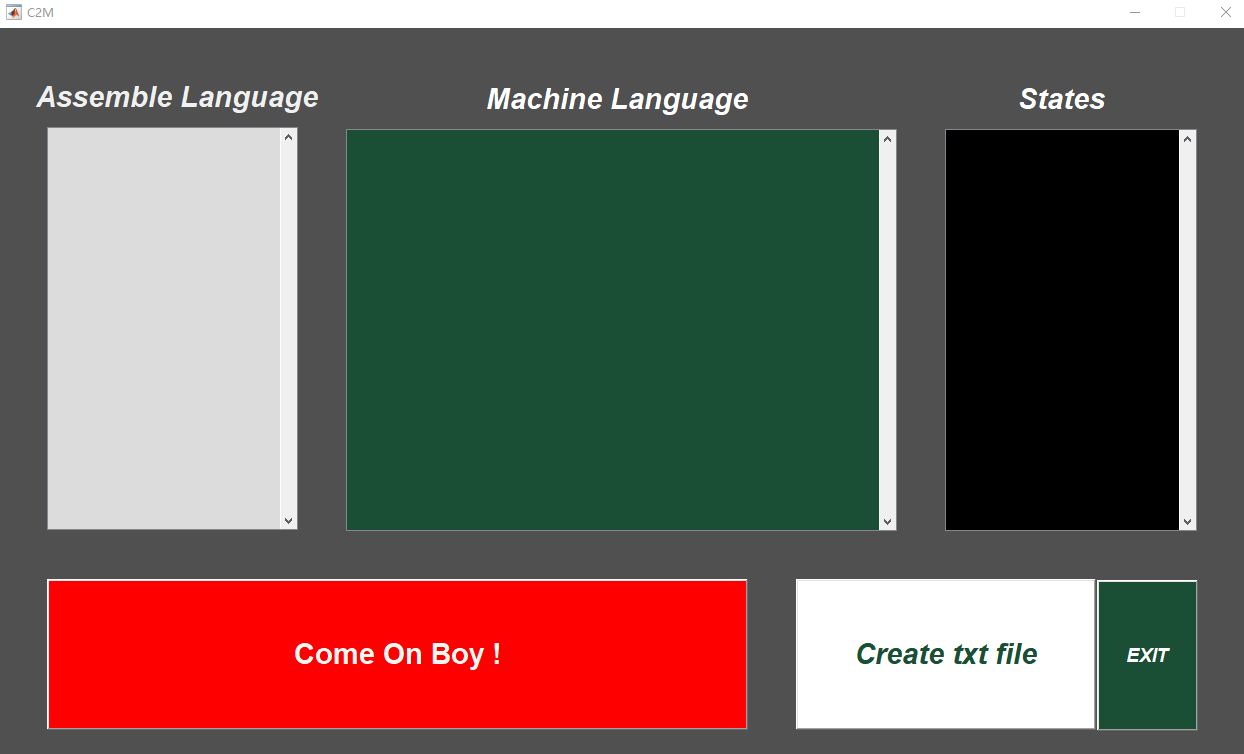
以及附带的read me 和最终打包的Matlab程序~~
 *** 修正了lw和sw指令

 *** 打开C2M.m文件运行程序

 *** 立即数变成5位,lw,sw,addi等指令的数字都变成了5位

 支持指令名称:

 add\sub\and\slt\sll\srl\beq\bne\mul\addi\or\lw\sw

 标准形式:

 add    $s1, $s2, $s0

 sub    $s1, $s2, $s0

 and    $s1, $s2, $s0

 slt    $s1, $s2, $s0

 sll    $s1, $s2,

 srl    $s1, $s2,

 beq    $s1, $s2,

 bne    $s1, $s2,

 mul    $s1, $s2, $s3

 or    $s1, $s2, $s3

 lw    $s1, ($s2)

 sw    $s1, ($s2)

 addi    $s1, $s2, -

 每一个命令之后加一个tab,地址前加$,逗号之后有空格,立即数的输入为3位,如5写成005,负数-5写成-

 寄存器文件按照书上标准,其中$0写法为$0_

 创建txt文件:

 地址为:line266

 C:\Users\ALIENWARE\Desktop\test_.txt    (需要改成你自己的地址)

 *不包含 j 指令
Read_me
function varargout = C2M_export(varargin)
val = zeros(,); % C2M_export MATLAB code for C2M_export.fig
% C2M_export, by itself, creates a new C2M_export or raises the existing
% singleton*.
%
% H = C2M_export returns the handle to a new C2M_export or the handle to
% the existing singleton*.
%
% C2M_export('CALLBACK',hObject,eventData,handles,...) calls the local
% function named CALLBACK in C2M_export.M with the given input arguments.
%
% C2M_export('Property','Value',...) creates a new C2M_export or raises the
% existing singleton*. Starting from the left, property value pairs are
% applied to the GUI before C2M_export_OpeningFcn gets called. An
% unrecognized property name or invalid value makes property application
% stop. All inputs are passed to C2M_export_OpeningFcn via varargin.
%
% *See GUI Options on GUIDE's Tools menu. Choose "GUI allows only one
% instance to run (singleton)".
%
% See also: GUIDE, GUIDATA, GUIHANDLES % Edit the above text to modify the response to help C2M_export % Last Modified by GUIDE v2. -Jul- :: % Begin initialization code - DO NOT EDIT
gui_Singleton = ;
gui_State = struct('gui_Name', mfilename, ...
'gui_Singleton', gui_Singleton, ...
'gui_OpeningFcn', @C2M_export_OpeningFcn, ...
'gui_OutputFcn', @C2M_export_OutputFcn, ...
'gui_LayoutFcn', @C2M_export_LayoutFcn, ...
'gui_Callback', []);
if nargin && ischar(varargin{})
gui_State.gui_Callback = str2func(varargin{});
end if nargout
[varargout{:nargout}] = gui_mainfcn(gui_State, varargin{:});
else
gui_mainfcn(gui_State, varargin{:});
end
% End initialization code - DO NOT EDIT % --- Executes just before C2M_export is made visible.
function C2M_export_OpeningFcn(hObject, eventdata, handles, varargin)
% This function has no output args, see OutputFcn.
% hObject handle to figure
% eventdata reserved - to be defined in a future version of MATLAB
% handles structure with handles and user data (see GUIDATA)
% varargin command line arguments to C2M_export (see VARARGIN) % Choose default command line output for C2M_export
handles.output = hObject; % Update handles structure
guidata(hObject, handles); % UIWAIT makes C2M_export wait for user response (see UIRESUME)
% uiwait(handles.figure1); % --- Outputs from this function are returned to the command line.
function varargout = C2M_export_OutputFcn(hObject, eventdata, handles)
% varargout cell array for returning output args (see VARARGOUT);
% hObject handle to figure
% eventdata reserved - to be defined in a future version of MATLAB
% handles structure with handles and user data (see GUIDATA) % Get default command line output from handles structure
varargout{} = handles.output; function edit1_Callback(hObject, eventdata, handles)
% hObject handle to edit1 (see GCBO)
% eventdata reserved - to be defined in a future version of MATLAB
% handles structure with handles and user data (see GUIDATA) % Hints: get(hObject,'String') returns contents of edit1 as text
% str2double(get(hObject,'String')) returns contents of edit1 as a double % --- Executes during object creation, after setting all properties.
function edit1_CreateFcn(hObject, eventdata, handles)
% hObject handle to edit1 (see GCBO)
% eventdata reserved - to be defined in a future version of MATLAB
% handles empty - handles not created until after all CreateFcns called % Hint: edit controls usually have a white background on Windows.
% See ISPC and COMPUTER.
if ispc && isequal(get(hObject,'BackgroundColor'), get(,'defaultUicontrolBackgroundColor'))
set(hObject,'BackgroundColor','white');
end function edit2_Callback(hObject, eventdata, handles)
% hObject handle to edit2 (see GCBO)
% eventdata reserved - to be defined in a future version of MATLAB
% handles structure with handles and user data (see GUIDATA) % Hints: get(hObject,'String') returns contents of edit2 as text
% str2double(get(hObject,'String')) returns contents of edit2 as a double % --- Executes during object creation, after setting all properties.
function edit2_CreateFcn(hObject, eventdata, handles)
% hObject handle to edit2 (see GCBO)
% eventdata reserved - to be defined in a future version of MATLAB
% handles empty - handles not created until after all CreateFcns called % Hint: edit controls usually have a white background on Windows.
% See ISPC and COMPUTER.
if ispc && isequal(get(hObject,'BackgroundColor'), get(,'defaultUicontrolBackgroundColor'))
set(hObject,'BackgroundColor','white');
end % --- Executes on button press in pushbutton1.
function pushbutton1_Callback(hObject, eventdata, handles)
global val
% hObject handle to pushbutton1 (see GCBO)
% eventdata reserved - to be defined in a future version of MATLAB
% handles structure with handles and user data (see GUIDATA) str1 = get(handles.edit2, 'String'); %?????? x = size(str1, ); %????????
y = size(str1, ); %????????
%b = zeros(y, x); %b?????????????????? for i = : y opcode1 = str1(i,);
opcode2 = strcat(str1(i,), str1(i,));
opcode3 = strcat(str1(i,), str1(i,), str1(i,));
opcode4 = strcat(str1(i,), str1(i,), str1(i,), str1(i,));
rd = strcat(str1(i, ), str1(i, ));
rs = strcat(str1(i,), str1(i,));
rt = strcat(str1(i,), str1(i,)); if (x >= )
imm_sh = strcat(str1(i,), str1(i,), str1(i,), str1(i, ), str1(i, ));
end
rt4 = strcat(str1(i,), str1(i,));
rs4 = strcat(str1(i,), str1(i,));
if (x >= ) imm4 = strcat(str1(i,), str1(i,), str1(i, ), str1(i, ), str1(i, ));
end rd2 = strcat(str1(i, ), str1(i, ));
rs2 = strcat(str1(i,), str1(i,));
rt2 = strcat(str1(i,), str1(i,));
rt_w = strcat(str1(i, ), str1(i, ));
imm_w = strcat(str1(i, ), str1(i, ), str1(i, ), str1(i, ), str1(i, ));
rs_w = strcat(str1(i, ), str1(i, )); switch opcode4
case 'addi'
b(i,)=;b(i,)=;b(i,)=;b(i,)=;b(i,)=;b(i,)=;
b(i, :) = rig_f(rs4); b(i, :) = rig_f(rt4);
b(i, :) = rig_n(imm4);
% bq(i,:) = 'this is adi';bqq(i,:) = strcat('this is addi ', rs4 , '-', rt4 , '-',imm4);
otherwise
switch opcode3
case 'add'
b(i,)=;b(i,)=;b(i,)=;b(i,)=;b(i,)=;b(i,)=;
b(i,)=;b(i,)=;b(i,)=;b(i,)=;b(i,)=;b(i,)=;
b(i, :) = rig_f(rs); b(i, :) = rig_f(rt); b(i, :) = rig_f(rd); b(i, :) = ;
bq(i,:) = 'this is add';bqq(i,:) = strcat('this is add, ', rs , '-', rt , '-',rd);
case 'sub'
b(i,)=;b(i,)=;b(i,)=;b(i,)=;b(i,)=;b(i,)=;
b(i,)=;b(i,)=;b(i,)=;b(i,)=;b(i,)=;b(i,)=;
b(i, :) = rig_f(rs); b(i, :) = rig_f(rt); b(i, :) = rig_f(rd); b(i, :) = ;
bq(i,:) = 'this is sub';bqq(i,:) = strcat('this is sub, ', rs , '-', rt , '-',rd);
case 'and'
b(i,)=;b(i,)=;b(i,)=;b(i,)=;b(i,)=;b(i,)=;
b(i,)=;b(i,)=;b(i,)=;b(i,)=;b(i,)=;b(i,)=;
b(i, :) = rig_f(rs); b(i, :) = rig_f(rt); b(i, :) = rig_f(rd); b(i, :) = ;
bq(i,:) = 'this is and';bqq(i,:) = strcat('this is and, ', rs , '-', rt , '-',rd);
case 'slt'
b(i,)=;b(i,)=;b(i,)=;b(i,)=;b(i,)=;b(i,)=;
b(i,)=;b(i,)=;b(i,)=;b(i,)=;b(i,)=;b(i,)=;
b(i, :) = rig_f(rs); b(i, :) = rig_f(rt); b(i, :) = rig_f(rd); b(i, :) = ;
bq(i,:) = 'this is slt';bqq(i,:) = strcat('this is slt, ', rs , '-', rt , '-',rd);
case 'sll'
b(i,)=;b(i,)=;b(i,)=;b(i,)=;b(i,)=;b(i,)=;
b(i,)=;b(i,)=;b(i,)=;b(i,)=;b(i,)=;b(i,)=;
b(i, :) = ; b(i, :) = rig_f(rs); b(i, :) = rig_f(rd); b(i, :) = rig_sh(imm_sh);
bq(i,:) = 'this is sll';
% bqq(i,:) = strcat('this is sll, ', rs , '-', rd , '-',imm_sh);
case 'srl'
b(i,)=;b(i,)=;b(i,)=;b(i,)=;b(i,)=;b(i,)=;
b(i,)=;b(i,)=;b(i,)=;b(i,)=;b(i,)=;b(i,)=;
b(i, :) = ; b(i, :) = rig_f(rs); b(i, :) = rig_f(rd); b(i, :) = rig_sh(imm_sh);
bq(i,:) = 'this is srl';
% bqq(i,:) = strcat('this is srl, ', rs , '-', rd , '-',imm_sh);
case 'sra'
b(i,)=;b(i,)=;b(i,)=;b(i,)=;b(i,)=;b(i,)=;
b(i,)=;b(i,)=;b(i,)=;b(i,)=;b(i,)=;b(i,)=;
b(i, :) = ; b(i, :) = rig_f(rs); b(i, :) = rig_f(rd); b(i, :) = rig_sh(imm_sh);
bq(i,:) = 'this is sra';
case 'beq'
b(i,)=;b(i,)=;b(i,)=;b(i,)=;b(i,)=;b(i,)=;
b(i, :) = rig_f(rd); b(i, :) = rig_f(rs); b(i, :) = rig_n(imm_sh);
bq(i,:) = 'this is beq';
% bqq(i,:) = strcat('this is beq, ', rd , '-', rs , '-',imm_sh);
case 'bne'
b(i,)=;b(i,)=;b(i,)=;b(i,)=;b(i,)=;b(i,)=;
b(i, :) = rig_f(rd); b(i, :) = rig_f(rs); b(i, :) = rig_n(imm_sh);
bq(i,:) = 'this is bne';
% bqq(i,:) = strcat('this is bne, ', rd , '-', rs , '-',imm_sh);
case 'mul'
b(i,)=;b(i,)=;b(i,)=;b(i,)=;b(i,)=;b(i,)=;
b(i,)=;b(i,)=;b(i,)=;b(i,)=;b(i,)=;b(i,)=;
b(i, :) = rig_f(rs); b(i, :) = rig_f(rt); b(i, :) = rig_f(rd); b(i, :) = ;
bq(i,:) = 'this is mul';bqq(i,:) = strcat('this is mul, ', rs , '-', rt , '-',rd);
otherwise
switch opcode1
case 'j'
b(i,)=;b(i,)=;b(i,)=;b(i,)=;b(i,)=;b(i,)=;
b(i, :) = ;
bq(i,:) = 'this is jrr';bqq(i,:) = strcat('this is j ', '');
otherwise
end
end
end switch opcode2
case 'or'
b(i,)=;b(i,)=;b(i,)=;b(i,)=;b(i,)=;b(i,)=;
b(i,)=;b(i,)=;b(i,)=;b(i,)=;b(i,)=;b(i,)=;
b(i, :) = rig_f(rs2); b(i, :) = rig_f(rt2); b(i, :) = rig_f(rd2); b(i, :) = ;
bq(i,:) = 'this is orr'; case 'lw'
b(i,)=;b(i,)=;b(i,)=;b(i,)=;b(i,)=;b(i,)=;
b(i, :) = rig_f(rs_w);b(i, :) = rig_f(rt_w); b(i, :) = rig_n(imm_w); % bqq(i,:) = strcat('this is lwr, ', rs_w, '-', rt_w, '-',imm_w);
bq(i,:) = 'this is lwr'; case 'sw'
b(i,)=;b(i,)=;b(i,)=;b(i,)=;b(i,)=;b(i,)=;
b(i, :) = rig_f(rs_w);b(i, :) = rig_f(rt_w); b(i, :) = rig_n(imm_w);
bq(i,:) = 'this is swr';
otherwise
end end bb = num2str(b);
set(handles.edit1, 'String', bb);
set(handles.edit3, 'String', bq);
val = b; % --- Executes on button press in pushbutton2.
function pushbutton2_Callback(hObject, eventdata, handles)
global val
% hObject handle to pushbutton2 (see GCBO)
% eventdata reserved - to be defined in a future version of MATLAB
% handles structure with handles and user data (see GUIDATA)
dlmwrite('C:\Users\ALIENWARE\Desktop\fft_test.txt', val, 'delimiter', '', 'precision', , 'newline','pc'); function edit3_Callback(hObject, eventdata, handles)
% hObject handle to edit3 (see GCBO)
% eventdata reserved - to be defined in a future version of MATLAB
% handles structure with handles and user data (see GUIDATA) % Hints: get(hObject,'String') returns contents of edit3 as text
% str2double(get(hObject,'String')) returns contents of edit3 as a double % --- Executes during object creation, after setting all properties.
function edit3_CreateFcn(hObject, eventdata, handles)
% hObject handle to edit3 (see GCBO)
% eventdata reserved - to be defined in a future version of MATLAB
% handles empty - handles not created until after all CreateFcns called % Hint: edit controls usually have a white background on Windows.
% See ISPC and COMPUTER.
if ispc && isequal(get(hObject,'BackgroundColor'), get(,'defaultUicontrolBackgroundColor'))
set(hObject,'BackgroundColor','white');
end % --- Executes on button press in pushbutton3.
function pushbutton3_Callback(hObject, eventdata, handles)
% hObject handle to pushbutton3 (see GCBO)
% eventdata reserved - to be defined in a future version of MATLAB
% handles structure with handles and user data (see GUIDATA)
close(gcf); % --- Creates and returns a handle to the GUI figure.
function h1 = C2M_export_LayoutFcn(policy)
% policy - create a new figure or use a singleton. 'new' or 'reuse'. persistent hsingleton;
if strcmpi(policy, 'reuse') & ishandle(hsingleton)
h1 = hsingleton;
return;
end
load C2M_export.mat appdata = [];
appdata.GUIDEOptions = mat{};
appdata.lastValidTag = 'figure1';
appdata.GUIDELayoutEditor = [];
appdata.initTags = struct(...
'handle', [], ...
'tag', 'figure1'); h1 = figure(...
'PaperUnits','inches',...
'Units','characters',...
'Position',[135.8 23.5 250.2 52.2857142857143],...
'Visible',get(,'defaultfigureVisible'),...
'Color',[0.313725490196078 0.313725490196078 0.313725490196078],...
'IntegerHandle','off',...
'MenuBar','none',...
'Name','C2M',...
'NumberTitle','off',...
'Tag','figure1',...
'Resize','off',...
'PaperPosition',get(,'defaultfigurePaperPosition'),...
'PaperSize',[8.5 ],...
'PaperSizeMode',get(,'defaultfigurePaperSizeMode'),...
'PaperType','usletter',...
'PaperTypeMode',get(,'defaultfigurePaperTypeMode'),...
'PaperUnitsMode',get(,'defaultfigurePaperUnitsMode'),...
'ScreenPixelsPerInchMode','manual',...
'HandleVisibility','callback',...
'CreateFcn', {@local_CreateFcn, blanks(), appdata} ); appdata = [];
appdata.lastValidTag = 'edit1'; h2 = uicontrol(...
'Parent',h1,...
'FontUnits',get(,'defaultuicontrolFontUnits'),...
'Units','characters',...
'HorizontalAlignment','left',...
'Max',,...
'String',blanks(),...
'Style','edit',...
'Position',[69.6 16.3571428571429 110.2 28.7142857142857],...
'BackgroundColor',[0.105882352941176 0.309803921568627 0.207843137254902],...
'Callback',@(hObject,eventdata)C2M_export('edit1_Callback',hObject,eventdata,guidata(hObject)),...
'Children',[],...
'ForegroundColor',[ ],...
'CreateFcn', {@local_CreateFcn, @(hObject,eventdata)C2M_export('edit1_CreateFcn',hObject,eventdata,guidata(hObject)), appdata} ,...
'Tag','edit1',...
'FontSize',); appdata = [];
appdata.lastValidTag = 'edit2'; h3 = uicontrol(...
'Parent',h1,...
'FontUnits',get(,'defaultuicontrolFontUnits'),...
'Units','characters',...
'HorizontalAlignment','left',...
'Max',,...
'String',blanks(),...
'Style','edit',...
'Position',[9.8 16.3571428571429 50.2 28.8571428571429],...
'BackgroundColor',[0.862745098039216 0.862745098039216 0.862745098039216],...
'Callback',@(hObject,eventdata)C2M_export('edit2_Callback',hObject,eventdata,guidata(hObject)),...
'Children',[],...
'ForegroundColor',[0.231372549019608 0.443137254901961 0.337254901960784],...
'TooltipString',blanks(),...
'CreateFcn', {@local_CreateFcn, @(hObject,eventdata)C2M_export('edit2_CreateFcn',hObject,eventdata,guidata(hObject)), appdata} ,...
'Tag','edit2',...
'FontSize',,...
'FontWeight',get(,'defaultuicontrolFontWeight')); appdata = [];
appdata.lastValidTag = 'pushbutton1'; h4 = uicontrol(...
'Parent',h1,...
'FontUnits',get(,'defaultuicontrolFontUnits'),...
'Units','characters',...
'String','Come On Boy !',...
'Style',get(,'defaultuicontrolStyle'),...
'Value',,...
'ValueMode',get(,'defaultuicontrolValueMode'),...
'Position',[9.8 2.14285714285714 140.2 10.7857142857143],...
'BackgroundColor',[ ],...
'Callback',@(hObject,eventdata)C2M_export('pushbutton1_Callback',hObject,eventdata,guidata(hObject)),...
'Children',[],...
'ForegroundColor',[0.945098039215686 0.968627450980392 0.949019607843137],...
'Tag','pushbutton1',...
'FontSize',,...
'FontWeight','bold',...
'CreateFcn', {@local_CreateFcn, blanks(), appdata} ); appdata = [];
appdata.lastValidTag = 'pushbutton2'; h5 = uicontrol(...
'Parent',h1,...
'FontUnits',get(,'defaultuicontrolFontUnits'),...
'Units','characters',...
'String','Create txt file',...
'Style',get(,'defaultuicontrolStyle'),...
'Position',[159.6 2.14285714285714 60.2 10.7857142857143],...
'BackgroundColor',[ ],...
'Callback',@(hObject,eventdata)C2M_export('pushbutton2_Callback',hObject,eventdata,guidata(hObject)),...
'Children',[],...
'ForegroundColor',[0.105882352941176 0.309803921568627 0.207843137254902],...
'Tag','pushbutton2',...
'FontSize',,...
'FontAngle','italic',...
'FontWeight','bold',...
'CreateFcn', {@local_CreateFcn, blanks(), appdata} ); appdata = [];
appdata.lastValidTag = 'text3'; h6 = uicontrol(...
'Parent',h1,...
'FontUnits',get(,'defaultuicontrolFontUnits'),...
'Units','characters',...
'String','Assemble Language',...
'Style','text',...
'Position',[5.4 45.7857142857143 60.8 2.92857142857143],...
'BackgroundColor',[0.313725490196078 0.313725490196078 0.313725490196078],...
'Children',[],...
'ForegroundColor',[0.941176470588235 0.941176470588235 0.941176470588235],...
'CreateFcn', {@local_CreateFcn, blanks(), appdata} ,...
'Tag','text3',...
'FontSize',,...
'FontAngle','italic',...
'FontWeight','bold'); appdata = [];
appdata.lastValidTag = 'text4'; h7 = uicontrol(...
'Parent',h1,...
'FontUnits',get(,'defaultuicontrolFontUnits'),...
'Units','characters',...
'String','Machine Language',...
'Style','text',...
'Position',[93.6 45.6428571428571 60.8 2.92857142857143],...
'BackgroundColor',[0.313725490196078 0.313725490196078 0.313725490196078],...
'Children',[],...
'ForegroundColor',[ ],...
'ButtonDownFcn',blanks(),...
'CreateFcn', {@local_CreateFcn, blanks(), appdata} ,...
'DeleteFcn',blanks(),...
'Tag','text4',...
'FontSize',,...
'FontAngle','italic',...
'FontWeight','bold'); appdata = [];
appdata.lastValidTag = 'edit3'; h8 = uicontrol(...
'Parent',h1,...
'FontUnits',get(,'defaultuicontrolFontUnits'),...
'Units','characters',...
'Max',,...
'String',blanks(),...
'Style','edit',...
'Position',[189.4 16.3571428571429 50.4 28.7142857142857],...
'BackgroundColor',[ ],...
'Callback',@(hObject,eventdata)C2M_export('edit3_Callback',hObject,eventdata,guidata(hObject)),...
'Children',[],...
'ForegroundColor',[ 0.949019607843137 0.866666666666667],...
'CreateFcn', {@local_CreateFcn, @(hObject,eventdata)C2M_export('edit3_CreateFcn',hObject,eventdata,guidata(hObject)), appdata} ,...
'Tag','edit3',...
'FontSize',,...
'FontWeight','bold'); appdata = [];
appdata.lastValidTag = 'text5'; h9 = uicontrol(...
'Parent',h1,...
'FontUnits',get(,'defaultuicontrolFontUnits'),...
'Units','characters',...
'String','States',...
'Style','text',...
'Position',[182.4 45.6428571428571 60.8 2.92857142857143],...
'BackgroundColor',[0.313725490196078 0.313725490196078 0.313725490196078],...
'Children',[],...
'ForegroundColor',[ ],...
'ButtonDownFcn',blanks(),...
'CreateFcn', {@local_CreateFcn, blanks(), appdata} ,...
'DeleteFcn',blanks(),...
'Tag','text5',...
'FontSize',,...
'FontAngle','italic',...
'FontWeight','bold'); appdata = [];
appdata.lastValidTag = 'pushbutton3'; h10 = uicontrol(...
'Parent',h1,...
'FontUnits',get(,'defaultuicontrolFontUnits'),...
'Units','characters',...
'String','EXIT',...
'Style',get(,'defaultuicontrolStyle'),...
'Position',[219.8 2.07142857142857 20.2 10.7857142857143],...
'BackgroundColor',[0.105882352941176 0.309803921568627 0.207843137254902],...
'Callback',@(hObject,eventdata)C2M_export('pushbutton3_Callback',hObject,eventdata,guidata(hObject)),...
'Children',[],...
'ForegroundColor',[ ],...
'Tag','pushbutton3',...
'FontSize',,...
'FontAngle','italic',...
'FontWeight','bold',...
'CreateFcn', {@local_CreateFcn, blanks(), appdata} ); hsingleton = h1; % --- Set application data first then calling the CreateFcn.
function local_CreateFcn(hObject, eventdata, createfcn, appdata) if ~isempty(appdata)
names = fieldnames(appdata);
for i=:length(names)
name = char(names(i));
setappdata(hObject, name, getfield(appdata,name));
end
end if ~isempty(createfcn)
if isa(createfcn,'function_handle')
createfcn(hObject, eventdata);
else
eval(createfcn);
end
end % --- Handles default GUIDE GUI creation and callback dispatch
function varargout = gui_mainfcn(gui_State, varargin) gui_StateFields = {'gui_Name'
'gui_Singleton'
'gui_OpeningFcn'
'gui_OutputFcn'
'gui_LayoutFcn'
'gui_Callback'};
gui_Mfile = '';
for i=:length(gui_StateFields)
if ~isfield(gui_State, gui_StateFields{i})
error(message('MATLAB:guide:StateFieldNotFound', gui_StateFields{ i }, gui_Mfile));
elseif isequal(gui_StateFields{i}, 'gui_Name')
gui_Mfile = [gui_State.(gui_StateFields{i}), '.m'];
end
end numargin = length(varargin); if numargin ==
% C2M_EXPORT
% create the GUI only if we are not in the process of loading it
% already
gui_Create = true;
elseif local_isInvokeActiveXCallback(gui_State, varargin{:})
% C2M_EXPORT(ACTIVEX,...)
vin{} = gui_State.gui_Name;
vin{} = [get(varargin{}.Peer, 'Tag'), '_', varargin{end}];
vin{} = varargin{};
vin{} = varargin{end-};
vin{} = guidata(varargin{}.Peer);
feval(vin{:});
return;
elseif local_isInvokeHGCallback(gui_State, varargin{:})
% C2M_EXPORT('CALLBACK',hObject,eventData,handles,...)
gui_Create = false;
else
% C2M_EXPORT(...)
% create the GUI and hand varargin to the openingfcn
gui_Create = true;
end if ~gui_Create
% In design time, we need to mark all components possibly created in
% the coming callback evaluation as non-serializable. This way, they
% will not be brought into GUIDE and not be saved in the figure file
% when running/saving the GUI from GUIDE.
designEval = false;
if (numargin> && ishghandle(varargin{}))
fig = varargin{};
while ~isempty(fig) && ~ishghandle(fig,'figure')
fig = get(fig,'parent');
end designEval = isappdata(,'CreatingGUIDEFigure') || (isscalar(fig)&&isprop(fig,'GUIDEFigure'));
end if designEval
beforeChildren = findall(fig);
end % evaluate the callback now
varargin{} = gui_State.gui_Callback;
if nargout
[varargout{:nargout}] = feval(varargin{:});
else
feval(varargin{:});
end % Set serializable of objects created in the above callback to off in
% design time. Need to check whether figure handle is still valid in
% case the figure is deleted during the callback dispatching.
if designEval && ishghandle(fig)
set(setdiff(findall(fig),beforeChildren), 'Serializable','off');
end
else
if gui_State.gui_Singleton
gui_SingletonOpt = 'reuse';
else
gui_SingletonOpt = 'new';
end % Check user passing 'visible' P/V pair first so that its value can be
% used by oepnfig to prevent flickering
gui_Visible = 'auto';
gui_VisibleInput = '';
for index=::length(varargin)
if length(varargin) == index || ~ischar(varargin{index})
break;
end % Recognize 'visible' P/V pair
len1 = min(length('visible'),length(varargin{index}));
len2 = min(length('off'),length(varargin{index+}));
if ischar(varargin{index+}) && strncmpi(varargin{index},'visible',len1) && len2 >
if strncmpi(varargin{index+},'off',len2)
gui_Visible = 'invisible';
gui_VisibleInput = 'off';
elseif strncmpi(varargin{index+},'on',len2)
gui_Visible = 'visible';
gui_VisibleInput = 'on';
end
end
end % Open fig file with stored settings. Note: This executes all component
% specific CreateFunctions with an empty HANDLES structure. % Do feval on layout code in m-file if it exists
gui_Exported = ~isempty(gui_State.gui_LayoutFcn);
% this application data is used to indicate the running mode of a GUIDE
% GUI to distinguish it from the design mode of the GUI in GUIDE. it is
% only used by actxproxy at this time.
setappdata(,genvarname(['OpenGuiWhenRunning_', gui_State.gui_Name]),);
if gui_Exported
gui_hFigure = feval(gui_State.gui_LayoutFcn, gui_SingletonOpt); % make figure invisible here so that the visibility of figure is
% consistent in OpeningFcn in the exported GUI case
if isempty(gui_VisibleInput)
gui_VisibleInput = get(gui_hFigure,'Visible');
end
set(gui_hFigure,'Visible','off') % openfig (called by local_openfig below) does this for guis without
% the LayoutFcn. Be sure to do it here so guis show up on screen.
movegui(gui_hFigure,'onscreen');
else
gui_hFigure = local_openfig(gui_State.gui_Name, gui_SingletonOpt, gui_Visible);
% If the figure has InGUIInitialization it was not completely created
% on the last pass. Delete this handle and try again.
if isappdata(gui_hFigure, 'InGUIInitialization')
delete(gui_hFigure);
gui_hFigure = local_openfig(gui_State.gui_Name, gui_SingletonOpt, gui_Visible);
end
end
if isappdata(, genvarname(['OpenGuiWhenRunning_', gui_State.gui_Name]))
rmappdata(,genvarname(['OpenGuiWhenRunning_', gui_State.gui_Name]));
end % Set flag to indicate starting GUI initialization
setappdata(gui_hFigure,'InGUIInitialization',); % Fetch GUIDE Application options
gui_Options = getappdata(gui_hFigure,'GUIDEOptions');
% Singleton setting in the GUI MATLAB code file takes priority if different
gui_Options.singleton = gui_State.gui_Singleton; if ~isappdata(gui_hFigure,'GUIOnScreen')
% Adjust background color
if gui_Options.syscolorfig
set(gui_hFigure,'Color', get(,'DefaultUicontrolBackgroundColor'));
end % Generate HANDLES structure and store with GUIDATA. If there is
% user set GUI data already, keep that also.
data = guidata(gui_hFigure);
handles = guihandles(gui_hFigure);
if ~isempty(handles)
if isempty(data)
data = handles;
else
names = fieldnames(handles);
for k=:length(names)
data.(char(names(k)))=handles.(char(names(k)));
end
end
end
guidata(gui_hFigure, data);
end % Apply input P/V pairs other than 'visible'
for index=::length(varargin)
if length(varargin) == index || ~ischar(varargin{index})
break;
end len1 = min(length('visible'),length(varargin{index}));
if ~strncmpi(varargin{index},'visible',len1)
try set(gui_hFigure, varargin{index}, varargin{index+}), catch break, end
end
end % If handle visibility is set to 'callback', turn it on until finished
% with OpeningFcn
gui_HandleVisibility = get(gui_hFigure,'HandleVisibility');
if strcmp(gui_HandleVisibility, 'callback')
set(gui_hFigure,'HandleVisibility', 'on');
end feval(gui_State.gui_OpeningFcn, gui_hFigure, [], guidata(gui_hFigure), varargin{:}); if isscalar(gui_hFigure) && ishghandle(gui_hFigure)
% Handle the default callbacks of predefined toolbar tools in this
% GUI, if any
guidemfile('restoreToolbarToolPredefinedCallback',gui_hFigure); % Update handle visibility
set(gui_hFigure,'HandleVisibility', gui_HandleVisibility); % Call openfig again to pick up the saved visibility or apply the
% one passed in from the P/V pairs
if ~gui_Exported
gui_hFigure = local_openfig(gui_State.gui_Name, 'reuse',gui_Visible);
elseif ~isempty(gui_VisibleInput)
set(gui_hFigure,'Visible',gui_VisibleInput);
end
if strcmpi(get(gui_hFigure, 'Visible'), 'on')
figure(gui_hFigure); if gui_Options.singleton
setappdata(gui_hFigure,'GUIOnScreen', );
end
end % Done with GUI initialization
if isappdata(gui_hFigure,'InGUIInitialization')
rmappdata(gui_hFigure,'InGUIInitialization');
end % If handle visibility is set to 'callback', turn it on until
% finished with OutputFcn
gui_HandleVisibility = get(gui_hFigure,'HandleVisibility');
if strcmp(gui_HandleVisibility, 'callback')
set(gui_hFigure,'HandleVisibility', 'on');
end
gui_Handles = guidata(gui_hFigure);
else
gui_Handles = [];
end if nargout
[varargout{:nargout}] = feval(gui_State.gui_OutputFcn, gui_hFigure, [], gui_Handles);
else
feval(gui_State.gui_OutputFcn, gui_hFigure, [], gui_Handles);
end if isscalar(gui_hFigure) && ishghandle(gui_hFigure)
set(gui_hFigure,'HandleVisibility', gui_HandleVisibility);
end
end function gui_hFigure = local_openfig(name, singleton, visible) % openfig with three arguments was new from R13. Try to call that first, if
% failed, try the old openfig.
if nargin('openfig') ==
% OPENFIG did not accept 3rd input argument until R13,
% toggle default figure visible to prevent the figure
% from showing up too soon.
gui_OldDefaultVisible = get(,'defaultFigureVisible');
set(,'defaultFigureVisible','off');
gui_hFigure = matlab.hg.internal.openfigLegacy(name, singleton);
set(,'defaultFigureVisible',gui_OldDefaultVisible);
else
% Call version of openfig that accepts 'auto' option"
gui_hFigure = matlab.hg.internal.openfigLegacy(name, singleton, visible);
% %workaround for CreateFcn not called to create ActiveX
% peers=findobj(findall(allchild(gui_hFigure)),'type','uicontrol','style','text');
% for i=:length(peers)
% if isappdata(peers(i),'Control')
% actxproxy(peers(i));
% end
% end
end function result = local_isInvokeActiveXCallback(gui_State, varargin) try
result = ispc && iscom(varargin{}) ...
&& isequal(varargin{},gcbo);
catch
result = false;
end function result = local_isInvokeHGCallback(gui_State, varargin) try
fhandle = functions(gui_State.gui_Callback);
result = ~isempty(findstr(gui_State.gui_Name,fhandle.file)) || ...
(ischar(varargin{}) ...
&& isequal(ishghandle(varargin{}), ) ...
&& (~isempty(strfind(varargin{},[get(varargin{}, 'Tag'), '_'])) || ...
~isempty(strfind(varargin{}, '_CreateFcn'))) );
catch
result = false;
end
C2M_EXPORT
MIPS架构——汇编代码转机器代码编译器 Matlab GUI的更多相关文章
- 如何在C或C++代码中嵌入ARM汇编代码
转载自:http://blog.csdn.net/roland_sun/article/details/42921131 大家知道,用C或者C++等高级语言编写的程序,会被编译器编译成最终的机器指令. ...
- 程序编码(机器级代码+汇编代码+C代码+反汇编)
[-1]相关声明 本文总结于csapp: 了解详情,或有兴趣,建议看原版书籍: [0]程序编码 GCC调用了一系列程序,将源代码转化成可执行代码的流程如下: (1)C预处理器扩展源代码,插入所有用#i ...
- c++(vs上)与g++(linux下)对于++操作的汇编代码解读
先来看一个代码,估计很多同学都碰到过其中的某一个. #include <stdio.h> #include <iostream> using namespace std; in ...
- arm-elf-gcc汇编代码个人理解
arm-elf-gcc汇编代码个人理解 有关arm-elf-gcc的安装使用问题请参照本人博客的另一篇文章http://www.cnblogs.com/wsine/p/4664503.html 由于各 ...
- GCC 嵌入汇编代码
The format of basic inline assembly is very much straight forward. Its basic form is 基本汇编嵌入格式如下: asm ...
- 使用WinDbg获得托管方法的汇编代码
概述:有时候,我们需要查看一个托管方法的汇编指令是怎么样的.记得在大学的时候,我们使用gcc -s和objdump来获得一个c程序代码的汇编指令.但是对于.NET程序来说,我们肯定无法轻松地获得这些内 ...
- GCC生成的汇编代码
假设我们写了一个C代码文件 code.c包含下面代码: int accum = 0; int sum(int x, int y){ int t = x + y; accum += t; return ...
- Keil 中关于C语言编译生成汇编代码函数名规则
在keil 中 C语言的函数有带参数和不带参数之分. 一般的资料里说fun(void)类型的函数不带参数,所以,keil编译器生成的汇编的调用地址(函数名) 为fun.这没有错.事实上,不管C语言的函 ...
- libaio under MIPS architecture /在mips架构下使用的libaio
First, you can find libaio source in http://libaio.sourcearchive.com/ Second,download the libaio_0.3 ...
随机推荐
- java语言导学(5版)--第12章并发之二
1不可变对象 概念:(immutable)对象创建后,状态不可更改.不可变对象在并发程序中尤其有用,因状态不可变,不会被线程干扰,也不会出现不一致状态. 书中通过实例是可变的类,并从此类衍生出一个不可 ...
- SQLSERVER数据库备份操作和还原操作做了什么
SQLSERVER数据库备份操作和还原操作做了什么 看了这篇文章:还原/备份时做了些什么 自己也测试了一下,下面说的错误日志指的是SQLSERVER ERRORLOG 一般在C:\Program Fi ...
- 在 Azure 中的 Linux 虚拟机上使用 SSL 证书保护 Web 服务器
若要保护 Web 服务器,可以使用安全套接字层 (SSL) 证书来加密 Web 流量. 这些 SSL 证书可存储在 Azure Key Vault 中,并可安全部署到 Azure 中的 Linux 虚 ...
- linux下手动安装git教程
Git是一个开源的分布式版本控制系统,可以有效.高速的处理从很小到非常大的项目版本管理.而国外的GitHub和国内的Coding都是项目的托管平台.但是在使用git工具的时候,第一步要学会如何安装gi ...
- Linux优化远程SSH连接
优化远程SSH连接 1.Linxu和Window的ssh连接区别 Windom默认3389端口,管理员administartor 普通是guest Linux 默认22端口 管理员root 普通一堆 ...
- CVE-2013-2551漏洞成因与利用分析(ISCC2014 PWN6)
CVE-2013-2551漏洞成因与利用分析 1. 简介 VUPEN在Pwn2Own2013上利用此漏洞攻破了Win8+IE10,5月22日VUPEN在其博客上公布了漏洞的细节.它是一个ORG数组整数 ...
- 从 s = "我爱北京天安门" 中悟道了-----------迭代器操作print(c.__next__())的最!大!好!处!-----------------------------------------------------可以一个一个输出
s = "我爱北京天安⻔"c = s.__iter__() # 获取迭代器# print(c) # 打印迭代器的地址# print(c.__next__()) # 打印迭代器中的下 ...
- 操作系统之Linux的内存分页管理
内存是计算机的主存储器.内存为进程开辟出进程空间,让进程在其中保存数据.我将从内存的物理特性出发,深入到内存管理的细节,特别是了解虚拟内存和内存分页的概念. 内存 简单地说,内存就是一个数据货架.内存 ...
- JNLP应用程序无法打开的解决办法
JNLP应用程序无法打开: 1.控制面板-Java-Java 选项卡-查看.用户选项卡勾选对应版本JDK(没有就添加,路径填类似:D:\Program Files\Java\jre6\bin\java ...
- Golang channel 用法简介
channel 是 golang 里相当有趣的一个功能,大部分时候 channel 都是和 goroutine 一起配合使用.本文主要介绍 channel 的一些有趣的用法. 通道(channel), ...